lock VOLVO S60 TWIN ENGINE 2020 Owners Manual
[x] Cancel search | Manufacturer: VOLVO, Model Year: 2020, Model line: S60 TWIN ENGINE, Model: VOLVO S60 TWIN ENGINE 2020Pages: 657, PDF Size: 13.6 MB
Page 304 of 657

||
DRIVER SUPPORT
302
CauseAction
Water or snow is spraying/swirling up and blocking the radar signals or the camera's range of visibility. No action. Very wet or snow-covered roads may sometimes prevent the cam-era/radar sensor from functioning.
There is dirt between the inside of the windshield and the cam-era/radar sensor. Consult a workshop to have the area of the windshield on the inside of the cam-era's casing cleaned. An authorized Volvo workshop is recommended.
Bright sunlight. No action. The camera/radar sensor will reset automatically when lighting con-ditions improve.
High temperatures
If the temperature in the passenger compart- ment is very high, the camera/radar sensorwill switch off temporarily forapprox. 15 minutes after the engine is startedto protect its electronic components. Whenthe temperature has cooled sufficiently, thecamera/radar sensor will automatically restart.
Damaged windshield
NOTE
Failure to take action could result in reduced performance for the driver supportsystems that use the camera and radarunit. It could cause functions to bereduced, deactivated completely or to pro-duce an incorrect function response.
To avoid the risk of malfunction of the driver support systems that use the radar sensor, thefollowing also apply:
If there are cracks, scratches or stonechips on the windshield in front of any ofthe camera and radar sensor "windows"and this covers an area ofabout 0.5 × 3.0 mm (0.02 × 0.12 in.) ormore, contact a workshop to have the windshield replaced 53
.
Volvo advises
against repairing cracks,
scratches or stone chips in the area in front of the camera and radar sensor – theentire windshield should instead bereplaced.
Before replacing the windshield, contact a workshop 53
to verify that the right wind-
shield has been ordered and installed.
The same type of windshield wipers or wipers approved by Volvo should be usedfor replacement.
If the windshield is replaced, the cameraand radar sensor must be recalibrated by a workshop 53
to help ensure proper func-
tioning of all of the vehicle's camera and radar-based systems.
Radar
Vehicle speed
The radar sensor's ability to detect a vehicle ahead is significantly reduced if the speed ofthe vehicle ahead differs greatly from yourvehicle's speed.
53 An authorized Volvo workshop is recommended.
Page 318 of 657

||
DRIVER SUPPORT
316
your lane must have clear side lane mark- ings
your vehicle must be positioned straight inyour lane
the oncoming vehicle must be positionedwithin your vehicle's lane markings
the oncoming vehicle's headlights mustbe on
the function can only handle “front-to-front” collisions
the function can only detect vehicles withfour wheels.
WARNING
Warnings and brake interventions due to an imminent collision with an oncomingvehicle always come very late.
Related information
City Safety
™ (p. 306)
City Safety limitations (p. 316)
City Safety limitations
City Safety 60
functionality may be reduced in
certain situations.
Surroundings
Low objects
Hanging objects, such as flags for overhang- ing loads or accessories such as auxiliarylights or front protective grids that extendbeyond the height of the hood, may limit City Safety functionality.
Slippery road conditions
The extended braking distance on slippery roads may reduce City Safety's capacity tohelp avoid a collision. In these types of situa-tions, the Anti-lock Braking System and Elec- tronic Stability Control (ESC 61
) are designed
for optimal braking power with maintained stability.
Backlighting
The visual warning signal in the windshield may be difficult to detect in bright sunlight, ifthere are reflections, or if the driver is wearingsunglasses or not looking straight ahead.
Heat
If the temperature in the passenger compart- ment is high due to e.g. bright sunlight, thevisual warning signal in the windshield may betemporarily disabled.
Camera and radar sensor's field of vision
The camera's field of vision is limited and in certain situations, it may be unable to detectpedestrians, large animals, cyclists or vehicles,or it may detect them later than expected. Vehicles that are dirty may be detected later than clean vehicles, and in dark conditions,motorcycles may be detected late or not at all. If a text message displayed in the instrument panel indicates that the camera/radar sensoris obstructed, it may be difficult for City Safetyto detect pedestrians, large animals, cyclists,vehicles or lane markings in front of the vehi-cle. City Safety functionality may therefore bereduced. Text messages may not be displayed for all sit- uations in which the windshield sensors areblocked. The driver must therefore alwayskeep the windshield in front of the camera/radar sensor clean.
CAUTION
Only a workshop may perform mainte- nance on driver support components – anauthorized Volvo workshop is recom-mended.
60 This function is not available on all markets.
61 Electronic Stability Control
Page 328 of 657

||
DRIVER SUPPORT
* Option/accessory.
326
Related information
Driver support systems (p. 260)
Activating or deactivating Cross Traffic Alert
* (p. 326)
Cross Traffic Alert
* limitations (p. 326)
Cross Traffic Alert
* messages (p. 328)
BLIS
* (p. 321)
Park Assist
* (p. 349)
Activating or deactivating Cross Traffic Alert *72
The driver can select to switch off the warn-
ing in the function Cross Traffic Alert (CTA) –
the sub-function auto brake cannot be
switched off and continues to be active.
Activate or deactivate the function using this button inthe center display's Functionview.
GREEN button indicator light – the func- tion is activated.
GRAY button indication – warning signaland indication on display for the functionis deactivated.
The function is automatically activated eachtime the engine is started.
Related information
Cross Traffic Alert
* (p. 325)
Cross Traffic Alert
* limitations (p. 326)
Cross Traffic Alert *73
limitations
The Cross Traffic Alert (CTA) function with auto brake may have limited functionality in
certain situations. Auto-brake is active atspeeds under 15 km/h (9.3 mph).
WARNING
The auto-brake sub-function can only
detect and apply the brakes for other mov- ing vehicles – not for e.g. stationary obsta-
cles, cyclists or pedestrians.
CTA has certain limitations – The CTA sen- sors, for example, cannot "see" through otherparked vehicles or objects blocking the vehi-cle. Below are a few examples of situations in which CTA's field of vision may be initially lim-ited and approaching vehicles may thereforenot be detected until they are very close toyour vehicle:
72 Warning for crossing traffic when the vehicle is backing up.
73 Warning for crossing traffic when the vehicle is backing up.
Page 342 of 657

DRIVER SUPPORT
340
Lane Keeping Aid symbols and messages
A number of symbols and messages related to Lane Keeping Aid (LKA 92
) may be dis- played in the instrument panel. Several exam- ples are provided below.
Symbol Message Meaning
Driver support system Reduced functionality Service requiredThe system is not functioning as intended. Contact a workshop
A
.
Windscreen sensor Sensor blocked, see Owner's manualThe camera's ability to detect the lane in front of the vehicle is reduced.
Lane Keeping Aid Apply steeringLKA's steering assistance is disabled when the driver's hands are not on the wheel. Follow the instructions and steer the vehicle.
Lane Keeping Aid Standby until steering appliedLKA will go into standby mode until the driver begins steering the vehicle again.
A An authorized Volvo workshop is recommended.
92 Lane Keeping Aid
Page 350 of 657
DRIVER SUPPORT
348
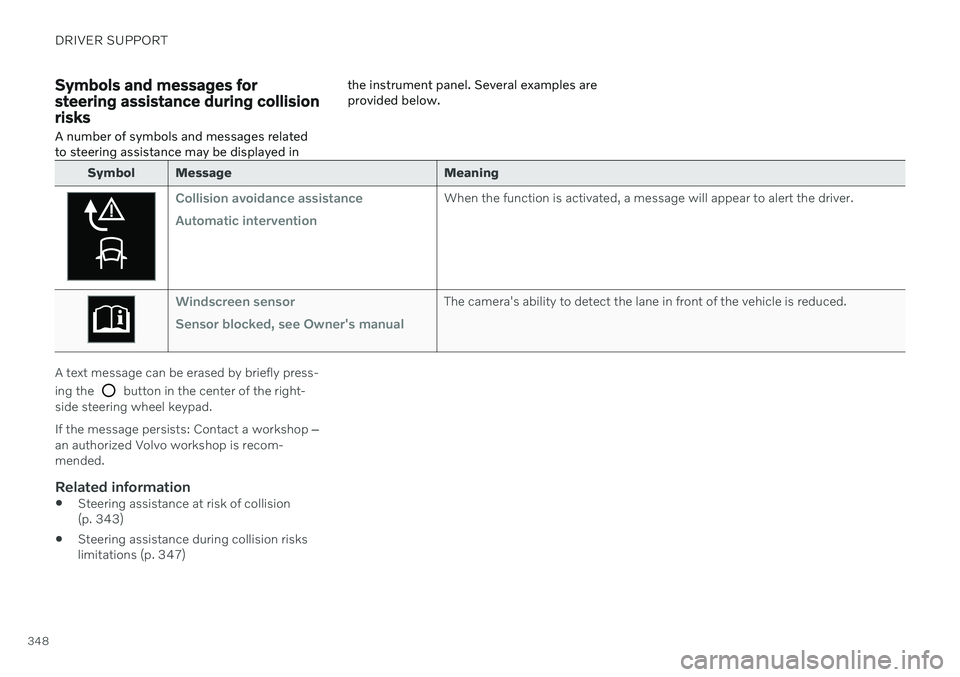
Symbols and messages for steering assistance during collisionrisks
A number of symbols and messages related to steering assistance may be displayed in the instrument panel. Several examples areprovided below.
Symbol Message
Meaning
Collision avoidance assistance Automatic interventionWhen the function is activated, a message will appear to alert the driver.
Windscreen sensor Sensor blocked, see Owner's manualThe camera's ability to detect the lane in front of the vehicle is reduced.
A text message can be erased by briefly press- ing the
button in the center of the right-
side steering wheel keypad. If the message persists: Contact a workshop ‒
an authorized Volvo workshop is recom- mended.
Related information
Steering assistance at risk of collision(p. 343)
Steering assistance during collision riskslimitations (p. 347)
Page 355 of 657
DRIVER SUPPORT
* Option/accessory.353
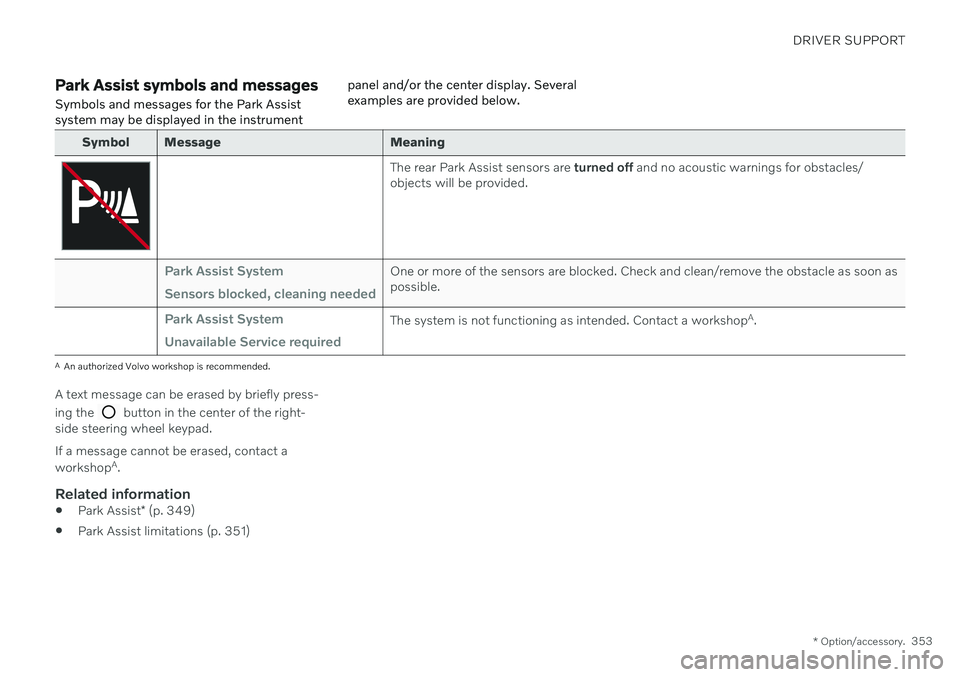
Park Assist symbols and messages
Symbols and messages for the Park Assist system may be displayed in the instrument panel and/or the center display. Severalexamples are provided below.
Symbol Message Meaning
The rear Park Assist sensors are
turned off and no acoustic warnings for obstacles/
objects will be provided.
Park Assist System Sensors blocked, cleaning neededOne or more of the sensors are blocked. Check and clean/remove the obstacle as soon as possible.
Park Assist System Unavailable Service requiredThe system is not functioning as intended. Contact a workshop A
.
A An authorized Volvo workshop is recommended.
A text message can be erased by briefly press- ing the
button in the center of the right-
side steering wheel keypad. If a message cannot be erased, contact a workshop A
.
Related information
Park Assist
* (p. 349)
Park Assist limitations (p. 351)
Page 364 of 657
DRIVER SUPPORT
* Option/accessory.
362
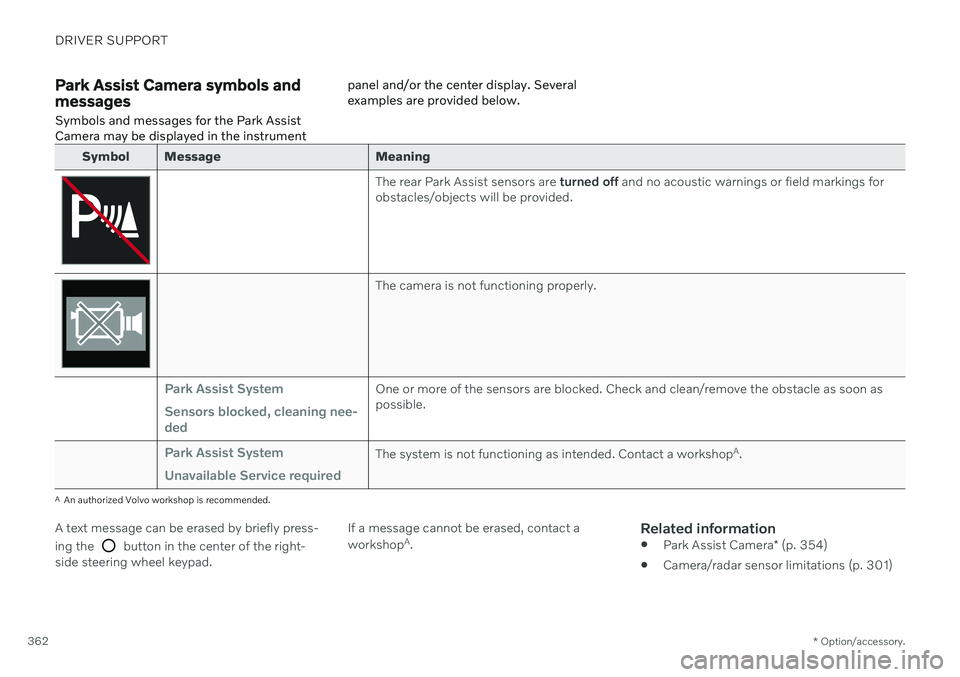
Park Assist Camera symbols and messages
Symbols and messages for the Park Assist Camera may be displayed in the instrument panel and/or the center display. Severalexamples are provided below.
Symbol Message Meaning
The rear Park Assist sensors are
turned off and no acoustic warnings or field markings for
obstacles/objects will be provided.
The camera is not functioning properly.
Park Assist System Sensors blocked, cleaning nee- dedOne or more of the sensors are blocked. Check and clean/remove the obstacle as soon as possible.
Park Assist System Unavailable Service requiredThe system is not functioning as intended. Contact a workshop A
.
A An authorized Volvo workshop is recommended.
A text message can be erased by briefly press- ing the
button in the center of the right-
side steering wheel keypad. If a message cannot be erased, contact a workshop
A
.
Related information
Park Assist Camera
* (p. 354)
Camera/radar sensor limitations (p. 301)
Page 371 of 657

DRIVER SUPPORT
}}
369
The parking sequence is cancelledA parking sequence will be cancelled if: the driver moves the steering wheel
the vehicle's speed exceeds 7 km/h (4 mph)
the driver taps
Cancel in the center dis-
play
when the anti-lock brakes or the Elec- tronic stability control are engaged - e.g.when a wheel loses grip on a slippery road
when speed-dependent power steeringwheel resistance is working at reducedpower – e.g. during cooling due to over-heating.
when, while parking, the parking sensorsdetect a vehicle or pedestrian in the vehi-cle's intended direction of travel behind orin front of the vehicle, the auto-brake func-tion will bring the vehicle to a standstill.
A message in the center display will explainwhy the parking sequence was cancelled.
CAUTION
Under certain circumstances, the function may not be able to find parking spaces –one reason may be that the sensors aredisrupted by external sound sources thatemit the same ultrasonic frequencies thatthe system works with. Examples of such sources include horns, wet tires on asphalt, pneumatic brakes,exhaust noise from motorcycles, etc.
NOTE
Dirt, ice and snow covering the sensors reduce their function and can make meas-urement impossible.
Driver responsibilityThe driver should keep in mind that the func- tion is a parking aid ‒
not an infallible fully
automatic system. The driver must always beprepared to take control and cancel a parkingsequence if necessary. There are a number of things to keep in mindwhen parking, including:
The driver is always responsible for deter-mining if the space suggested by the func-tion is suitable for parking.
Do not use the function when using snowchains or a temporary spare tire.
Do not use the function if there are anyobjects protruding from the vehicle.
Heavy rain or snowfall may inhibit PAP'sability to accurately measure a parkingspace.
While searching and measuring the park-ing space, the function may be unable todetect objects located far into the space.
PAP may not suggest parking spaces onnarrow streets if it does not detect suffi-cient space for maneuvering the vehicle.
Use approved tires 104
inflated to the cor-
rect tire pressure because this affects thefunction's ability to provide parking assis-tance.
The function is based on the way the vehi-cles are parked behind and in front of yourparking space. If they are, for example,parked too close to the curb, there is a riskthat your vehicle's tires or wheel rims
104
"Approved tires" refers to tires of the same type and make as the vehicle's original, factory-installed tires.
Page 373 of 657
DRIVER SUPPORT
* Option/accessory.371
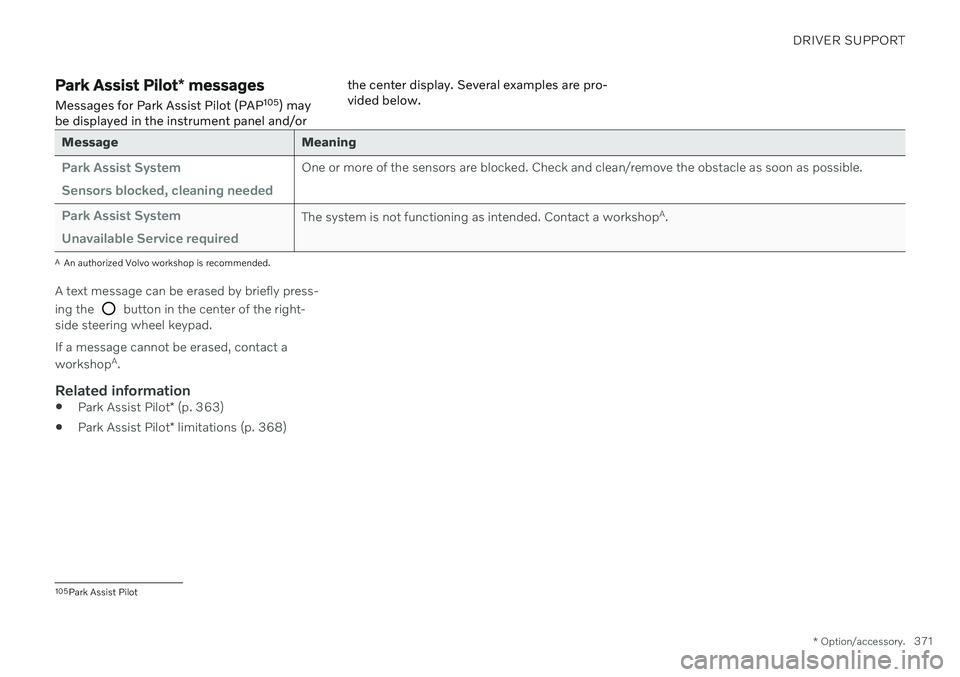
Park Assist Pilot * messages
Messages for Park Assist Pilot (PAP 105
) may
be displayed in the instrument panel and/or the center display. Several examples are pro- vided below.
Message Meaning
Park Assist System Sensors blocked, cleaning neededOne or more of the sensors are blocked. Check and clean/remove the obstacle as soon as possible.
Park Assist System Unavailable Service requiredThe system is not functioning as intended. Contact a workshop
A
.
A An authorized Volvo workshop is recommended.
A text message can be erased by briefly press- ing the
button in the center of the right-
side steering wheel keypad. If a message cannot be erased, contact a workshop A
.
Related information
Park Assist Pilot
* (p. 363)
Park Assist Pilot
* limitations (p. 368)
105
Park Assist Pilot
Page 384 of 657

||
HYBRID INFORMATION
3822. The charging cable handle will lock into
place and charging will begin within 5 seconds. When charging starts, thegreen LED light in the charging socket willbegin to flash. The approximate remainingcharging time or the charging status willbe displayed in the instrument panel. Charging may be temporarily interrupted if the vehicle is unlocked:
and a door is open
‒ charging will
restart within a few minutes.
if no door is opened
‒ the vehicle will
automatically relock. Charging willresume after 1 minute.
CAUTION
Never detach the charging cable from the 120/240 V outlet (AC, alternating current)while charging is in progress – the120/240 V outlet could be damaged insuch circumstances. Always interruptcharging first and then disconnect thecharging cable – first from the vehicle'scharging socket and then from the120/240 V outlet.
During charging, condensation from the air conditioning may form under the vehicle. Thisis normal and is caused by the hybrid batterycooling.
Related information
Charging the hybrid battery (p. 375)
Opening and closing the charging socketcover (p. 380)
Charging status in the vehicle's chargingsocket (p. 382)
Charging status in the instrument panel(p. 384)
Charging status in the charging cable's charging module (p. 383)
Stopping hybrid battery charging (p. 386)
Charging status in the vehicle's charging socket
The charging status is indicated by an LED light in the charging socket.
Location of the LED indicator light in the vehicle's charging socket.
The LED indicator light shows the current charge status during charging. If the LED indi-cator light is not illuminated, check to makesure the cable is securely connected in thewall outlet and in the outlet in the vehicle. Awhite, red or yellow light illuminates when thepassenger compartment lighting is activatedand will remain illuminated for a short timeafter the passenger compartment lighting hasgone out.