clock VOLVO S80 2009 Owner´s Manual
[x] Cancel search | Manufacturer: VOLVO, Model Year: 2009, Model line: S80, Model: VOLVO S80 2009Pages: 288, PDF Size: 6.3 MB
Page 134 of 288
04 Comfort and driving pleasureAudio system
04134
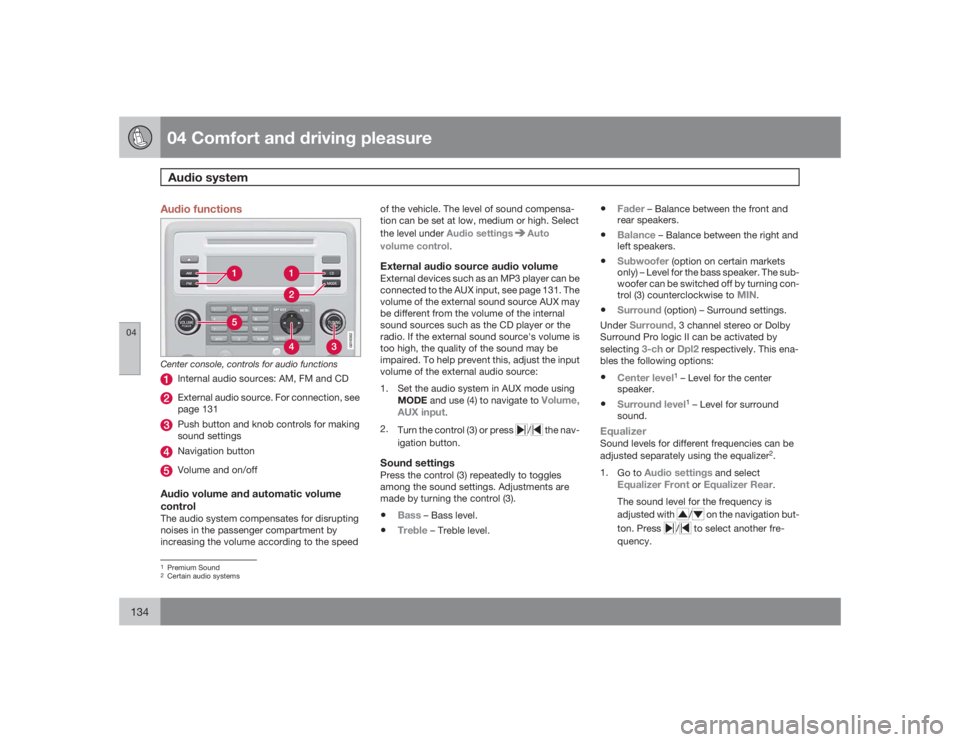
Audio functions
G018382
Center console, controls for audio functions
Internal audio sources: AM, FM and CDExternal audio source. For connection, see
page 131Push button and knob controls for making
sound settingsNavigation buttonVolume and on/off
Audio volume and automatic volume
controlThe audio system compensates for disrupting
noises in the passenger compartment by
increasing the volume according to the speedof the vehicle. The level of sound compensa-
tion can be set at low, medium or high. Select
the level under Audio settings
Auto
volume control.
External audio source audio volumeExternal devices such as an MP3 player can be
connected to the AUX input, see page 131. The
volume of the external sound source AUX may
be different from the volume of the internal
sound sources such as the CD player or the
radio. If the external sound source's volume is
too high, the quality of the sound may be
impaired. To help prevent this, adjust the input
volume of the external audio source:
1. Set the audio system in AUX mode using
MODE and use (4) to navigate to
Volume,
AUX input
.
2.
Turn the control (3) or press
/
the nav-
igation button.
Sound settingsPress the control (3) repeatedly to toggles
among the sound settings. Adjustments are
made by turning the control (3).•
Bass
– Bass level.
•
Treble
– Treble level.
•
Fader
– Balance between the front and
rear speakers.
•
Balance
– Balance between the right and
left speakers.
•
Subwoofer
(option on certain markets
only) – Level for the bass speaker. The sub-
woofer can be switched off by turning con-
trol (3) counterclockwise to
MIN
.
•
Surround
(option) – Surround settings.
Under
Surround,
3 channel stereo or Dolby
Surround Pro logic II can be activated by
selecting
3-ch
or
Dpl2
respectively. This ena-
bles the following options:
•
Center level
1 – Level for the center
speaker.
•
Surround level
1 – Level for surround
sound.
EqualizerSound levels for different frequencies can be
adjusted separately using the equalizer
2.
1.
Go to
Audio settings
and select
Equalizer Front
or
Equalizer Rear
.
The sound level for the frequency is
adjusted with
/
on the navigation but-
ton. Press
/
to select another fre-
quency.
1Premium Sound2Certain audio systems
Page 200 of 288
05 During your tripRefueling
05200
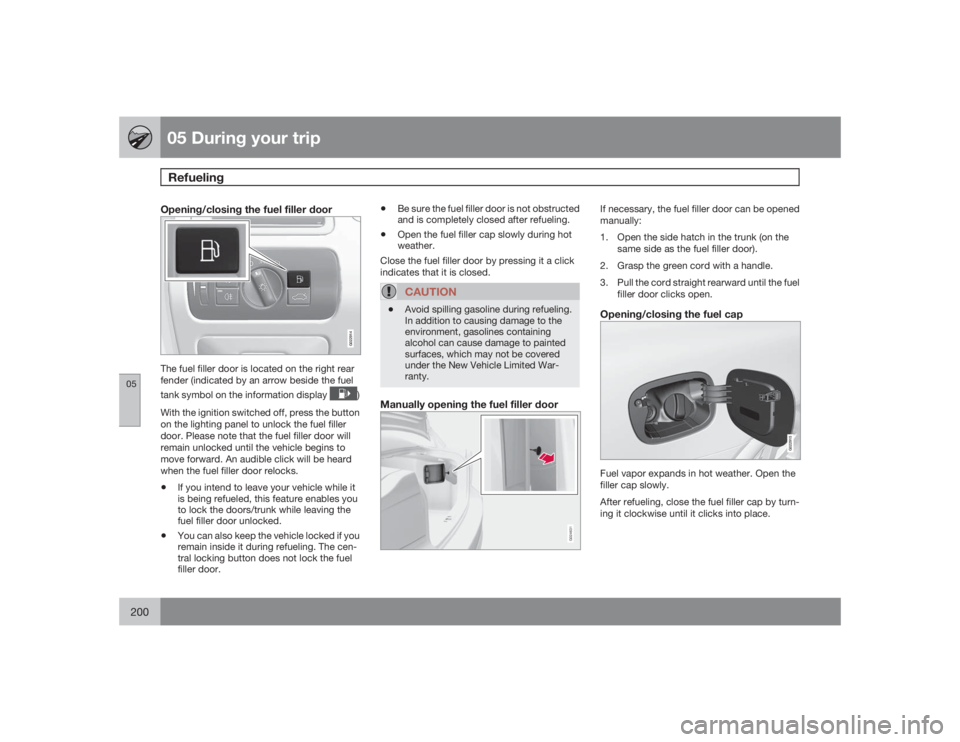
Opening/closing the fuel filler door
G022914
The fuel filler door is located on the right rear
fender (indicated by an arrow beside the fuel
tank symbol on the information display
)
With the ignition switched off, press the button
on the lighting panel to unlock the fuel filler
door. Please note that the fuel filler door will
remain unlocked until the vehicle begins to
move forward. An audible click will be heard
when the fuel filler door relocks.
•
If you intend to leave your vehicle while it
is being refueled, this feature enables you
to lock the doors/trunk while leaving the
fuel filler door unlocked.
•
You can also keep the vehicle locked if you
remain inside it during refueling. The cen-
tral locking button does not lock the fuel
filler door.
•
Be sure the fuel filler door is not obstructed
and is completely closed after refueling.
•
Open the fuel filler cap slowly during hot
weather.
Close the fuel filler door by pressing it a click
indicates that it is closed.CAUTION
•
Avoid spilling gasoline during refueling.
In addition to causing damage to the
environment, gasolines containing
alcohol can cause damage to painted
surfaces, which may not be covered
under the New Vehicle Limited War-
ranty.
Manually opening the fuel filler door
G024631
If necessary, the fuel filler door can be opened
manually:
1. Open the side hatch in the trunk (on the
same side as the fuel filler door).
2. Grasp the green cord with a handle.
3. Pull the cord straight rearward until the fuel
filler door clicks open.Opening/closing the fuel cap
G022915
Fuel vapor expands in hot weather. Open the
filler cap slowly.
After refueling, close the fuel filler cap by turn-
ing it clockwise until it clicks into place.
Page 224 of 288
06 Maintenance and specificationsReplacing bulbs
06224
Fog lights
G021753
1. Remove the cover by pressing in the clips
and pulling straight out.
2. Unscrew the fog light housing screw and
pull it out.
3. Turn the bulb counterclockwise and
remove it.
4. Install a new bulb by turning clockwise.
5. Press the bulb into the holder. (The profile
of the bulb holder corresponds to the pro-
file of the foot of the bulb.)
6.
Reinstall the bulb holder. The TOP mark on
the bulb holder must always be upward.
7. Put the cover back into place.
Taillight housing
G021754
The bulbs in the taillight cluster are replaced
from inside the trunk (not the LED functions).
NOTE
Before starting to replace a bulb, see
page 220.1. Remove the covers in the left/right panel to
access the bulbs. The bulbs are located in
separate bulb holders.
2. Press the catches together and pull out the
bulb holder.
3. Remove the defective bulb by pressing it in
slightly and turning it before pulling it out.
4. Plug in the connector.5. Press the bulb holder until it clicks into
place and reinstall the cover.
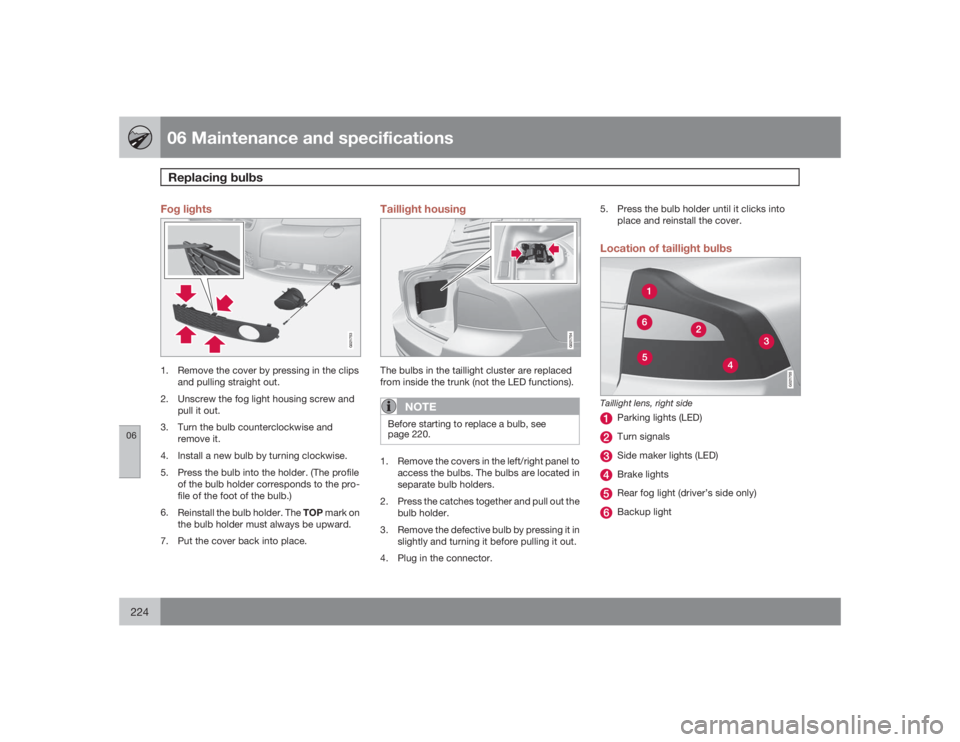
Location of taillight bulbs
G021755
Taillight lens, right side
Parking lights (LED)Turn signalsSide maker lights (LED)Brake lightsRear fog light (driver’s side only)Backup light
Page 239 of 288
06 Maintenance and specifications
Fuses
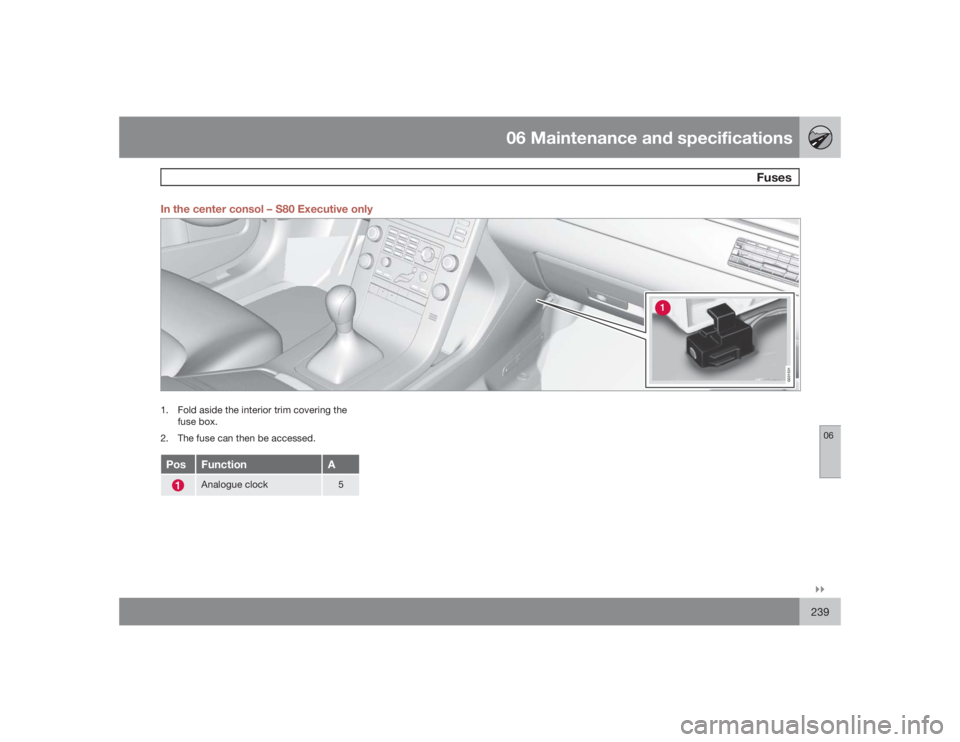
06``239 In the center consol – S80 Executive only
G031531
1. Fold aside the interior trim covering the
fuse box.
2. The fuse can then be accessed.Pos
Function
A
Analogue clock
5
Page 255 of 288
06 Maintenance and specifications
Wheels and tires
06``255
4. Remove the wheel cover (where applica-
ble) using the lug wrench in the tool
bag.With the vehicle still on the ground,
use the lug wrench to loosen the wheel
nuts 1/2 – 1 turns by exerting downward
pressure.
5. Turn the nuts counterclockwise to loosen.
G017465
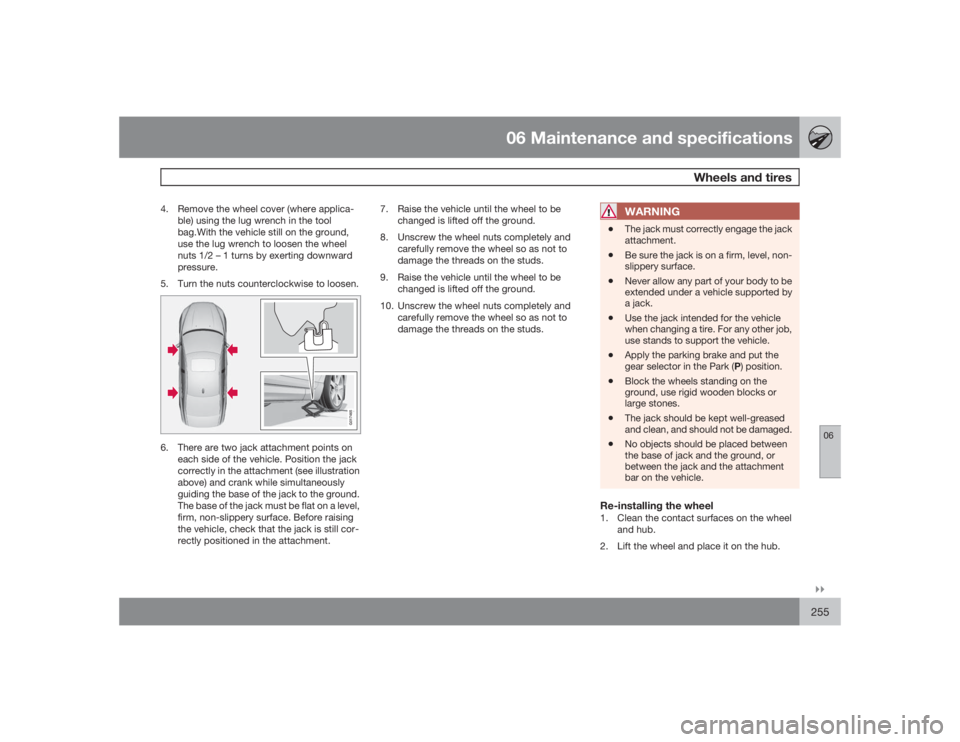
6. There are two jack attachment points on
each side of the vehicle. Position the jack
correctly in the attachment (see illustration
above) and crank while simultaneously
guiding the base of the jack to the ground.
The base of the jack must be flat on a level,
firm, non-slippery surface. Before raising
the vehicle, check that the jack is still cor-
rectly positioned in the attachment.7. Raise the vehicle until the wheel to be
changed is lifted off the ground.
8. Unscrew the wheel nuts completely and
carefully remove the wheel so as not to
damage the threads on the studs.
9. Raise the vehicle until the wheel to be
changed is lifted off the ground.
10. Unscrew the wheel nuts completely and
carefully remove the wheel so as not to
damage the threads on the studs.
WARNING
•
The jack must correctly engage the jack
attachment.
•
Be sure the jack is on a firm, level, non-
slippery surface.
•
Never allow any part of your body to be
extended under a vehicle supported by
a jack.
•
Use the jack intended for the vehicle
when changing a tire. For any other job,
use stands to support the vehicle.
•
Apply the parking brake and put the
gear selector in the Park (P) position.
•
Block the wheels standing on the
ground, use rigid wooden blocks or
large stones.
•
The jack should be kept well-greased
and clean, and should not be damaged.
•
No objects should be placed between
the base of jack and the ground, or
between the jack and the attachment
bar on the vehicle.
Re-installing the wheel1. Clean the contact surfaces on the wheel
and hub.
2. Lift the wheel and place it on the hub.
Page 260 of 288
06 Maintenance and specificationsWheels and tires
06260
CAUTION
The compressor should not be used for
more than 10 minutes at a time to avoid
overheating.
WARNING
If the pressure remains below 22 psi (1.8
bar) after approximately seven minutes, turn
off the compressor. In this case, the hole is
too large to be sealed and the vehicle should
not be driven.12. Switch off the compressor and disconnect
the electrical wire from the 12-volt socket.
13. Unscrew the hose from the tire’s inflation
valve and reinstall the valve cap.
14. Immediately drive the vehicle for approxi-
mately 2 miles (3 km) at a maximum speed
of 50 mph (80 km/h) to distribute the seal-
ing compound in the tire.
NOTE
•
Safely stow the tire sealing system in a
convenient place as it will soon be used
again to check the tire’s inflation pres-
sure.
•
The empty bottle of sealing compound
cannot be removed from the bottle
holder. Consult a trained and qualified
Volvo service technician to have the
bottle removed and properly disposed
of.WARNING
If heavy vibrations, unsteady steering
behavior, or noises should occur while driv-
ing, reduce speed and park the vehicle in a
safe place. Recheck the tire for bumps,
cracks, or other visible damage, and
recheck its inflation pressure. If the pressure
is below 19 psi (1.3 bar), do not continue
driving. Have the vehicle towed to a trained
and qualified Volvo service technician.Stage 2: Checking inflation pressure1. Connect the tire sealing system as descri-
bed in stage 1.
2. Refer to the inflation pressure tablesfor the
correct inflation pressure. If the tire needs
to be inflated, start the tire sealing system’s
compressor. If necessary, release air fromthe tire by turning the air release knob
counterclockwise.
CAUTION
The compressor should not be used for
more than 10 minutes at a time to avoid
overheating.
WARNING
If you interrupt your trip for more than 1
hour, check the inflation pressure in the
damaged tire again before continuing.Replacing the sealing compound
containerThe sealing compound container must be
replaced if:•
the tire sealing system has been used to
repair a tire
•
the container’s expiration date has passed
(see the date on decal).
Page 261 of 288
06 Maintenance and specifications
Wheels and tires
06``261
NOTE
•
After use, the sealing compound bottle,
the hose, and certain other system
components must be replaced. Please
consult your Volvo retailer for replace-
ment parts.
•
If the sealing compound bottle’s expi-
ration date has passed, please take it to
a Volvo retailer or a recycling station
that can properly dispose of harmful
substances.
Inflating tiresThe tire sealing system can be used to inflate
the tires. To do so:
1. Park the car in a safe place.
2. The compressor should be switched off.
Ensure that the on/off switch is in position
0 (the 0 side of the switch should be
pressed down).
3. Take out the electrical wire and hose.
4. Remove the valve cap from the tire’s infla-
tion valve and screw the hose connector
onto the valve as tightly as possible by
hand.
5. Connect the electrical wire to the nearest
12-volt socket in the vehicle.6. Start the vehicle’s engine.
WARNING
•The vehicle’s engine should be running
when the tire sealing system is used to
avoid battery drain. Therefore, be sure
the vehicle is parked in a well ventilated
place, or outdoors, before using the sys-
tem.•Children should never be left unattended
in the vehicle when the engine is running.
7. Check the tire’s inflation pressure on the
gauge. Switch off the compressor briefly to
get a clear reading from the pressure
gauge.
8. Refer to the tire inflation tables for the cor-
rect inflation pressure. If the tire needs to
be inflated, start the tire sealing system’s
compressor (press the on/off switch to
position I). If necessary, release air from the
tire by turning the air release knob coun-
terclockwise.
CAUTION
The compressor should not be used for
more than 10 minutes at a time to avoid
overheating.
9. Turn off the compressor (press the on/off
switch to position 0) when the correct infla-
tion pressure has been reached.
10. Unscrew the hose from the tire’s inflation
valve and reinstall the valve cap.
11. Disconnect the electrical wire from the
12-volt socket.Tire Pressure Monitoring System
(TPMS)–U.S models only
NOTE
USA – FCC ID: KR5S122780002
This device complies with part 15 of the
FCC rules. Operation is subject to the fol-
lowing conditions: (1) This device may not
cause harmful interference, and (2) this
device must accept any interference
received, including interference that may
cause undesired operation.The tire pressure monitoring system uses sen-
sors mounted in the tire valves to check infla-
tion pressure levels. When the vehicle is
moving at a speed of approximately 20 mph
(30 km/h) or faster, these sensors transmit
inflation pressure data to a receiver located in
the vehicle.
Page 280 of 288
07 Index
07280
side marker lights...............................223
specifications...................................... 226
CCapacity weight....................................... 250
Cargo area
changing bulbs................................... 225
Catalytic converter................................... 200
CD player/changer........................... 135, 136
Cell phone, hands-free connection......... 142
Central locking system, introduction......... 50
Chains...................................................... 251
Check engine light..................................... 72
Child restraints
recalls and registration......................... 44
Child restraint systems.............................. 35
booster cushions.................................. 41
convertible seats.................................. 39
infant seats........................................... 37
ISOFIX/LATCH anchors........................ 42
top tether anchors................................ 43
Child safety.......................................... 33, 34
booster cushions.................................. 41
child restraint systems.......................... 35convertible seats.................................. 39
infant seats........................................... 37
Child safety locks...................................... 47
Climate system........................................ 128
air distribution............................. 125, 130
air vents.............................................. 126
Interior Air Quality System.................. 125
introduction......................................... 124
passenger compartment filter............ 125
refrigerant........................................... 124
Clock
analogue............................................... 76
Clock, setting............................................. 76
Cold weather driving................................ 196
Collision warning system......................... 159
Compass in rearview mirror..................... 152
Conserving electrical current................... 195
Convertible seats....................................... 39
Coolant............................................218, 276
Cooling system, general information....... 195
Courtesy lighting.................................. 91, 92
Crash mode............................................... 32
Cruise control..................................157, 158
adaptive......................165, 166, 167, 168Curb weight............................................. 250
Current, conserving................................. 195
DDefroster.................................................. 128
Detachable key blade................................ 55
Disconnecting the front passenger’s air-
bag....................................................... 23, 24
Dome lighting....................................... 91, 92
Door mirrors............................................... 98
Driver distraction warning............................ 9
Driving economically................................ 194
Driving in cold weather............................ 196
Driving through water..............................195EECC.......................................... 127, 128, 129
Economical driving..................................194
Electric parking brake.............................. 114
Electronic Climate Control.......126, 128, 129
air distribution table............................ 130
Page 284 of 288
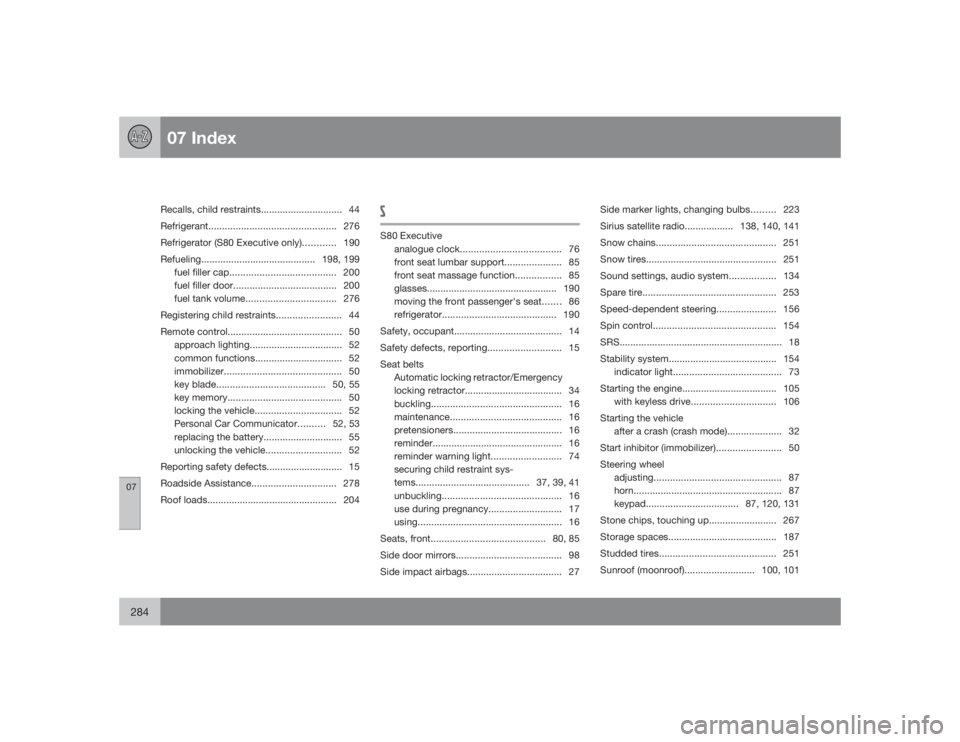
07 Index
07284
Recalls, child restraints.............................. 44
Refrigerant............................................... 276
Refrigerator (S80 Executive only)............ 190
Refueling..........................................198, 199
fuel filler cap....................................... 200
fuel filler door...................................... 200
fuel tank volume.................................276
Registering child restraints........................ 44
Remote control.......................................... 50
approach lighting.................................. 52
common functions................................ 52
immobilizer........................................... 50
key blade........................................ 50, 55
key memory.......................................... 50
locking the vehicle................................ 52
Personal Car Communicator..........52, 53
replacing the battery............................. 55
unlocking the vehicle............................ 52
Reporting safety defects............................ 15
Roadside Assistance............................... 278
Roof loads................................................ 204
SS80 Executive
analogue clock..................................... 76
front seat lumbar support..................... 85
front seat massage function................. 85
glasses................................................ 190
moving the front passenger's seat....... 86
refrigerator.......................................... 190
Safety, occupant........................................ 14
Safety defects, reporting........................... 15
Seat belts
Automatic locking retractor/Emergency
locking retractor.................................... 34
buckling................................................ 16
maintenance......................................... 16
pretensioners........................................ 16
reminder................................................ 16
reminder warning light.......................... 74
securing child restraint sys-
tems.......................................... 37, 39, 41
unbuckling............................................ 16
use during pregnancy........................... 17
using.....................................................16
Seats, front..........................................80, 85
Side door mirrors....................................... 98
Side impact airbags................................... 27Side marker lights, changing bulbs......... 223
Sirius satellite radio.................. 138, 140, 141
Snow chains............................................ 251
Snow tires................................................ 251
Sound settings, audio system................. 134
Spare tire................................................. 253
Speed-dependent steering...................... 156
Spin control............................................. 154
SRS............................................................ 18
Stability system........................................ 154
indicator light........................................ 73
Starting the engine................................... 105
with keyless drive...............................106
Starting the vehicle
after a crash (crash mode).................... 32
Start inhibitor (immobilizer)........................ 50
Steering wheel
adjusting............................................... 87
horn....................................................... 87
keypad.................................. 87, 120, 131
Stone chips, touching up......................... 267
Storage spaces........................................ 187
Studded tires........................................... 251
Sunroof (moonroof).......................... 100, 101