fog light VOLVO S80 2009 Owner´s Manual
[x] Cancel search | Manufacturer: VOLVO, Model Year: 2009, Model line: S80, Model: VOLVO S80 2009Pages: 288, PDF Size: 6.3 MB
Page 186 of 288
04 Comfort and driving pleasureBlind Spot Information System (option)
04186
switched off, and a text message is dis-
played.
•
BLIS can be switched on again by pressing
the button. The indicator light in the button
will illuminate and a new text message will
be displayed. Press the READ button (see
page 121) to erase the message.
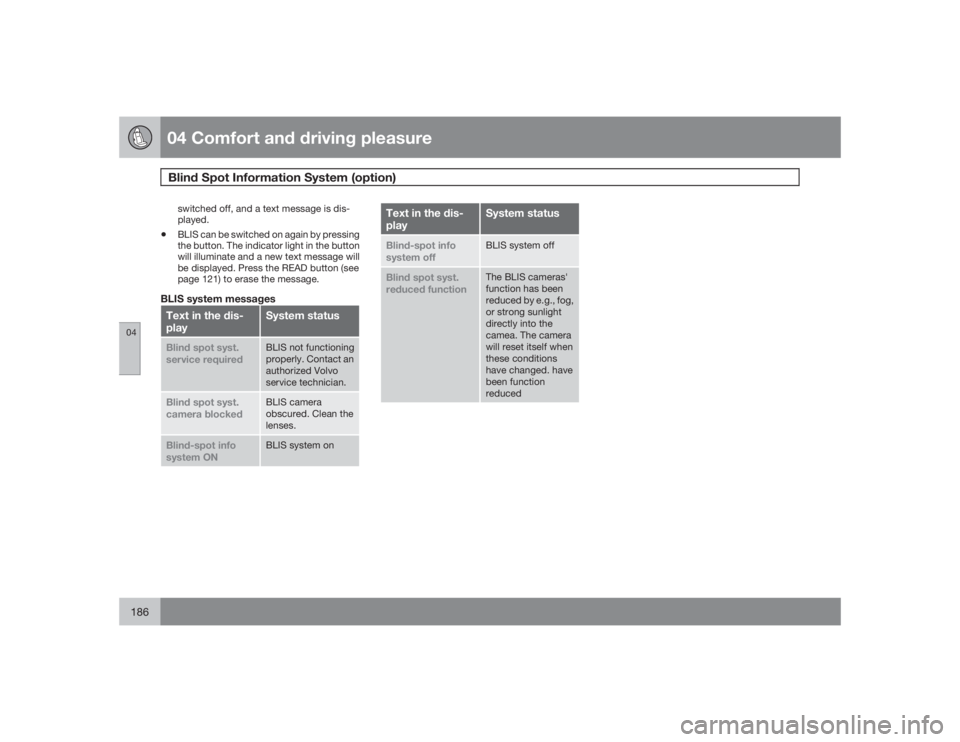
BLIS system messagesText in the dis-
play
System status
Blind spot syst.
service required
BLIS not functioning
properly. Contact an
authorized Volvo
service technician.
Blind spot syst.
camera blocked
BLIS camera
obscured. Clean the
lenses.
Blind-spot info
system ON
BLIS system on
Text in the dis-
play
System status
Blind-spot info
system off
BLIS system off
Blind spot syst.
reduced function
The BLIS cameras'
function has been
reduced by e.g., fog,
or strong sunlight
directly into the
camea. The camera
will reset itself when
these conditions
have changed. have
been function
reduced
Page 220 of 288
06 Maintenance and specificationsReplacing bulbs
06220
IntroductionAll bulb specifications are listed on page 226.
The following bulbs should only be replaced by
a trained and qualified Volvo service techni-
cian:•
Dome lighting
•
Reading lights
•
Glove compartment lighting
•
Turn signals in the door mirror
•
Approach lighting in the door mirror
•
Brake/fog/taillights
•
Rear side parking lights
•
Active Bi-XenonŸ and LED bulbsNOTE
For information regarding any other bulbs
not mentioned in this section, please con-
tact your Volvo retailer or a trained and
authorized Volvo service technician.
WARNING
•
Active Bi-XenonŸ headlights (option) –
due to the high voltage used by these
headlights, these bulbs should only be
replaced by a trained and qualified
Volvo service technician.
•
Turn off the lights and remove the
remote key from the ignition before
changing any bulbs.
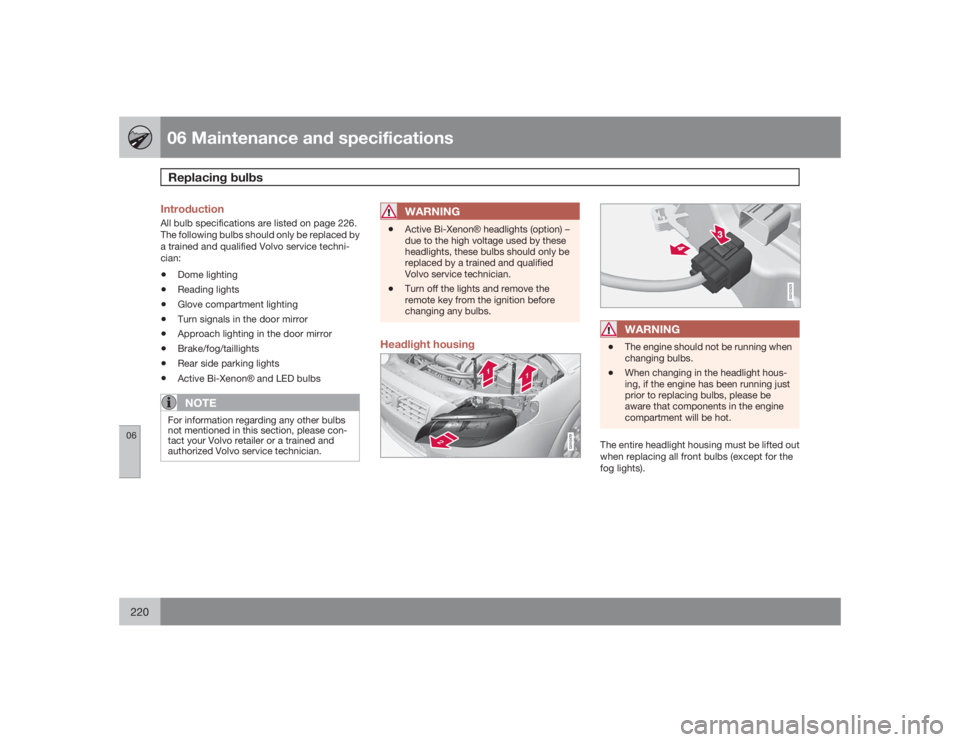
Headlight housing
G010479
G010325
WARNING
•
The engine should not be running when
changing bulbs.
•
When changing in the headlight hous-
ing, if the engine has been running just
prior to replacing bulbs, please be
aware that components in the engine
compartment will be hot.
The entire headlight housing must be lifted out
when replacing all front bulbs (except for the
fog lights).
Page 224 of 288
06 Maintenance and specificationsReplacing bulbs
06224
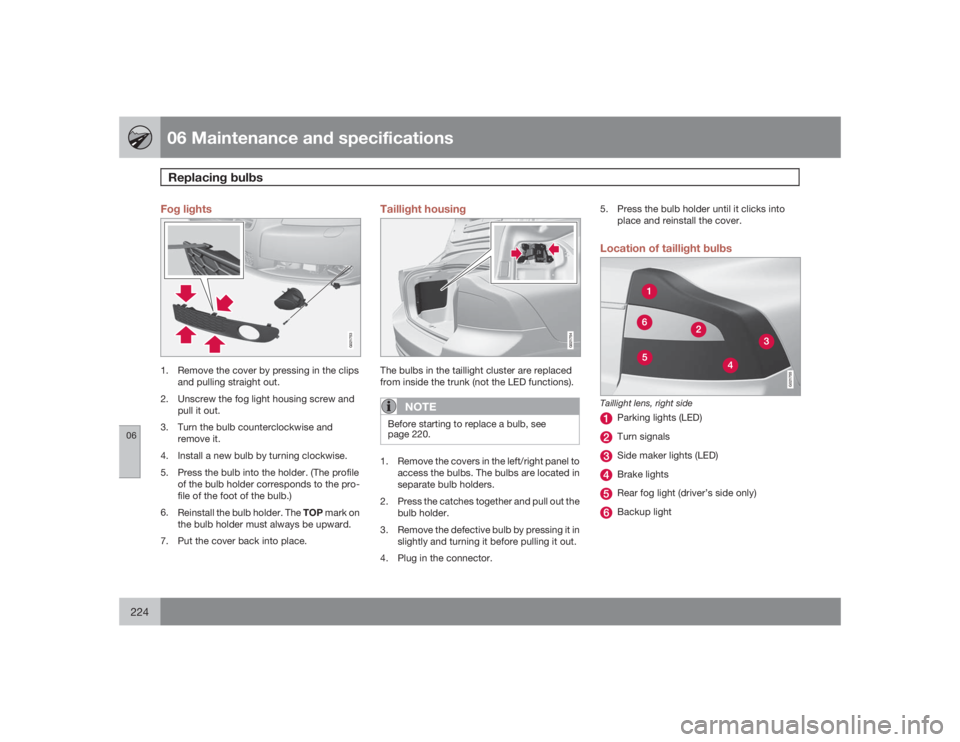
Fog lights
G021753
1. Remove the cover by pressing in the clips
and pulling straight out.
2. Unscrew the fog light housing screw and
pull it out.
3. Turn the bulb counterclockwise and
remove it.
4. Install a new bulb by turning clockwise.
5. Press the bulb into the holder. (The profile
of the bulb holder corresponds to the pro-
file of the foot of the bulb.)
6.
Reinstall the bulb holder. The TOP mark on
the bulb holder must always be upward.
7. Put the cover back into place.
Taillight housing
G021754
The bulbs in the taillight cluster are replaced
from inside the trunk (not the LED functions).
NOTE
Before starting to replace a bulb, see
page 220.1. Remove the covers in the left/right panel to
access the bulbs. The bulbs are located in
separate bulb holders.
2. Press the catches together and pull out the
bulb holder.
3. Remove the defective bulb by pressing it in
slightly and turning it before pulling it out.
4. Plug in the connector.5. Press the bulb holder until it clicks into
place and reinstall the cover.
Location of taillight bulbs
G021755
Taillight lens, right side
Parking lights (LED)Turn signalsSide maker lights (LED)Brake lightsRear fog light (driver’s side only)Backup light
Page 225 of 288
06 Maintenance and specifications
Replacing bulbs
06``225
NOTE
If an error message remains in the display
after a faulty bulb has been replaced, con-
tact an authorized Volvo workshop.
G015418
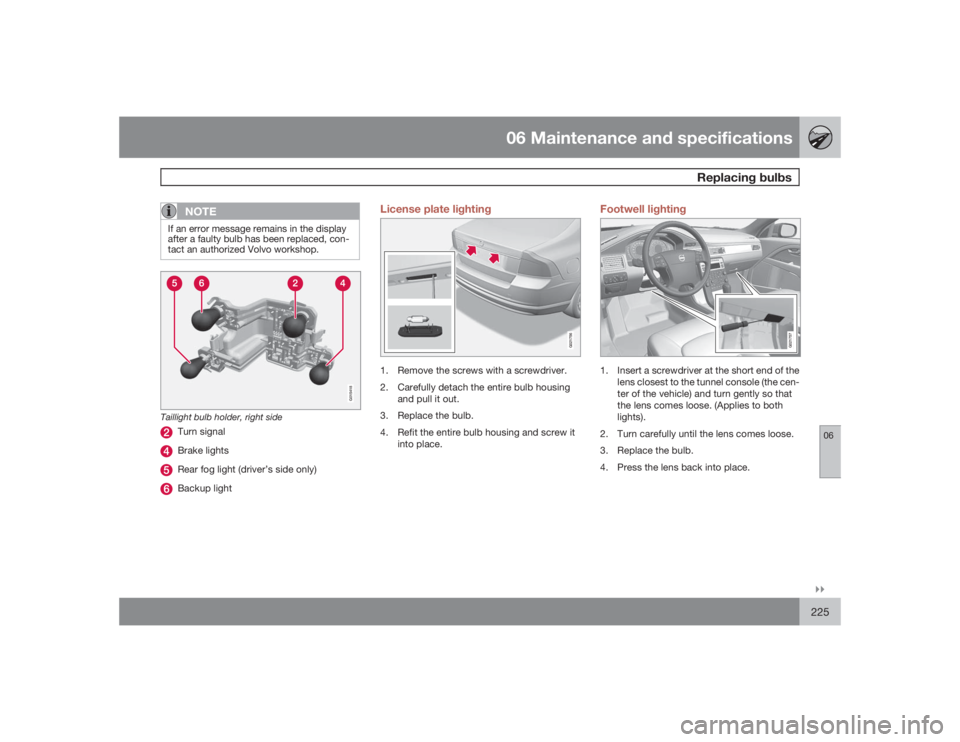
Taillight bulb holder, right side
Turn signalBrake lightsRear fog light (driver’s side only)Backup light
License plate lighting
G021756
1. Remove the screws with a screwdriver.
2. Carefully detach the entire bulb housing
and pull it out.
3. Replace the bulb.
4. Refit the entire bulb housing and screw it
into place.
Footwell lighting
G021757
1. Insert a screwdriver at the short end of the
lens closest to the tunnel console (the cen-
ter of the vehicle) and turn gently so that
the lens comes loose. (Applies to both
lights).
2. Turn carefully until the lens comes loose.
3. Replace the bulb.
4. Press the lens back into place.
Page 226 of 288
06 Maintenance and specificationsReplacing bulbs
06226
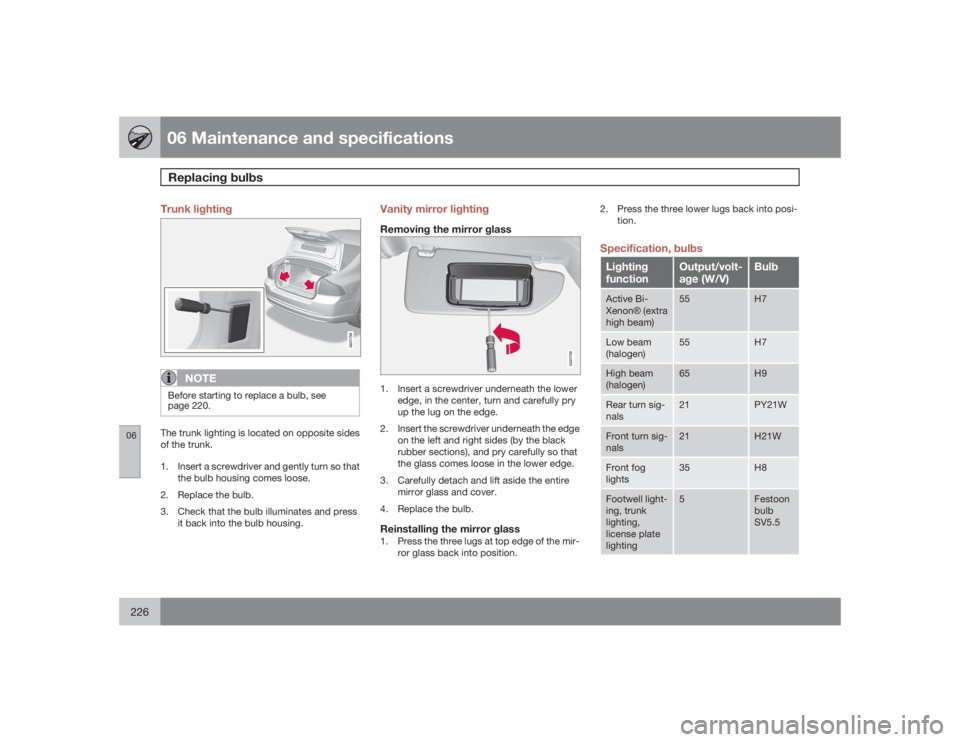
Trunk lighting
G021758
NOTE
Before starting to replace a bulb, see
page 220.The trunk lighting is located on opposite sides
of the trunk.
1. Insert a screwdriver and gently turn so that
the bulb housing comes loose.
2. Replace the bulb.
3. Check that the bulb illuminates and press
it back into the bulb housing.
Vanity mirror lightingRemoving the mirror glass
G021759
1. Insert a screwdriver underneath the lower
edge, in the center, turn and carefully pry
up the lug on the edge.
2. Insert the screwdriver underneath the edge
on the left and right sides (by the black
rubber sections), and pry carefully so that
the glass comes loose in the lower edge.
3. Carefully detach and lift aside the entire
mirror glass and cover.
4. Replace the bulb.Reinstalling the mirror glass1. Press the three lugs at top edge of the mir-
ror glass back into position.2. Press the three lower lugs back into posi-
tion.
Specification, bulbsLighting
function
Output/volt-
age (W/V)
Bulb
Active Bi-
XenonŸ (extra
high beam)
55
H7
Low beam
(halogen)
55
H7
High beam
(halogen)
65
H9
Rear turn sig-
nals
21
PY21W
Front turn sig-
nals
21
H21W
Front fog
lights
35
H8
Footwell light-
ing, trunk
lighting,
license plate
lighting
5
Festoon
bulb
SV5.5
Page 237 of 288
06 Maintenance and specifications
Fuses
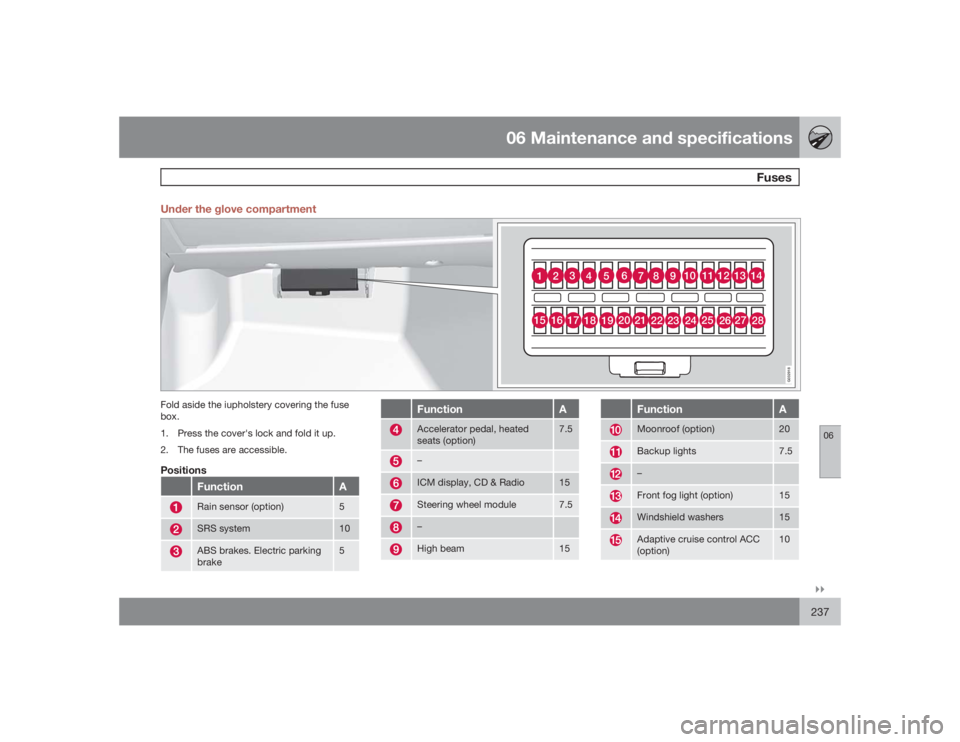
06``237 Under the glove compartment
10
11
12
13
14
1
2
3
4
56
7
8
923
22
21
20
19
18 17 16
15
24
25
26
27
28
G032918
Fold aside the iupholstery covering the fuse
box.
1. Press the cover's lock and fold it up.
2. The fuses are accessible.Positions
Function
A
Rain sensor (option)
5
SRS system
10
ABS brakes. Electric parking
brake
5
Function
A
Accelerator pedal, heated
seats (option)
7.5
–ICM display, CD & Radio
15
Steering wheel module
7.5
–High beam
15
Function
A
Moonroof (option)
20
Backup lights
7.5
–Front fog light (option)
15
Windshield washers
15
Adaptive cruise control ACC
(option)
10
Page 265 of 288
06 Maintenance and specifications
Vehicle care
06``265
fully. Solvents or stain removers should not be
used.
CAUTION
•
Avoid waxing or polishing plastic or rub-
ber components
•
Polishing chromed strips can wear
away or damage the surface
•
Polishes containing abrasive sub-
stances should not be used
Automatic car wash•
We do NOT recommend washing your car
in an automatic wash during the first six
months (because the paint will not have
hardened sufficiently).
•
An automatic wash is a simple and quick
way to clean your car, but it is worth
remembering that it may not be as thor-
ough as when you yourself go over the car
with sponge and water. Keeping the under-
body clean is most important, especially in
the winter. Some automatic washers do
not have facilities for washing the under-
body.
CAUTION
•
Before driving into an automatic car
wash, turn off the optional rain sensor
to avoid damaging the windshield wip-
ers.
•
Make sure that side view mirrors, auxil-
iary lamps, etc, are secure, and that any
antenna(s) are retracted or removed.
Otherwise there is risk of the machine
dislodging them.
•
Chromed wheels: Clean chrome-
plated wheels using the same deter-
gents used for the body of the vehicle.
Aggressive wheel-cleaning agents can
permanently stain chrome-plated
wheels.WARNING
•
When the vehicle is driven immediately
after being washed, apply the brakes,
including the parking brake, several
times in order to remove any moisture
from the brake linings.
•
Engine cleaning agents should not be
used when the engine is warm. This
constitutes a fire risk.
Exterior lightingCondensation may form temporarily on the
inside of the lenses of exterior lights such asheadlights, fog lights, or taillights. This is nor-
mal and the lights are designed to withstand
moisture. Normally, condensation will dissi-
pate after the lights have been on for a short
time.
Polishing and waxing•
Normally, polishing is not required during
the first year after delivery, however, wax-
ing may be beneficial.
•
Before applying polish or wax the vehicle
must be washed and dried. Tar spots can
be removed with kerosene or tar remover.
Difficult spots may require a fine rubbing
compound.
•
After polishing use liquid or paste wax.
•
Several commercially available products
contain both polish and wax.
•
Waxing alone does not substitute for pol-
ishing a dull surface.
•
A wide range of polymer-based waxes can
be purchased today. These waxes are easy
to use and produce a long-lasting, high-
gloss finish that protects the bodywork
against oxidation, road dirt and fading.
•
Do not polish or wax your vehicle in direct
sunlight (the surface of the vehicle should
not be warmer than 113 °F (45 °C).
Page 281 of 288
07 Index
07
281
Interior Air Quality System.................. 129
ventilated seats................................... 127
Emergency brake lights............................. 89
Emergency locking retractor...................... 34
Emergency starting.................................. 107
Emergency towing...........................207, 208
Emission inspection readiness................ 213
Engine
overheating........................................... 75
specifications...................................... 273
starting................................................ 105
starting with keyless drive.................. 106
Engine compartment overview................ 215
Engine oil
checking............................................. 216
low pressure warning light.................... 73
specifications...................................... 274
volumes.............................................. 276
Environment............................................... 10
Eyelets for anchoring loads..................... 202
FFederal Clean Air Act............................... 212
Fluid specifications.................................. 276
Fog lights
front...................................................... 73
front/rear...............................................89
Four C (active chassis system)................156
Front airbags.................................. 19, 20, 21
disconnecting passenger’s side air-
bag.................................................. 23, 24
Front fog lights..................................... 73, 89
Front park assist..............................180, 182
Front seats..................................... 80, 81, 85
heated................................................. 127
lumbar support (S80 Executive only).... 85
massage function (S80 Executive only) 85
moving passenger's seat (S80 Execu-
tive only)................................................ 86
Fuel filler cap............................................ 200
Fuel filler door, opening........................... 200
Fuel level warning light.............................. 73
Fuel requirements............................198, 199
Fuel tank volume...................................... 276
Fuses...............................233, 234, 237, 240
GGasoline requirements............................. 199
Gas tank volume...................................... 276
Gauges...................................................... 71
Geartronic................................................ 110
Geartronic automatic transmission.. 109, 110
Generator warning light............................. 74
Glossary of tire terminology..................... 249
Grocery bag holder.................................. 203
Gross vehicle weight............................... 250HHands-free connection (cell phone) (Cell
phone, hands-free connection)................ 142
Hazard warning flashers............................ 90
Headlights
active bi-xenon lights........................... 89
changing bulbs...........................221, 222
high/low beams.................................... 88
high beam flash.................................... 88
switch................................................... 88
Headlight washers..................................... 95
Page 283 of 288
07 Index
07
283
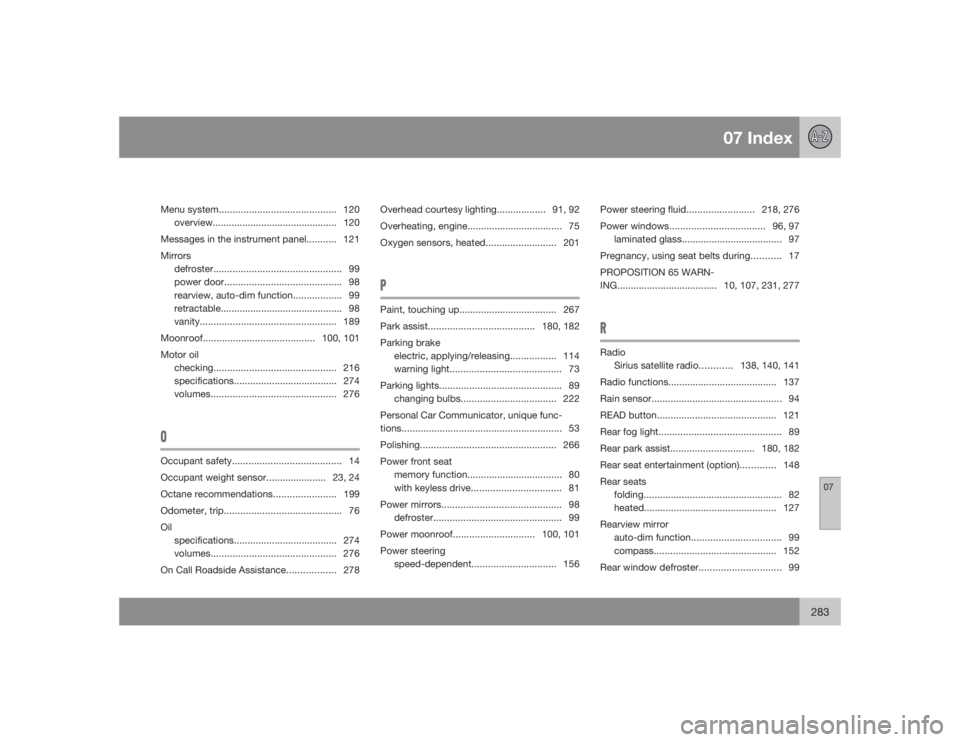
Menu system........................................... 120
overview.............................................. 120
Messages in the instrument panel........... 121
Mirrors
defroster............................................... 99
power door........................................... 98
rearview, auto-dim function.................. 99
retractable............................................. 98
vanity.................................................. 189
Moonroof.........................................100, 101
Motor oil
checking............................................. 216
specifications...................................... 274
volumes.............................................. 276OOccupant safety........................................ 14
Occupant weight sensor...................... 23, 24
Octane recommendations.......................199
Odometer, trip........................................... 76
Oil
specifications...................................... 274
volumes.............................................. 276
On Call Roadside Assistance.................. 278Overhead courtesy lighting.................. 91, 92
Overheating, engine................................... 75
Oxygen sensors, heated.......................... 201
PPaint, touching up.................................... 267
Park assist.......................................180, 182
Parking brake
electric, applying/releasing................. 114
warning light......................................... 73
Parking lights............................................. 89
changing bulbs................................... 222
Personal Car Communicator, unique func-
tions........................................................... 53
Polishing.................................................. 266
Power front seat
memory function................................... 80
with keyless drive................................. 81
Power mirrors............................................ 98
defroster............................................... 99
Power moonroof..............................100, 101
Power steering
speed-dependent............................... 156Power steering fluid.........................218, 276
Power windows...................................96, 97
laminated glass..................................... 97
Pregnancy, using seat belts during........... 17
PROPOSITION 65 WARN-
ING..................................... 10, 107, 231, 277
RRadio
Sirius satellite radio............138, 140, 141
Radio functions........................................ 137
Rain sensor................................................ 94
READ button............................................ 121
Rear fog light............................................. 89
Rear park assist............................... 180, 182
Rear seat entertainment (option)............. 148
Rear seats
folding................................................... 82
heated................................................. 127
Rearview mirror
auto-dim function................................. 99
compass............................................. 152
Rear window defroster.............................. 99