key VOLVO S80 2009 Owner´s Manual
[x] Cancel search | Manufacturer: VOLVO, Model Year: 2009, Model line: S80, Model: VOLVO S80 2009Pages: 288, PDF Size: 6.3 MB
Page 106 of 288
03 Your driving environmentStarting the engine
03106
WARNING
•
Always remove the remote key from the
ignition slot when leaving the vehicle,
especially if there are children in the
vehicle.
•
Never remove the remote key from the
ignition slot while driving or when the
vehicle is being towed. The steering
lock could otherwise be activated, mak-
ing it impossible to steer the vehicle.
Never remove the remote key with key-
less drive function (option) from the
vehicle while driving or during towing.
•
Always place the gear selector in Park
and apply the parking brake before
leaving the vehicle. Never leave the
vehicle unattended with the engine run-
ning.
•
Always open garage doors fully before
starting the engine inside a garage to
ensure adequate ventilation. The
exhaust gases contain carbon monox-
ide, which is invisible and odorless but
very poisonous.
NOTE
•
The idling speed can be noticeably
higher than normal during cold starts.
This is to enable emission control sys-
tem can reach normal operating tem-
perature as quickly as possible, which
helps reduce exhaust emissions
3.
•
Keylock: Your vehicle is equipped with
a keylock system. When the engine is
switched off, the gear selector must be
in the Park position before the key can
be removed
4 from the ignition slot.
CAUTION
•
When starting in cold weather, the auto-
matic transmission may shift up at
slightly higher engine speeds than nor-
mal until the automatic transmission
fluid reaches normal operating tem-
perature.
•
Do not race a cold engine immediately
after starting. Oil flow may not reach
some lubrication points fast enough to
prevent engine damage.
•
The engine should be idling when you
move the gear selector. Never acceler-
ate until after you feel the transmission
engage. Accelerating immediately after
selecting a gear will cause harsh
engagement and premature transmis-
sion wear.
•
SelectingP or N when idling at a stand-
still for prolonged periods of time will
help prevent overheating of the auto-
matic transmission fluid.
Keyless drive (option)Follow steps 3 – 4 for starting the engine.
3If the gear selector is in the D or R positions and the car is not moving, engine speed (rpm) will be lower and it will take longer for the engine to reach normal operating temperature.4Does not apply to vehicles with the optional keyless drive.
Page 107 of 288
03 Your driving environment
Starting the engine
03``107
NOTE
For the vehicle to start, one of the vehicle's
remote keys must be in the passenger com-
partment.Jump starting
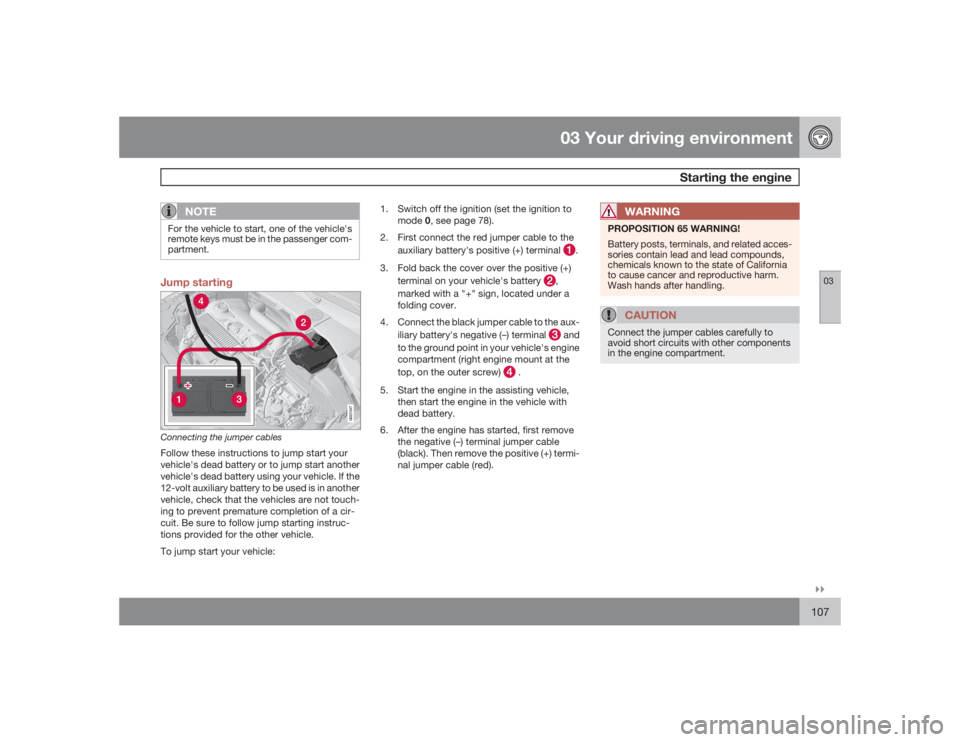
G021347
Connecting the jumper cablesFollow these instructions to jump start your
vehicle's dead battery or to jump start another
vehicle's dead battery using your vehicle. If the
12-volt auxiliary battery to be used is in another
vehicle, check that the vehicles are not touch-
ing to prevent premature completion of a cir-
cuit. Be sure to follow jump starting instruc-
tions provided for the other vehicle.
To jump start your vehicle:1. Switch off the ignition (set the ignition to
mode0, see page 78).
2. First connect the red jumper cable to the
auxiliary battery's positive (+) terminal
.
3. Fold back the cover over the positive (+)
terminal on your vehicle's battery
,
marked with a "+" sign, located under a
folding cover.
4. Connect the black jumper cable to the aux-
iliary battery's negative (–) terminal and
to the ground point in your vehicle's engine
compartment (right engine mount at the
top, on the outer screw)
.
5. Start the engine in the assisting vehicle,
then start the engine in the vehicle with
dead battery.
6. After the engine has started, first remove
the negative (–) terminal jumper cable
(black). Then remove the positive (+) termi-
nal jumper cable (red).
WARNING
PROPOSITION 65 WARNING!
Battery posts, terminals, and related acces-
sories contain lead and lead compounds,
chemicals known to the state of California
to cause cancer and reproductive harm.
Wash hands after handling.
CAUTION
Connect the jumper cables carefully to
avoid short circuits with other components
in the engine compartment.
Page 109 of 288
03 Your driving environment
Transmission
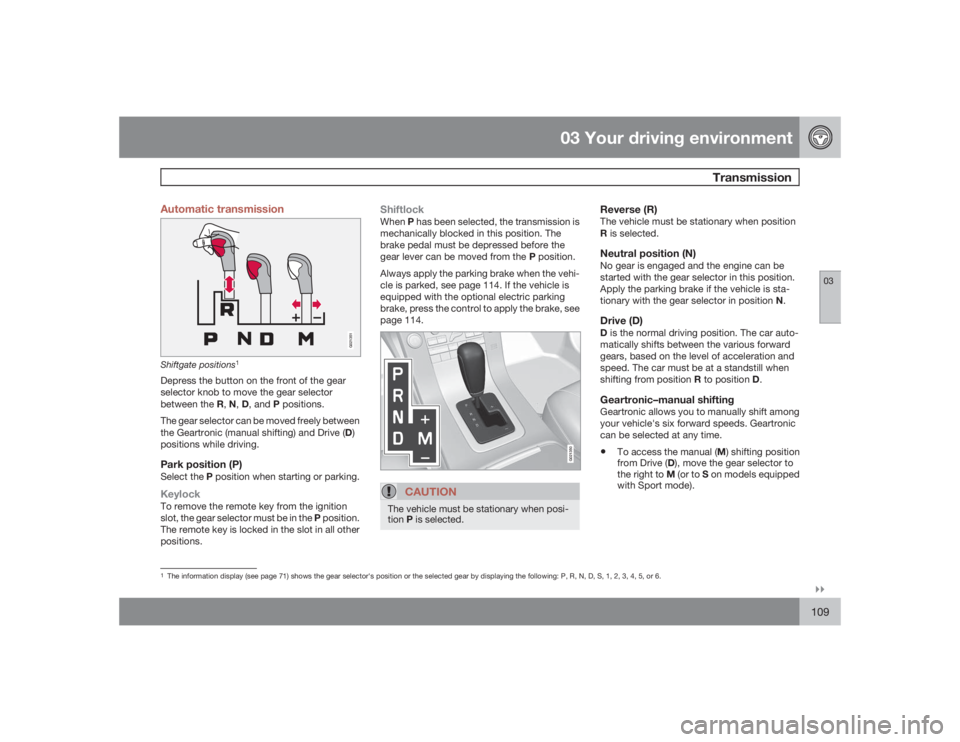
03``109 Automatic transmission
G021351
Shiftgate positions
1
Depress the button on the front of the gear
selector knob to move the gear selector
between the R,N,D, and P positions.
The gear selector can be moved freely between
the Geartronic (manual shifting) and Drive (D)
positions while driving.Park position (P)Select the P position when starting or parking.KeylockTo remove the remote key from the ignition
slot, the gear selector must be in the P position.
The remote key is locked in the slot in all other
positions.
ShiftlockWhenP has been selected, the transmission is
mechanically blocked in this position. The
brake pedal must be depressed before the
gear lever can be moved from the P position.
Always apply the parking brake when the vehi-
cle is parked, see page 114. If the vehicle is
equipped with the optional electric parking
brake, press the control to apply the brake, see
page 114.
G021350
CAUTION
The vehicle must be stationary when posi-
tionP is selected.
Reverse (R)The vehicle must be stationary when position
R is selected.Neutral position (N)No gear is engaged and the engine can be
started with the gear selector in this position.
Apply the parking brake if the vehicle is sta-
tionary with the gear selector in position N.Drive (D)D is the normal driving position. The car auto-
matically shifts between the various forward
gears, based on the level of acceleration and
speed. The car must be at a standstill when
shifting from position R to position D.Geartronic–manual shiftingGeartronic allows you to manually shift among
your vehicle's six forward speeds. Geartronic
can be selected at any time.•
To access the manual (M) shifting position
from Drive (D), move the gear selector to
the right to M (or to S on models equipped
with Sport mode).
1The information display (see page 71) shows the gear selector's position or the selected gear by displaying the following: P, R, N, D, S, 1, 2, 3, 4, 5, or 6.
Page 110 of 288
03 Your driving environmentTransmission
03110
NOTE
On models equipped with Sport mode, the
transmission will not switch to manual shift-
ing mode until the gear selector is moved
forward or rearward. The selected gear will
then be shown in the information display
(see page 71).•
To return to the D position from M or S,
move the gear selector to the left.
While driving•
If you select the M position while driving,
the gear that was being used in the Drive
position will also initially be selected in the
M position.
•
Move the gear selector forward (toward
"+") to shift to a higher gear or rearward
(toward "–") to shift to a lower gear.
•
If you hold the gear selector toward "–", the
transmission will downshift one gear at a
time and will utilize the braking power of
the engine. If the current speed is too high
for using a lower gear, the downshift will
not occur until the speed has decreased
enough to allow the lower gear to be used.
•
If you slow to a very low speed, the trans-
mission will automatically shift down.
Shiftlock – Neutral (N)If the gear selector is in the N position and the
vehicle has been stationary for at least 3 sec-
onds (irrespective of whether the engine is run-
ning) then the gear selector is locked.
To be able to move the gear selector from N to
another gear position, the brake pedal must be
depressed and the ignition must be in posi-
tionII, see page 78.Geartronic–starting on slippery surfacesSelecting 3rd gear in Geartronic’s manual shift-
ing mode can help provide better traction when
starting off on slippery surfaces. To do so:
1. Depress the brake pedal and move the
gear selector to the right from the D posi-
tion to M. The text in the instrument panel
display will change from
D to
1.
2. Press the gear selector forward and
release it (this selects 2nd gear). Press the
selector forward again and release it to
select 3rd gear.
3. Release the brake pedal and press gently
on the accelerator pedal.
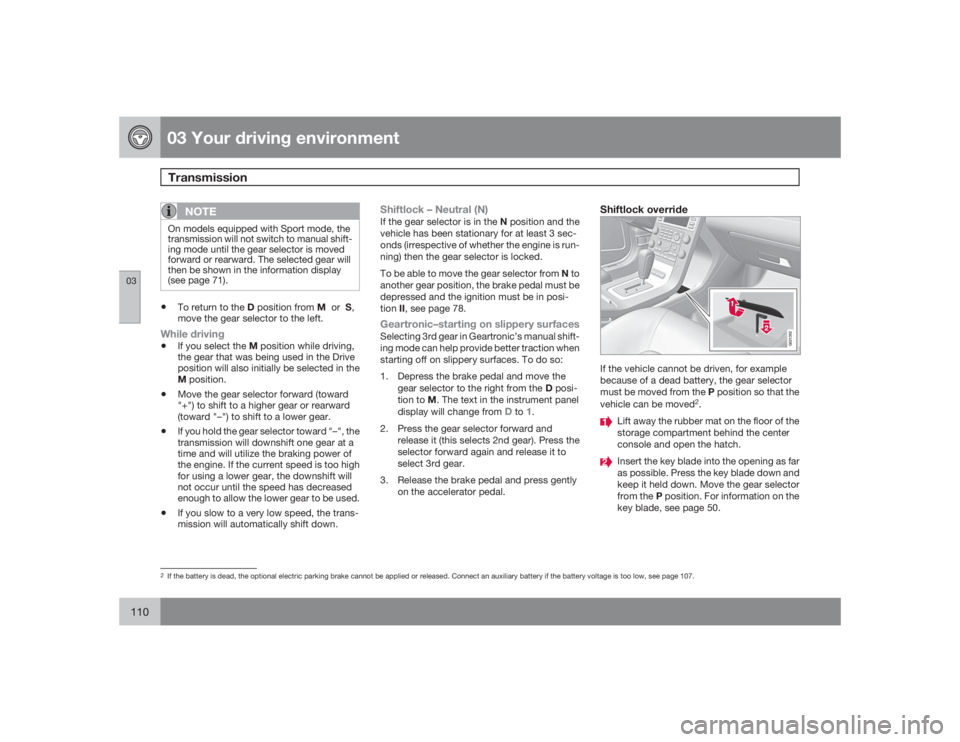
Shiftlock override
G021352
If the vehicle cannot be driven, for example
because of a dead battery, the gear selector
must be moved from the P position so that the
vehicle can be moved
2.
Lift away the rubber mat on the floor of the
storage compartment behind the center
console and open the hatch.Insert the key blade into the opening as far
as possible. Press the key blade down and
keep it held down. Move the gear selector
from the P position. For information on the
key blade, see page 50.
2If the battery is dead, the optional electric parking brake cannot be applied or released. Connect an auxiliary battery if the battery voltage is too low, see page 107.
Page 115 of 288
03 Your driving environment
Parking brake
03``115
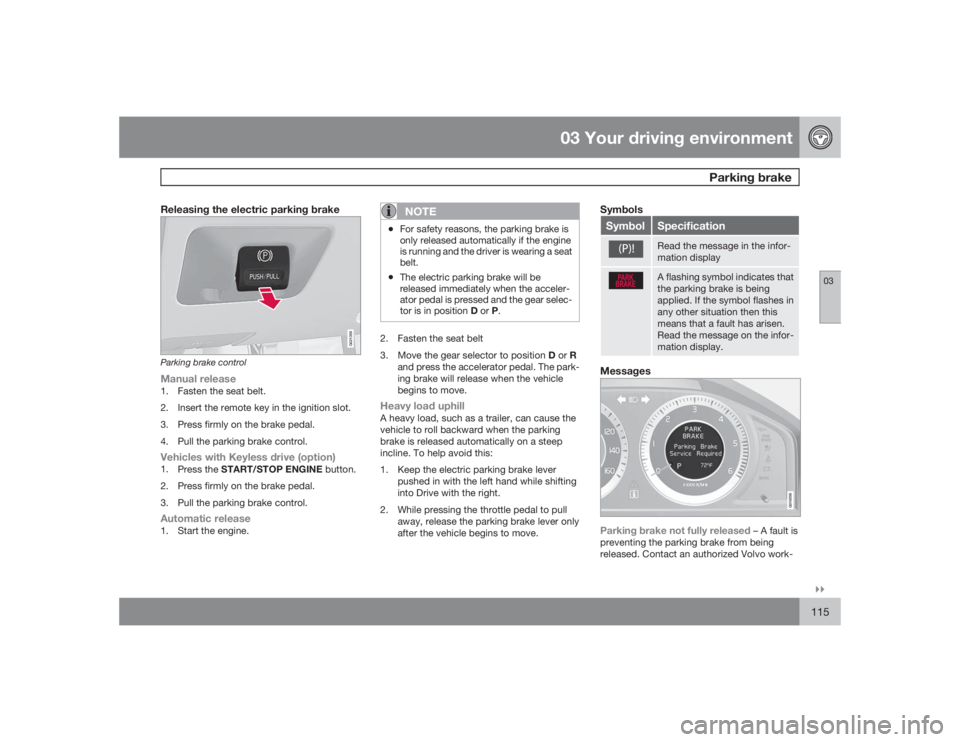
Releasing the electric parking brake
G021359
Parking brake controlManual release1. Fasten the seat belt.
2. Insert the remote key in the ignition slot.
3. Press firmly on the brake pedal.
4. Pull the parking brake control.Vehicles with Keyless drive (option)1.
Press the START/STOP ENGINE button.
2. Press firmly on the brake pedal.
3. Pull the parking brake control.Automatic release1. Start the engine.
NOTE
•For safety reasons, the parking brake is
only released automatically if the engine
is running and the driver is wearing a seat
belt.•The electric parking brake will be
released immediately when the acceler-
ator pedal is pressed and the gear selec-
tor is in position D or P.
2. Fasten the seat belt
3.
Move the gear selector to position D or R
and press the accelerator pedal. The park-
ing brake will release when the vehicle
begins to move.Heavy load uphillA heavy load, such as a trailer, can cause the
vehicle to roll backward when the parking
brake is released automatically on a steep
incline. To help avoid this:
1. Keep the electric parking brake lever
pushed in with the left hand while shifting
into Drive with the right.
2. While pressing the throttle pedal to pull
away, release the parking brake lever only
after the vehicle begins to move.
SymbolsSymbol
SpecificationRead the message in the infor-
mation displayA flashing symbol indicates that
the parking brake is being
applied. If the symbol flashes in
any other situation then this
means that a fault has arisen.
Read the message on the infor-
mation display.
Messages
G016556
Parking brake not fully released
– A fault is
preventing the parking brake from being
released. Contact an authorized Volvo work-
Page 120 of 288
04 Comfort and driving pleasureMenus and messages
04120
Center consoleCertain functions are controlled from the cen-
ter console via the menu system or from the
optional keypad in the steering wheel. Each
function is described under its respective sec-
tion.
The current menu level is shown at the top right
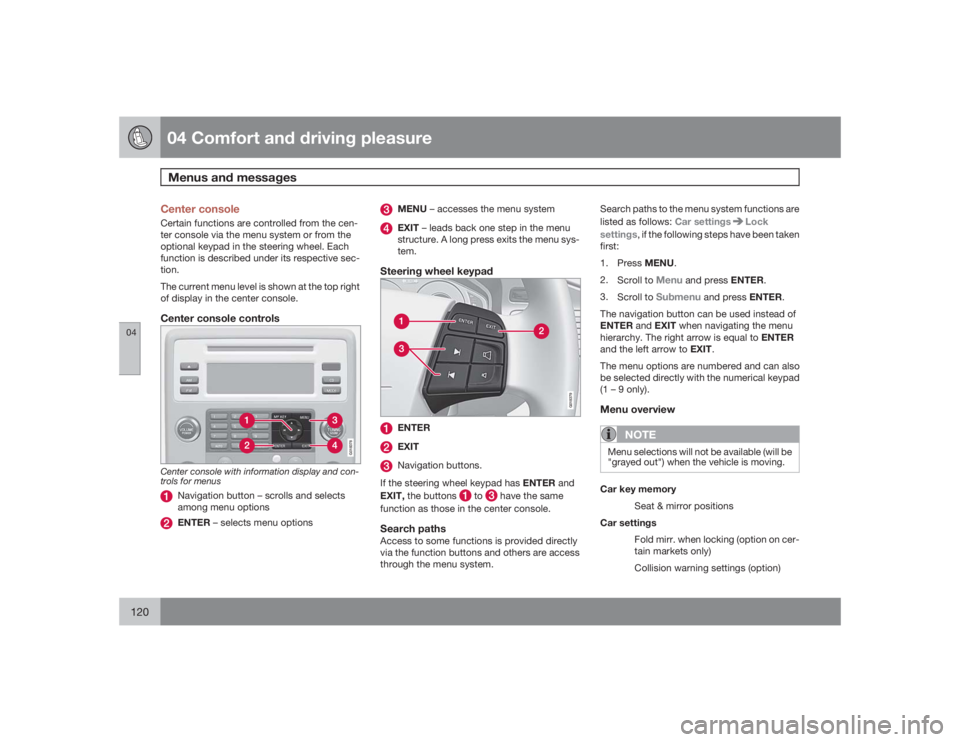
of display in the center console.Center console controls
G018378
Center console with information display and con-
trols for menus
Navigation button – scrolls and selects
among menu optionsENTER – selects menu options
MENU – accesses the menu systemEXIT – leads back one step in the menu
structure. A long press exits the menu sys-
tem.
Steering wheel keypad
G018379
ENTEREXITNavigation buttons.
If the steering wheel keypad has ENTER and
EXIT, the buttons
to
have the same
function as those in the center console.
Search pathsAccess to some functions is provided directly
via the function buttons and others are access
through the menu system.Search paths to the menu system functions are
listed as follows: Car settings
Lock
settings, if the following steps have been taken
first:
1.
PressMENU.
2.
Scroll to
Menu
and press ENTER.
3.
Scroll to
Submenu
and press ENTER.
The navigation button can be used instead of
ENTER and EXIT when navigating the menu
hierarchy. The right arrow is equal to ENTER
and the left arrow to EXIT.
The menu options are numbered and can also
be selected directly with the numerical keypad
(1 – 9 only).
Menu overview
NOTE
Menu selections will not be available (will be
"grayed out") when the vehicle is moving.Car key memory
Seat & mirror positions
Car settings
Fold mirr. when locking (option on cer-
tain markets only)
Collision warning settings (option)
Page 131 of 288
04 Comfort and driving pleasure
Audio system
04``131 Introduction
The audio system is available in two versions:
High Performance och Premium Sound. The
system version is shown in the display when
the audio system is switched on.
If the audio system is on when the ignition is
switched off, it will come on automatically the
next time the ignition is put in mode I or higher.
The audio system can be operated without a
key in the ignition slot for 15 minutes at a time
by pressing the POWER button (the driver's
door must be closed on vehicles with the
optional keyless drive).
Some functions are controlled from the menu
system in the center console. For more infor-
mation on menus, see page 120.
Dolby Surround Pro Logic II and the sym-
bol are trademarks of Dolby Laboratories
Licensing Corporation. The Dolby Surround
Pro Logic II System is manufactured under
license from Dolby Laboratories Licensing Cor-
poration.
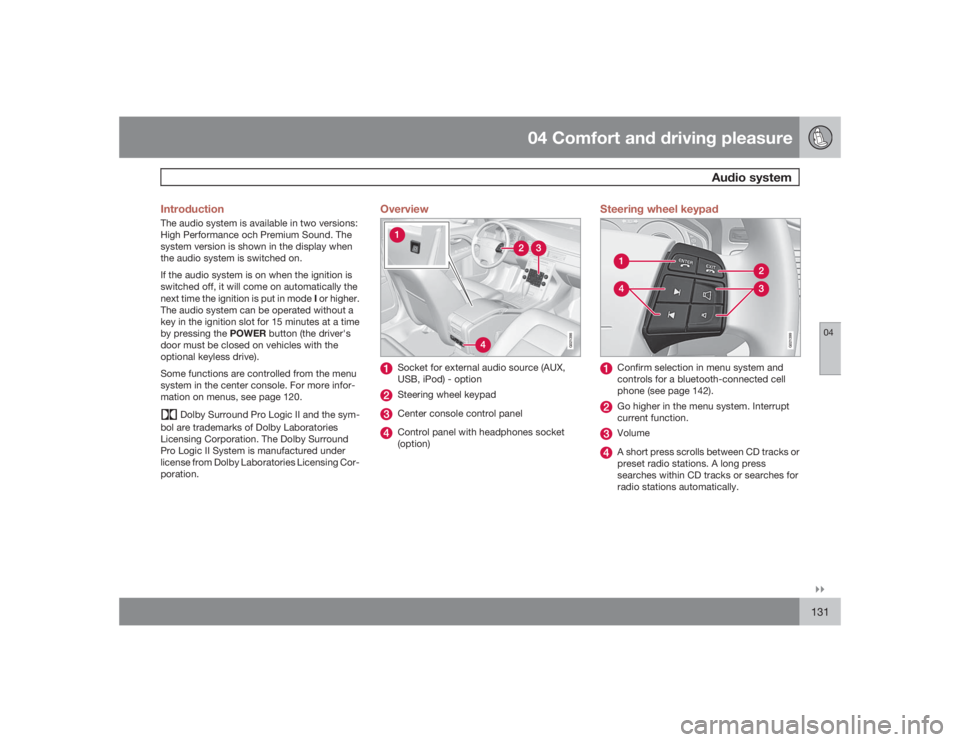
Overview
G021398
Socket for external audio source (AUX,
USB, iPod) - optionSteering wheel keypadCenter console control panelControl panel with headphones socket
(option)
Steering wheel keypad
G021399
Confirm selection in menu system and
controls for a bluetooth-connected cell
phone (see page 142).Go higher in the menu system. Interrupt
current function.VolumeA short press scrolls between CD tracks or
preset radio stations. A long press
searches within CD tracks or searches for
radio stations automatically.
Page 132 of 288
04 Comfort and driving pleasureAudio system
04132
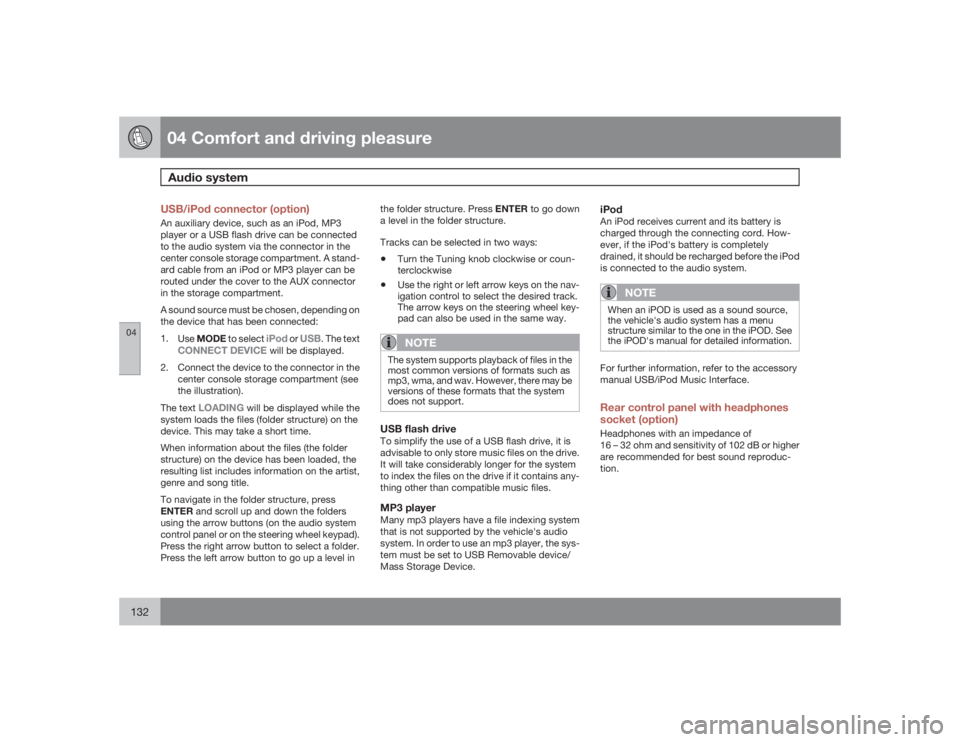
USB/iPod connector (option)An auxiliary device, such as an iPod, MP3
player or a USB flash drive can be connected
to the audio system via the connector in the
center console storage compartment. A stand-
ard cable from an iPod or MP3 player can be
routed under the cover to the AUX connector
in the storage compartment.
A sound source must be chosen, depending on
the device that has been connected:
1.
UseMODE to select
iPod
or
USB
. The text
CONNECT DEVICE
will be displayed.
2. Connect the device to the connector in the
center console storage compartment (see
the illustration).
The text
LOADING
will be displayed while the
system loads the files (folder structure) on the
device. This may take a short time.
When information about the files (the folder
structure) on the device has been loaded, the
resulting list includes information on the artist,
genre and song title.
To navigate in the folder structure, press
ENTER and scroll up and down the folders
using the arrow buttons (on the audio system
control panel or on the steering wheel keypad).
Press the right arrow button to select a folder.
Press the left arrow button to go up a level inthe folder structure. Press ENTER to go down
a level in the folder structure.
Tracks can be selected in two ways:
•
Turn the Tuning knob clockwise or coun-
terclockwise
•
Use the right or left arrow keys on the nav-
igation control to select the desired track.
The arrow keys on the steering wheel key-
pad can also be used in the same way.NOTE
The system supports playback of files in the
most common versions of formats such as
mp3, wma, and wav. However, there may be
versions of these formats that the system
does not support.USB flash driveTo simplify the use of a USB flash drive, it is
advisable to only store music files on the drive.
It will take considerably longer for the system
to index the files on the drive if it contains any-
thing other than compatible music files.MP3 playerMany mp3 players have a file indexing system
that is not supported by the vehicle's audio
system. In order to use an mp3 player, the sys-
tem must be set to USB Removable device/
Mass Storage Device.
iPodAn iPod receives current and its battery is
charged through the connecting cord. How-
ever, if the iPod's battery is completely
drained, it should be recharged before the iPod
is connected to the audio system.
NOTE
When an iPOD is used as a sound source,
the vehicle's audio system has a menu
structure similar to the one in the iPOD. See
the iPOD's manual for detailed information.For further information, refer to the accessory
manual USB/iPod Music Interface.Rear control panel with headphones
socket (option)Headphones with an impedance of
16 – 32 ohm and sensitivity of 102 dB or higher
are recommended for best sound reproduc-
tion.
Page 133 of 288
04 Comfort and driving pleasure
Audio system
04``133
G021400
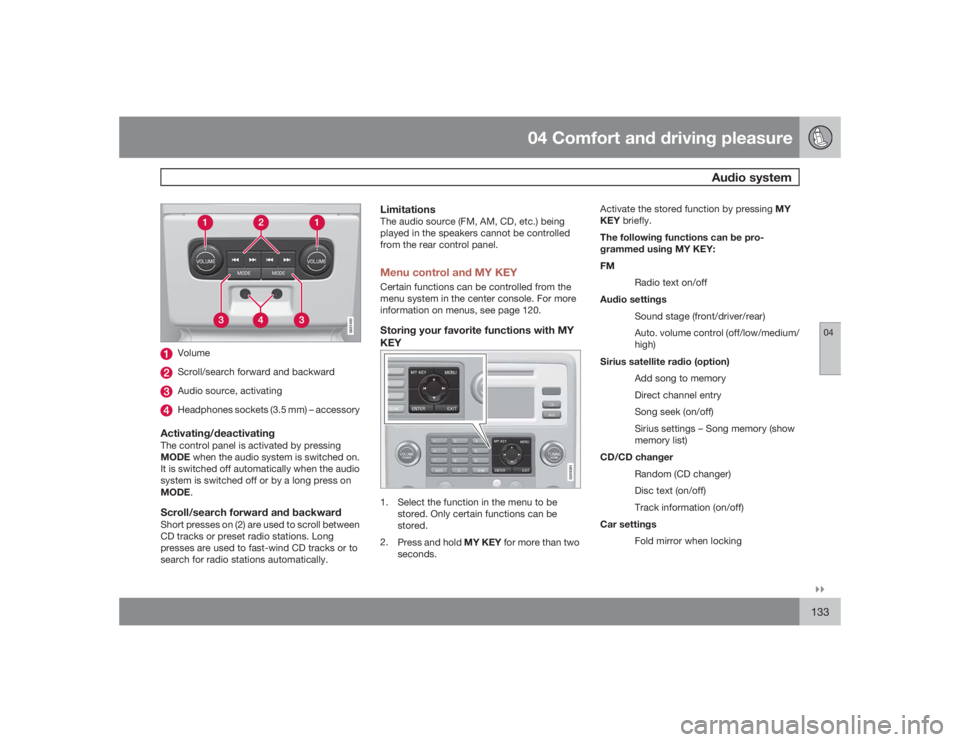
VolumeScroll/search forward and backwardAudio source, activatingHeadphones sockets (3.5 mm) – accessory
Activating/deactivatingThe control panel is activated by pressing
MODE when the audio system is switched on.
It is switched off automatically when the audio
system is switched off or by a long press on
MODE.Scroll/search forward and backwardShort presses on (2) are used to scroll between
CD tracks or preset radio stations. Long
presses are used to fast-wind CD tracks or to
search for radio stations automatically.
LimitationsThe audio source (FM, AM, CD, etc.) being
played in the speakers cannot be controlled
from the rear control panel.Menu control and MY KEYCertain functions can be controlled from the
menu system in the center console. For more
information on menus, see page 120.Storing your favorite functions with MY
KEY
G018381
1. Select the function in the menu to be
stored. Only certain functions can be
stored.
2.
Press and hold MY KEY for more than two
seconds.Activate the stored function by pressing MY
KEY briefly.
The following functions can be pro-
grammed using MY KEY:
FM
Radio text on/off
Audio settings
Sound stage (front/driver/rear)
Auto. volume control (off/low/medium/
high)
Sirius satellite radio (option)
Add song to memory
Direct channel entry
Song seek (on/off)
Sirius settings – Song memory (show
memory list)
CD/CD changer
Random (CD changer)
Disc text (on/off)
Track information (on/off)
Car settings
Fold mirror when locking
Page 136 of 288
04 Comfort and driving pleasureAudio system
04136
Eject all discs with a long press on the eject
button. The entire magazine is emptied disc by
disc.
NOTE
The Eject all function can only be used while
the vehicle is at a standstill and will be can-
celled if the vehicle begins to move.PauseWhen the audio system volume is turned off
completely, the CD player will pause and will
resume playing when the volume is turned up
again.Sound filesIn addition to playing normal music CDs, the
CD player/changer can also play discs con-
taining files in mp3 or wma format.
NOTE
Some copy protected sound files may not
be read by the player.When a CD containing sound files is inserted
into the player the disc's directory structure is
scanned before the CD begins playing. The
length of time that this takes depends on the
quality of the disc.
Navigating the disc and playing tracksIf a disc containing sound files is inside the CD
player, press ENTER to display the disc's
directory structure. The directory structure is
navigated in the same way as the audio sys-
tem's menu structure. Sound files have the
symbol and directories have the
symbol. Press ENTER to play a selected folder
or a file.
When the music file has been played, the
player will continue to play the rest of the files
in the current folder. When all of the files in the
folder have been played, the player will auto-
matically go to the next folder and play the files
in it.Fast-forward/change CD tracks and
sound filesShort presses
/
on the navigation button
are used to scroll between CD tracks/sound
files. Long presses are used to search within
CD tracks/sound files. TUNING (or the steering
wheel keypad) can also be used for this pur-
pose.
Scan CDThis function plays the first ten seconds of
each CD track/sound file. Press SCAN to acti-
vate. Interrupt with EXIT or SCAN to continue
playing the current CD track/sound file.
RandomThis function plays the tracks in random order
(shuffle). The random CD tracks/sound files
can be scrolled through in the normal way.
NOTE
It is only possible to scroll between random
CD tracks on the current disc.Different messages are displayed depending
on which random function has been selected:•
RANDOM
means that the tracks from only
one music CD are played
•
RND ALL
means that all tracks on all
music CDs in the optional CD changer are
played.
•
RANDOM FOLDER
means that the sound
files in a directory on the current CD are
played.
CD playerIf a normal music CD is being played, activate/
deactivate under
Random
.
If a disc with sound files is being played, acti-
vate/deactivate under Random
Folder.
CD changerIf a normal music CD is being played under
Random
Single disc or Random
All