warning VOLVO S80 2009 Owner´s Manual
[x] Cancel search | Manufacturer: VOLVO, Model Year: 2009, Model line: S80, Model: VOLVO S80 2009Pages: 288, PDF Size: 6.3 MB
Page 116 of 288
03 Your driving environmentParking brake
03116
shop. If you drive off with this error message
showing, a warning signal sounds.Parking brake not applied
– A fault is pre-
venting the parking brake from being applied.
Try to apply and release. Contact a Volvo work-
shop if the message remains.
Parking brake Service required
– A fault has
arisen. Contact a Volvo workshop if the fault
remains.
WARNING
If the vehicle must be parked before the fault
has been corrected, always put the gear
selector in P and turn the wheels so that
they point away from the curb if the vehicle
is pointing uphill or toward the curb if it is
pointing downhill.
Page 118 of 288
G020908
118
Menus and messages........................................................................... 120
Climate system..................................................................................... 124
Audio system........................................................................................ 131
BluetoothŸ hands-free connection....................................................... 142
Rear Seat Entertainment - Dual Screen (RSE)–option ......................... 148
Trip computer........................................................................................ 151
Compass............................................................................................... 152
Stability system..................................................................................... 154
Active chassis system–Four C.............................................................. 156
Cruise control........................................................................................ 157
Collision warning with Auto-brake (option)........................................... 159
Adaptive Cruise Control–ACC (option)................................................. 165
Distance alert ....................................................................................... 172
Driver Alert System (option) ................................................................. 175
Park assist (option)................................................................................ 180
Blind Spot Information System (option)................................................183
Passenger compartment convenience................................................. 187
Passenger compartment convenience–S80 Executive ........................ 190
Page 120 of 288
04 Comfort and driving pleasureMenus and messages
04120
Center consoleCertain functions are controlled from the cen-
ter console via the menu system or from the
optional keypad in the steering wheel. Each
function is described under its respective sec-
tion.
The current menu level is shown at the top right
of display in the center console.Center console controls
G018378
Center console with information display and con-
trols for menus
Navigation button – scrolls and selects
among menu optionsENTER – selects menu options
MENU – accesses the menu systemEXIT – leads back one step in the menu
structure. A long press exits the menu sys-
tem.
Steering wheel keypad
G018379
ENTEREXITNavigation buttons.
If the steering wheel keypad has ENTER and
EXIT, the buttons
to
have the same
function as those in the center console.
Search pathsAccess to some functions is provided directly
via the function buttons and others are access
through the menu system.Search paths to the menu system functions are
listed as follows: Car settings
Lock
settings, if the following steps have been taken
first:
1.
PressMENU.
2.
Scroll to
Menu
and press ENTER.
3.
Scroll to
Submenu
and press ENTER.
The navigation button can be used instead of
ENTER and EXIT when navigating the menu
hierarchy. The right arrow is equal to ENTER
and the left arrow to EXIT.
The menu options are numbered and can also
be selected directly with the numerical keypad
(1 – 9 only).
Menu overview
NOTE
Menu selections will not be available (will be
"grayed out") when the vehicle is moving.Car key memory
Seat & mirror positions
Car settings
Fold mirr. when locking (option on cer-
tain markets only)
Collision warning settings (option)
Page 122 of 288
04 Comfort and driving pleasureMenus and messages
04122
Menu overviewDriving distance on current fuel reserve
Average
Instantaneous:
Average speed
Current speed in mph (Canadian models
only)
DSTCMessage
G028940
When a warning, information or indicator sym-
bol comes on, a corresponding message
appears on the information display. An error
message is stored in a memory list until the
fault is rectified.PressREAD to acknowledge and scroll among
the messages.
NOTE
If a warning message appears while you are
using the trip computer, the message must
be read and confirmed by pressing READ
before the previous activity can be
resumed.Message
Description
Stop safely
Stop and switch off
the engine. Serious
risk of damage.
Contact an author-
ized Volvo work-
shop.
Stopping the
engine
Stop and switch off
the engine. Serious
risk of damage.
Contact an author-
ized Volvo work-
shop.
Service urgent
Have the vehicle
checked by an
authorized Volvo
workshop immedi-
ately.
Message
Description
Service required
Have the vehicle
checked by an
authorized Volvo
workshop as soon
as possible.
See manual
Read the owner's
manual.
Book time for
maintenance
Time to book service
at an authorized
Volvo retailer.
Time for regular
maintenance
Time for regular
service at an author-
ized Volvo work-
shop. The timing is
determined by the
number of miles
driven, number of
months since the
last service, engine
running time.
Page 140 of 288
04 Comfort and driving pleasureAudio system
04140
If a new song is selected when the memory is
full, you will be prompted to press ENTER to
delete the last song on the list.
NOTE
The remaining songs in the list will move
down one position, and the newly added
song will be placed at the top of the list.Song seekWhen a satellite radio channel plays one of the
songs stored in the song memory, the listener
will be alerted by a text message and an audi-
ble signal.
PressENTER to listen to the song or EXIT to
cancel.
To activate/deactivate the song seek function:
1.
PressMENU
2.
Scroll to
Song seek
3.
PressENTER to activate or deactivate the
function.
NOTE
When the song has ended, the radio will
remain tuned to the channel on which the
song was played.
Radio textThe text that is displayed about the song that
is currently playing can be changed. Use the
AUTO button or the menu to display the Artist,
Title, Composer, or switch radio text off.Advanced settingsThis menu function enables you to make set-
tings on certain Sirius satellite radio functions.
To access this menu:
1.
PressMENU.
2. Scroll to the Sirius menu.
3.
Select
Advanced Sirius settings
.
WARNING
Settings should be made when the vehicle
is at a standstill.The following settings can be made in the Sir-
ius menu:•
The list of saved songs can be displayed
•
Channel skip settings can be made
•
Channel lock settings can be made
•
The channel access code can be displayed
or changed
•
Your Sirius ID can be displayed
Skip optionsThis function is used to remove a channel from
the list of available channels.Skipping a channel1.
Select
CHANNEL SKIP LIST
and press
ENTER.
2. Select a category in the list and press
ENTER.
3. Skip channels in the list presented by
pressingENTER or right arrow key.
Unskip all channelsThis permanently removes all channels from
the skip list and makes them available for
selection.Temp. unskip all ch.This function will temporarily unskip all chan-
nels and make them available for selection. The
channels remain on the skip list and will again
be skipped the next time the ignition is
switched on.Channel lockAccess to specific channels can be restricted
(locked). A locked channel will not provide
audio, song titles, or artist information.
NOTE
All channels are initially unlocked.
Page 142 of 288
04 Comfort and driving pleasureBluetoothŸ hands-free connection
04142
Introduction
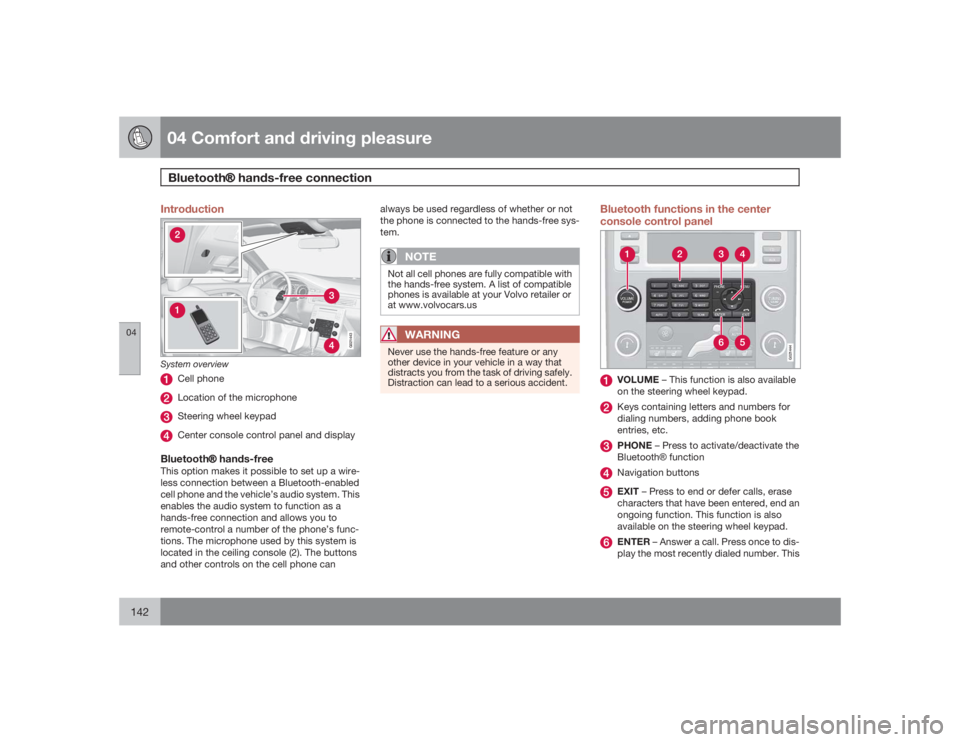
G021443
System overview
Cell phoneLocation of the microphoneSteering wheel keypadCenter console control panel and display
BluetoothŸ hands-freeThis option makes it possible to set up a wire-
less connection between a Bluetooth-enabled
cell phone and the vehicle’s audio system. This
enables the audio system to function as a
hands-free connection and allows you to
remote-control a number of the phone’s func-
tions. The microphone used by this system is
located in the ceiling console (2). The buttons
and other controls on the cell phone canalways be used regardless of whether or not
the phone is connected to the hands-free sys-
tem.
NOTE
Not all cell phones are fully compatible with
the hands-free system. A list of compatible
phones is available at your Volvo retailer or
at www.volvocars.us
WARNING
Never use the hands-free feature or any
other device in your vehicle in a way that
distracts you from the task of driving safely.
Distraction can lead to a serious accident.
Bluetooth functions in the center
console control panel
G021444
VOLUME – This function is also available
on the steering wheel keypad.Keys containing letters and numbers for
dialing numbers, adding phone book
entries, etc.PHONE – Press to activate/deactivate the
BluetoothŸ functionNavigation buttonsEXIT – Press to end or defer calls, erase
characters that have been entered, end an
ongoing function. This function is also
available on the steering wheel keypad.ENTER – Answer a call. Press once to dis-
play the most recently dialed number. This
Page 151 of 288
04 Comfort and driving pleasure
Trip computer
04
151 Introduction
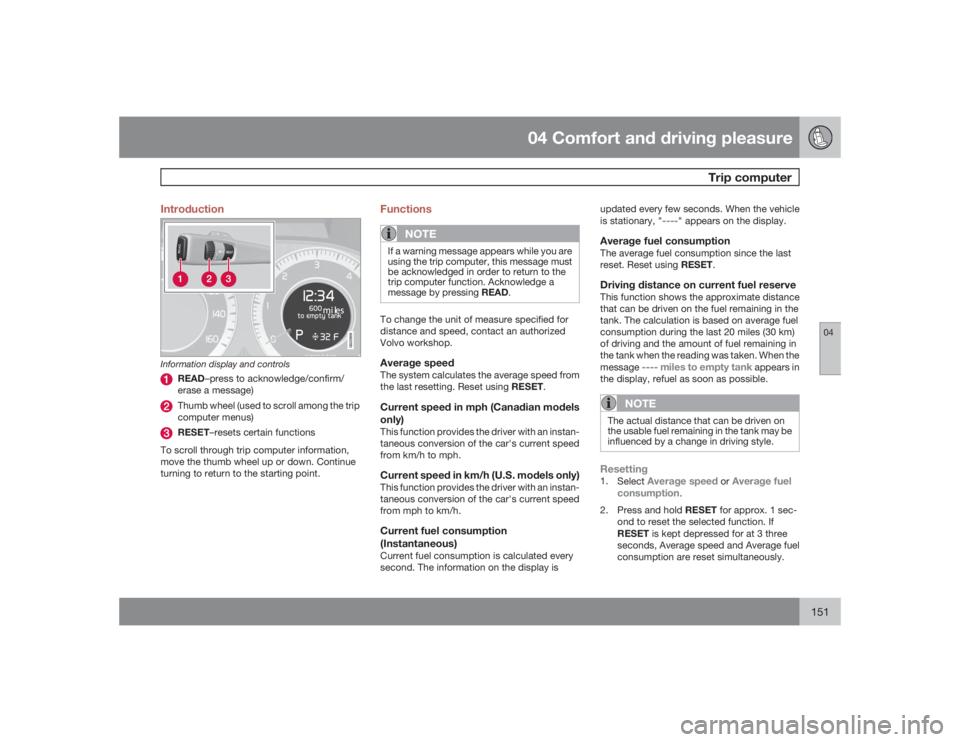
G022909
Information display and controls
READ–press to acknowledge/confirm/
erase a message)Thumb wheel (used to scroll among the trip
computer menus)RESET–resets certain functions
To scroll through trip computer information,
move the thumb wheel up or down. Continue
turning to return to the starting point.
Functions
NOTE
If a warning message appears while you are
using the trip computer, this message must
be acknowledged in order to return to the
trip computer function. Acknowledge a
message by pressing READ.To change the unit of measure specified for
distance and speed, contact an authorized
Volvo workshop.Average speedThe system calculates the average speed from
the last resetting. Reset using RESET.Current speed in mph (Canadian models
only)This function provides the driver with an instan-
taneous conversion of the car's current speed
from km/h to mph.Current speed in km/h (U.S. models only)This function provides the driver with an instan-
taneous conversion of the car's current speed
from mph to km/h.Current fuel consumption
(Instantaneous)Current fuel consumption is calculated every
second. The information on the display isupdated every few seconds. When the vehicle
is stationary, "
----
" appears on the display.
Average fuel consumptionThe average fuel consumption since the last
reset. Reset using RESET.Driving distance on current fuel reserveThis function shows the approximate distance
that can be driven on the fuel remaining in the
tank. The calculation is based on average fuel
consumption during the last 20 miles (30 km)
of driving and the amount of fuel remaining in
the tank when the reading was taken. When the
message
---- miles to empty tank
appears in
the display, refuel as soon as possible.
NOTE
The actual distance that can be driven on
the usable fuel remaining in the tank may be
influenced by a change in driving style.Resetting1.
Select
Average speed
or
Average fuel
consumption
.
2.
Press and hold RESET for approx. 1 sec-
ond to reset the selected function. If
RESET is kept depressed for at 3 three
seconds, Average speed and Average fuel
consumption are reset simultaneously.
Page 154 of 288
04 Comfort and driving pleasureStability system
04154
IntroductionThe Dynamic Stability and Traction Control
system (DSTC) consists of a number of func-
tions designed help reduce wheel spin, coun-
teract skidding, and to generally help improve
directional stability.
CAUTION
A pulsating sound will be audible when the
system is actively operating and is normal.Traction control (TC)This function is designed to help reduce wheel
spin by transferring power from a drive wheel
that begins to lose traction to the wheel on the
opposite side of the vehicle (on the same axle).
TC is most active at low speeds.
This is one of DSTC's permanent functions and
cannot be switched off.Active Yaw Control (AYC)This function helps maintain directional stabil-
ity, for example when cornering, by braking
one or more of the wheels if the vehicle shows
a tendency to skid or slide laterally.
This is one of DSTC's permanent functions and
cannot be switched off.
Spin control (SC)The spin control function is designed to help
prevent the drive wheels from spinning while
the vehicle is accelerating.
Under certain circumstances, such as when
driving with snow chains, or driving in deep
snow or loose sand, it may be advisable to
temporarily switch off this function for maxi-
mum tractive force.
WARNING
The car's handling and stability characteris-
tics will be altered if the spin control function
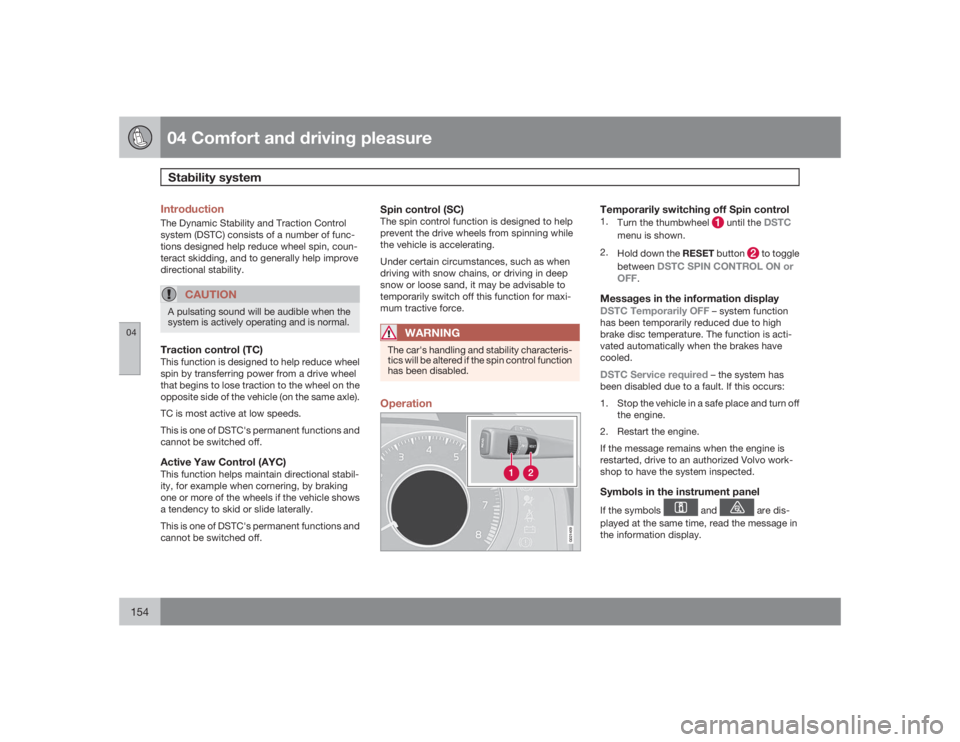
has been disabled.Operation
G021409
Temporarily switching off Spin control1.
Turn the thumbwheel
until the
DSTC
menu is shown.
2.
Hold down the RESET button
to toggle
between
DSTC SPIN CONTROL ON or
OFF
.
Messages in the information displayDSTC Temporarily OFF
– system function
has been temporarily reduced due to high
brake disc temperature. The function is acti-
vated automatically when the brakes have
cooled.
DSTC Service required
– the system has
been disabled due to a fault. If this occurs:
1. Stop the vehicle in a safe place and turn off
the engine.
2. Restart the engine.
If the message remains when the engine is
restarted, drive to an authorized Volvo work-
shop to have the system inspected.
Symbols in the instrument panelIf the symbols
and
are dis-
played at the same time, read the message in
the information display.
Page 155 of 288
04 Comfort and driving pleasure
Stability system
04
155
If the symbol
appears alone, it may
appear as follows:
•
If the symbol flashes, this indicates that the
stability system is actively functioning to
help counteract wheel spin and/or a skid.
•
If the symbol remains on for approximately
2 seconds after the engine has been
started, this indicates that the system is
performing a self-diagnostic test.WARNING
The stability system is intended to help
improve driving safety. It supplements, but
can never replace, the driver's judgment
and responsibility when operating the vehi-
cle. Speed and driving style should always
be adapted to traffic and road conditions.
Page 158 of 288
04 Comfort and driving pleasureCruise control
04158
Temporary deactivationThe driver can temporarily deactivate cruise
control by pressing 0. The saved speed is
shown in brackets in the information display.Resume set speedIf cruise control has been deactivated tempo-
rarily, it can be reactivated by pressing
. The
vehicle's speed returns to the most recently set
speed.
WARNING
There may be a significant increase in speed
after the
button has been pressed.
DeactivationCruise control is disengaged with CRUISE, by
putting the gear selector in Neutral, or by
switching off the engine. The set speed is
cleared.
WARNING
Cruise control should not be used in heavy
traffic or when driving on wet or slippery
roads. Cruise control may not maintain set
speed on steep downgrades.