phone VOLVO S80 2009 Owner´s Manual
[x] Cancel search | Manufacturer: VOLVO, Model Year: 2009, Model line: S80, Model: VOLVO S80 2009Pages: 288, PDF Size: 6.3 MB
Page 9 of 288
Introduction
Important warnings
9 Driver distraction
A driver has a responsibility to do everything
possible to ensure his or her own safety and
the safety of passengers in the vehicle and oth-
ers sharing the roadway. Avoiding distractions
is part of that responsibility.
Driver distraction results from driver activities
that are not directly related to controlling the
vehicle in the driving environment. Your new
Volvo is, or can be, equipped with many fea-
ture-rich entertainment and communication
systems. These include hands-free cellular tel-
ephones, navigation systems, and multipur-
pose audio systems. You may also own other
portable electronic devices for your own con-
venience. When used properly and safely, they
enrich the driving experience. Improperly used,
any of these could cause a distraction.
For all of these systems, we want to provide the
following warning that reflects the strong Volvo
concern for your safety.Never use these devi-
ces or any feature of your vehicle in a way that
distracts you from the task of driving safely.
Distraction can lead to a serious accident. In
addition to this general warning, we offer the
following guidance regarding specific newer
features that may be found in your vehicle•
Never use a hand-held cellular telephone
while driving. Some jurisdictions prohibitcellular telephone use by a driver while the
vehicle is moving.
•
If your vehicle is equipped with a naviga-
tion system, set and make changes to your
travel itinerary only with the vehicle parked.
•
Never program your audio system while
the vehicle is moving. Program radio pre-
sets with the vehicle parked, and use your
programmed presets to make radio use
quicker and simpler.
•
Never use portable computers or personal
digital assistants while the vehicle is mov-
ing.
Accessory installation•
We strongly recommend that Volvo owners
install only genuine, Volvo-approved
accessories, and that accessory installa-
tions be performed only by a trained and
qualified Volvo service technician.
•
Genuine Volvo accessories are tested to
ensure compatibility with the performance,
safety, and emission systems in your vehi-
cle. Additionally, a trained and qualified
Volvo service technician knows where
accessories may and may not be safely
installed in your Volvo. In all cases, please
consult a trained and qualified Volvo serv-
ice technician before installing any acces-
sory in or on your vehicle.
•
Accessories that have not been approved
by Volvo may or may not be specifically
tested for compatibility with your vehicle.
Additionally, an inexperienced installer
may not be familiar with some of your car's
systems.
•
Any of your car's performance and safety
systems could be adversely affected if you
install accessories that Volvo has not tes-
ted, or if you allow accessories to be instal-
led by someone unfamiliar with your vehi-
cle.
•
Damage caused by unapproved or
improperly installed accessories may not
be covered by your new vehicle warranty.
See your Warranty and Service Records
Information booklet for more warranty
information. Volvo assumes no responsi-
bility for death, injury, or expenses that
may result from the installation of non-gen-
uine accessories.
Page 15 of 288
01 Safety
Reporting safety defects
0115 Reporting safety defects in the U.S.
If you believe that your vehicle has a
defect which could cause a crash or
could cause injury or death, you
should immediately inform the
National Highway Traffic Safety
Administration (NHTSA) in addition to
notifying Volvo Cars of North Amer-
ica, LLC. If NHTSA receives similar
complaints, it may open an investiga-
tion, and if it finds that a safety defect
exists in a group of vehicles, it may
order a recall and remedy campaign.
However, NHTSA cannot become
involved in individual problems
between you, your retailer, or Volvo
Cars of North America, LLC. To con-
tact NHTSA, you may either call the
Auto Safety Hotline toll-free at
1-888-327-4236
(TTY: 1-800-424-9153) or write to:
NHTSA, U.S. Department of Trans-
portation, Washington D.C. 20590.
You can also obtain other information
about motor vehicle safety from:http://www.safercar.gov
Volvo strongly recommends that if
your vehicle is covered under a serv-
ice campaign, safety or emission
recall or similar action, it should be
completed as soon as possible.
Please check with your local retailer
or Volvo Cars of North America, LLC
if your vehicle is covered under these
conditions.
NHTSA can be reached at:
Internet:
http://www.nhtsa.gov
Telephone:
1-888-DASH-2-DOT
(1-888-327-4236).
Reporting safety defects in CanadaIf you believe your vehicle has a defect that
could cause a crash or could cause injury or
death, you should immediately inform Trans-
port Canada in addition to notifying Volvo Cars
of Canada Corp.
To contact Transport Canada, call
(800) 333 – 0510, or (613) 993 – 9851 if you are
calling from the Ottawa region.
Page 59 of 288
02 Locks and alarm
Keyless drive
02``59
NOTE
If several people carrying PCCs approach
the vehicle at the same time, the driver's
seat and door mirrors will assume the posi-
tions they were in for the person who opens
the driver's door.See also page 81 for information on adjusting
and storing the seat's position in the seat mem-
ory.Keyless drive information messagesIf all of the PCCs are removed from the vehicle
while the engine is running or if the ignition is
in mode II and all of the doors are closed, a
message will appear in the instrument panel
display and an audible signal will sound.
When at least one PCC has been returned to
the car, the message will be erased in the dis-
play and the audible signal will stop when:•
A door has been opened and closed
•
The PCC has been inserted in the ignition
slot
•
TheREAD button (see page 121 for the
location of this button) has been pressed.
CAUTION
•
Keyless drive remote controls should
never be left in the vehicle. In the event
of a break-in, a remote found in the
vehicle could make it possible to start
the engine.
•
Electromagnetic fields or metal
obstructions can interfere with the key-
less drive system. Avoid placing the
remote control near cellular phones,
metallic objects or e.g., in a metal brief-
case.
USA – FCC ID:KR55WK48952, KR55WK48964
NOTE
This device complies with part 15 of the FCC
Rules. Operation is subject to the following two
conditions: (1) This device may not cause
harmful interference, and (2) this device must
accept interference received, including inter-
ference that may cause undesired operation.
CAUTION
Changes or modifications not expressly
approved by the manufacturer could void the
user's authority to operate the equipment.
Siemens VDO
5WK48891Tested To Comply With FCC Standards
For Automobile Use
Canada – IC:267T-5WK48952,
267T-5WK48964, 267T-5WK48891
NOTE
This device complies with RSS -210 of Industry
Canada. Operation is subject to the following
two conditions: (1) This device may not cause
harmful interference, and (2) this device must
accept interference received, including inter-
ference that may cause undesired operation.
CAUTION
Changes or modifications not expressly
approved by the manufacturer could void the
user's authority to operate the equipment.
Page 131 of 288
04 Comfort and driving pleasure
Audio system
04``131 Introduction
The audio system is available in two versions:
High Performance och Premium Sound. The
system version is shown in the display when
the audio system is switched on.
If the audio system is on when the ignition is
switched off, it will come on automatically the
next time the ignition is put in mode I or higher.
The audio system can be operated without a
key in the ignition slot for 15 minutes at a time
by pressing the POWER button (the driver's
door must be closed on vehicles with the
optional keyless drive).
Some functions are controlled from the menu
system in the center console. For more infor-
mation on menus, see page 120.
Dolby Surround Pro Logic II and the sym-
bol are trademarks of Dolby Laboratories
Licensing Corporation. The Dolby Surround
Pro Logic II System is manufactured under
license from Dolby Laboratories Licensing Cor-
poration.
Overview
G021398
Socket for external audio source (AUX,
USB, iPod) - optionSteering wheel keypadCenter console control panelControl panel with headphones socket
(option)
Steering wheel keypad
G021399
Confirm selection in menu system and
controls for a bluetooth-connected cell
phone (see page 142).Go higher in the menu system. Interrupt
current function.VolumeA short press scrolls between CD tracks or
preset radio stations. A long press
searches within CD tracks or searches for
radio stations automatically.
Page 132 of 288
04 Comfort and driving pleasureAudio system
04132
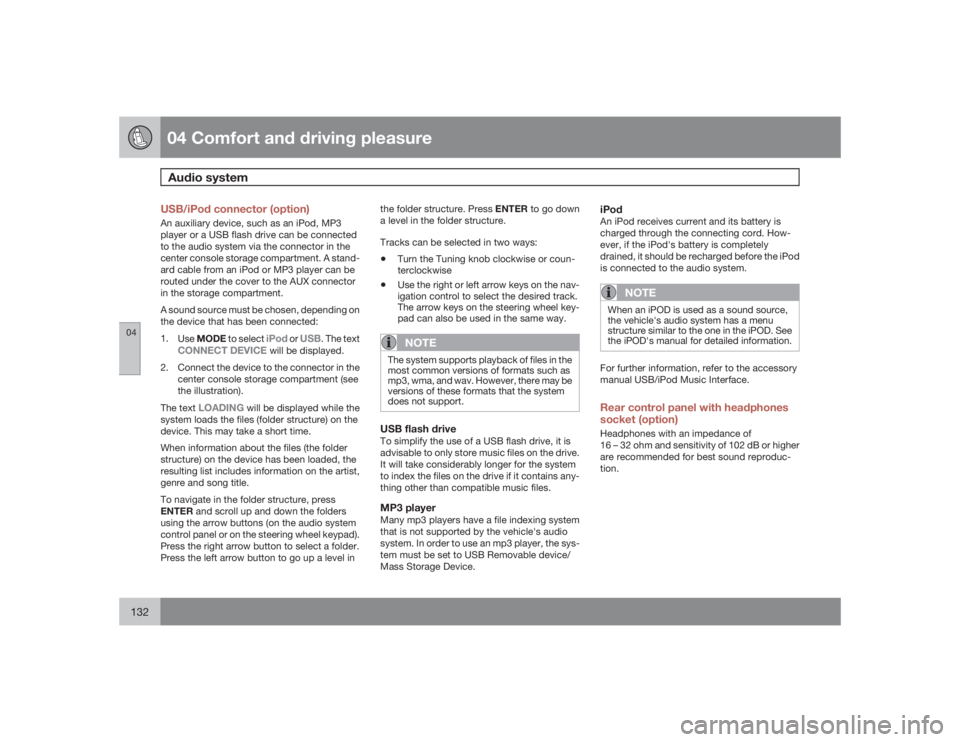
USB/iPod connector (option)An auxiliary device, such as an iPod, MP3
player or a USB flash drive can be connected
to the audio system via the connector in the
center console storage compartment. A stand-
ard cable from an iPod or MP3 player can be
routed under the cover to the AUX connector
in the storage compartment.
A sound source must be chosen, depending on
the device that has been connected:
1.
UseMODE to select
iPod
or
USB
. The text
CONNECT DEVICE
will be displayed.
2. Connect the device to the connector in the
center console storage compartment (see
the illustration).
The text
LOADING
will be displayed while the
system loads the files (folder structure) on the
device. This may take a short time.
When information about the files (the folder
structure) on the device has been loaded, the
resulting list includes information on the artist,
genre and song title.
To navigate in the folder structure, press
ENTER and scroll up and down the folders
using the arrow buttons (on the audio system
control panel or on the steering wheel keypad).
Press the right arrow button to select a folder.
Press the left arrow button to go up a level inthe folder structure. Press ENTER to go down
a level in the folder structure.
Tracks can be selected in two ways:
•
Turn the Tuning knob clockwise or coun-
terclockwise
•
Use the right or left arrow keys on the nav-
igation control to select the desired track.
The arrow keys on the steering wheel key-
pad can also be used in the same way.NOTE
The system supports playback of files in the
most common versions of formats such as
mp3, wma, and wav. However, there may be
versions of these formats that the system
does not support.USB flash driveTo simplify the use of a USB flash drive, it is
advisable to only store music files on the drive.
It will take considerably longer for the system
to index the files on the drive if it contains any-
thing other than compatible music files.MP3 playerMany mp3 players have a file indexing system
that is not supported by the vehicle's audio
system. In order to use an mp3 player, the sys-
tem must be set to USB Removable device/
Mass Storage Device.
iPodAn iPod receives current and its battery is
charged through the connecting cord. How-
ever, if the iPod's battery is completely
drained, it should be recharged before the iPod
is connected to the audio system.
NOTE
When an iPOD is used as a sound source,
the vehicle's audio system has a menu
structure similar to the one in the iPOD. See
the iPOD's manual for detailed information.For further information, refer to the accessory
manual USB/iPod Music Interface.Rear control panel with headphones
socket (option)Headphones with an impedance of
16 – 32 ohm and sensitivity of 102 dB or higher
are recommended for best sound reproduc-
tion.
Page 133 of 288
04 Comfort and driving pleasure
Audio system
04``133
G021400
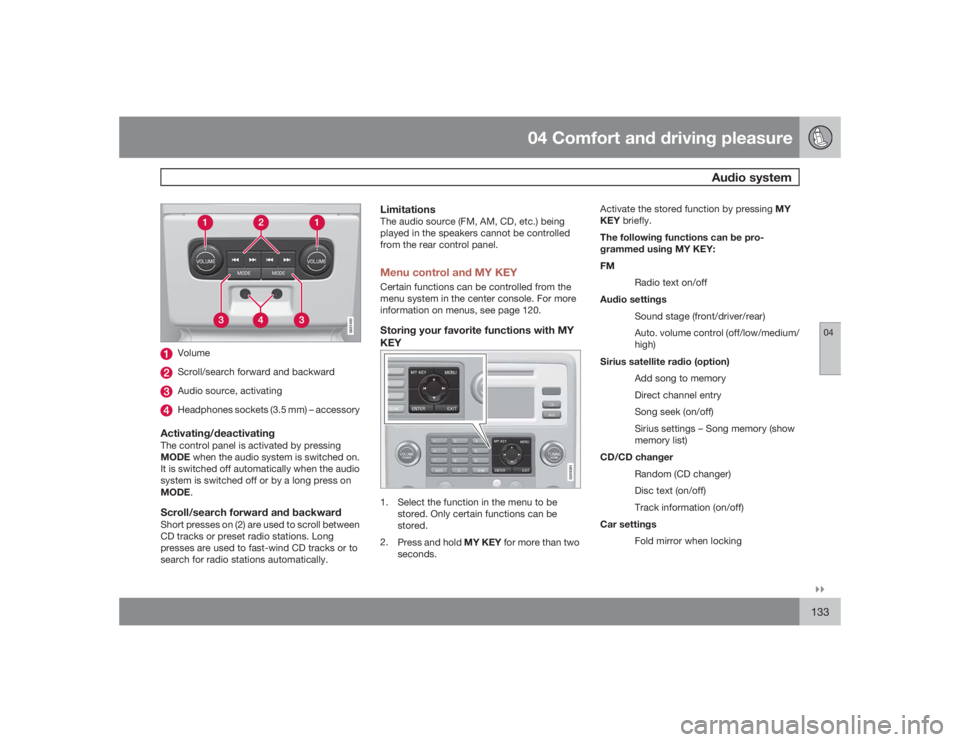
VolumeScroll/search forward and backwardAudio source, activatingHeadphones sockets (3.5 mm) – accessory
Activating/deactivatingThe control panel is activated by pressing
MODE when the audio system is switched on.
It is switched off automatically when the audio
system is switched off or by a long press on
MODE.Scroll/search forward and backwardShort presses on (2) are used to scroll between
CD tracks or preset radio stations. Long
presses are used to fast-wind CD tracks or to
search for radio stations automatically.
LimitationsThe audio source (FM, AM, CD, etc.) being
played in the speakers cannot be controlled
from the rear control panel.Menu control and MY KEYCertain functions can be controlled from the
menu system in the center console. For more
information on menus, see page 120.Storing your favorite functions with MY
KEY
G018381
1. Select the function in the menu to be
stored. Only certain functions can be
stored.
2.
Press and hold MY KEY for more than two
seconds.Activate the stored function by pressing MY
KEY briefly.
The following functions can be pro-
grammed using MY KEY:
FM
Radio text on/off
Audio settings
Sound stage (front/driver/rear)
Auto. volume control (off/low/medium/
high)
Sirius satellite radio (option)
Add song to memory
Direct channel entry
Song seek (on/off)
Sirius settings – Song memory (show
memory list)
CD/CD changer
Random (CD changer)
Disc text (on/off)
Track information (on/off)
Car settings
Fold mirror when locking
Page 142 of 288
04 Comfort and driving pleasureBluetoothŸ hands-free connection
04142
Introduction
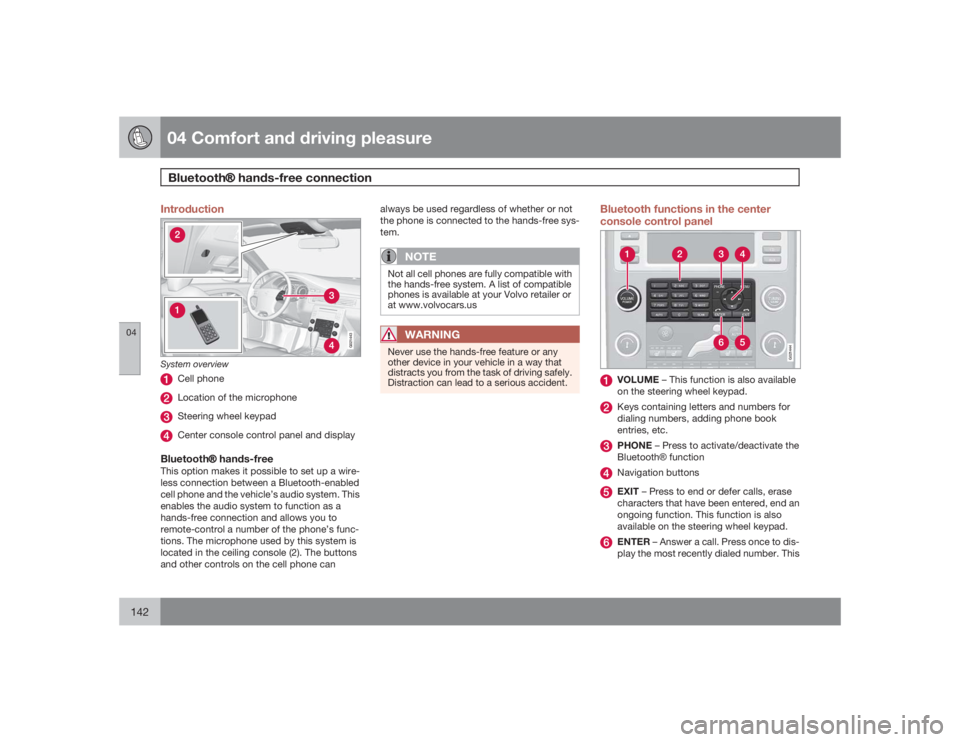
G021443
System overview
Cell phoneLocation of the microphoneSteering wheel keypadCenter console control panel and display
BluetoothŸ hands-freeThis option makes it possible to set up a wire-
less connection between a Bluetooth-enabled
cell phone and the vehicle’s audio system. This
enables the audio system to function as a
hands-free connection and allows you to
remote-control a number of the phone’s func-
tions. The microphone used by this system is
located in the ceiling console (2). The buttons
and other controls on the cell phone canalways be used regardless of whether or not
the phone is connected to the hands-free sys-
tem.
NOTE
Not all cell phones are fully compatible with
the hands-free system. A list of compatible
phones is available at your Volvo retailer or
at www.volvocars.us
WARNING
Never use the hands-free feature or any
other device in your vehicle in a way that
distracts you from the task of driving safely.
Distraction can lead to a serious accident.
Bluetooth functions in the center
console control panel
G021444
VOLUME – This function is also available
on the steering wheel keypad.Keys containing letters and numbers for
dialing numbers, adding phone book
entries, etc.PHONE – Press to activate/deactivate the
BluetoothŸ functionNavigation buttonsEXIT – Press to end or defer calls, erase
characters that have been entered, end an
ongoing function. This function is also
available on the steering wheel keypad.ENTER – Answer a call. Press once to dis-
play the most recently dialed number. This
Page 143 of 288
04 Comfort and driving pleasure
Bluetooth hands-free connection
04``143
function is also available on the steering
wheel keypad.
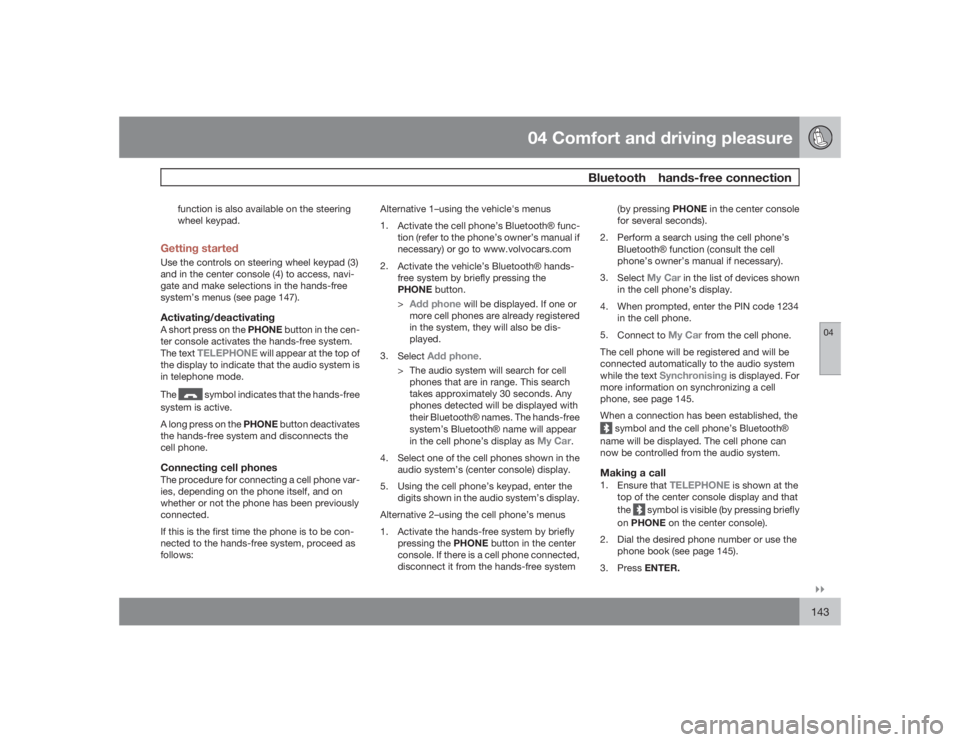
Getting startedUse the controls on steering wheel keypad (3)
and in the center console (4) to access, navi-
gate and make selections in the hands-free
system’s menus (see page 147).Activating/deactivatingA short press on the PHONE button in the cen-
ter console activates the hands-free system.
The text
TELEPHONE
will appear at the top of
the display to indicate that the audio system is
in telephone mode.
The
symbol indicates that the hands-free
system is active.
A long press on the PHONE button deactivates
the hands-free system and disconnects the
cell phone.
Connecting cell phonesThe procedure for connecting a cell phone var-
ies, depending on the phone itself, and on
whether or not the phone has been previously
connected.
If this is the first time the phone is to be con-
nected to the hands-free system, proceed as
follows:Alternative 1–using the vehicle's menus
1.
Activate the cell phone’s BluetoothŸ func-
tion (refer to the phone’s owner’s manual if
necessary) or go to www.volvocars.com
2.
Activate the vehicle’s BluetoothŸ hands-
free system by briefly pressing the
PHONE button.
>
Add phone
will be displayed. If one or
more cell phones are already registered
in the system, they will also be dis-
played.
3.
Select
Add phone
.
> The audio system will search for cell
phones that are in range. This search
takes approximately 30 seconds. Any
phones detected will be displayed with
their BluetoothŸ names. The hands-free
system’s BluetoothŸ name will appear
in the cell phone’s display as
My Car
.
4. Select one of the cell phones shown in the
audio system’s (center console) display.
5. Using the cell phone’s keypad, enter the
digits shown in the audio system’s display.
Alternative 2–using the cell phone’s menus
1. Activate the hands-free system by briefly
pressing the PHONE button in the center
console. If there is a cell phone connected,
disconnect it from the hands-free system(by pressing PHONE in the center console
for several seconds).
2. Perform a search using the cell phone’s
BluetoothŸ function (consult the cell
phone’s owner’s manual if necessary).
3.
Select
My Car
in the list of devices shown
in the cell phone’s display.
4. When prompted, enter the PIN code 1234
in the cell phone.
5.
Connect to
My Car
from the cell phone.
The cell phone will be registered and will be
connected automatically to the audio system
while the text
Synchronising
is displayed. For
more information on synchronizing a cell
phone, see page 145.
When a connection has been established, the
symbol and the cell phone’s BluetoothŸ
name will be displayed. The cell phone can
now be controlled from the audio system.Making a call1.
Ensure that
TELEPHONE
is shown at the
top of the center console display and that
the
symbol is visible (by pressing briefly
onPHONE on the center console).
2. Dial the desired phone number or use the
phone book (see page 145).
3.
PressENTER.
Page 144 of 288
04 Comfort and driving pleasureBluetoothŸ hands-free connection
04144
End the call by pressing EXIT.Disconnecting the cell phoneThe cell phone is automatically disconnected
from the audio system if it is moved out of
range. For more information about connec-
tions, see page 143.
The cell phone can be manually disconnected
from the hands-free system by pressing
PHONE. The hands-free system is also deac-
tivated when the ignition is switched off (or if
the driver’s door is opened on vehicles equip-
ped with the optional keyless drive).
When the cell phone is disconnected from the
hands-free system, a call in progress can be
continued using the cell phone’s own speaker
and microphone.
NOTE
Certain cell phones may require confirma-
tion from the phone’s keypad when a call is
transferred from hands-free to the cell
phone.
Handling callsIncoming callsPressENTER to answer a call, even if the audio
system is currently in e.g., CD or FM mode.
PressEXIT to defer a call.Automatic answerThis function means that incoming calls will be
answered automatically. Activate or deactivate
the function in the menu system under Phone
settings
Call options
Automatic
answer.
Call settingsWhile a call is in progress, press MENU or
ENTER on the center console to access the
following functions:•
Microphone off
–mute the audio system’s
microphone.
•
Transfer call to mobile
–transfer the call
from hands-free to the cell phone.
•
Phone book
–this feature enables you to
search for a stored telephone number.
NOTE
•
On certain cell phones, the connection
is broken when the mute function is
used, which is normal. If this happens,
the hands-free system will prompt you
to reconnect.
•
A new call cannot be initiated while
another call is in progress.
Sound settingsCall volumeCall volume can be adjusted when the hands-
free system is activated. Use the buttons in the
steering wheel keypad or the audio system’s
volume control.Audio system volumeWhile a phone call is in progress, volume for
the audio system can be adjusted in the normal
way with the audio system's volume control. In
order to adjust volume during a phone call, the
audio system must be switched to one of the
other modes (FM, CD, etc).
Audio system sound can be automatically
muted when a phone call is received in Phone
settings
Sounds and volume
Mute
radio and adjust the volume with the
/
keys on the center console.
Page 145 of 288
04 Comfort and driving pleasure
Bluetooth hands-free connection
04``145
Ringing volumeGo to Phone settings
Sounds and volume
Ring volume and adjust the volume with
the
/
keys on the center console.
Ringing tonesThe hands-free system’s integrated ringing
tones can be selected in Phone settingsSounds and volume
Ring signal
Ring
signal 1,2,3....
NOTE
The connected cell phone’s ring tone is not
switched off when one of the hands-free
system's ringing tones is used.If you prefer to use the connected cell phone’s
ring tone
1, go to Phone settings
Sounds
and volume
Ring signal
Use mobile
phone signal
More information about registering
and connecting cell phonesA maximum of 5 cell phones can be registered
in the hands-free system. Registration only
needs to be done once for each phone. After
registration, the cell phone no longer needs to
be in sight or searchable. Only one cell phone
can be connected to hands-free at a time.
Phones can be unregistered in BluetoothRemove telephoneAutomatic connectionWhen the hands-free system is active and the
most recently connected cell phone is within
range, it is detected automatically. When the
audio system searches for the most recently
connected phone, this phone’s name appears
in the display. To manually connect a different
cell phone, press EXIT.Manual connectionTo connect a phone other than the one that
was most recently connected or to switch
between cell phones that are already regis-
tered in the hands-free system:
1. Put the audio system in telephone mode.
2.
PressPHONE in the center console and
select one of the phones on the list.A connection can also be established in the
menu system under Bluetooth
Connect
phone or Change phone.
Phone bookIn order to use the hands-free system’s phone
book (list of contacts),
TELEPHONE
must be
displayed at the top of the center console dis-
play and the
symbol must be visible.
The audio system stores a copy of the phone
book of each registered cell phone. The phone
book is automatically copied each time a
phone is connected. This function can be acti-
vated in Phone settings
Synchronise
phone book. Searches for contacts are only
made in the phone book of the currently con-
nected cell phone.
NOTE
If a particular cell phone does not support
copying of the phone book,
List is empty
will be displayed when copying has been
completed.If the phone book contains information about
someone who is trying to call you, this infor-
mation will be shown in the display.
1Not supported by all cell phones