ECO mode VOLVO S80 2015 Owner´s Manual
[x] Cancel search | Manufacturer: VOLVO, Model Year: 2015, Model line: S80, Model: VOLVO S80 2015Pages: 392, PDF Size: 10.66 MB
Page 117 of 392
03 Your driving environment
HomeLink®
Wireless Control System*
03
* Option/accessory, for more information, see Introduction.115
both the HomeLink and hand-held trans- mitter buttons.
Proceed with “Programming” step 3 to com-
plete.
Using HomeLink
To operate, simply press and hold the pro- grammed HomeLink button until the traineddevice begins to operate (this may take sev-eral seconds). Activation will now occur forthe trained device (i.e., garage door opener,gate operator, security system, entry doorlock, home/office lighting, etc.). For conven-ience, the hand-held transmitter of the devicemay also be used at any time. In the eventthat there are still programming difficulties orquestions, contact HomeLink at:www.homelink.com or by phoning the hotlineat 1–800–355–3515.
NOTE
If the ignition is switched off, HomeLink will function for 30 minutes after the driv-er's door has been opened.
Resetting HomeLink Buttons
Use the following procedure to reset (erase programming) from the three HomeLink but-tons (individual buttons cannot be reset butcan be “reprogrammed” as outlined in the fol-lowing section):
1. Press and hold the two outer HomeLink buttons until the indicator light begins to flash.
2. Release both buttons. > HomeLink is now in the training (orlearning) mode and can be pro-grammed at any time beginning with“Programming” - step 1.
Reprogramming a Single HomeLink Button
To program a device to HomeLink using a HomeLink button previously trained, followthese steps:
1. Press and hold the desired HomeLink button. DO NOT release the button.
2. The indicator light will begin to flash after 20 seconds. Without releasing the Home- Link button, proceed with “Programming”- step 1. For questions or comments, contact Home-Link at: www.homelink.com or phone 1–800–355–3515. This device complies with FCC rules part 15 and Industry Canada (IC) RSS-210. Operationis subject to the following two conditions: (1)This device may not cause harmful interfer-ence, and (2) This device must accept anyinterference that may be received includinginterference that may cause undesired opera-tion.
NOTE
The transmitter has been tested and com- plies with FCC and IC rules. Changes ormodifications not expressly approved bythe party responsible for compliance couldvoid the user’s authority to operate the device.
2
2
The term “IC:” before the certification/registration number only signifies that Industry Canada technical specifications were met.
Page 118 of 392
03 Your driving environment
Starting the engine
03
116* Option/accessory, for more information, see Introduction.
Start
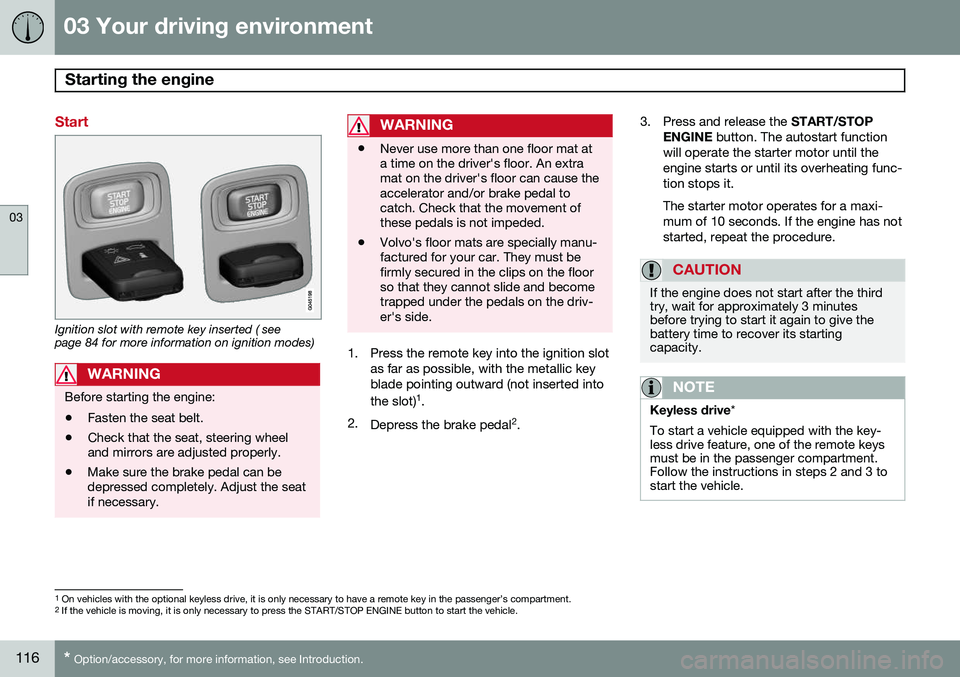
Ignition slot with remote key inserted ( see page 84 for more information on ignition modes)
WARNING
Before starting the engine:
• Fasten the seat belt.
• Check that the seat, steering wheel and mirrors are adjusted properly.
• Make sure the brake pedal can bedepressed completely. Adjust the seatif necessary.
WARNING
•Never use more than one floor mat at a time on the driver's floor. An extramat on the driver's floor can cause theaccelerator and/or brake pedal tocatch. Check that the movement ofthese pedals is not impeded.
• Volvo's floor mats are specially manu-factured for your car. They must befirmly secured in the clips on the floorso that they cannot slide and becometrapped under the pedals on the driv-er's side.
1. Press the remote key into the ignition slot
as far as possible, with the metallic key blade pointing outward (not inserted into the slot) 1
.
2. Depress the brake pedal 2
. 3. Press and release the
START/STOP
ENGINE button. The autostart function
will operate the starter motor until the engine starts or until its overheating func-tion stops it. The starter motor operates for a maxi- mum of 10 seconds. If the engine has notstarted, repeat the procedure.
CAUTION
If the engine does not start after the third try, wait for approximately 3 minutesbefore trying to start it again to give thebattery time to recover its startingcapacity.
NOTE
Keyless drive *
To start a vehicle equipped with the key- less drive feature, one of the remote keysmust be in the passenger compartment.Follow the instructions in steps 2 and 3 tostart the vehicle.
1 On vehicles with the optional keyless drive, it is only necessary to have a remote key in the passenger’s compartment.
2 If the vehicle is moving, it is only necessary to press the START/STOP ENGINE button to start the vehicle.
Page 121 of 392
03 Your driving environment
Starting the engine
03
}}
* Option/accessory, for more information, see Introduction.119
Models with a Personal Car
Communicator (PCC) remote key* (seepage 58)
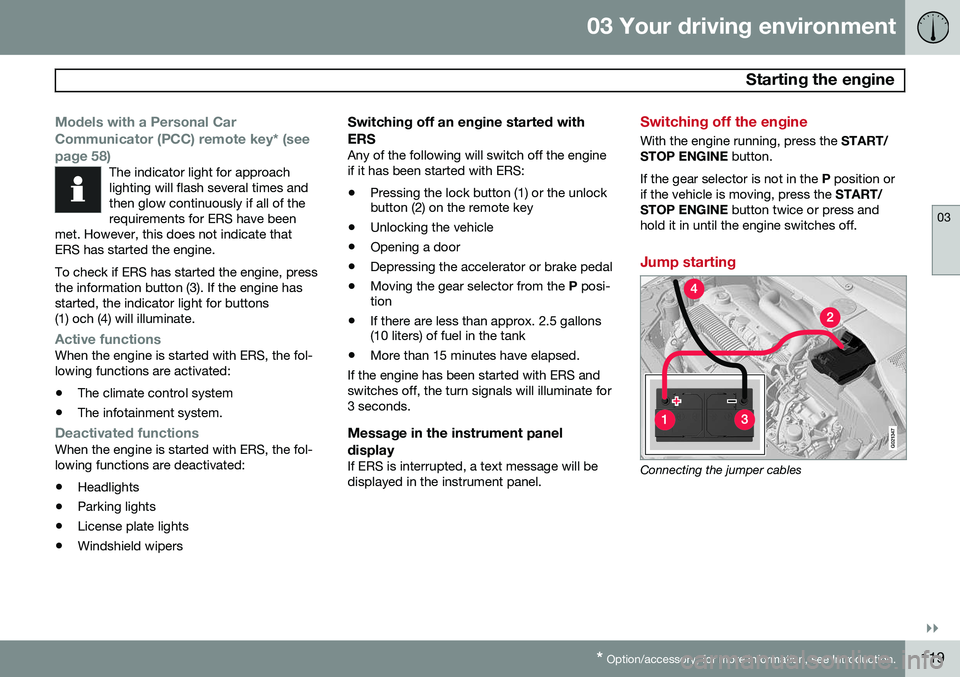
The indicator light for approach lighting will flash several times andthen glow continuously if all of therequirements for ERS have been
met. However, this does not indicate thatERS has started the engine. To check if ERS has started the engine, press the information button (3). If the engine hasstarted, the indicator light for buttons(1) och (4) will illuminate.
Active functionsWhen the engine is started with ERS, the fol- lowing functions are activated: • The climate control system
• The infotainment system.
Deactivated functionsWhen the engine is started with ERS, the fol- lowing functions are deactivated: •Headlights
• Parking lights
• License plate lights
• Windshield wipers
Switching off an engine started with ERS
Any of the following will switch off the engine if it has been started with ERS:
• Pressing the lock button (1) or the unlock button (2) on the remote key
• Unlocking the vehicle
• Opening a door
• Depressing the accelerator or brake pedal
• Moving the gear selector from the
P posi-
tion
• If there are less than approx. 2.5 gallons(10 liters) of fuel in the tank
• More than 15 minutes have elapsed.
If the engine has been started with ERS and switches off, the turn signals will illuminate for3 seconds.
Message in the instrument panel
display
If ERS is interrupted, a text message will bedisplayed in the instrument panel.
Switching off the engine
With the engine running, press the START/
STOP ENGINE button.
If the gear selector is not in the P position or
if the vehicle is moving, press the START/
STOP ENGINE button twice or press and
hold it in until the engine switches off.
Jump starting
G021347
Connecting the jumper cables
Page 123 of 392
03 Your driving environment
Transmission
03
}}
121
Automatic transmission
G021351
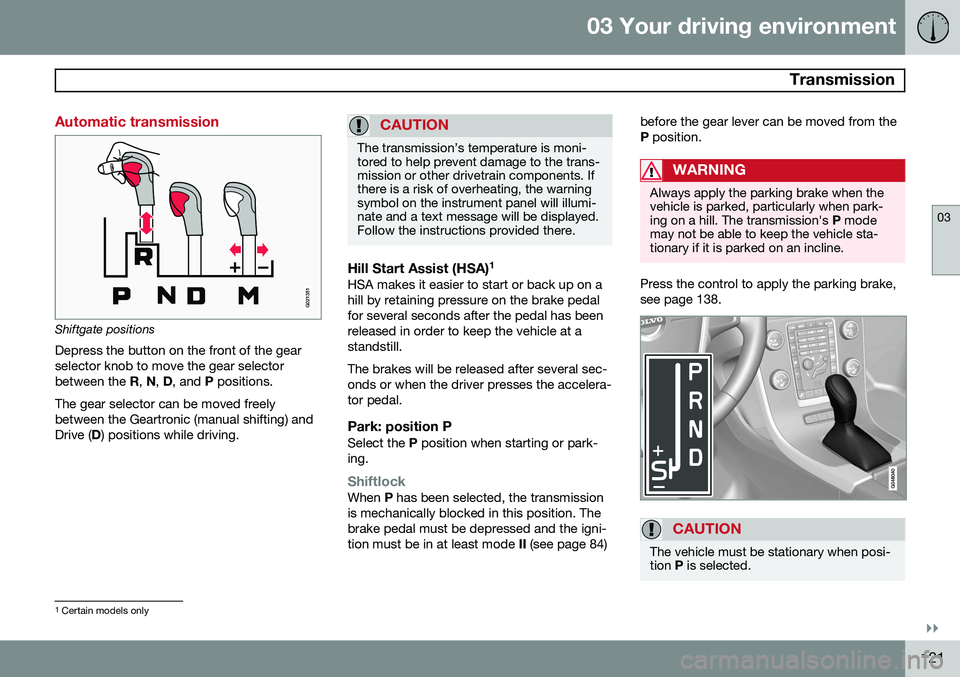
Shiftgate positions
Depress the button on the front of the gear selector knob to move the gear selectorbetween the R, N , D , and P positions.
The gear selector can be moved freelybetween the Geartronic (manual shifting) andDrive ( D) positions while driving.
CAUTION
The transmission’s temperature is moni- tored to help prevent damage to the trans-mission or other drivetrain components. Ifthere is a risk of overheating, the warningsymbol on the instrument panel will illumi-nate and a text message will be displayed.Follow the instructions provided there.
Hill Start Assist (HSA) 1HSA makes it easier to start or back up on a hill by retaining pressure on the brake pedalfor several seconds after the pedal has beenreleased in order to keep the vehicle at astandstill. The brakes will be released after several sec- onds or when the driver presses the accelera-tor pedal.
Park: position PSelect the
P position when starting or park-
ing.
ShiftlockWhen P has been selected, the transmission
is mechanically blocked in this position. The brake pedal must be depressed and the igni-tion must be in at least mode II (see page 84) before the gear lever can be moved from theP
position.
WARNING
Always apply the parking brake when the vehicle is parked, particularly when park-ing on a hill. The transmission's P mode
may not be able to keep the vehicle sta-tionary if it is parked on an incline.
Press the control to apply the parking brake, see page 138.
CAUTION
The vehicle must be stationary when posi- tion P is selected.
1
Certain models only
Page 124 of 392
03 Your driving environment
Transmission
03
122* Option/accessory, for more information, see Introduction.
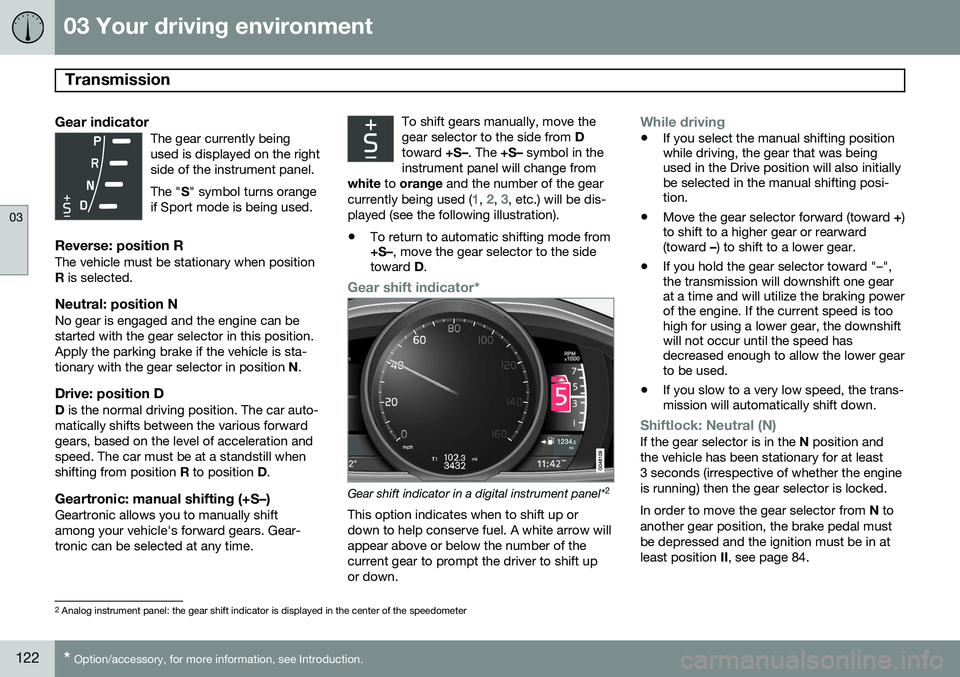
Gear indicatorThe gear currently being used is displayed on the rightside of the instrument panel. The " S" symbol turns orange
if Sport mode is being used.
Reverse: position RThe vehicle must be stationary when position R is selected.
Neutral: position NNo gear is engaged and the engine can bestarted with the gear selector in this position.Apply the parking brake if the vehicle is sta-tionary with the gear selector in position N.
Drive: position DD is the normal driving position. The car auto-
matically shifts between the various forwardgears, based on the level of acceleration andspeed. The car must be at a standstill whenshifting from position R to position D.
Geartronic: manual shifting (+S–)Geartronic allows you to manually shiftamong your vehicle's forward gears. Gear-tronic can be selected at any time. To shift gears manually, move thegear selector to the side from
D
toward +S–. The +S– symbol in the
instrument panel will change from
white to orange and the number of the gear
currently being used (
1, 2, 3, etc.) will be dis-
played (see the following illustration).
• To return to automatic shifting mode from +S–
, move the gear selector to the side
toward D.
Gear shift indicator*
Gear shift indicator in a digital instrument panel* 2
This option indicates when to shift up or down to help conserve fuel. A white arrow willappear above or below the number of thecurrent gear to prompt the driver to shift upor down.
While driving
• If you select the manual shifting position while driving, the gear that was beingused in the Drive position will also initiallybe selected in the manual shifting posi-tion.
• Move the gear selector forward (toward
+)
to shift to a higher gear or rearward(toward –) to shift to a lower gear.
• If you hold the gear selector toward "–",the transmission will downshift one gearat a time and will utilize the braking powerof the engine. If the current speed is toohigh for using a lower gear, the downshiftwill not occur until the speed hasdecreased enough to allow the lower gearto be used.
• If you slow to a very low speed, the trans-mission will automatically shift down.
Shiftlock: Neutral (N)If the gear selector is in the
N position and
the vehicle has been stationary for at least 3 seconds (irrespective of whether the engineis running) then the gear selector is locked. In order to move the gear selector from N to
another gear position, the brake pedal must be depressed and the ignition must be in atleast position II, see page 84.
2
Analog instrument panel: the gear shift indicator is displayed in the center of the speedometer
Page 125 of 392
03 Your driving environment
Transmission
03
}}
* Option/accessory, for more information, see Introduction.123
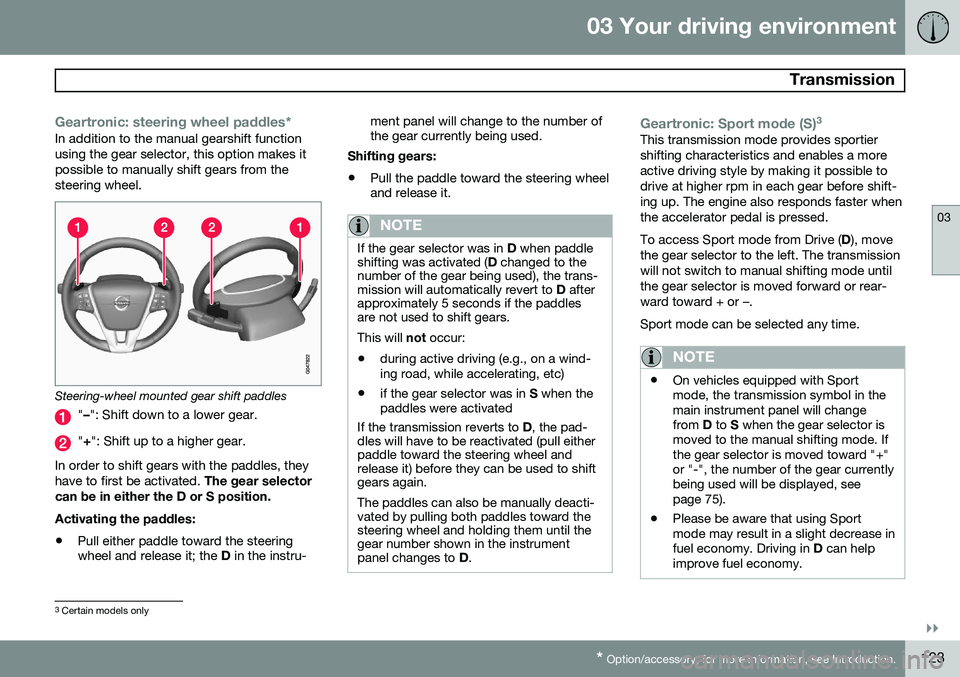
Geartronic: steering wheel paddles*In addition to the manual gearshift function using the gear selector, this option makes itpossible to manually shift gears from thesteering wheel.
Steering-wheel mounted gear shift paddles
" – ": Shift down to a lower gear.
"+ ": Shift up to a higher gear.
In order to shift gears with the paddles, they have to first be activated. The gear selector
can be in either the D or S position. Activating the paddles:
• Pull either paddle toward the steering wheel and release it; the
D in the instru- ment panel will change to the number ofthe gear currently being used.
Shifting gears:
• Pull the paddle toward the steering wheeland release it.
NOTE
If the gear selector was in
D when paddle
shifting was activated ( D changed to the
number of the gear being used), the trans- mission will automatically revert to D after
approximately 5 seconds if the paddlesare not used to shift gears. This will not occur:
• during active driving (e.g., on a wind- ing road, while accelerating, etc)
• if the gear selector was in
S when the
paddles were activated
If the transmission reverts to D, the pad-
dles will have to be reactivated (pull either paddle toward the steering wheel andrelease it) before they can be used to shiftgears again. The paddles can also be manually deacti- vated by pulling both paddles toward thesteering wheel and holding them until thegear number shown in the instrumentpanel changes to D.
Geartronic: Sport mode (S) 3This transmission mode provides sportier shifting characteristics and enables a moreactive driving style by making it possible todrive at higher rpm in each gear before shift-ing up. The engine also responds faster whenthe accelerator pedal is pressed. To access Sport mode from Drive (
D), move
the gear selector to the left. The transmission will not switch to manual shifting mode untilthe gear selector is moved forward or rear-ward toward + or –. Sport mode can be selected any time.
NOTE
• On vehicles equipped with Sport mode, the transmission symbol in themain instrument panel will changefrom
D to S when the gear selector is
moved to the manual shifting mode. Ifthe gear selector is moved toward "+"or "-", the number of the gear currentlybeing used will be displayed, seepage 75).
• Please be aware that using Sportmode may result in a slight decrease infuel economy. Driving in
D can help
improve fuel economy.
3 Certain models only
Page 130 of 392
03 Your driving environment
Eco*
03
128* Option/accessory, for more information, see Introduction.
Introduction
Eco is a function 1
developed by Volvo to give
the driver the opportunity to actively drive more economically and to help reduce fuelconsumption.
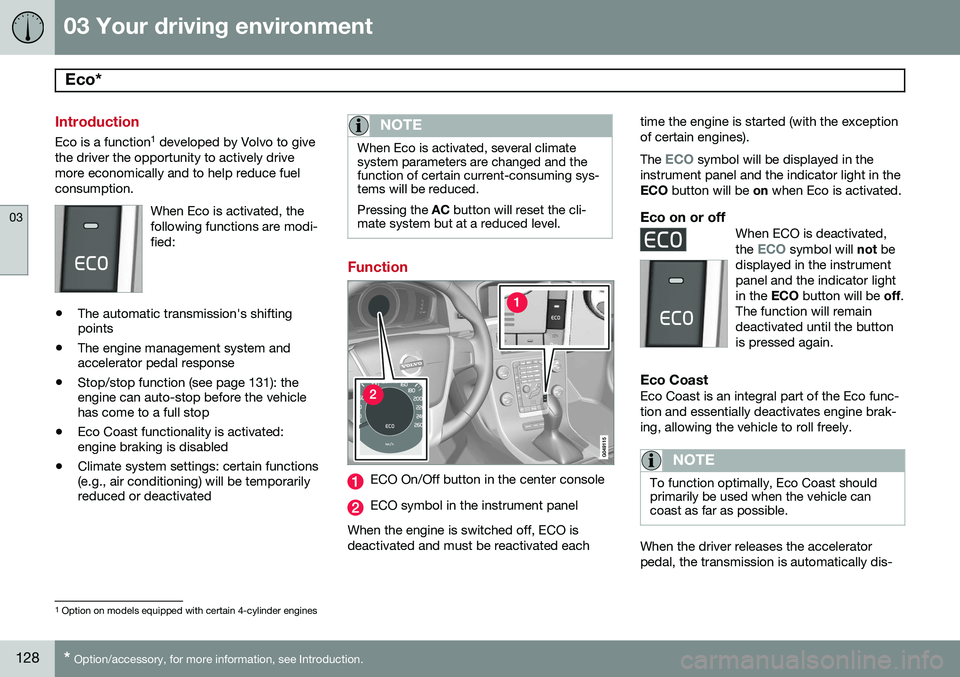
When Eco is activated, thefollowing functions are modi-fied:
•The automatic transmission's shifting points
• The engine management system andaccelerator pedal response
• Stop/stop function (see page 131): theengine can auto-stop before the vehiclehas come to a full stop
• Eco Coast functionality is activated:engine braking is disabled
• Climate system settings: certain functions(e.g., air conditioning) will be temporarilyreduced or deactivated
NOTE
When Eco is activated, several climate system parameters are changed and thefunction of certain current-consuming sys-tems will be reduced. Pressing the
AC button will reset the cli-
mate system but at a reduced level.
Function
ECO On/Off button in the center console
ECO symbol in the instrument panel
When the engine is switched off, ECO is deactivated and must be reactivated each time the engine is started (with the exceptionof certain engines). The
ECO symbol will be displayed in the
instrument panel and the indicator light in the ECO button will be on when Eco is activated.
Eco on or offWhen ECO is deactivated, the ECO symbol will not be
displayed in the instrument panel and the indicator lightin the ECO button will be off.
The function will remaindeactivated until the buttonis pressed again.
Eco CoastEco Coast is an integral part of the Eco func- tion and essentially deactivates engine brak-ing, allowing the vehicle to roll freely.
NOTE
To function optimally, Eco Coast should primarily be used when the vehicle cancoast as far as possible.
When the driver releases the accelerator pedal, the transmission is automatically dis-
1 Option on models equipped with certain 4-cylinder engines
Page 135 of 392
03 Your driving environment
Start/Stop*
03
}}
* Option/accessory, for more information, see Introduction.133
Condition/situation
The gear selector is moved from D to SB
, R
or " +/–".
The driver's door is opened with the gear selector in D – an audible signal and a text
message will inform the driver thatStart/Stop is active.
A Certain engines only
B Sport mode (where applicable)
WARNING
Do not open the hood if the engine has auto-stopped. The engine could suddenlyauto-start. Before opening the hood:
• Switch off the ignition using the START/STOP ENGINE
button.
• Be aware that if the engine has beenrunning, components in the enginecompartment will be very hot.
If the engine does not auto-start, this could be due to
:
• The driver's seat belt is not fastened
• The gear selector is in
P and the driver's
door is opened
In these cases, the driver will have to restart the engine by pressing the START/STOP
ENGINE button.
Settings
Settings for the Start/Stop function can be made in the MY CAR menu system.Symbols and messages
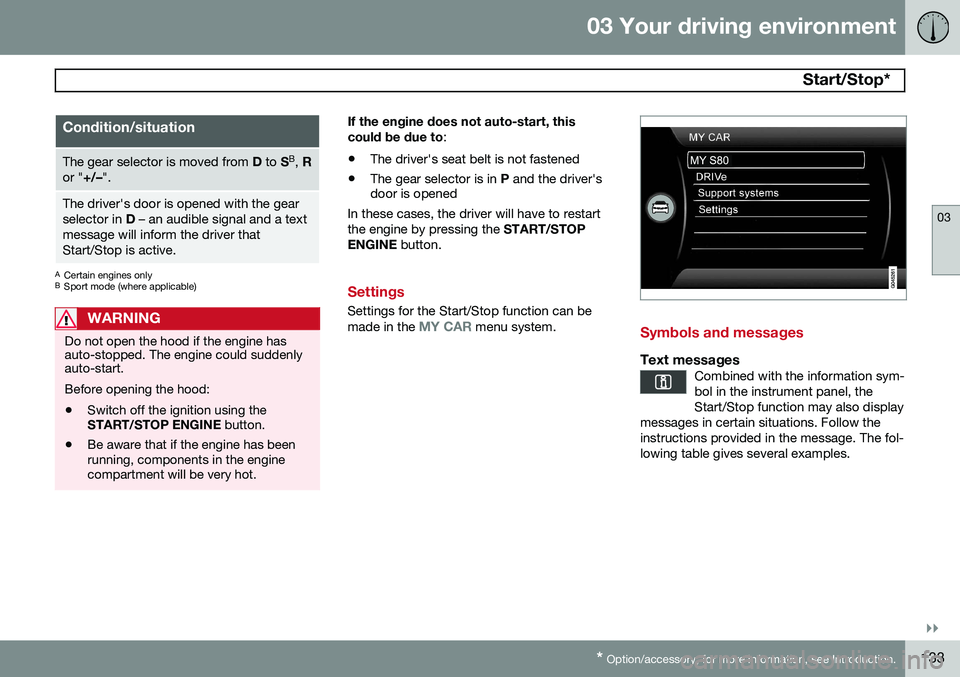
Text messagesCombined with the information sym- bol in the instrument panel, theStart/Stop function may also display
messages in certain situations. Follow theinstructions provided in the message. The fol-lowing table gives several examples.
Page 150 of 392
04 Driver support
Cruise control
04
148
Operation
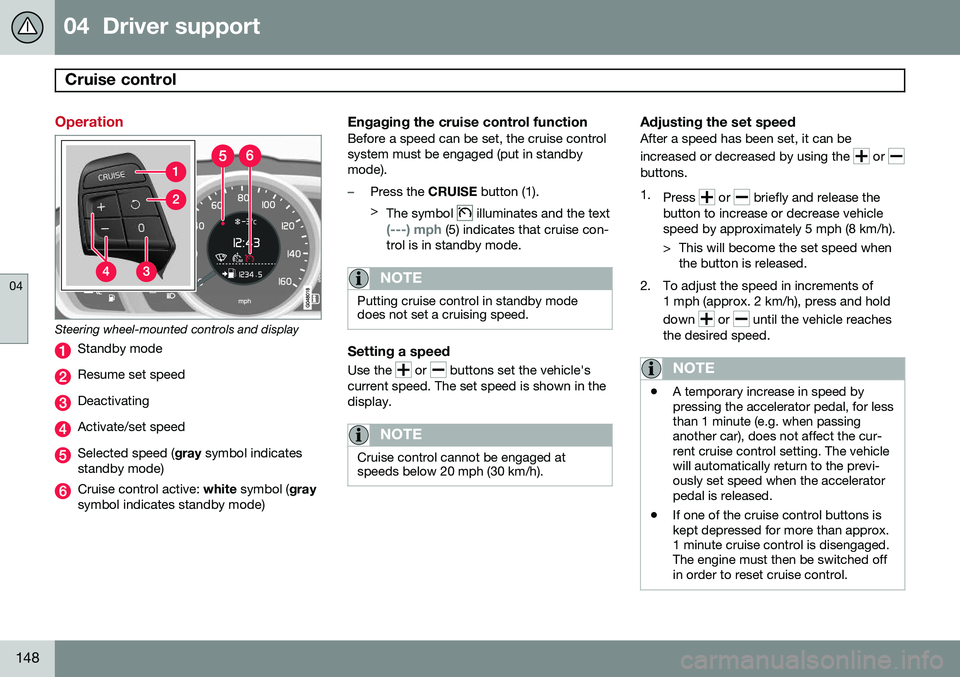
Steering wheel-mounted controls and display
Standby mode
Resume set speed
Deactivating
Activate/set speed
Selected speed (gray symbol indicates
standby mode)
Cruise control active: white symbol ( gray
symbol indicates standby mode)
Engaging the cruise control functionBefore a speed can be set, the cruise control system must be engaged (put in standbymode).
–Press the CRUISE button (1).
> The symbol
illuminates and the text
(---) mph (5) indicates that cruise con-
trol is in standby mode.
NOTE
Putting cruise control in standby mode does not set a cruising speed.
Setting a speed
Use the or buttons set the vehicle's
current speed. The set speed is shown in the display.
NOTE
Cruise control cannot be engaged at speeds below 20 mph (30 km/h).
Adjusting the set speedAfter a speed has been set, it can be increased or decreased by using the
or buttons. 1. Press
or briefly and release the
button to increase or decrease vehicle speed by approximately 5 mph (8 km/h).
> This will become the set speed when the button is released.
2. To adjust the speed in increments of 1 mph (approx. 2 km/h), press and hold down
or until the vehicle reaches
the desired speed.
NOTE
• A temporary increase in speed by pressing the accelerator pedal, for lessthan 1 minute (e.g. when passinganother car), does not affect the cur-rent cruise control setting. The vehiclewill automatically return to the previ-ously set speed when the acceleratorpedal is released.
• If one of the cruise control buttons iskept depressed for more than approx.1 minute cruise control is disengaged.The engine must then be switched offin order to reset cruise control.
Page 153 of 392

04 Driver support
Adaptive Cruise Control (ACC)*
04
}}
* Option/accessory, for more information, see Introduction.151
2-second interval will vary according the speed of the vehicles.
WARNING
•
Adaptive Cruise Control is not a colli- sion avoidance system. The driver isalways responsible for applying thebrakes if the system does not detectanother vehicle.
• Adaptive Cruise Control does not reactto people or animals, or small vehiclessuch as bicycles and motorcycles. Italso does not react to slow moving,parked or approaching vehicles, orstationary objects.
• Do not use Adaptive Cruise Control indemanding driving conditions such ascity driving or other heavy traffic situa-tions, in slippery conditions, whenthere is a great deal of water or slushon the road, during heavy rain orsnow, in poor visibility, on windingroads or on highway on- or off-ramps.
The distance to the vehicle ahead (in the same lane) is monitored by a radar sensor.Your vehicle's speed is regulated by acceler-ating and braking. The brakes may emit asound when they are being modulated by the adaptive cruise control system. This is nor-mal.
WARNING
The brake pedal moves when the adaptive cruise control system modulates thebrakes. Do not rest your foot under thebrake pedal.
The ACC system is designed to smoothly regulate speed. However, the driver mustapply the brakes in situations that requireimmediate braking. This applies when thereare great differences in speed between vehi-cles, or if the vehicle ahead brakes suddenly.
WARNING
Due to limitations in the radar sensor, braking may occur unexpectedly or not atall, see page 157.
Adaptive Cruise Control can be put in active mode at any permitted speed. However, if thevehicle's speed falls below 18 mph (30 km/h)or if engine speed (rpm) becomes too low,ACC disengages (goes into standby mode)and will no longer modulate the brakes. Thedriver will then have to maintain a safe dis-tance to the vehicle ahead.
WARNING
When Adaptive Cruise Control is in standby mode or is switched off com-pletely, the brakes will not be modulatedautomatically. The driver must assume fullcontrol over the vehicle.
Warning light—driver braking requiredAdaptive Cruise Control can exert brake force that is equivalent to approximately 40% ofthe vehicle's total braking capacity. In situa-tions requiring more brake force than ACCcan provide and if the driver does not applythe brakes, an audible signal from the Colli-sion Warning system will sound and warninglight will illuminate (see page 171) in thewindshield to alert the driver to react.
NOTE
Strong sunlight, reflections, extreme light contrasts, the use of sunglasses, or if thedriver is not looking straight ahead maymake the visual warning signal in the wind-shield difficult to see.