park VOLVO S90 2017 Owner´s Manual
[x] Cancel search | Manufacturer: VOLVO, Model Year: 2017, Model line: S90, Model: VOLVO S90 2017Pages: 548, PDF Size: 11.42 MB
Page 293 of 548
DRIVER SUPPORT
* Option/accessory.291
CAUTION
•Service and maintenance on City Safety may only be carried out by a trained andqualified Volvo service technician.
• If a crack, scratch or stone chip shouldoccur in the section of the windshield infront the camera/radar sensor, contact atrained and qualified Volvo service techni-cian to repair or replace the windshield.Failing to do so may result in reducedCity Safety functionality.
• This can also result in certain functionsbeing reduced or disabled, or they mayrespond incorrectly.
To help avoid the risk of incorrect, reduced ordisabled functionality for driver support sys-tems using the camera or radar sensors:
• Volvo recommends that cracks, scratchesor stone chips on the windshield in front of the camera/radar sensor should
not
be repaired; in such cases, the entire windshield should be replaced.
• Before the windshield is replaced, con-tact a Volvo retailer to ensure that thecorrect windshield is ordered and instal-led. If the wrong type of windshield isused, this may cause City Safety to func-tion improperly or not at all.
• Volvo recommends the use of only Genu-ine Volvo Replacement Windshields.
• When replacing windshield wipers, use the same type or ones approved by Volvo.
After the windshield has been replaced, thecamera/radar sensor will have to be recalibra-ted by a trained and qualified Volvo servicetechnician to help ensure proper function ofall of the vehicle's camera-/radar-based sys-tems.
MaintenanceIn order for camera and radar sensor to function properly, the area of the windshield must be keptfree of dirt, ice, snow, etc. and should be washedregularly with a suitable car washing detergent.
NOTE
Dirt, ice and/or snow covering the camera and radar sensors reduce functionality andmay disable the vehicle's camera-/radar-based systems. This can also result in certain functions being reduced or disabled, or they may respond incorrectly.
Related information
• Driver support system radar sensor (p. 288)
• Camera limitations (p. 293)
• Pilot Assist limitations (p. 285)
• City Safety limitations (p. 304) •
City Safety limitations (p. 304)
• Road Sign Information (RSI)
* limitations
(p. 318)
• Park Assist Pilot (PAP)
* limitations (p. 342)
Page 297 of 548
DRIVER SUPPORT
* Option/accessory.295
MaintenanceIn order for camera and radar sensor to function properly, the area of the windshield must be keptfree of dirt, ice, snow, etc. and should be washedregularly with a suitable car washing detergent.
NOTE
Dirt, ice and/or snow covering the camera and radar sensors reduce functionality andmay disable the vehicle's camera-/radar-based systems. This can also result in certain functions being reduced or disabled, or they may respondincorrectly.
Related information
•Driver support system camera (p. 292)
• Radar sensor limitations (p. 289)
• Driving lane assistance (p. 320)
• Driver Alert Control limitations (p. 320)
• Pilot Assist limitations (p. 285)
• City Safety limitations (p. 304)
• Road Sign Information (RSI)
* limitations
(p. 318)
• Park Assist Pilot (PAP)
* limitations (p. 342)
Page 307 of 548

DRIVER SUPPORT
}}
305
Camera and radar sensor's field of vision
The camera and radar sensor have limited fields of vision. In some situations they may detect avehicle, large animal, pedestrian or cyclist laterthan expected or not detect them at all. Other vehicles that are dirty may be detected later than others and in dark conditions, motorcy-cles may be detected late or not at all. If a text message is displayed in the instrument panel indicates that the camera or radar sensorare blocked, it may be difficult for City Safety todetect a vehicle, pedestrian or cyclist and thesystem's functionality may be reduced.
WARNING
Text messages may not be displayed in all sit- uations in which the camera and/or radarsensor are blocked. It is therefore essential tokeep the windshield in front the camera/radarsensor clean and free from snow, ice, etc. Camera and radar sensor components should only be serviced or replaced by a trained andqualified Volvo service technician.
Action by the driver
Backing up
City Safety is temporarily deactivated while the vehicle is backing up.
Low speed
City Safety is not activated at very low speeds (under approx. 3 mph (4 km/h). This means thatthe system will not be triggered if your vehicleapproaches a vehicle ahead at very low speed,such as when parking.
Active driver
Action by the driver always has priority. For this reason, City Safety may not react or react laterthan expected in situations in which the driver isactively operating the vehicle, even if a collision isimminent. This is also done to help eliminateexcessive warnings.
Other limitations
City Safety uses the vehicle's camera and radar sensor, which have certain general limitations.See the articles "Camera limitations" and "Radarsensor limitations" for additional information.
WARNING
•
Warnings and braking may be delayed or not occur at all if traffic, weather or otherconditions prevent the camera and/orradar sensor from detecting pedestrians,cyclists, large animals or other vehiclescorrectly.
• Other vehicles can only be detected indarkness if their headlights and taillightsare clearly visible.
• The sensors have a limited range forpedestrians and cyclists. The systemfunctions best at relative speeds up to30 mph (50 km/h). For stationary orslow-moving vehicles, the system func-tions best at speeds up to approx.43 mph (70 km/h).
• If there is a risk of colliding with a largeanimal, City Safety can reduce the vehi-cle's speed by up to 9 mph (15 km/h).Warnings and braking are most effectiveat speeds above 43 mph (70 km/h) andless effective at lower speeds.
Page 313 of 548

DRIVER SUPPORT
}}
* Option/accessory.311
Blind Spot Information (BLIS) *
limitations
Blind Spot Information functionality may be reduced in certain situations.
• Dirt, ice and snow on the sensors may reduce functionality and prevent the systemfrom providing warnings.
• Do not attach any objects, tape, decals, etc.,on the surface of the sensors.
• BLIS is deactivated if a trailer is attached tothe vehicle's electrical system.
Maintenance
The BLIS/CTA 5
sensors are located on the
inside of the rear fenders/bumper.
Keep the highlighted area clean (on both sides of the vehicle) - generic illustration
For the system to function optimally, the area over and around the sensors must be kept clean.
CAUTION
Repairs to the BLIS/CTA systems and/or repainting the rear bumper should only bedone by a trained and qualified Volvo servicetechnician.
Related information
• Blind Spot Information (BLIS)
* On/Off
(p. 310)
• Blind Spot Information (BLIS)
* (p. 309)
• Cross Traffic Alert (CTA)
* (p. 311)
Cross Traffic Alert (CTA) *
Cross Traffic Alert (CTA) is a supplementary part of Blind Spot Information and is intended todetect vehicles crossing behind your vehiclewhile you are backing up.
When does Cross Traffic Alert function
Principle for CTA
CTA supplements BLIS by warning the driver of crossing traffic behind your vehicle, for example,when backing out of a parking space. It is primarily designed to detect another vehicle but in certain cases may also detect pedestriansor smaller objects such as bicycles. CTA is only activated when the vehicle is rolling rearward or when the gear selector is put inreverse.
5 Cross Traffic Alert *
Page 314 of 548
||
DRIVER SUPPORT
* Option/accessory.
312 If CTA detects that something is approaching your vehicle from the side:
• An audible signal indicates will sound fromeither the left or right infotainment systemspeakers, depending on which the side ofyour vehicle the approaching vehicle/ objecthas been detected.
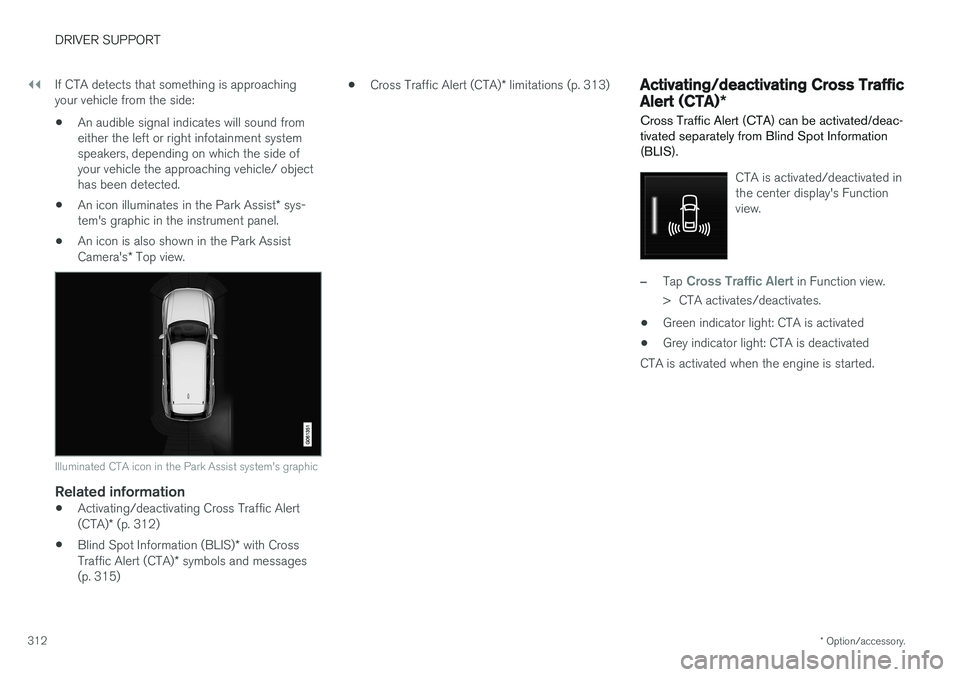
• An icon illuminates in the Park Assist
* sys-
tem's graphic in the instrument panel.
• An icon is also shown in the Park Assist Camera's
* Top view.
Illuminated CTA icon in the Park Assist system's graphic
Related information
• Activating/deactivating Cross Traffic Alert (CTA)
* (p. 312)
• Blind Spot Information (BLIS)
* with Cross
Traffic Alert (CTA) * symbols and messages
(p. 315) •
Cross Traffic Alert (CTA)
* limitations (p. 313)
Activating/deactivating Cross Traffic Alert (CTA) *
Cross Traffic Alert (CTA) can be activated/deac- tivated separately from Blind Spot Information(BLIS).
CTA is activated/deactivated in the center display's Functionview.
–Tap Cross Traffic Alert in Function view.
> CTA activates/deactivates.
• Green indicator light: CTA is activated
• Grey indicator light: CTA is deactivated
CTA is activated when the engine is started.
Page 315 of 548

DRIVER SUPPORT
}}
* Option/accessory.313
WARNING
•BLIS and CTA are information systems, NOT warning or safety systems and donot function in all situations.
• BLIS and CTA do not eliminate the needfor you to visually confirm the conditionsaround you, and the need for you to turnyour head and shoulders to make surethat you can safely change lanes or backup.
• As the driver, you have full responsibilityfor changing lanes/backing up in a safemanner.
Related information
•
Cross Traffic Alert (CTA)
* (p. 311)
• Blind Spot Information (BLIS)
* On/Off
(p. 310)
Cross Traffic Alert (CTA) * limitations
CTA functionality may be reduced in certain sit- uations.
LimitationsCTA has limitations in certain situations, for example, the CTA sensors cannot "see" throughother parked vehicles or obstructions. The following are several examples where CTA's "field of vision" may initially be limited andapproaching vehicles cannot be detected untilthey are too close:
The vehicle is pulled far into a parking space
In angled parking spaces, CTA may be "blind" on one side
CTA's blind area
CTA's "field of vision"
However, as you back your vehicle out of a park- ing space, CTA's "field of vision" expands. Examples of other limitations include:
• Dirt, ice or snow obstructing the sensors may reduce the system's function or make itimpossible to detect other vehicles orobjects.
• CTA is deactivated if a trailer's wiring is con-nected to the vehicle's electrical system.
MaintenanceThe CTA sensors are located on the inside of therear fenders/bumper.
Page 330 of 548

DRIVER SUPPORT
* Option/accessory.
328
Park Assist *
The Park Assist system is designed to assist you
when driving into parking spaces, garages, etc. An audible signal and symbols in the instrumentpanel and center display indicate the distance tothe object.
Display view showing object zones and sensor sectors
The center display shows an overview of the vehi- cle in relation to objects that have been detected. The highlighted sector shows which of the sen- sors has detected the object. The closer thehighlighted sector is to the vehicle symbol, thecloser the actual object is to your vehicle. The Park Assist system uses an intermittent tone that pulses faster as you come closer to anobject. Sound from the infotainment system willbe temporarily turned down. The audible signals for objects in front of and tothe sides are active while the vehicle is movingand will stop after the vehicle has been stoppedfor approx. 2 seconds. The audible signals forobjects behind the vehicle are active even whenthe vehicle has stopped moving. The audible signal becomes constant when you are within approximately 1 ft (30 cm) of an objectand the highlighted sensor field is filled in. While an audible signal is being given, its volume level can be raised/lowered using the
>II control
in the center console or can be adjusted in the center displays Top view under
Settings.
NOTE
Audible alerts will only be provided for objects that are directly in the vehicle's path.
WARNING
Park Assist is an information system, NOT a safety system. This system is designed to bea supplementary aid when parking the vehicle.It is not, however, intended to replace the driv-er's attention and judgement.
Rear park assist
The system's rear sensors are activated automat- ically when the engine is started and are active ifthe vehicle rolls rearward with the gear selector in N or if R has been selected.
The distance monitored behind the vehicle is approximately 5 ft (1.5 m). The audible signalcomes from the rear speakers. The rear sensors will be deactivated automatically when towing a trailer if Volvo genuine trailer wir-ing is used. If a non-Volvo trailer hitch is beingused, it may be necessary to switch off the sys-tem manually.
Page 331 of 548

DRIVER SUPPORT
* Option/accessory.329
Side park assist
The system's side sensors are activated automat- ically when the engine is started and are active atspeeds below approximately 6 mph (10 km/h). The distance monitored along the sides of the vehicle is approximately 1 ft (30 cm). The audiblesignal comes from the side speakers.
Front park assist
The system's front sensors are activated auto- matically when the engine is started and areactive at speeds below approximately 6 mph(10 km/h). The distance monitored in front of the vehicle is approximately 2.5 ft (80 cm). The audible signalcomes from the front speakers. Front Park Assist is deactivated if the parking brake is applied or if the gear selector is put in P.
When installing auxiliary headlights, be sure that they do not obstruct the front sensors. Otherwise,these lights could trigger a Park Assist warning.
Related information
• Activating/deactivating Park Assist (p. 329)
• Park Assist limitations (p. 330)
• Park assist symbols and messages (p. 331)
Activating/deactivating Park Assist
The Park Assist system can be turned on or off.
On/OffPark Assist's front and side sensors are activated automatically when the engine is started. Therear sensors activate if the vehicle rolls rearward in N or if R is selected.
This function can be activated/ deactivated in the center dis-play's Function view.
–Tap the Park Assist button.
> Green indicator: the function is active. Gray indicator: the function is deactivated.
Related information
• Park Assist
* (p. 328)
• Park Assist limitations (p. 330)
• Park assist symbols and messages (p. 331)
Page 332 of 548
DRIVER SUPPORT
* Option/accessory.
330
Park Assist limitations
The Park Assist system has certain limitations.
NOTE
A trailer hitch whose wiring is integrated with the vehicle's electrical system will be takeninto account when measuring the availablespace behind the vehicle.
NOTE
• The system will not detect high objects, such as a loading dock, etc.
• Certain materials or fabrics may not bedetected by the sensors. Objects made ofthese materials or people wearing cloth-ing made of these fabrics may not bedetected.
• Children or animals near the vehicle maynot always be detected.
• Objects such as chains, thin shiny polesor low objects may temporarily not bedetected by the system. This may resultin the pulsing tone unexpectedly stoppinginstead of changing to a constant tone asthe vehicle approaches the object. Insuch cases, use caution when backing upor stop the vehicle to help avoid damage.
• In certain circumstances, the park assistsystem may give unexpected warning sig-nals that can be caused by externalsound sources that use the same ultra-sound frequencies as the system. Thismay include such things as the horns ofother vehicles, wet tires on asphalt, pneu-matic brakes, motorcycle exhaust pipes,other vehicles with similar ultrasound sys-tems, etc. This does not indicate a fault inthe system.
Cleaning the sensors
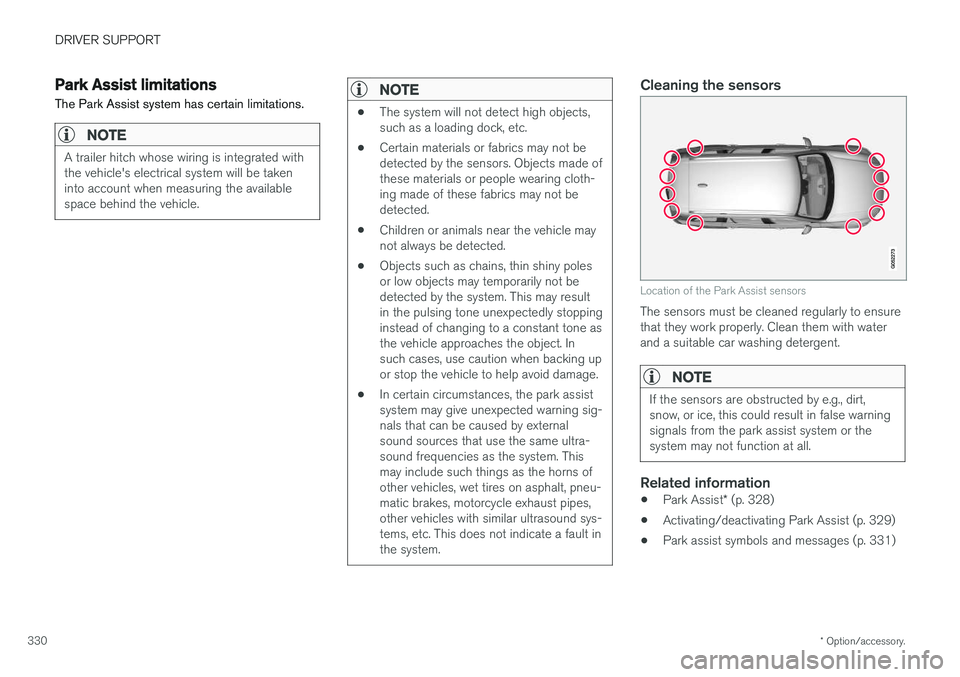
Location of the Park Assist sensors
The sensors must be cleaned regularly to ensure that they work properly. Clean them with waterand a suitable car washing detergent.
NOTE
If the sensors are obstructed by e.g., dirt, snow, or ice, this could result in false warningsignals from the park assist system or thesystem may not function at all.
Related information
•
Park Assist
* (p. 328)
• Activating/deactivating Park Assist (p. 329)
• Park assist symbols and messages (p. 331)
Page 333 of 548
DRIVER SUPPORT
* Option/accessory.331
Park assist symbols and messages
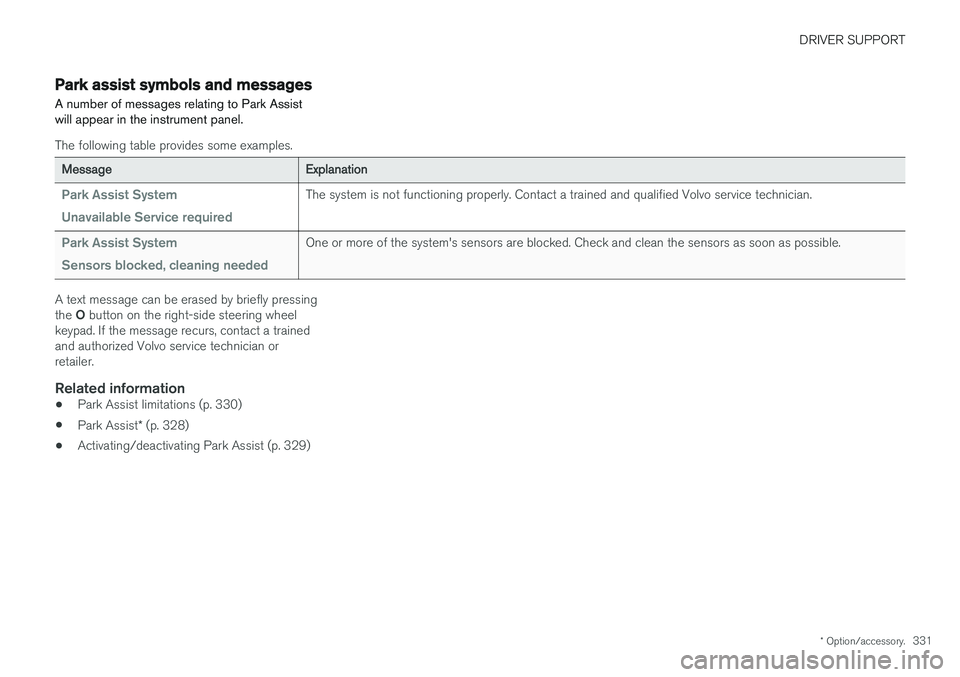
A number of messages relating to Park Assist will appear in the instrument panel.
The following table provides some examples.
Message Explanation
Park Assist System Unavailable Service requiredThe system is not functioning properly. Contact a trained and qualified Volvo service technician.
Park Assist System Sensors blocked, cleaning neededOne or more of the system's sensors are blocked. Check and clean the sensors as soon as possible.
A text message can be erased by briefly pressing the O button on the right-side steering wheel
keypad. If the message recurs, contact a trained and authorized Volvo service technician orretailer.
Related information
• Park Assist limitations (p. 330)
• Park Assist
* (p. 328)
• Activating/deactivating Park Assist (p. 329)