fuel VOLVO S90 2018 Owner´s Manual
[x] Cancel search | Manufacturer: VOLVO, Model Year: 2018, Model line: S90, Model: VOLVO S90 2018Pages: 640, PDF Size: 11.37 MB
Page 5 of 640
3
Top tether anchors72
Lower child seat attachment points 73
ISOFIX/LATCH lower anchors 74
DISPLAYS AND VOICE CONTROL
Instruments and controls in left-hand drive vehicles78
Instrument panel 80
Instrument panel settings 84
Fuel gauge 85
Trip computer 85
Displaying trip data in the instrumentpanel 87
Resetting the trip odometer 88
Displaying trip statistics in the centerdisplay 88
Trip statistics settings 89
Date and time 90
Ambient temperature sensor 90
Indicator symbols in the instrument panel 91
Warning symbols in the instrument panel 93
Instrument panel licenses 94
App menu in instrument panel 100
Handling the App menu in the instru-ment panel 101
Messages in the instrument panel 102
Handling messages in the instru-ment panel 103
Handling messages saved from theinstrument panel 105
Center display overview 107
Handling the center display110
Activating and deactivating the cen- ter display 113
Navigating in the center display's views 113
Handling tiles in the center display 117
Function view in the center display 120
Moving apps and buttons in the cen-ter display 122
Symbols in the center display status bar 122
Using the center display keyboard 124
Changing keyboard language in thecenter display 127
Entering characters, letters andwords by hand in the center display 127
Changing the appearance of thecenter display 129
Turning off and adjusting the volumeof the center display system sounds 129
Changing system units of measurement 130
Changing system language 130
Opening settings in the center display 130
Opening contextual setting in thecenter display 131
Changing settings in the center display 132
Resetting user data when the vehiclechanges owners 132
Resetting center display settings 133
Page 12 of 640
10
Using the steering wheel paddles* to
shift 409
Shiftlock 411
Deactivating the automatic shiftlock 411
The kickdown function 412
Gear indicator *
412
All Wheel Drive (AWD) *
413
Drive modes *
413
Changing drive mode *
415
ECO drive mode 415
Activating and deactivating ECO drive mode using the function button 417
Start/Stop function 418
Driving with the Start/Stop function 418
Temporarily deactivating the Start/Stop function 419
Conditions for the Start/Stop function 420
Leveling control * and suspension
422
Leveling control settings *
424
Economical driving 424
Preparing for a long trip 425
Winter driving 425
Driving through standing water 426
Opening/closing the fuel filler door 427
Refueling 427
Fuel428
Octane rating 429
Emission controls 431
Overheating of engine and transmission 431
Battery drain 432
Jump starting using another battery 433
Towing using a towline 434
Attaching and removing the towing eyelet 435
Recovery 437
HomeLink ®
* 437
Programming HomeLink ®
* 438
Using HomeLink 439
Type approval for HomeLink ®
* 440
Compass 441
Activating and deactivating the compass 441
Calibrating the compass 441
AUDIO, MEDIA AND INTERNET
Audio, media and Internet444
Sound settings 444
Apps 445
Download apps 446
Updating apps 447
Deleting apps 448
Radio 448
Starting the radio 449
Changing waveband and radio station 449
Searching for a radio station 450
Storing radio favorites 451
Radio settings 451
RBDS 452
HD Radio ™
452
Activating and deactivating the HD Radio ™ 454
HD Radio ™ sub-channels
454
HD Radio ™ limitations
455
SiriusXM ®
Satellite radio * 456
Using SiriusXM ®
Satellite radio *457
Settings for SiriusXM ®
Satellite radio *458
SiriusXM Travel Link ®
* 460
SiriusXM Travel Link ®
* - Weather 461
SiriusXM Travel Link ®
* - Notifications 462
Page 13 of 640
11
SiriusXM Travel Link®
* - Fuel 463
SiriusXM Travel Link ®
* - Sports 464
Media player 465
Playing media 466
Controlling and changing media 467
Media searches 468
Gracenote ®
469
CD player *
469
Video 470
Playing video 470
Playing DivX ®
470
Video settings 471
Streaming media via Bluetooth ®
471
Connecting a device via Bluetooth ®
471
Playing media via the USB port 472
Connecting a device via the USB port 472
Apple ®
CarPlay ®
* 473
Using Apple ®
CarPlay ®
* 473
Settings for Apple ®
CarPlay ®
* 474
Tips for using Apple ®
CarPlay ®
* 475
Android Auto *
476
Using Android Auto *
476
Settings for Android Auto *
477
Tips for using Android Auto *
478
Phone 478
Connecting a phone to the car via Bluetooth for the first time 479
Connecting a phone to the car viaBluetooth automatically 481
Connecting a phone to the car viaBluetooth manually 481
Disconnecting a Bluetooth-con-nected phone 482
Switch between phones connectedvia Bluetooth 482
Removing a Bluetooth-connected phone 483
Handling phone calls 483
Handling text messages 484
Text message settings 485
Managing the phone book 485
Phone settings 486
Settings for Bluetooth devices 487
Internet-connected vehicle *
487
Connecting the car to the Internetvia a mobile device (Bluetooth) 489
Connecting the car to the Internetvia a mobile device (Wi-Fi) 489
Connect the car to the Internet viacar modem (SIM card) 490
Vehicle modem settings 491
Sharing Internet from the vehicle via Wi-Fi hotspot (tethering)491
No or poor Internet connection 492
Deleting Wi-Fi networks 493
Wi-Fi technology and security 493
Terms of use and data sharing 494
Activating and deactivating data sharing 494
Compatible file formats for media 494
Technical specifications for USB devices 495
Hard disk storage space 496
License agreement for audio and media 497
Page 16 of 640
14
SPECIFICATIONS
Type designations610
Dimensions 613
Weights 615
Towing capacity and tongue weight 616
Engine specifications 617
Engine oil specifications 618
Coolant specifications 619
Transmission fluid specifications 619
Brake fluid specifications 619
Fuel tank volume 620
Air conditioning specifications 620
Approved tire pressure 621
INDEX
Index 623
Page 29 of 640
YOUR VOLVO
}}
* Option/accessory.27
Creating and registering a Volvo ID
A Volvo ID can be created in two ways. If your Volvo ID was created with the Volvo On Callapp, the Volvo IDmust also be registered to thevehicle to enable access to the Volvo ID serv-ices.
Creating a Volvo ID using the app
1. Download the Volvo ID app from Download
Center in the center display's App view.
2. Start the app and register a personal email address.
3. Follow the instructions that will be sent auto- matically to this email address.
> A Volvo ID has now been created and isautomatically registered to the vehicle. The Volvo ID services can now be used.
Creating a Volvo ID using the Volvo On Call
app3
1. Download the latest version of the Volvo On Call app from a smartphone, via e.g. App Store, Windows Phone or Google Play.
2. On the app's start page, create a Volvo ID and enter a personal email address.
3. Follow the instructions that will be sent auto- matically to this email address.
> A Volvo ID has now been created. Seebelow for information on how the ID is registered to the vehicle.
Registering your Volvo ID to the vehicleIf your Volvo ID was created using the Volvo OnCall app, follow these steps to register the ID tothe vehicle:
1. If you have not already done so, download
the Volvo ID app from
Download Center in
App view.
NOTE
To download apps the vehicle must be con- nected to the internet.
2. Start the app and enter your Volvo ID/email address.
3. Follow the instructions that will be automati- cally sent to the email address connected to your Volvo ID.
> Your Volvo ID has now been registered tothe vehicle. The Volvo ID services can now be used.
Related information
• Volvo ID (p. 26)
• Download apps (p. 446)
• Handling system updates via Download Cen-ter (p. 551)
• Internet-connected vehicle
* (p. 487)
Drive-E ‒ purer driving pleasure
Volvo is committed to the well-being of its cus- tomers. As a natural part of this commitment, wecare about the environment in which we all live.Concern for the environment means an everydayinvolvement in reducing our environmentalimpact.
Volvo's environmental activities are based on a holistic view, which means we consider the over-all environmental impact of a product throughoutits complete life cycle. In this context, design, pro-duction, product use, and recycling are all impor-tant considerations. In production, Volvo haspartly or completely phased out several chemicalsincluding CFCs, lead chromates, asbestos, andcadmium; and reduced the number of chemicalsused in our plants 50% since 1991. Volvo was the first in the world to introduce into production a three-way catalytic converter with aLambda sond, now called the heated oxygen sen-sor, in 1976. The current version of this highlyefficient system reduces emissions of harmfulsubstances (CO, HC, NOx) from the exhaust pipeby approximately 95 - 99% and the search toeliminate the remaining emissions continues.Volvo is the only automobile manufacturer tooffer CFC-free retrofit kits for the air conditioningsystem of all models as far back as the 1975model 240. Advanced electronic engine controlsand cleaner fuels are bringing us closer to our
3 Vehicles with Volvo On Call.
Page 30 of 640
||
YOUR VOLVO
* Option/accessory.
28 goal. In addition to continuous environmental refinement of conventional gasoline-poweredinternal combustion engines, Volvo is activelylooking at advanced technology alternative-fuelvehicles. When you drive a Volvo, you become our partner in the work to lessen the vehicle's impact on theenvironment. To reduce your vehicle's environ-mental impact, you can:
• Maintain proper air pressure in your tires.Tests have shown decreased fuel economywith improperly inflated tires.
• Follow the recommended maintenanceschedule in your Warranty and ServiceRecords Information booklet.
• Drive at a constant speed whenever possible.
• See a trained and qualified Volvo servicetechnician as soon as possible for inspectionif the check engine (malfunction indicator)light illuminates, or stays on after the vehiclehas started.
• Properly dispose of any vehicle-related wastesuch as used motor oil, used batteries, brakepads, etc.
• When cleaning your vehicle, please use gen-uine Volvo car care products. All Volvo carcare products are formulated to be environ-mentally friendly.
Related information
•Economical driving (p. 424)
• Air quality (p. 199)
IntelliSafe - driver support
IntelliSafe is Volvo Cars' philosophy regarding vehicle safety. IntelliSafe consists of a number ofsystems, both standard and optional, that aredesigned to help make driving safer, preventaccidents and protect passengers and otherroad users.
SupportIntelliSafe includes driver support functions such as Adaptive cruise control * which helps the driver
to maintain an even speed combined with a pre- selected time interval to the vehicle ahead. Pilot Assist 4
helps the driver keep the vehicle in
the current traffic lane by providing steering assistance and maintaining an even speed and aset time interval to the vehicle ahead. Park Assist Pilot * helps the driver pull into and
out of parking spaces. Other examples of systems that can help the driver are the Active main beam, Cross Traffic Alert (CTA) * and Blind Spot Information (BLIS) *
systems.
PreventionCity Safety is a function intended to help prevent accidents. The function can help prevent or miti-gate a collision with pedestrians, cyclists, largeanimals or other vehicles. Light, sound and pulsa-tions in the brake pedal are provided to alert of a
4 Depending on market, this function can be either standard or optional.
Page 53 of 640
SAFETY
}}
51
Resetting the electric seat belttensionersThe electric seat belt tensioners are designed to be reset automatically, but if the seat beltremains taut it can be reset manually.
1. Stop the vehicle in a safe location.
2. Unbuckle the seat belt and then rebuckle it.
> The seat belt and the electric seat belttensioner will be reset.
WARNING
Never attempt to alter or repair the seat belt on your own. Volvo recommends contactingan authorized Volvo workshop. If the seat belt has been exposed to extreme forces, e.g. in conjunction with a collision, theentire seat belt must be replaced. Even if theseat belt appears undamaged, some of itsprotective properties may have been lost. Alsoreplace the seat belt if it is worn or damaged.The new seat belt must be type approved andintended for the same seating position as thereplaced seat belt.
Related information
• Seat belt tensioners (p. 50)
• Seat belts (p. 47)
Door and seat belt reminders
This system is intended to remind occupants to buckle their seat belts and to alert the driver if adoor or the hood, trunk lid or fuel filler door isopen.
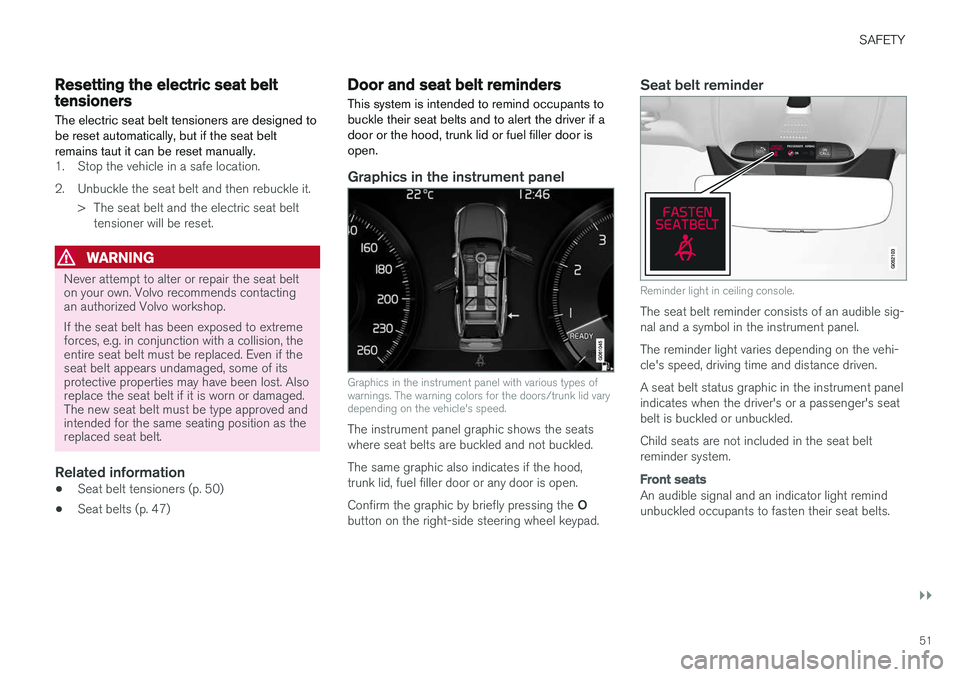
Graphics in the instrument panel
Graphics in the instrument panel with various types of warnings. The warning colors for the doors/trunk lid varydepending on the vehicle's speed.
The instrument panel graphic shows the seats where seat belts are buckled and not buckled. The same graphic also indicates if the hood, trunk lid, fuel filler door or any door is open. Confirm the graphic by briefly pressing the O
button on the right-side steering wheel keypad.
Seat belt reminder
Reminder light in ceiling console.
The seat belt reminder consists of an audible sig- nal and a symbol in the instrument panel. The reminder light varies depending on the vehi- cle's speed, driving time and distance driven. A seat belt status graphic in the instrument panel indicates when the driver's or a passenger's seatbelt is buckled or unbuckled. Child seats are not included in the seat belt reminder system.
Front seats
An audible signal and an indicator light remind unbuckled occupants to fasten their seat belts.
Page 54 of 640
||
SAFETY
52
Rear seat
The rear seat belt reminder has two functions:• To indicate which seat belts are buckled in the rear seats. This will also be displayed inan instrument panel graphic.
• To provide audio and visual reminders if anyseat belt in the rear seat is removed whilethe vehicle is in motion. The reminder willstop when the seat belt has been rebuckled.
Door/hood/trunk lid and fuel filler door
reminder
If the hood, trunk lid, fuel filler door or any door isnot properly closed, this will be indicated by agraphic in the instrument panel. Stop the vehiclesafely and close the open door, hood, etc.
If the vehicle is moving at a speedunder approx. 10 km/h (6 mph), theinformation symbol will illuminate in theinstrument panel.
If the vehicle is moving at a speed above approx. 10 km/h (6 mph), thewarning symbol will illuminate in theinstrument panel.
Related information
•Seat belts (p. 47)
• Buckling and unbuckling seat belts (p. 48)
Airbags
The vehicle is equipped with airbags and inflat- able curtains for the driver and passengers.
WARNING
• If the airbag warning light stays on after the engine has started or if it illuminateswhile you are driving, have the vehicleinspected by a trained and qualified Volvoservice technician as soon as possible.
• Never attempt to alter or repair any of thevehicle's safety systems yourself. Incor-rectly performed repairs to any systemcould impair function and lead to seriousinjury. All work on these systems shouldbe performed by a trained and qualifiedVolvo service technician.
WARNING
If your vehicle has become water-damaged in any way (e.g., soaked floor mats/standingwater on the floor of the vehicle), do notattempt to start the engine. This may causeairbag deployment, which could result in seri-ous injury. Volvo recommends towing thevehicle directly to an authorized Volvo work-shop. Before attempting to tow the vehicle:
1. Switch off the ignition for at least 10
minutes and disconnect the battery.
2. Follow the instructions for manually over- riding the shiftlock system.
Deployed airbags
WARNING
If any of the airbags have deployed:
• Do not attempt to drive the vehicle. Have it towed to an authorized workshop.
• If necessary, seek medical attention.
Related information
•
Safety (p. 42)
• Driver/passenger-side airbags (p. 53)
• Side airbags (p. 59)
• Inflatable curtain (p. 60)
Page 63 of 640

SAFETY
61
Related information
•Airbags (p. 52)
Safety mode Safety mode is a feature that is triggered after a collision if there is potential damage to an impor-tant function in the vehicle, such as the fuellines, sensors for one of the safety systems, thebrake system, etc.
If the vehicle has been involved in a collision, the text Safety mode See Owner's manual may
appear in the instrument panel along with the warning symbol if the panel is undamaged andthe vehicle's electrical system is intact. The mes-sage indicates that one or more of the vehicle'sfunctions may be reduced.
WARNING
Never attempt to restart the vehicle if you smell fuel fumes when the message Safety
mode See Owner's manual is displayed in
the instrument panel. Leave the vehicle imme- diately.
If safety mode has been set, it may be possible to reset the system in order to start and move thevehicle a short distance, for example, if it is block-ing traffic.
WARNING
Never attempt to perform repairs or reset electrical components on your own after thevehicle has been in safety mode. This couldresult in injury or prevent the vehicle fromfunctioning properly. Volvo recommends hav-ing the vehicle inspected and reset to normaloperating status by an authorized Volvo work- shop after
Safety mode See Owner's
manual has been displayed.
WARNING
When the vehicle is in safety mode, it should not be towed behind another vehicle. It shouldbe towed from the site on a tow truck. Volvorecommends towing the vehicle directly to anauthorized Volvo workshop.
Related information
• Safety (p. 42)
• Starting and moving the vehicle when it is in safety mode (p. 62)
• Recovery (p. 437)
Page 64 of 640
SAFETY
62
Starting and moving the vehiclewhen it is in safety mode If safety mode has been set, it may be possible to reset the system in order to start and movethe vehicle a short distance, for example, if it isblocking traffic.
Starting the vehicle when it is in safety mode
1. Check the vehicle for damage, particularly forfuel leakage. Make sure you do not detect any gasoline fumes. If the damage to the vehicle is minor and there is no fuel leakage/fumes, you mayattempt to start the engine.
WARNING
Never attempt to restart the vehicle if you smell fuel fumes when the message Safety
mode See Owner's manual is displayed in
the instrument panel. Leave the vehicle imme- diately.
2. Switch off the ignition. 3. Then try to start the vehicle.
> The vehicle's electrical system will per-form a system check and then attempt to reset to normal operating mode.
CAUTION
If the message Safety mode See Owner's
manual is still displayed, the vehicle should
not be driven or towed behind another vehi- cle. If the vehicle needs to be moved, it mustbe towed on a tow truck. Even if no damageis apparent, there may be hidden damage thatcould make the vehicle impossible to control.
Moving the vehicle when it is in safety mode
1. If the message Normal mode The vehicle
is now in normal mode is displayed after
attempting to start the engine, the vehicle may be moved carefully from its presentposition if, for example, it is blocking traffic.
2. Do not move the vehicle farther than abso- lutely necessary.
WARNING
When the vehicle is in safety mode, it should not be towed behind another vehicle. It shouldbe towed from the site on a tow truck. Volvorecommends towing the vehicle directly to anauthorized Volvo workshop.
Related information
• Safety mode (p. 61)
• Starting the vehicle (p. 394)
• Recovery (p. 437)