four wheel drive VOLVO S90 2020 Quick Guide
[x] Cancel search | Manufacturer: VOLVO, Model Year: 2020, Model line: S90, Model: VOLVO S90 2020Pages: 643, PDF Size: 13.68 MB
Page 324 of 643
||
DRIVER SUPPORT
322
your lane must have clear side lane mark- ings
your vehicle must be positioned straight inyour lane
the oncoming vehicle must be positionedwithin your vehicle's lane markings
the oncoming vehicle's headlights mustbe on
the function can only handle “front-to-front” collisions
the function can only detect vehicles withfour wheels.
WARNING
Warnings and brake interventions due to an imminent collision with an oncomingvehicle always come very late.
Related information
City Safety
™ (p. 312)
City Safety limitations (p. 322)
City Safety limitations
City Safety 57
functionality may be reduced in
certain situations.
Surroundings
Low objects
Hanging objects, such as flags for overhang- ing loads or accessories such as auxiliarylights or front protective grids that extendbeyond the height of the hood, may limit City Safety functionality.
Slippery road conditions
The extended braking distance on slippery roads may reduce City Safety's capacity tohelp avoid a collision. In these types of situa-tions, the Anti-lock Braking System and Elec- tronic Stability Control (ESC 58
) are designed
for optimal braking power with maintained stability.
Backlighting
The visual warning signal in the windshield may be difficult to detect in bright sunlight, ifthere are reflections, or if the driver is wearingsunglasses or not looking straight ahead.
Heat
If the temperature in the passenger compart- ment is high due to e.g. bright sunlight, thevisual warning signal in the windshield may betemporarily disabled.
Camera and radar sensor's field of vision
The camera's field of vision is limited and in certain situations, it may be unable to detectpedestrians, large animals, cyclists or vehicles,or it may detect them later than expected. Vehicles that are dirty may be detected later than clean vehicles, and in dark conditions,motorcycles may be detected late or not at all. If a text message displayed in the instrument panel indicates that the camera/radar sensoris obstructed, it may be difficult for City Safetyto detect pedestrians, large animals, cyclists,vehicles or lane markings in front of the vehi-cle. City Safety functionality may therefore bereduced. Text messages may not be displayed for all sit- uations in which the windshield sensors areblocked. The driver must therefore alwayskeep the windshield in front of the camera/radar sensor clean.
CAUTION
Only a workshop may perform mainte- nance on driver support components – anauthorized Volvo workshop is recom-mended.
57 This function is not available on all markets.
58 Electronic Stability Control
Page 401 of 643

STARTING AND DRIVING
}}
* Option/accessory.399
All Wheel Drive (AWD) *
All-wheel drive (AWD 8
), also called four-
wheel drive, means that power is distributed to all four wheels, which improves traction.
To achieve the best traction, power is auto- matically directed to the wheels that have thebest grip. The system continuously calculatesthe need for torque to the rear wheels, andcan immediately redistribute up to half of theengine's torque to the rear wheels. All-wheel drive also has a stabilizing effect at higher speeds. In normal driving conditions,most of the engine's power is directed to thefront wheels. When the vehicle is stationary,all-wheel drive is always activated in prepara-tion for maximum traction during acceleration. All-wheel drive reacts differently depending on which drive mode is selected.
Related information
Drive modes
* (p. 399)
Transmission (p. 391)
Drive modes
*
Drive modes affect the vehicle's driving cha- racteristics in different ways to enhance andsimplify the driving experience in certaintypes of situations.
Drive modes enable easy access to the vehi- cle's many functions and settings in differentdriving situations. The following systems areadapted to help optimize driving characteris-tics in each drive mode: Steering
Engine/transmission/all-wheel drive
*
Brakes
Shock absorbers
Instrument panel
Start/Stop function
Climate control settings
Select the drive mode that is adapted to the current driving conditions. Keep in mind thatnot all drive modes are available in all situa-tions.
Available drive modesWhen the engine is started, the vehicle will be in Comfort mode and the start/stop function
will be activated. Drive mode can be changed once the vehicle is started, e.g. to
Individual
mode. Once Individual mode is selected, you
can adjust settings to personal preferences, e.g. to show the tachometer.
Comfort
Comfort is the vehicle's default mode. This
setting offers driving comfort, light steering and soft suspension. In
Comfort mode, no tachometer will be dis-
played in the instrument panel 9
.
Eco
Adapt the vehicle for more fuel-efficient and eco-friendly driving with Eco mode.
In this mode, the Start/Stop function is acti- vated and certain climate settings arereduced. When driving in
Eco mode, an ECO gauge
indicating how economical the driving is will be displayed in the instrument panel.
8 All Wheel Drive
9 Only applies to vehicles with 8-inch instrument panels.
Page 402 of 643

||
STARTING AND DRIVING
* Option/accessory.
400
Dynamic
Dynamic mode is designed to help pro-
vide sportier driving characteristics and a faster acceleration response.
Gear shifting will be faster and more distinctand the transmission will prioritize gears witha higher traction force. Steering response is faster and suspension is stiffer 10
to help reduce body roll when corner-
ing. The Start/Stop function is deactivated.
Dynamic mode is also available in a Polestar
Engineered* version.
Individual
Customizes drive mode to personal prefer- ences.
Select one of the drive modes as a basis andadjust the settings to achieve your preferreddriving characteristics. These settings will bestored in the active driver profile and will beavailable every time the vehicle is unlockedwith that remote key. Individual drive mode is only available if it has been activated in the center display.
Settings view 11
for Individual drive mode.
1. Tap Settings in the Top view.
2. Tap
My CarIndividual Drive Modeand select Individual Drive Mode. 3.
Under
Presets, select one of the following
drive modes as a basis: Eco, Comfort,Dynamic or Polestar Engineered* .
The following settings can be modified:
Driver Display
Steering Force
Powertrain Characteristics
Brake Characteristics
Suspension Control
ECO Climate
Start/Stop.
Related information
Changing drive mode
* (p. 401)
Eco drive mode (p. 401)
Economical driving (p. 411)
Start/Stop function (p. 404)
All Wheel Drive (AWD)
* (p. 399)
Driver profiles (p. 133)
10
Vehicles with Four-C.
11 The illustration is generic - details may vary according to vehicle model.
Page 502 of 643
WHEELS AND TIRES
500
TiresThe function of the tires is to carry loads, pro- vide traction on road surfaces, reduce vibra-tions and protect the wheels from wear.
The tires significantly influence the vehicle's driving characteristics. The type, dimensions,tire pressure and speed rating have a consid-erable impact on how the vehicle performs. Your vehicle is equipped with tires according to the vehicle's tire information placard on theB-pillar (the structural member at the side ofthe vehicle, at the rear of the driver's dooropening).
WARNING
A damaged tire could cause the driver to lose control of the vehicle.
CAUTION
Some Volvo models are equipped with an Ultra High Performance tire and wheelcombination designed to provide maxi-mum dry pavement performance with con-sideration for hydroplaning resistance.They may be more susceptible to road haz-ard damage and, depending on drivingconditions, may achieve a tread life of lessthan 30,000 km (20,000 miles). Even ifthis vehicle is equipped with Volvo'sadvanced AWD or stability system, thesetires are not designed for winter driving,and should be replaced with winter tireswhen weather conditions dictate.
The tires have good road holding characteris- tics and offer good handling on dry and wetsurfaces. It should be noted however that thetires have been developed to give these fea-tures on snow/ice-free surfaces. Most models are equipped with "all-season" tires, which provide a somewhat higherdegree of roadholding on slippery road surfa-ces than tires without the "all-season" rating.However, for optimal roadholding on icy orsnow-covered roads, Volvo recommendssnow tires on all four wheels. When replacing tires, be sure that the newtires are the same size designation, type(radial) and preferably from the same manu-facturer, on all four wheels. Otherwise there isa risk of altering the vehicle's roadholding andhandling characteristics.
Recommended tiresOn delivery, the car is equipped with Volvo original tires that have the VOL
1
marking on
the side of the tires. These tires have been designed specifically for your vehicle. It istherefore important when replacing tires thatthe new tires have this same marking to helpmaintain the vehicle's driving characteristics,comfort and fuel consumption.
New tires
1 This may vary for certain tire dimensions.
Page 507 of 643

WHEELS AND TIRES
505
NOTE
The tire's load index and speed rating may not appear on the sidewall because theyare not required by law.
7.M+S or M/S = Mud and Snow, AT = All
Terrain, AS = All Season
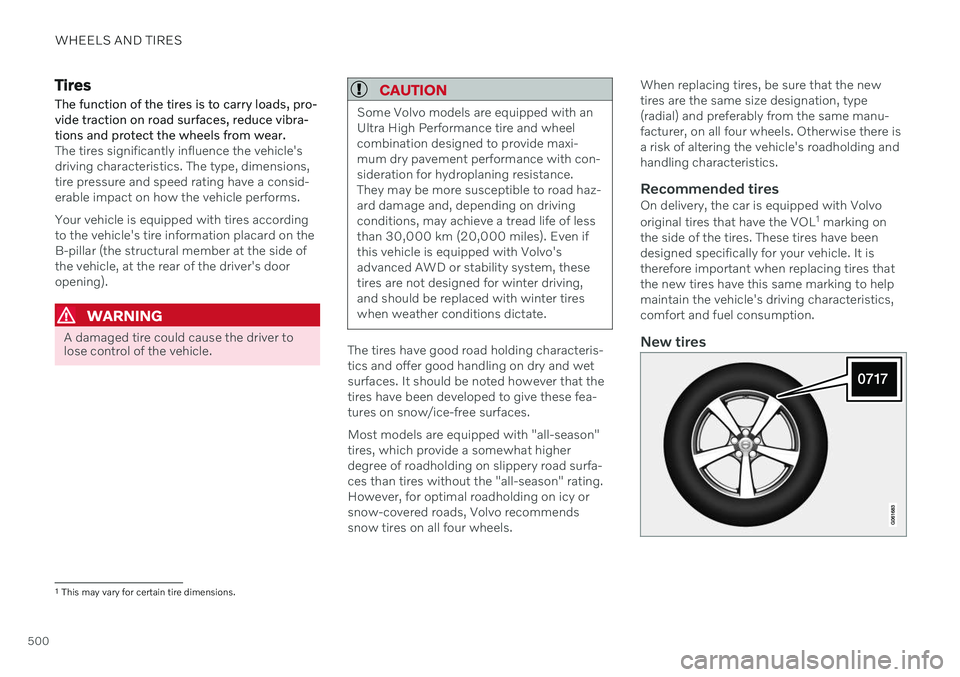
8. U.S. DOT Tire Identification Number (TIN) : This begins with the letters "DOT"
and indicates that the tire meets all federalstandards. The next two numbers are thefactory code where the tire was manufac-tured, the next two are the tire size codeand the last four numbers represent theweek and year the tire was made. Forexample, 0717 means that the tire wasmanufactured during week 7 of 2017. Thenumbers in between are marketing codesused at the manufacturer's discretion. Thisinformation helps a tire manufactureridentify a tire for safety recall purposes.
9. Tire Ply Composition and Material Used :
Indicates the number of plies indicates orthe number of layers of rubber-coated fab-ric in the tire tread and sidewall. Tire man-ufacturers also must indicate the plymaterials in the tire and the sidewall,which include steel, nylon, polyester, andothers.
10. Maximum Load : Indicates the maximum
load in pounds and kilograms that can be carried by the tire. Refer to the vehicle'stire information placard located on the B-Pillar for the correct tire pressure for yourvehicle.
11. Treadwear, Traction, and Temperaturegrades .
12. Maximum permissible inflationpressure: the greatest amount of air pres-
sure that should ever be put in the tire.This limit is set by the tire manufacturer.
Speed SymbolA tire's Speed Symbol (SS) indicates the maxi-mum speed for which the tire has been certi-fied and should be at least equivalent to thevehicle's top speed. Winter tires, with or without studs, are excep- tions and may use a lower SS. When wintertires are installed, the vehicle may not bedriven faster than the tires' SS. The vehicle's speed should always be deter- mined by the posted speed limit and trafficand road conditions, not the tire's SS. The following table indicates the maximum permissible speed for each SS.
M 130 km/h (81 mph)
Q 160 km/h (100 mph)
T 190 km/h (118 mph)
H 210 km/h (130 mph)
V 240 km/h (149 mph)
W 270 km/h (168 mph)
Y 300 km/h (186 mph)
WARNING
The wheel and tire sizes for your Volvo are specified to meet stringent stabilityand handling requirements. Unap-proved wheel/tire size combinationscan negatively affect your vehicle's sta-bility and handling.
Any damage caused by installation ofunapproved wheel/tire size combina-tions will not be covered by your newvehicle warranty. Volvo assumes noresponsibility for death, injury, orexpenses that may result from suchinstallations.
Related information
Tires (p. 500)
Page 513 of 643
WHEELS AND TIRES
* Option/accessory.511
Saving a new inflation pressure in the monitoring system *
In order for the tire pressure monitoring sys- tem 9
to function correctly, tire pressure refer-
ence values must be saved correctly. To help ensure that the system can correctly alert thedriver of low inflation pressure, this must bedone each time the tires are changed or theinflation pressure is adjusted.
For example, when driving with a heavy load or at high speeds (over 160 km/h (100 mph)),tire pressure should be adjusted to the Volvo-recommended tire pressure values. The sys-tem should then be reset by saving the newinflation pressure. To store the new inflation pressure as a refer- ence value in the system:
1. Switch off the ignition.
2. Inflate the tire to the correct inflation pres- sure; see the tire pressure placard on the driver's side B pillar for recommendedpressures for factory-mounted tires.
3. Start the vehicle. 4. Open the
Car Status app in App view.
5. Tap
TPMS.
NOTE
The vehicle must be stationary for theStore Pressure button to be selectable.
6.Tap Store Pressure.
7. Tap
OK to confirm that the tire pressure in
all four tires has been checked and adjusted.
8. Drive the vehicle until the new inflation pressure has been saved. The new infla-tion pressure is stored when the vehicle isdriven at speeds over 35 km/h (22 mph).
> When enough data has been collectedfor the system to detect low inflation pressure, the animation showing theprogress of the storing procedure willdisappear from the center display. Thesystem will not provide any further con-firmation that the new inflation pres-sure has been stored.
If storing cannot be performed,
Storing
pressure unsuccessful. Try again. will be
displayed. If the vehicle's ignition is switched off before the new inflation pressure has been saved, theprocedure must be performed again. To helpensure that the new inflation pressure is saved correctly, allow the storing procedure to com-plete during a single operating cycle.
WARNING
The exhaust gases contain carbon monox- ide, which is invisible and odorless but verypoisonous. The procedure for saving a newinflation pressure must therefore always beperformed outdoors or in a workshop withexhaust gas extraction.
Related information
Recommended tire pressure (p. 509)
Adjusting tire pressure (p. 508)
Viewing tire pressure status in the center display
* (p. 512)
Action when warned of low tire pressure (p. 513)
Tire pressure monitoring system
* (p. 509)
9
Tire Pressure Monitoring System (TPMS)
Page 515 of 643
WHEELS AND TIRES
* Option/accessory.513
Action when warned of low tire pressure When the inflation pressure monitoring sys- tem11
detects low inflation pressure in a tire,
immediate action is required.
If the system's indicator symbol illu- minates and the message Tire
pressure low is displayed, check
the tire pressure and inflate if neces-
sary.
1. Switch off the ignition.
2. Check the inflation pressure on all four tires using a tire pressure gauge.
3. Inflate the tire to the correct inflation pres- sure; see the tire pressure placard on the driver's side B pillar for recommendedpressures for factory-mounted tires.
4. After the inflation pressure has been adjusted, always save the new inflationpressure in the system via the center dis-play. Please be aware that the indicator symbol will not go out until the low tire pressurehas been corrected and a storing proce-dure has been started for the new inflationpressure.
NOTE
To help prevent incorrect inflation pressure, pressure should be checked when the tiresare cold. The tires are considered to becold when they have reached the sametemperature as the ambient temperature(about 3 hours after the vehicle was lastdriven). After driving for a few kilometers,the tires will warm up and the pressure willincrease.
NOTE
After inflating a tire, always replace the valve cap to help prevent valve damagecaused by gravel, dirt, etc.
Use plastic valve caps only. Metal capscould corrode and become difficult toremove.
WARNING
Incorrect inflation pressure could lead to tire failure, which could cause thedriver to lose control of the vehicle.
The system cannot predict sudden tiredamage.
Related information
Recommended tire pressure (p. 509)
Adjusting tire pressure (p. 508)
Saving a new inflation pressure in the monitoring system
* (p. 511)
Viewing tire pressure status in the centerdisplay
* (p. 512)
Tire pressure monitoring system
* (p. 509)
Inflate tires with the compressor included in the tire sealing system (p. 527)
11
Tire Pressure Monitoring System (TPMS)
Page 596 of 643

||
MAINTENANCE AND SERVICE
* Option/accessory.
594
WARNING
Never use more than one inlay mat at a time on the driver's floor. If any othertype of floor mat is used, remove theoriginal mat from the driver's seat floorbefore driving. All types of mats mustbe securely anchored in the attach-ment points in the floor. Make sure thefloor mat does not impede the move-ment of the brake pedal or acceleratorpedal in any way, as this could be aserious safety hazard.
Volvo's floor mats are specially manu-factured for your vehicle. They must beproperly secured in the attachmentpoints in the floor to help ensure theycannot slide and become trappedunder the pedals.
Related information
Cleaning the interior (p. 591)
Cleaning the center display (p. 591)
Cleaning fabric upholstery and ceiling liner(p. 593)
Cleaning the seat belt (p. 593)
Cleaning leather upholstery
* (p. 594)
Cleaning the leather steering wheel(p. 595)
Cleaning interior plastic, metal and woodsurfaces (p. 595)
Cleaning leather upholstery
*
Only use cleaning agents and car care prod- ucts recommended by Volvo. Clean regularlyand treat stains immediately. It is importantto vacuum before using a cleaning agent.
Volvo's leather upholstery * is treated to pro-
tect its original appearance. Over time, sun- light, grease, dirt, etc. could break down theprotective layer. This could result in scratchesand cracking. Leather upholstery * is a natural product that
changes and acquires a beautiful patina over time. Regular cleaning and treatments arerequired to preserve the qualities and color ofthe leather. Volvo offers a comprehensiveproduct, Volvo Leather Care KitWipes, forcleaning and treating leather upholstery.When used as directed, it helps preserve theleather's protective coating. For optimal results, Volvo recommends clean- ing and applying protective cream one to fourtimes a year (or more often as needed). VolvoLeather Care Kit 951 0251 and Volvo LeatherSoftener 943 7429 are available for purchaseat Volvo retailers.
Cleaning the leather upholstery1. Apply the leather cleaner to a damp sponge and squeeze it until the cleanerfoams. 2. Move the sponge in circular motions to
apply the foam to the stain.
3. Dampen the stain thoroughly with the sponge. Let the sponge absorb the stainand do not rub.
4. Dry the stain using a soft towel and let the leather dry completely.
Protecting the leather upholstery1. Apply a small amount of leather protectorto a cloth and then apply the protector tothe leather using light circular movements.
2. Let it dry for approximately 20 minutes. > Protecting the leather upholsterymakes it better able to withstand sun-light's harmful UV rays.
Related information
Cleaning the interior (p. 591)
Cleaning the center display (p. 591)
Cleaning fabric upholstery and ceiling liner(p. 593)
Cleaning the seat belt (p. 593)
Cleaning floor mats and inlay mats(p. 593)
Cleaning the leather steering wheel(p. 595)
Cleaning interior plastic, metal and wood surfaces (p. 595)
Page 625 of 643

INDEX
623
1, 2, 3 ...
4WD 399
A
ABSanti-lock brakes 383
AC (Air conditioning) 223
Accessories and extra equipment 35 installation 36
Accessory installation warning 36, 37
Active Bending Lights 154
Adapting driving characteristics 399
Adaptive Cruise Control 276 activating 278
auto-brake 298
change cruise control functionality 282
limitations 281
manage speed 296
passing 302
set time interval 297
standby mode 280
switching target vehicles 295
Symbols and messages 283
troubleshooting 281
turn off 279
WARNING 294
Adjusting the steering wheel 193
Airbag 52
activation/deactivation 56
driver's side 53
passenger side 53, 56
Air bag, see Airbag 52
Air conditioning 223Air conditioning, fluid volume and grade 619
Air distribution 201 air vents 201, 203
changing 202
defrosting 215
recirculation 214
table showing options 204
Air quality 199, 200 allergy and asthma 200
passenger compartment filter 201
Air recirculation 214
Alarm 261 deactivating 262
Allergy and asthma-inducing sub-
stances 200
All Wheel Drive, AWD 399
All Wheel Drive (AWD) 399
All Wheel Drive (four-wheel drive) 399
Android Auto 468, 469, 470Antenna location 251
Apple CarPlay 464, 465, 467
Approach lighting 158
Apps 436Armrest folding down the rear seats 537
Assistance at risk of collision 349 activating/deactivating 350
at risk of run-off 350
during collision risks from behind 352during collision risks from oncoming
traffic 351
limitations 353
Symbols and messages 354
Audio and media 434 Audio system HD digital radio 445 SiriusXM ®
Satellite radio 446, 447,
449
Auto-climate 214
Auto hold 389
Auto-hold brakes 389 activating/deactivating 390
after collision 391
driver support 266
Automatic car wash 599
INDEX