park assist VOLVO S90 2020 Quick Guide
[x] Cancel search | Manufacturer: VOLVO, Model Year: 2020, Model line: S90, Model: VOLVO S90 2020Pages: 643, PDF Size: 13.68 MB
Page 374 of 643

||
DRIVER SUPPORT
* Option/accessory.
372
Positioning the vehicle in the parking space
Parallel parking positioning overview.
Perpendicular parking positioning overview.
1. Move the gear selector to the gear instruc-
ted by the system. Wait until the steering wheel turns and then drive slowly forward.
2. Be prepared to stop the vehicle when instructed to do so by a graphic and mes-sage in the center display.
3. Engage reverse gear and back up slowly.
4. Be prepared to apply the brakes when instructed to do so by a graphic and mes- sage in the center display.
The function will switch off automatically anda graphic and message will appear to indicatethat parking has been completed. Adjust-ments can always be made be the driver after-ward. Only the driver can determine when thevehicle is correctly parked.
CAUTION
The warning distance is shorter when the sensors are used by Park Assist Pilot (PAP 99
) compared to when they are used
by the Parking Assist system.
Related information
Park Assist Pilot
* (p. 368)
Park Assist Pilot
* limitations (p. 373)
Leaving a parallel parking space with Park Assist Pilot *
The
Park Out function can help the driver to
pull out of a parking space when the vehicle is parallel-parked.
NOTE
Leaving a parking space with the Park Outfunction should only be used in connection with parallel parking – it does not work forperpendicular parking.
The Park Out function is acti-
vated in the center display's Function view or in Cameraview.
GREEN button indicator light – the func- tion is activated.
GRAY button indicator light – the functionis deactivated.
1. Tap
Park Out in Function view or in Cam-
era view.
2. Move the gear selector to the suitable position (e.g. D or R) for the direction in which you will be pulling out of the park-ing space.
99Park Assist Pilot
Page 375 of 643

DRIVER SUPPORT
}}
* Option/accessory.373
3. Be prepared to stop the vehicle when
instructed to do so by a graphic and mes- sage in the center display. Follow theinstructions in the same way as for theparking procedure.
Note that the steering wheel can "spring"back when the procedure is completed andthe driver may need to turn the steering wheelback to the maximum position in order to pullout of the parking space. If the function determines that the driver can pull out of the parking space without any extramaneuvers, the function will be deactivated,even if it seems as though the vehicle is notcompletely out of the parking space.
Related information
Park Assist Pilot
* (p. 368)
Park Assist Pilot
* limitations (p. 373)
Park Assist Pilot * limitations
Park Assist Pilot (PAP 100
) may not be able to
detect all conditions in all situations and func- tionality may therefore be limited.
WARNING
The parking sensors have dead/blind spots where objects cannot bedetected.
Pay particular attention to people andanimals near the vehicle.
Bear in mind that the front end of thevehicle may swing out towards oncom-ing traffic during the parking maneuver.
CAUTION
Objects situated higher than the detection area of the sensors are not included whenthe parking maneuver is calculated, whichcould cause the function to swing into theparking space too early. Such parkingspaces should be avoided for this reason.
The driver should be aware of the following limitations for Park Assist Pilot:
The parking sequence is cancelledA parking sequence will be cancelled if: the driver moves the steering wheel
the vehicle's speed exceeds 7 km/h (4 mph)
the driver taps
Cancel in the center dis-
play
when the anti-lock brakes or the Elec- tronic stability control are engaged - e.g.when a wheel loses grip on a slippery road
when speed-dependent power steeringwheel resistance is working at reducedpower – e.g. during cooling due to over-heating.
A message in the center display will explainwhy the parking sequence was cancelled.
CAUTION
Under certain circumstances, the function may not be able to find parking spaces –one reason may be that the sensors aredisrupted by external sound sources thatemit the same ultrasonic frequencies thatthe system works with. Examples of such sources include horns, wet tires on asphalt, pneumatic brakes,exhaust noise from motorcycles, etc.
100 Park Assist Pilot
Page 376 of 643

||
DRIVER SUPPORT
* Option/accessory.
374
NOTE
Dirt, ice and snow covering the sensors reduce their function and can make meas-urement impossible.
Driver responsibilityThe driver should keep in mind that the func- tion is a parking aid ‒ not an infallible fully
automatic system. The driver must always beprepared to take control and cancel a parkingsequence if necessary. There are a number of things to keep in mind when parking, including:
The driver is always responsible for deter-mining if the space suggested by the func- tion is suitable for parking.
Do not use the function when using snow chains or a temporary spare tire.
Do not use the function if there are anyobjects protruding from the vehicle.
Heavy rain or snowfall may inhibit PAP'sability to accurately measure a parkingspace.
While searching and measuring the park-ing space, the function may be unable todetect objects located far into the space.
PAP may not suggest parking spaces onnarrow streets if it does not detect suffi-cient space for maneuvering the vehicle.
Use approved tires 101
inflated to the cor-
rect tire pressure because this affects thefunction's ability to provide parking assis-tance.
The function is based on the way the vehi-cles are parked behind and in front of yourparking space. If they are, for example,parked too close to the curb, there is a riskthat your vehicle's tires or wheel rimscould be damaged by the curb during theparking procedure.
Perpendicular parking spaces may not bedetected or may be suggested unneces-sarily if a parked vehicle is sticking outmore than other parked vehicles.
The function is intended to provide park-ing assistance on straight streets, not sec-tions of street with sharp curves or bends.Always make sure that your vehicle is par-allel to relevant parking spaces when thefunction is measuring the parking space.
Related information
Park Assist Pilot
* (p. 368)
Speed-dependent steering wheel resis-tance (p. 266)
Camera/radar sensor limitations (p. 307)
101
"Approved tires" refers to tires of the same type and make as the vehicle's original, factory-installed tires.
Page 377 of 643

DRIVER SUPPORT
* Option/accessory.375
Park Assist Pilot * messages
Messages for Park Assist Pilot (PAP 102
) may
be displayed in the instrument panel and/or the center display. Several examples are pro- vided below.
Message Meaning
Park Assist System Sensors blocked, cleaning neededOne or more of the sensors are blocked. Check and clean/remove the obstacle as soon as possible.
Park Assist System Unavailable Service requiredThe system is not functioning as intended. Contact a workshop
A
.
A An authorized Volvo workshop is recommended.
A text message can be erased by briefly press- ing the
button in the center of the right-
side steering wheel keypad. If a message cannot be erased, contact a workshop A
.
Related information
Park Assist Pilot
* (p. 368)
Park Assist Pilot
* limitations (p. 373)
102
Park Assist Pilot
Page 384 of 643
STARTING AND DRIVING
382
Selecting ignition modeThe vehicle's ignition can be put in various modes (levels) to make different functionsavailable.
Selecting an ignition mode
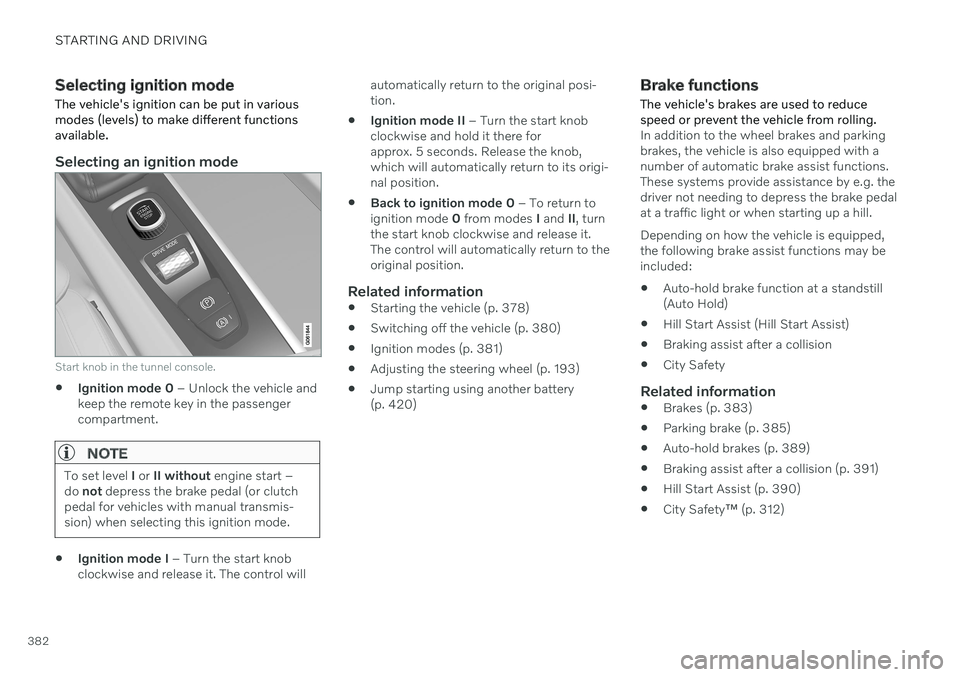
Start knob in the tunnel console.
Ignition mode 0
– Unlock the vehicle and
keep the remote key in the passenger compartment.
NOTE
To set level I or II without engine start –
do not depress the brake pedal (or clutch
pedal for vehicles with manual transmis- sion) when selecting this ignition mode.
Ignition mode I
– Turn the start knob
clockwise and release it. The control will automatically return to the original posi- tion.
Ignition mode II
– Turn the start knob
clockwise and hold it there forapprox. 5 seconds. Release the knob,which will automatically return to its origi-nal position.
Back to ignition mode 0
– To return to
ignition mode 0 from modes I and II, turn
the start knob clockwise and release it.The control will automatically return to theoriginal position.
Related information
Starting the vehicle (p. 378)
Switching off the vehicle (p. 380)
Ignition modes (p. 381)
Adjusting the steering wheel (p. 193)
Jump starting using another battery(p. 420)
Brake functions
The vehicle's brakes are used to reduce speed or prevent the vehicle from rolling.
In addition to the wheel brakes and parking brakes, the vehicle is also equipped with anumber of automatic brake assist functions.These systems provide assistance by e.g. thedriver not needing to depress the brake pedalat a traffic light or when starting up a hill. Depending on how the vehicle is equipped, the following brake assist functions may beincluded:
Auto-hold brake function at a standstill(Auto Hold)
Hill Start Assist (Hill Start Assist)
Braking assist after a collision
City Safety
Related information
Brakes (p. 383)
Parking brake (p. 385)
Auto-hold brakes (p. 389)
Braking assist after a collision (p. 391)
Hill Start Assist (p. 390)
City Safety
™ (p. 312)
Page 391 of 643

STARTING AND DRIVING
389
Related information
Activating and deactivating the parking brake (p. 386)
Parking on a hill (p. 388)
Start battery (p. 567)
Volvo's service program (p. 542)
Auto-hold brakes
With the Auto-hold brake function, the driver can release the brake pedal and the brakeswill remain applied, for example, when thevehicle has stopped at a traffic light or inter-section.
When the vehicle stops, the brakes are acti- vated automatically. The function can useeither the normal brakes or the parking brakesto keep the vehicle stationary and works onflat surfaces or hills. If the driver has their seatbelt fastened or if the driver's door is closed,the brakes will disengage automatically whenthe vehicle starts driving.
NOTE
When braking to a stop on an uphill or downhill gradient, depress the brake pedalwith slightly more force than usual beforereleasing to ensure that the vehicle cannotmove at all.
The parking brake is activated if
the vehicle is switched off
the driver's door is opened
the driver's seat belt is removed
the vehicle has been stationary for a pro- longed period of time (5-10 minutes)
Symbols in the instrument panel
Symbol Meaning
This symbol illuminates when the function is using the normalbrakes to keep the vehicle sta-tionary.
A
B This symbol illuminates when the function is using the parkingbrake to keep the vehicle station-ary.
A
Canadian models.
B US models.
Related information
Activating and deactivating Auto-hold at a standstill (p. 390)
Brakes (p. 383)
Parking brake (p. 385)
Hill Start Assist (p. 390)
Page 422 of 643

STARTING AND DRIVING
420
Jump starting using another battery If the start battery is discharged, current from another battery can be used to start the vehi-cle.
Jumper cable connecting points. Engine compart- ment appearance may vary depending on vehiclemodel and equipment level.
To avoid short circuits or other damage, the following steps are recommended when jumpstarting the battery using another battery:
1. Put the ignition in mode 0.
2. Make sure the auxiliary battery (the bat- tery used to jump start the discharged battery) has a voltage of 12 volts. 3. If the auxiliary battery is in another vehicle,
turn off that vehicle's engine and makesure that the vehicles are not touchingeach other.
4. Clamp the red jumper cable onto the auxil- iary battery's positive (+) terminal (1).
CAUTION
Connect the jump cable carefully to pre- vent short circuits with other componentsin the engine compartment.
5. Fold back the cover over your vehicle'spositive (+) jump start terminal (2).
6. Clamp the other end of the red jumper cable to your vehicle's positive (+) jump start terminal (2).
7. Clamp the black jumper cable onto the auxiliary battery's negative (-) terminal (3).
8. Clamp the other end of the black jumper cable to your vehicle's negative (-) groundpoint (4).
9. Make sure the jumper cables are securely attached to help prevent sparks whilejump starting. 10. Start the engine of the assisting vehicle
and let it run for a few minutes at a higheridling speed than normal, about1500 rpm.
11. Start the engine of the vehicle with the dead battery.
CAUTION
Do not touch the connections between the cable and the vehicle during the startattempt. Risk of sparking.
12. Remove the jumper cables in the reverseorder ‒ first the black cables and then the
red cables. Make sure that none of the clamps of the black jumper cables come into contactwith either vehicle's positive (+) jump startterminals or either of the red jumpercable's connected clamps.
Page 424 of 643

STARTING AND DRIVING
422
Selecting ignition mode (p. 382)
Support battery (p. 571)
Towing using a towline
This section refers to one vehicle being towed behind another using a towline.
Before towing another vehicle, check applica- ble speed limit regulations.
Preparations and towing
CAUTION
Vehicles with the small gear selector can- not shift out of the P position when theengine is off. Contact an authorized Volvoworkshop or a professional towing com-pany for assistance towing the vehicle.
CAUTION
Note that the vehicle must always be towed with the wheels rolling forward.
Do not tow a vehicle with automatictransmission at a speed greater than80 km/h (50 mph) or for a distancegreater than 80 km (50 miles).
WARNING
Ignition mode
II must be active – all
airbags are deactivated in ignition mode I.
Always have the remote key in thevehicle when it is towed.
WARNING
The brake and steering servos do not work when the engine is off – it takesabout 5 times more pressure on the brakepedal and steering requires much moreeffort than normal.
1. Turn on the hazard warning flashers.
2. Attach the towline to the towing eyelet.
3. Put the vehicle in ignition mode II – with-
out pressing the brake pedal, turn the start knob clockwise and hold it there for about4 seconds. Release the knob, which willautomatically return to its original position.
4. Move the gear selector to neutral (N) and release the parking brake. If the battery charge level is too low, it may not be possible to release the parkingbrake. Connect an auxiliary battery to thevehicle if the battery is discharged.
> The towing vehicle can now start driv-ing.
Page 427 of 643
STARTING AND DRIVING
}}
* Option/accessory.425
Recovery
This section refers to transporting the vehicle with a tow truck or similar vehicle.
Call a professional towing service for assis- tance. In certain conditions, the towing eyelet can be used to pull the vehicle onto a flatbed towtruck. For vehicles equipped with leveling con- trol *: If the vehicle is equipped with pneumatic
suspension, this feature must be turned off before the vehicle is lifted onto a tow truck.Turning off the function in the center display. 1. Tap
Settings in the Top view.
2. Tap
My CarParking Brake and
Suspension.
3. Select
Disable Leveling Control.
The vehicle's location and ground clearance determine if it can be lifted onto a tow truck. Ifthe incline of the tow truck is too steep or ifthe ground clearance under the vehicle isinsufficient, attempting to pull it up may resultin damage. In this case, the vehicle shouldonly be lifted with the tow truck's lifting equip-ment.
WARNING
No person or object should be behind the tow truck when the vehicle is lifted ontothe bed of the truck.
CAUTION
The towing eyelet is only intended for tow- ing on roads, and must not be used to pull
vehicles from ditches or any similar pur-pose involving severe strain. Call a towtruck for professional assistance.
CAUTION
Note that the vehicle must always be towed with the wheels rolling forward.
Related information
Attaching and removing the towing eyelet (p. 423)
HomeLink ®
*17
HomeLink ®
18
is a programmable remote con-
trol, integrated in the vehicle electrical sys- tem, that can control up to three differentdevices (e.g. garage door opener, alarm sys-tem, outdoor and indoor lighting) and therebyreplace the remote controls for these.
General
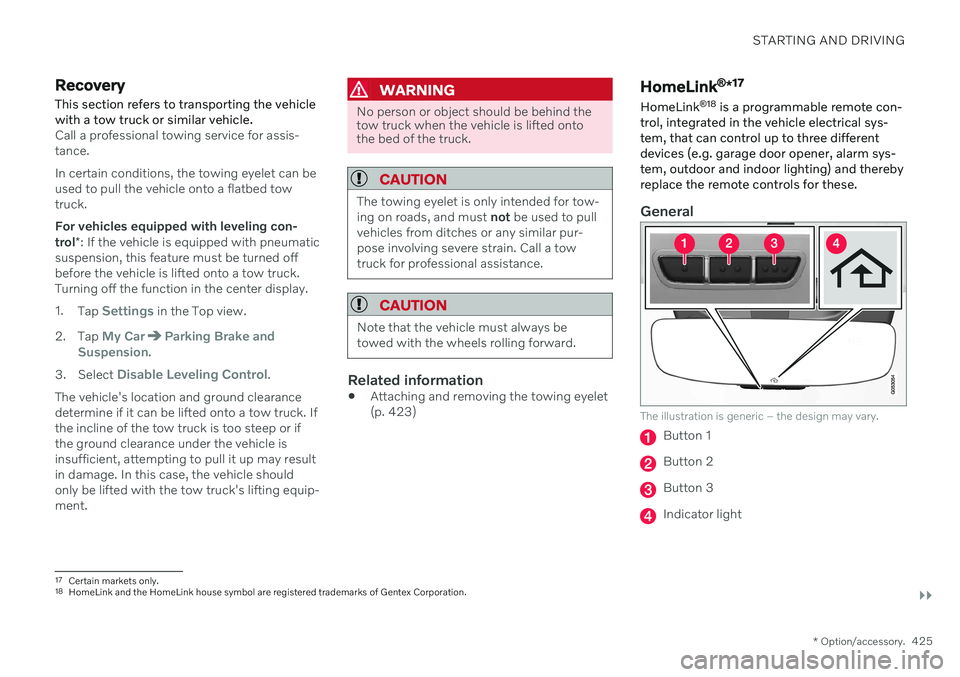
The illustration is generic – the design may vary.
Button 1
Button 2
Button 3
Indicator light
17 Certain markets only.
18 HomeLink and the HomeLink house symbol are registered trademarks of Gentex Corporation.
Page 437 of 643
AUDIO, MEDIA AND INTERNET
* Option/accessory.435
Control, Park Assist and Phone
Ringtone.
High Performance Pro * (Harman
Kardon)
Equalizer - setting of equalizer.
Balance - balance between right/left and
front/rear speakers.
System Volumes – adjusts volume in the
various systems of the car, e.g. Voice
Control, Park Assist and Phone
Ringtone.
High Performance
Tone - setting for e.g. bass, treble, equal-
izer, etc.
Balance - balance between right/left and
front/rear speakers.
System Volumes – adjusts volume in the
various systems of the car, e.g. Voice
Control, Park Assist and Phone
Ringtone.
Related information
Sound experience
* (p. 435)
Media player (p. 455)
Voice control settings (p. 146)
Phone settings (p. 478)
Audio, media and Internet (p. 434)
Internet-connected vehicle
* (p. 480)
Sound experience *
Sound experience is an app that provides access to additional sound settings.
Open Sound Experience from the center dis-
play's App view. Depending on the sound sys- tem installed in the vehicle, the following set-tings are possible:
Premium Sound * (Bowers & Wilkins)
Studio – sound settings can be adjusted
to be primarily adapted for Driver, All andRear.
Individual stage - surround sound mode
with settings for intensity and enclosure.
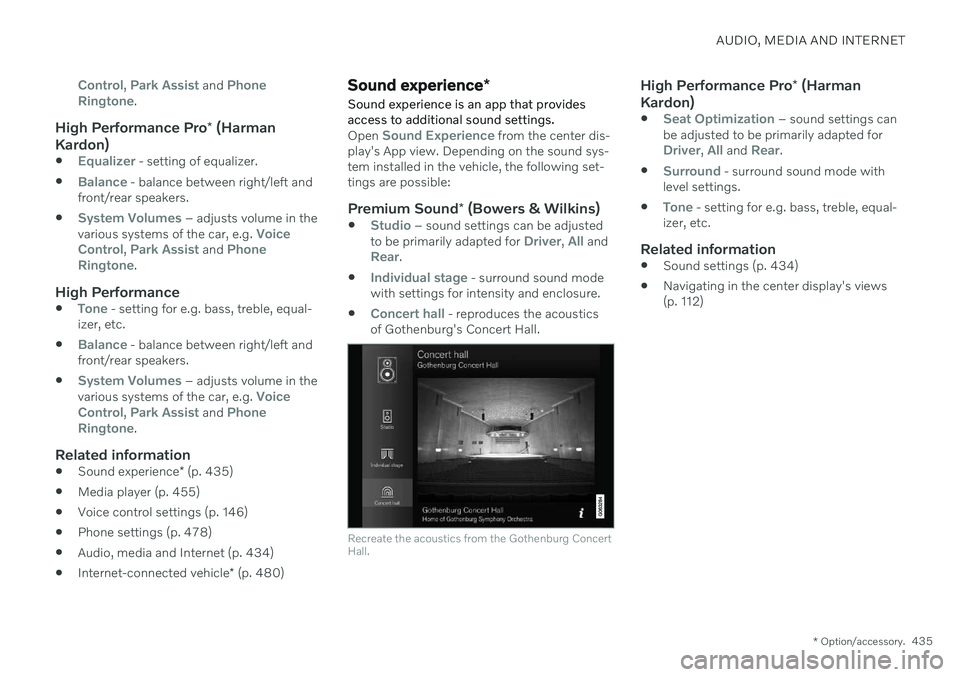
Concert hall - reproduces the acoustics
of Gothenburg's Concert Hall.
Recreate the acoustics from the Gothenburg Concert Hall.
High Performance Pro * (Harman
Kardon)
Seat Optimization – sound settings can
be adjusted to be primarily adapted for
Driver, All and Rear.
Surround - surround sound mode with
level settings.
Tone - setting for e.g. bass, treble, equal-
izer, etc.
Related information
Sound settings (p. 434)
Navigating in the center display's views (p. 112)