seats VOLVO S90 2020 Quick Guide
[x] Cancel search | Manufacturer: VOLVO, Model Year: 2020, Model line: S90, Model: VOLVO S90 2020Pages: 643, PDF Size: 13.68 MB
Page 220 of 643

||
CLIMATE CONTROL
* Option/accessory.
218
Blower control buttons in Climate view.
2.
Tap the desired blower speed: Off, 1-5 orMax.
> The blower speed will be changed and the buttons for the set speed will light up.
CAUTION
The air conditioning will not engage if the blower is turned off completely, which maycause fogging on the inside of the win-dows.
NOTE
The climate system automatically adapts airflow as needed within the set blowerspeed, which means that airflow speedmay vary slightly within the same blowerspeed.
Related information
Climate system controls (p. 207)
Setting the blower speed for the rear seats
*
The blower can be set to several different automatically controlled speeds for the rearseat.
Setting blower speed for the rear seats from the front seats
1. Tap the symbol in the center of the climate bar to open Climate view in the center dis- play.
2. Select the
Rear climate tab.
Page 221 of 643
CLIMATE CONTROL
219
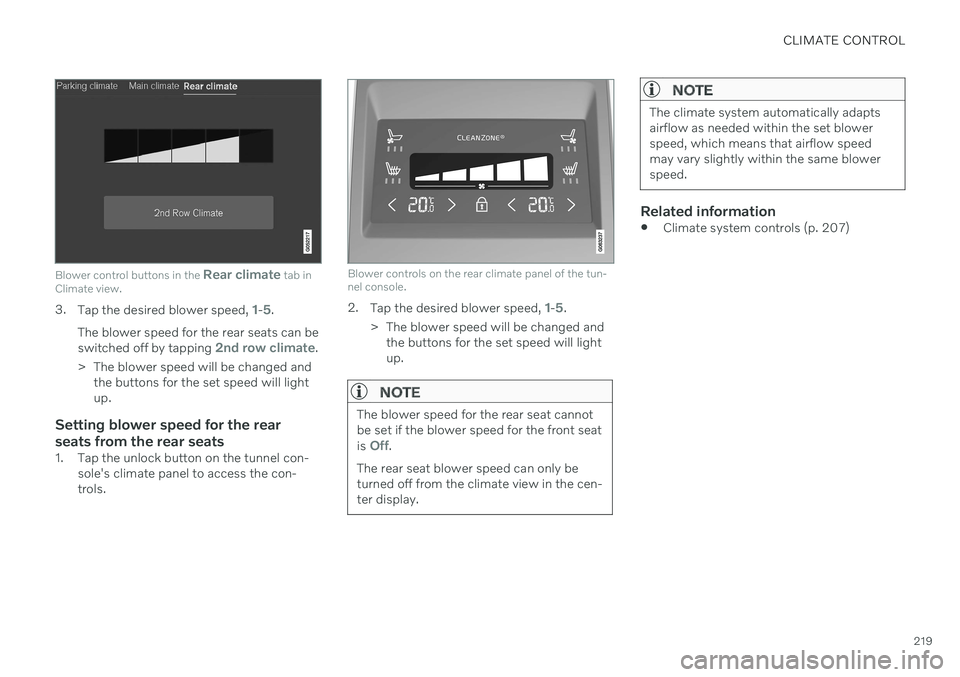
Blower control buttons in the Rear climate tab in
Climate view.
3. Tap the desired blower speed, 1-5.
The blower speed for the rear seats can be switched off by tapping
2nd row climate.
> The blower speed will be changed and the buttons for the set speed will light up.
Setting blower speed for the rear seats from the rear seats
1. Tap the unlock button on the tunnel con- sole's climate panel to access the con- trols.
Blower controls on the rear climate panel of the tun- nel console.
2.Tap the desired blower speed, 1-5.
> The blower speed will be changed and the buttons for the set speed will light up.
NOTE
The blower speed for the rear seat cannot be set if the blower speed for the front seat is
Off.
The rear seat blower speed can only be turned off from the climate view in the cen-ter display.
NOTE
The climate system automatically adapts airflow as needed within the set blowerspeed, which means that airflow speedmay vary slightly within the same blowerspeed.
Related information
Climate system controls (p. 207)
Page 222 of 643

CLIMATE CONTROL
220
Setting the temperature for the front seats5
The temperature can be set to the desired number of degrees for the front seat climatezones.
Temperature buttons in the climate bar.
1. Tap the left- or right-side temperature but- tons in the center display's climate bar to open the control.
Temperature control.
2. Set the temperature by doing one of thefollowing:
dragging the control to the desired temperature, or
tapping
+
− to raise/lower the tempera-
ture.
> The temperature will be set and the button will display the new tempera- ture.
NOTE
Heating/cooling cannot be accelerated by choosing a higher/lower temperature thanthe desired temperature.
Related information
Climate system controls (p. 207)
5
The same setting applies to the rear seats with the 2-zone climate system.
Page 223 of 643
CLIMATE CONTROL
}}
* Option/accessory.221
Setting the temperature for the rear seats*
The temperature can be set to the desired number of degrees for the rear seat climatezones.
Setting the temperature for the rear seats from the front seats
1. Tap the symbol in the center of the climate bar to open Climate view in the center dis- play.
2. Select the
Rear climate tab.
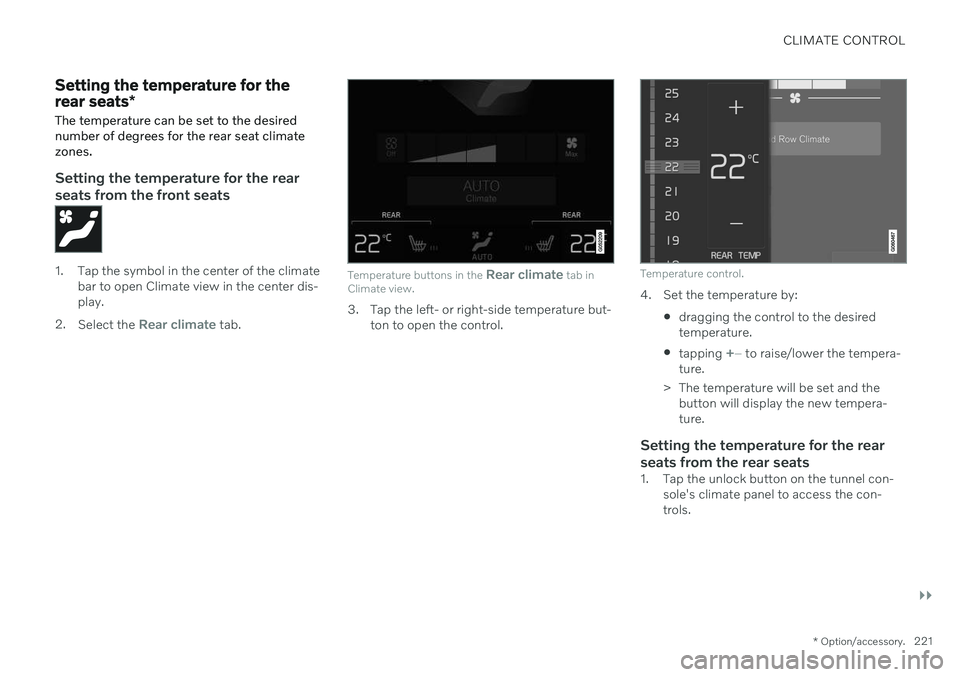
Temperature buttons in the Rear climate tab in
Climate view.
3. Tap the left- or right-side temperature but-
ton to open the control.
Temperature control.
4. Set the temperature by:
dragging the control to the desired temperature.
tapping
+
− to raise/lower the tempera-
ture.
> The temperature will be set and the button will display the new tempera- ture.
Setting the temperature for the rear seats from the rear seats
1. Tap the unlock button on the tunnel con- sole's climate panel to access the con- trols.
Page 262 of 643

KEY, LOCKS AND ALARM
260
Private Locking The trunk lid and rear seat backrests can be locked using the private locking function, e.g.when the vehicle is left at a workshop or witha valet. This function prevents the trunk lidfrom being opened and locks the rear seatbackrests in the upright position.
The function button for pri- vate locking is located in thecenter display's Functionview. Depending on the cur-rent status of the lock,
Private Locking Unlockedor Private Locking Lockedwill be displayed.
Related information
Activating and deactivating private locking (p. 260)
Activating and deactivating private locking
Private locking is activated using the function button in the center display and a PIN code.
NOTE
For the valet lock function to be activated the car must be in at least ignition mode I.
Two codes are used for private locking:
A security code, which is created the first time the function is used.
A PIN code, which is changed each timethe function is activated.
Entering security code before initial
use
The first time the function is used, a securitycode must be selected. This code can then beused to deactivate private locking if theselected PIN code has been forgotten or lost.The security code functions as a PUK (secur-ity) code for all PIN codes used for privatelocking. Save the security code in a safe place. To create a security code:
1. Tap the button for private locking in Func-
tion view.
> A pop-up window will appear.
2. Enter the desired security code and press
Confirm.
> The security code is saved. The private locking function is now ready for activa- tion.
Activating private locking
NOTE
The rear seat must be in the upright posi- tion when private locking is activated inorder for the seats to lock.
Page 263 of 643

KEY, LOCKS AND ALARM
}}
261
1. Tap the button for private locking in Func-
tion view.
> A pop-up window will appear.
2. Enter the code you would like to use to unlock the trunk lid and rear seats and tap
Confirm.
> The trunk lid and rear seats will lock. A green indicator light will illuminate next to the button in Function view to con-firm locked status.
Deactivating private locking1. Tap the button for private locking in Func- tion view.
> A pop-up window will appear. 2. Enter the code used for locking and tap
Confirm.
> The trunk lid and rear seats will unlock. The green indicator light next to the button in Function view will go out toconfirm unlocked status.
Forgotten PIN codeIf you have forgotten your PIN code or enteredit incorrectly more than three times, the secur-ity code can be used to deactivate privatelocking. If the vehicle is unlocked using Volvo On Call or the Volvo On Call app, private locking willbe automatically deactivated.
Forgotten security code
If you have forgotten your security code, con- tact an authorized Volvo retailer for assistancedeactivating private locking.
Related information
Private Locking (p. 260)
Alarm The alarm emits sound and light signals if anyone without a valid remote key attemptsto break into the vehicle or interferes with thestart battery or alarm siren.
When armed, the alarm will be triggered if:
the hood, trunk lid or any door is opened.
a battery cable is disconnected.
the alarm siren is disconnected.
Alarm signalsThe following occurs if the alarm is triggered:
A siren will sound for 30 seconds or until the alarm is turned off.
The hazard warning flashers will flash for5 minutes or until the alarm is turned off.
If the reason the alarm was triggered is notrectified, the alarm cycle will repeat up to 10 times 15
.
15 Certain markets only.
Page 383 of 643
STARTING AND DRIVING
* Option/accessory.381
Ignition modes The vehicle's ignition can be put in various modes (levels) to make different functionsavailable.
To enable the use of a limited number of func- tions when the engine is not running, the igni-tion can be put in one of three different levels:0, I and II. These levels are referred to as "igni-
tion modes" in the Owner's Manual. The following table shows which functions are available in each ignition mode:
Mode Functions
0 The odometer, clock and tem- perature gauge are illumi- nated A
.
The power
* seats can be
adjusted.
The power windows can be used.
The center display is activated and can be used A
.
The infotainment system canbe used A
.
In this mode, the functions are available for a limited time andthen switch off automatically.
I The panoramic roof, powerwindows, 12-volt electricalsocket in the passenger com-partment, Bluetooth, naviga-tion, phone, blower and wind-shield wipers can be used.
The power seats can beadjusted.
The 12-volt electrical socket
* in
the trunk can be used.
Electrical current will be takenfrom the battery in this ignitionmode.Mode Functions
II The headlights illuminate.
Warning/indicator lights illumi- nate for 5 seconds.
A number of other systems areactivated. However, seat andrear window heating can onlybe activated when the engineis running.
This ignition mode uses a lot ofcurrent from the battery andshould be avoided wheneverpossible!
A Also activated when the door is opened.
Related information
Starting the vehicle (p. 378)
Adjusting the steering wheel (p. 193)
Jump starting using another battery (p. 420)
Selecting ignition mode (p. 382)
Page 387 of 643

STARTING AND DRIVING
}}
385
Braking on salted roads
When driving on salted roads, a layer of salt may form on the brake discs and brake pads.
This could increase stopping distance. Main- tain an extra large safety distance to the vehi-cle ahead. Make sure to also:
Apply the brakes from time to time to helpremove salt. Make sure braking does notpose a risk to any other road users.
Gently apply the brakes when you havefinished driving and before driving again.
Related information
Brakes (p. 383)
Braking on wet roads (p. 384)
Maintenance of the brake system
Regularly check the brake system compo- nents for wear.
To keep the vehicle as safe and reliable as possible, follow the Volvo service schedulespecified in the Warranty and MaintenanceRecords Information booklet. After replacingbrake pads and brake discs, braking effect isnot adapted until they are "broken in" by driv-ing a few hundred kilometers (miles). Com-pensate for the reduced braking effect byapplying greater pressure to the brake pedal.Volvo recommends only using brake padsapproved for your Volvo.
CAUTION
The brake system's components should be regularly checked for wear. Contact a workshop for advice on how to do this or let a workshop perform theinspection - an authorized Volvo workshopis recommended.
Related information
Brakes (p. 383)
Parking brake
The parking brake helps keep the vehicle sta- tionary by mechanically locking two wheels.
The parking brake controls are located in the tunnel console between the seats.
When the electric parking brake is being applied, a faint sound can be heard from thebrake's electric motor. This sound can also beheard during the automatic function check ofthe parking brake. If the vehicle is stationary when the parking brake is activated, it will only be applied to therear wheels. If it is activated while the vehicleis moving, the normal brakes will be used onall four wheels. Braking will be transferred toonly the rear wheels when the vehicle isalmost stopped.
Page 534 of 643
LOADING, STORAGE AND PASSENGER COMPARTMENT
* Option/accessory.
532
Passenger compartment interior
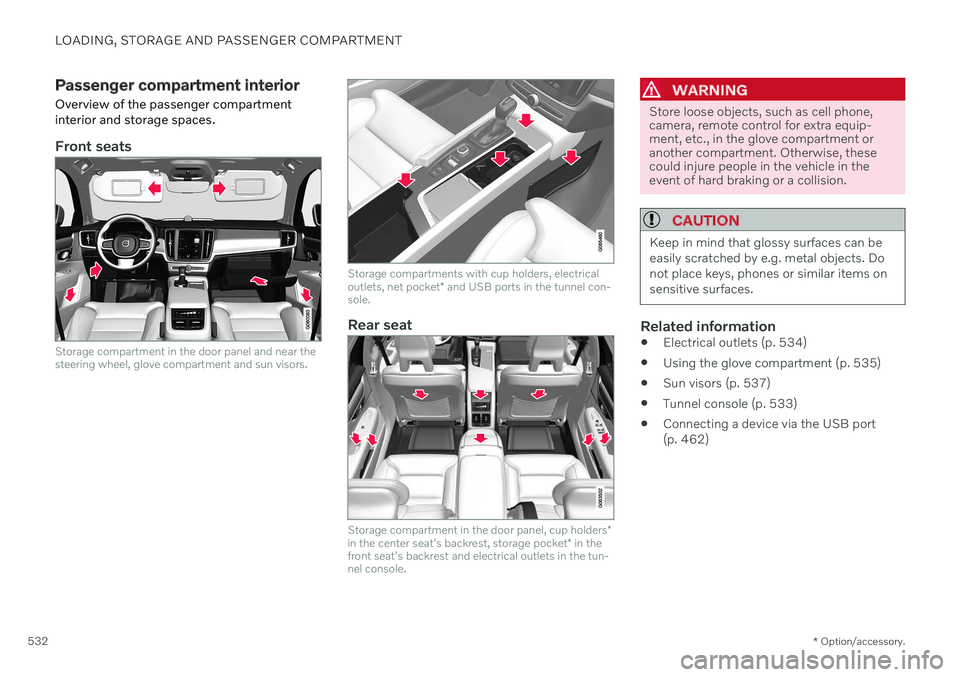
Overview of the passenger compartment interior and storage spaces.
Front seats
Storage compartment in the door panel and near the steering wheel, glove compartment and sun visors.
Storage compartments with cup holders, electrical outlets, net pocket * and USB ports in the tunnel con-
sole.
Rear seat
Storage compartment in the door panel, cup holders *
in the center seat's backrest, storage pocket * in the
front seat's backrest and electrical outlets in the tun- nel console.
WARNING
Store loose objects, such as cell phone, camera, remote control for extra equip-ment, etc., in the glove compartment oranother compartment. Otherwise, thesecould injure people in the vehicle in theevent of hard braking or a collision.
CAUTION
Keep in mind that glossy surfaces can be easily scratched by e.g. metal objects. Donot place keys, phones or similar items onsensitive surfaces.
Related information
Electrical outlets (p. 534)
Using the glove compartment (p. 535)
Sun visors (p. 537)
Tunnel console (p. 533)
Connecting a device via the USB port (p. 462)
Page 535 of 643
LOADING, STORAGE AND PASSENGER COMPARTMENT
* Option/accessory.533
Tunnel console
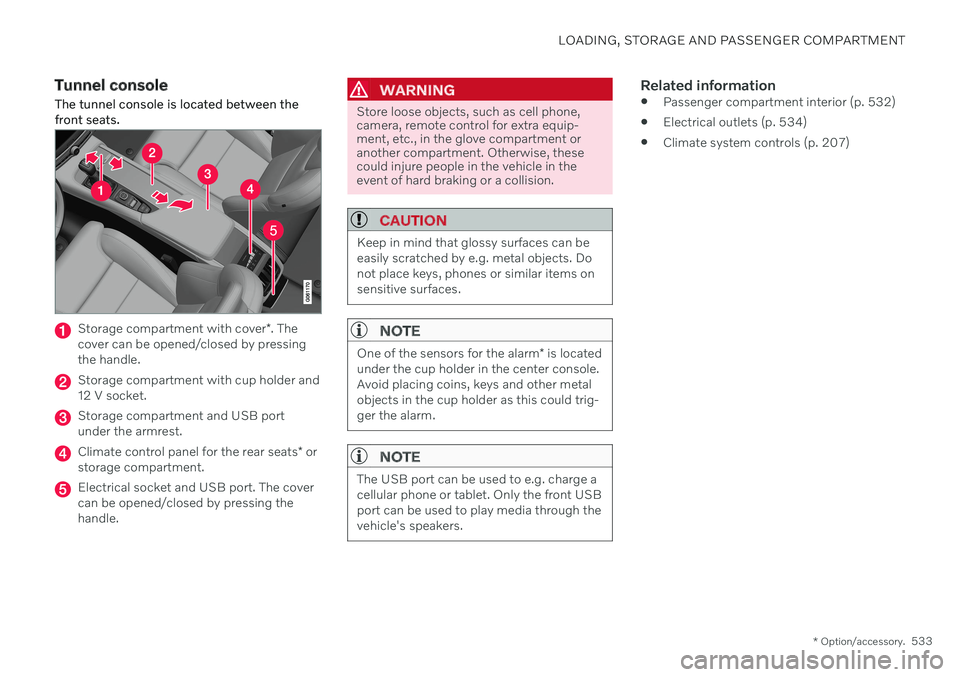
The tunnel console is located between the front seats.
Storage compartment with cover *. The
cover can be opened/closed by pressing the handle.
Storage compartment with cup holder and 12 V socket.
Storage compartment and USB port under the armrest.
Climate control panel for the rear seats * or
storage compartment.
Electrical socket and USB port. The cover can be opened/closed by pressing thehandle.
WARNING
Store loose objects, such as cell phone, camera, remote control for extra equip-ment, etc., in the glove compartment oranother compartment. Otherwise, thesecould injure people in the vehicle in theevent of hard braking or a collision.
CAUTION
Keep in mind that glossy surfaces can be easily scratched by e.g. metal objects. Donot place keys, phones or similar items onsensitive surfaces.
NOTE
One of the sensors for the alarm * is located
under the cup holder in the center console. Avoid placing coins, keys and other metalobjects in the cup holder as this could trig-ger the alarm.
NOTE
The USB port can be used to e.g. charge a cellular phone or tablet. Only the front USBport can be used to play media through thevehicle's speakers.
Related information
Passenger compartment interior (p. 532)
Electrical outlets (p. 534)
Climate system controls (p. 207)