instrument panel VOLVO S90 2020 Quick Guide
[x] Cancel search | Manufacturer: VOLVO, Model Year: 2020, Model line: S90, Model: VOLVO S90 2020Pages: 643, PDF Size: 13.68 MB
Page 348 of 643

DRIVER SUPPORT
346
Lane Keeping Aid symbols and messages
A number of symbols and messages related to Lane Keeping Aid (LKA 89
) may be dis- played in the instrument panel. Several exam- ples are provided below.
Symbol Message Meaning
Driver support system Reduced functionality Service requiredThe system is not functioning as intended. Contact a workshop
A
.
Windscreen sensor Sensor blocked, see Owner's manualThe camera's ability to detect the lane in front of the vehicle is reduced.
Lane Keeping Aid Apply steeringLKA's steering assistance is disabled when the driver's hands are not on the wheel. Follow the instructions and steer the vehicle.
Lane Keeping Aid Standby until steering appliedLKA will go into standby mode until the driver begins steering the vehicle again.
A An authorized Volvo workshop is recommended.
89 Lane Keeping Aid
Page 350 of 643
DRIVER SUPPORT
348
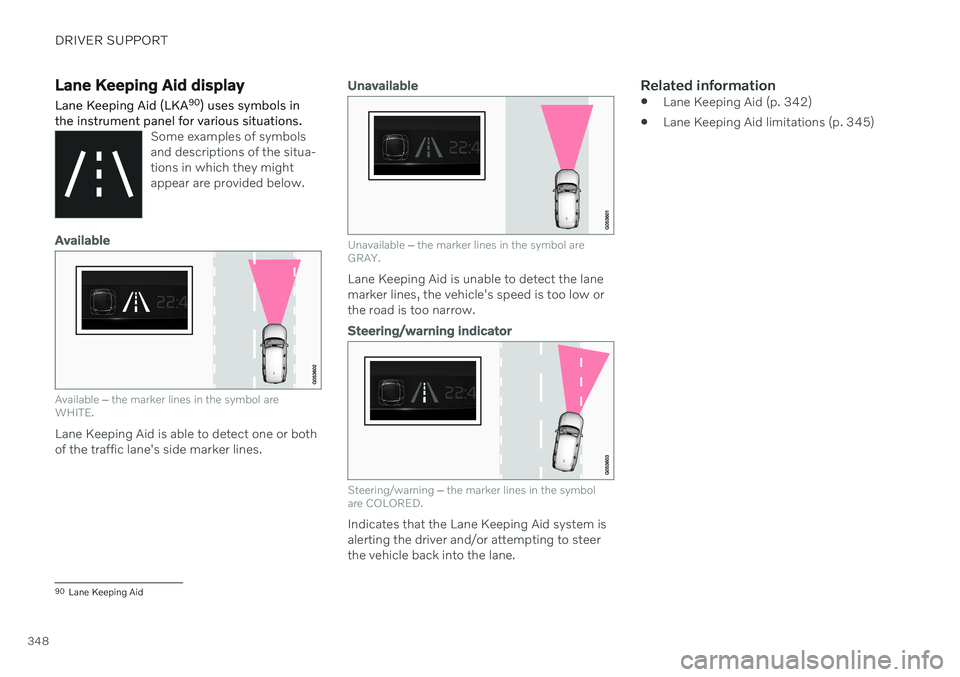
Lane Keeping Aid display Lane Keeping Aid (LKA90
) uses symbols in
the instrument panel for various situations.
Some examples of symbols and descriptions of the situa-tions in which they mightappear are provided below.
Available
Available ‒ the marker lines in the symbol are
WHITE.
Lane Keeping Aid is able to detect one or both of the traffic lane's side marker lines.
Unavailable
Unavailable ‒ the marker lines in the symbol are
GRAY.
Lane Keeping Aid is unable to detect the lane marker lines, the vehicle's speed is too low orthe road is too narrow.
Steering/warning indicator
Steering/warning ‒
the marker lines in the symbol
are COLORED.
Indicates that the Lane Keeping Aid system is alerting the driver and/or attempting to steerthe vehicle back into the lane.
Related information
Lane Keeping Aid (p. 342)
Lane Keeping Aid limitations (p. 345)
90
Lane Keeping Aid
Page 356 of 643

DRIVER SUPPORT
354
Symbols and messages for steering assistance during collisionrisks
A number of symbols and messages related to steering assistance may be displayed in the instrument panel. Several examples areprovided below.
Symbol Message
Meaning
Collision avoidance assistance Automatic interventionWhen the function is activated, a message will appear to alert the driver.
Windscreen sensor Sensor blocked, see Owner's manualThe camera's ability to detect the lane in front of the vehicle is reduced.
A text message can be erased by briefly press- ing the
button in the center of the right-
side steering wheel keypad. If the message persists: Contact a workshop ‒
an authorized Volvo workshop is recom- mended.
Related information
Steering assistance at risk of collision(p. 349)
Steering assistance during collision riskslimitations (p. 353)
Page 361 of 643

DRIVER SUPPORT
* Option/accessory.359
Park Assist symbols and messages
Symbols and messages for the Park Assist system may be displayed in the instrument panel and/or the center display. Severalexamples are provided below.
Symbol Message Meaning
The rear Park Assist sensors are
turned off and no acoustic warnings for obstacles/
objects will be provided.
Park Assist System Sensors blocked, cleaning neededOne or more of the sensors are blocked. Check and clean/remove the obstacle as soon as possible.
Park Assist System Unavailable Service requiredThe system is not functioning as intended. Contact a workshop A
.
A An authorized Volvo workshop is recommended.
A text message can be erased by briefly press- ing the
button in the center of the right-
side steering wheel keypad. If a message cannot be erased, contact a workshop A
.
Related information
Park Assist
* (p. 355)
Park Assist limitations (p. 357)
Page 369 of 643

DRIVER SUPPORT
* Option/accessory.367
Park Assist Camera symbols and messages
Symbols and messages for the Park Assist Camera may be displayed in the instrument panel and/or the center display. Severalexamples are provided below.
Symbol Message Meaning
The rear Park Assist sensors are
turned off and no acoustic warnings or field markings for
obstacles/objects will be provided.
The camera is not functioning properly.
Park Assist System Sensors blocked, cleaning nee- dedOne or more of the sensors are blocked. Check and clean/remove the obstacle as soon as possible.
Park Assist System Unavailable Service requiredThe system is not functioning as intended. Contact a workshop A
.
A An authorized Volvo workshop is recommended.
A text message can be erased by briefly press- ing the
button in the center of the right-
side steering wheel keypad. If a message cannot be erased, contact a workshop
A
.
Related information
Park Assist Camera
* (p. 360)
Camera/radar sensor limitations (p. 307)
Page 377 of 643

DRIVER SUPPORT
* Option/accessory.375
Park Assist Pilot * messages
Messages for Park Assist Pilot (PAP 102
) may
be displayed in the instrument panel and/or the center display. Several examples are pro- vided below.
Message Meaning
Park Assist System Sensors blocked, cleaning neededOne or more of the sensors are blocked. Check and clean/remove the obstacle as soon as possible.
Park Assist System Unavailable Service requiredThe system is not functioning as intended. Contact a workshop
A
.
A An authorized Volvo workshop is recommended.
A text message can be erased by briefly press- ing the
button in the center of the right-
side steering wheel keypad. If a message cannot be erased, contact a workshop A
.
Related information
Park Assist Pilot
* (p. 368)
Park Assist Pilot
* limitations (p. 373)
102
Park Assist Pilot
Page 380 of 643

STARTING AND DRIVING
* Option/accessory.
378
Starting the vehicle
The vehicle can be started using the start knob in the tunnel console when the remotekey is in the passenger compartment.
Start knob in the tunnel console.
WARNING
Before starting:
Buckle your seat belt.
Adjust the seat, steering wheel and mirrors.
Make sure you can fully depress thebrake pedal.
The remote key is not physically used to startthe ignition because the vehicle is equippedwith the keyless Passive Start system. To start the vehicle:
1. The remote key must be inside the vehicle.
For vehicles with Passive Start, the key must be in the front section of the passen-ger compartment. With the optional key- less locking/unlocking function *, the key
can be anywhere in the vehicle.
2. Press and hold down the brake pedal 1
as
far as possible.
3. Turn the start knob clockwise and release. The control will automatically return to the original position.
WARNING
Never use more than one inlay mat at a time on the driver's floor. If any othertype of floor mat is used, remove theoriginal mat from the driver's seat floorbefore driving. All types of mats mustbe securely anchored in the attach-ment points in the floor. Make sure thefloor mat does not impede the move-ment of the brake pedal or acceleratorpedal in any way, as this could be aserious safety hazard.
Volvo's floor mats are specially manu-factured for your vehicle. They must beproperly secured in the attachmentpoints in the floor to help ensure theycannot slide and become trappedunder the pedals.
The starter motor will crank until the enginestarts or until overheating protection is trig-gered.
Error messagesIf the Vehicle key not found message is
shown in the instrument panel at start, place the remote key at the backup reader and thenmake a new start attempt.
1 If the vehicle is moving, it is only necessary to turn the start knob clockwise to start the engine.
Page 385 of 643

STARTING AND DRIVING
}}
383
Brakes
The brake pedal is used to apply the vehicle's regular brakes, which are part of the brakesystem.
The vehicle is equipped with two brake cir- cuits. If one brake circuit is damaged, thebrake pedal will go down further whendepressed. More pressure will then berequired from the driver for normal brakingeffect. The driver's pressure on the brake pedal is enhanced by a power braking function.
WARNING
Power braking only functions if the engine is running.
If the brake pedal is used when the engine is turned off, the pedal will feel stiffer than usualand greater pressure must be applied to brakethe vehicle. In very hilly areas or when driving with a heavy load, manual gear shifting can be used to aug-ment the brakes with engine braking. Enginebraking is most effective if the same gear isused both uphill and downhill.
Anti-lock brakesThe vehicle is equipped with an Anti-lock Braking System (ABS 2
), which helps prevent
the wheels from locking and helps maintain steering control when braking. Vibrations maybe felt from the brake pedal when ABS isoperating, which is normal. After the vehicle is started, a brief test of the ABS system is automatically performed whenthe driver releases the brake pedal. An addi-tional automatic test of the system may beperformed when the vehicle is traveling at alow speed. During the test, the brake pedalmay feel as though it is pulsating.Symbols in the instrument panel
Symbol Meaning
A
B Check the brake fluid level. If the level is low, fill brake fluid andcheck to determine the reasonfor the loss of brake fluid.
A
BSteady glow for 2 seconds after the engine is started: Automaticfunction check. Steady glow for more than 2 seconds: Fault in the ABS sys-tem. The vehicle's regular brakesystem is still working, but with-out the ABS function.
A
In Canada.
B In the US.
2Anti-lock Braking System
Page 388 of 643

||
STARTING AND DRIVING
386
Related information
Activating and deactivating the parking brake (p. 386)
Parking on a hill (p. 388)
Parking brake malfunction (p. 388)
Auto-hold brakes (p. 389)
Activating and deactivating the parking brake
Use the parking brake to help keep the vehi- cle stationary when it is parked.
Activating the parking brake
1. Pull up the control.
> The symbol in the instrument panel willilluminate when the parking brake is activated.
2. Make sure the vehicle is stationary.
Symbol in the instrument panel
Symbol Meaning
A
B The symbol will be illuminated when the parking brake is acti-vated. A flashing symbol indicates that a fault has been detected. Readthe message in the instrumentpanel.
A
Canadian models.
B US models.
Automatic activation
The parking brake is applied automatically when the ignition is switched off and the setting for automatically activating theparking brake is activated in the centerdisplay.
when the gear selector is moved to
P on a
steep hill.
if the auto-hold brake (automatic brake atstandstill) function is activated and
the vehicle has been stationary for aprolonged period of time (5-10minutes).
the vehicle is switched off.
the driver has left the vehicle.
Page 389 of 643

STARTING AND DRIVING
387
Emergency braking
In an emergency, the parking brake can be activated when the vehicle is moving by pull-ing and holding up the control. The brakingprocess is canceled when the control isreleased or if the accelerator pedal isdepressed.
NOTE
In case of emergency braking at high speeds, a signal sounds during the brakeprocedure.
Deactivating the parking brake
Deactivating manually
1. Depress the brake pedal firmly.2. Press the control.
> The parking brake will release and thesymbol in the instrument panel will go out.
Deactivating automatically
1. Start the vehicle.
2. Depress the brake pedal firmly. Move the gear selector to D or R and press the
accelerator pedal.
> The parking brake will release and the symbol in the instrument panel will go out.
NOTE
For automatic deactivation to be possible, the driver's seat belt must be buckled orthe driver's door closed.
Related information
Settings for automatically activating the parking brake (p. 387)
Parking brake malfunction (p. 388)
Parking brake (p. 385)
Parking on a hill (p. 388)
Settings for automatically activating the parking brake Choose whether the parking brake should be activated automatically when the vehicle isswitched off.
To change this setting: 1.
Tap
Settings in the center display's Top
view.
2. Tap
My CarParking Brake and
Suspension and select or deselect theAuto Activate Parking Brake function.
Related information
Activating and deactivating the parking brake (p. 386)
Parking brake (p. 385)