instrument panel VOLVO S90 2020 Quick Guide
[x] Cancel search | Manufacturer: VOLVO, Model Year: 2020, Model line: S90, Model: VOLVO S90 2020Pages: 643, PDF Size: 13.68 MB
Page 156 of 643

LIGHTING
* Option/accessory.
154
Using turn signals
The vehicle's turn signals are controlled using the left-side steering wheel lever. The turnsignals flash three times or continuously,depending on how far up or down the lever ismoved.
Turn signals.
Triple flash indicatorMove the steering wheel lever up or down to the first position and release. The turnsignals will flash three times. If the func-tion is deactivated via the center display,the signals will flash once.
NOTE
This automatic flashing sequence can be interrupted by immediately movingthe lever in the opposite direction.
If the turn signal indicator flashes morequickly than normal, refer to the mes-sage in the instrument panel.
Continuous flashing sequenceMove the lever up or down as far as possi- ble.
The lever will stop in its end position and canbe moved back manually or automatically bymoving the steering wheel.
Related information
Hazard warning flashers (p. 157)
Adjusting light functions via the centerdisplay (p. 149)
Replacing front turn signal bulbs (p. 563)
Active Bending Lights
*
Active Bending Lights (ABL) are designed to help provide extra illumination in curves andintersections. Depending on equipment level, vehicles with LED 3
headlights * may be equip-
ped with Active Bending Lights.
Headlight pattern with function deactivated (left) and activated (right).
Active Bending Lights follow the movement of the steering wheel to help provide extra illumi-nation in curves and intersections, helping toimprove visibility for the driver. The function is automatically activated when the engine is started. If a fault is detected in the system, the
symbol will illuminate in
the instrument panel and a message will be displayed.
3 LED (Light Emitting Diode)
Page 157 of 643

LIGHTING
}}
* Option/accessory.155
The function is only active in weak daylight or dark conditions and only when the vehicle ismoving and the low beams are on.
Deactivating/activating the functionThe function is activated as the default factorysetting and can be activated and deactivatedin the center display's Function view:
Tap the
Active Bending
Lights button.
Related information
Adjusting light functions via the center display (p. 149)
Front fog lights/corner illumination
*
(p. 155)
Front fog lights/corner illumination *
The fog lights can be activated manually when driving in fog and are activated auto-matically when backing up to help augmentthe backup light. If the vehicle is equipped with corner illumi- nation *, the fog lights are activated automati-
cally in weak daylight or dark conditions to illuminate the area diagonally in front of thevehicle.
Front fog lights button.
The front fog lights can be turned on when the ignition is in mode II and the lighting ring is in
position
, or .
Tap the button to activate or deactivate the function. The
symbol in the instrument
panel comes on when the front fog lights are on. The front fog lights turn off automaticallywhen the ignition is switched off or when the lighting ring is in position
.
NOTE
Regulations concerning fog light use vary from country to country.
Cornering illumination
*The front fog lamps can include the cornering lights function, which temporarily illuminates the area diagonally in front of the car in thedirection the steering wheel is turned on asharp bend, or in the direction shown by thedirection indicators. The function is activated in weak daylight or dark conditions when the lighting ring is in
or mode and the vehicle speed is
less than about 30 km/h (about 20 mph). Both cornering illumination are also illumi- nated as a complement to the taillights whenreversing. The function is activated as the default factory setting and can be activated and deactivated using the center display.
Related information
Lighting control and panel (p. 148)
Ignition modes (p. 381)
Rear fog light (p. 156)
Page 158 of 643

LIGHTING
* Option/accessory.
156
Active Bending Lights
* (p. 154)
Adjusting light functions via the center display (p. 149)
Rear fog light
The rear fog light is considerably brighter than ordinary taillights and should only beused to help other road users see the vehiclewhen visibility is reduced by conditions suchas fog, snow, smoke or dust.
Rear fog light button.
The rear fog light consists of a light on the rear of the vehicle on the driver's side. The rear fog light can only be used when:
ignition mode
II is active and the lighting
ring is in position
or
the lighting ring is in the position
and the front fog lights are on.
Press the button to switch on/off. The
symbol in the instrument panel illuminates when the rear fog light is on. The rear fog light turns off automatically when:
the ignition is off or the lighting ring is in the
position.
the lighting ring is in the
position
and the front fog lights are turned off.
NOTE
Regulations concerning rear fog light use vary from country to country.
Related information
Lighting control and panel (p. 148)
Front fog lights/corner illumination
*
(p. 155)
Ignition modes (p. 381)
Replacing the rear fog light bulb (p. 563)
Page 160 of 643
LIGHTING
* Option/accessory.
158
Using home safe lighting
Some of the exterior lights remain on to illu- minate the area around the vehicle. This iscalled home safe lighting.
To activate home safe lighting:
1. Switch off the ignition.
2. Push the left-side steering wheel lever toward the dashboard and release.
3. Exit the vehicle and lock the doors. > A symbol in the instrument panel illumi-nates to indicate that the function is activated and exterior lighting switcheson: Parking lights, headlights, licenseplate lighting and outer door handle lighting *.
The length of time home safe lighting remains illuminated can be set in the center display.
Related information
Adjusting light functions via the centerdisplay (p. 149)
Welcome Light (p. 158)
Welcome Light
Approach lighting is activated when the vehi- cle is unlocked and can be used to providelight as you walk toward the vehicle.
The function is activated when the remote key is used for unlocking. The parking lights, ceil-ing lights, footwell lights and trunk/cargocompartment lights are activated in daylightconditions. In weak daylight or dark condi-tions, the license plate lighting and outer door handle lighting * will also be activated, with the
light directed toward the ground. If no door is opened, the lights will remain illu- minated for approx. 2 minutes. If a door isopened while the function is activated, the interior lighting and outer door handle lighting *
will remain on for a longer period of time. This function can be activated and deactivated in the center display.
Related information
Adjusting light functions via the centerdisplay (p. 149)
Using home safe lighting (p. 158)
Remote key (p. 234)
Interior Lighting
The passenger compartment is equipped with several different types of lighting, e.g.general lighting, adjustable ambient lightingand reading lights.
All lighting in the passenger compartment can be turned on and off manually within5 minutes after:
the engine has been switched off and theignition is in mode
0.
the vehicle is unlocked but has not yetbeen started.
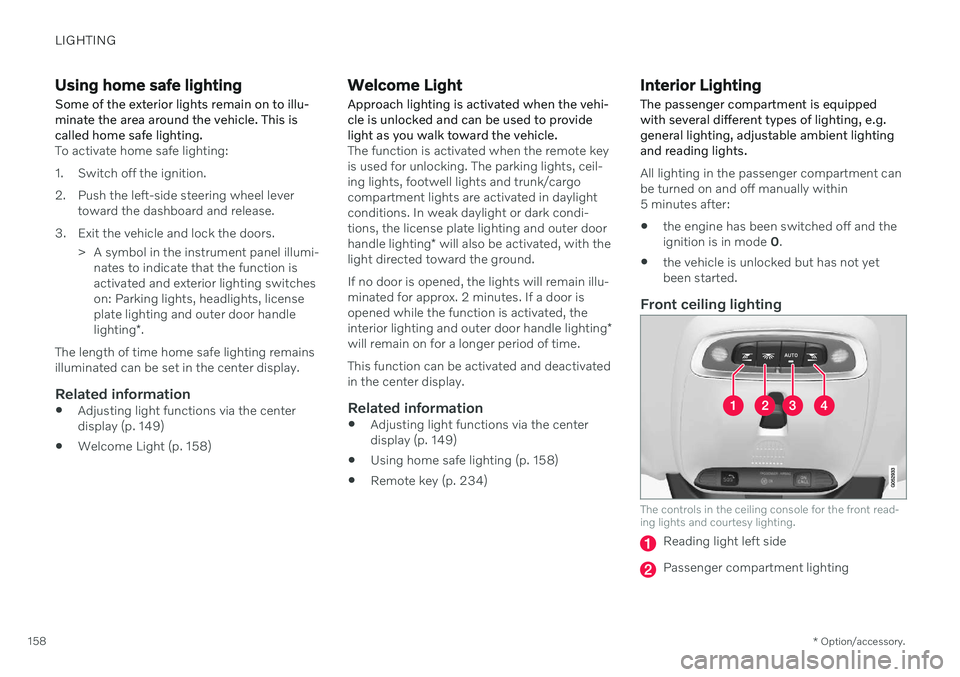
Front ceiling lighting
The controls in the ceiling console for the front read- ing lights and courtesy lighting.
Reading light left side
Passenger compartment lighting
Page 178 of 643

WINDOWS, GLASS AND MIRRORS
* Option/accessory.
176
Wiper blades and washer fluid The wipers and the washer fluid are designed to improve visibility and the headlight pat-tern.
The washer nozzles are heated * automatically
in cold weather to prevent the washer fluid from freezing. When there is approximately 1 liter (1 qt) of washer fluid remaining, a message to refill willappear in the instrument panel.
Related information
Using the rain sensor (p. 177)
Using the windshield and headlight wash-ers (p. 178)
Using the rain sensor's memory function(p. 178)
Filling washer fluid (p. 607)
Putting the wiper blades in service posi-tion (p. 606)
Replacing windshield wiper blades(p. 605)
Using the windshield wipers (p. 176)
Using the windshield wipers
The windshield wipers are designed to clean the windshield. The right-side steering wheellever is used to adjust windshield wiper set-tings.
Right-hand steering wheel lever.
The thumb wheel is used to set rain sen- sor sensitivity and interval wiper speed.
Single sweepMove the lever down and release for asingle sweep.
Wipers offMove the lever to position 0 to turn off
the windshield wipers.
Interval wipersMove the lever upward to put the wip- ers in interval wiping mode. Set the
number of sweeps per time unit with thethumb wheel when interval wipers areselected.
Continuous wipersMove the lever upward for the wipers to operate at normal speed.
Move the lever upward again for the wipers to operate at high speed.
CAUTION
Before activating the wipers, make sure that the wiper blades are not frozen inplace and that any snow or ice on thewindshield has been scraped away.
CAUTION
Use plenty of washer fluid when the wipers clean the windshield. The windshield mustbe wet when the windshield wipers areworking.
Related information
Using the rain sensor (p. 177)
Using the windshield and headlight wash- ers (p. 178)
Wiper blades and washer fluid (p. 176)
Page 179 of 643

WINDOWS, GLASS AND MIRRORS
}}
177
Using the rain sensor's memory function (p. 178)
Filling washer fluid (p. 607)
Putting the wiper blades in service posi-tion (p. 606)
Replacing windshield wiper blades(p. 605)
Using the rain sensor
The rain sensor monitors the amount of water on the windshield and automatically startsthe windshield wipers. Rain sensor sensitivitycan be adjusted using the thumb wheel onthe right-hand steering wheel lever.
Right-hand steering wheel lever.
Rain sensor button
Thumb wheel, sensitivity/interval wiper speed
When the rain sensor is activated, the
rain sensor symbol will be displayed in the instrument panel.
Activating the rain sensorWhen the rain sensor is activated, the enginemust be running or the ignition in mode I or II
while the windshield wiper lever is in position0 or in the single sweep position. Activate the rain sensor by pressing the rain sensor button
.
Move the lever downward for an extra wiper sweep. Turn the thumb wheel upward for increased sensitivity and downward for decreased sensi-tivity. The wipers will make one extra sweepwhen the thumb wheel is turned upward.
Deactivate the rain sensorDeactivate the rain sensor by pressing the
rain sensor button or moving the lever
upward to another wiper mode. The rain sensor is automatically deactivated in ignition mode 0 or when the engine is
switched off. The rain sensor is also automatically deacti- vated when the wiper blades are put in theservice position. The rain sensor will reactivatewhen service mode is switched off.
CAUTION
The windshield wipers may start inadver- tently and be damaged in automatic carwashes. Deactivate the rain sensor whenthe engine is running or when the ignitionis in mode I or II. The symbol in the instru-
ment panel will go out.
Page 181 of 643

WINDOWS, GLASS AND MIRRORS
* Option/accessory.179
CAUTION
Avoid activating the washer system when it is frozen or the fluid reservoir is empty.Otherwise, there is a risk of damaging thepump.
Headlight washer *To save washer fluid, the headlights are washed automatically according to a definedinterval when the headlights are on.
Reduced washingWhen there is about 1 liter (1 qt) of washer fluid left in the reservoir and the Washer fluid
Level low, refill message is displayed in the
instrument panel together with the
sym-
bol, the washer fluid supply to the headlights is cut off. This is to prioritize windshield clean-ing and visibility through it. The headlights areonly washed if high or low beam is on.
Related information
Using the rain sensor (p. 177)
Wiper blades and washer fluid (p. 176)
Using the rain sensor's memory function(p. 178)
Filling washer fluid (p. 607)
Putting the wiper blades in service posi-tion (p. 606)
Replacing windshield wiper blades(p. 605)
Using the windshield wipers (p. 176)
Page 231 of 643

CLIMATE CONTROL
* Option/accessory.229
Parking climate symbols and messages*
A number of symbols and messages related to parking climate may be displayed in theinstrument panel.Messages related to parking climate can also be displayed in a device that has the Volvo On Call * app.
Symbol Message Meaning
Parking climate Service requiredParking climate is not functioning properly. Contact a workshop A
to have the system checked as soon as
possible.
Parking climate Temporarily unavailableParking climate is temporarily not functioning properly. If the problem persists, contact a workshop A
to have
the system checked.
A An authorized Volvo workshop is recommended.
Related information
Parking climate
* (p. 223)
Page 240 of 643

||
KEY, LOCKS AND ALARM
* Option/accessory.
238 approx. 1.5 meter (5 feet) along the sides of the vehicle or approx. 1 meter (3 feet) from thetrunk lid.
NOTE
The functions of the remote control key can be disrupted by ambient radio waves,buildings, topographical conditions, etc.The vehicle can always be locked/unlockedusing the key blade.
If the remote key is removed from the vehicle
If the remote key is removed from the vehicle while the engine is run- ning, the warning message
Vehicle
key not found Removed from
vehicle will be displayed in the instrument
panel and an audible signal will sound when the last door is closed.
The message will disappear when the key is returned to the vehicle and the O button on
the right-side steering wheel keypad ispressed or when the last door is closed again.
Related information
Remote key (p. 234)
Antenna locations for the start and locksystem (p. 251)
Keyless and touch-sensitive surfaces
*
(p. 248)
Replacing the remote key's battery
The battery in the remote key must be replaced when it is discharged.
NOTE
All batteries have a limited service life and must eventually be replaced (does notapply for Key Tag). The battery's service lifevaries depending on how often thevehicle/key is used.
The remote key battery should be replaced if
the information symbol illuminates and the message
Vehicle key bat. low is dis-
played in the instrument panel
the locks do not react after several attempts to lock or unlock the vehicleusing the remote key within approx.20 meter (65 feet) from the vehicle.
NOTE
Move closer to the vehicle and try to unlock it again.
The battery in the smaller key without but- tons 7
(the Key Tag) cannot be replaced. A new key can be ordered from an authorized Volvo workshop.
CAUTION
An end-of-life Key Tag must be turned in to an authorized Volvo workshop. The keymust be deleted from the vehicle becauseit can still be used to start the vehicle viabackup start.
Opening the key and replacing the battery
Hold the remote key with the front side
(with the Volvo logo) facing up and move the button on the key ring section to theright. Slide the front cover slightly upward.
The cover will loosen and can be
removed from the key.
Page 248 of 643

||
KEY, LOCKS AND ALARM
246
–Remove the detachable key blade from the remote key. Insert the key blade intothe opening for the lock mechanism andpush the key in as far as possible, about12 mm (0.5 in).
The door can be opened from both the outside and the inside.
The door cannot be opened from the out- side. To return to position A, open the doorusing the inside door handle.
The doors can also be unlocked by pressingthe unlock button on the remote key or thecentral lock button in the driver's door.
NOTE
The door's lock controls only lock that specific door, not all doors simultane-ously.
A manually locked rear door with anactivated manual or electric childsafety lock cannot be opened fromeither the outside or inside of the vehi-cle. A rear door locked in this way canonly be unlocked using the remote keyor the central unlocking button.
Related information
Starting the vehicle (p. 378)
Detachable key blade (p. 244)
Arming and disarming the alarm (p. 262)
Replacing the remote key's battery (p. 238)
Remote key (p. 234)
Electronic immobilizer The electronic immobilizer is a start inhibitor that helps prevent the vehicle from beingstarted by an unauthorized person.
The vehicle can only be started with the right remote key. The following instrument panel error mes- sages are related to the electronic immobil-izer:
Symbol Message Meaning
Vehicle key not found See Owner'smanualRemote key not recognized dur-ing start. Placethe remote keyon the key sym-bol in the cupholder and try tostart the vehicleagain.
Remote immobilizer with tracking system 9
The vehicle is equipped with a system that makes it possible to track and locate the vehi-cle and to remotely activate the immobilizer toprevent the vehicle from being started. Con-tact your nearest Volvo retailer for more infor-mation and assistance activating the system.