buttons VOLVO S90 TWIN ENGINE 2019 Service Manual
[x] Cancel search | Manufacturer: VOLVO, Model Year: 2019, Model line: S90 TWIN ENGINE, Model: VOLVO S90 TWIN ENGINE 2019Pages: 669, PDF Size: 14.33 MB
Page 261 of 669

KEY, LOCKS AND ALARM
}}
* Option/accessory.259
Activating and deactivating childsafety locks
Child safety locks help prevent children fromopening the rear doors from inside the vehicle.There is an electric safety lock* and a manualsafety lock.
Activating and deactivating electric
child safety locks *
The electric child safety lock can be activatedand deactivated in any ignition mode higher than0. The lock can be activated and deactivated upto 2 minutes after the ignition is turned off if nodoor has been opened.
Button for electric activation and deactivation.
1. Turn on the ignition and select any ignitionmode higher than 0.
2.Press the button on the driver's door controlpanel.
>The message Rear child lock Activatedwill be shown in the instrument panel andthe indicator light will illuminate to showthat the child safety locks are activated.
When the electric child safety locks are activated:
the rear windows can only be opened usingthe driver's door control panel
the rear doors cannot be opened from theinside.
The buttons on the right-side rear door will alsobe deactivated.
To deactivate the child safety locks:
–Press the button on the driver's door controlpanel.
>The message Rear child lockDeactivated will be shown in the instru-ment panel and the indicator light will goout to show that the child safety locks aredeactivated.
When the ignition is switched off, the current set-ting will be saved. If the child safety locks wereactivated when the ignition was switched off, theywill remain activated the next time the ignition isstarted.
Symbol Message Meaning
Rear childlock Acti-vated
The child safetylocks are acti-vated.
Rear childlock Deacti-vated
The child safetylocks are deacti-vated.
Activating and deactivating manual
child safety locks
Manual child safety lock (this is not the manual doorlock).
–Use the detachable key blade in the remotekey to turn the control.
The door cannot be opened from the inside.
The door can be opened from both the out-side and the inside.
Page 277 of 669
DRIVER SUPPORT
275
Speed limiter
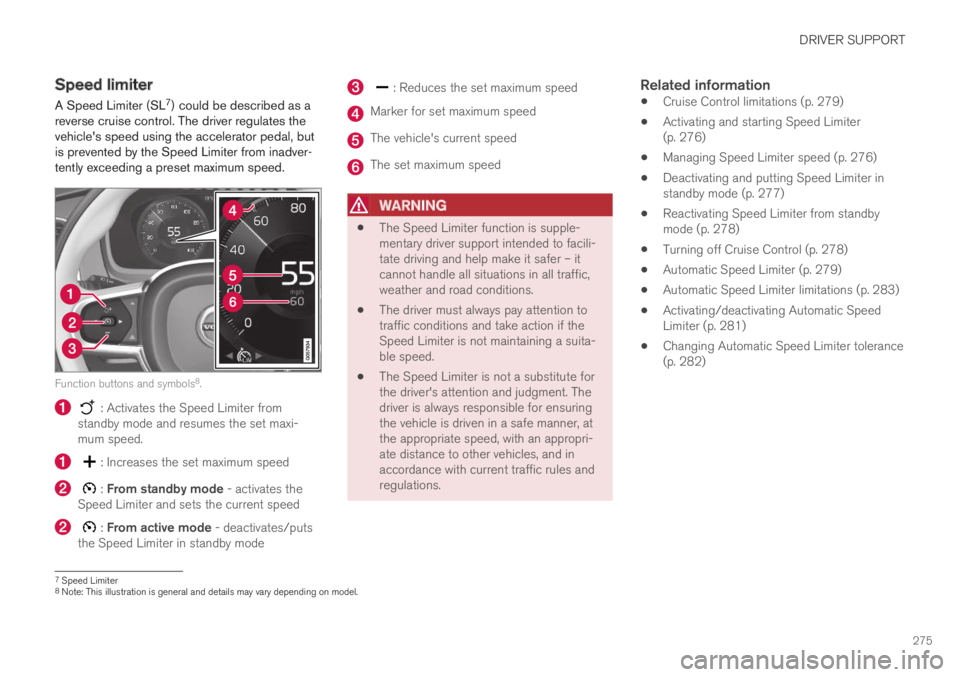
A Speed Limiter (SL7) could be described as areverse cruise control. The driver regulates thevehicle's speed using the accelerator pedal, butis prevented by the Speed Limiter from inadver-tently exceeding a preset maximum speed.
Function buttons and symbols8.
: Activates the Speed Limiter fromstandby mode and resumes the set maxi-mum speed.
: Increases the set maximum speed
: From standby mode - activates theSpeed Limiter and sets the current speed
: From active mode - deactivates/putsthe Speed Limiter in standby mode
: Reduces the set maximum speed
Marker for set maximum speed
The vehicle's current speed
The set maximum speed
WARNING
The Speed Limiter function is supple-mentary driver support intended to facili-tate driving and help make it safer – itcannot handle all situations in all traffic,weather and road conditions.
The driver must always pay attention totraffic conditions and take action if theSpeed Limiter is not maintaining a suita-ble speed.
The Speed Limiter is not a substitute forthe driver's attention and judgment. Thedriver is always responsible for ensuringthe vehicle is driven in a safe manner, atthe appropriate speed, with an appropri-ate distance to other vehicles, and inaccordance with current traffic rules andregulations.
Related information
Cruise Control limitations (p. 279)
Activating and starting Speed Limiter(p. 276)
Managing Speed Limiter speed (p. 276)
Deactivating and putting Speed Limiter instandby mode (p. 277)
Reactivating Speed Limiter from standbymode (p. 278)
Turning off Cruise Control (p. 278)
Automatic Speed Limiter (p. 279)
Automatic Speed Limiter limitations (p. 283)
Activating/deactivating Automatic SpeedLimiter (p. 281)
Changing Automatic Speed Limiter tolerance(p. 282)
7Speed Limiter8Note: This illustration is general and details may vary depending on model.
Page 278 of 669

DRIVER SUPPORT
276
Activating and starting SpeedLimiter
The Speed Limiter (SL9) function must beselected and activated in order to regulatespeed.
Putting Speed Limiter in standby mode
Note: This illustration is general and details may varydepending on model.
–Press ◀ (1) or ▶ (3) and scroll to the Speed
Limiter function (4).
> The symbol (4) will appear, indicating thatthe Speed Limiter is in standby mode.
Starting the Speed Limiter
The Speed Limiter can only be activated whilethe engine is running. The lowest maximumspeed that can be set is 30 km/h (20 mph).
–With the Speed Limiter in standby mode and
the symbol displayed, press the
button (2) on the steering wheel key-pad.
> The Speed Limiter will be started and thevehicle's current speed will be set as themaximum speed.
Related information
Speed limiter (p. 275)
Managing Speed Limiter speed
The Speed Limiter (SL10) can be set to variousspeeds.
Setting/changing set speed
Note: This illustration is general and details may varydepending on model.
–Change a set speed by pressing the (1)
or (3) buttons briefly or by pressing andholding them:
Press briefly: Press briefly: each presschanges the speed in +/- 5 mph(+/- 5 km/h) increments.
Press and hold: Release the button whenthe set speed indicator (4) has moved tothe desired speed.
The most recently set speed will be stored.
9Speed Limiter
Page 280 of 669

DRIVER SUPPORT
278
Reactivating Speed Limiter fromstandby mode
Speed Limiter (SL12) can be reactivated afterhaving been temporarily deactivated and put instandby mode.
Note: This illustration is general and details may varydepending on model.
To reactivate the Speed Limiter from standbymode:
–Press the button on the steering wheel(1).
> The speed limit markings in the instru-ment panel will change from GRAY toWHITE. The vehicle's speed will onceagain be limited to the most recently setspeed.
or
–Press the button on the steering wheel(2).
> The speed limit markings and symbols inthe instrument panel will change fromGRAY to WHITE and the vehicle's currentspeed will be set as the maximum speed.
Related information
Speed limiter (p. 275)
Turning off Cruise Control
The Speed Limiter (SL13) can be turned off.
Note: This illustration is general and details may varydepending on model.
To turn off Cruise Control:
1.Press the button on the steering wheel(2).
> The Speed Limiter will go into standbymode.
2.Press the ◀ (1) or ▶ (3) buttons on thesteering wheel to select another function.
> The Speed Limiter symbol and marking(4) in the instrument panel will go out andthe set maximum speed will be erased.
12Speed Limiter13Speed Limiter
Page 284 of 669
DRIVER SUPPORT
* Option/accessory.282
Changing Automatic Speed Limitertolerance
The Automatic Speed Limiter (ASL) can be setto different tolerance levels.
It is also possible to allow the vehicle to driveabove or below the posted speed limit. For exam-ple, if the vehicle is following a current postedspeed limit of 70 km/h (43 mph), the driver caninstead allow the vehicle to maintain a speed of75 km/h (47 mph).
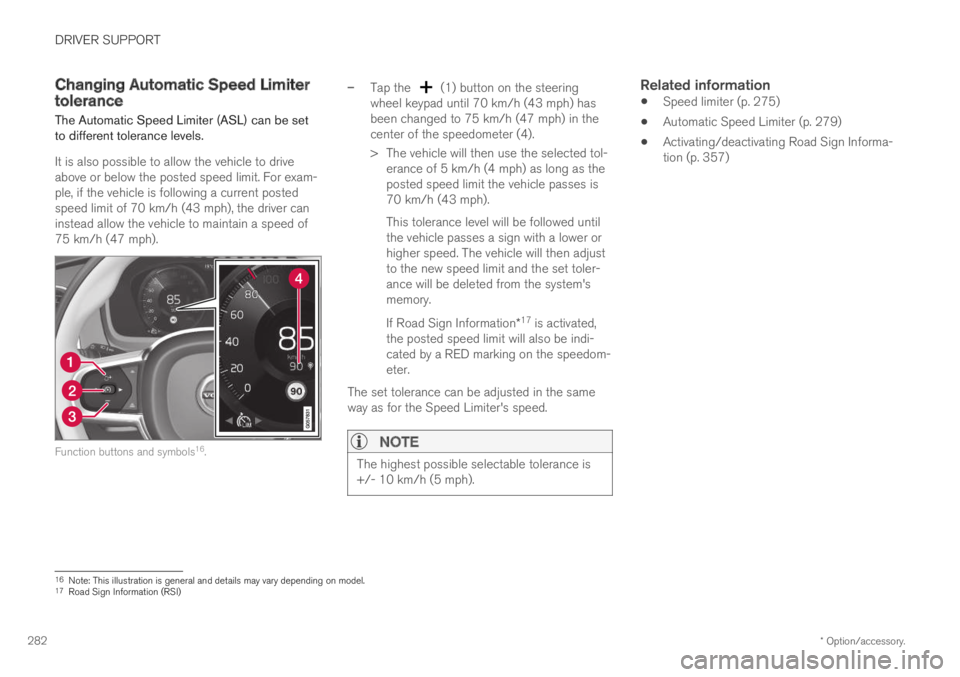
Function buttons and symbols16.
–Tap the (1) button on the steeringwheel keypad until 70 km/h (43 mph) hasbeen changed to 75 km/h (47 mph) in thecenter of the speedometer (4).
> The vehicle will then use the selected tol-erance of 5 km/h (4 mph) as long as theposted speed limit the vehicle passes is70 km/h (43 mph).
This tolerance level will be followed untilthe vehicle passes a sign with a lower orhigher speed. The vehicle will then adjustto the new speed limit and the set toler-ance will be deleted from the system'smemory.
If Road Sign Information*17 is activated,the posted speed limit will also be indi-cated by a RED marking on the speedom-eter.
The set tolerance can be adjusted in the sameway as for the Speed Limiter's speed.
NOTE
The highest possible selectable tolerance is+/- 10 km/h (5 mph).
Related information
Speed limiter (p. 275)
Automatic Speed Limiter (p. 279)
Activating/deactivating Road Sign Informa-tion (p. 357)
16Note: This illustration is general and details may vary depending on model.17Road Sign Information (RSI)
Page 285 of 669
DRIVER SUPPORT
}}
* Option/accessory.283
Automatic Speed Limiter limitations
Automatic Speed Limiter (ASL) utilizes the
speed limit information provided by the RSI18
function, not from the speed limit signs that thevehicle passes.
If RSI18 is unable to interpret and provide ASLwith speed information, ASL will go into standbymode and switch over to SL. The driver will thenhave to actively brake to bring the vehicle downto the appropriate speed.
ASL will be reactivated when RSI18 is once againable to interpret and provide speed information toASL.
See “Road Sign Information limitations” for moreinformation.
Related information
Speed limiter (p. 275)
Automatic Speed Limiter (p. 279)
Automatic Speed Limiter limitations (p. 283)
Activating/deactivating Road Sign Informa-tion (p. 357)
Cruise control
Cruise Control (CC) helps the driver maintain aneven speed to provide a more relaxing drivingexperience on highways and long, straight roadswith even traffic flows.
Overview
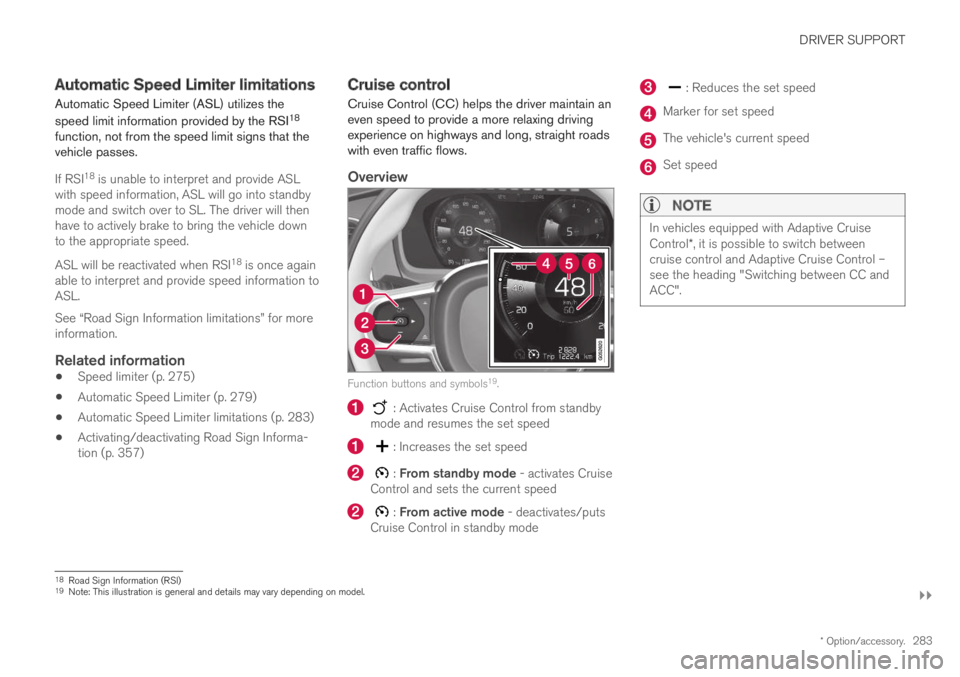
Function buttons and symbols19.
: Activates Cruise Control from standbymode and resumes the set speed
: Increases the set speed
: From standby mode - activates CruiseControl and sets the current speed
: From active mode - deactivates/putsCruise Control in standby mode
: Reduces the set speed
Marker for set speed
The vehicle's current speed
Set speed
NOTE
In vehicles equipped with Adaptive CruiseControl*, it is possible to switch betweencruise control and Adaptive Cruise Control –see the heading "Switching between CC andACC".
18Road Sign Information (RSI)19Note: This illustration is general and details may vary depending on model.
Page 287 of 669
DRIVER SUPPORT
}}
285
30 km/h (20 mph) or higher. The lowest speedthat can be set is 30 km/h (20 mph).
To start Cruise Control:
–With the function displayed, press
(2) on the steering wheel keypad.
> Cruise Control will be started and thevehicle's current speed will be set.
NOTE
Cruise control can then not be connected atspeeds below 30 km/h (20 mph).
Related information
Cruise control (p. 283)
Managing Cruise Control speed
Cruise Control (CC21) can be set to variousspeeds.
Setting/changing set speed
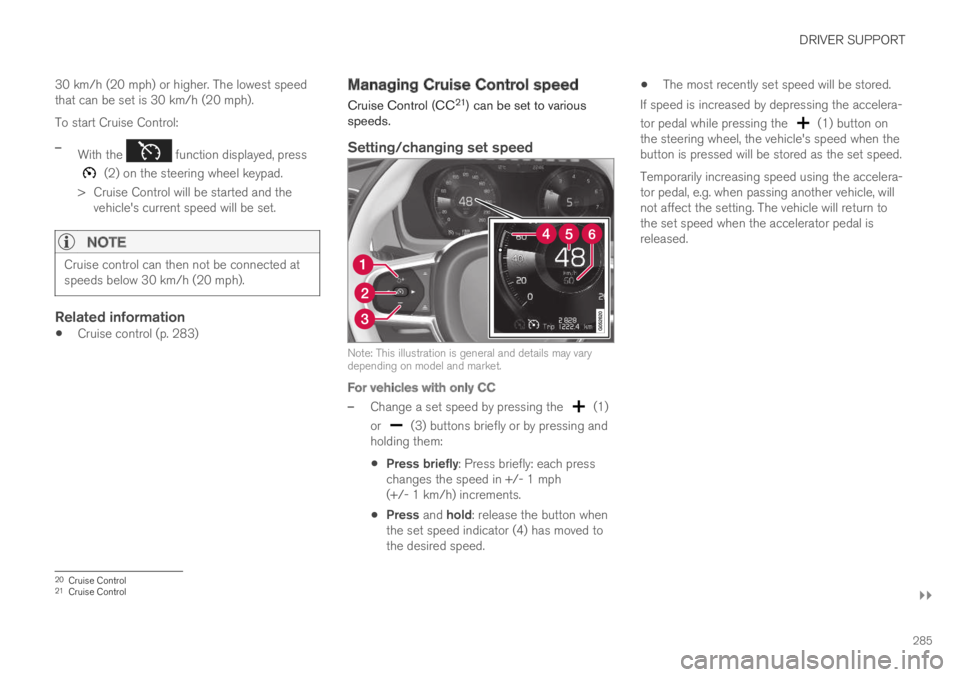
Note: This illustration is general and details may varydepending on model and market.
For vehicles with only CC
–Change a set speed by pressing the (1)
or (3) buttons briefly or by pressing andholding them:
Press briefly: Press briefly: each presschanges the speed in +/- 1 mph(+/- 1 km/h) increments.
Press and hold: release the button whenthe set speed indicator (4) has moved tothe desired speed.
The most recently set speed will be stored.
If speed is increased by depressing the accelera-
tor pedal while pressing the (1) button onthe steering wheel, the vehicle's speed when thebutton is pressed will be stored as the set speed.
Temporarily increasing speed using the accelera-tor pedal, e.g. when passing another vehicle, willnot affect the setting. The vehicle will return tothe set speed when the accelerator pedal isreleased.
20Cruise Control21Cruise Control
Page 288 of 669

||
DRIVER SUPPORT
286
For vehicles with both CC and ACC
–Change a set speed by pressing the (1)
or (3) buttons briefly or by pressing andholding them:
Press briefly: Press briefly: each presschanges the speed in +/- 5 mph(+/- 5 km/h) increments.
Press and hold: release the button whenthe set speed indicator (4) has moved tothe desired speed.
The most recently set speed will be stored.
If speed is increased by depressing the accelera-
tor pedal while pressing the (1) button onthe steering wheel, the vehicle's speed when thebutton is pressed will be stored as the set speed.
Temporarily increasing speed using the accelera-tor pedal, e.g. when passing another vehicle, willnot affect the setting. The vehicle will return tothe set speed when the accelerator pedal isreleased.
Using engine braking instead of
applying the brakes
Cruise Control regulates speed by lightly applyingthe brakes. On downgrades, it can sometimes bedesirable to roll a bit faster and let speed bereduced instead by engine braking alone. Thedriver can temporarily disengage the Cruise Con-trol braking function.
To disengage CC:
–Press the accelerator pedal about halfwaydown and then release it.
> Cruise Control will automatically disen-gage the automatic brake function andspeed will only be reduced using theengine braking function.
How drive mode affects cruise control
The way the cruise control maintains the vehicle'sspeed can vary depending on the selected drive
mode22.
Cruise Control Eco Cruise with ECO drive
mode
In the ECO drive mode, cruise control's accelera-tion and deceleration will be smoother than inother drive modes to help provide optimal fuelefficiency and reduced environmental impact.Because of this, the vehicle's actual speed maybe slightly above or below the set speed.
Cruise Control Dynamic Cruise
With the Dynamic drive mode, cruise control'sacceleration and deceleration will be faster andmore immediate than in other drive modes.
Related information
Cruise control (p. 283)
Drive modes (p. 446)
Deactivating and putting CruiseControl in standby mode
Cruise Control (CC23) can be temporarily putinto standby mode and then reactivated.
Deactivating and putting Cruise Control
in standby mode
Note: This illustration is general and details may varydepending on model.
To put Cruise Control in standby mode:
–Press the button on the steering wheel(2).
> The Cruise Control markings and symbolswill change from WHITE to GRAY, indicat-ing that Cruise Control is temporarilydeactivated and the driver needs to con-trol the vehicle's speed.
22For more information, see "Drive modes".
Page 290 of 669
DRIVER SUPPORT
* Option/accessory.288
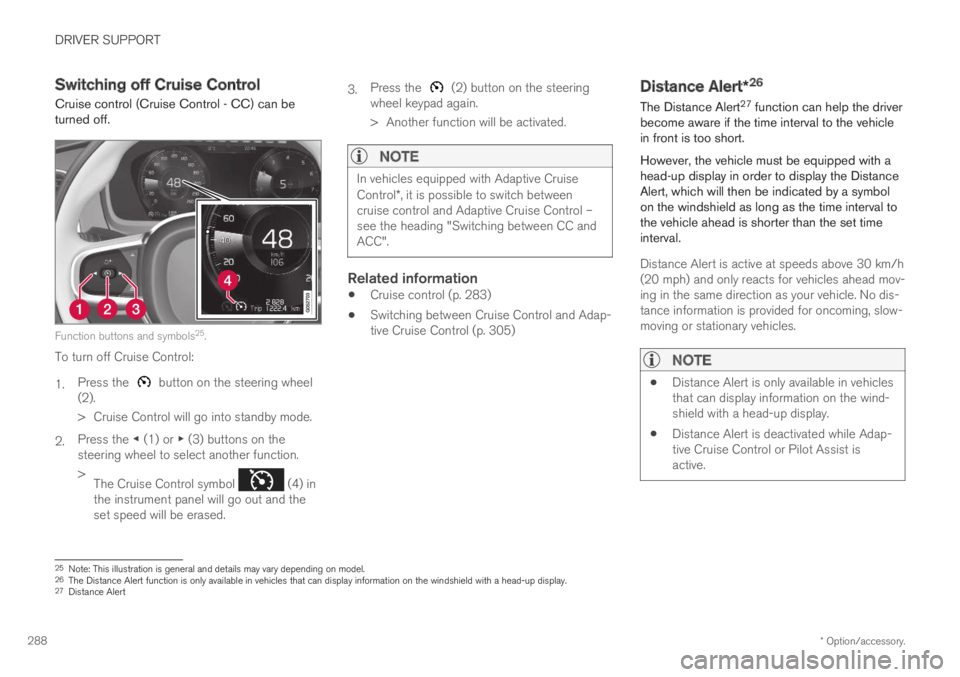
Switching off Cruise Control
Cruise control (Cruise Control - CC) can beturned off.
Function buttons and symbols25.
To turn off Cruise Control:
1.Press the button on the steering wheel(2).
> Cruise Control will go into standby mode.
2.Press the ◀ (1) or ▶ (3) buttons on thesteering wheel to select another function.
>The Cruise Control symbol (4) inthe instrument panel will go out and theset speed will be erased.
3.Press the (2) button on the steeringwheel keypad again.
> Another function will be activated.
NOTE
In vehicles equipped with Adaptive CruiseControl*, it is possible to switch betweencruise control and Adaptive Cruise Control –see the heading "Switching between CC andACC".
Related information
Cruise control (p. 283)
Switching between Cruise Control and Adap-tive Cruise Control (p. 305)
Distance Alert*26
The Distance Alert27 function can help the driverbecome aware if the time interval to the vehiclein front is too short.
However, the vehicle must be equipped with ahead-up display in order to display the DistanceAlert, which will then be indicated by a symbolon the windshield as long as the time interval tothe vehicle ahead is shorter than the set timeinterval.
Distance Alert is active at speeds above 30 km/h(20 mph) and only reacts for vehicles ahead mov-ing in the same direction as your vehicle. No dis-tance information is provided for oncoming, slow-moving or stationary vehicles.
NOTE
Distance Alert is only available in vehiclesthat can display information on the wind-shield with a head-up display.
Distance Alert is deactivated while Adap-tive Cruise Control or Pilot Assist isactive.
25Note: This illustration is general and details may vary depending on model.26The Distance Alert function is only available in vehicles that can display information on the windshield with a head-up display.27Distance Alert
Page 295 of 669

DRIVER SUPPORT
}}
293
Adaptive Cruise Control regulates speed byaccelerating and braking. It is normal for thebrakes to emit a slight sound when they arebeing used to adjust speed.
Adaptive Cruise Control always attempts to regu-late speed smoothly. The driver must apply thebrakes in situations requiring immediate braking.For example, when there are great differences inspeed between vehicles or if the vehicle aheadbrakes suddenly. Due to limitations in the radarsensor, braking may occur unexpectedly or not atall.
Adaptive Cruise Control is designed to follow avehicle ahead in the same lane and maintain atime interval to that vehicle set by the driver. If theradar sensor does not detect a vehicle ahead, itwill instead maintain the speed set by the driver.This will also happen if the speed of the vehicleahead exceeds the set speed for your vehicle.
Adaptive Cruise Control can follow anothervehicle at speeds from a standstill up to200 km/h (125 mph).
WARNING
Adaptive Cruise Control is not a collisionavoidance system. The driver is alwaysresponsible and must intervene if the sys-tem fails to detect a vehicle ahead.
Adaptive Cruise Control does not brakefor people or animals and does not brakefor small vehicles, such as bikes andmotorcycles. Similarly, it does not brakefor low trailers, oncoming, slow-moving orstationary vehicles and objects.
Do not use Adaptive Cruise Control indemanding situations, such as in city traf-fic, at intersections, on slippery surfaces,with a lot of water or slush on the road, inheavy rain/snow, in poor visibility, onwinding roads, or on on/off ramps.
CAUTION
Maintenance of Adaptive Cruise Control com-ponents may only be performed by a work-shop – an authorized Volvo workshop is rec-ommended.
Overview
Controls
Function buttons and symbols34.
: Activates Adaptive Cruise Control fromstandby mode and resumes the set speed
: Increases the set speed
: From standby mode - activates theAdaptive Cruise Control and stores the cur-rent speed
: From active mode - deactivates/switches the Adaptive Cruise Control tostandby mode
: Reduces the set speed
Increases the time interval to the vehicleahead
34Note: This illustration is general and details may vary depending on model.