tow VOLVO S90 TWIN ENGINE 2019 Workshop Manual
[x] Cancel search | Manufacturer: VOLVO, Model Year: 2019, Model line: S90 TWIN ENGINE, Model: VOLVO S90 TWIN ENGINE 2019Pages: 669, PDF Size: 14.33 MB
Page 581 of 669

LOADING, STORAGE AND PASSENGER COMPARTMENT
* Option/accessory.579
Folding down the armrest in the
rear seat*
The rear seat armrest* can be folded down forincreased comfort.
The armrest is locked in the raised position andneeds to be unlocked before it is folded down.The handle for unlocking the armrest is locateddirectly underneath the head restraint.
1. Grasp the handle and rotate it toward you tounlock the armrest.
2. When the handle is rotated to its maximumposition, the armrest is unlocked and can befolded down.
CAUTION
Before moving down the armrest, makesure to unlock it by rotating the handle. Donot pull the handle if the armrest is locked.
Make sure the armrest is securely lockedinto position after it is folded up.
Cargo compartment
Loads can be secured in the trunk to keep themin place while driving.
The folding* rear seat backrests can helpincrease the cargo capacity of the trunk. Loadanchoring eyelets and grocery bag holders areprovided to help secure objects in place.
If the vehicle is equipped with a temporary sparetire, this is secured to the cargo compartmentfloor under the cover. The towing eyelet and tiresealing system are located under the cargo com-partment floor.
Related information
Loading recommendations (p. 580)
Grocery bag holders (p. 581)
Load anchoring eyelets (p. 582)
Page 583 of 669
LOADING, STORAGE AND PASSENGER COMPARTMENT
581
Roof loads and load carriers
Volvo-developed load carriers are recommendedfor carrying loads on the roof of the vehicle.
Volvo load carriers are specially designed to helpprevent damage to your vehicle and help ensuremaximum safety while driving. Volvo load carriersare available from authorized Volvo retailers.
Carefully follow the installation instructions provi-ded with the load carriers.
Distribute the load evenly throughout theload carriers. Place heavier cargo at the bot-tom of the load.
Check periodically to ensure that the loadcarriers and load are properly secured.Secure the load firmly using tie straps orsimilar.
If the load is longer than the vehicle, such asa canoe or kayak, attach the towing eyelet inits front outlet and secure the tie straps in it.
The vehicle's wind resistance and fuel con-sumption increase with the size of the load.
Drive smoothly. Avoid rapid acceleration, hardbraking and fast cornering.
WARNING
The vehicle's center of gravity and drivingcharacteristics are altered by roof loads.
Follow the vehicle's specifications regardingweights and maximum permitted load.
Related information
Loading recommendations (p. 580)
Weights (p. 643)
Grocery bag holders
Grocery bag holders (hooks) help keep shop-ping bags in place and prevent them from fallingover and spilling their contents in the cargocompartment.
On the sides of the cargo compartment
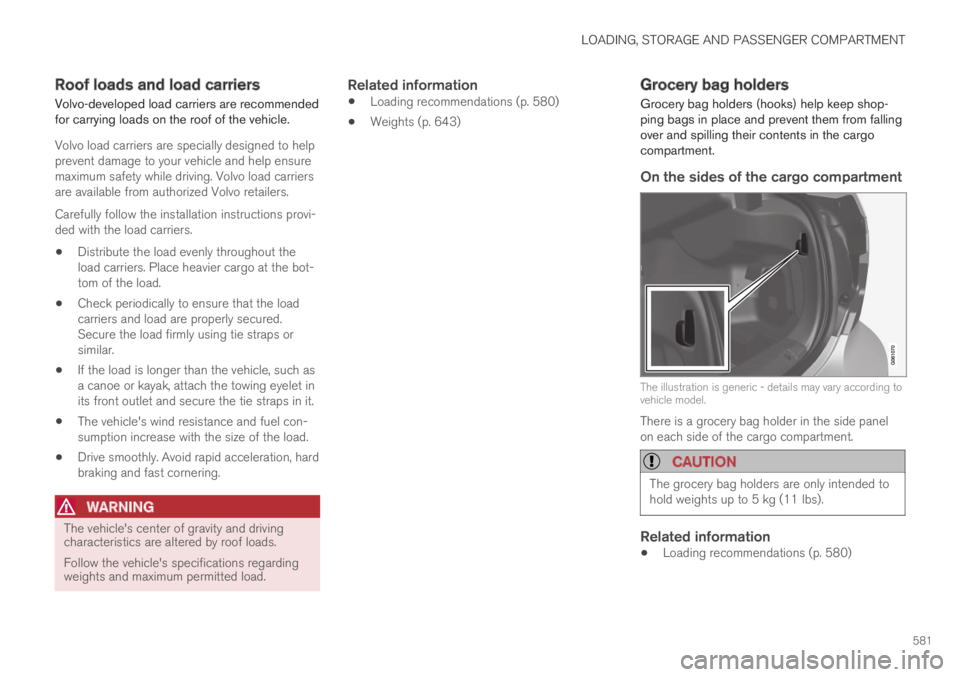
The illustration is generic - details may vary according tovehicle model.
There is a grocery bag holder in the side panelon each side of the cargo compartment.
CAUTION
The grocery bag holders are only intended tohold weights up to 5 kg (11 lbs).
Related information
Loading recommendations (p. 580)
Page 588 of 669

||
MAINTENANCE AND SERVICE
586
Monthly:
Check cold tire pressure in all tires. Inspectthe tires for wear.
Check that engine coolant and other fluidlevels are between the indicated "min" and"max" markings.
Clean interior glass surfaces with a glasscleaner and soft paper towels.
Wipe driver information displays with a softcloth.
Visually inspect battery terminals for corro-sion. Corrosion may indicate a loose terminalconnector, or a battery near the end of itsuseful service life. Consult your Volvo retailerfor additional information.
As needed:
Wash the car, including the undercarriage, toreduce wear that can be caused by a buildup ofdirt, and corrosion that can be caused by salt res-idues.
Clean leaves and twigs from air intake vents atthe base of the windshield, and from other placeswhere they may collect.
NOTE
Complete service information for qualifiedtechnicians is available online for purchase orsubscription at www.volvotechinfo.com.
Related information
Vehicle status (p. 588)
Scheduling service and repairs (p. 589)
Connecting equipment to the vehicle's datalink connector (p. 37)
Technician certification (p. 38)
Climate control system service (p. 595)
Maintenance of the brake system (p. 433)
Engine compartment overview (p. 596)
Data transfer between vehicle andworkshop over Wi-Fi
Volvo workshops have a designated Wi-Fi net-work for secure data transfer between your vehi-cle and the workshop. Your visit to the workshopwill be easier and more effective when diagnos-tics information and software can be transferredover the workshop's network.
When you arrive at the workshop, your servicetechnician can connect your vehicle to the work-shop's Wi-Fi network to perform troubleshootingand download software. For this type of commu-nication, the vehicle only connects to a work-shop's network. It is not possible to connect thevehicle to another Wi-Fi network (e.g. your homenetwork) in the same way as to a workshop's net-work.
Connecting with remote key
Connection is usually managed by the servicetechnician, who will use the remote key buttons. Itis therefore important to bring a key with buttonswith you when you visit the workshop. Pressingthe lock button on the remote key three times willconnect the vehicle to the workshop's Wi-Fi net-work.
When the car is connected to a Wi-Fi network,
the symbol appears in the center display.
Page 592 of 669

||
MAINTENANCE AND SERVICE
* Option/accessory.590
7.Tap Send appointment request.
>You will receive an appointment sugges-
tion by email within a couple of days7.
You will also receive the same messagevia email and when you log in towww.volvocars.com.
On some markets, the message in theinstrument panel indicating that the vehi-cle requires service will go out once theappointment request has been sent.
8.Tap Cancel request if you would like tocancel your request.
The appointment request contains informationabout your vehicle that helps the workshop planfor your visit.
The retailer will send you a digital appointmentsuggestion. Information about your retailer is alsoavailable in the vehicle so that you can contactyour workshop at any time.
Accepting an appointment suggestion
When the vehicle has received an appointmentsuggestion, a message will be displayed at thetop of the center display.
1. Tap the message.
2. To accept the suggested appointment, tapAccept. Otherwise, tap Send newproposal or Decline.
For some markets, the system reminds you whenan appointment time is approaching and the navi-
gation system8 can also guide you to the work-shop at the appointed time.
Related information
Vehicle status (p. 588)
Sending vehicle information to the workshop(p. 590)
Navigating in the center display's views(p. 111)
Volvo ID (p. 26)
Internet-connected vehicle* (p. 523)
Sending vehicle information to the
workshop9
Vehicle-related information can be sent at anytime from the vehicle, e.g. if you schedule a visitto a workshop and would like to assist yourworkshop by providing additional basic informa-tion. Sending vehicle information is not the sameas scheduling service.
1.Open the Car Status app from App view inthe center display.
2.Tap Appointments.
3.Tap Send vehicle data.
> A message confirming that vehicle-relatedinformation has been sent will appear atthe top of the center display. You cancancel data transmission by tapping thecheckbox in the activity indicator.
Information is sent via the vehicle's Inter-
net connection10.
7Timespan may vary depending on market.8For vehicles with Sensus Navigation*.9Certain markets only.10There may be a charge for transmitting data over the Internet, depending on your service plan.
Page 601 of 669

MAINTENANCE AND SERVICE
}}
599
NOTE
If the conditions for measuring oil level arenot properly fulfilled (time after engine shut-down, vehicle inclination, ambient tempera-ture, etc.) the message No value availablewill be shown in the center display. This doesnot mean that anything is wrong in the vehi-cle systems.
Related information
Engine oil (p. 597)
Engine oil specifications (p. 646)
Ignition modes (p. 429)
Vehicle status (p. 588)
Refilling coolant
Coolant helps keep the combustion engine atthe right operating temperature. The heat trans-ferred from the engine to the coolant can beused to warm the passenger compartment.
When refilling coolant, follow the instructions onthe package. Never fill the cooling system withonly water. The risk of freezing is increased withtoo low or too high amounts of coolant.
If there is coolant under the vehicle, smoke fromthe cooling system, or if more than 2 liters (about2 quarts) of coolant has been added to the sys-tem, there could be something wrong with thecooling system and starting the vehicle coulddamage the engine. Call a tow truck and do notattempt to start the engine.
WARNING
The coolant may be very hot. Never unscrewthe cap when the coolant is hot. If coolantmust be filled, unscrew the expansion tankcap slowly to relieve overpressure.
Coolant expansion tank, left-hand drive vehicle.
Page 605 of 669

MAINTENANCE AND SERVICE
}}
603
Location
The start battery is located in the trunk.
WARNING
If the starter battery is disconnected, the func-tion for automatic opening and closing mustbe reset to function correctly. A reset isrequired in order for the pinch protection towork.
Specifications for start battery
Battery typeH8 AGM
Voltage (V)12
Cold start capacityA - CCAB (A)850
Dimensions, L×W×H353×175×190 mm (13.9×6.9×7.5 inches)
Capacity (Ah)95
AAccording to EN standard.BCold Cranking Amperes.
Volvo recommends that batteries are replaced byan authorized Volvo workshop.
Page 619 of 669
MAINTENANCE AND SERVICE
}}
* Option/accessory.617
Positions
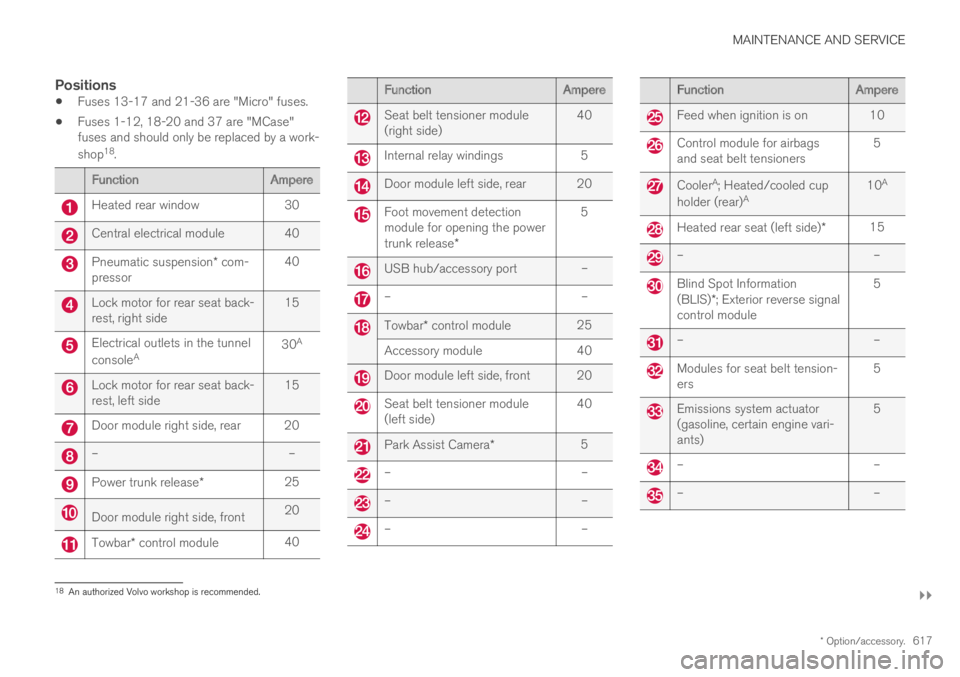
Fuses 13-17 and 21-36 are "Micro" fuses.
Fuses 1-12, 18-20 and 37 are "MCase"fuses and should only be replaced by a work-
shop18.
FunctionAmpere
Heated rear window30
Central electrical module 40
Pneumatic suspension* com-pressor40
Lock motor for rear seat back-rest, right side15
Electrical outlets in the tunnel
consoleA30A
Lock motor for rear seat back-rest, left side15
Door module right side, rear 20
––
Power trunk release*25
Door module right side, front20
Towbar* control module40
FunctionAmpere
Seat belt tensioner module(right side)40
Internal relay windings5
Door module left side, rear 20
Foot movement detectionmodule for opening the powertrunk release*
5
USB hub/accessory port –
––
Towbar* control module25
Accessory module40
Door module left side, front 20
Seat belt tensioner module(left side)40
Park Assist Camera*5
––
––
––
FunctionAmpere
Feed when ignition is on 10
Control module for airbagsand seat belt tensioners5
CoolerA; Heated/cooled cup
holder (rear)A10A
Heated rear seat (left side)*15
––
Blind Spot Information(BLIS)*; Exterior reverse signalcontrol module
5
––
Modules for seat belt tension-ers5
Emissions system actuator(gasoline, certain engine vari-ants)
5
––
––
18An authorized Volvo workshop is recommended.
Page 622 of 669
||
MAINTENANCE AND SERVICE
* Option/accessory.620
CAUTION
The microfiber cloth must be free of sand anddirt when cleaning the center display.
CAUTION
When cleaning the center display, apply onlylight pressure to the screen. Pressing toohard could damage the screen.
CAUTION
Do not spray liquid or corrosive chemicalsdirectly onto the center display. Do not usewindow cleaners, cleaning agents, aerosolsprays, solvents, alcohol, ammonia or deter-gents that contain abrasives.
Never use abrasive cloths, paper towels or tis-sue paper, as these may scratch the centerdisplay.
Related information
Cleaning the interior (p. 619)
Cleaning fabric upholstery and ceiling liner(p. 621)
Cleaning the seat belt (p. 621)
Cleaning floor mats and inlay mats (p. 621)
Cleaning leather upholstery (p. 622)
Cleaning the leather steering wheel(p. 623)
Cleaning interior plastic, metal and wood sur-faces (p. 624)
Cleaning the head-up display*
Carefully wipe the glass covering the head-updisplay unit with a clean and dry microfiber cloth.If necessary, the cloth may be slightly moistened.
Never use strong stain removers. For difficultcleaning conditions, a special cleaning agent canbe purchased at a Volvo retailer.
Related information
Activating and deactivating the head-up dis-play* (p. 139)
Head-up display* (p. 138)
Page 625 of 669
MAINTENANCE AND SERVICE
623
Cleaning the leather upholstery
1. Apply the leather cleaner to a damp spongeand squeeze it until the cleaner foams.
2. Move the sponge in circular motions to applythe foam to the stain.
3. Dampen the stain thoroughly with thesponge. Let the sponge absorb the stain anddo not rub.
4. Dry the stain using a soft towel and let theleather dry completely.
Protecting the leather upholstery
1. Apply a small amount of leather protector toa cloth and then apply the protector to theleather using light circular movements.
2. Let it dry for approximately 20 minutes.
Protecting the leather upholstery makes it betterable to withstand sunlight's harmful UV rays.
Related information
Cleaning the interior (p. 619)
Cleaning the center display (p. 619)
Cleaning fabric upholstery and ceiling liner(p. 621)
Cleaning the seat belt (p. 621)
Cleaning floor mats and inlay mats (p. 621)
Cleaning the leather steering wheel(p. 623)
Cleaning interior plastic, metal and wood sur-faces (p. 624)
Cleaning the leather steering wheel
Only use cleaning agents and car care productsrecommended by Volvo. Clean regularly andtreat stains immediately for best results. It isimportant to vacuum before using a cleaningagent.
Leather steering wheel
Leather needs to breathe. Never cover theleather steering wheel with a plastic protector.Volvo Leather Care Kit 951 0251 and LeatherSoftener 943 7429 are recommended for clean-ing the leather steering wheel. First, remove dirt,dust, etc. with a damp sponge or cloth.
CAUTION
Sharp objects such as rings could damagethe leather on the steering wheel.
If there are stains on the steering wheel:
Type 1(ink, wine, coffee, milk, sweat or blood)
–Use a soft cloth or sponge. Wipe the steeringwheel using a solution of 5% ammonia. Forblood stains, mix approximately 2 dl(1 cup) ofwater with 25 g (one ounce) of salt and wipethe stain.
Type 2(grease, oil, sauces or chocolate)
1. Same procedure as for Type 1 stains.
2.Finish by wiping the wheel with an absorbentpaper or towel.
Type 3(dry dirt or dust)
1. Remove the dirt/dust using a soft brush.
2. Same procedure as for Type 1 stains.
Related information
Cleaning the interior (p. 619)
Cleaning the center display (p. 619)
Cleaning fabric upholstery and ceiling liner(p. 621)
Cleaning the seat belt (p. 621)
Cleaning floor mats and inlay mats (p. 621)
Cleaning leather upholstery (p. 622)
Cleaning interior plastic, metal and wood sur-faces (p. 624)
Page 645 of 669

SPECIFICATIONS
643
Weights
The following table lists important weight datafor your vehicle.
CategoryUSA
(lbs)
Canada
(kg)
Gross vehicle weight57752620
Capacity weight950430
Permissible axle weights, front28651300
Permissible axle weights, rear30401380
Curb weight4600–46302090–2100
Max. roof load220100
CAUTION
When loading the vehicle, the maximumgross vehicle weight and permissible axleweights may not be exceeded.
Related information
Type designations (p. 638)
Towing capacity and tongue weight(p. 644)