sensor VOLVO S90 TWIN ENGINE 2019 Repair Manual
[x] Cancel search | Manufacturer: VOLVO, Model Year: 2019, Model line: S90 TWIN ENGINE, Model: VOLVO S90 TWIN ENGINE 2019Pages: 669, PDF Size: 14.33 MB
Page 351 of 669

DRIVER SUPPORT
* Option/accessory.349
Related information
BLIS* (p. 347)
BLIS limitations
BLIS73 functionality may be reduced in certainsituations.
Keep the marked area clean (on both the left and rightsides of the vehicle)74.
Examples of limitations:
Dirt, ice and snow covering the sensors mayreduce functionality and prevent the systemfrom providing warnings.
The BLIS function is automatically deacti-vated if a trailer, bicycle holder or similar isconnected to the vehicle's electrical system.
For BLIS to function optimally, bicycle hold-ers, luggage racks or similar should not bemounted on the vehicle's towbar.
WARNING
BLIS does not work in sharp curves.
BLIS does not work when the vehicle isbeing reversed.
Related information
BLIS* (p. 347)
71Blind Spot Information72Note: This illustration is general and details may vary depending on model.73Blind Spot Information74Note: This illustration is general and details may vary depending on model.
Page 352 of 669
DRIVER SUPPORT
* Option/accessory.350
Recommended maintenance forBLIS
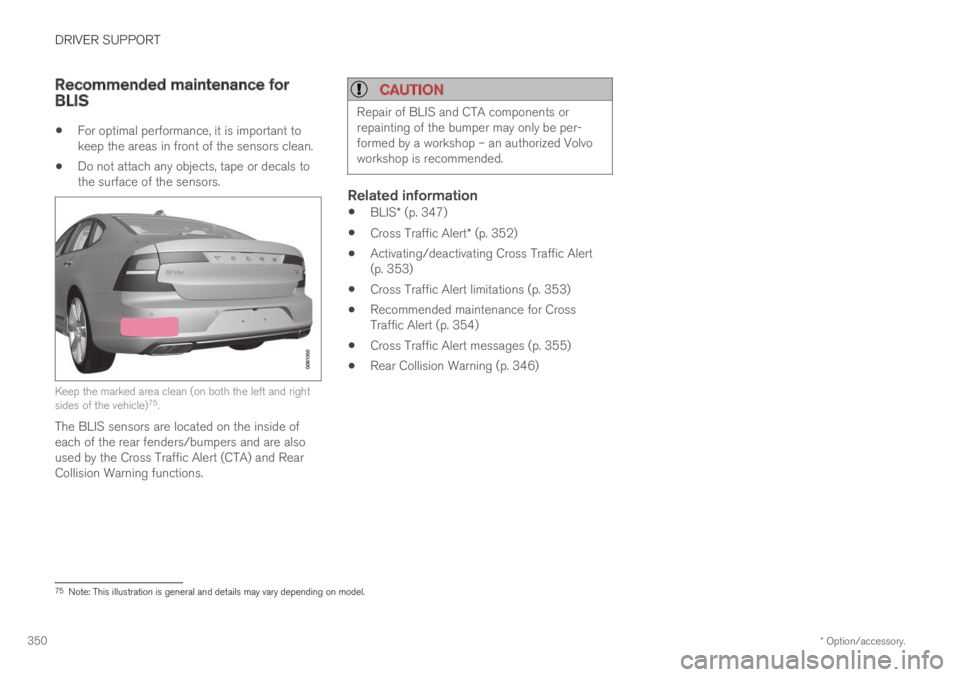
For optimal performance, it is important tokeep the areas in front of the sensors clean.
Do not attach any objects, tape or decals tothe surface of the sensors.
Keep the marked area clean (on both the left and rightsides of the vehicle)75.
The BLIS sensors are located on the inside ofeach of the rear fenders/bumpers and are alsoused by the Cross Traffic Alert (CTA) and RearCollision Warning functions.
CAUTION
Repair of BLIS and CTA components orrepainting of the bumper may only be per-formed by a workshop – an authorized Volvoworkshop is recommended.
Related information
BLIS* (p. 347)
Cross Traffic Alert* (p. 352)
Activating/deactivating Cross Traffic Alert(p. 353)
Cross Traffic Alert limitations (p. 353)
Recommended maintenance for CrossTraffic Alert (p. 354)
Cross Traffic Alert messages (p. 355)
Rear Collision Warning (p. 346)
75Note: This illustration is general and details may vary depending on model.
Page 353 of 669
DRIVER SUPPORT
* Option/accessory.351
BLIS messages
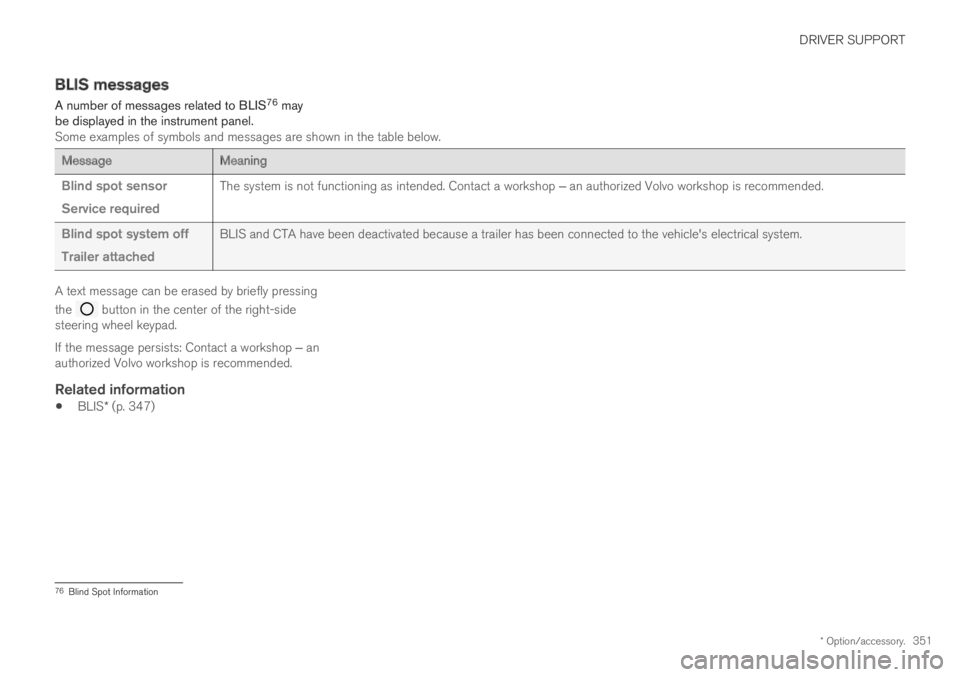
A number of messages related to BLIS76 maybe displayed in the instrument panel.Some examples of symbols and messages are shown in the table below.
MessageMeaning
Blind spot sensor
Service required
The system is not functioning as intended. Contact a workshop ‒ an authorized Volvo workshop is recommended.
Blind spot system off
Trailer attached
BLIS and CTA have been deactivated because a trailer has been connected to the vehicle's electrical system.
A text message can be erased by briefly pressing
the button in the center of the right-sidesteering wheel keypad.
If the message persists: Contact a workshop ‒ anauthorized Volvo workshop is recommended.
Related information
BLIS* (p. 347)
76Blind Spot Information
Page 354 of 669

DRIVER SUPPORT
* Option/accessory.352
Cross Traffic Alert*
CTA77 is a supplementary driver support system
to BLIS78 that is intended to help the driverdetect vehicles crossing behind the vehiclewhile backing up.
CTA overview.
CTA supplements BLIS by detecting traffic cross-ing from the side, e.g. when backing out of aparking space.
CTA is primarily designed to detect vehicles, butin certain cases can also detect pedestrians orsmaller objects such as bicycles.
CTA is only active when the vehicle is movingbackward or if reverse gear is engaged.
If CTA detects that something is approachingyour vehicle from the side:
an audible signal will sound from either theleft or right speaker, depending on whichside of your vehicle the object is approachingfrom.
an icon will illuminate in the PAS79 graphicon the screen.
an icon will appear in the Park Assist Cam-era's Top view.
Illuminated CTA icon in the PAS graphic80 on thescreen.
WARNING
The Cross Traffic Alert function is supple-mentary driver support intended to facili-tate driving and make it safer – it cannothandle all situations in all traffic, weatherand road conditions.
The responsibility for reversing the vehiclesafely and using good judgment alwaysrests with the driver.
Cross Traffic Alert is not a substitute forthe driver's attention and judgment. Thedriver is always responsible for ensuringthe vehicle is driven in a safe manner, atthe appropriate speed, with an appropri-ate distance to other vehicles, and inaccordance with current traffic rules andregulations.
Related information
Activating/deactivating Cross Traffic Alert(p. 353)
Cross Traffic Alert limitations (p. 353)
Recommended maintenance for CrossTraffic Alert (p. 354)
Cross Traffic Alert messages (p. 355)
77Cross Traffic Alert78Blind Spot Information79Park Assist System: Parking assistance with reversing sensors80Note: This illustration is general and details may vary depending on model.
Page 355 of 669

DRIVER SUPPORT
}}
* Option/accessory.353
Activating/deactivating Cross TrafficAlert
The driver can choose to deactivate the CTA81
function as follows:
Press the Cross Traffic Alertbutton in the center display'sFunction view.
GRAY button indicator light - CTA is deacti-vated.
GREEN button indicator light - CTA is acti-vated.
CTA is automatically activated each time theengine is started.
Related information
Cross Traffic Alert* (p. 352)
Cross Traffic Alert limitations
CTA82 functionality may be reduced in certainsituations.
CTA does not function optimally in all situationsand has certain limitations. The CTA sensors, forexample, cannot "see" through other parkedvehicles or objects blocking the vehicle.
Below are a few examples of situations in whichCTA's field of vision may be initially limited andapproaching vehicles may therefore not bedetected until they are very close to your vehicle:
The vehicle is parked very far into a parking space.
In a diagonal parking space, CTA may be completely"blind" on one side of your vehicle.
CTA's blind zone.
CTA's field of vision.
However, as you back your vehicle slowly out of aparking space, CTA's field of vision changes inrelation to the obstructing vehicle/object and itsblind zone is reduced.
81Cross Traffic Alert82Cross Traffic Alert
Page 356 of 669

||
DRIVER SUPPORT
* Option/accessory.354
Examples of further limitations
Dirt, ice and snow covering the sensors mayreduce functionality and prevent the systemfrom providing warnings. For additional infor-mation, see the section "Recommendedmaintenance for Cross Traffic Alert".
CTA is automatically deactivated if a trailer,bicycle holder or similar is connected to thevehicle's electrical system.
For CTA to function optimally, bicycle hold-ers, luggage racks or similar should not bemounted on the vehicle's towbar.
Related information
Cross Traffic Alert* (p. 352)
Recommended maintenance for CrossTraffic Alert (p. 354)
Recommended maintenance forCross Traffic Alert
For optimal performance, it is important tokeep the areas in front of the sensors clean.
Do not attach any objects, tape or decals tothe surface of the sensors.
Keep the marked area clean (on both the left and rightsides of the vehicle)83.
The CTA sensors are located on the inside ofeach of the rear fenders/bumpers and are also
used by the BLIS84 and Rear Collision Warningfunctions.
CAUTION
Repair of BLIS and CTA components orrepainting of the bumper may only be per-formed by a workshop – an authorized Volvoworkshop is recommended.
Related information
Cross Traffic Alert* (p. 352)
BLIS* (p. 347)
Rear Collision Warning (p. 346)
83Note: This illustration is general and details may vary depending on model.84Blind Spot Information
Page 357 of 669
DRIVER SUPPORT
* Option/accessory.355
Cross Traffic Alert messages
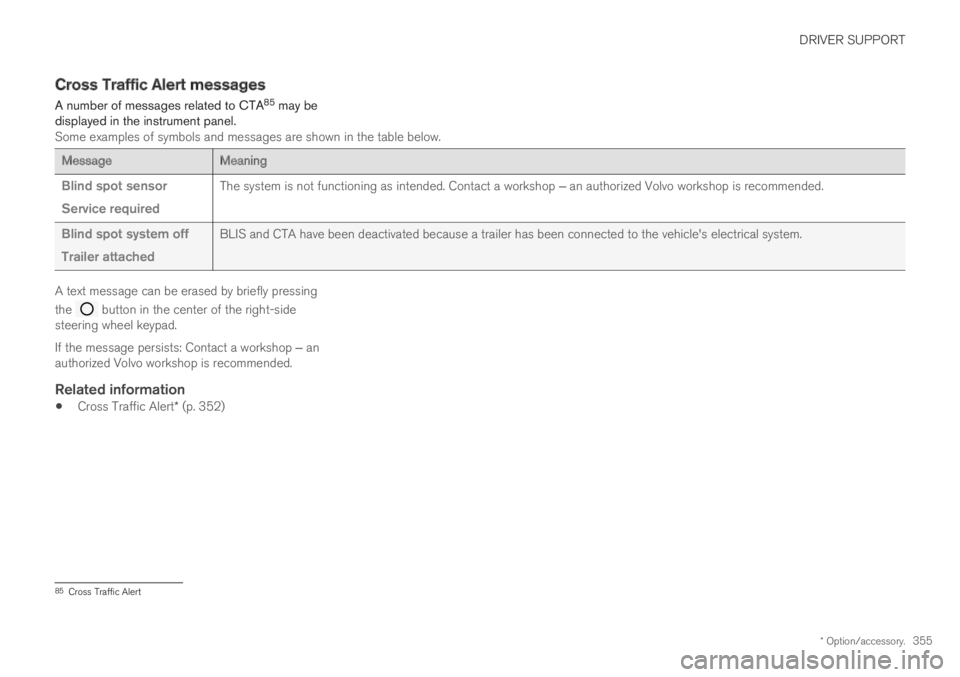
A number of messages related to CTA85 may bedisplayed in the instrument panel.Some examples of symbols and messages are shown in the table below.
MessageMeaning
Blind spot sensor
Service required
The system is not functioning as intended. Contact a workshop ‒ an authorized Volvo workshop is recommended.
Blind spot system off
Trailer attached
BLIS and CTA have been deactivated because a trailer has been connected to the vehicle's electrical system.
A text message can be erased by briefly pressing
the button in the center of the right-sidesteering wheel keypad.
If the message persists: Contact a workshop ‒ anauthorized Volvo workshop is recommended.
Related information
Cross Traffic Alert* (p. 352)
85Cross Traffic Alert
Page 371 of 669
DRIVER SUPPORT
}}
369
Lane Keeping Aid symbols andmessages
A number of symbols and messages related to
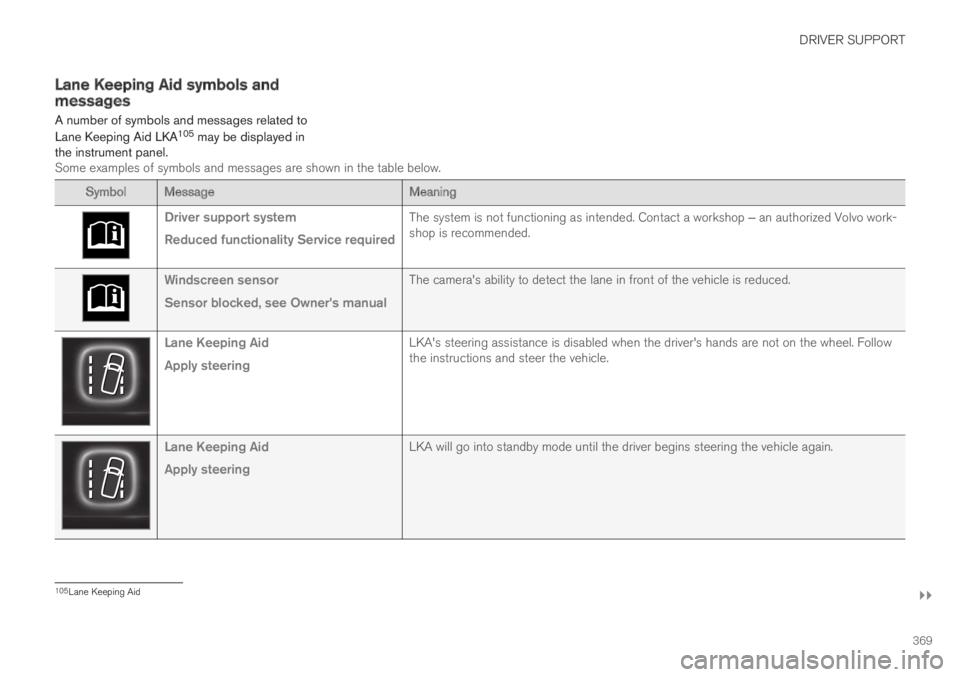
Lane Keeping Aid LKA105 may be displayed inthe instrument panel.Some examples of symbols and messages are shown in the table below.
Symbol MessageMeaning
Driver support system
Reduced functionality Service required
The system is not functioning as intended. Contact a workshop ‒ an authorized Volvo work-shop is recommended.
Windscreen sensor
Sensor blocked, see Owner's manual
The camera's ability to detect the lane in front of the vehicle is reduced.
Lane Keeping Aid
Apply steering
LKA's steering assistance is disabled when the driver's hands are not on the wheel. Followthe instructions and steer the vehicle.
Lane Keeping Aid
Apply steering
LKA will go into standby mode until the driver begins steering the vehicle again.
105Lane Keeping Aid
Page 377 of 669
DRIVER SUPPORT
}}
375
Limitations of Run-Off Mitigationwith steering assistance
In certain demanding driving conditions, thefunction may not be able to properly assist thedriver. In these situations, it is recommendedthat it is turned off.
Examples of such situations include:
road work
winter driving conditions
narrow roads
poor road surfaces
a very sporty driving style
bad weather with reduced visibility
roads with indistinct or no lane markings
sharp edges or lines other than the lane'sside markings
when the power steering works at reducedpower, e.g. during cooling due to overheating(see section “Speed-dependent steeringforce”).
NOTE
The function uses the vehicle's combinedcamera and radar unit, which has certain gen-eral limitations; see sections "Camera limita-tions" and "Radar sensor limitations".
Related information
Steering assistance at risk of collision(p. 372)
Speed-dependent steering wheel resistance(p. 270)
Camera limitations (p. 330)
Radar sensor limitations (p. 325)
Steering assistance during collisionrisks from oncoming traffic
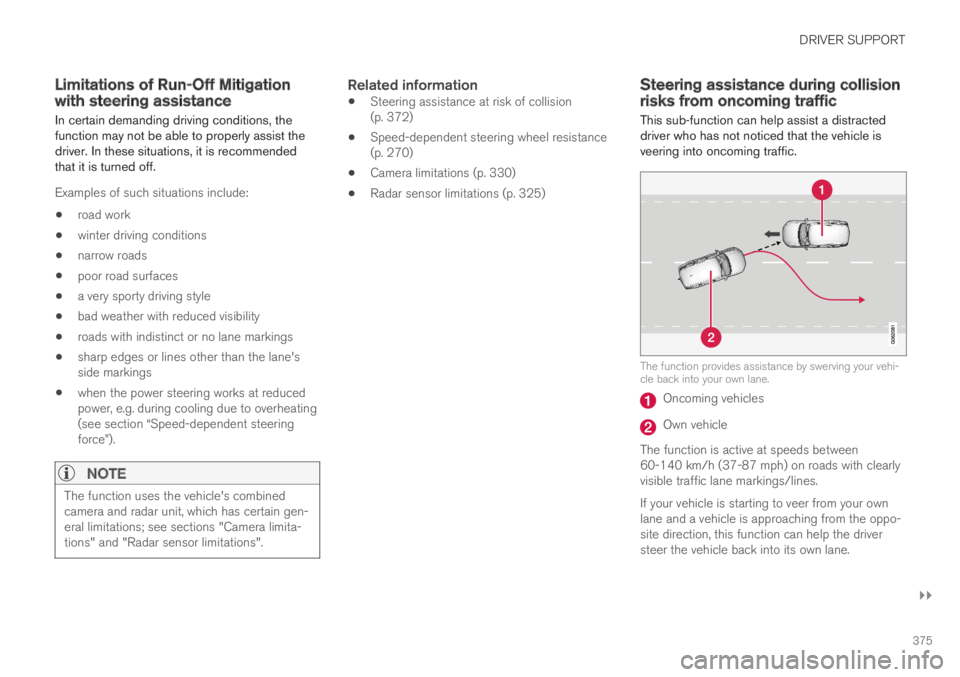
This sub-function can help assist a distracteddriver who has not noticed that the vehicle isveering into oncoming traffic.
The function provides assistance by swerving your vehi-cle back into your own lane.
Oncoming vehicles
Own vehicle
The function is active at speeds between60-140 km/h (37-87 mph) on roads with clearlyvisible traffic lane markings/lines.
If your vehicle is starting to veer from your ownlane and a vehicle is approaching from the oppo-site direction, this function can help the driversteer the vehicle back into its own lane.
Page 379 of 669
DRIVER SUPPORT
377
Related information
Steering assistance at risk of collision(p. 372)
Steering assistance during collision risksfrom oncoming traffic (p. 375)
Limitations of steering assistanceduring collision risks fromoncoming traffic
The function may have limited functionality incertain situations and not intervene, e.g.:
for smaller vehicles such as motorcycles
on roads that do not have clear lane mark-ings
if more than half of your vehicle has movedinto the adjacent lane
outside the speed range 60-140 km/h(37-87 mph)
when the power steering works at reducedpower - e.g. during cooling due to overheat-ing (see section "Speed-dependent steeringforce").
Functionality may also be reduced in other situa-tions, such as:
road work
winter driving conditions
narrow roads
poor road surfaces
a very sporty driving style
bad weather with reduced visibility.
In these demanding driving conditions, the func-tion may not be able to properly assist the driver.
In these situations, it is recommended that it isturned off.
NOTE
The function uses the vehicle's combinedcamera and radar unit, which has certain gen-eral limitations; see sections "Camera limita-tions" and "Radar sensor limitations".
Related information
Steering assistance at risk of collision(p. 372)
Steering assistance during collision risksfrom oncoming traffic (p. 375)
Speed-dependent steering wheel resistance(p. 270)
Camera limitations (p. 330)
Radar sensor limitations (p. 325)