stop start VOLVO V60 2012 Owner's Guide
[x] Cancel search | Manufacturer: VOLVO, Model Year: 2012, Model line: V60, Model: VOLVO V60 2012Pages: 400, PDF Size: 9.28 MB
Page 171 of 400
04 Comfort and driving pleasure
DSTC – Stability and traction control system
04
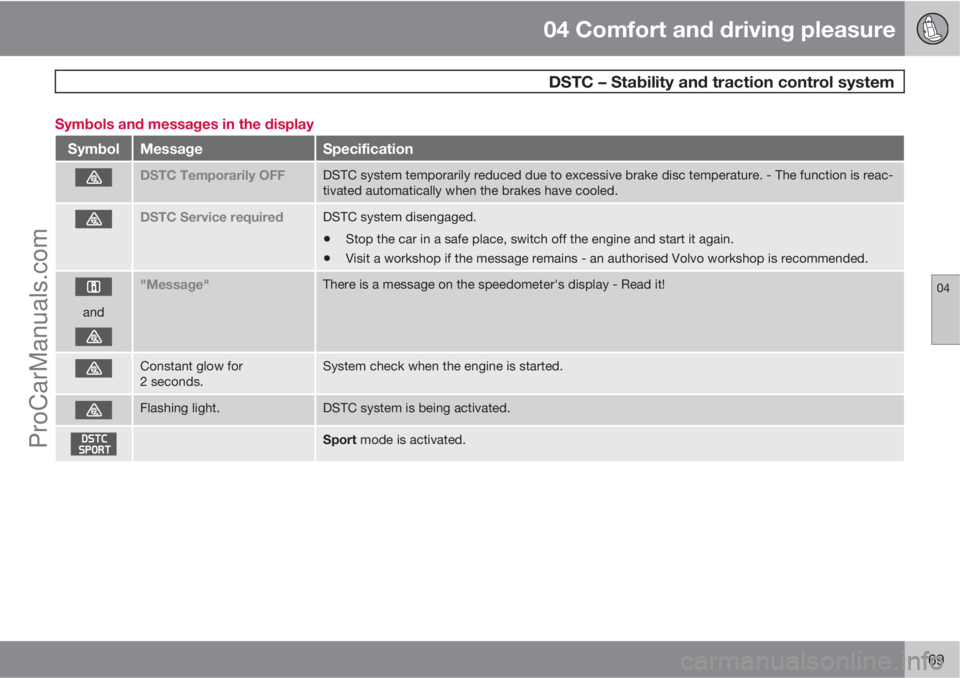
169 Symbols and messages in the display
SymbolMessageSpecification
DSTC Temporarily OFFDSTC system temporarily reduced due to excessive brake disc temperature. - The function is reac-
tivated automatically when the brakes have cooled.
DSTC Service requiredDSTC system disengaged.
•Stop the car in a safe place, switch off the engine and start it again.
•Visit a workshop if the message remains - an authorised Volvo workshop is recommended.
and
"Message"There is a message on the speedometer's display - Read it!
Constant glow for
2 seconds.System check when the engine is started.
Flashing light.DSTC system is being activated.
Sport mode is activated.
ProCarManuals.com
Page 182 of 400
04 Comfort and driving pleasure
Adaptive cruise control*
04
180* Option/accessory, for more information, see Introduction.
NOTE
Activation of the cruise control below
30 km/h requires a vehicle in front within a
reasonable distance.
For shorter stops in connection with inching in
slow traffic or at traffic lights driving is auto-
matically resumed if the stops do not exceed
about 3 seconds - if it takes longer before the
car in front starts moving again then the cruise
control is set in standby mode. The driver must
then re-activate the cruise control in one of the
following ways:
•Press the steering wheel button .
or
•Press the accelerator pedal and accelerate
up to at least about 4 km/h (normal walking
pace).
The cruise control will then resume following
the vehicle in front.
NOTE
The cruise control can hold the car station-
ary for a maximum of 2 minutes - then the
parking brake is applied and the cruise con-
trol is disengaged.
•The driver has to release the parking
brake before the cruise control can be
reactivated.
Change of target
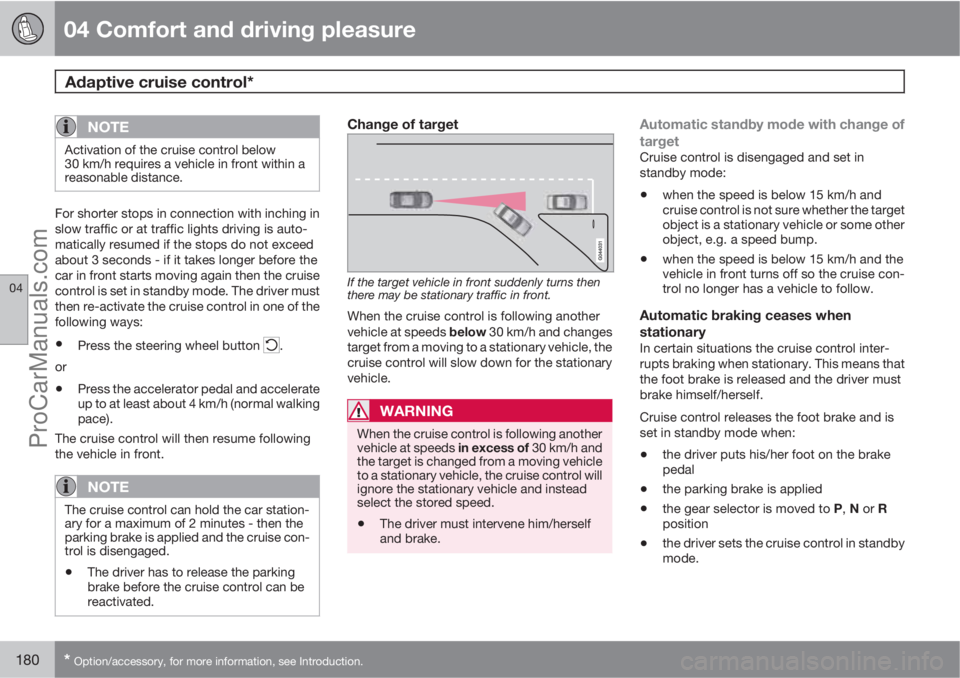
If the target vehicle in front suddenly turns then
there may be stationary traffic in front.
When the cruise control is following another
vehicle at speeds below 30 km/h and changes
target from a moving to a stationary vehicle, the
cruise control will slow down for the stationary
vehicle.
WARNING
When the cruise control is following another
vehicle at speeds in excess of 30 km/h and
the target is changed from a moving vehicle
to a stationary vehicle, the cruise control will
ignore the stationary vehicle and instead
select the stored speed.
•The driver must intervene him/herself
and brake.
Automatic standby mode with change of
target
Cruise control is disengaged and set in
standby mode:
•when the speed is below 15 km/h and
cruise control is not sure whether the target
object is a stationary vehicle or some other
object, e.g. a speed bump.
•when the speed is below 15 km/h and the
vehicle in front turns off so the cruise con-
trol no longer has a vehicle to follow.
Automatic braking ceases when
stationary
In certain situations the cruise control inter-
rupts braking when stationary. This means that
the foot brake is released and the driver must
brake himself/herself.
Cruise control releases the foot brake and is
set in standby mode when:
•the driver puts his/her foot on the brake
pedal
•the parking brake is applied
•the gear selector is moved to P, N or R
position
•the driver sets the cruise control in standby
mode.
ProCarManuals.com
Page 190 of 400
04 Comfort and driving pleasure
City Safety™
04
188* Option/accessory, for more information, see Introduction.
General
City Safety™ is a function for helping the driver
to avoid a collision when driving in queues,
amongst other things, when changes in the
traffic ahead, combined with a lapse in atten-
tion, could lead to an incident.
The function is active at speeds below
30 km/h and it helps the driver by automatically
braking the car in the event of imminent risk of
collision with vehicles in front, should the driver
not react in time by braking and/or steering
away.
City Safety™ is activated in situations where
the driver should have started braking earlier,
which is why it cannot help the driver in every
situation.
City Safety™ is designed to be activated as
late as possible in order to avoid unnecessary
intervention.
City Safety™ must not be used as an excuse
for the driver to change his/her driving style. If
the driver solely relies on City Safety™ to do
the braking, there will be a collision sooner or
later.
The driver or passengers normally only notice
City Safety™ if a situation arises where the car
is extremely close to being in a collision.If the car is also equipped with a Collision
Warning function with Auto Brake*, these two
systems complement each other. For more
information on Collision Warning function with
Auto Brake, see page 192.
IMPORTANT
Maintenance and replacement of City
Safety™ components must only be per-
formed by a workshop - an authorised Volvo
workshop is recommended.
WARNING
City Safety™ does not engage in all driving
situations or traffic, weather or road condi-
tions.
City Safety™ does not react to vehicles
driving in a different direction from the car,
to small vehicles, motorcycles and bicycles
or to humans and animals.
City Safety™ can prevent collision at a
speed difference of less than 15 km/h - at a
higher speed difference, it is only possible
to reduce collision speed. In order to obtain
full brake function, the driver must depress
the brake pedal.
Never wait for City Safety™ to engage. The
driver always bears responsibility for main-
taining the proper distance and speed.
Function
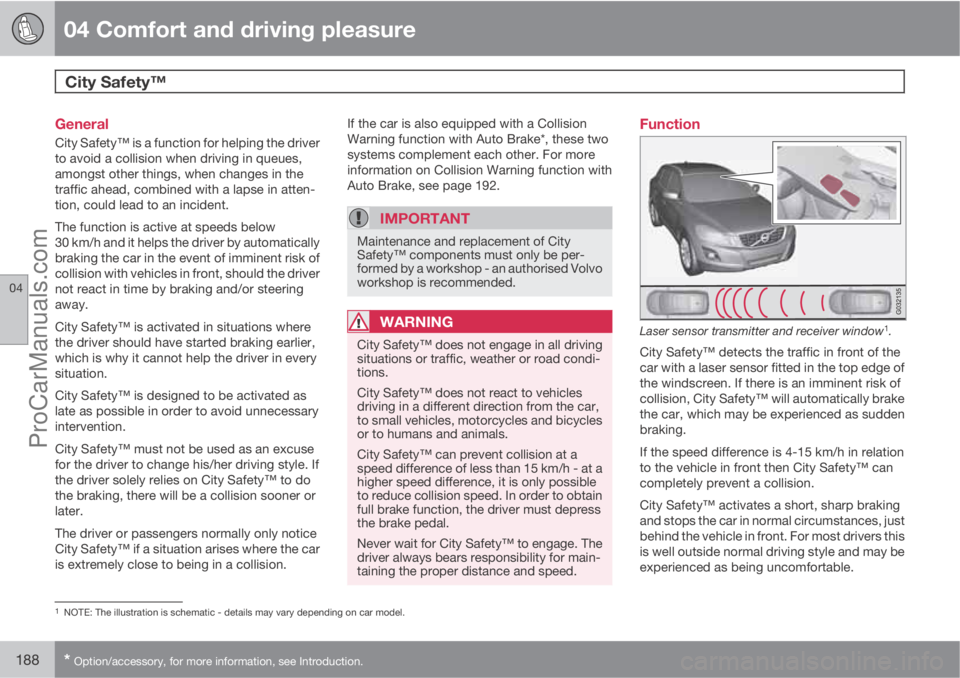
Laser sensor transmitter and receiver window1.
City Safety™ detects the traffic in front of the
car with a laser sensor fitted in the top edge of
the windscreen. If there is an imminent risk of
collision, City Safety™ will automatically brake
the car, which may be experienced as sudden
braking.
If the speed difference is 4-15 km/h in relation
to the vehicle in front then City Safety™ can
completely prevent a collision.
City Safety™ activates a short, sharp braking
and stops the car in normal circumstances, just
behind the vehicle in front. For most drivers this
is well outside normal driving style and may be
experienced as being uncomfortable.
1NOTE: The illustration is schematic - details may vary depending on car model.
ProCarManuals.com
Page 197 of 400
04 Comfort and driving pleasure
Collision Warning with Auto Brake & Pedestrian Protection*
04
* Option/accessory, for more information, see Introduction.195
WARNING
Warnings and brake interventions could be
implemented late or not at all if the traffic
situation or external influences mean that
the radar or camera sensor cannot detect a
pedestrian or a vehicle in front correctly.
The sensor system has a limited range for
pedestrians and the system therefore pro-
vides effective warnings and brake inter-
ventions at vehicle speeds up to 50 km/h.
For stationary or slow-moving vehicles,
warnings and brake interventions are effec-
tive at vehicle speeds up to 70 km/h.
Warnings for stationary or slow-moving
vehicles could be disengaged due to dark-
ness or poor visibility.
The collision warning system uses the same
radar sensors as adaptive cruise control. For
more information on the radar sensor and its
limitations, see page 181.
If warnings are perceived as being too frequent
or disturbing then the warning distance can be
reduced. This would lead to the system warn-
ing at a later stage, which reduces the total
number of warnings.
When the car is reversing Collision Warning
with Auto Brake cannot be activated.
Collision Warning with Auto Brake is not acti-
vated at low speeds - under 4 km/h, which iswhy the system does not intervene in situations
where the car is approaching a vehicle in front
very slowly, e.g. when parking.
Driver commands are always prioritised, which
is why Collision Warning with Auto Brake does
not intervene in situations where the driver is
steering, braking or accelerating in a clear
manner, even if a collision is unavoidable.
When Auto Brake has prevented a collision
with a stationary object the car remains sta-
tionary for a maximum of 1.5 seconds. If the car
is braked for a vehicle in front that is moving,
then speed is reduced to the same speed as
that maintained by the vehicle in front.
On a car with manual gearbox the engine stops
when Auto Brake has stopped the car, unless
the driver manages to depress the clutch pedal
beforehand.
Camera sensor limitationsThe car's camera sensor is used by the three
functions - Collision Warning with Auto Brake,
Driver Alert Control, see page 199 and Lane
Departure Warning, see page 202.
NOTE
Keep the windscreen surface in front of the
camera sensor clean from ice, snow, mist
and dirt.
Do not attach or fit anything to the wind-
screen in front of the camera sensor, as this
could reduce or prevent the function of one
or more camera-dependent systems.
The camera sensors have limitations similar to
the human eye, i.e. they "see" worse in dark-
ness, heavy snowfall or rain and in thick fog for
example. Under such conditions the functions
of camera-dependent systems could be sig-
nificantly reduced or temporarily disengaged.
Strong oncoming light, reflections in the car-
riageway, snow or ice on the road surface, dirty
road surfaces or unclear lane markings could
also significantly reduce camera sensor func-
tion when it is used to scan the carriageway
and detect pedestrians and other vehicles.
During very high temperatures the camera is
temporarily switched off for about 15 minutes
after the engine is started in order to protect
camera functionality.
ProCarManuals.com
Page 201 of 400
04 Comfort and driving pleasure
Driver Alert System – DAC*
04
* Option/accessory, for more information, see Introduction.199 General information on Driver Alert
System
The Driver Alert System is intended to assist
drivers whose driving ability is deteriorating or
who are inadvertently leaving the lane they are
driving on.
The Driver Alert System consists of two differ-
ent functions, which can either be switched on
at the same time or individually:
•Driver Alert Control (DAC)
•Lane Departure Warning (LDW), see
page 202.
A switched-on function is set in standby mode
and is not activated automatically until speed
exceeds 65 km/h.
The function is deactivated again when speed
decreases to below 60 km/h.
Both functions use a camera which is depend-
ent on the lane having side markings painted
on each side.
WARNING
The Driver Alert System does not work in all
situations but is instead only intended to be
of supplementary assistance.
The driver always has ultimate responsibility
that the car is driven safely.
General information on Driver Alert
Control - DAC
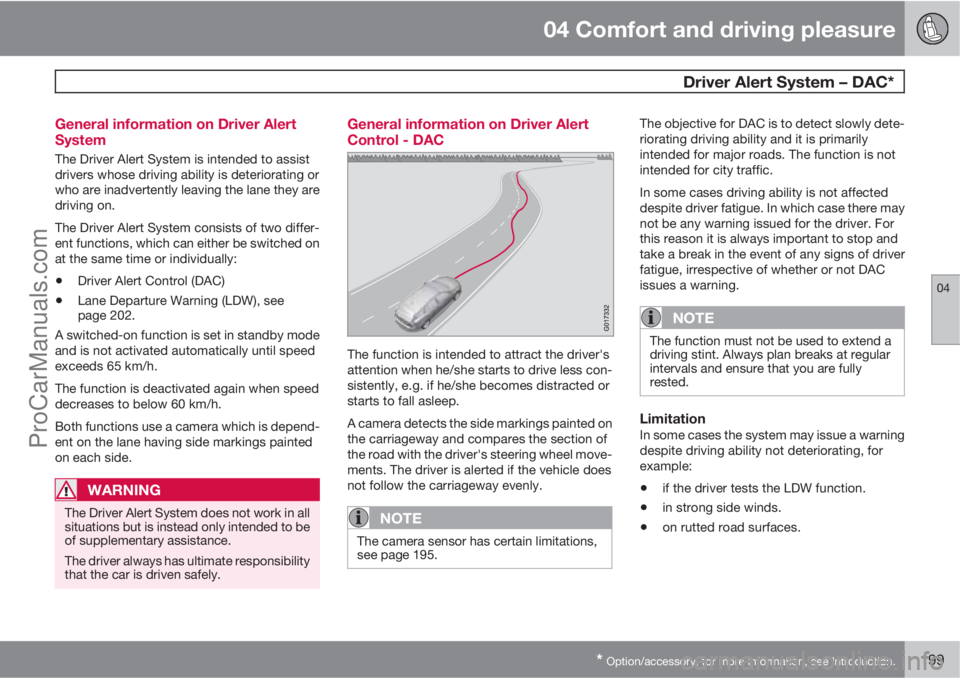
The function is intended to attract the driver's
attention when he/she starts to drive less con-
sistently, e.g. if he/she becomes distracted or
starts to fall asleep.
A camera detects the side markings painted on
the carriageway and compares the section of
the road with the driver's steering wheel move-
ments. The driver is alerted if the vehicle does
not follow the carriageway evenly.
NOTE
The camera sensor has certain limitations,
see page 195.
The objective for DAC is to detect slowly dete-
riorating driving ability and it is primarily
intended for major roads. The function is not
intended for city traffic.
In some cases driving ability is not affected
despite driver fatigue. In which case there may
not be any warning issued for the driver. For
this reason it is always important to stop and
take a break in the event of any signs of driver
fatigue, irrespective of whether or not DAC
issues a warning.
NOTE
The function must not be used to extend a
driving stint. Always plan breaks at regular
intervals and ensure that you are fully
rested.
LimitationIn some cases the system may issue a warning
despite driving ability not deteriorating, for
example:
•if the driver tests the LDW function.
•in strong side winds.
•on rutted road surfaces.
ProCarManuals.com
Page 233 of 400
05 Infotainment system
Radio
05
231
time and returns when the station is stored.
The preset button can now be used.
A list of pre-selected channels can be shown
2
in the TV screen. The function is activated/
deactivated in FM/AM mode under FM menu
Show presets or AM menuShow
presets.
Scan wavelengthThe function automatically searches the cur-
rent wavelength for strong stations. When a
station is found, it is played for approx. 8 sec-
onds before scanning is resumed. When a sta-
tion is playing back it can be saved as a preset
in the usual way, see the section "Pre-
set" above.
–To start scanning go in FM/AM mode to
FM menu
Scan or AM menuScan.
NOTE
Scanning stops if a station is saved.
RDS functionsRDS (Radio Data System) links FM transmitters
into a network. An FM transmitter in such a
network sends information that gives an RDS
radio the following functions:
•Automatically switches to a stronger trans-
mitter if reception in the area is poor.
•Searches for programme type, such as
traffic information or news.
•Receives text information on current radio
programme.
NOTE
Some radio stations do not use RDS or only
some if its functionality.
If a required programme type is located the
radio can switch stations interrupting the audio
source currently in use. For example, if the CD
player is in use, it is paused. The interrupting
transmission is played at a preset volume, see
page 233. The radio returns to the previous
audio source and volume when the set pro-
gramme type is no longer broadcast.
The programme functions alarm (
ALARM!),
traffic information (TP), news (NEWS), and pro-
gramme types (PTY) interrupt one another in
order of priority, where alarm has the highest
priority and programme types has the lowest.
For additional settings of programming inter-
ruptions (
EON Distant and EON Local), see
the section "Enhanced Other Networks –
EON" below. Press EXIT to return to the inter-rupted audio source, press the OK/MENU to
clear the message.
AlarmThis function is used to warn of serious acci-
dents and catastrophes. The alarm cannot be
temporarily interrupted or deactivated. The
message
ALARM! appears on the TV screen
when an alarm message is transmitted.
Traffic information – TPThis function allows traffic information sent
within a set station's RDS network to break
through. The
TP symbol indicates that the
function is activated. If the preset station can
send traffic information then this is shown by
TP glowing brightly in the TV screen, otherwiseTP will be grey.
–
Activate/deactivate in FM mode under FM
menu
TP.
Enhanced Other Networks – EONThis function is useful in urban areas with many
regional radio stations. It allows the distance
between the car and the radio station trans-
mitter to determine when programme functions
should interrupt the current audio source.
2Only applies to High Performance Multimedia and Premium Sound Multimedia.
ProCarManuals.com
Page 236 of 400
05 Infotainment system
Radio
05
234
Navigation in channel group list
(Ensemble)
To navigate in and access the channel group
list turn TUNE. The name of the Ensemble is
shown in the upper part of the TV screen. When
scrolling to the new Ensemble the name
changes to the new one. A thick grey line sep-
arates the two channel groups from each other.
•Service - Shows channels irrespective of
the channel group to which they are allo-
cated. The list can also be filtered using the
selection of programme type (
PTY
filtering), see below.
ScanningThe function automatically searches the cur-
rent wavelength for strong stations. When a
station is found, it is played for approx. 8 sec-
onds before scanning is resumed. When a sta-
tion is playing back it is saved as a preset in the
usual way. For more information on presets,
see "Preset" below.
–
Go in DAB mode to DAB menu
Scan to
start scanning.
NOTE
Scanning stops if a station is saved.
Scanning can also be selected in DAB-PTY
mode. In which case only channels of the pre-
selected programme type are played.
Programme type (PTY)Various types of radio programmes can be
selected using the programme type function.
There are a number of different programme
types which also include different programme
categories. After selecting a programme type,
navigation only takes place within the channels
that are broadcasting that type.
Programme type is selected in DAB mode
under DAB menu
PTY filtering. Exit this
mode as follows:
–
Press EXIT.
> An indicator is shown in the TV screen
when PTY is activated.
In certain cases DAB radio will exit PTY mode
when DAB to DAB linking (see below) is imple-
mented.
Preset10 station presets can be stored per wave-
length. DAB has 2 memories for presets:
DAB1 and DAB2. Storing of presets is per-
formed in the usual way, for more information
see page 230. The stored presets are selected
using the preset buttons.A preset contains one channel but no sub-
channels. If a subchannel is being played and
a preset is saved then only the main channel is
registered. This is because subchannels are
temporary. At the next attempt to retrieve the
preset, the channel which contained the sub-
channel will be played. The preset is not
dependent on the channel list.
A list of pre-selected channels can be shown
4
in the TV screen. The function is activated/
deactivated in DAB mode under DAB menu
Show presets.
NOTE
The audio system's DAB system does not
support all functions available in the DAB
standard.
Radio textSome radio stations transmit information on
programme content, artists, etc. This informa-
tion is shown on the TV screen.
The function is deactivated/activated in DAB
mode under DAB menu
Show radio text.
4Only applies to High Performance Multimedia and Premium Sound Multimedia
ProCarManuals.com
Page 239 of 400
05 Infotainment system
Media player
05
* Option/accessory, for more information, see Introduction.237
back. Press EXIT to cancel and exit the playlist.
A long press on EXIT leads to the playlist's root
level.
Disc tracks can also be changed by pressing
on
/ on the centre console or the
steering wheel keypad*.
Burned discs audio/video files1
Turn TUNE to access the disc's playlist/folder
structure and navigate in the list/structure. Use
OK/MENU to confirm either selection of sub-
folder or start of playback of the selected
audio/video file. Press EXIT to either stop and
exit the playlist or go up (back) in the folder
structure. A long press on EXIT leads to the
playlist's root level.
Audio/video files can also be changed by
pressing
/ on the centre console or the
steering wheel keypad*.
Audio files have the symbol
, video files1
have the symbol and folders have the
symbol
.
When playback of a file is complete the play-
back of the other files (of the same type) in that
particular folder continues. Change
3 of folder
takes place automatically when all the files inthe current folder have been played back. The
system automatically detects and changes
setting when a disc containing only audio files
or only video files is loaded into the media
player and then plays back these files. How-
ever, the system does not change setting if a
disc containing a mixture of audio and video
files is loaded into the media player, but instead
the player continues to play back the previous
file type.
NOTE
A video film is only shown when the car is
stationary. When the car is moving at a
speed of over about 8 km/h no picture is
shown and
No visual media available
during driving appears on the display
screen, although the audio is heard during
this time. The picture is shown again as
soon as the car's speed falls below about 6
km/h.
NOTE
Some audio files that are copy-protected by
record companies or privately copied audio
files cannot be loaded by the player.
DVD video discs1
For playback of DVD video discs, see
page 238.
Fast forward/reverse
Hold in the buttons / to fast forward/
rewind. Audio files are fast forwarded/rewound
at one speed, while video files are fast forwar-
ded/rewound at several speeds. Repeatedly
press the buttons
/ to increase the fast
forward/rewind speed for video files. Release
the button to return to viewing at normal speed.
Music recognition, GracenoteŸ
If the car is equipped with navigation* then
there is a hard drive in the car that contains a
database for music recognition of CD audio
discs. The database contains the most popular
songs at the moment. If the media player gets
a hit in the database then the album title and
artist name for the media are displayed, and
each track shows track title, artist and album.
If the current CD audio disc is not found in the
database then the CD text from the disc is
used. If there is no CD text on the disc then only
Track 1, Track 2 etc. is displayed.
1Only applies to High Performance Multimedia and Premium Sound Multimedia.3If Repeat folder is activated then this does not take place.
ProCarManuals.com
Page 243 of 400
05 Infotainment system
External audio source via AUX/USB* input
05
* Option/accessory, for more information, see Introduction.241
Playback and navigation3
Turn TUNE to access the playlist/folder struc-
ture and navigate in the list/structure. Use OK/
MENU to either confirm selection of subfolder
or start of playback of the selected audio/video
file. Press EXIT to either stop and exit the play-
list or go up (back) in the folder structure. A long
press on EXIT leads to the playlist's root level.
Audio/video files can also be changed by
pressing
/ on the centre console or the
steering wheel keypad*.
Audio files have the symbol
, video files4
have the symbol and folders have the
symbol
.
When playback of a file is complete the play-
back of the other files (of the same type) in that
particular folder continues. Change
5 of folder
takes place automatically when all the files in
the current folder have been played back. The
system automatically detects and changes
setting when a device containing only audio
files or only video files is connected to the USB
port and then it plays back these files. How-
ever, the system does not change setting if a
device containing a mixture of audio and video
files is connected to the USB port, but insteadthe player continues to play back the previous
file type.
Fast forward/reverse3
See page 237.
Scan3
See page 238.
Random3
See page 238.
Search function3
The keypad on the control panel in the centre
console can be used to find a filename in the
current folder.
The search function is accessed either by turn-
ing TUNE (to access the folder structure) or by
pressing one of the letter keys. As a letter or
character in a search string is entered you get
closer to your search target.
Start playback of a file by pressing OK/
MENU.
Repeat folder6
See page 238.
Audio sources
USB memory
To facilitate the use of a USB memory stick,
only store music files on it. It takes a lot longer
for the system to load storage media that con-
tains anything other than compatible music
files.
NOTE
The system supports mobile media compli-
ant with USB 2.0 and the FAT32 file system
and can handle 1000 folders with a maxi-
mum of 254 subfolders/files in every folder.
The top level, which can handle up to 1000
subfolders/files, is an exception to this.
NOTE
When using a longer model USB memory
stick the use of a USB adapter cable is rec-
ommended. This is to avoid mechanical
wear to the USB input and the connected
USB memory stick.
USB hubIt is possible to connect a USB hub to the USB
connection and thereby connect multiple USB
devices simultaneously. Selection of USB
3Only applies to USB and iPodŸ.4Applies to High Performance Multimedia and Premium Sound Multimedia.5If Repeat folder is activated then this does not take place.6Only applies to USB.
ProCarManuals.com
Page 248 of 400
05 Infotainment system
TV*
05
246* Option/accessory, for more information, see Introduction.
TV*
General
NOTE
This system only supports TV transmissions
in countries which transmit signals in
mpeg-2 format and follow the DVB-T stand-
ard. The system does not support TV trans-
missions in mpeg-4 format or analogue
transmissions.
NOTE
The TV picture is only shown when the car
is stationary. When the car is moving at a
speed over about 6 km/h the picture disap-
pears,
No visual media available during
driving appears on the display screen,
although the audio is heard during this time.
The picture reappears when the car has
stopped.
NOTE
The reception is dependent both on how
good the signal strength and signal quality
are. The transmission may be disturbed by
various factors such as tall buildings or the
TV transmitter being far away. Coverage
level can also vary depending on where in
the country you are located.
IMPORTANT
A TV licence is required for this product in
some countries.
Overview
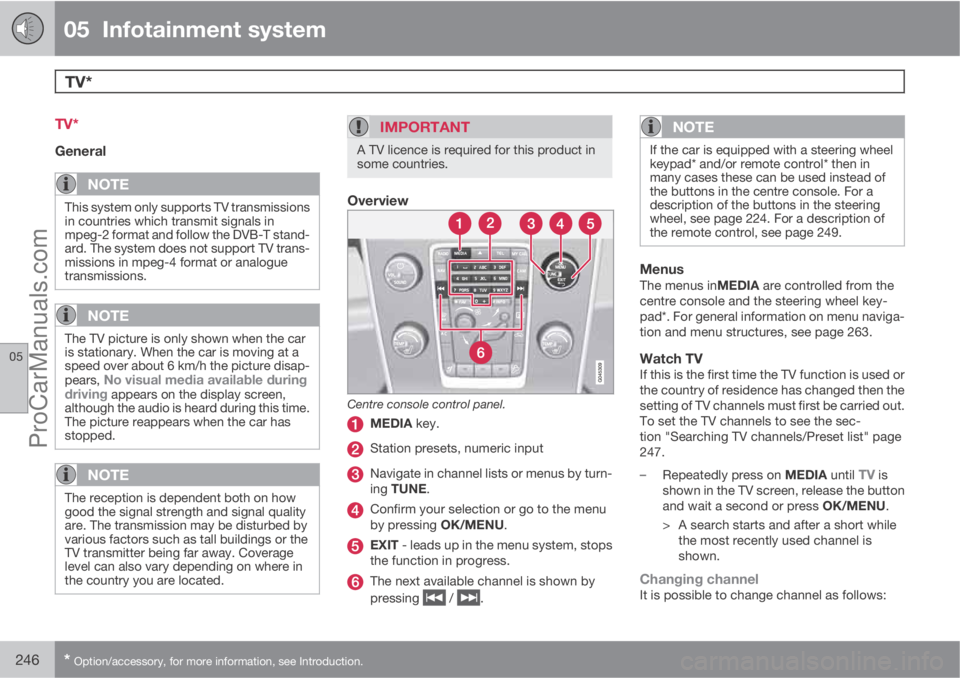
Centre console control panel.
MEDIA key.
Station presets, numeric input
Navigate in channel lists or menus by turn-
ing TUNE.
Confirm your selection or go to the menu
by pressing OK/MENU.
EXIT - leads up in the menu system, stops
the function in progress.
The next available channel is shown by
pressing
/ .
NOTE
If the car is equipped with a steering wheel
keypad* and/or remote control* then in
many cases these can be used instead of
the buttons in the centre console. For a
description of the buttons in the steering
wheel, see page 224. For a description of
the remote control, see page 249.
MenusThe menus inMEDIA are controlled from the
centre console and the steering wheel key-
pad*. For general information on menu naviga-
tion and menu structures, see page 263.
Watch TVIf this is the first time the TV function is used or
the country of residence has changed then the
setting of TV channels must first be carried out.
To set the TV channels to see the sec-
tion "Searching TV channels/Preset list" page
247.
–
Repeatedly press on MEDIA until
TV is
shown in the TV screen, release the button
and wait a second or press OK/MENU.
> A search starts and after a short while
the most recently used channel is
shown.
Changing channelIt is possible to change channel as follows:
ProCarManuals.com