change time VOLVO V60 2013 Owner's Manual
[x] Cancel search | Manufacturer: VOLVO, Model Year: 2013, Model line: V60, Model: VOLVO V60 2013Pages: 422, PDF Size: 9.59 MB
Page 213 of 422
05 Comfort and driving pleasure
Climate control
05
* Option/accessory, for more information, see Introduction.211
severely contaminated environment, it may be
necessary to replace the filter more often.
NOTE
There are different types of passenger com-
partment filter. Make sure that the correct
filter is fitted.
Clean Zone Interior Package (CZIP)*This option keeps the passenger compartment
clear of allergy and asthma inducing sub-
stances. For more information on CZIP, see the
brochure included with the purchase of the car.
The following is included:
•An enhanced fan function that means that
the fan starts when the car is opened with
the remote control key. The fan fills the
passenger compartment with fresh air. The
function starts when required and is dis-
engaged automatically after a time or when
one of the passenger compartment doors
is opened. The amount of time the fan runs
is reduced gradually due to reduced need
up until the car is 4 years old.
•The air quality system IAQS is a fully auto-
matic system that cleans the air in the pas-
senger compartment from contaminants
such as particles, hydrocarbons, nitrous
oxides and ground-level ozone.
NOTE
To keep the CZIP standard in cars with CZIP
the IAQS filter must be changed after
15 000 km or once per year depending on
whichever occurs first. However, up to
75 000 km over 5 years. In cars without CZIP
and where the customer does not want to
keep the CZIP standard the IAQS filter must
be changed at a regular service.
Use of tested materials in the interior
equipment.
The materials have been developed in order to
minimise the quantity of dust in the passenger
compartment and they contribute to making
the passenger compartment easier to keep
clean. The carpets in both the passenger com-
partment and the cargo area are removable
and easy to remove and clean. Use cleaning
agents and car care products recommended
by Volvo, see page 363.
Menu settingsIt is possible to activate/deactivate or change
the default settings for four of the climate con-
trol system's functions via the centre console.
For general information about menu naviga-
tion, see page 203:
•Fan speed in automatic mode*, see
page 216.
•Recirculation timer for passenger com-
partment air, see page 217.
•Automatic rear window defrosting, see
page 104.
•Air quality system IAQS*, see page 217
The climate control system's functions can be
reset to the default settings via the menu sys-
tem in MY CAR and this is carried out under:
Settings
Climate settingsReset
climate settings.
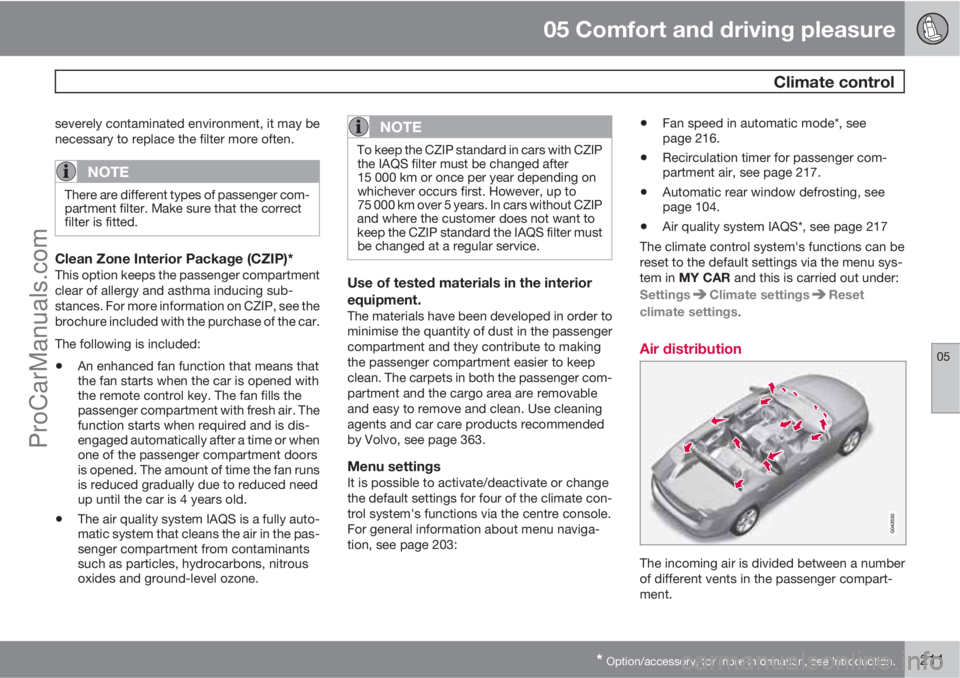
Air distribution
The incoming air is divided between a number
of different vents in the passenger compart-
ment.
ProCarManuals.com
Page 228 of 422
05 Comfort and driving pleasure
Adapting driving characteristics
05
226* Option/accessory, for more information, see Introduction.
Active chassis - Four-C*
Active chassis, Four-C (Continously Controlled
Chassis Concept), regulates the characteris-
tics of the shock absorbers so that the car's
driving characteristics can be adjusted. There
are three settings: Comfort, Sport and
Advanced.
ComfortThis setting means that the car is perceived as
being more comfortable on rough and uneven
road surfaces. Shock absorption is soft and the
movement of the body is smooth and gentle.
SportThis setting means that the car is perceived as
being more sporty and is recommended for
more active driving. Steering response is faster
than in the Comfort mode. Shock absorption is
harder and the body follows the road in order
to reduce rolling during cornering.
AdvancedThis setting is only recommended on very even
and smooth road surfaces.
The shock absorbers are optimised for maxi-
mum roadholding and rolling in bends is further
minimised.
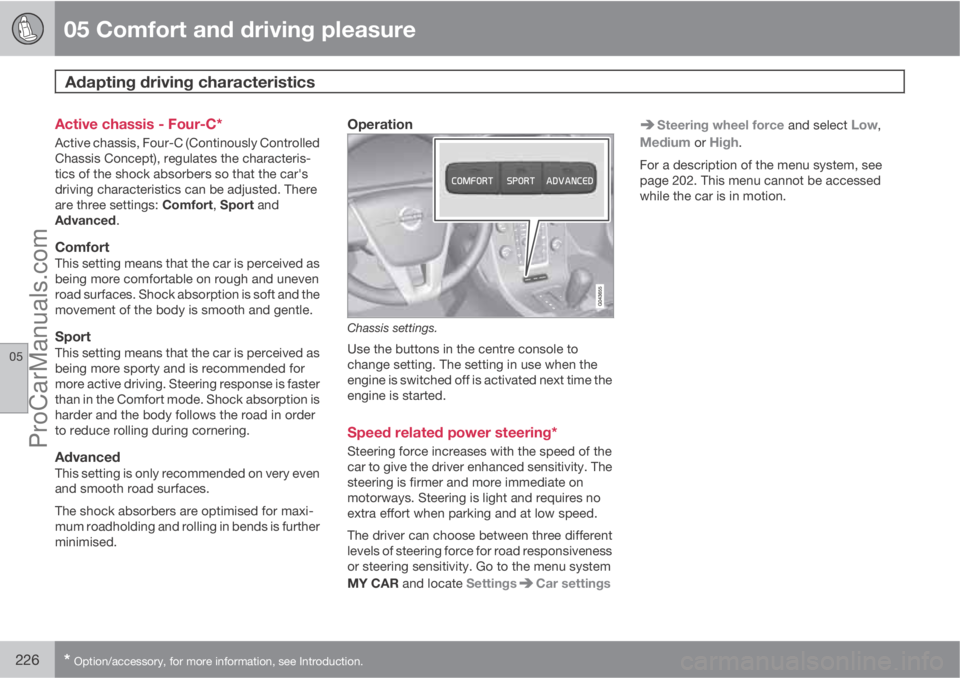
Operation
Chassis settings.
Use the buttons in the centre console to
change setting. The setting in use when the
engine is switched off is activated next time the
engine is started.
Speed related power steering*
Steering force increases with the speed of the
car to give the driver enhanced sensitivity. The
steering is firmer and more immediate on
motorways. Steering is light and requires no
extra effort when parking and at low speed.
The driver can choose between three different
levels of steering force for road responsiveness
or steering sensitivity. Go to the menu system
MY CAR and locate Settings
Car settings
Steering wheel force and select Low,
Medium or High.
For a description of the menu system, see
page 202. This menu cannot be accessed
while the car is in motion.
ProCarManuals.com
Page 242 of 422
06 Infotainment system
General information on infotainment
06
240* Option/accessory, for more information, see Introduction.
3.
Press and hold the FAV button until the
"favourites menu" is shown.
4.
Turn TUNE to select an option from the list
and press OK/MENU to save.
>
When the main source (e.g. RADIO,
MEDIA) is active the stored function is
available via a short press on FAV.
General audio settings
Press SOUND to access the audio settings
menu (Bass, Treble, etc.). Scroll forward with
SOUND or OK/MENU to your selection (e.g.
Treble).
Adjust the setting by turning TUNE and save
the setting with OK/MENU.
Continue pressing SOUND or OK/MENU to
access other options:
•Surround9 - Can be set to the On/Off posi-
tion. When On is selected, the system
selects the setting for optimal sound repro-
duction. Normally DPLII and
then
appear in the TV screen. If the recording is
made with Dolby Digital technology then
playback will take place with this setting,
then appears in the TV screen.When Off is selected, 3-channel stereo is
available.
•Bass - Bass level.
•Treble - Treble level.
•Fader – Balance between the front and
rear speakers.
•Balance – Balance between the left and
right-hand speakers.
•Subwoofer*9 - Bass speaker level.
•DPL II centre level3 channel centre
level9 - Volume for centre speaker.
•DPL II surround level9, 10 – Level for sur-
round.
Advanced audio settings
Equalizer11
The volume level can be adjusted separately
for different wavelengths.
1.
Press OK/MENU to access
Audio
settings and select Equalizer.
2.
Select wavelength by turning TUNE and
confirm with OK/MENU.3. Adjust the audio settings by turning
TUNE and confirm with OK/MENU. Con-
tinue in the same way with other wave-
lengths you want to change.
4. When you have finished with audio set-
tings, press EXIT to confirm and return to
normal view.
For general information on menu navigation,
see page 238 and menu overview, see
page 241.
Sound stage9
The sound experience can be optimised for the
driver's seat, both front seats or the rear seat.
If there are passengers in both the front and
rear seats then the option recommended is;
both front seats. The options can be selected
under Audio settings
Sound stage.
For general information on menu navigation,
see page 238 and menu overview, see
page 241.
Audio volume and automatic volume
control
The audio system compensates for disrupting
noises in the passenger compartment by
increasing the volume in relation to the speed
9Only Premium Sound Multimedia.10Only when Surround is activated.11Not Performance.
ProCarManuals.com
Page 244 of 422
06 Infotainment system
General information on infotainment
06
242* Option/accessory, for more information, see Introduction.
Advanced settings
REG
Alternative frequency
EON
Set TP favourite
PTY settings
Reset all FM settings
Audio settings16
Main menu DAB1*/DAB2*DAB menu
Ensemble learn
PTY filtering
Turn off PTY filtering
Show radio text
Show presets12
Scan
Advanced settings
DAB linking
DAB band
Sub channelsShow PTY text
Reset all DAB settings
Audio settings16
Menus MEDIA
Main menu CD Audio
Disc menu
Random
Scan
Audio settings16
Main menu CD/DVD12 DataDisc menu
Play/Pause
Stop
Random
Repeat folder
Change subtitles
Change audio track
Scan
Audio settings16
Main menu DVD12 VideoDVD Video Menu
DVD disc menu
Play/Pause/Continue
Stop
Subtitles
Audio tracks
Advanced settings
Angle
DivX® VOD code
Audio settings16
Main menu iPod15
iPod menu
Random
Scan
Audio settings16
Main menu USB15
USB menu
Play/Pause
16For submenus, see "Main menu AM".12Only applies to High Performance Multimedia and Premium Sound Multimedia.15Does not apply to Performance.
ProCarManuals.com
Page 248 of 422
06 Infotainment system
Radio
06
246
NOTE
•The list only shows the frequencies of
stations that are currently being
received, not a complete list of all radio
frequencies on the selected wave-
length.
•If the signal from the currently received
station is weak, this may prevent the
radio from updating the station list. If
this occurs, press the
button
(while the station list is shown in the dis-
play screen) in order to change to man-
ual tuning and set a frequency. If the
station list is no longer shown, turn
TUNE one step in either direction to
show the list again, and press
to
switch.
The list disappears from the TV screen after a
few seconds.
If the station list is no longer shown, turn
TUNE one step in either direction and press the
button in the centre console to change
to manual tuning (or to return from manual tun-
ing to the function for "Station list").
Manual tuningThe preset from the factory is that the radio
shows the station list of the strongest stationsin the area when you turn TUNE (see the sec-
tion "Station list", page 245). When the station
list is shown, press the
button in the cen-
tre console to change to manual tuning. This
allows you to select a frequency from the list of
all available radio frequencies in the selected
wavelength. In other words, if turn TUNE one
step in a manual search the frequency is
changed from e.g. 93.3 to 93.4 MHz, etc.
To manually select a station:
1.
Press the RADIO button, turn TUNE until
the desired wavelength (
AM, FM1 etc.) is
shown, press OK/MENU.
2.
Turn TUNE to select a frequency.
NOTE
The preset from the factory is that the radio
automatically searches for the stations in
the area where you are driving (see previous
section "Station list" above).
But if you have changed over to manual tun-
ing (by pressing the
button in the cen-
tre console when the station list was
shown), then the radio remains set in the
function for manual tuning the next time you
switch on the radio. To change back to the
function for "Station list", turn TUNE one
step (to show the complete list of stations)
and press the button
.
Note that if you press
when the sta-
tion list is not shown then INFO is activated.
For more information on this function, see
page 235.
Preset
10 presets can be stored per wavelength (AM,FM1 etc.).
The stored presets are selected using the pre-
set buttons.
1. Tune into a station (see "Tuning", page
245).
2. Hold in one of the preset buttons for a few
seconds, the sound disappears during this
ProCarManuals.com
Page 249 of 422
06 Infotainment system
Radio
06
247
time and returns when the station is stored.
The preset button can now be used.
A list of pre-selected channels can be shown
2
in the TV screen. The function is activated/
deactivated in FM/AM mode under FM menu
Show presets or AM menuShow
presets.
RDS functionsRDS (Radio Data System) links FM transmitters
into a network. An FM transmitter in such a
network sends information that gives an RDS
radio the following functions:
•Automatically switches to a stronger trans-
mitter if reception in the area is poor.
•Searches for programme type, such as
traffic information or news.
•Receives text information on current radio
programme.
NOTE
Some radio stations do not use RDS or only
some if its functionality.
If a required programme type is located the
radio can switch stations interrupting the audio
source currently in use. For example, if the CDplayer is in use, it is paused. The interrupting
transmission is played at a preset volume, see
page 249. The radio returns to the previous
audio source and volume when the set pro-
gramme type is no longer broadcast.
The programme functions alarm (
ALARM!),
traffic information (TP), news (NEWS), and pro-
gramme types (PTY) interrupt one another in
order of priority, where alarm has the highest
priority and programme types has the lowest.
For additional settings of programming inter-
ruptions (
EON Distant and EON Local), see
the section "Enhanced Other Networks –
EON" below. Press EXIT to return to the inter-
rupted audio source, press the OK/MENU to
clear the message.
AlarmThis function is used to warn of serious acci-
dents and catastrophes. The alarm cannot be
temporarily interrupted or deactivated. The
message
ALARM! appears on the TV screen
when an alarm message is transmitted.
Traffic information – TPThis function allows traffic information sent
within a set station's RDS network to break
through. The
TP symbol indicates that the
function is activated. If the preset station cansend traffic information then this is shown by
TP glowing brightly in the TV screen, otherwiseTP will be grey.
–
Activate/deactivate in FM mode under FM
menu
TP.
Enhanced Other Networks – EONThis function is useful in urban areas with many
regional radio stations. It allows the distance
between the car and the radio station trans-
mitter to determine when programme functions
should interrupt the current audio source.
–Activate/deactivate in FM mode by select-
ing one of the options under FM menu
Advanced settingsEON:
•Local – interrupts only if the radio station
transmitter is close.
•Distant3 – interrupts if the station trans-
mitter is far away, even if there is a lot of
static.
TP from selected station/all stationsThe radio can only interrupt for traffic informa-
tion from the selected station or all stations
within the RDS network.
–
Go in FM mode to FM menu
Advanced
settings
Set TP favourite to change.
2Only applies to High Performance Multimedia and Premium Sound Multimedia.3Factory settings.
ProCarManuals.com
Page 254 of 422
06 Infotainment system
Media player
06
252* Option/accessory, for more information, see Introduction.
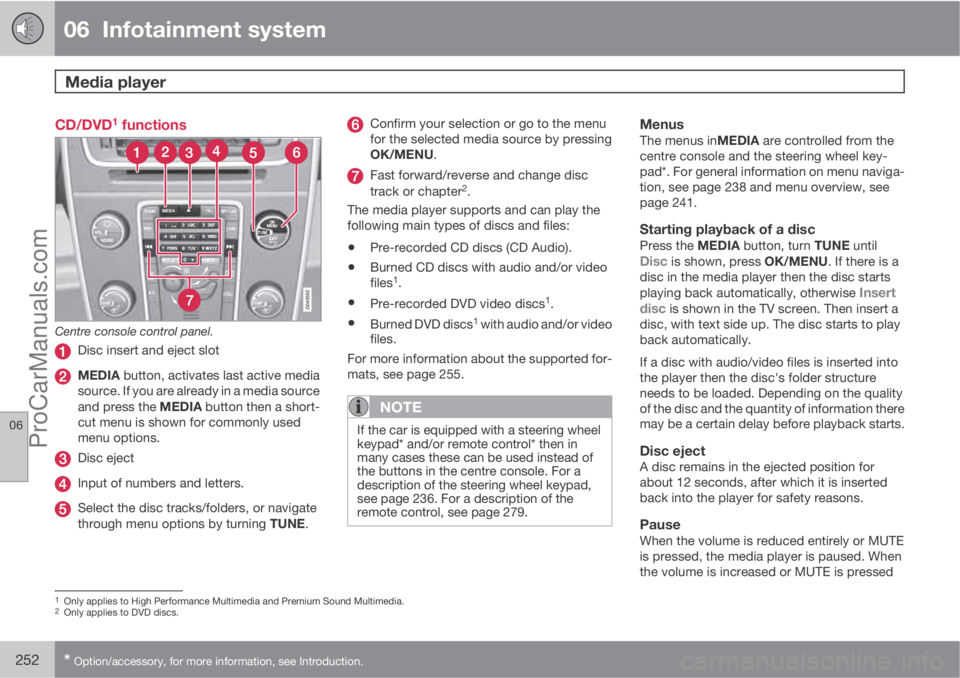
CD/DVD1 functions
Centre console control panel.
Disc insert and eject slot
MEDIA button, activates last active media
source. If you are already in a media source
and press the MEDIA button then a short-
cut menu is shown for commonly used
menu options.
Disc eject
Input of numbers and letters.
Select the disc tracks/folders, or navigate
through menu options by turning TUNE.
Confirm your selection or go to the menu
for the selected media source by pressing
OK/MENU.
Fast forward/reverse and change disc
track or chapter2.
The media player supports and can play the
following main types of discs and files:
•Pre-recorded CD discs (CD Audio).
•Burned CD discs with audio and/or video
files1.
•Pre-recorded DVD video discs1.
•Burned DVD discs1 with audio and/or video
files.
For more information about the supported for-
mats, see page 255.
NOTE
If the car is equipped with a steering wheel
keypad* and/or remote control* then in
many cases these can be used instead of
the buttons in the centre console. For a
description of the steering wheel keypad,
see page 236. For a description of the
remote control, see page 279.
MenusThe menus inMEDIA are controlled from the
centre console and the steering wheel key-
pad*. For general information on menu naviga-
tion, see page 238 and menu overview, see
page 241.
Starting playback of a discPress the MEDIA button, turn TUNE untilDisc is shown, press OK/MENU. If there is a
disc in the media player then the disc starts
playing back automatically, otherwise
Insert
disc is shown in the TV screen. Then insert a
disc, with text side up. The disc starts to play
back automatically.
If a disc with audio/video files is inserted into
the player then the disc's folder structure
needs to be loaded. Depending on the quality
of the disc and the quantity of information there
may be a certain delay before playback starts.
Disc ejectA disc remains in the ejected position for
about 12 seconds, after which it is inserted
back into the player for safety reasons.
PauseWhen the volume is reduced entirely or MUTE
is pressed, the media player is paused. When
the volume is increased or MUTE is pressed
1Only applies to High Performance Multimedia and Premium Sound Multimedia.2Only applies to DVD discs.
ProCarManuals.com
Page 255 of 422
06 Infotainment system
Media player
06
* Option/accessory, for more information, see Introduction.253
again, the media player starts. It is also possi-
ble to pause via the menu system3, press OK/
MENU, select Play/Pause.
Playback and navigation
CD audio discs
Turn TUNE to access the disc's playlist and
navigate in the list. Use OK/MENU to confirm
the selection of the disc track and start play-
back. Press EXIT to cancel and exit the playlist.
A long press on EXIT leads to the playlist's root
level.
Disc tracks can also be changed by pressing
on
/ on the centre console or the
steering wheel keypad*.
Burned discs audio/video files1
Turn TUNE to access the disc's playlist/folder
structure and navigate in the list/structure. Use
OK/MENU to confirm either selection of sub-
folder or start of playback of the selected
audio/video file. Press EXIT to either stop and
exit the playlist or go up (back) in the folder
structure. A long press on EXIT leads to the
playlist's root level.Audio/video files can also be changed by
pressing
/ on the centre console or the
steering wheel keypad*.
Audio files have the symbol
, video files1
have the symbol and folders have the
symbol
.
When playback of a file is complete the play-
back of the other files (of the same type) in that
particular folder continues. Change
4 of folder
takes place automatically when all the files in
the current folder have been played back. The
system automatically detects and changes
setting when a disc containing only audio files
or only video files is loaded into the media
player and then plays back these files. How-
ever, the system does not change setting if a
disc containing a mixture of audio and video
files is loaded into the media player, but instead
the player continues to play back the previous
file type.
NOTE
A video film is only shown when the car is
stationary. When the car is moving at a
speed of over about 8 km/h no picture is
shown and
No visual media available
while driving appears on the display
screen, although the audio is heard during
this time. The picture is shown again as
soon as the car's speed falls below about 6
km/h.
NOTE
Some audio files that are copy-protected by
record companies or privately copied audio
files cannot be loaded by the player.
DVD video discs1
For playback of DVD video discs, see
page 254.
Fast forward/reverse
Hold in the buttons / to fast forward/
rewind. Audio files are fast forwarded/rewound
at one speed, while video files are fast forwar-
ded/rewound at several speeds. Repeatedly
press the buttons
/ to increase the fast
3Does not apply to CD Audio1Only applies to High Performance Multimedia and Premium Sound Multimedia.4If Repeat folder is activated then this does not take place.
ProCarManuals.com
Page 256 of 422
06 Infotainment system
Media player
06
254* Option/accessory, for more information, see Introduction.
forward/rewind speed for video files. Release
the button to return to viewing at normal speed.
Scan5
This function plays the first ten seconds of
each disc track/audio file. To scan:
1.
Press OK/MENU
2.
Turn TUNE to
Scan
> The first 10 seconds of each disc track
or audio file are played.
3.
Cancel the scan with EXIT, the disc track
or audio file being played back will con-
tinue playing.
Random5
This function plays the tracks in random order.
To listen to the tracks in random order:
1.
Press OK/MENU
2.
Turn TUNE to
Random
3.
Press OK/MENU to activate/deactivate
the function.
Disc tracks/audio files can be changed by
pressing
/ on the centre console or the
steering wheel keypad*.
Repeat folder6
This function makes it possible to play files in
a folder over and over again. When the last file
has been played out, playback of the first file
starts again.
1.
Press OK/MENU
2.
Turn TUNE to
Repeat folder
3.
Press OK/MENU to activate/deactivate
the function.
Playback of DVD video discs1
PlaybackWhen playing back a DVD video disc a disc
menu may appear on the display screen. The
disc menu gives access to additional functions
and settings, such as selecting subtitles, lan-
guage and scene selection.
NOTE
A video film is only shown when the car is
stationary. When the car is moving at a
speed of over about 8 km/h no picture is
shown and
No visual media available
while driving appears on the display
screen, although the audio is heard during
this time. The picture is shown again as
soon as the car's speed falls below about 6
km/h.
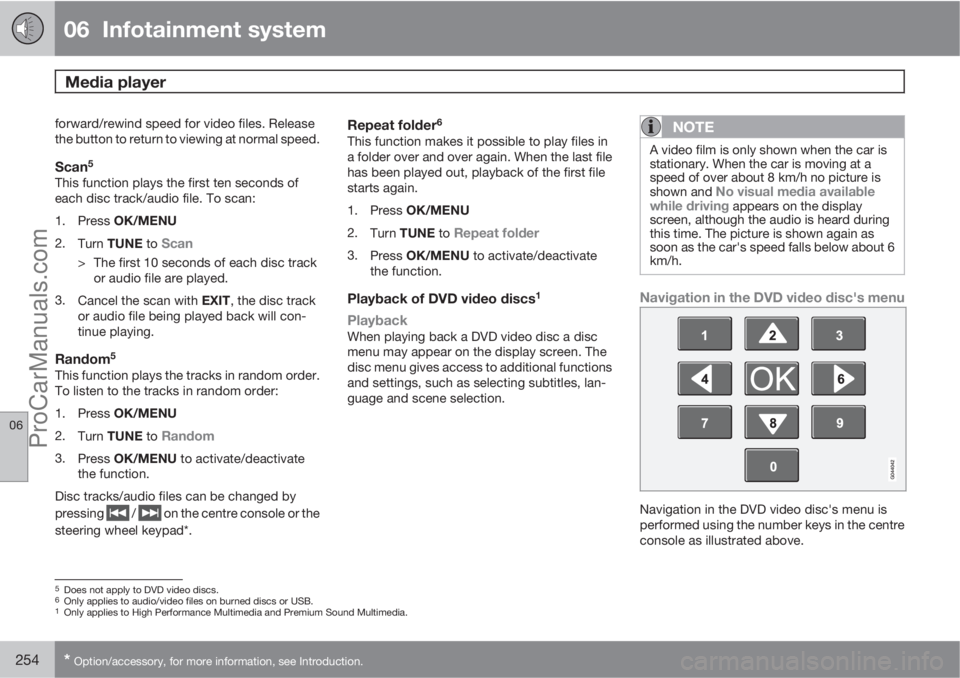
Navigation in the DVD video disc's menu
Navigation in the DVD video disc's menu is
performed using the number keys in the centre
console as illustrated above.
5Does not apply to DVD video discs.6Only applies to audio/video files on burned discs or USB.1Only applies to High Performance Multimedia and Premium Sound Multimedia.
ProCarManuals.com
Page 257 of 422
06 Infotainment system
Media player
06
* Option/accessory, for more information, see Introduction.255
Changing chapter or titleTurn TUNE to access the list of chapters and
navigate through them (if the film is being
played back then it is paused). Press OK/
MENU to select the chapter, this also leads
back to the original position (if the film was
being played back then it is restarted). Press
EXIT to access the title list.
Titles are selected in the title list by turning
TUNE and the selection is confirmed with OK/
MENU, this also leads back to the chapter list.
Press OK/MENU to activate the selection and
return to the start position. Use EXIT to cancel
the selection and this leads back to the original
position (without any selection being made).
The chapter can also be changed by pressing
on
/ on the centre console or the
steering wheel keypad*.
Advanced settings7
AngleIf the DVD video disc supports it, the function
can be used to choose from which camera
position a particular scene should be shown.
Go in disc mode to Disc menu
Advanced
settings
Angle.
DivXŸ Video On DemandThe media player can be registered in order to
play DivX VOD type files from burned discs or
USB. The code for registration can be found in
the menu system MY CAR Settings
InformationDivX® VOD code. For general
information on menus, see under MY CAR, see
page 202.
For more information visit www.divx.com/vod.
Picture settings7
You can adjust the settings (when the car is
stationary) for brightness and contrast.
1.
Press OK/MENU and select
Image
settings, confirm with OK/MENU.
2.
Turn TUNE to the adjustment option and
confirm with OK/MENU.
3.
Adjust the setting by turning TUNE and
confirm with OK/MENU.
To return to the settings list, press the OK/
MENU or EXIT.
The picture settings can be reset to factory
settings with the
Reset option.
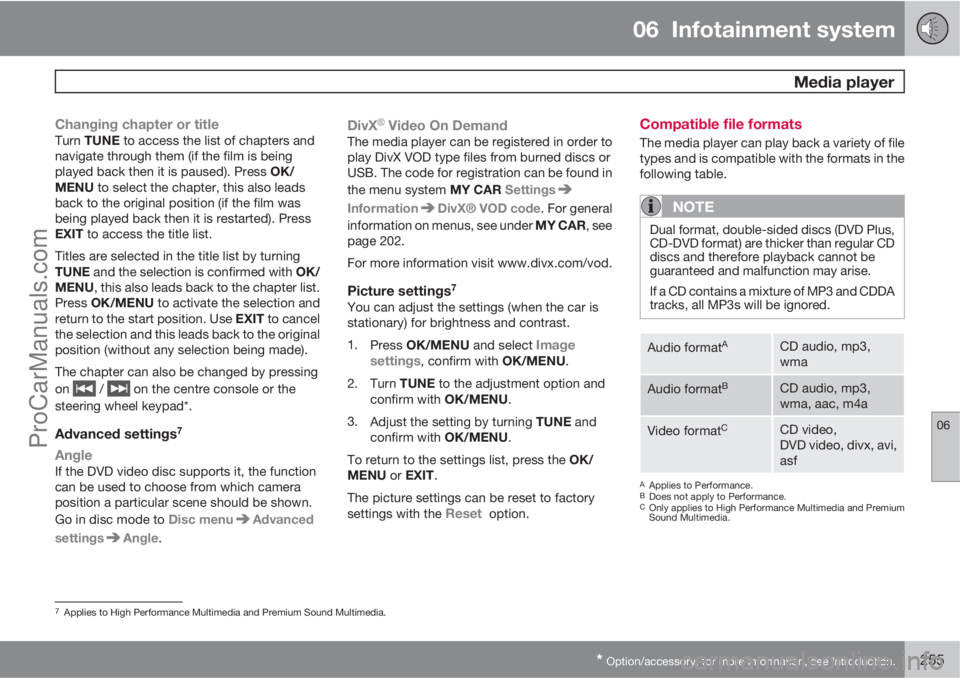
Compatible file formats
The media player can play back a variety of file
types and is compatible with the formats in the
following table.
NOTE
Dual format, double-sided discs (DVD Plus,
CD-DVD format) are thicker than regular CD
discs and therefore playback cannot be
guaranteed and malfunction may arise.
If a CD contains a mixture of MP3 and CDDA
tracks, all MP3s will be ignored.
Audio formatACD audio, mp3,
wma
Audio formatBCD audio, mp3,
wma, aac, m4a
Video formatCCD video,
DVD video, divx, avi,
asf
AApplies to Performance.BDoes not apply to Performance.COnly applies to High Performance Multimedia and Premium
Sound Multimedia.
7Applies to High Performance Multimedia and Premium Sound Multimedia.
ProCarManuals.com