ESP VOLVO V60 2013 Service Manual
[x] Cancel search | Manufacturer: VOLVO, Model Year: 2013, Model line: V60, Model: VOLVO V60 2013Pages: 422, PDF Size: 9.59 MB
Page 189 of 422
04 Driver support
Driver Alert System - LDW*
04
* Option/accessory, for more information, see Introduction.187
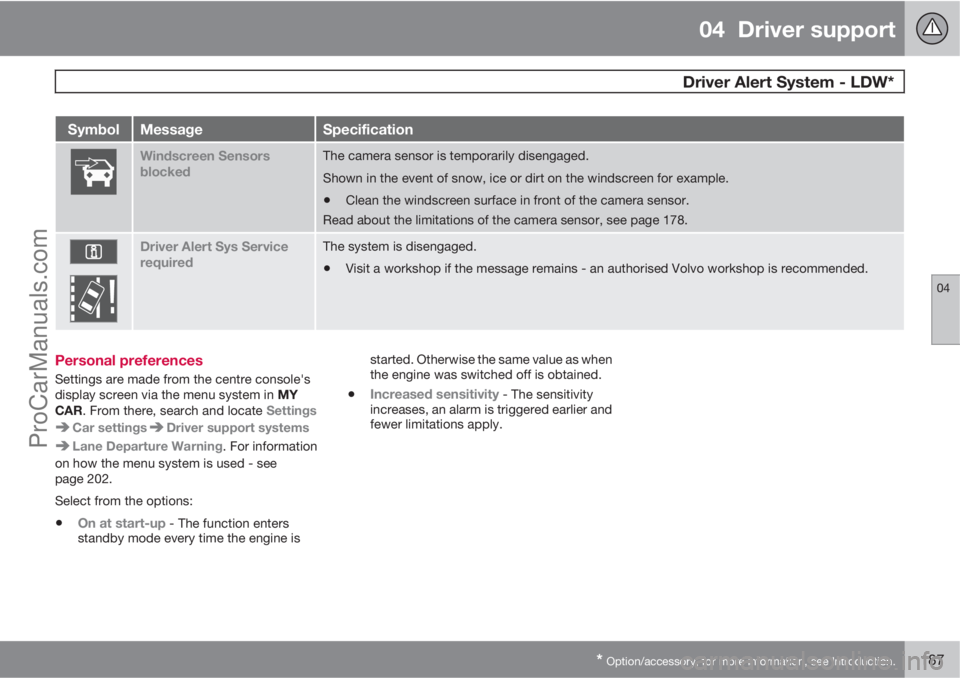
SymbolMessageSpecification
Windscreen Sensors
blockedThe camera sensor is temporarily disengaged.
Shown in the event of snow, ice or dirt on the windscreen for example.
•Clean the windscreen surface in front of the camera sensor.
Read about the limitations of the camera sensor, see page 178.
Driver Alert Sys Service
requiredThe system is disengaged.
•Visit a workshop if the message remains - an authorised Volvo workshop is recommended.
Personal preferences
Settings are made from the centre console's
display screen via the menu system in MY
CAR. From there, search and locate Settings
Car settingsDriver support systems
Lane Departure Warning. For information
on how the menu system is used - see
page 202.
Select from the options:
•On at start-up - The function enters
standby mode every time the engine isstarted. Otherwise the same value as when
the engine was switched off is obtained.
•Increased sensitivity - The sensitivity
increases, an alarm is triggered earlier and
fewer limitations apply.
ProCarManuals.com
Page 190 of 422
04 Driver support
Park assist syst*
04
188* Option/accessory, for more information, see Introduction.
General
Parking assistance is used as an aid to parking.
An acoustic signal as well as symbols on the
centre console's display screen indicate the
distance to the detected obstacle.
Parking assistance sound level can be
adjusted during the ongoing acoustic signal
using the centre console's VOL knob or in the
car's menu system MY CAR - see page 202.
Parking assistance is available in two variants:
•Rear only
•Both front and rear.
NOTE
When a towbar is configured with the car's
electrical system, the protrusion of the tow-
bar is included when the function measures
the parking space.
WARNING
•Parking assistance does not relinquish
the driver's own responsibility during
parking.
•The sensors have blind spots where
obstacles cannot be detected.
•Be aware of e.g. people or animals near
the car.
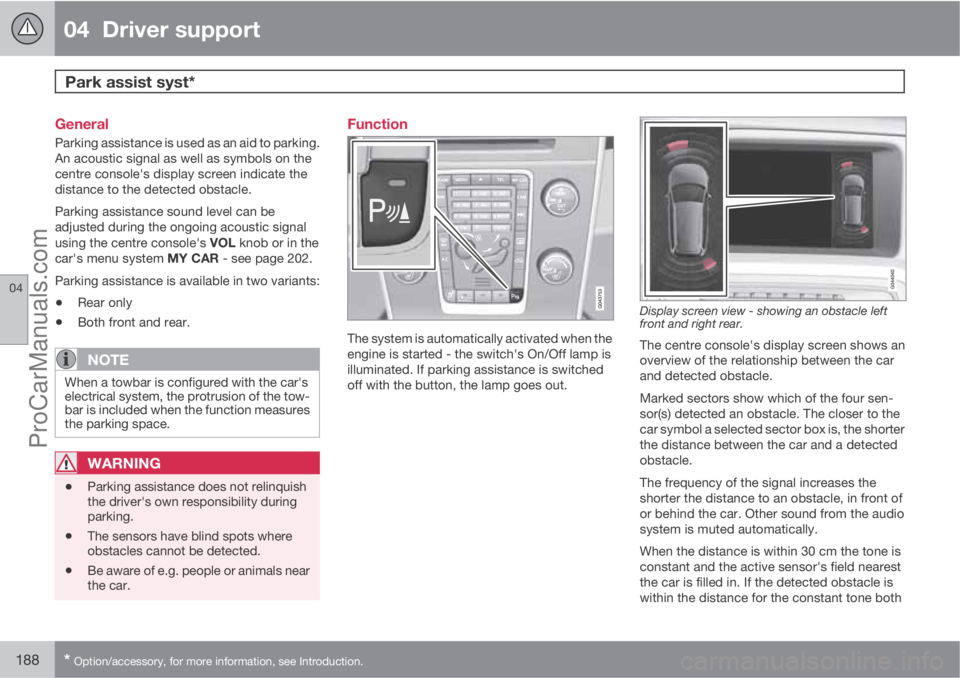
Function
The system is automatically activated when the
engine is started - the switch's On/Off lamp is
illuminated. If parking assistance is switched
off with the button, the lamp goes out.
Display screen view - showing an obstacle left
front and right rear.
The centre console's display screen shows an
overview of the relationship between the car
and detected obstacle.
Marked sectors show which of the four sen-
sor(s) detected an obstacle. The closer to the
car symbol a selected sector box is, the shorter
the distance between the car and a detected
obstacle.
The frequency of the signal increases the
shorter the distance to an obstacle, in front of
or behind the car. Other sound from the audio
system is muted automatically.
When the distance is within 30 cm the tone is
constant and the active sensor's field nearest
the car is filled in. If the detected obstacle is
within the distance for the constant tone both
ProCarManuals.com
Page 193 of 422
04 Driver support
Park assist camera*
04
* Option/accessory, for more information, see Introduction.191 General
The parking camera is an assist system and is
activated when reverse gear is engaged (can
be changed in the settings menu, see
page 202).
The camera image is shown on the centre con-
sole's screen.
NOTE
When a towbar is configured with the car's
electrical system, the protrusion of the tow-
bar is included when the function measures
the parking space.
WARNING
•The parking camera serves as an aid. It
does not relieve the driver of responsi-
bility when reversing.
•The camera has blind spots, where
obstacles cannot be detected.
•Be aware of people and animals in the
vicinity of the car.
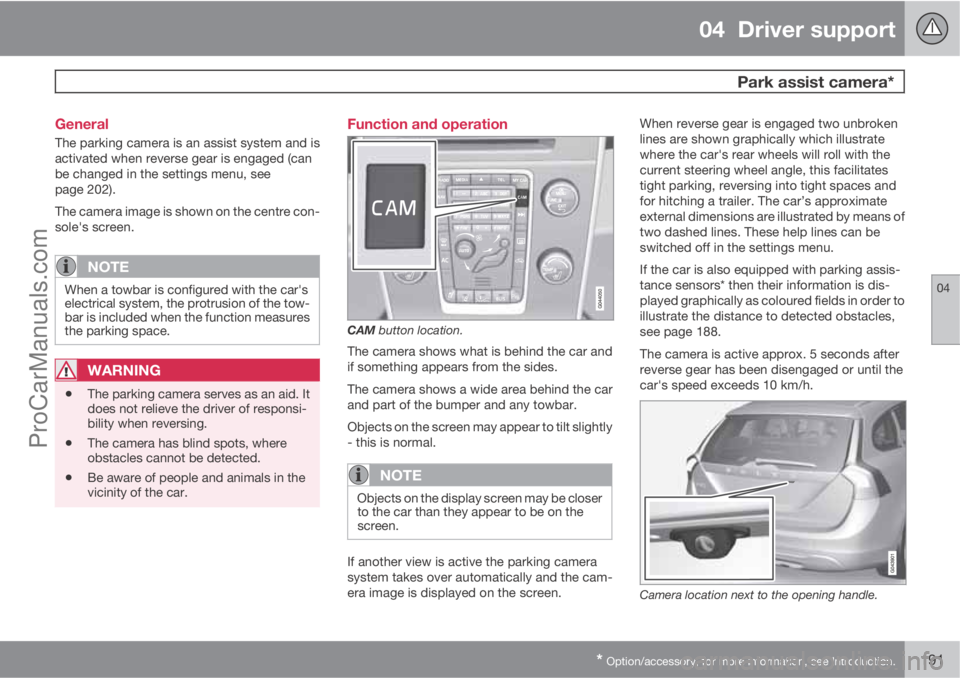
Function and operation
CAM button location.
The camera shows what is behind the car and
if something appears from the sides.
The camera shows a wide area behind the car
and part of the bumper and any towbar.
Objects on the screen may appear to tilt slightly
- this is normal.
NOTE
Objects on the display screen may be closer
to the car than they appear to be on the
screen.
If another view is active the parking camera
system takes over automatically and the cam-
era image is displayed on the screen.When reverse gear is engaged two unbroken
lines are shown graphically which illustrate
where the car's rear wheels will roll with the
current steering wheel angle, this facilitates
tight parking, reversing into tight spaces and
for hitching a trailer. The car’s approximate
external dimensions are illustrated by means of
two dashed lines. These help lines can be
switched off in the settings menu.
If the car is also equipped with parking assis-
tance sensors* then their information is dis-
played graphically as coloured fields in order to
illustrate the distance to detected obstacles,
see page 188.
The camera is active approx. 5 seconds after
reverse gear has been disengaged or until the
car's speed exceeds 10 km/h.
Camera location next to the opening handle.
ProCarManuals.com
Page 196 of 422
04 Driver support
BLIS* – Blind Spot Information System
04
194* Option/accessory, for more information, see Introduction.
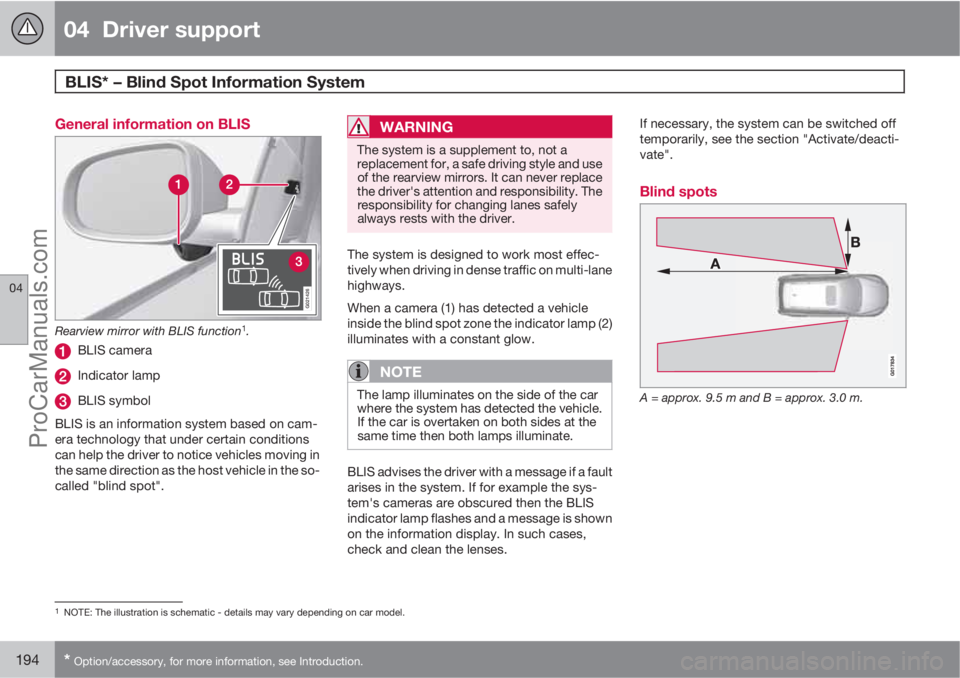
General information on BLIS
G021426
Rearview mirror with BLIS function1.
BLIS camera
Indicator lamp
BLIS symbol
BLIS is an information system based on cam-
era technology that under certain conditions
can help the driver to notice vehicles moving in
the same direction as the host vehicle in the so-
called "blind spot".
WARNING
The system is a supplement to, not a
replacement for, a safe driving style and use
of the rearview mirrors. It can never replace
the driver's attention and responsibility. The
responsibility for changing lanes safely
always rests with the driver.
The system is designed to work most effec-
tively when driving in dense traffic on multi-lane
highways.
When a camera (1) has detected a vehicle
inside the blind spot zone the indicator lamp (2)
illuminates with a constant glow.
NOTE
The lamp illuminates on the side of the car
where the system has detected the vehicle.
If the car is overtaken on both sides at the
same time then both lamps illuminate.
BLIS advises the driver with a message if a fault
arises in the system. If for example the sys-
tem's cameras are obscured then the BLIS
indicator lamp flashes and a message is shown
on the information display. In such cases,
check and clean the lenses.If necessary, the system can be switched off
temporarily, see the section "Activate/deacti-
vate".
Blind spots
A = approx. 9.5 m and B = approx. 3.0 m.
1NOTE: The illustration is schematic - details may vary depending on car model.
ProCarManuals.com
Page 198 of 422
04 Driver support
BLIS* – Blind Spot Information System
04
196* Option/accessory, for more information, see Introduction.
Cleaning
In order to work most effectively the BLIS cam-
era lenses must be clean. The lenses can be
cleaned with a soft cloth or damp sponge.
Clean the lenses carefully so that they are not
scratched.
IMPORTANT
The lenses are electrically heated to melt ice
or snow. If necessary, brush snow away
from the lenses.
Messages on the display
MessageSpecification
Blind-spot info
system ONThe BLIS system is
activated.
Blind spot syst.
Service requiredBlind spot syst. dis-
engaged - contact a
workshop.
Blind spot syst.
Camera blockedThe BLIS camera is
blocked by dirt,
snow or ice - clean
the lenses.
MessageSpecification
Blind spot syst.
Reduced functionReduced function in
the data transmis-
sion between the
BLIS system's cam-
era and the car's
electrical system.
The camera resets
itself when the data
transmission
between the BLIS
system's camera
and the car's electri-
cal system returns to
normal.
Blind-spot info
system OFFThe BLIS system is
deactivated.
IMPORTANT
Repair of the BLIS system components
must only be performed by a workshop - an
authorised Volvo workshop is recom-
mended.
Limitations
In some situations the BLIS indicator lamp may
illuminate despite there being no other vehicle
within the blind spot.
NOTE
If the BLIS indicator lamp illuminates on iso-
lated occasions despite there being no
other vehicle within the blind spot then this
does not mean that a fault has arisen in the
system.
In the event of a fault in the BLIS system the
display shows the text
Blind spot syst.
Service required.
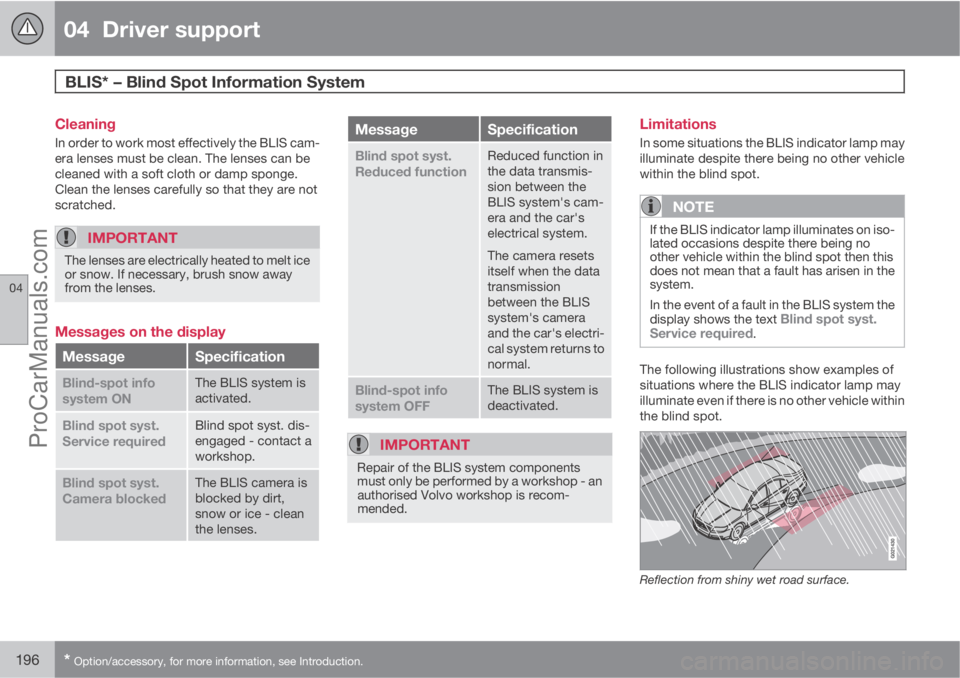
The following illustrations show examples of
situations where the BLIS indicator lamp may
illuminate even if there is no other vehicle within
the blind spot.
Reflection from shiny wet road surface.
ProCarManuals.com
Page 202 of 422
05 Comfort and driving pleasure
Menus and messages
05
200* Option/accessory, for more information, see Introduction.
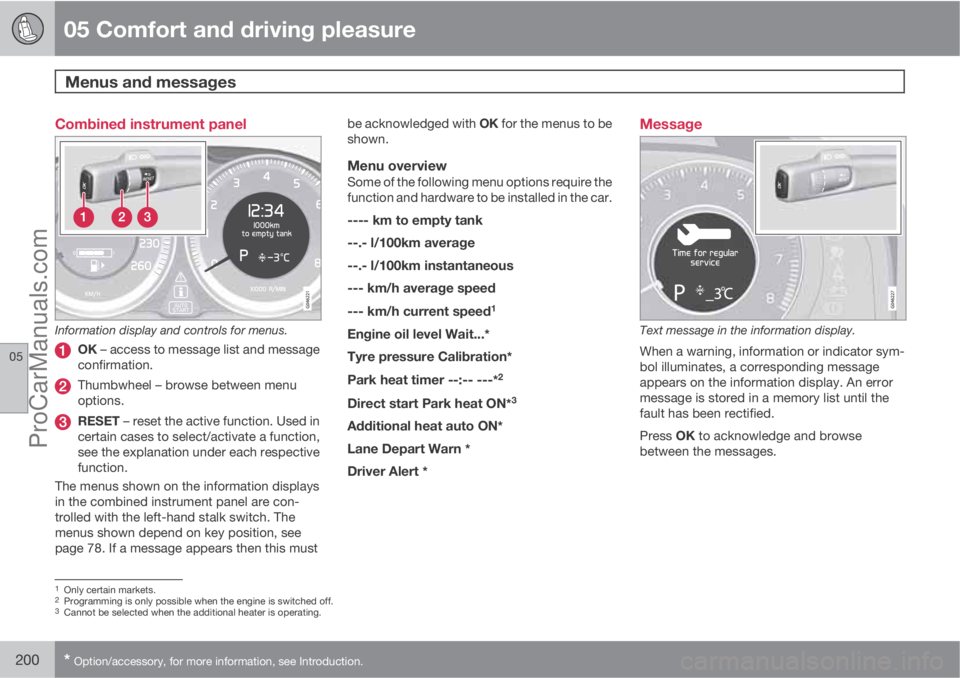
Combined instrument panel
Information display and controls for menus.
OK – access to message list and message
confirmation.
Thumbwheel – browse between menu
options.
RESET – reset the active function. Used in
certain cases to select/activate a function,
see the explanation under each respective
function.
The menus shown on the information displays
in the combined instrument panel are con-
trolled with the left-hand stalk switch. The
menus shown depend on key position, see
page 78. If a message appears then this mustbe acknowledged with OK for the menus to be
shown.
Menu overviewSome of the following menu options require the
function and hardware to be installed in the car.
---- km to empty tank
--.- l/100km average
--.- l/100km instantaneous
--- km/h average speed
--- km/h current speed
1
Engine oil level Wait...*
Tyre pressure Calibration*
Park heat timer --:-- ---*2
Direct start Park heat ON*3
Additional heat auto ON*
Lane Depart Warn *
Driver Alert *
Message
Text message in the information display.
When a warning, information or indicator sym-
bol illuminates, a corresponding message
appears on the information display. An error
message is stored in a memory list until the
fault has been rectified.
Press OK to acknowledge and browse
between the messages.
1Only certain markets.2Programming is only possible when the engine is switched off.3Cannot be selected when the additional heater is operating.
ProCarManuals.com
Page 203 of 422
05 Comfort and driving pleasure
Menus and messages
05
201
NOTE
If a warning message appears while you are
using the trip computer, the message must
be read (press OK) before the previous
activity can be resumed.
MessageSpecification
Stop safelyAStop and switch off the
engine. Serious risk of
damage - consult a
workshop
B.
Stop engineAStop and switch off the
engine. Serious risk of
damage - consult a
workshop
B.
Service urgentAContact a workshopB to
check the car immedi-
ately.
Service
requiredAContact a workshopB to
check the car as soon
as possible.
See manualARead the owner's man-
ual.
Book time for
maintenanceTime to book regular
service - contact a
workshop
B.
MessageSpecification
Time for regular
maintenanceTime for regular service
- contact a workshopB.
The timing is deter-
mined by the number of
kilometres driven, num-
ber of months since the
last service, engine run-
ning time and oil grade.
Maintenance
overdueIf the service intervals
are not followed then
the warranty does not
cover any damaged
parts - contact a work-
shop
B.
Transmission
oil Change nee-
dedContact a workshopB to
check the car as soon
as possible.
Transmission
performance
lowThe gearbox cannot
handle full capacity.
Drive carefully until the
message clears
C.
If shown repeatedly -
contact a workshop
B.
MessageSpecification
Transmission
hot Reduce
speedDrive more smoothly or
stop the car in a safe
manner. Disengage the
gear and run the engine
at idling speed until the
message clears
C.
Transmission
hot Stop safelyCritical fault. Stop the
car immediately in a
safe manner and con-
tact a workshop
B.
Temporarily
OFFAA function has been
temporarily switched
off and is reset auto-
matically while driving
or after starting again.
Low battery
Power save
modeThe audio system is
switched off to save
energy. Charge the bat-
tery.
APart of message, shown together with information on where
the problem has arisen.
BAn authorised Volvo workshop is recommended.CFor more messages concerning automatic transmission, see
page 125.
ProCarManuals.com
Page 206 of 422
05 Comfort and driving pleasure
Menu source MY CAR
05
204* Option/accessory, for more information, see Introduction.
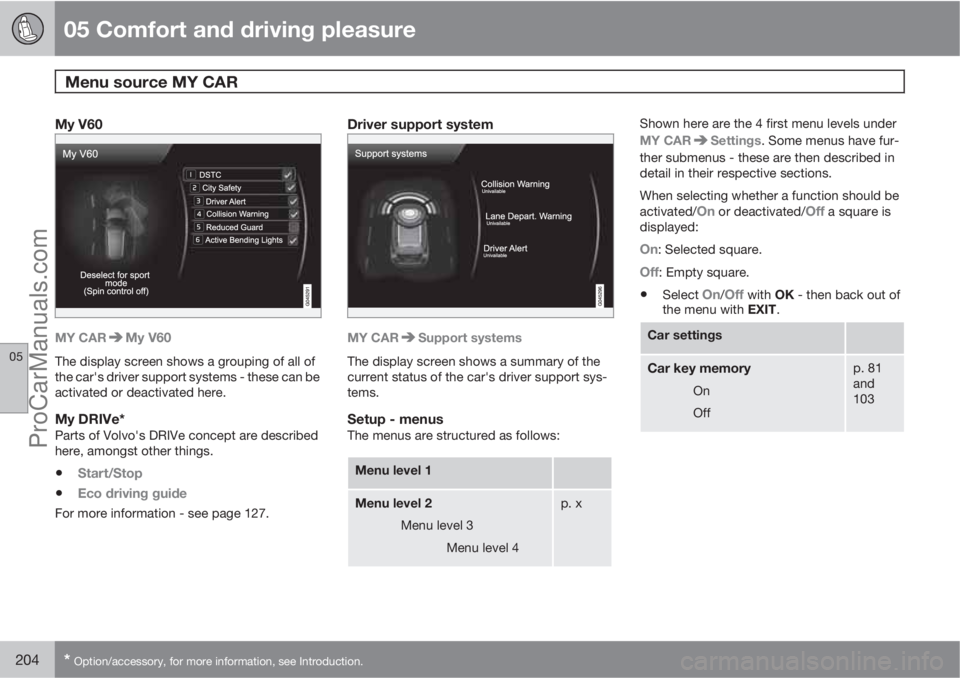
My V60
MY CARMy V60
The display screen shows a grouping of all of
the car's driver support systems - these can be
activated or deactivated here.
My DRIVe*Parts of Volvo's DRIVe concept are described
here, amongst other things.
•Start/Stop
•Eco driving guide
For more information - see page 127.
Driver support system
MY CARSupport systems
The display screen shows a summary of the
current status of the car's driver support sys-
tems.
Setup - menusThe menus are structured as follows:
Menu level 1
Menu level 2
Menu level 3
Menu level 4p. x
Shown here are the 4 first menu levels under
MY CAR
Settings. Some menus have fur-
ther submenus - these are then described in
detail in their respective sections.
When selecting whether a function should be
activated/
On or deactivated/Off a square is
displayed:
On: Selected square.
Off: Empty square.
•Select On/Off with OK - then back out of
the menu with EXIT.
Car settings
Car key memory
On
Off
p. 81
and
103
ProCarManuals.com
Page 212 of 422
05 Comfort and driving pleasure
Climate control
05
210* Option/accessory, for more information, see Introduction.
General
Climate controlThe car is equipped with electronic climate
control. The climate control system cools or
heats as well as dehumidifies the air in the pas-
senger compartment.
NOTE
The air conditioning system (AC) can be
switched off, but to ensure the best possible
climate comfort in the passenger compart-
ment and to prevent the windows from mist-
ing, it should always be on.
Actual temperatureThe temperature you select corresponds to the
physical experience with reference to factors
such as air speed, humidity and solar radiation
etc. in and around the car.
The system includes a sun sensor which
detects on which side the sun is shining into
the passenger compartment. This means
1 that
the temperature can differ between the right
and left-hand air vents despite the controls
being set for the same temperature on both
sides.
Sensor location
•The sun sensor is located on the top side
of the dashboard.
•The temperature sensor for the passenger
compartment is located below the climate
control panel.
•The outside temperature sensor is located
on the door mirror.
•The humidity sensor* is located by the inte-
rior rearview mirror.
NOTE
Do not cover or block the sensors with
clothing or other objects.
Side windows and sunroof*To ensure that the air conditioning works opti-
mally, the side windows, and sunroof* if speci-
fied, should be closed.
Misting windowsRemove misting on the insides of the windows
by primarily using the defroster function.
To reduce the risk of misting, keep the win-
dows clean and use window cleaner.
Temporary shut-off of the air
conditioning
When the engine requires full power, e.g. for full
acceleration or driving uphill with a trailer, the
air conditioning can be temporarily switched
off. There may then be a temporary increase in
temperature in the passenger compartment.
CondensationIn warm weather, condensation from the air
conditioning may drip under the car. This is
normal.
Ice and snowRemove ice and snow from the climate control
system air intake (the grille between the bonnet
and the windscreen).
Total airing functionThe function opens/closes all side windows
simultaneously and can be used for example to
quickly air the car during hot weather, see
page 58.
Passenger compartment filterAll air entering the car's passenger compart-
ment is cleaned with a filter. This must be
replaced at regular intervals. Follow the Volvo
Service Programme for the recommended
replacement intervals. If the car is used in a
1Only applies to ECC.
ProCarManuals.com
Page 218 of 422
05 Comfort and driving pleasure
Climate control
05
216* Option/accessory, for more information, see Introduction.
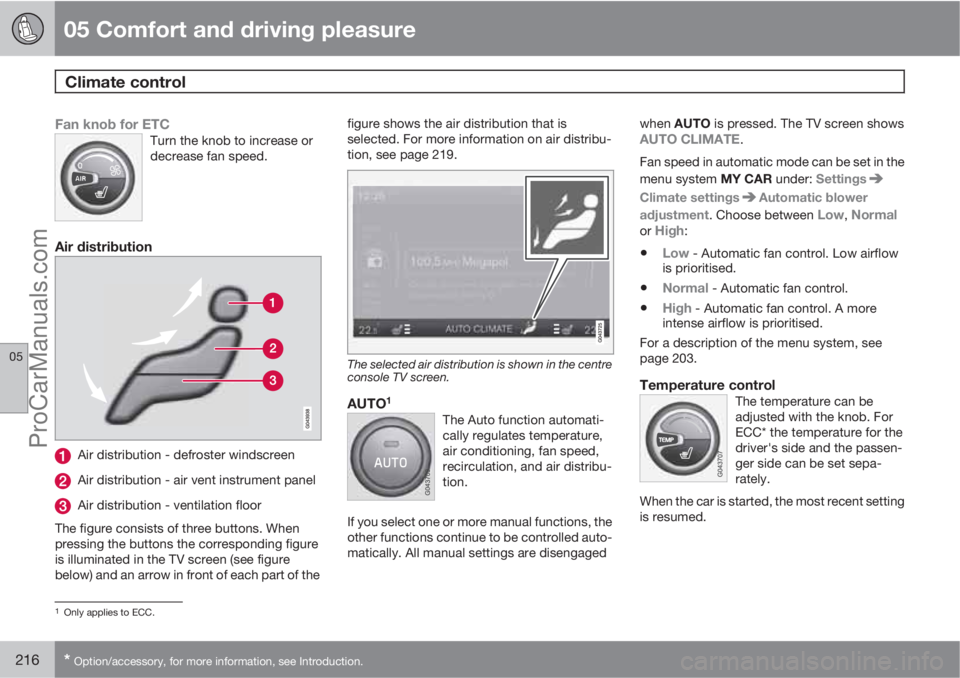
Fan knob for ETCTurn the knob to increase or
decrease fan speed.
Air distribution
Air distribution - defroster windscreen
Air distribution - air vent instrument panel
Air distribution - ventilation floor
The figure consists of three buttons. When
pressing the buttons the corresponding figure
is illuminated in the TV screen (see figure
below) and an arrow in front of each part of thefigure shows the air distribution that is
selected. For more information on air distribu-
tion, see page 219.
The selected air distribution is shown in the centre
console TV screen.
AUTO1
The Auto function automati-
cally regulates temperature,
air conditioning, fan speed,
recirculation, and air distribu-
tion.
If you select one or more manual functions, the
other functions continue to be controlled auto-
matically. All manual settings are disengagedwhen AUTO is pressed. The TV screen shows
AUTO CLIMATE.
Fan speed in automatic mode can be set in the
menu system MY CAR under: Settings
Climate settingsAutomatic blower
adjustment. Choose between
Low, Normalor High:
•Low - Automatic fan control. Low airflow
is prioritised.
•Normal - Automatic fan control.
•High - Automatic fan control. A more
intense airflow is prioritised.
For a description of the menu system, see
page 203.
Temperature controlThe temperature can be
adjusted with the knob. For
ECC* the temperature for the
driver's side and the passen-
ger side can be set sepa-
rately.
When the car is started, the most recent setting
is resumed.
1Only applies to ECC.
ProCarManuals.com