instrument panel VOLVO V60 2014 Owners Manual
[x] Cancel search | Manufacturer: VOLVO, Model Year: 2014, Model line: V60, Model: VOLVO V60 2014Pages: 442, PDF Size: 13.85 MB
Page 273 of 442
08 Starting and driving
08
* Option/accessory, for more information, see Introduction.271
11. Start the engine in the car with the dis-
charged battery.
IMPORTANT
Do not touch the crocodile clips during the start procedure. There is a risk of sparksforming.
12. Remove the jump leads in reverse order -first the black and then the red.
> Make sure that none of the black jumplead's clamps comes into contact with the battery's positive terminal or theclamp connected to the red jump lead!
WARNING
• The battery can generate oxyhydrogen gas, which is highly explosive. A sparkcan be formed if a jump lead is con-nected incorrectly, and this can beenough for the battery to explode.
• The battery contains sulphuric acid,which can cause serious burns.
• If sulphuric acid comes into contactwith eyes, skin or clothing, flush withlarge quantities of water. If acidsplashes into the eyes - seek medicalattention immediately.
Related information
•
Starting the engine (p. 264)
Gearboxes
There are two main types of gearbox. Manual gearbox and automatic gearbox.
• Manual gearbox (p. 271)
• Automatic gearbox - Geartronic (p. 273) and Powershift (p. 276)
IMPORTANT
To prevent damage to any drive system components, the working temperature ofthe gearbox is checked. If there is a risk ofoverheating, a warning symbol is illumi-nated in the combined instrument panel inconjunction with a text message beingshown. Follow the recommendation givenin the text message.
Related information
•Automatic gearbox -- Geartronic* (p. 273)
Manual gearbox
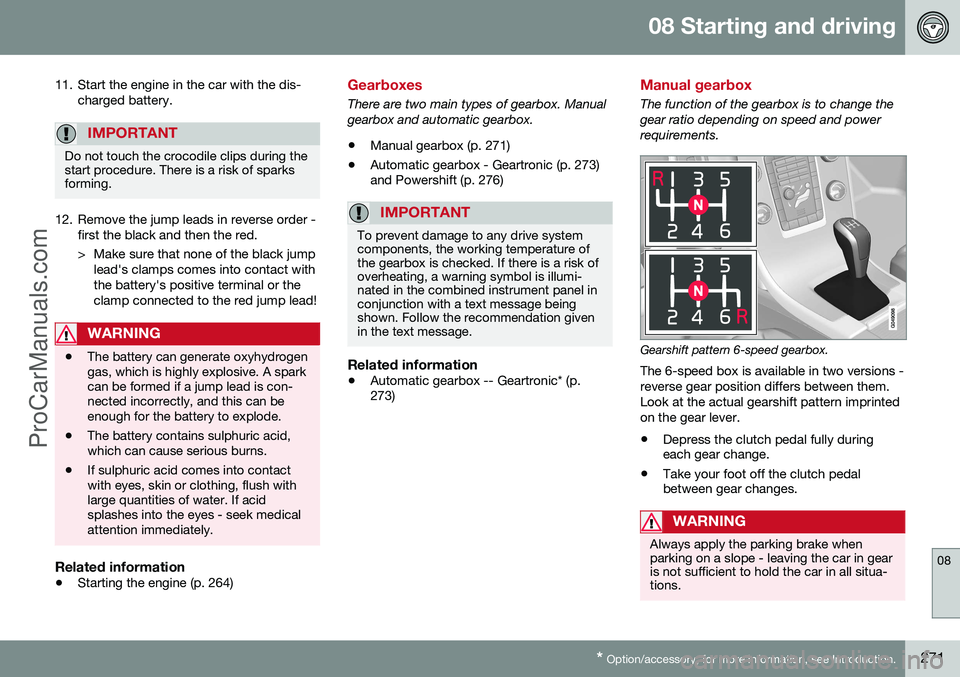
The function of the gearbox is to change the gear ratio depending on speed and powerrequirements.
Gearshift pattern 6-speed gearbox.
The 6-speed box is available in two versions - reverse gear position differs between them.Look at the actual gearshift pattern imprintedon the gear lever. • Depress the clutch pedal fully during each gear change.
• Take your foot off the clutch pedalbetween gear changes.
WARNING
Always apply the parking brake when parking on a slope - leaving the car in gearis not sufficient to hold the car in all situa-tions.
ProCarManuals.co’
Page 274 of 442
||
08 Starting and driving
08
272* Option/accessory, for more information, see Introduction.
Reverse gear inhibitorThe reverse gear inhibitor hinders the possi- bility of mistakenly attempting to engagereverse gear during normal forward travel.
• Follow the gearing pattern printed on the gear lever and start from neutral position,N
before moving it to R position.
• Engage reverse gear only when the car isstationary.
NOTE
With the upper variant of the shifting pat- tern for 6-speed gearbox (see previousillustration) -
first press down the gear
lever in the N position in order to engage
reverse gear.
Related information
• Gearboxes (p. 271)
• Transmission fluid - grade and volume (p. 399)
Gear shift indicator*
The gear shift indicator notifies the driver when it is appropriate to engage the nexthigher or lower gear. An essential detail inconnection with environmental driving is todrive in the right gear and to change gear inplenty of time.
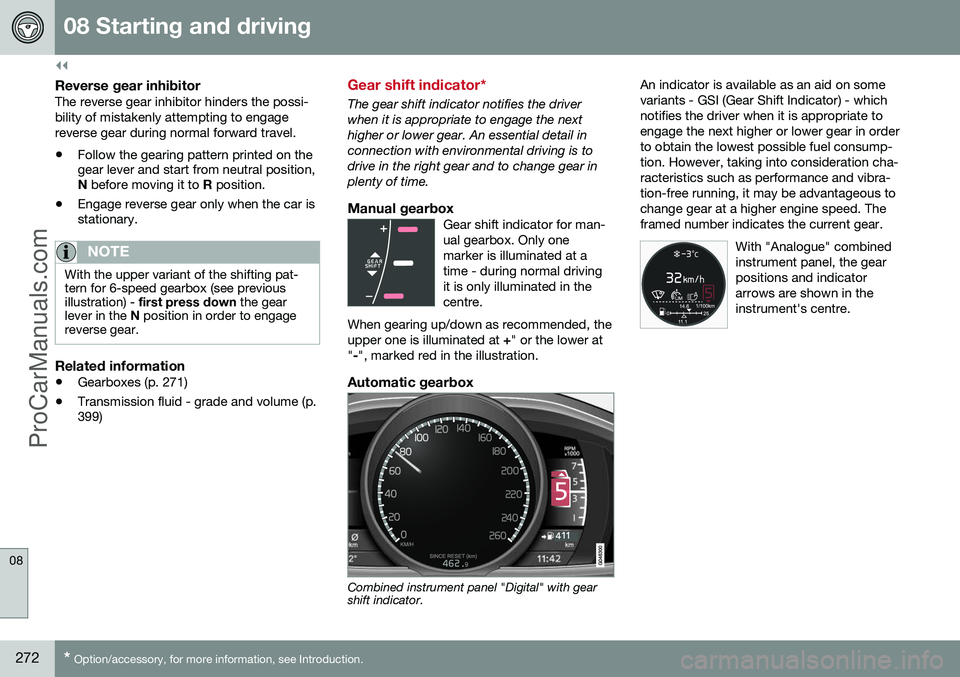
Manual gearboxGear shift indicator for man-ual gearbox. Only onemarker is illuminated at atime - during normal drivingit is only illuminated in thecentre.
When gearing up/down as recommended, theupper one is illuminated at +" or the lower at
" -", marked red in the illustration.
Automatic gearbox
Combined instrument panel "Digital" with gear shift indicator. An indicator is available as an aid on some variants - GSI (Gear Shift Indicator) - whichnotifies the driver when it is appropriate toengage the next higher or lower gear in orderto obtain the lowest possible fuel consump-tion. However, taking into consideration cha-racteristics such as performance and vibra- tion-free running, it may be advantageous tochange gear at a higher engine speed. Theframed number indicates the current gear.
With "Analogue" combinedinstrument panel, the gearpositions and indicatorarrows are shown in theinstrument's centre.
ProCarManuals.co’
Page 275 of 442
08 Starting and driving
08
}}
* Option/accessory, for more information, see Introduction.273
Automatic gearbox -- Geartronic*
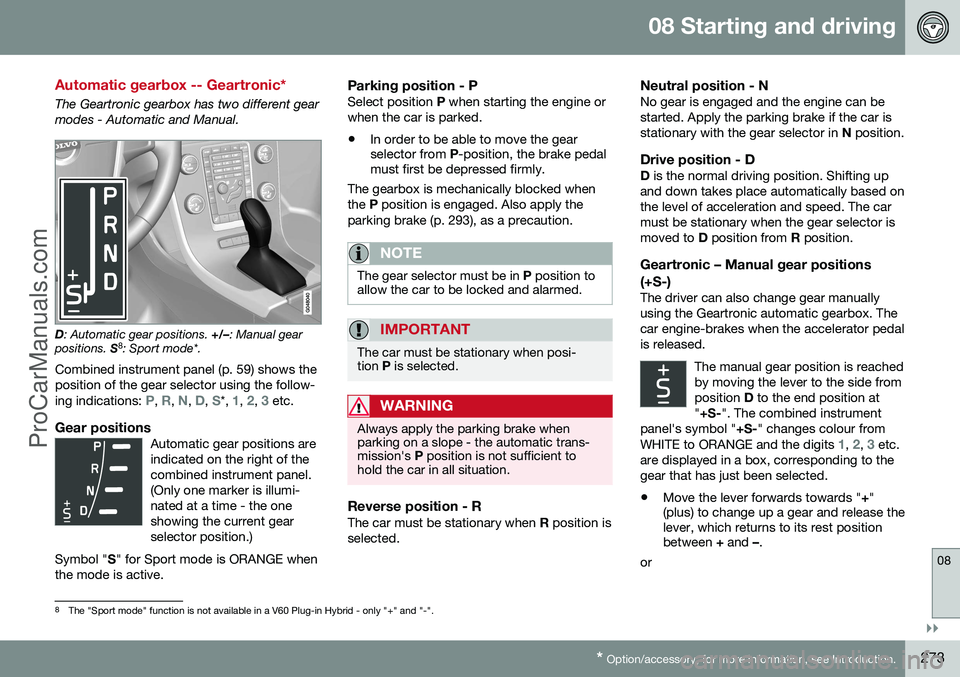
The Geartronic gearbox has two different gear modes - Automatic and Manual.
D : Automatic gear positions. +/–: Manual gear
positions. S8
: Sport mode*.
Combined instrument panel (p. 59) shows the position of the gear selector using the follow- ing indications:
P, R, N, D, S*, 1, 2, 3 etc.
Gear positionsAutomatic gear positions are indicated on the right of thecombined instrument panel.(Only one marker is illumi-nated at a time - the oneshowing the current gearselector position.)
Symbol " S" for Sport mode is ORANGE when
the mode is active.
Parking position - PSelect position P when starting the engine or
when the car is parked.
• In order to be able to move the gear selector from
P-position, the brake pedal
must first be depressed firmly.
The gearbox is mechanically blocked when the P position is engaged. Also apply the
parking brake (p. 293), as a precaution.
NOTE
The gear selector must be in P position to
allow the car to be locked and alarmed.
IMPORTANT
The car must be stationary when posi- tion P is selected.
WARNING
Always apply the parking brake when parking on a slope - the automatic trans-mission's P position is not sufficient to
hold the car in all situation.
Reverse position - RThe car must be stationary when R position is
selected.
Neutral position - NNo gear is engaged and the engine can be started. Apply the parking brake if the car isstationary with the gear selector in N position.
Drive position - DD is the normal driving position. Shifting up
and down takes place automatically based onthe level of acceleration and speed. The carmust be stationary when the gear selector ismoved to D position from R position.
Geartronic – Manual gear positions (+S-)
The driver can also change gear manually using the Geartronic automatic gearbox. Thecar engine-brakes when the accelerator pedalis released.
The manual gear position is reachedby moving the lever to the side fromposition D to the end position at
" +S- ". The combined instrument
panel's symbol " +S-" changes colour from
WHITE to ORANGE and the digits
1, 2, 3 etc.
are displayed in a box, corresponding to the gear that has just been selected.
• Move the lever forwards towards "
+"
(plus) to change up a gear and release the lever, which returns to its rest positionbetween + and –.
or
8 The "Sport mode" function is not available in a V60 Plug-in Hybrid - only "+" and "-".
ProCarManuals.co’
Page 276 of 442
||
08 Starting and driving
08
274* Option/accessory, for more information, see Introduction.
• Pull the lever back towards "
–" (minus) to
change down a gear and release it.
The manual gearshift mode " +S–" can be
selected at any time while driving. Geartronic automatically shifts down if the driver allows the speed to decrease lowerthan a level suitable for the selected gear, inorder to avoid jerking and stalling. To return to automatic driving mode:
• Move the lever to the side to the end position at
D.
NOTE
If the gearbox has a Sport programme then the gearbox will only become manualafter the gear selector has been movedforwards or backwards in its " +S–" posi-
tion. The combined instrument panel then changes indication from
S to show which
of the gears 1, 2, 3 etc. is engaged.
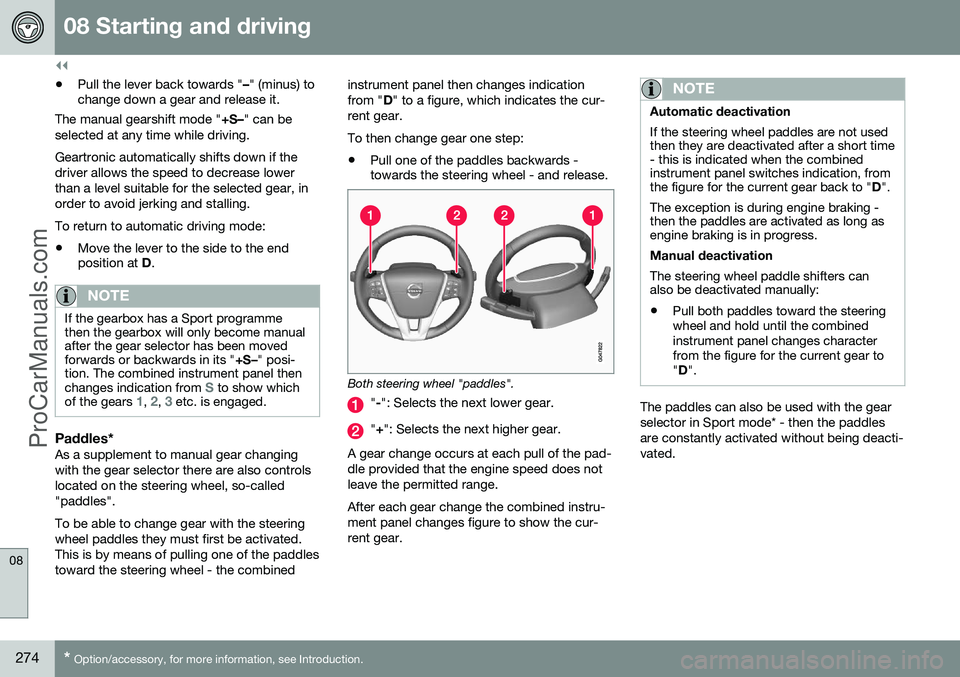
Paddles*As a supplement to manual gear changing with the gear selector there are also controlslocated on the steering wheel, so-called"paddles". To be able to change gear with the steering wheel paddles they must first be activated.This is by means of pulling one of the paddlestoward the steering wheel - the combined instrument panel then changes indicationfrom "
D" to a figure, which indicates the cur-
rent gear. To then change gear one step: • Pull one of the paddles backwards - towards the steering wheel - and release.
Both steering wheel "paddles".
"
-": Selects the next lower gear.
" + ": Selects the next higher gear.
A gear change occurs at each pull of the pad- dle provided that the engine speed does notleave the permitted range. After each gear change the combined instru- ment panel changes figure to show the cur-rent gear.
NOTE
Automatic deactivation If the steering wheel paddles are not used then they are deactivated after a short time- this is indicated when the combinedinstrument panel switches indication, fromthe figure for the current gear back to " D".
The exception is during engine braking -then the paddles are activated as long asengine braking is in progress. Manual deactivation The steering wheel paddle shifters can also be deactivated manually: • Pull both paddles toward the steering wheel and hold until the combinedinstrument panel changes characterfrom the figure for the current gear to"
D ".
The paddles can also be used with the gear selector in Sport mode* - then the paddlesare constantly activated without being deacti-vated.
ProCarManuals.co’
Page 277 of 442
08 Starting and driving
08
* Option/accessory, for more information, see Introduction.275
Geartronic - Sport mode* (S) 9The Sport programme provides sportier characteristics and allowshigher engine speed for the gears.At the same time it responds more
quickly to acceleration. During active driving,the use of a lower gear is prioritised, leadingto a delayed upshift.
To activate Sport mode: • Move the gear selector to the side from
D
position to the end position at " +S–" - the
combined instrument panel changes indi- cation from
D to S.
Sport mode can be selected at any time while driving.
Geartronic - Winter modeIt can be easier to pull away on slippery roadsif 3rd gear is engaged manually.
1. Depress the brake pedal and move the gear selector from D position to the end
position at " +S–" - the combined instru-
ment panel changes indication from
D to
the figure
110 .
2. Scroll up to gear 3 by pushing the lever forward towards " +" (plus) twice - the dis-
play shifts the indication from
1 to 3.
3. Release the brake and accelerate care- fully. The gearbox "winter mode" means that the car moves off with a lower engine speed andreduced engine power on the drive wheels.
Kick-downWhen the accelerator pedal is pressed all theway to the floor (beyond the position normallyregarded as full acceleration) a lower gear isimmediately engaged. This is known as kick-down. If the accelerator is released from the kick- down position, the gearbox automaticallychanges up. Kick-down is used when maximum accelera- tion is needed, such as for overtaking. Safety function To prevent overrevving the engine, the gear- box control program has a protective down-shift inhibitor which prevents the kick-downfunction. Geartronic does not permit downshifting/ kick-down which would result in an enginespeed high enough to damage the engine.Nothing happens if the driver still tries to shiftdown in this way at high engine speed – theoriginal gear remains engaged. When kick-down is activated the car can change one or more gears at a time depend-ing on engine speed. The car changes up when the engine reaches its maximum speedin order to prevent damage to the engine.
Related information
•
Transmission fluid - grade and volume (p. 399)
9
With some engines only.10
If the car has Sport mode* then " S" is shown first.
ProCarManuals.co’
Page 278 of 442
08 Starting and driving
08
276* Option/accessory, for more information, see Introduction.
Automatic gearbox -- Powershift*
An automatic gearbox with Powershift differs from an automatic gearbox with Geartronic (p.273), in that it has double mechanical clutchdiscs.
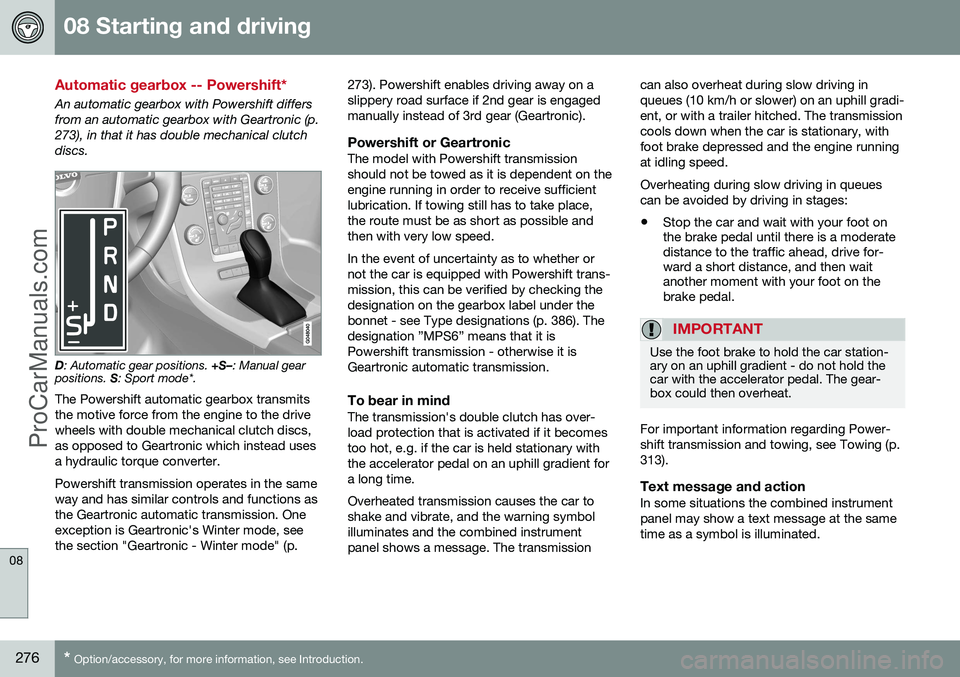
D : Automatic gear positions. +S–: Manual gear
positions. S: Sport mode*.
The Powershift automatic gearbox transmits the motive force from the engine to the drivewheels with double mechanical clutch discs,as opposed to Geartronic which instead usesa hydraulic torque converter. Powershift transmission operates in the same way and has similar controls and functions asthe Geartronic automatic transmission. Oneexception is Geartronic's Winter mode, seethe section "Geartronic - Winter mode" (p. 273). Powershift enables driving away on aslippery road surface if 2nd gear is engagedmanually instead of 3rd gear (Geartronic).
Powershift or GeartronicThe model with Powershift transmissionshould not be towed as it is dependent on theengine running in order to receive sufficientlubrication. If towing still has to take place,the route must be as short as possible andthen with very low speed. In the event of uncertainty as to whether or not the car is equipped with Powershift trans-mission, this can be verified by checking thedesignation on the gearbox label under thebonnet - see Type designations (p. 386). Thedesignation ”MPS6” means that it isPowershift transmission - otherwise it isGeartronic automatic transmission.
To bear in mindThe transmission's double clutch has over-load protection that is activated if it becomestoo hot, e.g. if the car is held stationary withthe accelerator pedal on an uphill gradient fora long time. Overheated transmission causes the car to shake and vibrate, and the warning symbolilluminates and the combined instrumentpanel shows a message. The transmissioncan also overheat during slow driving inqueues (10 km/h or slower) on an uphill gradi-ent, or with a trailer hitched. The transmissioncools down when the car is stationary, withfoot brake depressed and the engine runningat idling speed. Overheating during slow driving in queues can be avoided by driving in stages:
• Stop the car and wait with your foot on the brake pedal until there is a moderatedistance to the traffic ahead, drive for-ward a short distance, and then waitanother moment with your foot on thebrake pedal.
IMPORTANT
Use the foot brake to hold the car station- ary on an uphill gradient - do not hold thecar with the accelerator pedal. The gear-box could then overheat.
For important information regarding Power- shift transmission and towing, see Towing (p.313).
Text message and actionIn some situations the combined instrumentpanel may show a text message at the sametime as a symbol is illuminated.
ProCarManuals.co’
Page 282 of 442
||
08 Starting and driving
08
280* Option/accessory, for more information, see Introduction.
The Start/Stop function gives the driver the opportunity for a more active environmentallyconscious way of driving the car by means ofbeing able to allow the engine to stop auto-matically, whenever appropriate. Manual or Automatic Note that there are differences in the Start/Stop function depending on whether thegearbox is manual or automatic.
Related information
• Start/Stop* - function and operation (p. 280)
• Starting the engine (p. 264)
• Start/Stop* - settings (p. 285)
• Start/Stop* - the engine does not auto-start (p. 284)
• Start/Stop* - the engine auto-starts (p.283)
• Start/Stop* - the engine does not stop (p.282)
• Start/Stop* - involuntary engine stoppagemanual gearbox (p. 284)
• Start/Stop* - symbols and messages (p.286)
• Battery - Start/Stop (p. 365)
Start/Stop* - function and operation
Some engine and gearbox combinations are equipped with a Start/Stop function whichengages in the event of e.g. stationary trafficor waiting at traffic lights. The Start/Stopfunction is activated automatically when theengine is started with the key.
The Start/Stop function isactivated automatically whenthe engine is started with thekey. The driver is madeaware of this by the func-tion's symbol illuminating inthe combined instrumentpanel and the On/Off buttonlamp illuminating. All of the car's normal sys-
tems such as lighting, radio, etc. work as nor- mal even with an engine that has stoppedautomatically, except that some equipmentmay have the function temporarily reduced,e.g. the climate control system's fan speed orextremely high volume on the audio system.
Engine auto-stopThe following is required for the engine to auto-stop:
ConditionsM/A A
Declutch, set the gear lever in neu- tral position and release the clutchpedal - the engine stops automati-cally.M
Stop the car with the foot brake, and then keep your foot on thepedal - the engine auto-stops.A
AM = Manual gearbox, A = Automatic gearbox.
If the ECO function is acti- vated then the engine mayauto-stop before the car iscompletely stationary.
As verification and reminder that the engine is auto-stopped the com-bined instrument panel's symbol forthe Start/Stop function illuminates.
ProCarManuals.co’
Page 283 of 442
08 Starting and driving
08
* Option/accessory, for more information, see Introduction.281
Engine auto-start
ConditionsM/
A A
With the gear lever in neutral posi- tion:
1. Depress the clutch pedal or
press the accelerator pedal - the engine starts.
2. Engage a suitable gear and drive.M
Release the foot pressure on the foot brake - the engine auto-startsand the journey can continue.A
Maintain foot pressure on the foot brake and depress the acceleratorpedal - the engine auto-starts.A
The following option is also availa- ble on a downhill gradient: Release the foot brake and let the car move off - the engine startsautomatically when the speedexceeds normal walking pace.M +
A
A M = Manual gearbox, A = Automatic gearbox.
Deactivate the Start/Stop functionIn certain situations, it may advisable to temporarilyswitch off the automaticStart/Stop function - this iscarried out with a push ofthis button.
Disengaged function is indicated by the combined instrument panel'sStart/Stop symbol and the On/Offbutton's lamp extinguishing.
The Start/Stop function is disengaged until it is reactivated with the button or until the nexttime the engine is started with the key.
Start assistance HSAThe foot brake can also be released on anuphill slope to auto-start the engine - the HSA(p. 279) (Hill Start Assist) function preventsthe car from rolling backwards. HSA means that the pressure in the brake system remains temporarily available whilethe driver moves his/her foot from the brakepedal to the accelerator pedal for driving offwith the engine having stopped automatically.The temporary braking effect releases after afew seconds or when the driver depressesthe accelerator pedal.
Related information
• Start/Stop* (p. 279)
• Starting the engine (p. 264) •
Start/Stop* - settings (p. 285)
• Start/Stop* - the engine does not auto- start (p. 284)
• Start/Stop* - the engine auto-starts (p.283)
• Start/Stop* - the engine does not stop (p.282)
• Start/Stop* - involuntary engine stoppagemanual gearbox (p. 284)
• Start/Stop* - symbols and messages (p.286)
• Battery - Start/Stop (p. 365)
ProCarManuals.co’
Page 286 of 442
08 Starting and driving
08
284* Option/accessory, for more information, see Introduction.
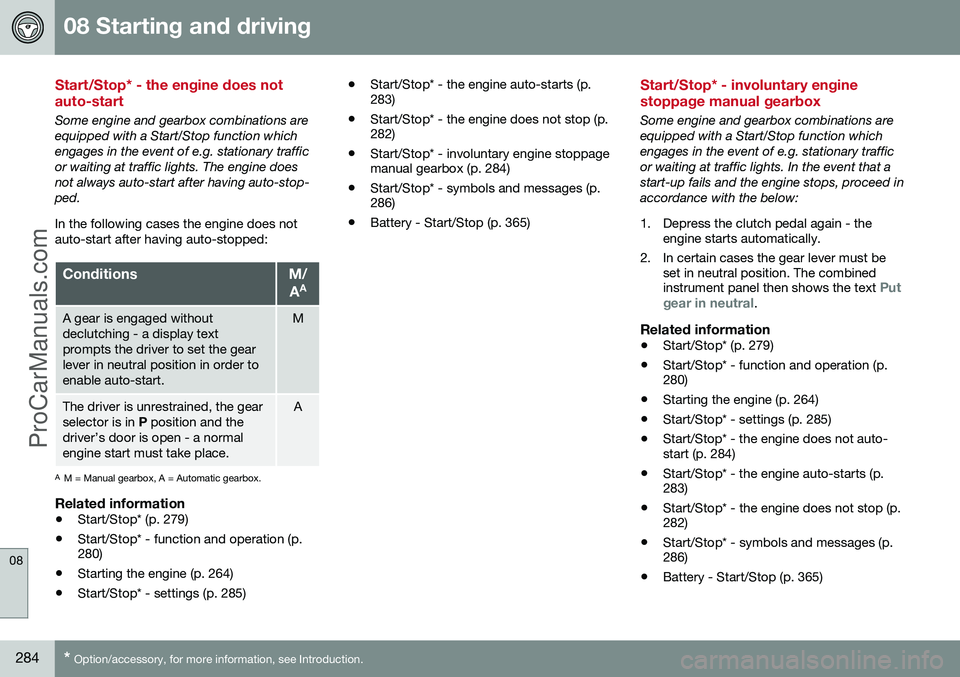
Start/Stop* - the engine does not auto-start
Some engine and gearbox combinations are equipped with a Start/Stop function whichengages in the event of e.g. stationary trafficor waiting at traffic lights. The engine doesnot always auto-start after having auto-stop-ped. In the following cases the engine does not auto-start after having auto-stopped:
ConditionsM/
A A
A gear is engaged without declutching - a display textprompts the driver to set the gearlever in neutral position in order toenable auto-start.M
The driver is unrestrained, the gear selector is in
P position and the
driver’s door is open - a normalengine start must take place.A
A M = Manual gearbox, A = Automatic gearbox.
Related information
• Start/Stop* (p. 279)
• Start/Stop* - function and operation (p. 280)
• Starting the engine (p. 264)
• Start/Stop* - settings (p. 285) •
Start/Stop* - the engine auto-starts (p.283)
• Start/Stop* - the engine does not stop (p.282)
• Start/Stop* - involuntary engine stoppagemanual gearbox (p. 284)
• Start/Stop* - symbols and messages (p.286)
• Battery - Start/Stop (p. 365)
Start/Stop* - involuntary engine stoppage manual gearbox
Some engine and gearbox combinations are equipped with a Start/Stop function whichengages in the event of e.g. stationary trafficor waiting at traffic lights. In the event that astart-up fails and the engine stops, proceed inaccordance with the below:
1. Depress the clutch pedal again - the
engine starts automatically.
2. In certain cases the gear lever must be set in neutral position. The combined instrument panel then shows the text
Put
gear in neutral.
Related information
• Start/Stop* (p. 279)
• Start/Stop* - function and operation (p. 280)
• Starting the engine (p. 264)
• Start/Stop* - settings (p. 285)
• Start/Stop* - the engine does not auto-start (p. 284)
• Start/Stop* - the engine auto-starts (p.283)
• Start/Stop* - the engine does not stop (p.282)
• Start/Stop* - symbols and messages (p.286)
• Battery - Start/Stop (p. 365)
ProCarManuals.co’
Page 288 of 442
08 Starting and driving
08
286* Option/accessory, for more information, see Introduction.
Start/Stop* - symbols and messages
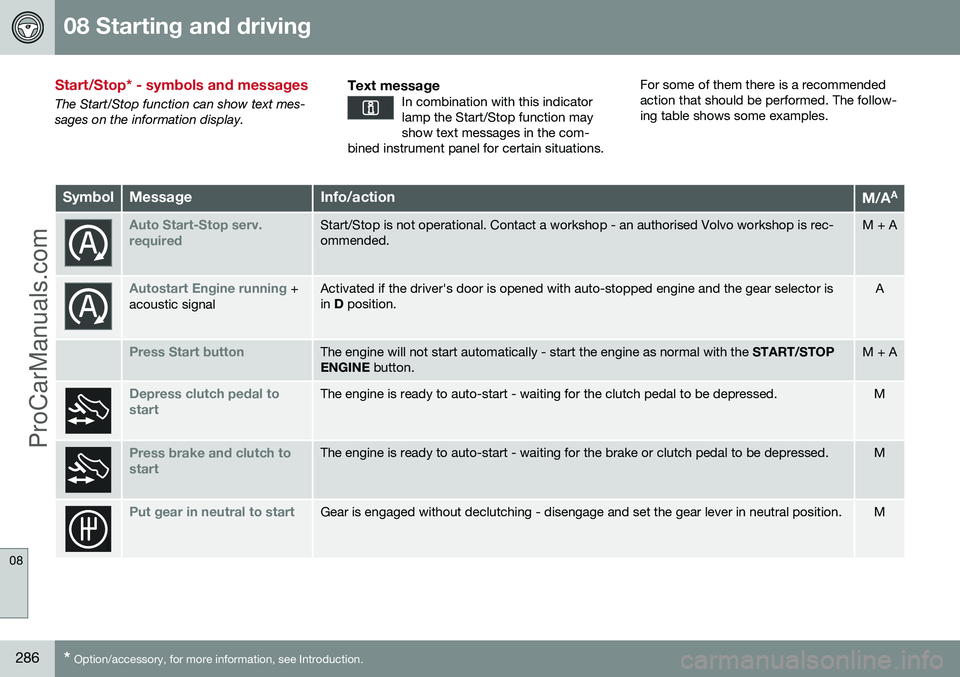
The Start/Stop function can show text mes- sages on the information display.
Text messageIn combination with this indicatorlamp the Start/Stop function mayshow text messages in the com-
bined instrument panel for certain situations.
For some of them there is a recommended action that should be performed. The follow-ing table shows some examples.
SymbolMessageInfo/actionM/A A
Auto Start-Stop serv. requiredStart/Stop is not operational. Contact a workshop - an authorised Volvo workshop is rec- ommended.M + A
Autostart Engine running +
acoustic signalActivated if the driver's door is opened with auto-stopped engine and the gear selector is in D position.A
Press Start buttonThe engine will not start automatically - start the engine as normal with the START/STOP
ENGINE button.M + A
Depress clutch pedal to startThe engine is ready to auto-start - waiting for the clutch pedal to be depressed.M
Press brake and clutch to startThe engine is ready to auto-start - waiting for the brake or clutch pedal to be depressed.M
Put gear in neutral to startGear is engaged without declutching - disengage and set the gear lever in neutral position.M
ProCarManuals.co’