ESP VOLVO V60 2014 User Guide
[x] Cancel search | Manufacturer: VOLVO, Model Year: 2014, Model line: V60, Model: VOLVO V60 2014Pages: 442, PDF Size: 13.85 MB
Page 90 of 442
03 Instruments and controls
03
88
Interior lighting
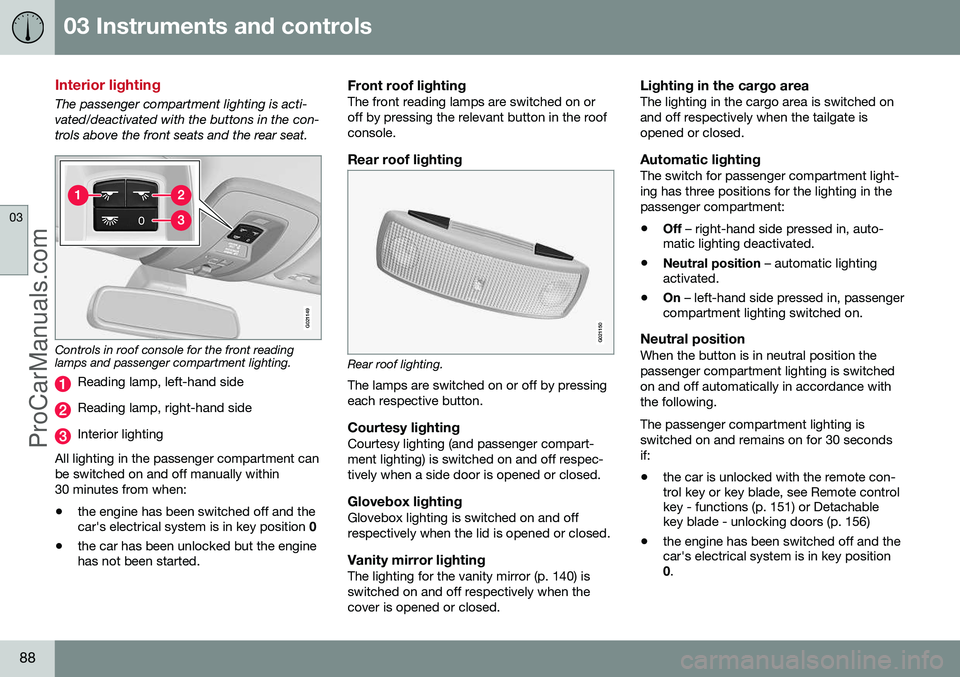
The passenger compartment lighting is acti- vated/deactivated with the buttons in the con-trols above the front seats and the rear seat.
G021149
Controls in roof console for the front reading lamps and passenger compartment lighting.
Reading lamp, left-hand side
Reading lamp, right-hand side
Interior lighting
All lighting in the passenger compartment can be switched on and off manually within30 minutes from when:
• the engine has been switched off and the car's electrical system is in key position
0
• the car has been unlocked but the enginehas not been started.
Front roof lightingThe front reading lamps are switched on or off by pressing the relevant button in the roofconsole.
Rear roof lighting
G021150
Rear roof lighting.
The lamps are switched on or off by pressing each respective button.
Courtesy lightingCourtesy lighting (and passenger compart-ment lighting) is switched on and off respec-tively when a side door is opened or closed.
Glovebox lightingGlovebox lighting is switched on and offrespectively when the lid is opened or closed.
Vanity mirror lightingThe lighting for the vanity mirror (p. 140) isswitched on and off respectively when thecover is opened or closed.
Lighting in the cargo areaThe lighting in the cargo area is switched onand off respectively when the tailgate isopened or closed.
Automatic lightingThe switch for passenger compartment light-ing has three positions for the lighting in thepassenger compartment:
• Off
– right-hand side pressed in, auto-
matic lighting deactivated.
• Neutral position
– automatic lighting
activated.
• On
– left-hand side pressed in, passenger
compartment lighting switched on.
Neutral positionWhen the button is in neutral position thepassenger compartment lighting is switchedon and off automatically in accordance withthe following. The passenger compartment lighting is switched on and remains on for 30 secondsif:
• the car is unlocked with the remote con- trol key or key blade, see Remote control key - functions (p. 151) or Detachable key blade - unlocking doors (p. 156)
• the engine has been switched off and thecar's electrical system is in key position0
.
ProCarManuals.co’
Page 94 of 442
||
03 Instruments and controls
03
92* Option/accessory, for more information, see Introduction.
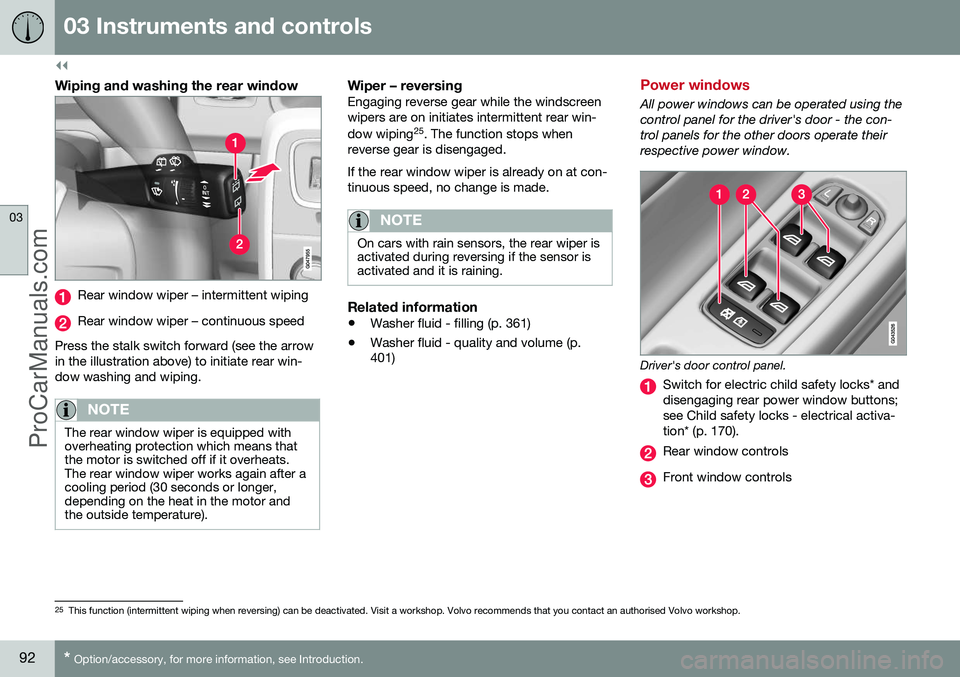
Wiping and washing the rear window
Rear window wiper – intermittent wiping
Rear window wiper – continuous speed
Press the stalk switch forward (see the arrow in the illustration above) to initiate rear win-dow washing and wiping.
NOTE
The rear window wiper is equipped with overheating protection which means thatthe motor is switched off if it overheats.The rear window wiper works again after acooling period (30 seconds or longer,depending on the heat in the motor andthe outside temperature).
Wiper – reversingEngaging reverse gear while the windscreen wipers are on initiates intermittent rear win- dow wiping 25
. The function stops when
reverse gear is disengaged. If the rear window wiper is already on at con- tinuous speed, no change is made.
NOTE
On cars with rain sensors, the rear wiper is activated during reversing if the sensor isactivated and it is raining.
Related information
• Washer fluid - filling (p. 361)
• Washer fluid - quality and volume (p. 401)
Power windows
All power windows can be operated using the control panel for the driver's door - the con-trol panels for the other doors operate theirrespective power window.
Driver's door control panel.
Switch for electric child safety locks* and disengaging rear power window buttons;see Child safety locks - electrical activa-tion* (p. 170).
Rear window controls
Front window controls
25
This function (intermittent wiping when reversing) can be deactivated. Visit a workshop. Volvo recommends that you contact an authorised Volvo workshop.
ProCarManuals.co’
Page 95 of 442
03 Instruments and controls
03
}}
93
WARNING
Check that no rear seat passengers are trapped when the windows are closedfrom the driver's door.
WARNING
Check that children or other passengers are not trapped if the windows are closed,even when the remote control key is used.
WARNING
If there are children in the car - remember to always switch off the power supply tothe power windows by selecting key posi-tion 0 and then take the remote control key
with you when leaving the car. For infor-mation on key positions - see Key posi-tions - functions at different levels (p. 70).
Operating
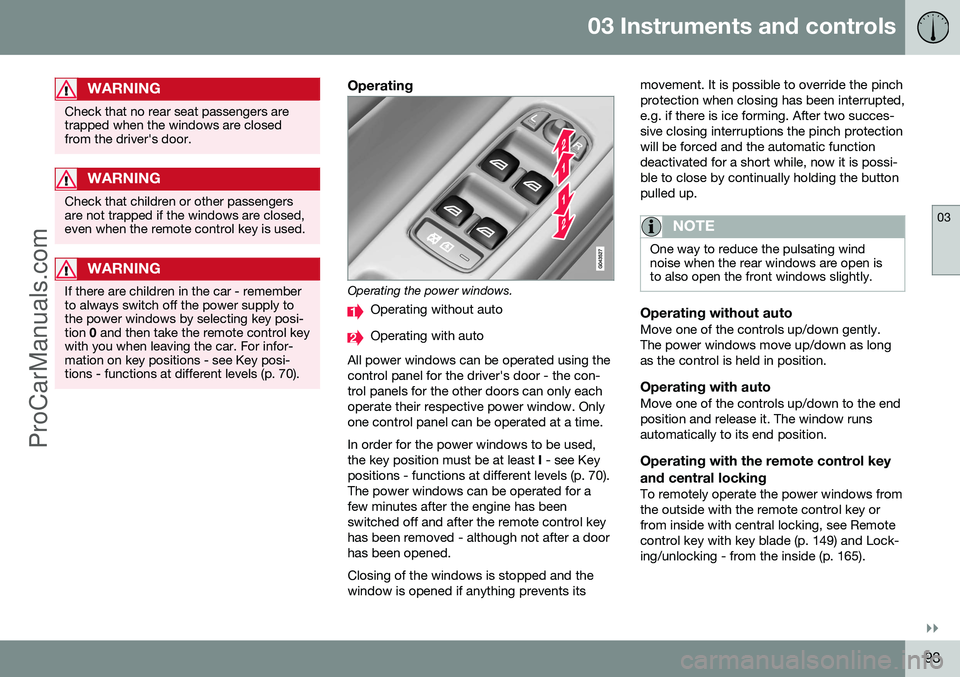
Operating the power windows.
Operating without auto
Operating with auto
All power windows can be operated using the control panel for the driver's door - the con-trol panels for the other doors can only eachoperate their respective power window. Onlyone control panel can be operated at a time. In order for the power windows to be used, the key position must be at least I - see Key
positions - functions at different levels (p. 70).The power windows can be operated for afew minutes after the engine has beenswitched off and after the remote control keyhas been removed - although not after a doorhas been opened. Closing of the windows is stopped and the window is opened if anything prevents its movement. It is possible to override the pinchprotection when closing has been interrupted,e.g. if there is ice forming. After two succes-sive closing interruptions the pinch protectionwill be forced and the automatic functiondeactivated for a short while, now it is possi-ble to close by continually holding the buttonpulled up.
NOTE
One way to reduce the pulsating wind noise when the rear windows are open isto also open the front windows slightly.
Operating without autoMove one of the controls up/down gently. The power windows move up/down as longas the control is held in position.
Operating with autoMove one of the controls up/down to the endposition and release it. The window runsautomatically to its end position.
Operating with the remote control key and central locking
To remotely operate the power windows from the outside with the remote control key orfrom inside with central locking, see Remotecontrol key with key blade (p. 149) and Lock-ing/unlocking - from the inside (p. 165).
ProCarManuals.co’
Page 96 of 442
||
03 Instruments and controls
03
94
ResettingIf the battery is disconnected then the func- tion for automatic opening must be reset sothat it can work correctly.
1. Gently raise the front section of the but-ton to raise the window to its end position and hold it there for one second.
2. Release the button briefly.
3. Raise the front section of the button again for one second.
WARNING
A reset must take place for pinch protec- tion to work.
Door mirrors
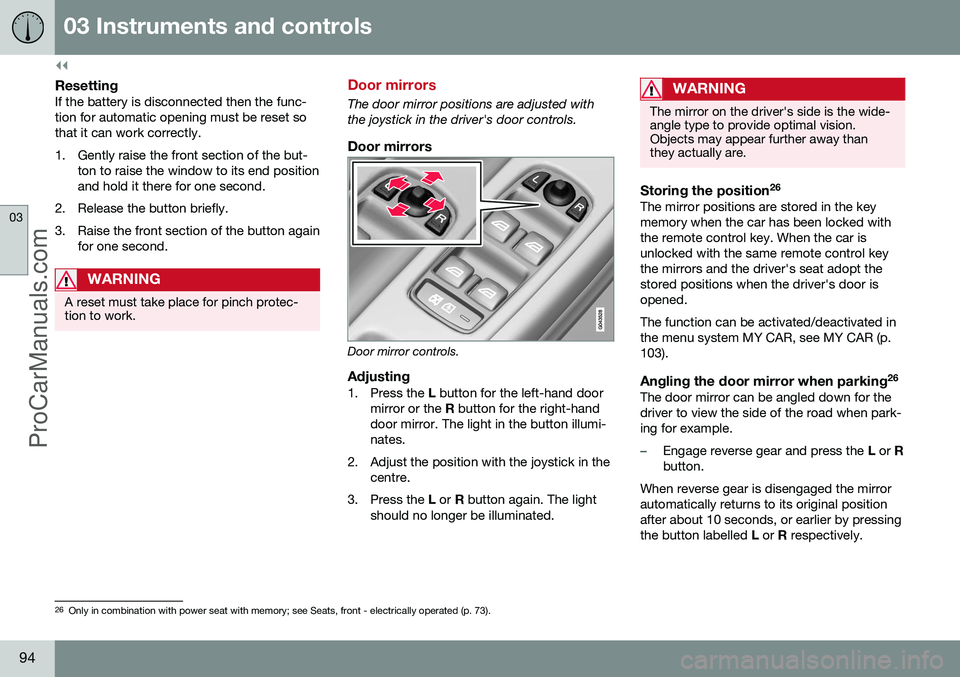
The door mirror positions are adjusted with the joystick in the driver's door controls.
Door mirrors
Door mirror controls.
Adjusting1. Press the L button for the left-hand door
mirror or the R button for the right-hand
door mirror. The light in the button illumi- nates.
2. Adjust the position with the joystick in the centre.
3. Press the L or R button again. The light
should no longer be illuminated.
WARNING
The mirror on the driver's side is the wide- angle type to provide optimal vision.Objects may appear further away thanthey actually are.
Storing the position 26The mirror positions are stored in the key memory when the car has been locked withthe remote control key. When the car isunlocked with the same remote control keythe mirrors and the driver's seat adopt thestored positions when the driver's door isopened. The function can be activated/deactivated in the menu system MY CAR, see MY CAR (p.103).
Angling the door mirror when parking 26The door mirror can be angled down for thedriver to view the side of the road when park-ing for example.
–Engage reverse gear and press the
L or R
button.
When reverse gear is disengaged the mirror automatically returns to its original positionafter about 10 seconds, or earlier by pressingthe button labelled L or R respectively.
26
Only in combination with power seat with memory; see Seats, front - electrically operated (p. 73).
ProCarManuals.co’
Page 98 of 442
03 Instruments and controls
03
96* Option/accessory, for more information, see Introduction.
Windows and rearview and door mirrors - heating
The defroster is used to quickly remove mist- ing and ice from the windscreen, rear windowand door mirrors.
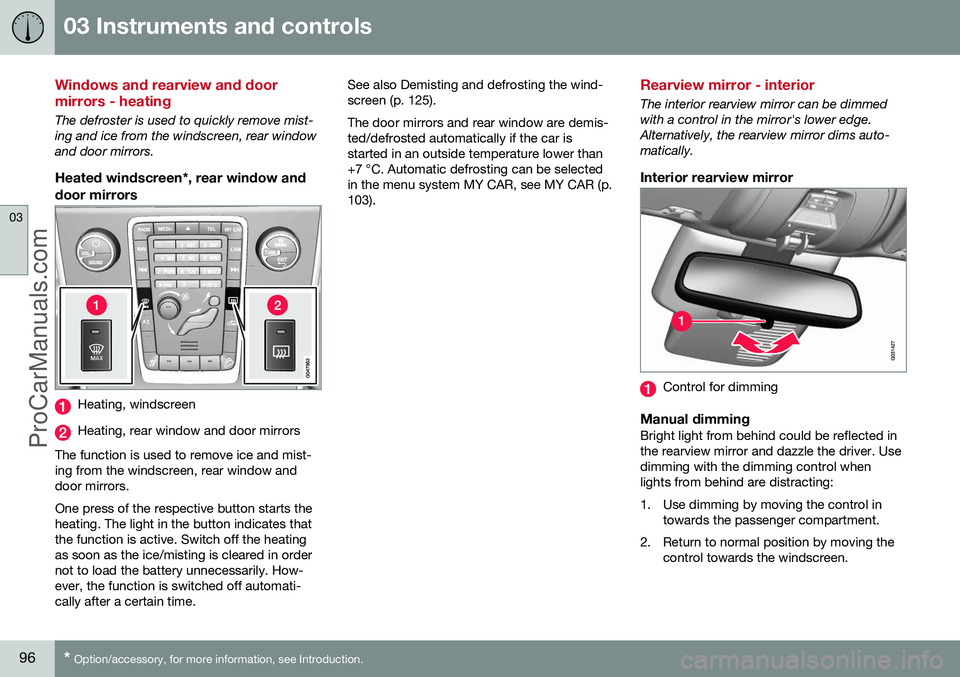
Heated windscreen*, rear window and
door mirrors
Heating, windscreen
Heating, rear window and door mirrors
The function is used to remove ice and mist- ing from the windscreen, rear window anddoor mirrors. One press of the respective button starts the heating. The light in the button indicates thatthe function is active. Switch off the heatingas soon as the ice/misting is cleared in ordernot to load the battery unnecessarily. How-ever, the function is switched off automati-cally after a certain time. See also Demisting and defrosting the wind-screen (p. 125). The door mirrors and rear window are demis- ted/defrosted automatically if the car isstarted in an outside temperature lower than+7 °C. Automatic defrosting can be selectedin the menu system MY CAR, see MY CAR (p.103).
Rearview mirror - interior
The interior rearview mirror can be dimmed with a control in the mirror's lower edge.Alternatively, the rearview mirror dims auto-matically.
Interior rearview mirror
Control for dimming
Manual dimmingBright light from behind could be reflected in the rearview mirror and dazzle the driver. Usedimming with the dimming control whenlights from behind are distracting:
1. Use dimming by moving the control in
towards the passenger compartment.
2. Return to normal position by moving the control towards the windscreen.
ProCarManuals.co’
Page 102 of 442
||
03 Instruments and controls
03
100
Pinch protectionThe sunroof's pinch protection function is triggered if it is blocked by an object duringautomatic closing. If blocked, the sunroof willstop and automatically open to the previousposition.
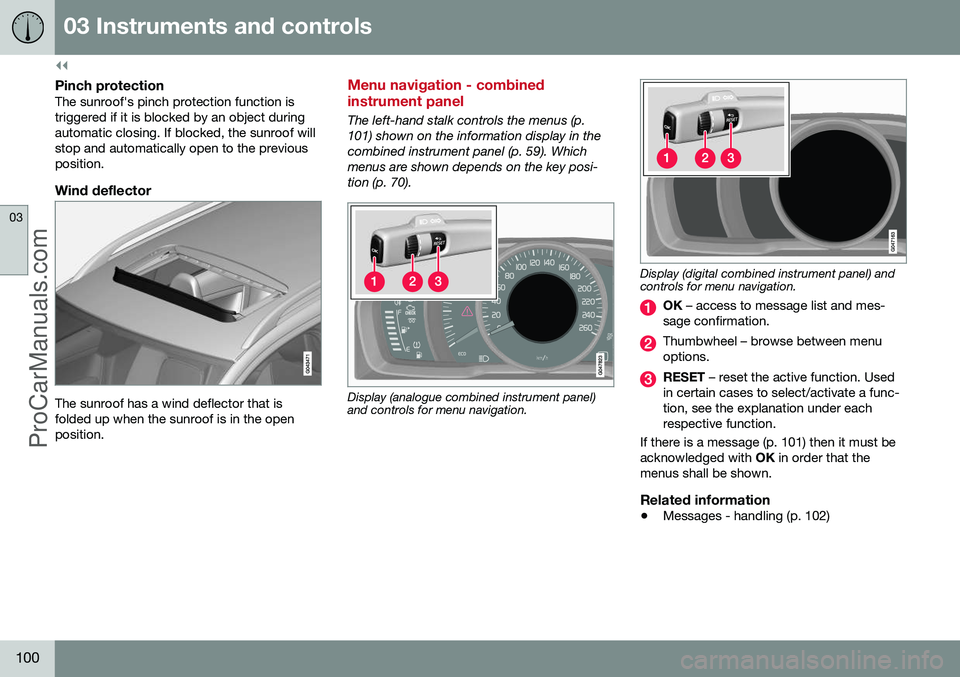
Wind deflector
The sunroof has a wind deflector that is folded up when the sunroof is in the openposition.
Menu navigation - combined instrument panel
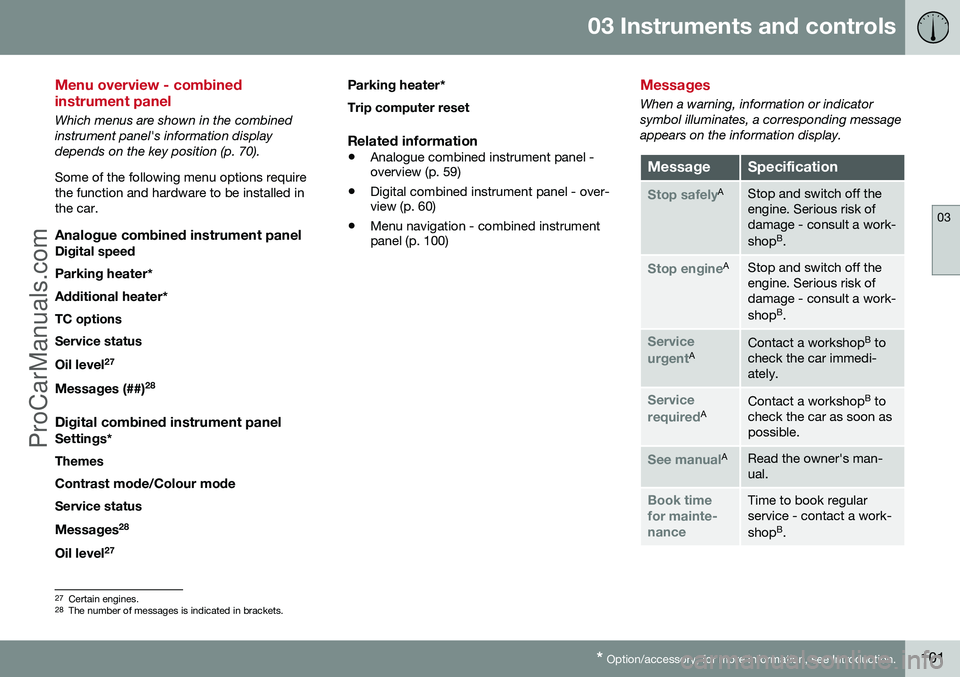
The left-hand stalk controls the menus (p. 101) shown on the information display in thecombined instrument panel (p. 59). Whichmenus are shown depends on the key posi-tion (p. 70).
Display (analogue combined instrument panel) and controls for menu navigation.
Display (digital combined instrument panel) and controls for menu navigation.
OK – access to message list and mes-
sage confirmation.
Thumbwheel – browse between menu options.
RESET – reset the active function. Used
in certain cases to select/activate a func- tion, see the explanation under eachrespective function.
If there is a message (p. 101) then it must beacknowledged with OK in order that the
menus shall be shown.
Related information
• Messages - handling (p. 102)
ProCarManuals.co’
Page 103 of 442
03 Instruments and controls
03
* Option/accessory, for more information, see Introduction.101
Menu overview - combined instrument panel
Which menus are shown in the combined instrument panel's information displaydepends on the key position (p. 70). Some of the following menu options require the function and hardware to be installed inthe car.
Analogue combined instrument panelDigital speed
Parking heater *
Additional heater *
TC options Service status
Oil level 27
Messages (##) 28
Digital combined instrument panel
Settings
*
Themes
Contrast mode /Colour mode
Service status
Messages 28
Oil level 27 Parking heater
*
Trip computer reset
Related information
• Analogue combined instrument panel - overview (p. 59)
• Digital combined instrument panel - over-view (p. 60)
• Menu navigation - combined instrumentpanel (p. 100)
Messages
When a warning, information or indicator symbol illuminates, a corresponding messageappears on the information display.
MessageSpecification
Stop safelyAStop and switch off the engine. Serious risk ofdamage - consult a work- shop B
.
Stop engineAStop and switch off the engine. Serious risk ofdamage - consult a work- shop B
.
Service urgentAContact a workshop B
to
check the car immedi- ately.
Service requiredAContact a workshop B
to
check the car as soon as possible.
See manualARead the owner's man- ual.
Book time for mainte-nanceTime to book regular service - contact a work- shop B
.
27 Certain engines.
28 The number of messages is indicated in brackets.
ProCarManuals.co’
Page 104 of 442
||
03 Instruments and controls
03
102* Option/accessory, for more information, see Introduction.
MessageSpecification
Time for reg- ular mainte-nanceTime for regular service - contact a workshop B
. The
timing is determined by the number of kilometresdriven, number of monthssince the last service,engine running time andoil grade.
Maintenance overdueIf the service intervals are not followed then thewarranty does not coverany damaged parts - contact a workshop B
.
Transmission Oil changeneededContact a workshop B
to
check the car as soon as possible.
Transmission ReducedperformanceThe gearbox cannot han- dle full capacity. Drivecarefully until the mes- sage clears C
.
If shown repeatedly -contact a workshop B
.
Transmission hot ReducespeedDrive more smoothly or stop the car in a safemanner. Disengage thegear and run the engineat idling speed until the message clears C
.
MessageSpecification
Transmission hot Stopsafely Waitfor coolingCritical fault. Stop the car immediately in a safemanner and contact a workshop B
.
Temporarily offAA function has been tem- porarily switched off andis reset automaticallywhile driving or after star-ting again.
Low battery chargePower savemodeThe audio system is switched off to saveenergy. Charge the bat-tery.
A Part of message, shown together with information on where the problem has arisen.
B An authorised Volvo workshop is recommended.
C For more information regarding the automatic gearbox, seeAutomatic gearbox -- Geartronic* (p. 273).
Related information
• Messages - handling (p. 102)
• Menu navigation - combined instrument panel (p. 100)
Messages - handling
Use the left-hand stalk switch to acknowledge and browse among messages (p. 101) thatare shown in the information display of thecombined instrument panel. When a warning, information or indicator symbol illuminates, a corresponding messageappears in the display at the same time. Anerror message is stored in a memory list untilthe fault has been rectified. Press
OK on the left-hand stalk switch to
acknowledge a message. Scroll through mes- sages with the thumbwheel (p. 100).
NOTE
If a warning message appears while you are using the trip computer, the messagemust be read (press OK) before the previ-
ous activity can be resumed.
Related information
• Menu overview - combined instrument panel (p. 101)
ProCarManuals.co’
Page 114 of 442
03 Instruments and controls
03
112* Option/accessory, for more information, see Introduction.
Trip computer - supplementary information
The car's trip computer can record, calculate and show information while driving. Supple-mentary information of several functions fol-lows below.
AverageAverage fuel consumption is calculated fromthe last resetting.
NOTE
There may be a slight error in the reading if a fuel-driven heater* has been used.
Average speedThe average speed is calculated for the driv- ing distance driven since the last reset tozero.
InstantaneousThe information for current fuel consumptionis updated continuously - approximately onceper second. When the car is driven at lowspeed the consumption is shown per timeunit - at a higher speed it is shown related tomileage. Different units (km/miles) can be selected for the display - see the section "Change unit" (p.112).
Range - distance to empty tankThe trip computer shows the approximatedistance that can be driven with the fuelquantity remaining in the tank. No guaranteed range remains when the head- ing
Distance to empty shows "----".
–In which case, refuel as soon as possible.
The calculation is based on the average fuel consumption over the last 30 km and theremaining driveable fuel quantity.
NOTE
There may be a slight error in the reading if the driving style has been changed.
An economic driving style generally results in a longer driving distance. For more informa-tion on how fuel consumption can be influ-enced, see Volvo Car Corporation 's Environ-mental Philosophy (p. 19).
Digital speed display 29The speed is shown in the opposite unit(kmh/mph) in relation to the main instrument.If it is calibrated in mph then the trip com-puter shows the corresponding speed inkm/h and vice versa.
Resetting with "Analog"With current trip computer heading - Tripmeter T1, Trip meter T2 or Average speed -shown in the combined instrument panel:
–Give a long press on
RESET - selected
heading is zeroed.
Each heading must be zeroed individually.
Resetting with "Digital"Trip meter:
1. Turn with the thumbwheel to the heading
combination containing the trip meter to be reset.
2. Give a long press on RESET - selected
trip meter is zeroed.
Average speed & Average consumption: 1. Select function
Trip computer reset and
activate with OK.
2. Select one of the following options with the thumbwheel and activate with OK:
• l/100 km
• km/h
• Reset both
3. Finish with RESET.
29
Only for combined instrument panel "Digital".
ProCarManuals.co’
Page 115 of 442
03 Instruments and controls
03
* Option/accessory, for more information, see Introduction.113
Change unitYou can change unit (km/miles) for distance and speed in the menu system My Car, seeMY CAR (p. 103).
NOTE
In addition to in the trip computer, these units are also changed in Volvo's naviga-tion system*.
Related information
• Trip computer - trip statistics* (p. 113)
Trip computer - trip statistics*
Information is stored about completed trips containing average fuel consumption andaverage speed, which can be viewed in thecentre console's screen as a bar chart.
Function
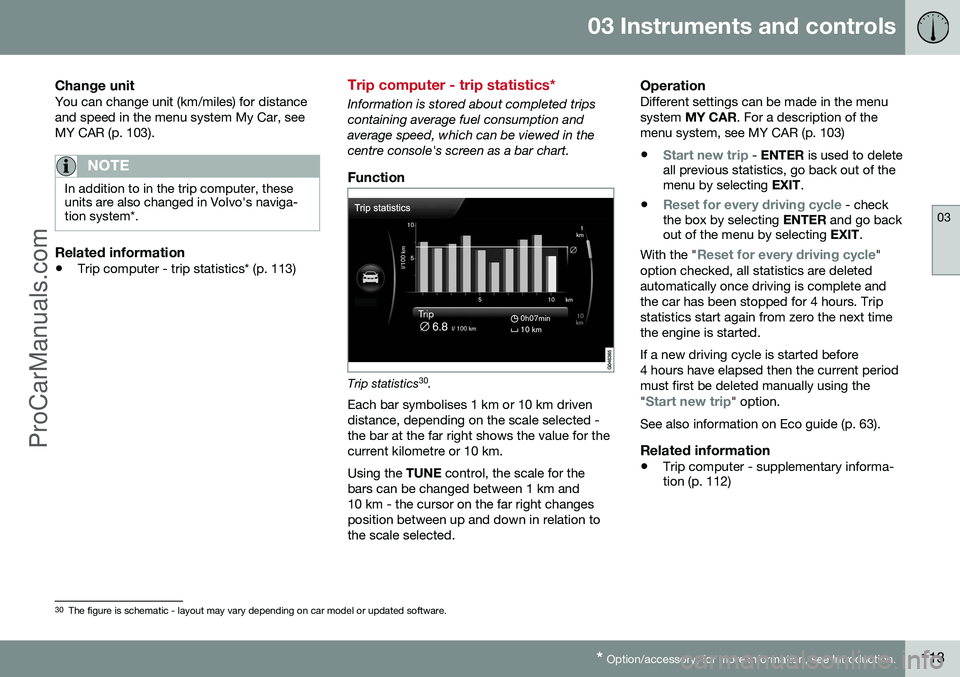
Trip statistics 30
.
Each bar symbolises 1 km or 10 km driven distance, depending on the scale selected -the bar at the far right shows the value for thecurrent kilometre or 10 km. Using the TUNE control, the scale for the
bars can be changed between 1 km and 10 km - the cursor on the far right changesposition between up and down in relation tothe scale selected.
OperationDifferent settings can be made in the menusystem MY CAR . For a description of the
menu system, see MY CAR (p. 103)
•
Start new trip - ENTER is used to delete
all previous statistics, go back out of the menu by selecting EXIT.
•
Reset for every driving cycle - check
the box by selecting ENTER and go back
out of the menu by selecting EXIT.
With the "
Reset for every driving cycle"
option checked, all statistics are deleted automatically once driving is complete andthe car has been stopped for 4 hours. Tripstatistics start again from zero the next timethe engine is started. If a new driving cycle is started before 4 hours have elapsed then the current periodmust first be deleted manually using the "
Start new trip" option.
See also information on Eco guide (p. 63).
Related information
• Trip computer - supplementary informa- tion (p. 112)
30
The figure is schematic - layout may vary depending on car model or updated software.
ProCarManuals.co’