ESP VOLVO V60 2014 Owner's Manual
[x] Cancel search | Manufacturer: VOLVO, Model Year: 2014, Model line: V60, Model: VOLVO V60 2014Pages: 442, PDF Size: 13.85 MB
Page 118 of 442
04 Climate control
04
116* Option/accessory, for more information, see Introduction.
Actual temperature
The temperature you select in the passenger compartment corresponds to the physicalexperience with reference to factors such asair speed, humidity and solar radiation etc. inand around the car. The system includes a sun sensor (p. 116) which detects on which side the sun is shin-ing into the passenger compartment. Thismeans that the temperature can differbetween the right and left-hand air ventsdespite the controls being set for the sametemperature on both sides.
Related information
• General information on climate control (p. 115)
• Temperature control in the passengercompartment (p. 124)
Sensors - climate control
The climate control system has a number of sensors to help control the temperature (p.116) in the car.
• The sun sensor is located on the top side of the dashboard.
• The temperature sensor for the passen-ger compartment is located below the cli-mate control panel.
• The outside temperature sensor islocated in the door mirror.
• The humidity sensor* is located by theinterior rearview mirror.
NOTE
Do not cover or block the sensors with clothing or other objects.
Related information
•General information on climate control (p. 115)
Air cleaning
The interior in a passenger compartment is designed to be pleasant and comfortable,even for people with contact allergies and forasthma sufferers.
• Passenger compartment filter (p. 117)
• Material in the passenger compart- ment (p. 118)
• Clean Zone Interior Package (CZIP) (p.117)*
• Interior Air Quality System (IAQS) (p.118)*
Related information
• General information on climate control (p.115)
ProCarManuals.co’
Page 122 of 442
||
04 Climate control
04
120
Air distribution
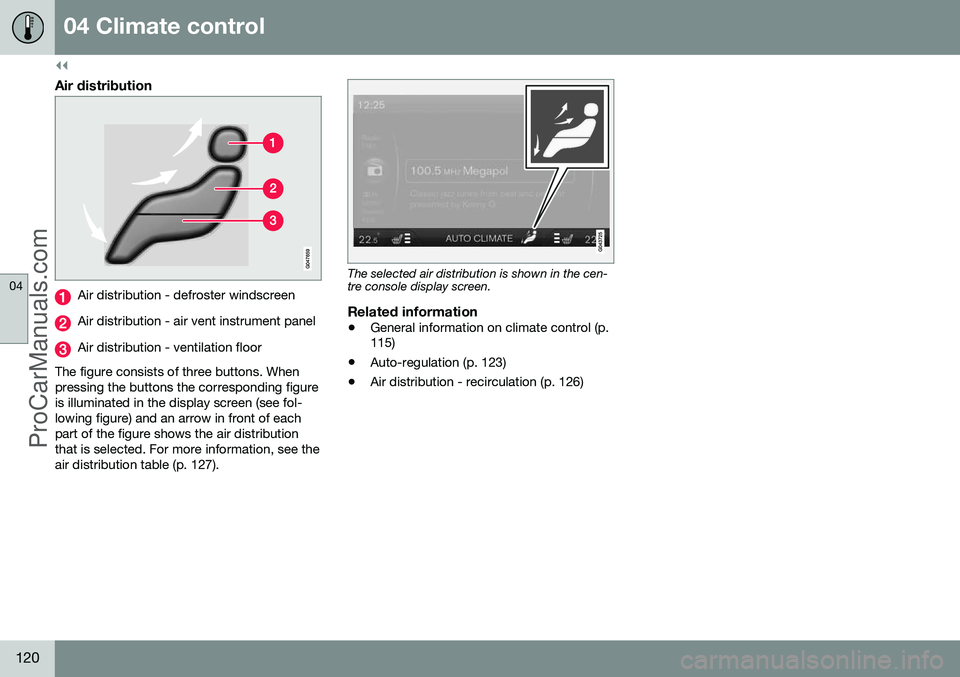
Air distribution - defroster windscreen
Air distribution - air vent instrument panel
Air distribution - ventilation floor
The figure consists of three buttons. When pressing the buttons the corresponding figureis illuminated in the display screen (see fol-lowing figure) and an arrow in front of eachpart of the figure shows the air distributionthat is selected. For more information, see theair distribution table (p. 127).
The selected air distribution is shown in the cen- tre console display screen.
Related information
• General information on climate control (p. 115)
• Auto-regulation (p. 123)
• Air distribution - recirculation (p. 126)
ProCarManuals.co’
Page 144 of 442
05 Loading and storage
05
142* Option/accessory, for more information, see Introduction.
Loading
Payload depends on the car's kerb weight. Payload depends on the car's kerb weight. The total of the weight of the passengers andall accessories reduces the car's payload bya corresponding weight. For more detailedinformation on weights, see Weights (p. 390).
The tailgate is opened via a buttonon the lighting panel or the remotecontrol key, see Locking/unlocking -
tailgate (p. 167).
WARNING
The car’s driving properties change depending on the weight and positioningof the load.
To bear in mind when loading
• Position the load firmly against the rear seat's backrest.
Note that objects must not prevent the func- tion of the WHIPS system for the front seats ifany of the rear seat's backrests is foldeddown, seeWHIPS - seating position (p. 35).
• Centre the load.
• Heavy objects should be placed as low as possible. Avoid placing heavy loads onlowered backrests.
• Cover sharp edges with something soft toavoid damaging the upholstery. •
Secure all loads to the load retaining eye-lets with straps or web lashings.
WARNING
A loose object weighing 20 kg can, in a frontal collision at a speed of 50 km/h,carry the impact of an item weighing1000 kg.
WARNING
The protection provided by the inflatable curtain in the headlining may be compro-mised or eliminated by high loads.
• Never load cargo above the backrest.
WARNING
Always secure the load. During heavy braking the load may otherwise shift, caus-ing injury to the car's occupants. Cover sharp edges and sharp corners with something soft. Switch off the engine and apply the park- ing brake when loading/unloading longitems. Otherwise you may accidentallyknock the gear lever or gear selector withthe load into a drive position - and the carcould then move off.
Related information
•
Load retaining eyelets (p. 143)
• Safety net* (p. 145) •
Loading - long load (p. 143)
• Roof load (p. 143)
ProCarManuals.co’
Page 151 of 442
06 Locks and alarm
06
* Option/accessory, for more information, see Introduction.149
Remote control key with key blade
The remote control key is used to start the car and for locking and unlocking. It contains adetachable key blade (p. 155) made of metal.The visible section is available in two versionsso that it is possible to distinguish betweenthe remote control keys. The car is supplied with 2 remote control keys or PCCs* (Personal Car Communicator). Additional remote control keys can be ordered - up to 6 can be programmed andused for the same car.
WARNING
If there are children in the car: Remember to switch off the supply to the power windows and sunroof by removingthe remote control key if the driver leavesthe car.
Remote control key with PCC (p. 153) has increased functionality compared with theremote control key, see PCC* - unique func-tions (p. 153).
Related information
• Remote control key - functions (p. 151)
Remote control key - losing
If you lose a remote control key then a new one can be ordered at a workshop - anauthorised Volvo workshop is recommended. The remaining remote control keys must be taken to the Volvo workshop. The code of themissing remote control key must be erasedfrom the system as a theft prevention meas-ure. The current number of keys registered tothe car can be checked in the menu systemMY CAR
. For a description of the menu sys-
tem, see MY CAR (p. 103).
Related information
• Remote control key - functions (p. 151)
Key memory*
The key memory in the remote control key (p. 149) means that certain settings in the car canbe individually adapted for different people. The key memory function is available in com- bination with power seat and power rearviewand door mirrors. Settings for door mirrors,driver's seat and steering force can be savedin the key memory.
Key memory – door mirrors and driver's
seat
The settings are automatically connected toeach respective remote control key, see Keymemory* in remote control key (p. 74) andAdjustable steering force* (p. 257). Afterlocking with the remote control key the set-ting of the combined instrument panel'stheme is also saved in the key, see MY CAR(p. 103). The function can be activated/deactivated in the menu system MY CAR. For a description
of the menu system, see MY CAR (p. 103). For cars with the Keyless drive function, see Keyless drive* (p. 159).
ProCarManuals.co’
Page 153 of 442
06 Locks and alarm
06
151
Mes- sageSpecification
Insert car keyError when reading the remote control key duringstarting - Remove the keyfrom the ignition switch, pressit in again and make a newstart attempt.
Car key notfoundError reading the remote con- trol key during starting - Try tostart again. If the error persists: Insert the remote control key into theignition switch and try to startagain.
Immobi- liser TrystartagainError in immobiliser system during starting. If the errorpersists: Contact a workshop- an authorised Volvo work-shop is recommended.
For starting the car, see Starting the engine (p. 264).
Related information
•Remote-controlled immobiliser with tracking system (p. 151)
Remote-controlled immobiliser with tracking system
Remote-controlled immobiliser with tracking system makes it possible to track and locatethe car, and to remotely activate the immobi-liser to switch off the engine. Contact your nearest Volvo dealer for more information and assistance with activating thesystem.
Related information
•Remote control key with key blade (p. 149)
• Immobiliser (p. 150)
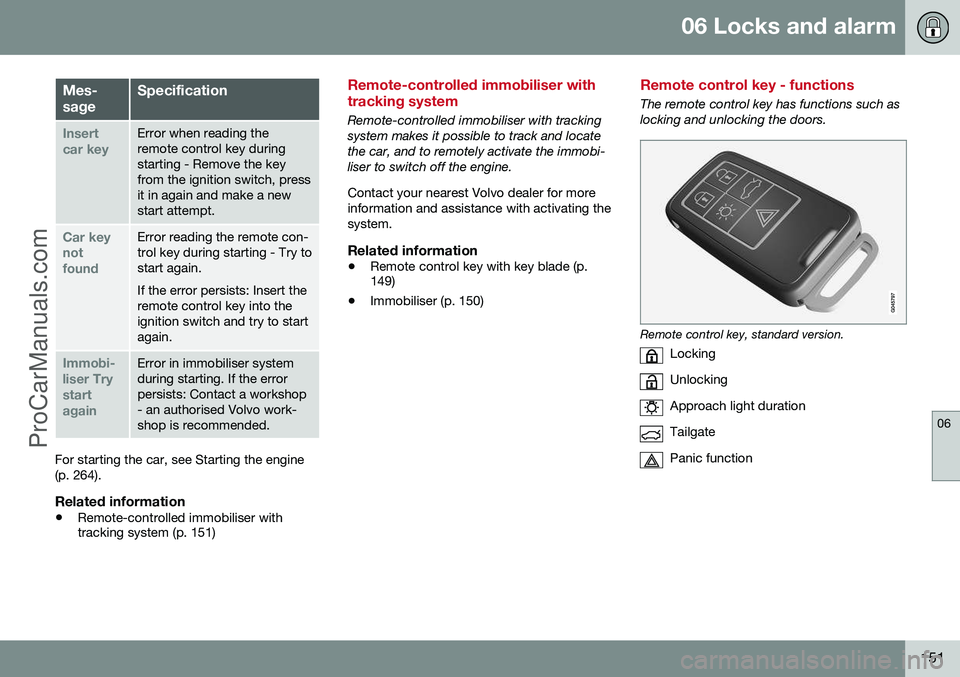
Remote control key - functions
The remote control key has functions such as locking and unlocking the doors.
Remote control key, standard version.
Locking
Unlocking
Approach light duration
Tailgate
Panic function
ProCarManuals.co’
Page 168 of 442
||
06 Locks and alarm
06
166* Option/accessory, for more information, see Introduction.
• Pull the door handle and open the door - the door is unlocked and opened in oneoperation.
Lamp in lock buttonCentral locking is available in two variants - the lamp in the central locking button for thedriver's door has different meanings depend-ent on the variant. With central locking button only in the driver's door, other doors have no button:
• Illuminated lamp means that all doors are locked.
With central locking button on both front doors and electric lock button in each reardoor:
• Illuminated lamp means that only that particular door is locked. When all but-tons are illuminated all doors are locked.
Locking
•
Press the central locking button - all
closed doors are locked.
A long press also closes all side windows and sunroof simultaneously (see also Total airingfunction (p. 166)).
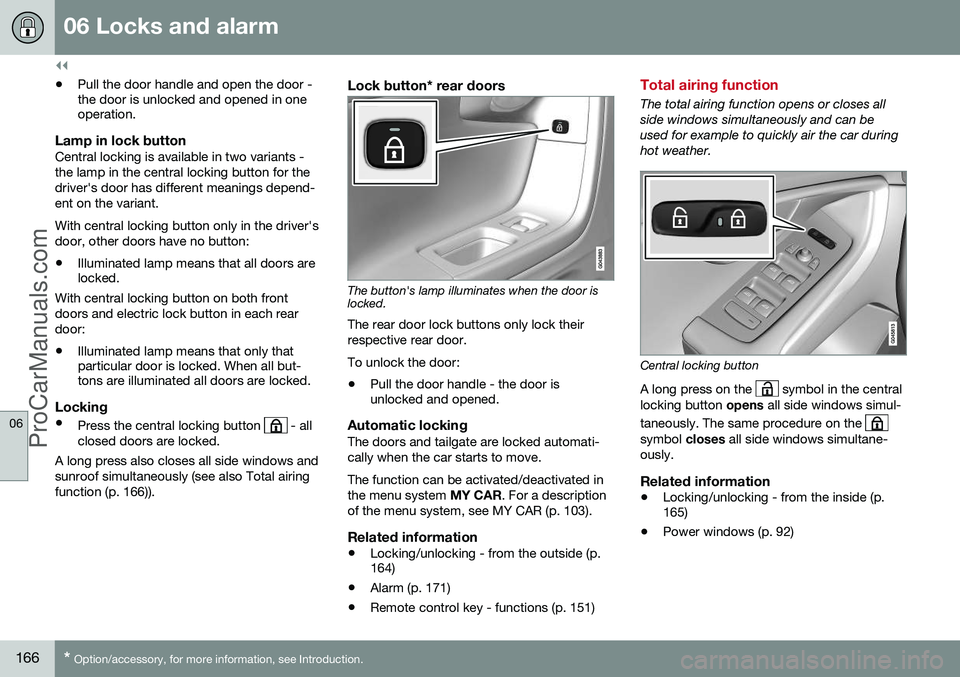
Lock button* rear doors
The button's lamp illuminates when the door is locked.
The rear door lock buttons only lock their respective rear door. To unlock the door:
• Pull the door handle - the door is unlocked and opened.
Automatic lockingThe doors and tailgate are locked automati- cally when the car starts to move. The function can be activated/deactivated in the menu system
MY CAR. For a description
of the menu system, see MY CAR (p. 103).
Related information
• Locking/unlocking - from the outside (p. 164)
• Alarm (p. 171)
• Remote control key - functions (p. 151)
Total airing function
The total airing function opens or closes all side windows simultaneously and can beused for example to quickly air the car duringhot weather.
Central locking button
A long press on the
symbol in the central
locking button opens all side windows simul-
taneously. The same procedure on the
symbol closes all side windows simultane-
ously.
Related information
• Locking/unlocking - from the inside (p. 165)
• Power windows (p. 92)
ProCarManuals.co’
Page 177 of 442
07 Driver support
07
* Option/accessory, for more information, see Introduction.175
Active chassis - Four C*
Active chassis "Four-C" (Continously Controlled Chassis Concept), regulates thecharacteristics of the shock absorbers so thatthe car's driving characteristics can beadjusted. There are three settings: Comfort,
Sport and Advanced .
ComfortThis setting means that the car is perceivedas being more comfortable on rough anduneven road surfaces. Shock absorption issoft and the movement of the body is smoothand gentle.
SportThis setting means that the car is perceivedas being more sporty and is recommendedfor more active driving. Steering response isfaster than in the Comfort mode. Shockabsorption is harder and the body follows theroad in order to reduce rolling during corner-ing.
AdvancedThis setting is only recommended on veryeven and smooth road surfaces. The shock absorbers are optimised for maxi- mum roadholding and rolling in bends is fur-ther minimised.
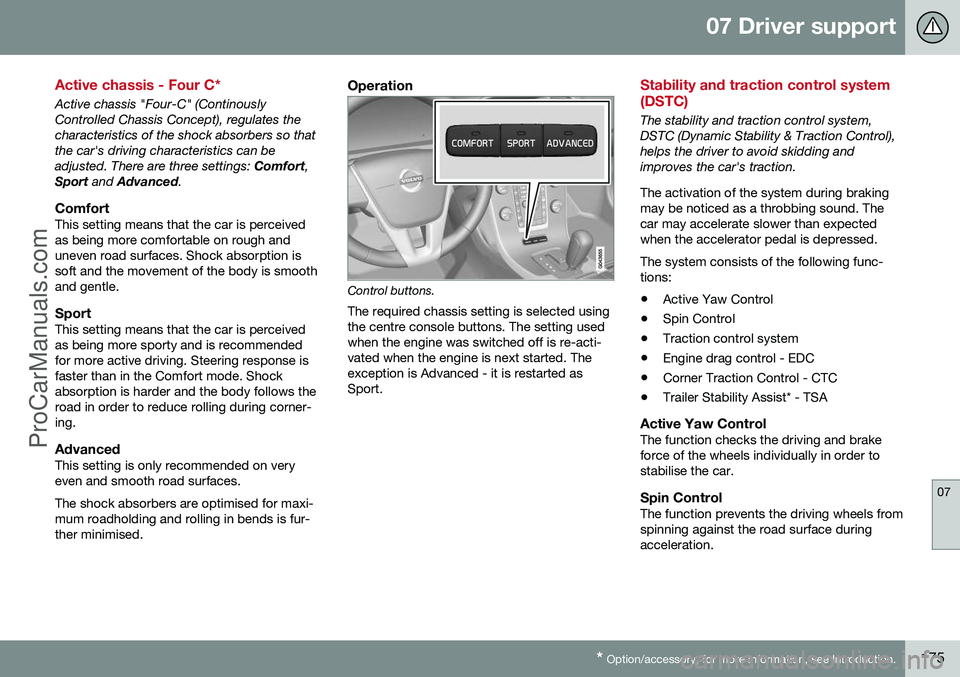
Operation
Control buttons.
The required chassis setting is selected using the centre console buttons. The setting usedwhen the engine was switched off is re-acti-vated when the engine is next started. Theexception is Advanced - it is restarted asSport.
Stability and traction control system (DSTC)
The stability and traction control system, DSTC (Dynamic Stability & Traction Control),helps the driver to avoid skidding andimproves the car's traction. The activation of the system during braking may be noticed as a throbbing sound. Thecar may accelerate slower than expectedwhen the accelerator pedal is depressed. The system consists of the following func- tions: • Active Yaw Control
• Spin Control
• Traction control system
• Engine drag control - EDC
• Corner Traction Control - CTC
• Trailer Stability Assist* - TSA
Active Yaw ControlThe function checks the driving and brake force of the wheels individually in order tostabilise the car.
Spin ControlThe function prevents the driving wheels fromspinning against the road surface duringacceleration.
ProCarManuals.co’
Page 180 of 442
07 Driver support
07
178
Stability and traction control system (DSTC) - symbols and messages
The stability and traction control system (p. 175) (DSTC - Dynamic Stability & TractionControl) helps the driver to avoid skidding andimproves the car's traction.
Table
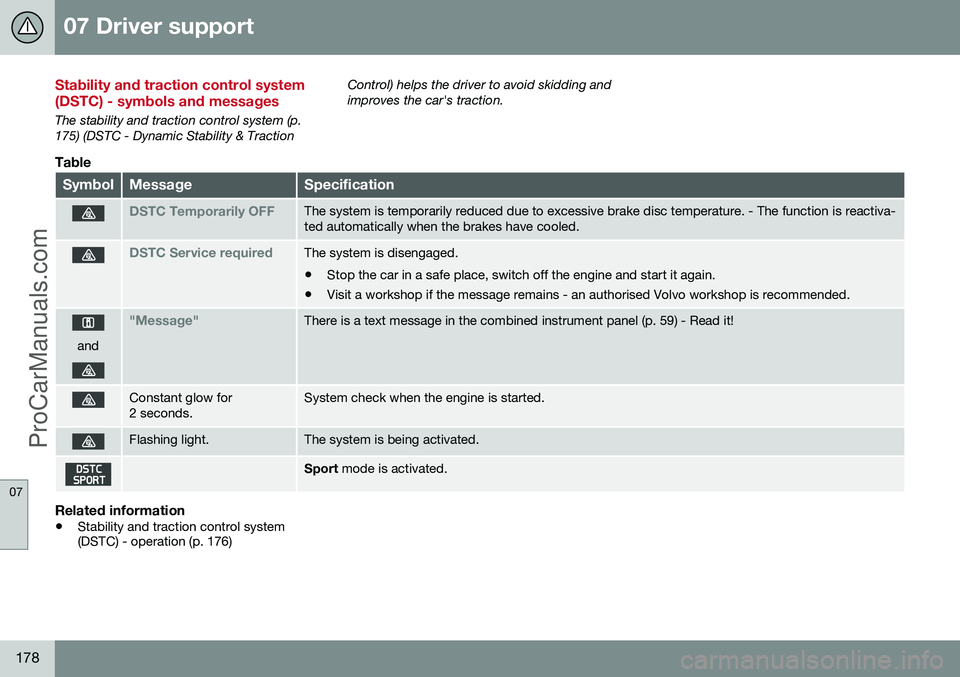
SymbolMessageSpecification
DSTC Temporarily OFFThe system is temporarily reduced due to excessive brake disc temperature. - The function is reactiva- ted automatically when the brakes have cooled.
DSTC Service requiredThe system is disengaged.
• Stop the car in a safe place, switch off the engine and start it again.
• Visit a workshop if the message remains - an authorised Volvo workshop is recommended.
and
"Message"There is a text message in the combined instrument panel (p. 59) - Read it!
Constant glow for 2 seconds.System check when the engine is started.
Flashing light.The system is being activated.
Sport
mode is activated.
Related information
•Stability and traction control system (DSTC) - operation (p. 176)
ProCarManuals.co’
Page 181 of 442
07 Driver support
07
* Option/accessory, for more information, see Introduction.179
Road Sign Information (RSI)*
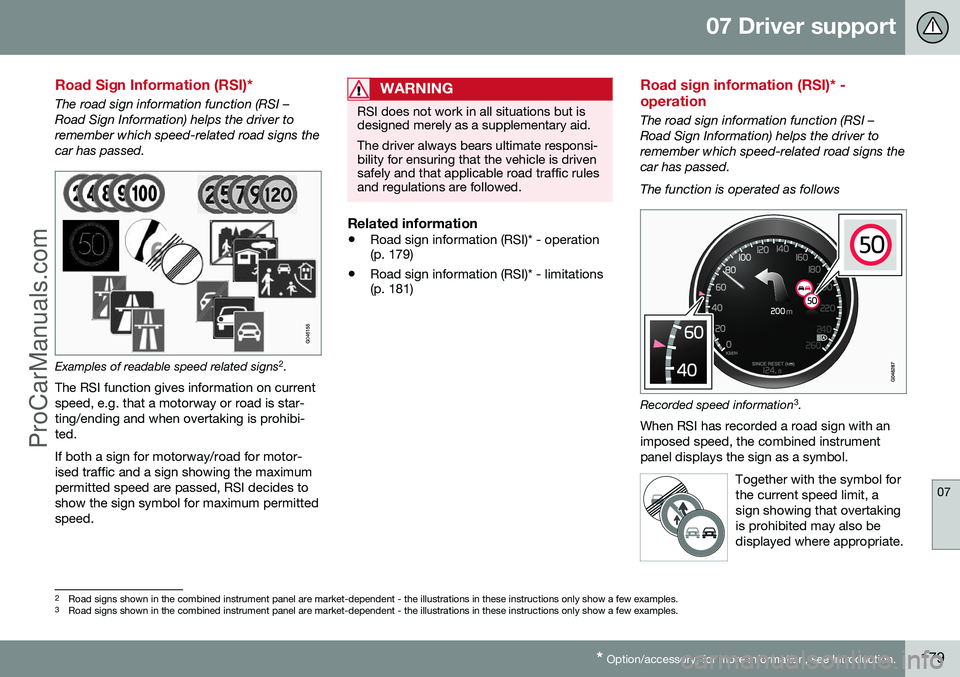
The road sign information function (RSI – Road Sign Information) helps the driver toremember which speed-related road signs thecar has passed.
Examples of readable speed related signs 2
.
The RSI function gives information on current speed, e.g. that a motorway or road is star-ting/ending and when overtaking is prohibi-ted. If both a sign for motorway/road for motor- ised traffic and a sign showing the maximumpermitted speed are passed, RSI decides toshow the sign symbol for maximum permittedspeed.
WARNING
RSI does not work in all situations but is designed merely as a supplementary aid. The driver always bears ultimate responsi- bility for ensuring that the vehicle is drivensafely and that applicable road traffic rulesand regulations are followed.
Related information
• Road sign information (RSI)* - operation (p. 179)
• Road sign information (RSI)* - limitations(p. 181)
Road sign information (RSI)* - operation
The road sign information function (RSI – Road Sign Information) helps the driver toremember which speed-related road signs thecar has passed. The function is operated as follows
Recorded speed information 3
.
When RSI has recorded a road sign with an imposed speed, the combined instrumentpanel displays the sign as a symbol.
Together with the symbol forthe current speed limit, asign showing that overtakingis prohibited may also bedisplayed where appropriate.
2Road signs shown in the combined instrument panel are market-dependent - the illustrations in these instructions only show a few examples.
3 Road signs shown in the combined instrument panel are market-dependent - the illustrations in these instructions only show a few examples.
ProCarManuals.co’
Page 182 of 442
||
07 Driver support
07
180
End of restriction or motorwayA corresponding road sign is shown in the combined instrument panel forapprox. 10 seconds in situations where RSIdetects a sign that involves the end of aspeed limit - or other speed-related informa-tion, e.g. end of a motorway. Examples of such signs are:
End of all restrictions.
End of motorway. Following which, the sign information is hid- den until the next speed-related sign isdetected.
Additional signs
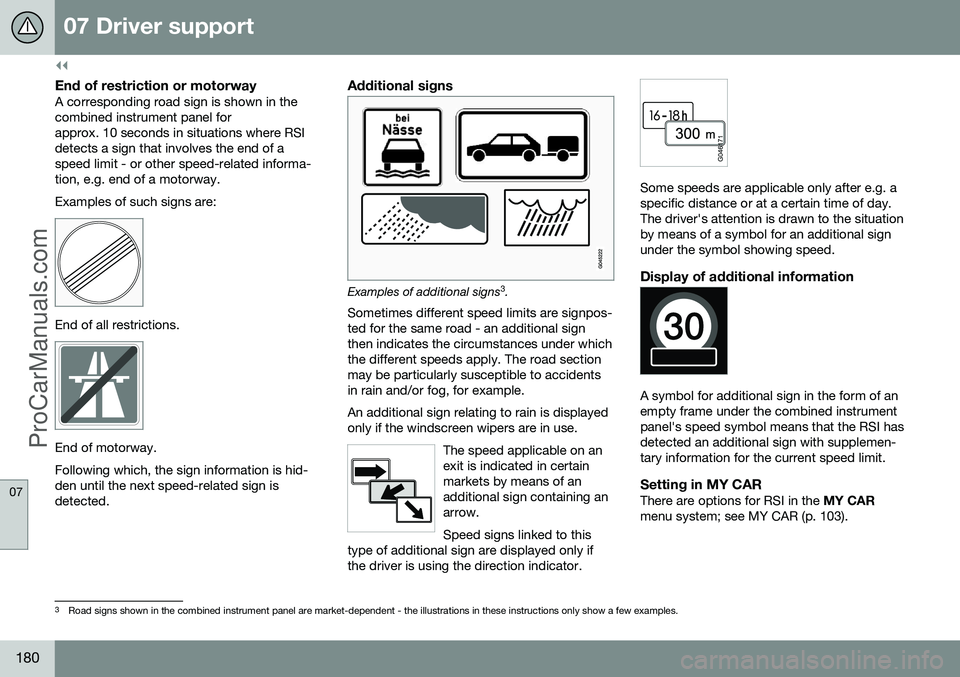
Examples of additional signs3
.
Sometimes different speed limits are signpos- ted for the same road - an additional signthen indicates the circumstances under whichthe different speeds apply. The road sectionmay be particularly susceptible to accidentsin rain and/or fog, for example. An additional sign relating to rain is displayed only if the windscreen wipers are in use.
The speed applicable on anexit is indicated in certainmarkets by means of anadditional sign containing anarrow. Speed signs linked to this
type of additional sign are displayed only if the driver is using the direction indicator.
Some speeds are applicable only after e.g. a specific distance or at a certain time of day.The driver's attention is drawn to the situationby means of a symbol for an additional signunder the symbol showing speed.
Display of additional information
A symbol for additional sign in the form of an empty frame under the combined instrumentpanel's speed symbol means that the RSI hasdetected an additional sign with supplemen-tary information for the current speed limit.
Setting in MY CARThere are options for RSI in the MY CAR
menu system; see MY CAR (p. 103).
3 Road signs shown in the combined instrument panel are market-dependent - the illustrations in these instructions only show a few examples.
ProCarManuals.co’