brake VOLVO V60 2014 User Guide
[x] Cancel search | Manufacturer: VOLVO, Model Year: 2014, Model line: V60, Model: VOLVO V60 2014Pages: 442, PDF Size: 13.85 MB
Page 65 of 442
03 Instruments and controls
03
* Option/accessory, for more information, see Introduction.63
Eco guide & Power guide*
Eco guide and Power guide are two com- bined instrument panel (p. 59) instrumentswhich help the driver to drive the car withoptimum driving economy. The car also stores statistics of journeys made, which can be viewed in the form of ablock diagram; see Trip computer - trip statis-tics* (p. 113).
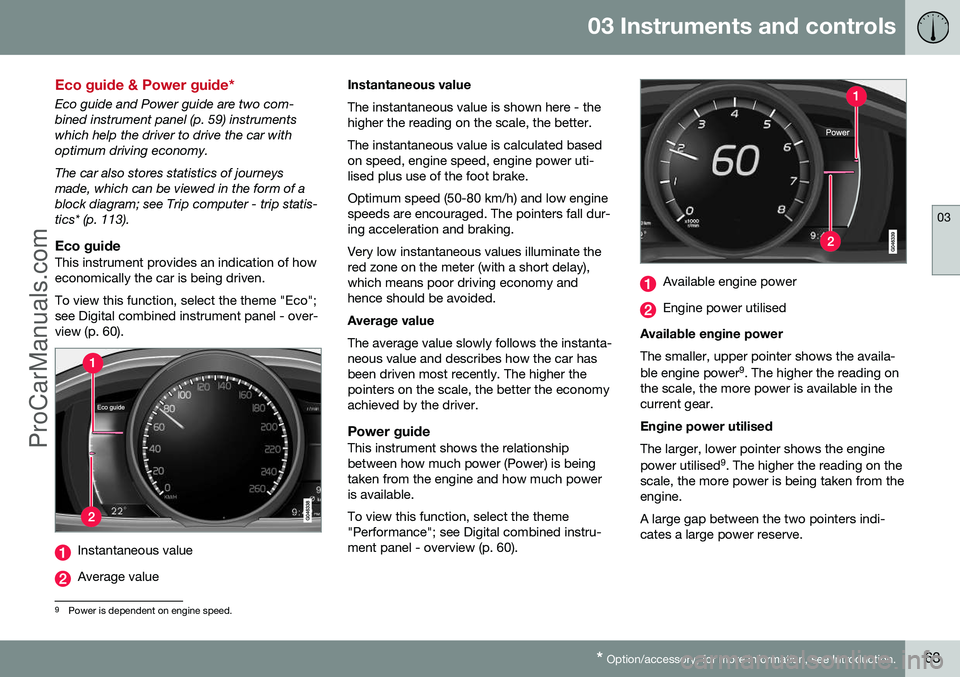
Eco guideThis instrument provides an indication of howeconomically the car is being driven. To view this function, select the theme "Eco"; see Digital combined instrument panel - over-view (p. 60).
Instantaneous value
Average value Instantaneous value The instantaneous value is shown here - the higher the reading on the scale, the better. The instantaneous value is calculated based on speed, engine speed, engine power uti-lised plus use of the foot brake. Optimum speed (50-80 km/h) and low engine speeds are encouraged. The pointers fall dur-ing acceleration and braking. Very low instantaneous values illuminate the red zone on the meter (with a short delay),which means poor driving economy andhence should be avoided. Average value The average value slowly follows the instanta- neous value and describes how the car hasbeen driven most recently. The higher thepointers on the scale, the better the economyachieved by the driver.
Power guideThis instrument shows the relationshipbetween how much power (Power) is beingtaken from the engine and how much poweris available. To view this function, select the theme "Performance"; see Digital combined instru-ment panel - overview (p. 60).
Available engine power
Engine power utilised
Available engine power The smaller, upper pointer shows the availa- ble engine power 9
. The higher the reading on
the scale, the more power is available in the current gear. Engine power utilised The larger, lower pointer shows the engine power utilised 9
. The higher the reading on the
scale, the more power is being taken from the engine. A large gap between the two pointers indi- cates a large power reserve.
9 Power is dependent on engine speed.
ProCarManuals.co’
Page 66 of 442
03 Instruments and controls
03
64* Option/accessory, for more information, see Introduction.
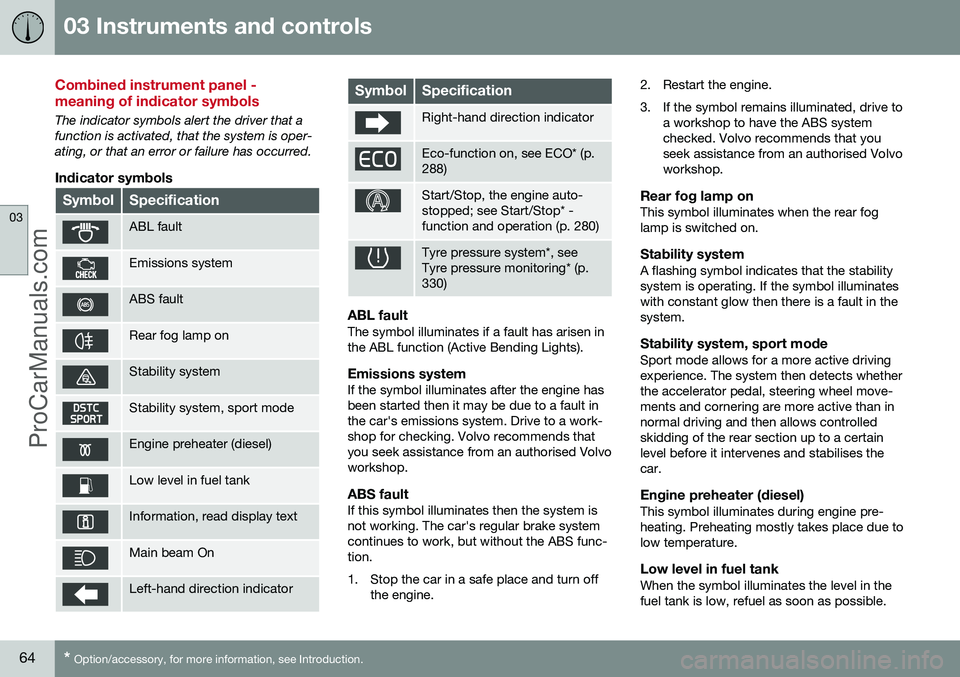
Combined instrument panel - meaning of indicator symbols
The indicator symbols alert the driver that a function is activated, that the system is oper-ating, or that an error or failure has occurred.
Indicator symbols
SymbolSpecification
ABL fault
Emissions system
ABS fault
Rear fog lamp on
Stability system
Stability system, sport mode
Engine preheater (diesel)
Low level in fuel tank
Information, read display text
Main beam On
Left-hand direction indicator
SymbolSpecification
Right-hand direction indicator
Eco-function on, see ECO* (p. 288)
Start/Stop, the engine auto- stopped; see Start/Stop* -function and operation (p. 280)
Tyre pressure system*, see Tyre pressure monitoring* (p.330)
ABL faultThe symbol illuminates if a fault has arisen in the ABL function (Active Bending Lights).
Emissions systemIf the symbol illuminates after the engine hasbeen started then it may be due to a fault inthe car's emissions system. Drive to a work-shop for checking. Volvo recommends thatyou seek assistance from an authorised Volvoworkshop.
ABS faultIf this symbol illuminates then the system isnot working. The car's regular brake systemcontinues to work, but without the ABS func-tion.
1. Stop the car in a safe place and turn off
the engine. 2. Restart the engine.
3. If the symbol remains illuminated, drive to
a workshop to have the ABS system checked. Volvo recommends that youseek assistance from an authorised Volvoworkshop.
Rear fog lamp onThis symbol illuminates when the rear foglamp is switched on.
Stability systemA flashing symbol indicates that the stabilitysystem is operating. If the symbol illuminateswith constant glow then there is a fault in thesystem.
Stability system, sport modeSport mode allows for a more active drivingexperience. The system then detects whetherthe accelerator pedal, steering wheel move-ments and cornering are more active than innormal driving and then allows controlledskidding of the rear section up to a certainlevel before it intervenes and stabilises thecar.
Engine preheater (diesel)This symbol illuminates during engine pre-heating. Preheating mostly takes place due tolow temperature.
Low level in fuel tankWhen the symbol illuminates the level in thefuel tank is low, refuel as soon as possible.
ProCarManuals.co’
Page 67 of 442
03 Instruments and controls
03
65
Information, read display textWhen one of the car's systems does not behave as intended, this information symbolilluminates and a text appears on the informa-tion display. The message text is cleared withthe OK button, see Menu navigation - com-
bined instrument panel (p. 100), or it disap-pears automatically after a time (timedepending on which function is indicated).The information symbol can also illuminate inconjunction with other symbols.
NOTE
When a service message is shown, the symbol and message are cleared using theOK button, or disappear automatically
after a time.
Main beam OnThe symbol illuminates when main beam is on and with main beam flash.
Left/right-hand direction indicatorBoth direction indicator symbols flash whenthe hazard warning flashers are used.
Eco function onThe symbol illuminates when the Eco functionis activated.
Start/StopThe symbol shines when the engine is auto-stopped.
Tyre pressure systemThe symbol illuminates in the event of lowtyre pressure, or if a fault arises in the tyrepressure system.
Related information
• Combined instrument panel (p. 59)
• Combined instrument cluster - meaning of warning symbols (p. 65)
• Digital combined instrument panel - over-view (p. 60)
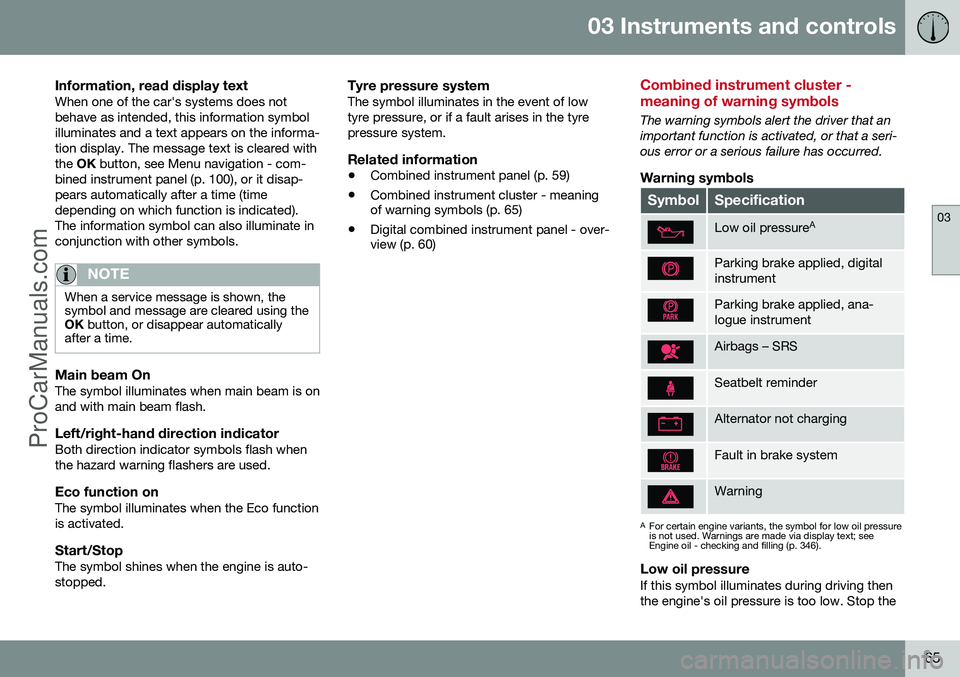
Combined instrument cluster - meaning of warning symbols
The warning symbols alert the driver that an important function is activated, or that a seri-ous error or a serious failure has occurred.
Warning symbols
SymbolSpecification
Low oil pressure A
Parking brake applied, digital instrument
Parking brake applied, ana- logue instrument
Airbags – SRS
Seatbelt reminder
Alternator not charging
Fault in brake system
Warning
A
For certain engine variants, the symbol for low oil pressure is not used. Warnings are made via display text; seeEngine oil - checking and filling (p. 346).
Low oil pressureIf this symbol illuminates during driving then the engine's oil pressure is too low. Stop the
ProCarManuals.co’
Page 68 of 442
||
03 Instruments and controls
03
66
engine immediately and check the engine oil level, top up if necessary. If the symbol illumi-nates and the oil level is normal, contact aworkshop. Volvo recommends that you seekassistance from an authorised Volvo work-shop.
Parking brake appliedThis symbol illuminates with a constant glowwhen the parking brake is applied. The sym-bol flashes during application, and thenchanges over to a constant glow. A flashing symbol in any other situation means that a fault has arisen. Read the mes-sage on the information display. For more information, see Parking brake (p. 293).
Airbags – SRSIf this symbol remains illuminated or illumi-nates while driving, it means a fault has beendetected in the seatbelt buckle, SRS, SIPS, orIC systems. Drive immediately to a workshopto have the system checked. Volvo recom-mends that you seek assistance from anauthorised Volvo workshop.
Seatbelt reminderThis symbol flashes if someone in a front seathas not put on their seatbelt or if someone ina rear seat has taken off their seatbelt.
Alternator not chargingThis symbol illuminates during driving if afault has occurred in the electrical system.Visit a workshop. Volvo recommends that youseek assistance from an authorised Volvoworkshop.
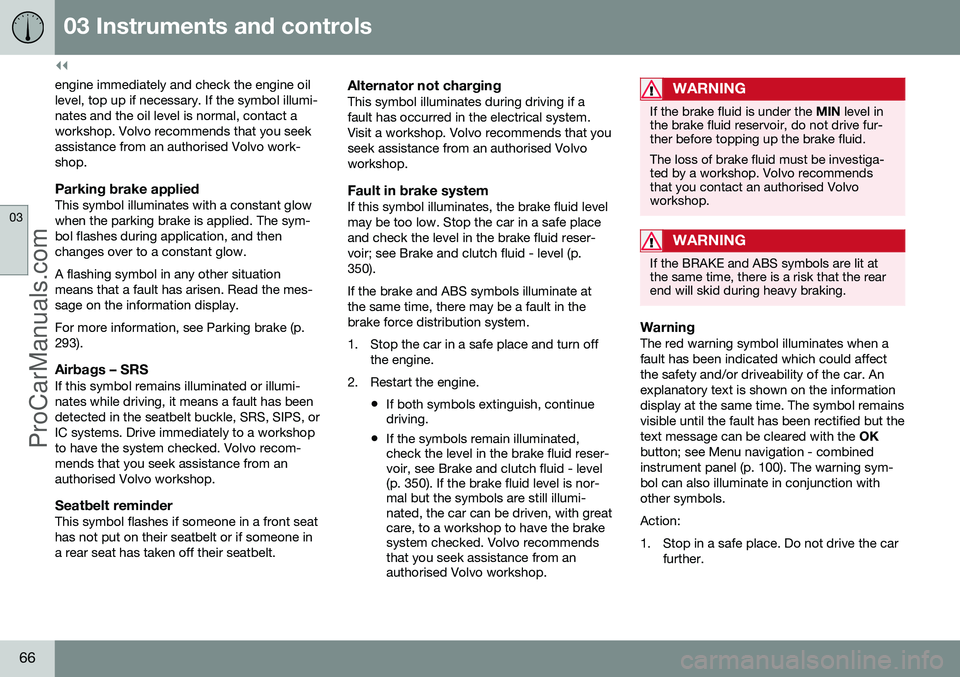
Fault in brake systemIf this symbol illuminates, the brake fluid levelmay be too low. Stop the car in a safe placeand check the level in the brake fluid reser-voir; see Brake and clutch fluid - level (p.350). If the brake and ABS symbols illuminate at the same time, there may be a fault in thebrake force distribution system.
1. Stop the car in a safe place and turn offthe engine.
2. Restart the engine.
•If both symbols extinguish, continue driving.
• If the symbols remain illuminated,check the level in the brake fluid reser-voir, see Brake and clutch fluid - level(p. 350). If the brake fluid level is nor-mal but the symbols are still illumi-nated, the car can be driven, with greatcare, to a workshop to have the brakesystem checked. Volvo recommendsthat you seek assistance from anauthorised Volvo workshop.
WARNING
If the brake fluid is under the
MIN level in
the brake fluid reservoir, do not drive fur- ther before topping up the brake fluid. The loss of brake fluid must be investiga- ted by a workshop. Volvo recommendsthat you contact an authorised Volvoworkshop.
WARNING
If the BRAKE and ABS symbols are lit at the same time, there is a risk that the rearend will skid during heavy braking.
WarningThe red warning symbol illuminates when a fault has been indicated which could affectthe safety and/or driveability of the car. Anexplanatory text is shown on the informationdisplay at the same time. The symbol remainsvisible until the fault has been rectified but thetext message can be cleared with the OK
button; see Menu navigation - combinedinstrument panel (p. 100). The warning sym-bol can also illuminate in conjunction withother symbols. Action:
1. Stop in a safe place. Do not drive the car further.
ProCarManuals.co’
Page 73 of 442
03 Instruments and controls
03
* Option/accessory, for more information, see Introduction.71
LevelFunctions
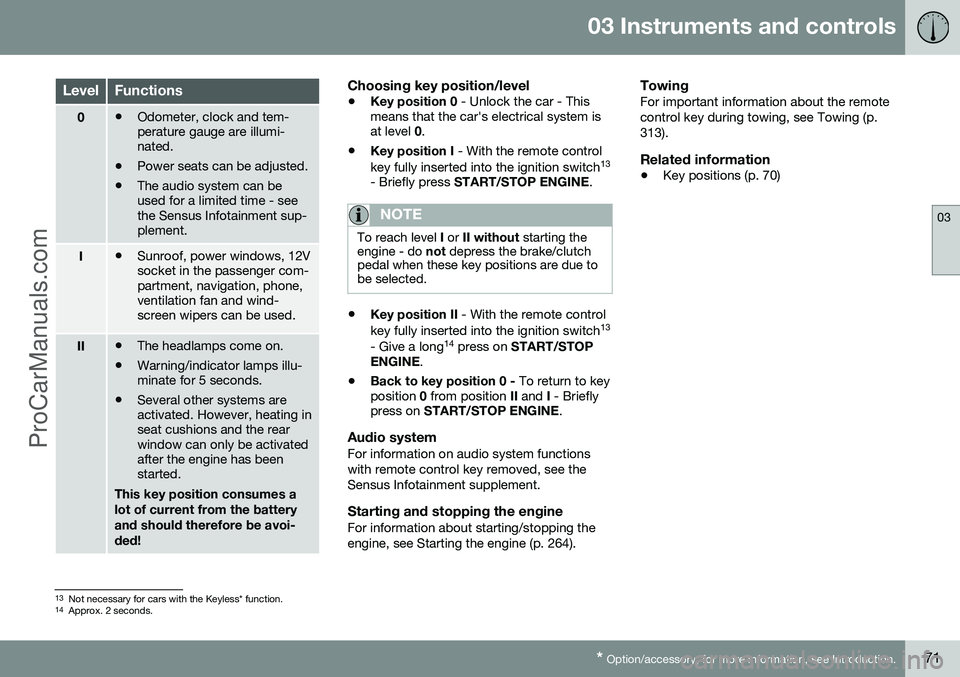
0• Odometer, clock and tem- perature gauge are illumi-nated.
• Power seats can be adjusted.
• The audio system can beused for a limited time - seethe Sensus Infotainment sup-plement.
I•Sunroof, power windows, 12V socket in the passenger com-partment, navigation, phone,ventilation fan and wind-screen wipers can be used.
II•The headlamps come on.
• Warning/indicator lamps illu- minate for 5 seconds.
• Several other systems areactivated. However, heating inseat cushions and the rearwindow can only be activatedafter the engine has beenstarted.
This key position consumes a lot of current from the batteryand should therefore be avoi-ded!
Choosing key position/level
• Key position 0
- Unlock the car - This
means that the car's electrical system is at level 0.
• Key position I
- With the remote control
key fully inserted into the ignition switch 13
- Briefly press START/STOP ENGINE .
NOTE
To reach level I or II without starting the
engine - do not depress the brake/clutch
pedal when these key positions are due to be selected.
• Key position II
- With the remote control
key fully inserted into the ignition switch 13
- Give a long 14
press on START/STOP
ENGINE .
• Back to key position 0 -
To return to key
position 0 from position II and I - Briefly
press on START/STOP ENGINE .
Audio systemFor information on audio system functions with remote control key removed, see theSensus Infotainment supplement.
Starting and stopping the engineFor information about starting/stopping theengine, see Starting the engine (p. 264).
TowingFor important information about the remotecontrol key during towing, see Towing (p.313).
Related information
•Key positions (p. 70)
13
Not necessary for cars with the Keyless* function.
14 Approx. 2 seconds.
ProCarManuals.co’
Page 88 of 442
||
03 Instruments and controls
03
86
the headlamp control's knob is turned to position
or .
NOTE
Regulations on the use of rear fog lamps vary from country to country.
Related information
•Light switches (p. 78)
Brake lights
The brake light automatically comes on during braking. The brake light is switched on when the brake pedal is depressed. In addition, it is switchedon when one of driving support systemsAdaptive cruise control (p. 188), City Safety(p. 205) or Collision warning system (p. 212)brakes the car. For information on emergency brake lights and automatic hazard warning flashers, seeFoot brake - emergency brake lights andautomatic hazard warning flashers (p. 291).
Hazard warning flashers
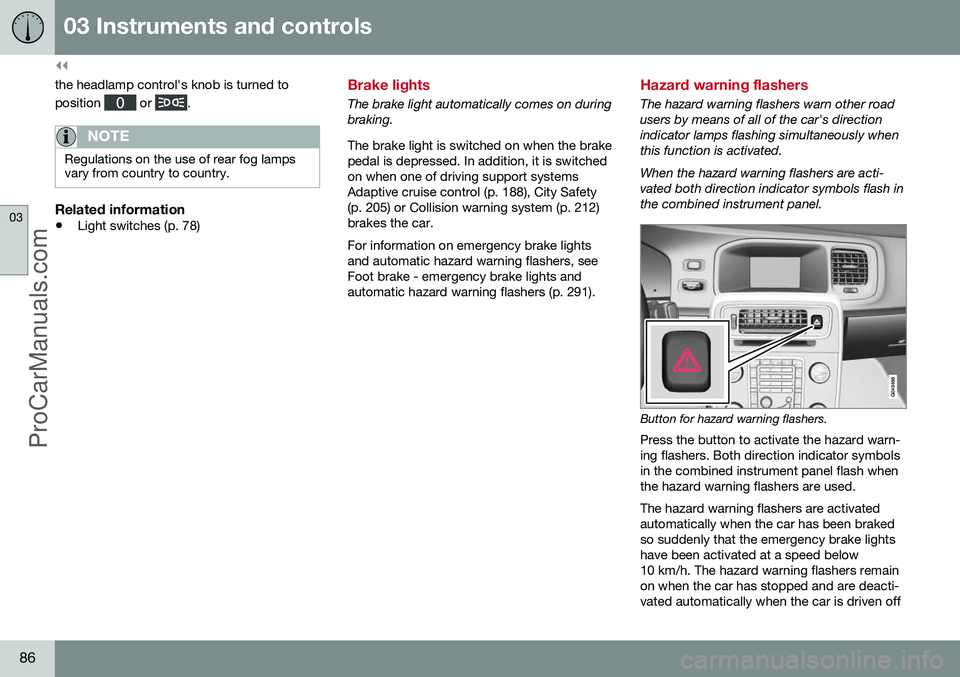
The hazard warning flashers warn other road users by means of all of the car's directionindicator lamps flashing simultaneously whenthis function is activated. When the hazard warning flashers are acti- vated both direction indicator symbols flash inthe combined instrument panel.
Button for hazard warning flashers.
Press the button to activate the hazard warn- ing flashers. Both direction indicator symbolsin the combined instrument panel flash whenthe hazard warning flashers are used. The hazard warning flashers are activated automatically when the car has been brakedso suddenly that the emergency brake lightshave been activated at a speed below10 km/h. The hazard warning flashers remainon when the car has stopped and are deacti-vated automatically when the car is driven off
ProCarManuals.co’
Page 89 of 442
03 Instruments and controls
03
87
again or the button is depressed. For more information on emergency brake lights andautomatic hazard warning flashers, see Footbrake - emergency brake lights and auto-matic hazard warning flashers (p. 291).
Related information
•
Direction indicators (p. 87)
Direction indicators
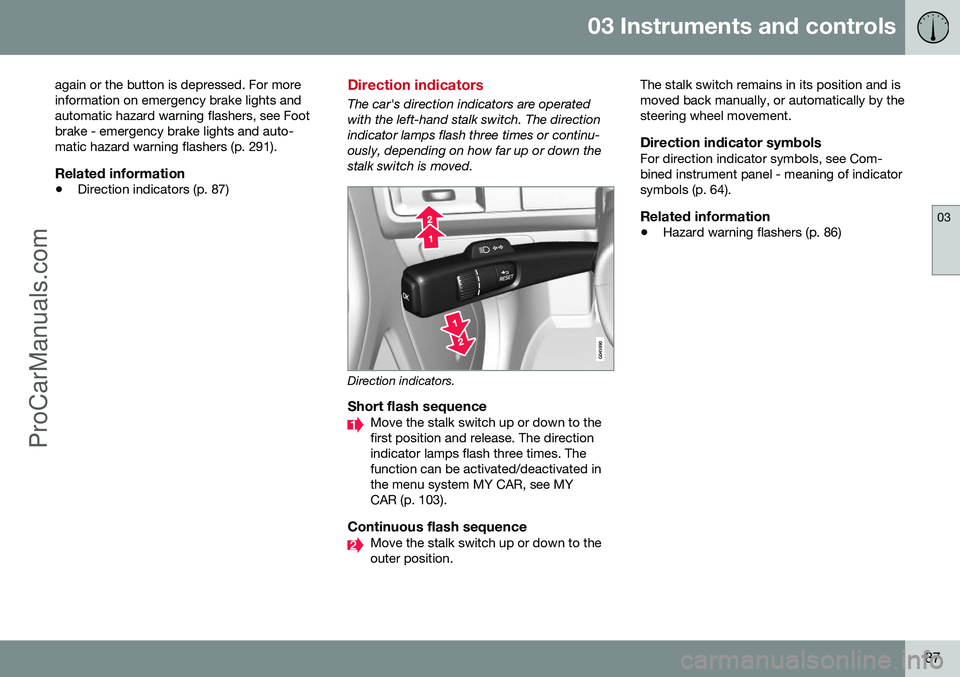
The car's direction indicators are operated with the left-hand stalk switch. The directionindicator lamps flash three times or continu-ously, depending on how far up or down thestalk switch is moved.
Direction indicators.
Short flash sequenceMove the stalk switch up or down to the first position and release. The directionindicator lamps flash three times. Thefunction can be activated/deactivated inthe menu system MY CAR, see MYCAR (p. 103).
Continuous flash sequenceMove the stalk switch up or down to the outer position. The stalk switch remains in its position and ismoved back manually, or automatically by thesteering wheel movement.
Direction indicator symbolsFor direction indicator symbols, see Com-bined instrument panel - meaning of indicatorsymbols (p. 64).
Related information
•
Hazard warning flashers (p. 86)
ProCarManuals.co’
Page 144 of 442
05 Loading and storage
05
142* Option/accessory, for more information, see Introduction.
Loading
Payload depends on the car's kerb weight. Payload depends on the car's kerb weight. The total of the weight of the passengers andall accessories reduces the car's payload bya corresponding weight. For more detailedinformation on weights, see Weights (p. 390).
The tailgate is opened via a buttonon the lighting panel or the remotecontrol key, see Locking/unlocking -
tailgate (p. 167).
WARNING
The car’s driving properties change depending on the weight and positioningof the load.
To bear in mind when loading
• Position the load firmly against the rear seat's backrest.
Note that objects must not prevent the func- tion of the WHIPS system for the front seats ifany of the rear seat's backrests is foldeddown, seeWHIPS - seating position (p. 35).
• Centre the load.
• Heavy objects should be placed as low as possible. Avoid placing heavy loads onlowered backrests.
• Cover sharp edges with something soft toavoid damaging the upholstery. •
Secure all loads to the load retaining eye-lets with straps or web lashings.
WARNING
A loose object weighing 20 kg can, in a frontal collision at a speed of 50 km/h,carry the impact of an item weighing1000 kg.
WARNING
The protection provided by the inflatable curtain in the headlining may be compro-mised or eliminated by high loads.
• Never load cargo above the backrest.
WARNING
Always secure the load. During heavy braking the load may otherwise shift, caus-ing injury to the car's occupants. Cover sharp edges and sharp corners with something soft. Switch off the engine and apply the park- ing brake when loading/unloading longitems. Otherwise you may accidentallyknock the gear lever or gear selector withthe load into a drive position - and the carcould then move off.
Related information
•
Load retaining eyelets (p. 143)
• Safety net* (p. 145) •
Loading - long load (p. 143)
• Roof load (p. 143)
ProCarManuals.co’
Page 177 of 442
07 Driver support
07
* Option/accessory, for more information, see Introduction.175
Active chassis - Four C*
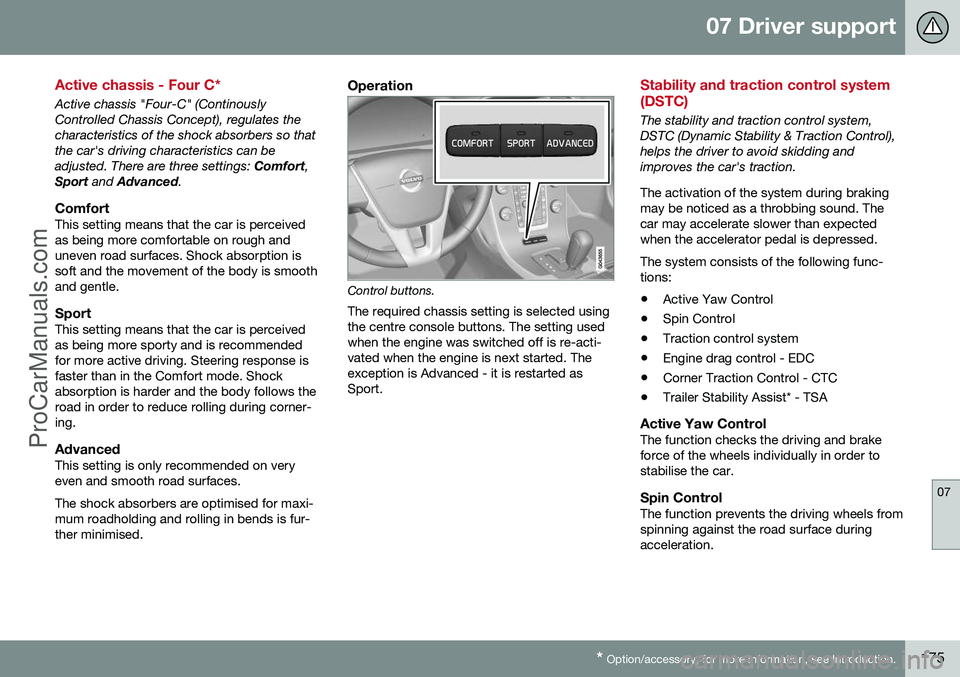
Active chassis "Four-C" (Continously Controlled Chassis Concept), regulates thecharacteristics of the shock absorbers so thatthe car's driving characteristics can beadjusted. There are three settings: Comfort,
Sport and Advanced .
ComfortThis setting means that the car is perceivedas being more comfortable on rough anduneven road surfaces. Shock absorption issoft and the movement of the body is smoothand gentle.
SportThis setting means that the car is perceivedas being more sporty and is recommendedfor more active driving. Steering response isfaster than in the Comfort mode. Shockabsorption is harder and the body follows theroad in order to reduce rolling during corner-ing.
AdvancedThis setting is only recommended on veryeven and smooth road surfaces. The shock absorbers are optimised for maxi- mum roadholding and rolling in bends is fur-ther minimised.
Operation
Control buttons.
The required chassis setting is selected using the centre console buttons. The setting usedwhen the engine was switched off is re-acti-vated when the engine is next started. Theexception is Advanced - it is restarted asSport.
Stability and traction control system (DSTC)
The stability and traction control system, DSTC (Dynamic Stability & Traction Control),helps the driver to avoid skidding andimproves the car's traction. The activation of the system during braking may be noticed as a throbbing sound. Thecar may accelerate slower than expectedwhen the accelerator pedal is depressed. The system consists of the following func- tions: • Active Yaw Control
• Spin Control
• Traction control system
• Engine drag control - EDC
• Corner Traction Control - CTC
• Trailer Stability Assist* - TSA
Active Yaw ControlThe function checks the driving and brake force of the wheels individually in order tostabilise the car.
Spin ControlThe function prevents the driving wheels fromspinning against the road surface duringacceleration.
ProCarManuals.co’
Page 180 of 442
07 Driver support
07
178
Stability and traction control system (DSTC) - symbols and messages
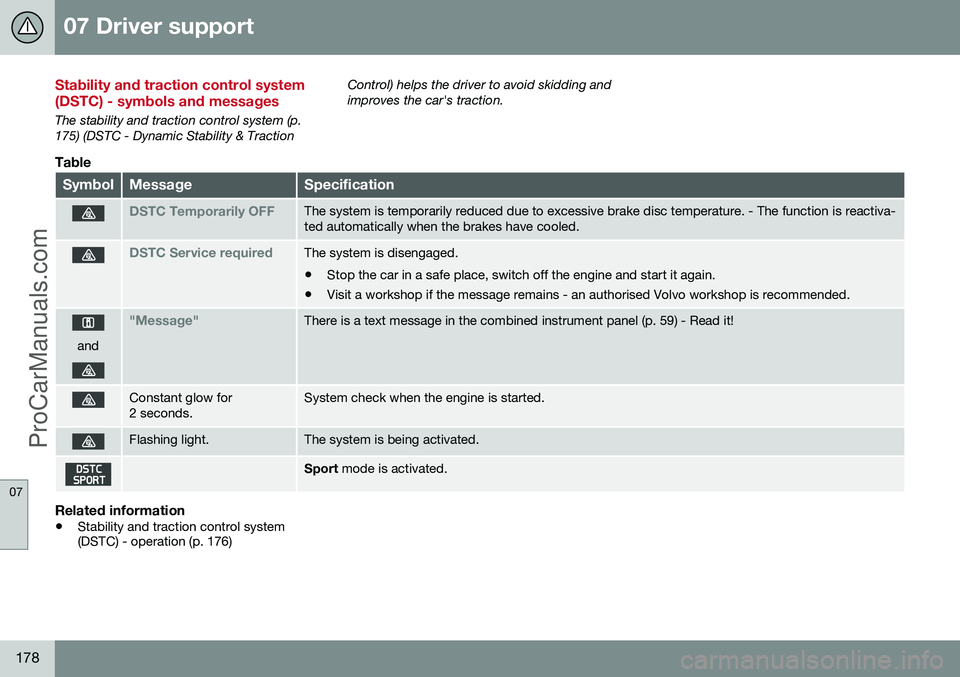
The stability and traction control system (p. 175) (DSTC - Dynamic Stability & TractionControl) helps the driver to avoid skidding andimproves the car's traction.
Table
SymbolMessageSpecification
DSTC Temporarily OFFThe system is temporarily reduced due to excessive brake disc temperature. - The function is reactiva- ted automatically when the brakes have cooled.
DSTC Service requiredThe system is disengaged.
• Stop the car in a safe place, switch off the engine and start it again.
• Visit a workshop if the message remains - an authorised Volvo workshop is recommended.
and
"Message"There is a text message in the combined instrument panel (p. 59) - Read it!
Constant glow for 2 seconds.System check when the engine is started.
Flashing light.The system is being activated.
Sport
mode is activated.
Related information
•Stability and traction control system (DSTC) - operation (p. 176)
ProCarManuals.co’