change time VOLVO V60 2014 User Guide
[x] Cancel search | Manufacturer: VOLVO, Model Year: 2014, Model line: V60, Model: VOLVO V60 2014Pages: 442, PDF Size: 13.85 MB
Page 113 of 442
03 Instruments and controls
03
* Option/accessory, for more information, see Introduction.111
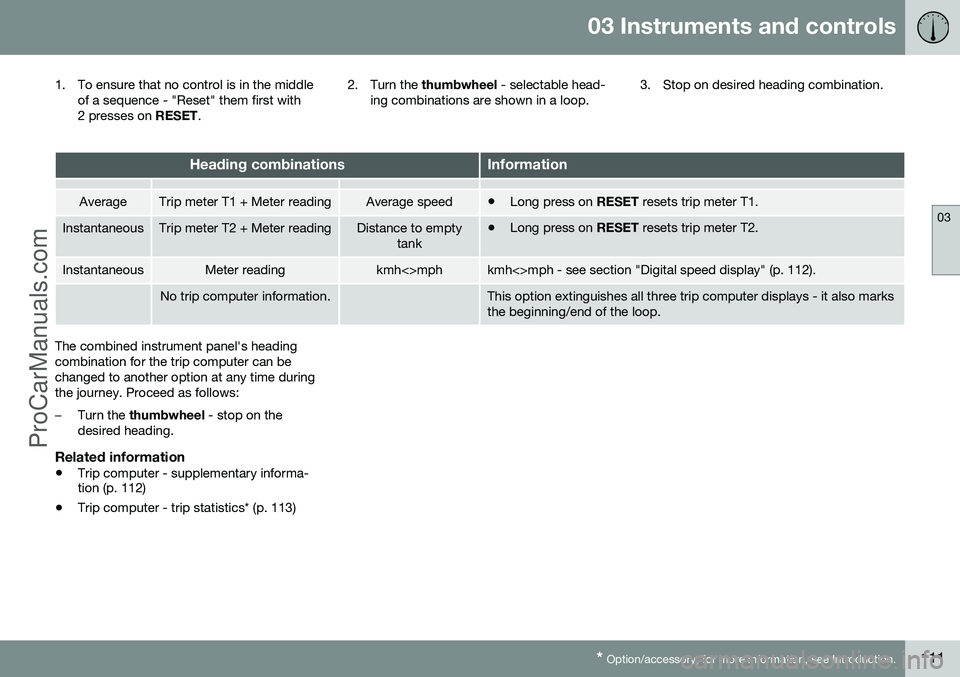
1. To ensure that no control is in the middle
of a sequence - "Reset" them first with
2 presses on RESET. 2. Turn the
thumbwheel - selectable head-
ing combinations are shown in a loop. 3. Stop on desired heading combination.
Heading combinationsInformation
AverageTrip meter T1 + Meter readingAverage speed•
Long press on
RESET resets trip meter T1.
InstantaneousTrip meter T2 + Meter readingDistance to empty
tank•Long press on
RESET resets trip meter T2.
InstantaneousMeter readingkmh<>mphkmh<>mph - see section "Digital speed display" (p. 112).
No trip computer information.This option extinguishes all three trip computer displays - it also marks the beginning/end of the loop.
The combined instrument panel's heading combination for the trip computer can bechanged to another option at any time duringthe journey. Proceed as follows:
–Turn the thumbwheel - stop on the
desired heading.
Related information
• Trip computer - supplementary informa- tion (p. 112)
• Trip computer - trip statistics* (p. 113)
ProCarManuals.co’
Page 114 of 442
03 Instruments and controls
03
112* Option/accessory, for more information, see Introduction.
Trip computer - supplementary information
The car's trip computer can record, calculate and show information while driving. Supple-mentary information of several functions fol-lows below.
AverageAverage fuel consumption is calculated fromthe last resetting.
NOTE
There may be a slight error in the reading if a fuel-driven heater* has been used.
Average speedThe average speed is calculated for the driv- ing distance driven since the last reset tozero.
InstantaneousThe information for current fuel consumptionis updated continuously - approximately onceper second. When the car is driven at lowspeed the consumption is shown per timeunit - at a higher speed it is shown related tomileage. Different units (km/miles) can be selected for the display - see the section "Change unit" (p.112).
Range - distance to empty tankThe trip computer shows the approximatedistance that can be driven with the fuelquantity remaining in the tank. No guaranteed range remains when the head- ing
Distance to empty shows "----".
–In which case, refuel as soon as possible.
The calculation is based on the average fuel consumption over the last 30 km and theremaining driveable fuel quantity.
NOTE
There may be a slight error in the reading if the driving style has been changed.
An economic driving style generally results in a longer driving distance. For more informa-tion on how fuel consumption can be influ-enced, see Volvo Car Corporation 's Environ-mental Philosophy (p. 19).
Digital speed display 29The speed is shown in the opposite unit(kmh/mph) in relation to the main instrument.If it is calibrated in mph then the trip com-puter shows the corresponding speed inkm/h and vice versa.
Resetting with "Analog"With current trip computer heading - Tripmeter T1, Trip meter T2 or Average speed -shown in the combined instrument panel:
–Give a long press on
RESET - selected
heading is zeroed.
Each heading must be zeroed individually.
Resetting with "Digital"Trip meter:
1. Turn with the thumbwheel to the heading
combination containing the trip meter to be reset.
2. Give a long press on RESET - selected
trip meter is zeroed.
Average speed & Average consumption: 1. Select function
Trip computer reset and
activate with OK.
2. Select one of the following options with the thumbwheel and activate with OK:
• l/100 km
• km/h
• Reset both
3. Finish with RESET.
29
Only for combined instrument panel "Digital".
ProCarManuals.co’
Page 115 of 442
03 Instruments and controls
03
* Option/accessory, for more information, see Introduction.113
Change unitYou can change unit (km/miles) for distance and speed in the menu system My Car, seeMY CAR (p. 103).
NOTE
In addition to in the trip computer, these units are also changed in Volvo's naviga-tion system*.
Related information
• Trip computer - trip statistics* (p. 113)
Trip computer - trip statistics*
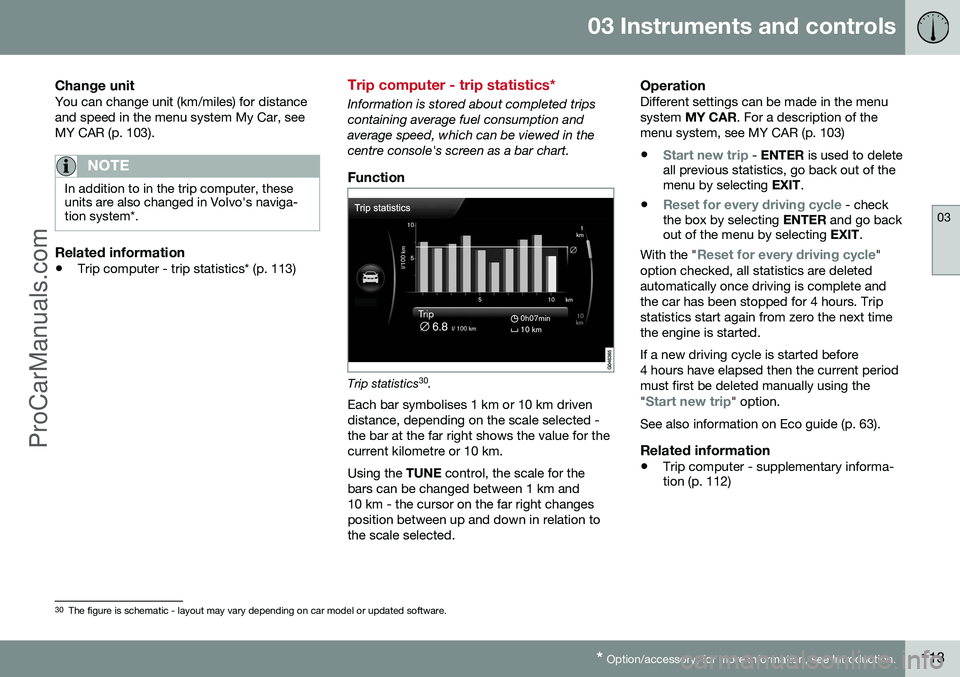
Information is stored about completed trips containing average fuel consumption andaverage speed, which can be viewed in thecentre console's screen as a bar chart.
Function
Trip statistics 30
.
Each bar symbolises 1 km or 10 km driven distance, depending on the scale selected -the bar at the far right shows the value for thecurrent kilometre or 10 km. Using the TUNE control, the scale for the
bars can be changed between 1 km and 10 km - the cursor on the far right changesposition between up and down in relation tothe scale selected.
OperationDifferent settings can be made in the menusystem MY CAR . For a description of the
menu system, see MY CAR (p. 103)
•
Start new trip - ENTER is used to delete
all previous statistics, go back out of the menu by selecting EXIT.
•
Reset for every driving cycle - check
the box by selecting ENTER and go back
out of the menu by selecting EXIT.
With the "
Reset for every driving cycle"
option checked, all statistics are deleted automatically once driving is complete andthe car has been stopped for 4 hours. Tripstatistics start again from zero the next timethe engine is started. If a new driving cycle is started before 4 hours have elapsed then the current periodmust first be deleted manually using the "
Start new trip" option.
See also information on Eco guide (p. 63).
Related information
• Trip computer - supplementary informa- tion (p. 112)
30
The figure is schematic - layout may vary depending on car model or updated software.
ProCarManuals.co’
Page 119 of 442
04 Climate control
04
* Option/accessory, for more information, see Introduction.117
Air cleaning - passenger compartment filter
All air entering the car's passenger compart- ment is cleaned with a filter. The filter must be replaced at regular inter- vals. Follow the Volvo Service Programme forthe recommended replacement intervals. Ifthe car is used in a severely contaminatedenvironment, it may be necessary to replacethe filter more often.
NOTE
There are different types of passenger compartment filter. Make sure that the cor-rect filter is fitted.
Related information
• Air cleaning (p. 116)
Air cleaning - Clean Zone Interior Package (CZIP)*
CZIP comprises a series of modifications that keep the passenger compartment evenclearer from allergy and asthma-inducing sub-stances. The following is included: •An enhanced fan function that means that the fan starts when the car is opened withthe remote control key. The fan fills thepassenger compartment with fresh air.The function starts when required and isdisengaged automatically after a time orwhen one of the passenger compartmentdoors is opened.
• The air quality system IAQS (p. 118) is afully automatic system that cleans the airin the passenger compartment from con-taminants such as particles, hydrocar-bons, nitrous oxides and ground-levelozone.
NOTE
To keep the CZIP standard in cars with CZIP the IAQS filter must be changed after15 000 km or once per year depending onwhichever occurs first. However, up to75 000 km over 5 years. In cars withoutCZIP and where the customer does notwant to keep the CZIP standard the IAQSfilter must be changed at a regular service.
For more information on CZIP, see the bro- chure included with the purchase of the car.
Related information
•
General information on climate control (p. 115)
• Air cleaning (p. 116)
ProCarManuals.co’
Page 120 of 442
04 Climate control
04
118* Option/accessory, for more information, see Introduction.
Air cleaning - IAQS*
The air quality system IAQS separates gases and particles to reduce the levels of odoursand pollution in the passenger compartment. If the outside air is contaminated then the air intake is closed and the air is recirculated. It is possible to activate/deactivate the func- tion in the menu system MY CAR. For a
description of the menu system, see MY CAR(p. 103).
NOTE
The air quality sensor must always be ena- bled to ensure the best air in the passen-ger compartment. In a cold climate recirculation is limited so as to prevent misting. In the event of misting, the air quality sen- sor should be disengaged, and thedefroster functions for the windscreen andside windows, as well as the rear window,should be used.
Related information
• General information on climate control (p. 115)
• Air cleaning (p. 116)
• Air cleaning - Clean Zone Interior Pack-age (CZIP)* (p. 117)
Air cleaning - material
Tested materials have been developed in order to minimise the quantity of dust in thepassenger compartment and to contribute tomaking the passenger compartment easier tokeep clean. The carpets in both the passenger compart- ment and the cargo area are removable andeasy to remove and clean. Use cleaningagents and car care products recommendedby Volvo to clean the interior (p. 381).
Related information
•Air cleaning (p. 116)
Menu settings - climate control
It is possible to activate/deactivate or change the default settings for six of the climate con-trol system's functions via the centre console. •Fan level during automatic climate control (p. 123).
• Recirculation timer (p. 126).
• Automatic start of rear window defroster(p. 96).
• Interior air quality system (p. 118)*.
• Automatic start of seat heating driver (p.122).
• Automatic start of steering wheel heating(p. 77).
More information is available in the descrip-
tion of the menu system (p. 103).
The climate control system's functions can be
reset to default settings in the menu system MY CAR . For a description of the menu sys-
tem, see MY CAR (p. 103).
Related information
• General information on climate control (p. 115)
ProCarManuals.co’
Page 160 of 442
06 Locks and alarm
06
158* Option/accessory, for more information, see Introduction.
Remote control key/PCC - replacing the battery
The batteries for the remote control key/PCC can be replaced. The batteries for the remote control key/PCC should be replaced if: • the information symbol in the combined instrument panel illuminates and the dis- play shows
Low battery in remote
control. Please change batteries.
and/or
• the locks repeatedly do not react to sig- nals from the remote control key within20 metres from the car.
Opening
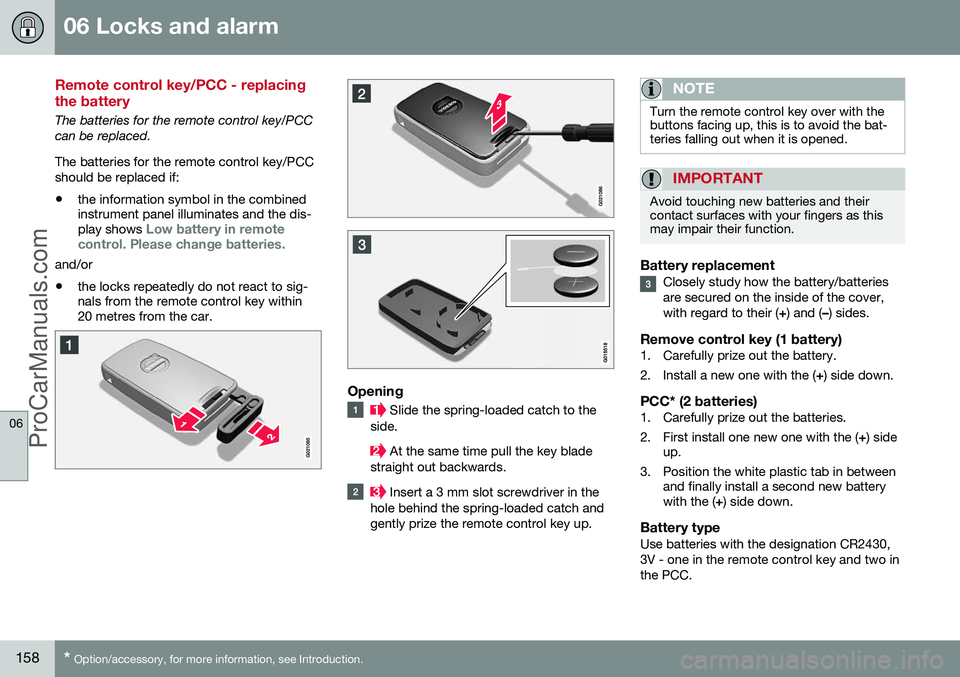
Slide the spring-loaded catch to the
side.
At the same time pull the key blade
straight out backwards.
Insert a 3 mm slot screwdriver in the
hole behind the spring-loaded catch and gently prize the remote control key up.
NOTE
Turn the remote control key over with the buttons facing up, this is to avoid the bat-teries falling out when it is opened.
IMPORTANT
Avoid touching new batteries and their contact surfaces with your fingers as thismay impair their function.
Battery replacementClosely study how the battery/batteries are secured on the inside of the cover,with regard to their ( +) and ( –) sides.
Remove control key (1 battery)1. Carefully prize out the battery.
2. Install a new one with the ( +) side down.
PCC* (2 batteries)1. Carefully prize out the batteries.
2. First install one new one with the ( +) side
up.
3. Position the white plastic tab in between and finally install a second new battery with the ( +) side down.
Battery typeUse batteries with the designation CR2430, 3V - one in the remote control key and two inthe PCC.
ProCarManuals.co’
Page 186 of 442
||
07 Driver support
07
184* Option/accessory, for more information, see Introduction.
–Depress the accelerator pedal fully.
> The combined instrument panel shows
the stored maximum speed with a col- oured mark (5) and the driver can tem-porarily exceed the set maximumspeed - the mark (5) changes colourduring this time from GREEN toWHITE. The speed limiter is automatically reac- tivated after the release of the acceler-ator pedal and the car's speed isslowed down to below the selected/stored maximum speed - the display'smark (5) changes colour from WHITEto GREEN and the car's maximumspeed is again limited.
Related information
• Speed limiter* (p. 182)
• Speed limiter* - getting started (p. 182)
• Speed limiter* - changing speed (p. 183)
• Speed limiter* - deactivation (p. 184)
• Speed limiter* - alarm for speed excee- ded (p. 184)
Speed limiter* - alarm for speed exceeded
A (Speed Limiter) can be regarded as a reverse cruise control - the driver regulatesthe speed using the accelerator pedal but isprevented from accidentally exceeding apre-selected/set speed by the speed limiter. On a steep downhill gradient the speed limit- er's engine braking effect may be inadequateand the selected maximum speed is excee-ded. The driver is alerted about this with anacoustic signal. The signal is active until the driver has slowed to below the selected maximum speed.
NOTE
The alarm is only activated after 5 seconds if the speed has been exceeded by at least3 km/h provided that none of the buttons
or has been depressed during the
last half minute.
Related information
• Speed limiter* (p. 182)
• Speed limiter* - changing speed (p. 183)
• Speed limiter* - getting started (p. 182)
• Speed limiter* - temporary deactivation and standby mode (p. 183)
• Speed limiter* - deactivation (p. 184)
Speed limiter* - deactivation
A (Speed Limiter) can be regarded as a reverse cruise control - the driver regulatesthe speed using the accelerator pedal but isprevented from accidentally exceeding a pre-selected/set speed by the speed limiter. To deactivate the speed limiter:
–Press the steering wheel button .
> The combined instrument panel's sym- bol for the speed limiter (6) and the mark for the set speed (5) are extin-guished. The selected and storedspeed are thus deleted from the mem-ory and cannot be resumed with the
button.
The driver can then use the accelerator pedal to choose a speed without limi-tation.
Related information
• Speed limiter* (p. 182)
• Speed limiter* - getting started (p. 182)
• Speed limiter* - temporary deactivation and standby mode (p. 183)
• Speed limiter* - alarm for speed excee-ded (p. 184)
ProCarManuals.co’
Page 189 of 442
07 Driver support
07
* Option/accessory, for more information, see Introduction.187
•
the clutch pedal is held depressed for a short time - however, a few seconds does not activate standby mode 5
• the gear selector is moved to neutral position (automatic gearbox)
• the driver maintains a speed higher thanthe set speed for longer than 1 minute.
The driver must then regulate the speed.
Related information
• Cruise control* (p. 185)
• Cruise control* - managing speed (p. 186)
• Cruise control* - resume set speed (p.187)
• Cruise control* - deactivate (p. 187)
Cruise control* - resume set speed
The cruise control (CC – Cruise Control) helps the driver to maintain an even speed. Aftertemporary deactivation and standby mode (p.186) it is possible to resume the set speed. To reactivate the cruise control from standby mode: •
Press the steering wheel button
.
> The combined instrument panel's mark- ing (5) and symbol (6) change colour from GREY to WHITE and the speed is thenset to the last speed stored.
NOTE
A marked speed increase may occur once the speed has been resumed by selecting
.
Related information
• Cruise control* (p. 185)
• Cruise control* - managing speed (p. 186)
• Cruise control* temporary deactivation and standby mode (p. 186)
• Cruise control* - deactivate (p. 187)
Cruise control* - deactivate
The cruise control (CC – Cruise Control) helps the driver to maintain an even speed. How itis deactivated is described here. The cruise control is deactivated with a steer- ing wheel button (1) or by switching off theengine - the set speed is deleted from the memory and cannot be resumed with the
button.
Related information
•
Cruise control* (p. 185)
• Cruise control* - managing speed (p. 186)
• Cruise control* temporary deactivation and standby mode (p. 186)
• Cruise control* - resume set speed (p.187)
5
Cars with 4-cyl 2.0L engine also allow gear changing.
ProCarManuals.co’
Page 193 of 442
07 Driver support
07
* Option/accessory, for more information, see Introduction.191
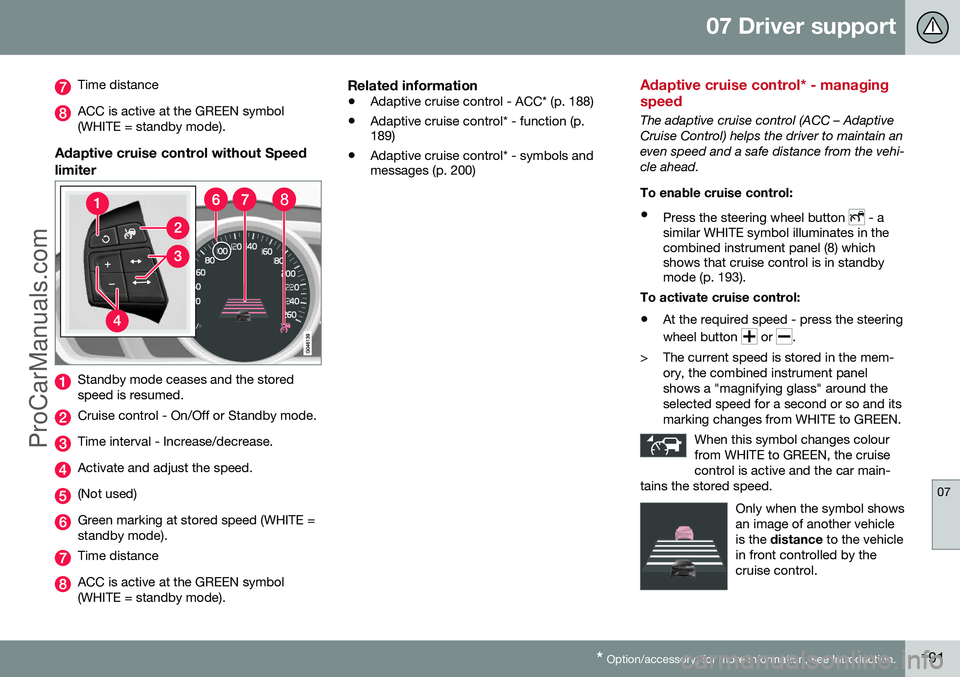
Time distance
ACC is active at the GREEN symbol (WHITE = standby mode).
Adaptive cruise control without Speed limiter
Standby mode ceases and the stored speed is resumed.
Cruise control - On/Off or Standby mode.
Time interval - Increase/decrease.
Activate and adjust the speed.
(Not used)
Green marking at stored speed (WHITE = standby mode).
Time distance
ACC is active at the GREEN symbol (WHITE = standby mode).
Related information
• Adaptive cruise control - ACC* (p. 188)
• Adaptive cruise control* - function (p. 189)
• Adaptive cruise control* - symbols andmessages (p. 200)
Adaptive cruise control* - managing speed
The adaptive cruise control (ACC – Adaptive Cruise Control) helps the driver to maintain aneven speed and a safe distance from the vehi-cle ahead. To enable cruise control:
• Press the steering wheel button
- a
similar WHITE symbol illuminates in the combined instrument panel (8) whichshows that cruise control is in standbymode (p. 193).
To activate cruise control: • At the required speed - press the steering wheel button
or .
> The current speed is stored in the mem- ory, the combined instrument panel shows a "magnifying glass" around theselected speed for a second or so and itsmarking changes from WHITE to GREEN.
When this symbol changes colourfrom WHITE to GREEN, the cruisecontrol is active and the car main-
tains the stored speed.
Only when the symbol shows an image of another vehicleis the distance to the vehicle
in front controlled by thecruise control.
ProCarManuals.co’
Page 194 of 442
||
07 Driver support
07
192* Option/accessory, for more information, see Introduction.
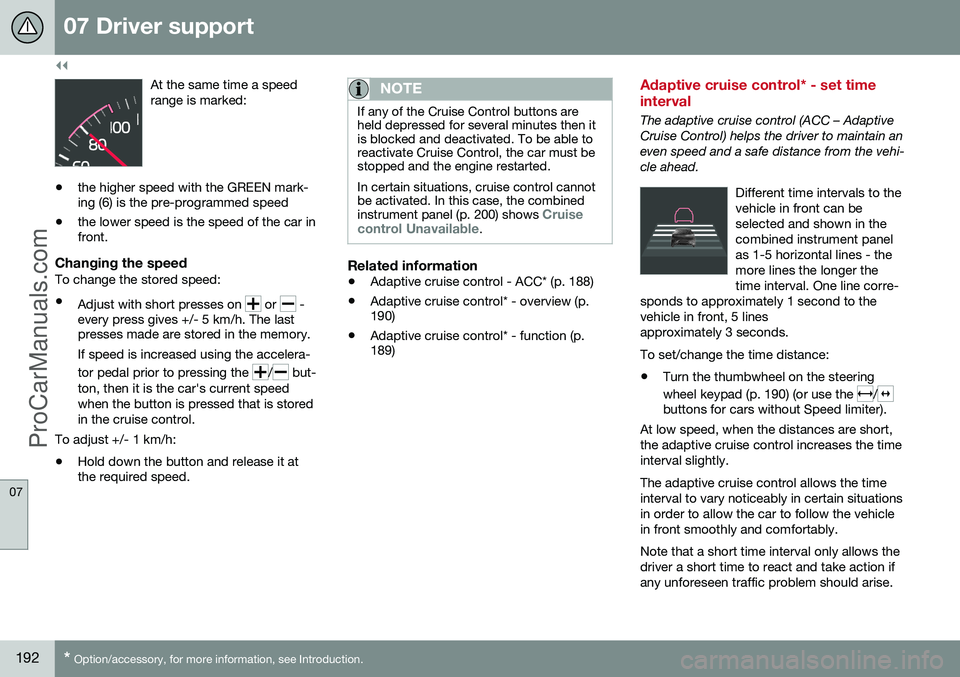
At the same time a speed range is marked:
• the higher speed with the GREEN mark- ing (6) is the pre-programmed speed
• the lower speed is the speed of the car infront.
Changing the speedTo change the stored speed: •
Adjust with short presses on
or -
every press gives +/- 5 km/h. The last presses made are stored in the memory.
If speed is increased using the accelera- tor pedal prior to pressing the
/ but-
ton, then it is the car's current speed when the button is pressed that is storedin the cruise control.
To adjust +/- 1 km/h: • Hold down the button and release it at the required speed.
NOTE
If any of the Cruise Control buttons are held depressed for several minutes then itis blocked and deactivated. To be able toreactivate Cruise Control, the car must bestopped and the engine restarted. In certain situations, cruise control cannot be activated. In this case, the combined instrument panel (p. 200) shows
Cruise
control Unavailable.
Related information
• Adaptive cruise control - ACC* (p. 188)
• Adaptive cruise control* - overview (p. 190)
• Adaptive cruise control* - function (p.189)
Adaptive cruise control* - set time interval
The adaptive cruise control (ACC – Adaptive Cruise Control) helps the driver to maintain aneven speed and a safe distance from the vehi-cle ahead.
Different time intervals to thevehicle in front can beselected and shown in thecombined instrument panelas 1-5 horizontal lines - themore lines the longer thetime interval. One line corre-
sponds to approximately 1 second to thevehicle in front, 5 linesapproximately 3 seconds.
To set/change the time distance:
• Turn the thumbwheel on the steering wheel keypad (p. 190) (or use the
/buttons for cars without Speed limiter).
At low speed, when the distances are short, the adaptive cruise control increases the timeinterval slightly. The adaptive cruise control allows the time interval to vary noticeably in certain situationsin order to allow the car to follow the vehiclein front smoothly and comfortably. Note that a short time interval only allows the driver a short time to react and take action ifany unforeseen traffic problem should arise.
ProCarManuals.co’