ECO mode VOLVO V60 2014 Owners Manual
[x] Cancel search | Manufacturer: VOLVO, Model Year: 2014, Model line: V60, Model: VOLVO V60 2014Pages: 442, PDF Size: 13.85 MB
Page 4 of 442
Table of contents
2* Option/accessory, for more information, see Introduction.
01
01 Introduction
Owner information.................................... 13
Reading the owner's manual.................... 13
Recording data......................................... 16
Accessories and extra equipment............ 17Change of ownership for cars with Volvo
On Call*..................................................... 17
Information on the Internet....................... 18
Volvo Cars' environmental philosophy..... 19The owner's manual and the environ-
ment.......................................................... 21
Laminated glass........................................ 21
02
02 Safety
General information on seatbelts.............. 23
Seatbelt - putting on................................. 24
Seat belt - loosening................................. 25
Seatbelt - pregnancy................................ 25
Seatbelt reminder...................................... 26
Seatbelt tensioner..................................... 26
Safety - warning symbol........................... 27
Airbag system........................................... 28
Driver airbag.............................................. 28
Passenger airbag...................................... 29Passenger airbag - activating/deactivat-
ing*............................................................ 30
Side airbag (SIPS)..................................... 31Side airbag (SIPS) - child seat/booster
cushion..................................................... 32
Inflatable Curtain (IC)................................ 33General information on WHIPS (whiplash
protection)................................................. 33
WHIPS - child seats.................................. 34
WHIPS - seating position.......................... 35
When the systems deploy......................... 36
General information on safety mode......... 37Safety mode - attempting to start the
car............................................................. 38
Safety mode - moving the car.................. 38
02
General information on child safety.......... 39
Child seats................................................ 40
Child seats - location................................ 44
Child seat - two-stage booster seat*........ 44
Two-stage booster seat* - raising............. 45
Two-stage booster seat* - lowering.......... 46
Child seat - ISOFIX................................... 47
ISOFIX - size classes................................ 48
ISOFIX - types of child seat...................... 49
Child seats - upper mounting points........ 51
ProCarManuals.co’
Page 15 of 442
01 Introduction
01
* Option/accessory, for more information, see Introduction.13
Owner information
Your car is equipped with a display screen* where you can find information on how yourcar works. This owner's manual is a supple-ment to the information and contains impor-tant text, the latest updates, as well asinstructions that can be useful when you, forpractical reasons, cannot read the on-screeninformation. Changing the display language may mean that some information does not correspond tonational or local laws and regulations.
IMPORTANT
The driver is always responsible that the vehicle is driven safely in traffic and thatapplicable laws and regulations are fol-lowed. It is also important that the car ismaintained and handled in accordancewith Volvo's recommendations in theowner's information. If there should be a difference between the information on the screen and in the prin-ted manual then it is always the printedinformation that applies.
Reading the owner's manual
A good way of getting to know your new car is to read the owner's manual, ideally beforeyour first journey. This will give you the oppor-tunity to familiarise yourself with new func-tions, to see how best to handle the car in dif-ferent situations, and to make the best use ofall the car's features. Please pay attention tothe safety instructions contained in the man-ual. The specifications, design features and illus- trations in this owner's manual are not bind-ing. We reserve the right to make modifica-tions without prior notice.
© Volvo Car Corporation
Digital owner's manual in the car 1When the printed manual refers to the digitalowner's manual it means the one shown onthe screen in the car. Open the digital owner's manual - press the MY CAR
button in the centre console, press
OK/MENU and select
Owner's manual.
There are four options for finding information in the owner's manual: •
Search - Search function for finding an
article.
•
Categories - All articles sorted into cate-
gories. •
Favourites - Quick access to favourite-
bookmarked articles.
•
Quick Guide - A selection of articles for
common functions.
NOTE
The owner's manual is not available while driving.
Owner's Manual in mobile devices
NOTE
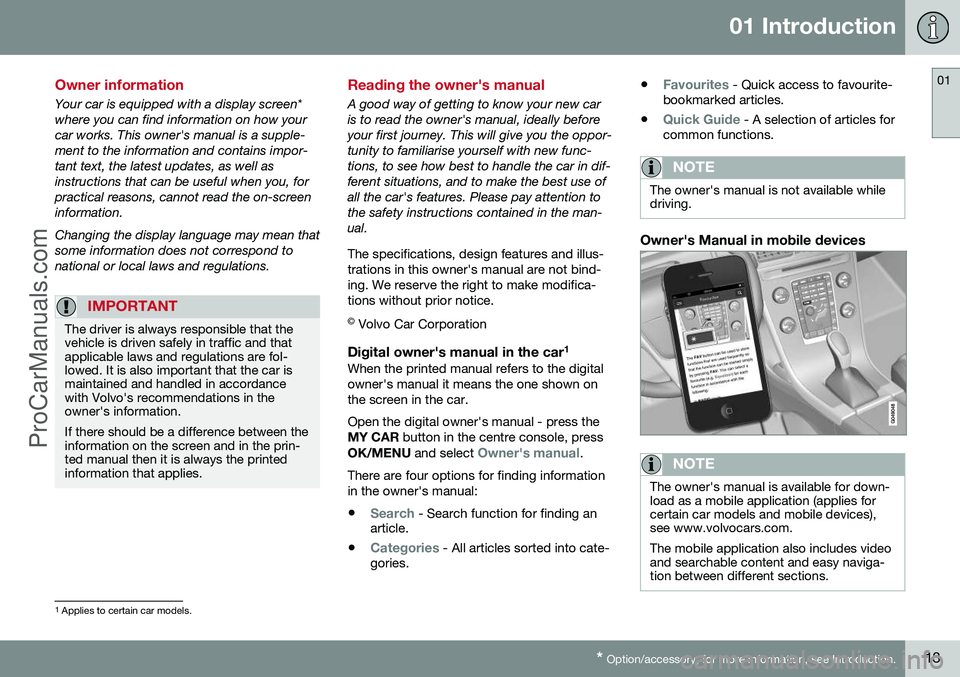
The owner's manual is available for down- load as a mobile application (applies forcertain car models and mobile devices),see www.volvocars.com. The mobile application also includes video and searchable content and easy naviga-tion between different sections.
1 Applies to certain car models.
ProCarManuals.co’
Page 29 of 442
02 Safety
02
27
Safety - warning symbol
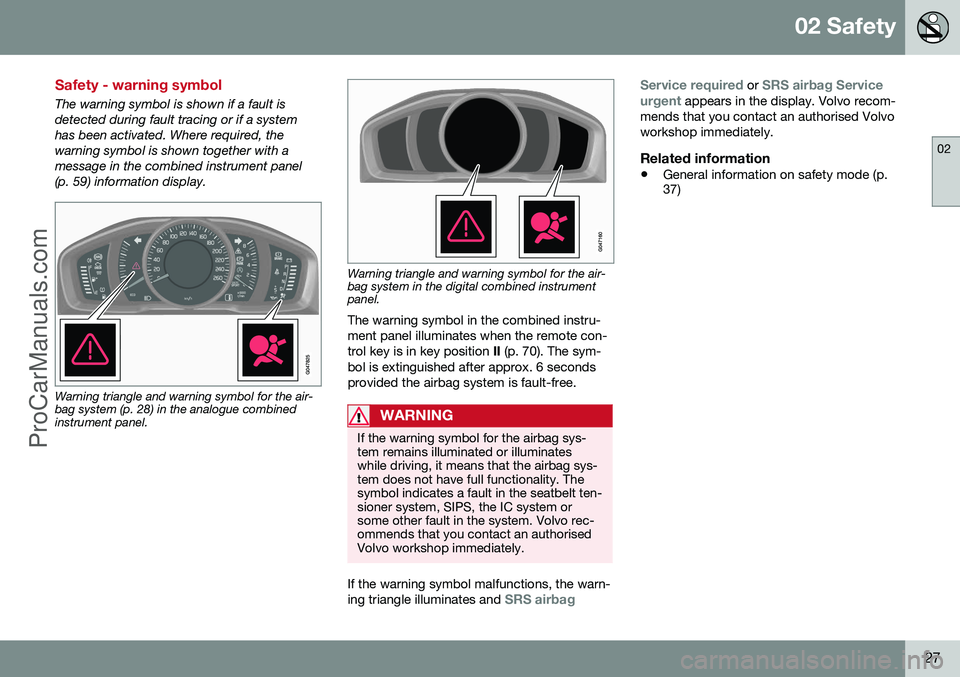
The warning symbol is shown if a fault is detected during fault tracing or if a systemhas been activated. Where required, thewarning symbol is shown together with a
message in the combined instrument panel
(p. 59) information display.
Warning triangle and warning symbol for the air- bag system (p. 28) in the analogue combinedinstrument panel.
Warning triangle and warning symbol for the air- bag system in the digital combined instrumentpanel.
The warning symbol in the combined instru- ment panel illuminates when the remote con-trol key is in key position II (p. 70). The sym-
bol is extinguished after approx. 6 secondsprovided the airbag system is fault-free.
WARNING
If the warning symbol for the airbag sys- tem remains illuminated or illuminateswhile driving, it means that the airbag sys-tem does not have full functionality. Thesymbol indicates a fault in the seatbelt ten-sioner system, SIPS, the IC system orsome other fault in the system. Volvo rec-ommends that you contact an authorisedVolvo workshop immediately.
If the warning symbol malfunctions, the warn- ing triangle illuminates and SRS airbag Service required
or SRS airbag Service
urgent appears in the display. Volvo recom-
mends that you contact an authorised Volvo workshop immediately.
Related information
• General information on safety mode (p. 37)
ProCarManuals.co’
Page 39 of 442
02 Safety
02
37
General information on safety mode
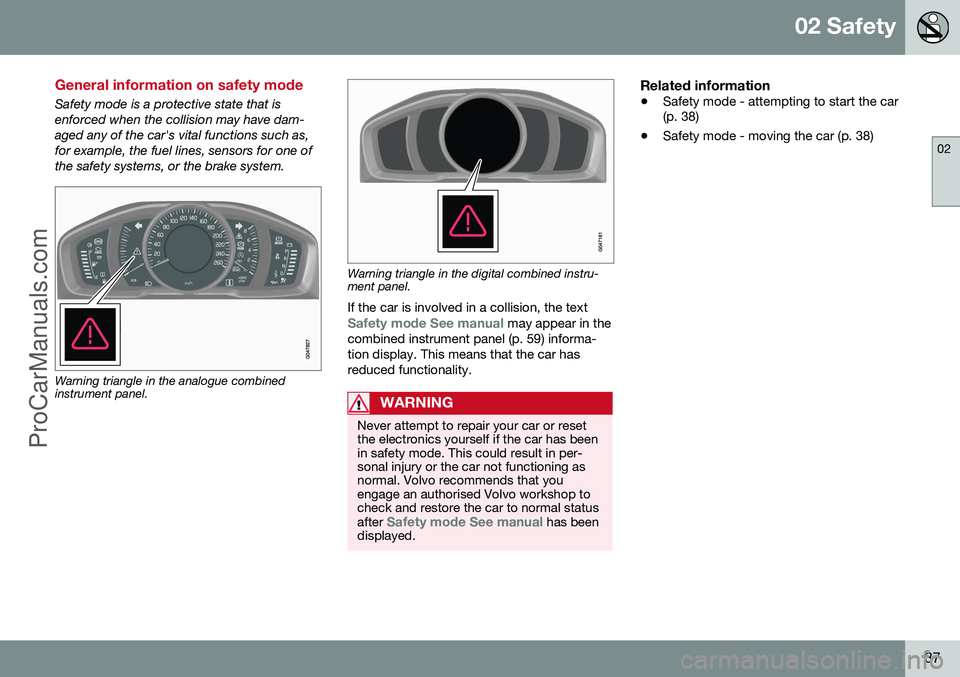
Safety mode is a protective state that is enforced when the collision may have dam-aged any of the car's vital functions such as,for example, the fuel lines, sensors for one ofthe safety systems, or the brake system.
Warning triangle in the analogue combined instrument panel.
Warning triangle in the digital combined instru- ment panel.If the car is involved in a collision, the text
Safety mode See manual may appear in the
combined instrument panel (p. 59) informa- tion display. This means that the car hasreduced functionality.
WARNING
Never attempt to repair your car or reset the electronics yourself if the car has beenin safety mode. This could result in per-sonal injury or the car not functioning asnormal. Volvo recommends that youengage an authorised Volvo workshop tocheck and restore the car to normal status after
Safety mode See manual has been
displayed.
Related information
• Safety mode - attempting to start the car (p. 38)
• Safety mode - moving the car (p. 38)
ProCarManuals.co’
Page 40 of 442
02 Safety
02
38
Safety mode - attempting to start the car
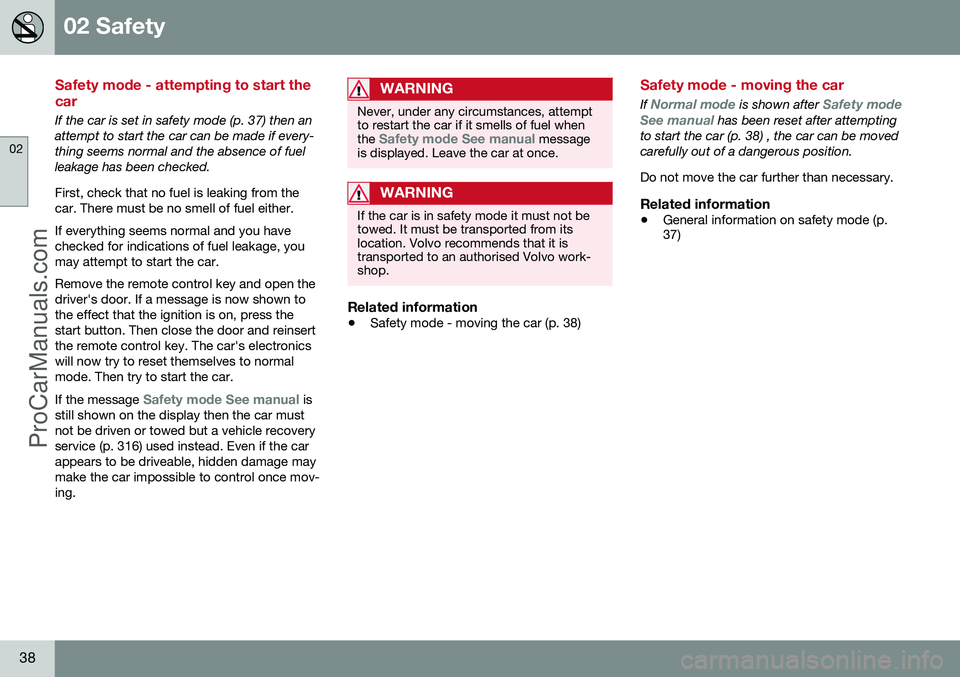
If the car is set in safety mode (p. 37) then an attempt to start the car can be made if every-thing seems normal and the absence of fuelleakage has been checked. First, check that no fuel is leaking from the car. There must be no smell of fuel either. If everything seems normal and you have checked for indications of fuel leakage, youmay attempt to start the car. Remove the remote control key and open the driver's door. If a message is now shown tothe effect that the ignition is on, press thestart button. Then close the door and reinsertthe remote control key. The car's electronicswill now try to reset themselves to normalmode. Then try to start the car. If the message
Safety mode See manual is
still shown on the display then the car must not be driven or towed but a vehicle recoveryservice (p. 316) used instead. Even if the carappears to be driveable, hidden damage maymake the car impossible to control once mov-ing.
WARNING
Never, under any circumstances, attempt to restart the car if it smells of fuel when the
Safety mode See manual message
is displayed. Leave the car at once.
WARNING
If the car is in safety mode it must not be towed. It must be transported from itslocation. Volvo recommends that it istransported to an authorised Volvo work-shop.
Related information
• Safety mode - moving the car (p. 38)
Safety mode - moving the car
If Normal mode is shown after Safety mode
See manual has been reset after attempting
to start the car (p. 38) , the car can be moved carefully out of a dangerous position. Do not move the car further than necessary.
Related information
• General information on safety mode (p. 37)
ProCarManuals.co’
Page 50 of 442
02 Safety
02
48
ISOFIX - size classes
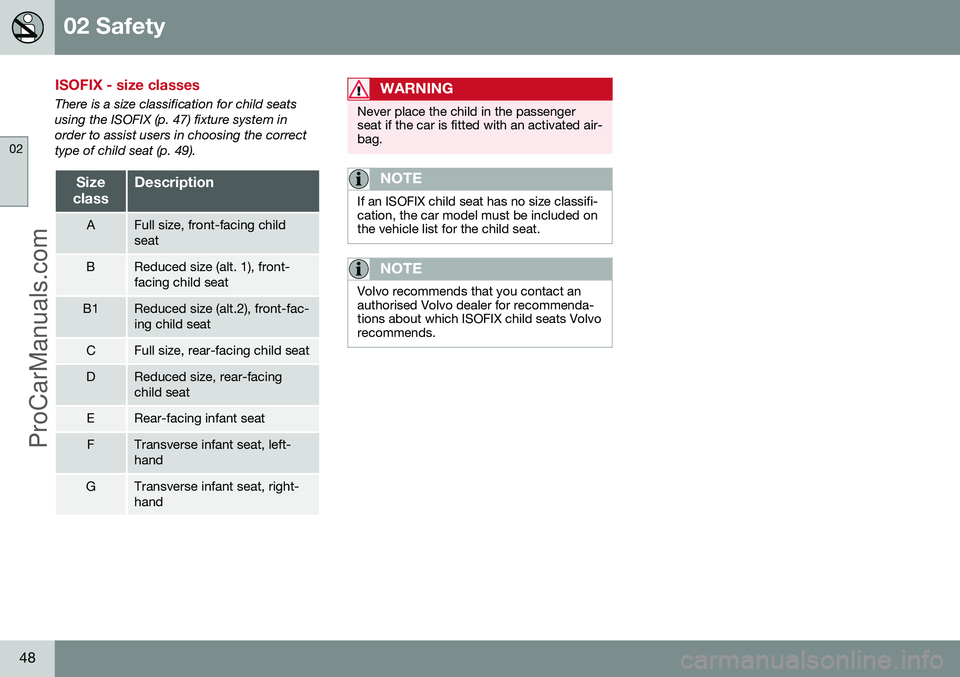
There is a size classification for child seats using the ISOFIX (p. 47) fixture system inorder to assist users in choosing the correcttype of child seat (p. 49).
Size
classDescription
AFull size, front-facing child seat
BReduced size (alt. 1), front- facing child seat
B1Reduced size (alt.2), front-fac- ing child seat
CFull size, rear-facing child seat
DReduced size, rear-facing child seat
ERear-facing infant seat
FTransverse infant seat, left- hand
GTransverse infant seat, right- hand
WARNING
Never place the child in the passenger seat if the car is fitted with an activated air-bag.
NOTE
If an ISOFIX child seat has no size classifi- cation, the car model must be included onthe vehicle list for the child seat.
NOTE
Volvo recommends that you contact an authorised Volvo dealer for recommenda-tions about which ISOFIX child seats Volvorecommends.
ProCarManuals.co’
Page 52 of 442
||
02 Safety
02
50
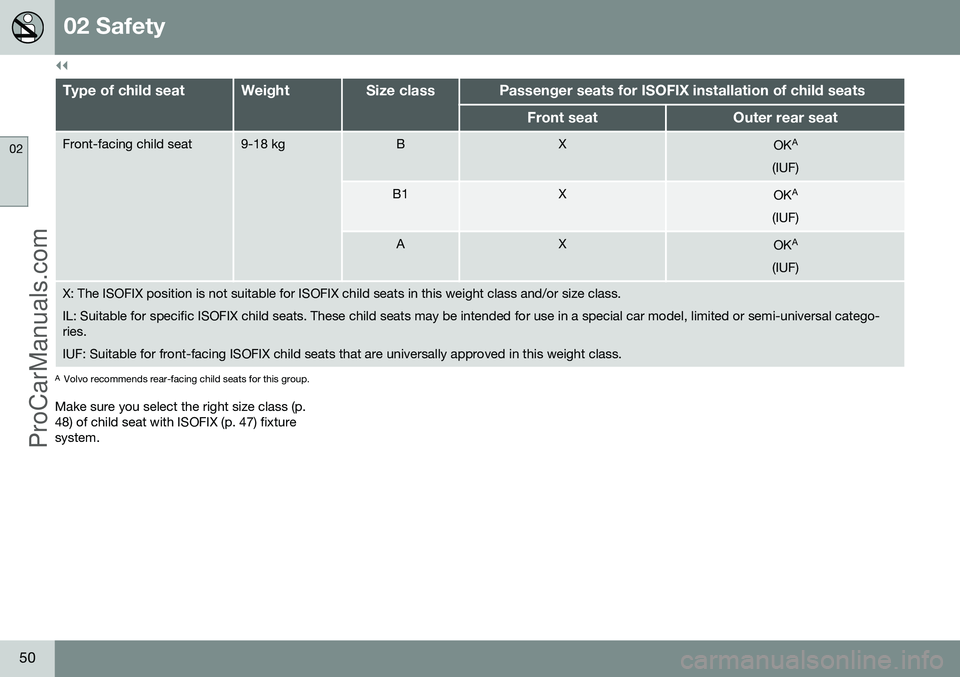
Type of child seatWeightSize classPassenger seats for ISOFIX installation of child seats
Front seatOuter rear seat
Front-facing child seat9-18 kgBXOKA
(IUF)
B1XOK A
(IUF)
AXOK A
(IUF)
X: The ISOFIX position is not suitable for ISOFIX child seats in this weight class and/or size class. IL: Suitable for specific ISOFIX child seats. These child seats may be intended for use in a special car model, limited or semi-universal catego- ries. IUF: Suitable for front-facing ISOFIX child seats that are universally approved in this weight class.
A Volvo recommends rear-facing child seats for this group.
Make sure you select the right size class (p. 48) of child seat with ISOFIX (p. 47) fixturesystem.
ProCarManuals.co’
Page 63 of 442
03 Instruments and controls
03
}}
* Option/accessory, for more information, see Introduction.61
Gauges and indicators, digital instrument panel
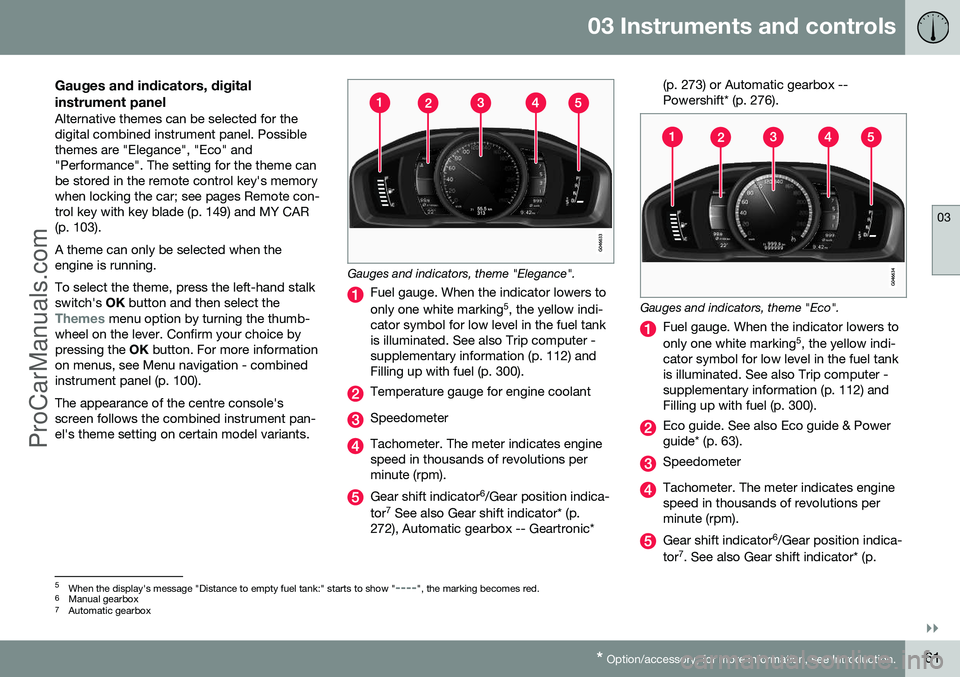
Alternative themes can be selected for the digital combined instrument panel. Possiblethemes are "Elegance", "Eco" and"Performance". The setting for the theme canbe stored in the remote control key's memorywhen locking the car; see pages Remote con-trol key with key blade (p. 149) and MY CAR(p. 103). A theme can only be selected when the engine is running. To select the theme, press the left-hand stalk switch's OK button and then select the
Themes menu option by turning the thumb-
wheel on the lever. Confirm your choice by pressing the OK button. For more information
on menus, see Menu navigation - combinedinstrument panel (p. 100). The appearance of the centre console's screen follows the combined instrument pan-el's theme setting on certain model variants.
Gauges and indicators, theme "Elegance".
Fuel gauge. When the indicator lowers to only one white marking 5
, the yellow indi-
cator symbol for low level in the fuel tank is illuminated. See also Trip computer -supplementary information (p. 112) andFilling up with fuel (p. 300).
Temperature gauge for engine coolant
Speedometer
Tachometer. The meter indicates engine speed in thousands of revolutions perminute (rpm).
Gear shift indicator 6
/Gear position indica-
tor 7
See also Gear shift indicator* (p.
272), Automatic gearbox -- Geartronic* (p. 273) or Automatic gearbox -- Powershift* (p. 276).
Gauges and indicators, theme "Eco".
Fuel gauge. When the indicator lowers to only one white marking
5
, the yellow indi-
cator symbol for low level in the fuel tank is illuminated. See also Trip computer -supplementary information (p. 112) andFilling up with fuel (p. 300).
Eco guide. See also Eco guide & Power guide* (p. 63).
Speedometer
Tachometer. The meter indicates engine speed in thousands of revolutions perminute (rpm).
Gear shift indicator 6
/Gear position indica-
tor 7
. See also Gear shift indicator* (p.
5 When the display's message "Distance to empty fuel tank:" starts to show "----", the marking becomes red.
6 Manual gearbox
7 Automatic gearbox
ProCarManuals.co’
Page 66 of 442
03 Instruments and controls
03
64* Option/accessory, for more information, see Introduction.
Combined instrument panel - meaning of indicator symbols
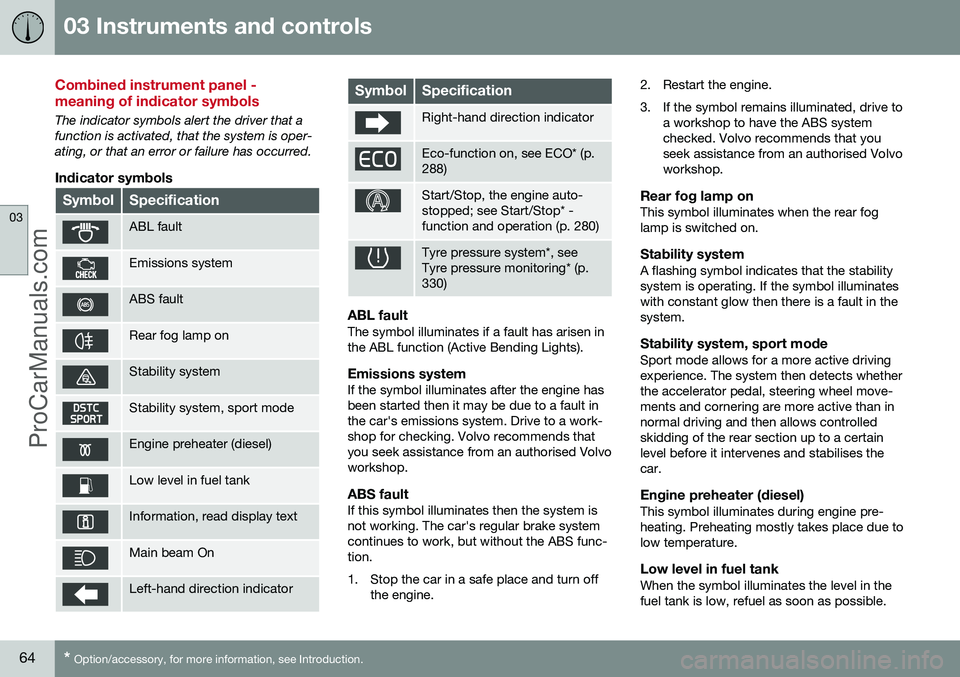
The indicator symbols alert the driver that a function is activated, that the system is oper-ating, or that an error or failure has occurred.
Indicator symbols
SymbolSpecification
ABL fault
Emissions system
ABS fault
Rear fog lamp on
Stability system
Stability system, sport mode
Engine preheater (diesel)
Low level in fuel tank
Information, read display text
Main beam On
Left-hand direction indicator
SymbolSpecification
Right-hand direction indicator
Eco-function on, see ECO* (p. 288)
Start/Stop, the engine auto- stopped; see Start/Stop* -function and operation (p. 280)
Tyre pressure system*, see Tyre pressure monitoring* (p.330)
ABL faultThe symbol illuminates if a fault has arisen in the ABL function (Active Bending Lights).
Emissions systemIf the symbol illuminates after the engine hasbeen started then it may be due to a fault inthe car's emissions system. Drive to a work-shop for checking. Volvo recommends thatyou seek assistance from an authorised Volvoworkshop.
ABS faultIf this symbol illuminates then the system isnot working. The car's regular brake systemcontinues to work, but without the ABS func-tion.
1. Stop the car in a safe place and turn off
the engine. 2. Restart the engine.
3. If the symbol remains illuminated, drive to
a workshop to have the ABS system checked. Volvo recommends that youseek assistance from an authorised Volvoworkshop.
Rear fog lamp onThis symbol illuminates when the rear foglamp is switched on.
Stability systemA flashing symbol indicates that the stabilitysystem is operating. If the symbol illuminateswith constant glow then there is a fault in thesystem.
Stability system, sport modeSport mode allows for a more active drivingexperience. The system then detects whetherthe accelerator pedal, steering wheel move-ments and cornering are more active than innormal driving and then allows controlledskidding of the rear section up to a certainlevel before it intervenes and stabilises thecar.
Engine preheater (diesel)This symbol illuminates during engine pre-heating. Preheating mostly takes place due tolow temperature.
Low level in fuel tankWhen the symbol illuminates the level in thefuel tank is low, refuel as soon as possible.
ProCarManuals.co’
Page 81 of 442
03 Instruments and controls
03
* Option/accessory, for more information, see Introduction.79
Posi-
tionSpecification
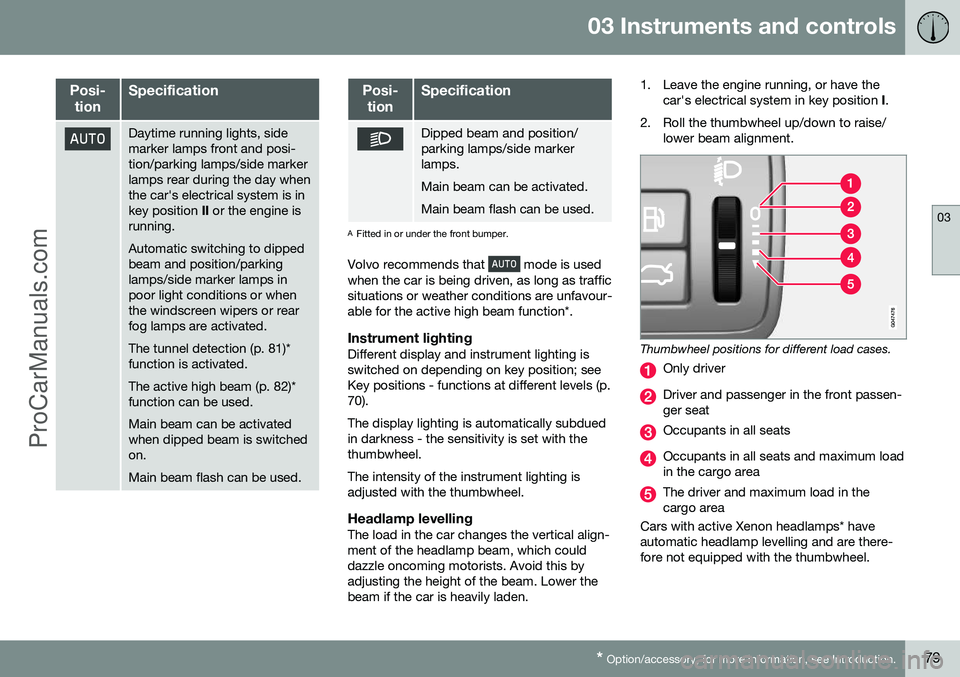
Daytime running lights, side marker lamps front and posi-tion/parking lamps/side markerlamps rear during the day whenthe car's electrical system is inkey position II or the engine is
running. Automatic switching to dipped beam and position/parkinglamps/side marker lamps inpoor light conditions or whenthe windscreen wipers or rearfog lamps are activated. The tunnel detection (p. 81)* function is activated. The active high beam (p. 82)* function can be used. Main beam can be activated when dipped beam is switchedon. Main beam flash can be used.
Posi-
tionSpecification
Dipped beam and position/ parking lamps/side markerlamps. Main beam can be activated.Main beam flash can be used.
A Fitted in or under the front bumper.
Volvo recommends that
mode is used
when the car is being driven, as long as traffic situations or weather conditions are unfavour-able for the active high beam function*.
Instrument lightingDifferent display and instrument lighting isswitched on depending on key position; seeKey positions - functions at different levels (p.70). The display lighting is automatically subdued in darkness - the sensitivity is set with thethumbwheel. The intensity of the instrument lighting is adjusted with the thumbwheel.
Headlamp levellingThe load in the car changes the vertical align-ment of the headlamp beam, which coulddazzle oncoming motorists. Avoid this byadjusting the height of the beam. Lower thebeam if the car is heavily laden. 1. Leave the engine running, or have the
car's electrical system in key position I.
2. Roll the thumbwheel up/down to raise/ lower beam alignment.
Thumbwheel positions for different load cases.
Only driver
Driver and passenger in the front passen- ger seat
Occupants in all seats
Occupants in all seats and maximum load in the cargo area
The driver and maximum load in the cargo area
Cars with active Xenon headlamps* haveautomatic headlamp levelling and are there-fore not equipped with the thumbwheel.
ProCarManuals.co’