change time VOLVO V60 2014 Owner's Manual
[x] Cancel search | Manufacturer: VOLVO, Model Year: 2014, Model line: V60, Model: VOLVO V60 2014Pages: 442, PDF Size: 13.85 MB
Page 195 of 442
07 Driver support
07
* Option/accessory, for more information, see Introduction.193
The same symbol is also shown when Dis- tance Warning (p. 202) function is activated.
NOTE
Only use the time intervals permitted by local traffic regulations. If Cruise Control does not appear to react when activated, this may be because thetime distance to the car in front is prevent-ing an increase in speed. The higher the speed the longer the calcu- lated distance in metres for a given timeinterval.
Related information
•
Adaptive cruise control - ACC* (p. 188)
• Adaptive cruise control* - overview (p. 190)
• Adaptive cruise control* - function (p.189)
• Adaptive cruise control* - deactivate (p.194)
Adaptive cruise control* - temporary deactivation, and standby mode
The adaptive cruise control (ACC – Adaptive Cruise Control) helps the driver to maintain aneven speed and a safe distance from the vehi-cle ahead. The cruise control can be tempo-rarily deactivated and set in standby mode.
Temporary deactivation - standby mode
with Speed limiter
To temporarily disengage the adaptive cruisecontrol and set it in standby mode:
• Press the steering wheel button
This symbol and the stored speed's marking then change colour fromGREEN to WHITE.
Temporary deactivation - standby mode without Speed limiter
To temporarily disengage the adaptive cruise control and set it in standby mode:
• Press the steering wheel button
Standby mode due to driver interventionCruise control is temporarily disengaged and set in standby mode if:
• the foot brake is used
• the clutch pedal is depressed for longer than 1 minute 9 •
the gear selector is moved to
N position
(automatic gearbox)
• the driver maintains a speed higher than the set speed for longer than 1 minute.
The driver must then regulate the speed. A temporary increase in speed with the accel- erator pedal, e.g. during overtaking, does notaffect the cruise control setting - the carreturns to the last stored speed when theaccelerator pedal is released.
Automatic standby modeThe adaptive cruise control is dependent onother systems, e.g. DSTC (Stability and trac-tion control system) (p. 175). If any of thesesystems stop working then cruise control isautomatically deactivated. In the event of automatic deactivation a signal will sound and the message
Cruise control
Cancelled is shown in the combined instru-
ment panel. The driver must then intervene and adapt the speed and distance to thevehicle ahead. An automatic deactivation can be due to:
• the driver opens the door
• the driver takes off his seatbelt
• engine speed is too low/high
• speed has fallen below 30 km/h 10
9
Disengaging and selecting a higher or lower gear does not involve standby mode.
10 Does not apply to a car with Queue Assistant - it manages right down to stationary.
ProCarManuals.co’
Page 198 of 442
||
07 Driver support
07
196* Option/accessory, for more information, see Introduction.
WARNING
When the cruise control is following another vehicle at speeds in excess of
30 km/h and the target is changed from amoving vehicle to a stationary vehicle, thecruise control will ignore the stationaryvehicle and instead select the storedspeed. • The driver must intervene him/herself and brake.
Automatic standby mode with change of target
The adaptive cruise control is disengaged and set in standby mode:
• when the speed is below 5 km/h and cruise control is not sure whether the tar-get object is a stationary vehicle or someother object, e.g. a speed bump.
• when the speed is below 5 km/h and thevehicle in front turns off so the cruisecontrol no longer has a vehicle to follow.
Termination of automatic braking at a
standstill
In certain situations, Queue Assist stops automatic braking at a standstill. This meansthat the brakes are released and the car maystart to roll - the driver must therefore inter-vene and brake the car himself/herself inorder to maintain its position. Queue Assist releases the foot brake and setsthe adaptive cruise control in standby modein the following situations:
• the driver puts his/her foot on the brake pedal
• the parking brake is applied
• the gear selector is moved to
P, N or R
position
• the driver sets the cruise control instandby mode.
Automatic activation parking brakeIn certain situations Queue Assist applies the parking brake in order to keep the car remain-ing stationary. This takes place if:
• the driver opens the door or takes off his/her seatbelt
• DSTC is changed from
Normal to Sport
mode
• Queue Assist has held the car stationaryfor more than 4 minutes
• the engine is switched off
• the brakes have overheated.
Related information
•Adaptive cruise control - ACC* (p. 188)
• Adaptive cruise control* - overview (p.190)
• Adaptive cruise control* - function (p.189)
Adaptive cruise control* - switch cruise control functionality
The adaptive cruise control (ACC – Adaptive Cruise Control) helps the driver maintain asafe distance from the vehicle ahead.
Changing from ACC to CCWith one press of the button the adaptivepart (spacing system) in the cruise control isdeactivated, at which point the car just fol-lows the set speed.
• Give a
long press on the steering wheel
button
- the combined instrument
panel's symbol changes from
to .
> By these means the standard cruise con- trol (p. 185) CC (Cruise Control) is activated.
WARNING
The car no longer brakes automatically after switching from ACC to CC - it merelyfollows the set speed.
Changing back from CC to ACCSwitch off cruise control with 1-2 presses on
in accordance with the deactivation
instructions (p. 194). The next time the sys- tem is switched on it is the Adaptive cruisecontrol that is activated.
ProCarManuals.co’
Page 207 of 442
07 Driver support
07
* Option/accessory, for more information, see Introduction.205
City Safety™
City Safety™ is a function for helping the driver to avoid a collision when driving inqueues, amongst other things, when changesin the traffic ahead, combined with a lapse inattention, could lead to an incident. The City Safety™ function is active at speeds under 50 km/h and it helps the driver by auto-matically braking the car in the event of immi-nent risk of collision with vehicles in front,should the driver not react in time by brakingand/or steering away. City Safety™ is activated in situations where the driver should have started braking earlier,which is why it cannot help the driver in everysituation. City Safety™ is designed to be activated as late as possible in order to avoid unnecessaryintervention. City Safety™ must not be used as an excuse for the driver to change his/her driving style. Ifthe driver solely relies on City Safety™ to dothe braking, there will be a collision sooner orlater. The driver or passengers normally only notice City Safety™ if a situation arises where thecar is extremely close to being in a collision. If the car is also equipped with Collision Warning with Auto Brake (p. 212)* these twosystems complement each other.IMPORTANT
Maintenance and replacement of City Safety™ components must only be per-formed by a workshop - an authorisedVolvo workshop is recommended.
WARNING
City Safety™ does not engage in all driv- ing situations or traffic, weather or roadconditions. City Safety™ does not react to vehicles driving in a different direction from the car,to small vehicles and motorcycles or tohumans and animals. City Safety™ can prevent collision at a speed difference of less than 15 km/h - ata higher speed difference, it is only possi-ble to reduce collision speed. In order toobtain full brake function, the driver mustdepress the brake pedal. Never wait for City Safety™ to engage. The driver always bears responsibility formaintaining the proper distance andspeed.
Related information
• City Safety™ - limitations (p. 207)
• City Safety™ - function (p. 205)
• City Safety™ - operation (p. 206)
• City Safety™ - laser sensor (p. 209)
• City Safety™ - symbols and messages (p. 211)
City Safety™ - function
City Safety™ detects the traffic in front of the car with a laser sensor fitted in the top edgeof the windscreen. If there is an imminent riskof collision, City Safety™ will automaticallybrake the car, which may be experienced assudden braking.
ProCarManuals.com
Page 208 of 442
||
07 Driver support
07
206
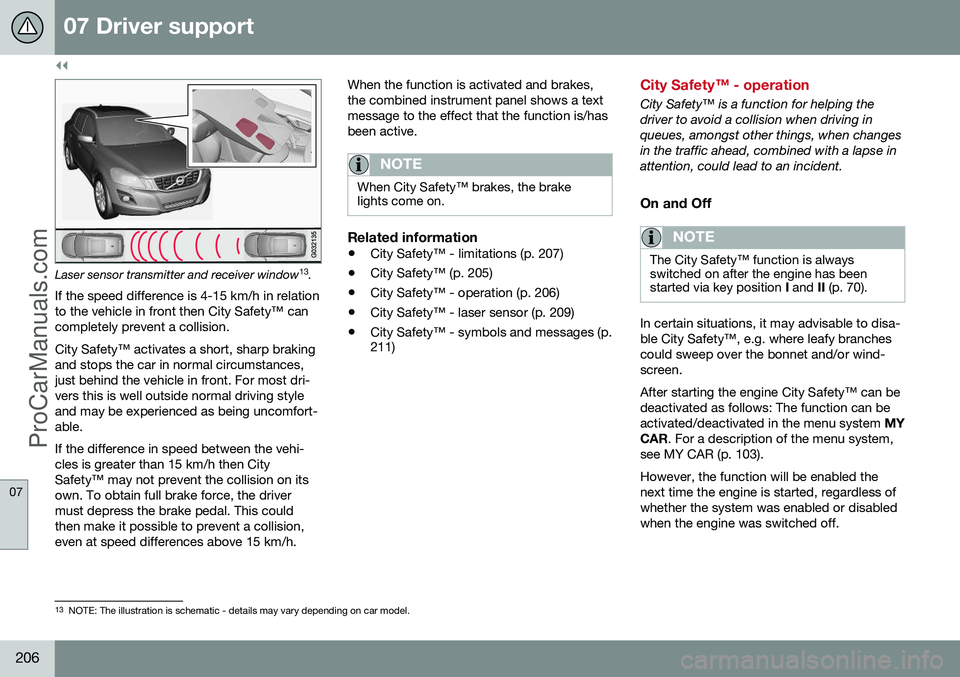
Laser sensor transmitter and receiver window13
.
If the speed difference is 4-15 km/h in relation to the vehicle in front then City Safety™ cancompletely prevent a collision. City Safety™ activates a short, sharp braking and stops the car in normal circumstances,just behind the vehicle in front. For most dri-vers this is well outside normal driving styleand may be experienced as being uncomfort-able. If the difference in speed between the vehi- cles is greater than 15 km/h then CitySafety™ may not prevent the collision on itsown. To obtain full brake force, the drivermust depress the brake pedal. This couldthen make it possible to prevent a collision,even at speed differences above 15 km/h. When the function is activated and brakes,the combined instrument panel shows a textmessage to the effect that the function is/hasbeen active.
NOTE
When City Safety™ brakes, the brake lights come on.
Related information
•
City Safety™ - limitations (p. 207)
• City Safety™ (p. 205)
• City Safety™ - operation (p. 206)
• City Safety™ - laser sensor (p. 209)
• City Safety™ - symbols and messages (p. 211)
City Safety™ - operation
City Safety™ is a function for helping the driver to avoid a collision when driving inqueues, amongst other things, when changesin the traffic ahead, combined with a lapse inattention, could lead to an incident.
On and Off
NOTE
The City Safety™ function is always switched on after the engine has beenstarted via key position
I and II (p. 70).
In certain situations, it may advisable to disa- ble City Safety™, e.g. where leafy branchescould sweep over the bonnet and/or wind-screen. After starting the engine City Safety™ can be deactivated as follows: The function can beactivated/deactivated in the menu system MY
CAR . For a description of the menu system,
see MY CAR (p. 103). However, the function will be enabled the next time the engine is started, regardless ofwhether the system was enabled or disabledwhen the engine was switched off.
13 NOTE: The illustration is schematic - details may vary depending on car model.
ProCarManuals.co’
Page 214 of 442
07 Driver support
07
212* Option/accessory, for more information, see Introduction.
Collision warning system*
"Collision Warning with Auto Brake and Cyclist and Pedestrian Detection" is an aid toassist the driver when there is a risk of collid-ing with a pedestrian, bicycle or vehicle infront that are stationary or moving in the samedirection. Collision Warning with Auto Brake & Pedes- trian Detection is activated in situations wherethe driver should have started braking earlier,which is why it cannot help the driver in everysituation. Collision Warning with Auto Brake & Pedes- trian Detection is designed to be activated aslate as possible in order to avoid unnecessaryintervention. Collision Warning with Auto Brake & Pedes- trian Detection may prevent a collision orreduce the collision speed. Collision Warning with Auto Brake & Pedes- trian Detection must not be used as anexcuse for the driver to change his/her drivingstyle. If the driver solely relies on CollisionWarning with Auto Brake to do the braking,there might be a risk of a collision sooner orlater.
Two system levelsThe Collision Warning with Auto Brake &Pedestrian Detection function is available in two variants, depending on how the car isequipped: Level 1 The driver is merely warned
14
of occurring
obstacles by means of visual and acoustic signals - no automatic braking intervenes, thedriver must himself brake. Level 2 The driver is warned of occurring obstacles by means of visual and acoustic signals - thecar is braked automatically if the driver him-self does not act within a reasonable time.
IMPORTANT
Maintenance of components included in Collision Warning with Auto Brake &Pedestrian Detection must only be carriedout in a workshop - an authorised Volvoworkshop is recommended.
Related information
• Collision warning system* - function (p. 213)
• Collision warning system* - detection ofpedestrians (p. 216)
• Collision warning system* - cyclist detec-tion (p. 214)
• Collision warning system* - operation (p.217) •
Collision warning system* - general limita-tions (p. 218)
• Collision warning system* - camera sen-sor limitations (p. 220)
• Collision warning system* - symbols andmessages (p. 222)
14
No warning for cyclists with "Level 1".
ProCarManuals.co’
Page 219 of 442
07 Driver support
07
}}
* Option/accessory, for more information, see Introduction.217
Collision warning system* - operation
"Collision Warning with Auto Brake and Cyclist and Pedestrian Detection" is an aid toassist the driver when there is a risk of collid-ing with a pedestrian, bicycle or vehicle infront that are stationary or moving in the samedirection. Settings for the collision warning system are made from MY CAR via the centre console
screen and menu system, see MY CAR (p.103).
Warning signals On and OffYou can select whether the collision warningsystem's acoustic and visual warning signalsshould be switched on or off. When starting the engine, the setting that was selected when the engine was switched off isobtained automatically.
NOTE
The Brake Support and Auto Brake func- tions are always enabled - they cannot bedeactivated.
Light and acoustic signalsBoth the light and acoustic signals can be deactivated after starting the engine. Thefunction can be activated/deactivated in themenu system MY CAR. For a description of
the menu system, see MY CAR (p. 103). The warning lamp (see (1) in the illustration (p.213)) is tested each time the engine is startedby briefly lighting the separate light points ofthe warning lamp if the visual and acousticwarning of the collision warning system isactivated.
Acoustic signalThe warning sound can be activated/deacti-vated separately in the menu system
MY
CAR . For a description of the menu system,
see MY CAR (p. 103).
Set warning distanceThe warning distance regulates the distanceat which the visual and acoustic warnings aredeployed. The warning distance is set in themenu system MY CAR. For a description of
the menu system, see MY CAR (p. 103). The warning distance determines the sys- tem's sensitivity. Warning distance
Long pro-
vides an earlier warning. First test with Longand if this setting produces too many warn- ings, which could be perceived as irritating incertain situations, then change to warning distance
Normal.
Only use warning distance
Short in excep-
tional cases, e.g. for dynamic driving.
NOTE
When the adaptive cruise control is in use the warning lamp and warning sound willbe used by the cruise control even if thecollision warning system is switched off. The collision warning system warns the driver in the event of a risk of a collision,but the function cannot shorten driverreaction time. In order for the collision warning system to be effective, always drive with DistanceWarning (p. 202) set at time interval 4–5.
NOTE
Even if the warning distance has been set to Long warnings could be perceived as
being late in certain situations, e.g. when there are large differences in speed or ifvehicles in front brake heavily.
WARNING
No automatic system can guarantee 100 % correct function in all situations.Therefore, never test Collision Warningwith Auto Brake by driving at people orvehicles - this may cause severe damageand injury and risk lives.
Checking settingsThe settings required can be controlled on the centre console display screen. Searchwith the menu system (p. 103) MY CAR.
ProCarManuals.co’
Page 254 of 442
||
07 Driver support
07
252* Option/accessory, for more information, see Introduction.
IMPORTANT
The PAP system's parameters may need to be updated when changing to anotherapproved wheel rim size involving changedtyre circumference. Consult a workshop -an authorised Volvo workshop is recom-mended.
Maintenance
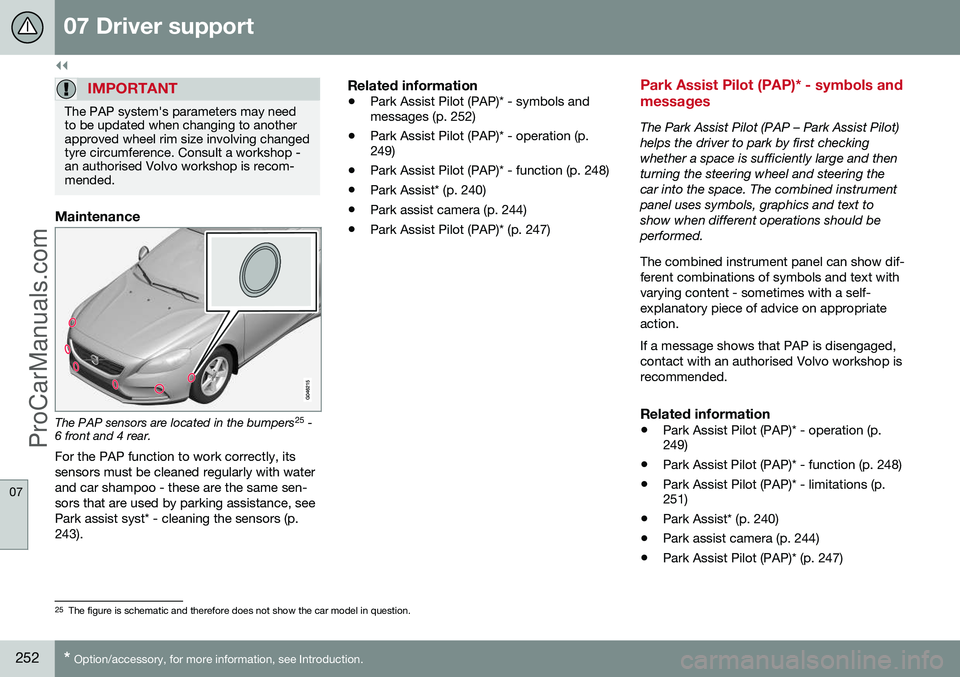
The PAP sensors are located in the bumpers 25
-
6 front and 4 rear.
For the PAP function to work correctly, its sensors must be cleaned regularly with waterand car shampoo - these are the same sen-sors that are used by parking assistance, seePark assist syst* - cleaning the sensors (p.243).
Related information
• Park Assist Pilot (PAP)* - symbols and messages (p. 252)
• Park Assist Pilot (PAP)* - operation (p.249)
• Park Assist Pilot (PAP)* - function (p. 248)
• Park Assist* (p. 240)
• Park assist camera (p. 244)
• Park Assist Pilot (PAP)* (p. 247)
Park Assist Pilot (PAP)* - symbols and messages
The Park Assist Pilot (PAP – Park Assist Pilot) helps the driver to park by first checkingwhether a space is sufficiently large and thenturning the steering wheel and steering thecar into the space. The combined instrumentpanel uses symbols, graphics and text toshow when different operations should beperformed. The combined instrument panel can show dif- ferent combinations of symbols and text withvarying content - sometimes with a self-explanatory piece of advice on appropriateaction. If a message shows that PAP is disengaged, contact with an authorised Volvo workshop isrecommended.
Related information
•
Park Assist Pilot (PAP)* - operation (p. 249)
• Park Assist Pilot (PAP)* - function (p. 248)
• Park Assist Pilot (PAP)* - limitations (p.251)
• Park Assist* (p. 240)
• Park assist camera (p. 244)
• Park Assist Pilot (PAP)* (p. 247)
25
The figure is schematic and therefore does not show the car model in question.
ProCarManuals.co’
Page 255 of 442
07 Driver support
07
* Option/accessory, for more information, see Introduction.253
BLIS* (Blind Spot Information System)
BLIS (Blind Spot Information System) is a function designed for providing support forthe driver when driving in dense traffic onroads with several lanes in the same direction. BLIS is a driver's aid intended to provide a warning about:
• vehicles in the car's blind spot
• rapidly approaching vehicles in the left and right-hand lanes closest to the car.
The BLIS function CTA (p. 255) (Cross Traffic Alert) is a driver's aid intended to provide awarning about:
• crossing traffic when the car is reversed.
WARNING
BLIS is a supplementary aid and does not work in all situations. BLIS is no substitute for a safe driving style and the use of rearview and door mir-rors. BLIS can never replace the driver's responsibility and attention - it is alwaysthe driver's responsibility to change lanesin a safe manner.
Overview
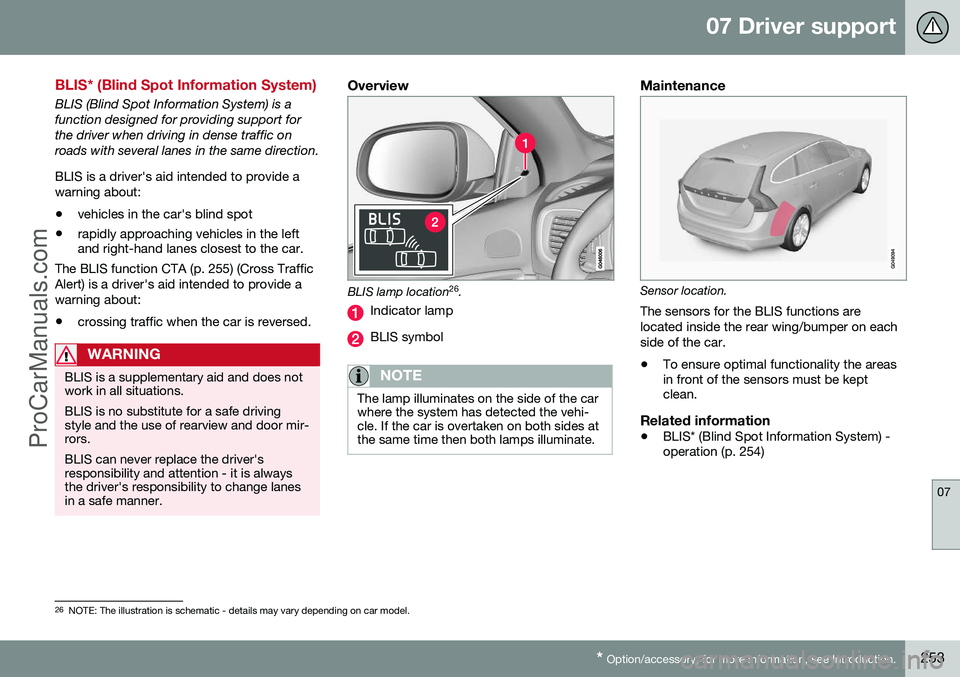
BLIS lamp location 26
.
Indicator lamp
BLIS symbol
NOTE
The lamp illuminates on the side of the car where the system has detected the vehi-cle. If the car is overtaken on both sides atthe same time then both lamps illuminate.
Maintenance
Sensor location.
The sensors for the BLIS functions are located inside the rear wing/bumper on eachside of the car.
• To ensure optimal functionality the areas in front of the sensors must be keptclean.
Related information
•BLIS* (Blind Spot Information System) -operation (p. 254)
26
NOTE: The illustration is schematic - details may vary depending on car model.
ProCarManuals.co’
Page 264 of 442
||
08 Starting and driving
08
262* Option/accessory, for more information, see Introduction.
Calibration and serviceThe Alcolock must be checked and calibrated at a workshop 2
every 12 months.
30 days before recalibration is necessary the combined instrument panel shows the mes- sage
Alcoguard Calibr. required. If calibra-
tion is not carried out within these 30 days then normal engine starting will be blocked -only starting with the Bypass function willthen be possible, see the following heading"Emergency situation". The message can be cleared by pressing the send button (3) once. Otherwise it goes outon its own after approx. 2 minutes but thenreappears each time the engine is started - only recalibration at a workshop 2
can clear
the message permanently.
Cold or hot weatherThe colder the weather the longer it takes before the Alcolock is ready for use:
Temperature (ºC)Maximum heat-
ing time (sec- onds)
+10 to +8510
-5 to +1060
-40 to -5180
At temperatures below -20 ºC or above +60 ºC the Alcolock requires additional powersupply. The combined instrument panel shows
Alcoguard insert power cable. In
which case, connect the power supply cable from the glovebox and wait until indicatorlamp (6) is green. In extremely cold weather the heating time can be reduced by taking the Alcolockindoors.
Emergency situationIn the event of an emergency situation or theAlcolock is out of order, it is possible tobypass the Alcolock in order to drive the car.
NOTE
All Bypass activation is logged and saved in memory, see Recording data (p. 16).
After the Bypass function has been activated the combined instrument panel shows
Alcoguard Bypass enabled the whole time
while driving and can only be reset by a work- shop 2
.
The Bypass function can be tested without the error message being logged - in whichcase, carry out all the steps without startingthe car. The error message is cleared whenthe car is locked. When the Alcolock is installed, either theBypass or Emergency function is selected asthe bypassing option. This setting can be changed afterwards at a workshop
2
.
Activating the Bypass function
• Depress and hold the left-hand stalk switch
OK button and the button for haz-
ard warning flashers simultaneously forapprox. 5 seconds - the combined instru- ment panel first shows
Bypass activated
Wait 1 minute and then Alcoguard
Bypass enabled - after which the engine
can be started.
This function can be activated several times. The error message shown during driving can only be cleared at a workshop 2
.
Activating the Emergency function • Depress and hold the left-hand stalk switch
OK button and the button for haz-
ard warning flashers simultaneously forapprox. 5 seconds - the combined instru- ment panel shows
Alcoguard Bypass
enabled and the engine can be started.
This function can be used once, after which a reset must be made at a workshop 2
.
Related information
• Alcolock* - functions and operation (p. 259)
• Alcolock* - storage (p. 260)
2
An authorised Volvo workshop is recommended.
ProCarManuals.co’
Page 274 of 442
||
08 Starting and driving
08
272* Option/accessory, for more information, see Introduction.
Reverse gear inhibitorThe reverse gear inhibitor hinders the possi- bility of mistakenly attempting to engagereverse gear during normal forward travel.
• Follow the gearing pattern printed on the gear lever and start from neutral position,N
before moving it to R position.
• Engage reverse gear only when the car isstationary.
NOTE
With the upper variant of the shifting pat- tern for 6-speed gearbox (see previousillustration) -
first press down the gear
lever in the N position in order to engage
reverse gear.
Related information
• Gearboxes (p. 271)
• Transmission fluid - grade and volume (p. 399)
Gear shift indicator*
The gear shift indicator notifies the driver when it is appropriate to engage the nexthigher or lower gear. An essential detail inconnection with environmental driving is todrive in the right gear and to change gear inplenty of time.
Manual gearboxGear shift indicator for man-ual gearbox. Only onemarker is illuminated at atime - during normal drivingit is only illuminated in thecentre.
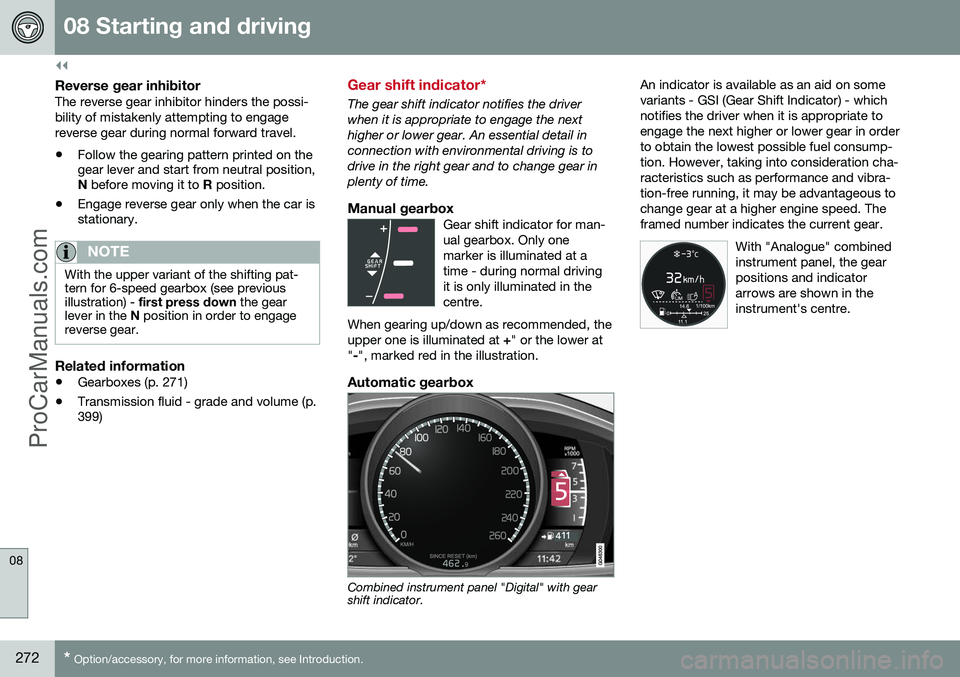
When gearing up/down as recommended, theupper one is illuminated at +" or the lower at
" -", marked red in the illustration.
Automatic gearbox
Combined instrument panel "Digital" with gear shift indicator. An indicator is available as an aid on some variants - GSI (Gear Shift Indicator) - whichnotifies the driver when it is appropriate toengage the next higher or lower gear in orderto obtain the lowest possible fuel consump-tion. However, taking into consideration cha-racteristics such as performance and vibra- tion-free running, it may be advantageous tochange gear at a higher engine speed. Theframed number indicates the current gear.
With "Analogue" combinedinstrument panel, the gearpositions and indicatorarrows are shown in theinstrument's centre.
ProCarManuals.co’