engine VOLVO V60 2014 User Guide
[x] Cancel search | Manufacturer: VOLVO, Model Year: 2014, Model line: V60, Model: VOLVO V60 2014Pages: 442, PDF Size: 13.85 MB
Page 63 of 442
03 Instruments and controls
03
}}
* Option/accessory, for more information, see Introduction.61
Gauges and indicators, digital instrument panel
Alternative themes can be selected for the digital combined instrument panel. Possiblethemes are "Elegance", "Eco" and"Performance". The setting for the theme canbe stored in the remote control key's memorywhen locking the car; see pages Remote con-trol key with key blade (p. 149) and MY CAR(p. 103). A theme can only be selected when the engine is running. To select the theme, press the left-hand stalk switch's OK button and then select the
Themes menu option by turning the thumb-
wheel on the lever. Confirm your choice by pressing the OK button. For more information
on menus, see Menu navigation - combinedinstrument panel (p. 100). The appearance of the centre console's screen follows the combined instrument pan-el's theme setting on certain model variants.
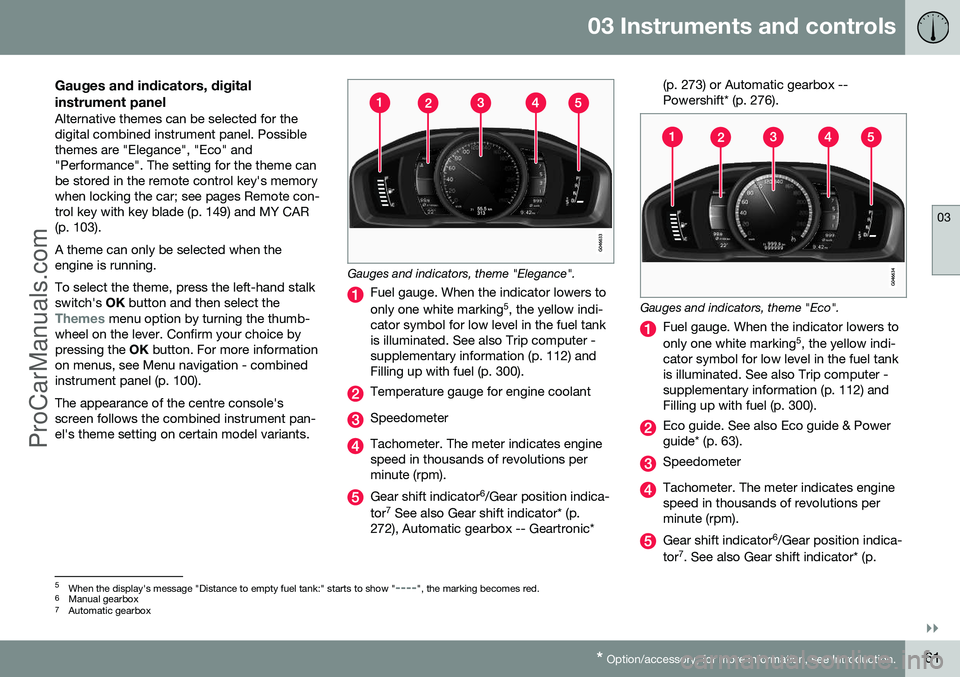
Gauges and indicators, theme "Elegance".
Fuel gauge. When the indicator lowers to only one white marking 5
, the yellow indi-
cator symbol for low level in the fuel tank is illuminated. See also Trip computer -supplementary information (p. 112) andFilling up with fuel (p. 300).
Temperature gauge for engine coolant
Speedometer
Tachometer. The meter indicates engine speed in thousands of revolutions perminute (rpm).
Gear shift indicator 6
/Gear position indica-
tor 7
See also Gear shift indicator* (p.
272), Automatic gearbox -- Geartronic* (p. 273) or Automatic gearbox -- Powershift* (p. 276).
Gauges and indicators, theme "Eco".
Fuel gauge. When the indicator lowers to only one white marking
5
, the yellow indi-
cator symbol for low level in the fuel tank is illuminated. See also Trip computer -supplementary information (p. 112) andFilling up with fuel (p. 300).
Eco guide. See also Eco guide & Power guide* (p. 63).
Speedometer
Tachometer. The meter indicates engine speed in thousands of revolutions perminute (rpm).
Gear shift indicator 6
/Gear position indica-
tor 7
. See also Gear shift indicator* (p.
5 When the display's message "Distance to empty fuel tank:" starts to show "----", the marking becomes red.
6 Manual gearbox
7 Automatic gearbox
ProCarManuals.co’
Page 64 of 442
||
03 Instruments and controls
03
62* Option/accessory, for more information, see Introduction.
272), Automatic gearbox -- Geartronic* (p. 273) or Automatic gearbox --Powershift* (p. 276).
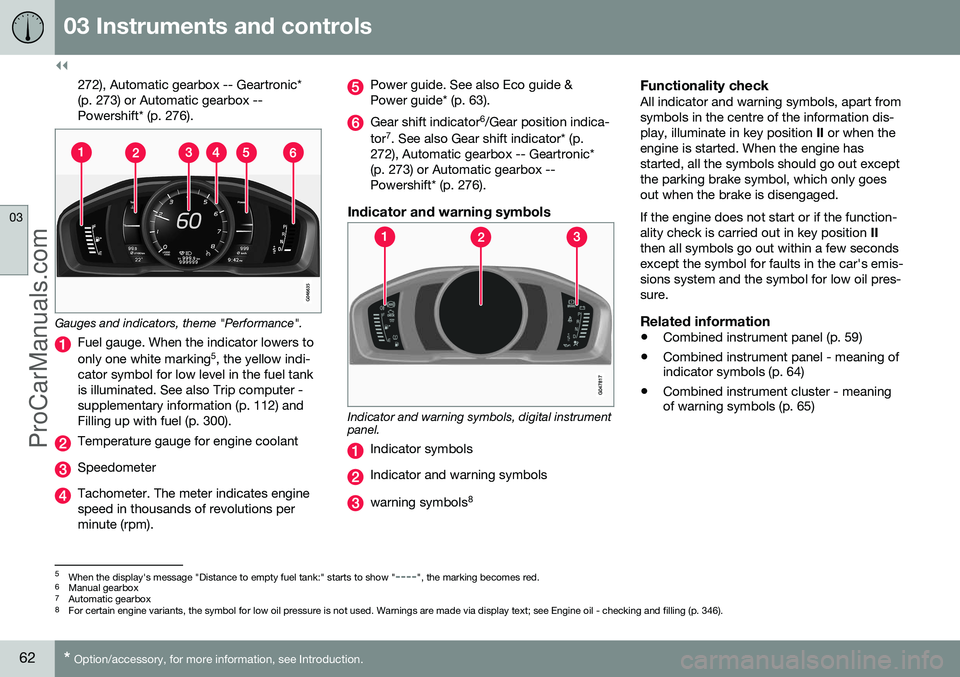
Gauges and indicators, theme "Performance".
Fuel gauge. When the indicator lowers to only one white marking 5
, the yellow indi-
cator symbol for low level in the fuel tank is illuminated. See also Trip computer -supplementary information (p. 112) andFilling up with fuel (p. 300).
Temperature gauge for engine coolant
Speedometer
Tachometer. The meter indicates engine speed in thousands of revolutions perminute (rpm).
Power guide. See also Eco guide & Power guide* (p. 63).
Gear shift indicator 6
/Gear position indica-
tor 7
. See also Gear shift indicator* (p.
272), Automatic gearbox -- Geartronic* (p. 273) or Automatic gearbox --Powershift* (p. 276).
Indicator and warning symbols
Indicator and warning symbols, digital instrument panel.
Indicator symbols
Indicator and warning symbols
warning symbols 8
Functionality checkAll indicator and warning symbols, apart from symbols in the centre of the information dis-play, illuminate in key position
II or when the
engine is started. When the engine hasstarted, all the symbols should go out exceptthe parking brake symbol, which only goesout when the brake is disengaged. If the engine does not start or if the function- ality check is carried out in key position II
then all symbols go out within a few secondsexcept the symbol for faults in the car's emis-sions system and the symbol for low oil pres-sure.
Related information
• Combined instrument panel (p. 59)
• Combined instrument panel - meaning of indicator symbols (p. 64)
• Combined instrument cluster - meaningof warning symbols (p. 65)
5
When the display's message "Distance to empty fuel tank:" starts to show "----", the marking becomes red.
6 Manual gearbox
7 Automatic gearbox
8 For certain engine variants, the symbol for low oil pressure is not used. Warnings are made via display text; see Engine oil - checking and filling (p. 346).
ProCarManuals.co’
Page 65 of 442
03 Instruments and controls
03
* Option/accessory, for more information, see Introduction.63
Eco guide & Power guide*
Eco guide and Power guide are two com- bined instrument panel (p. 59) instrumentswhich help the driver to drive the car withoptimum driving economy. The car also stores statistics of journeys made, which can be viewed in the form of ablock diagram; see Trip computer - trip statis-tics* (p. 113).
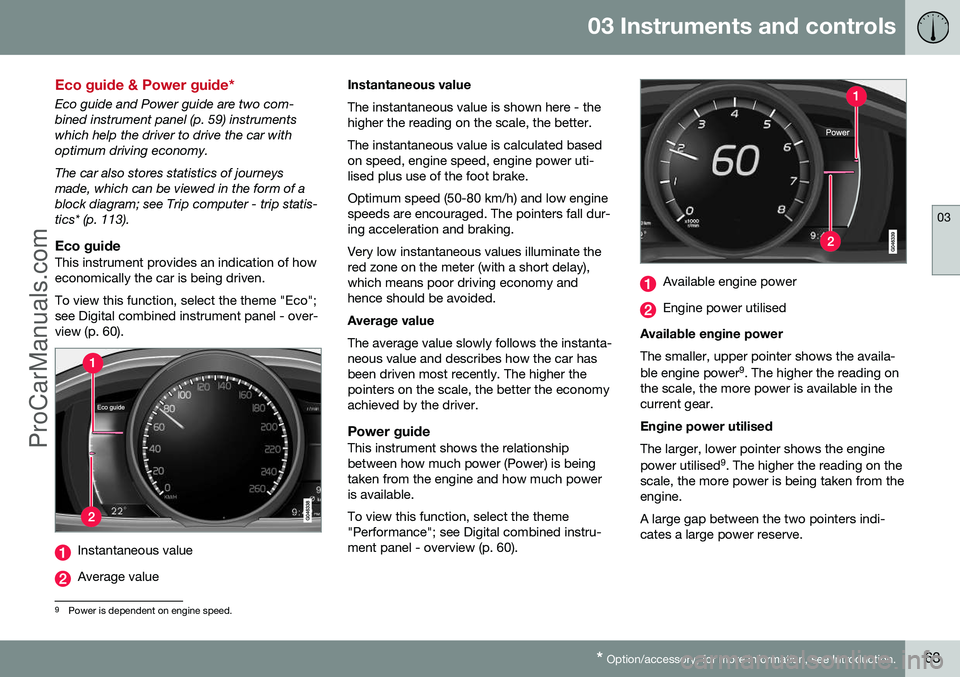
Eco guideThis instrument provides an indication of howeconomically the car is being driven. To view this function, select the theme "Eco"; see Digital combined instrument panel - over-view (p. 60).
Instantaneous value
Average value Instantaneous value The instantaneous value is shown here - the higher the reading on the scale, the better. The instantaneous value is calculated based on speed, engine speed, engine power uti-lised plus use of the foot brake. Optimum speed (50-80 km/h) and low engine speeds are encouraged. The pointers fall dur-ing acceleration and braking. Very low instantaneous values illuminate the red zone on the meter (with a short delay),which means poor driving economy andhence should be avoided. Average value The average value slowly follows the instanta- neous value and describes how the car hasbeen driven most recently. The higher thepointers on the scale, the better the economyachieved by the driver.
Power guideThis instrument shows the relationshipbetween how much power (Power) is beingtaken from the engine and how much poweris available. To view this function, select the theme "Performance"; see Digital combined instru-ment panel - overview (p. 60).
Available engine power
Engine power utilised
Available engine power The smaller, upper pointer shows the availa- ble engine power 9
. The higher the reading on
the scale, the more power is available in the current gear. Engine power utilised The larger, lower pointer shows the engine power utilised 9
. The higher the reading on the
scale, the more power is being taken from the engine. A large gap between the two pointers indi- cates a large power reserve.
9 Power is dependent on engine speed.
ProCarManuals.co’
Page 66 of 442
03 Instruments and controls
03
64* Option/accessory, for more information, see Introduction.
Combined instrument panel - meaning of indicator symbols
The indicator symbols alert the driver that a function is activated, that the system is oper-ating, or that an error or failure has occurred.
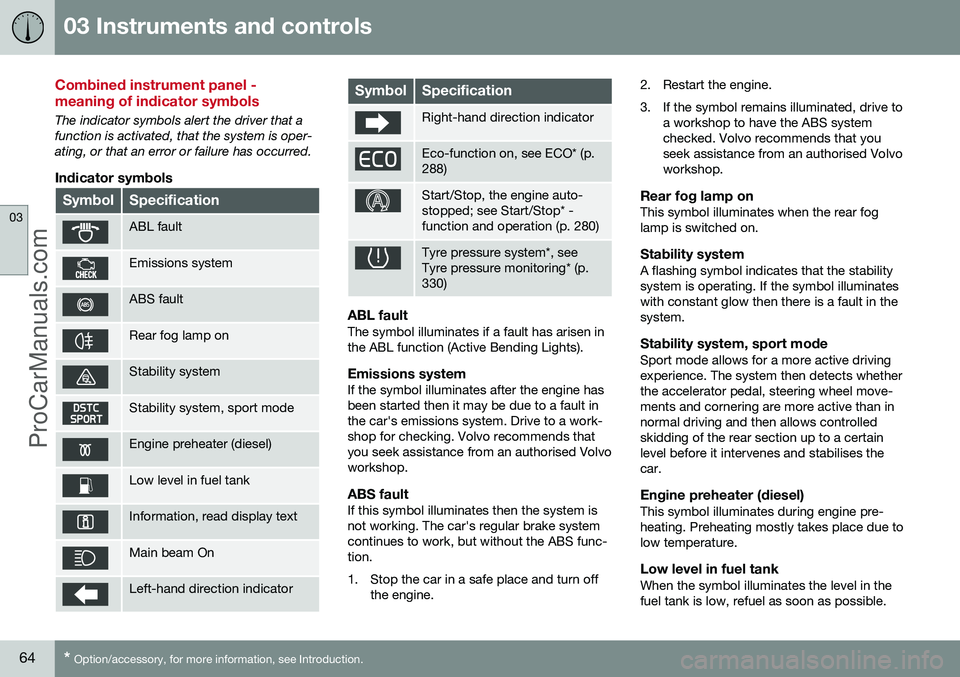
Indicator symbols
SymbolSpecification
ABL fault
Emissions system
ABS fault
Rear fog lamp on
Stability system
Stability system, sport mode
Engine preheater (diesel)
Low level in fuel tank
Information, read display text
Main beam On
Left-hand direction indicator
SymbolSpecification
Right-hand direction indicator
Eco-function on, see ECO* (p. 288)
Start/Stop, the engine auto- stopped; see Start/Stop* -function and operation (p. 280)
Tyre pressure system*, see Tyre pressure monitoring* (p.330)
ABL faultThe symbol illuminates if a fault has arisen in the ABL function (Active Bending Lights).
Emissions systemIf the symbol illuminates after the engine hasbeen started then it may be due to a fault inthe car's emissions system. Drive to a work-shop for checking. Volvo recommends thatyou seek assistance from an authorised Volvoworkshop.
ABS faultIf this symbol illuminates then the system isnot working. The car's regular brake systemcontinues to work, but without the ABS func-tion.
1. Stop the car in a safe place and turn off
the engine. 2. Restart the engine.
3. If the symbol remains illuminated, drive to
a workshop to have the ABS system checked. Volvo recommends that youseek assistance from an authorised Volvoworkshop.
Rear fog lamp onThis symbol illuminates when the rear foglamp is switched on.
Stability systemA flashing symbol indicates that the stabilitysystem is operating. If the symbol illuminateswith constant glow then there is a fault in thesystem.
Stability system, sport modeSport mode allows for a more active drivingexperience. The system then detects whetherthe accelerator pedal, steering wheel move-ments and cornering are more active than innormal driving and then allows controlledskidding of the rear section up to a certainlevel before it intervenes and stabilises thecar.
Engine preheater (diesel)This symbol illuminates during engine pre-heating. Preheating mostly takes place due tolow temperature.
Low level in fuel tankWhen the symbol illuminates the level in thefuel tank is low, refuel as soon as possible.
ProCarManuals.co’
Page 67 of 442
03 Instruments and controls
03
65
Information, read display textWhen one of the car's systems does not behave as intended, this information symbolilluminates and a text appears on the informa-tion display. The message text is cleared withthe OK button, see Menu navigation - com-
bined instrument panel (p. 100), or it disap-pears automatically after a time (timedepending on which function is indicated).The information symbol can also illuminate inconjunction with other symbols.
NOTE
When a service message is shown, the symbol and message are cleared using theOK button, or disappear automatically
after a time.
Main beam OnThe symbol illuminates when main beam is on and with main beam flash.
Left/right-hand direction indicatorBoth direction indicator symbols flash whenthe hazard warning flashers are used.
Eco function onThe symbol illuminates when the Eco functionis activated.
Start/StopThe symbol shines when the engine is auto-stopped.
Tyre pressure systemThe symbol illuminates in the event of lowtyre pressure, or if a fault arises in the tyrepressure system.
Related information
• Combined instrument panel (p. 59)
• Combined instrument cluster - meaning of warning symbols (p. 65)
• Digital combined instrument panel - over-view (p. 60)
Combined instrument cluster - meaning of warning symbols
The warning symbols alert the driver that an important function is activated, or that a seri-ous error or a serious failure has occurred.
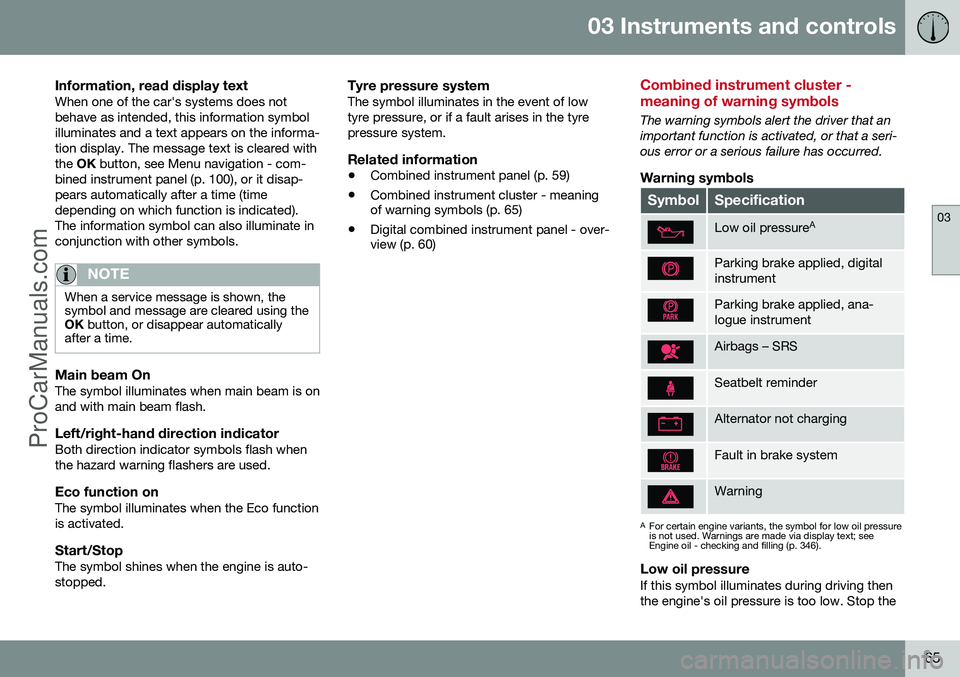
Warning symbols
SymbolSpecification
Low oil pressure A
Parking brake applied, digital instrument
Parking brake applied, ana- logue instrument
Airbags – SRS
Seatbelt reminder
Alternator not charging
Fault in brake system
Warning
A
For certain engine variants, the symbol for low oil pressure is not used. Warnings are made via display text; seeEngine oil - checking and filling (p. 346).
Low oil pressureIf this symbol illuminates during driving then the engine's oil pressure is too low. Stop the
ProCarManuals.co’
Page 68 of 442
||
03 Instruments and controls
03
66
engine immediately and check the engine oil level, top up if necessary. If the symbol illumi-nates and the oil level is normal, contact aworkshop. Volvo recommends that you seekassistance from an authorised Volvo work-shop.
Parking brake appliedThis symbol illuminates with a constant glowwhen the parking brake is applied. The sym-bol flashes during application, and thenchanges over to a constant glow. A flashing symbol in any other situation means that a fault has arisen. Read the mes-sage on the information display. For more information, see Parking brake (p. 293).
Airbags – SRSIf this symbol remains illuminated or illumi-nates while driving, it means a fault has beendetected in the seatbelt buckle, SRS, SIPS, orIC systems. Drive immediately to a workshopto have the system checked. Volvo recom-mends that you seek assistance from anauthorised Volvo workshop.
Seatbelt reminderThis symbol flashes if someone in a front seathas not put on their seatbelt or if someone ina rear seat has taken off their seatbelt.
Alternator not chargingThis symbol illuminates during driving if afault has occurred in the electrical system.Visit a workshop. Volvo recommends that youseek assistance from an authorised Volvoworkshop.
Fault in brake systemIf this symbol illuminates, the brake fluid levelmay be too low. Stop the car in a safe placeand check the level in the brake fluid reser-voir; see Brake and clutch fluid - level (p.350). If the brake and ABS symbols illuminate at the same time, there may be a fault in thebrake force distribution system.
1. Stop the car in a safe place and turn offthe engine.
2. Restart the engine.
•If both symbols extinguish, continue driving.
• If the symbols remain illuminated,check the level in the brake fluid reser-voir, see Brake and clutch fluid - level(p. 350). If the brake fluid level is nor-mal but the symbols are still illumi-nated, the car can be driven, with greatcare, to a workshop to have the brakesystem checked. Volvo recommendsthat you seek assistance from anauthorised Volvo workshop.
WARNING
If the brake fluid is under the
MIN level in
the brake fluid reservoir, do not drive fur- ther before topping up the brake fluid. The loss of brake fluid must be investiga- ted by a workshop. Volvo recommendsthat you contact an authorised Volvoworkshop.
WARNING
If the BRAKE and ABS symbols are lit at the same time, there is a risk that the rearend will skid during heavy braking.
WarningThe red warning symbol illuminates when a fault has been indicated which could affectthe safety and/or driveability of the car. Anexplanatory text is shown on the informationdisplay at the same time. The symbol remainsvisible until the fault has been rectified but thetext message can be cleared with the OK
button; see Menu navigation - combinedinstrument panel (p. 100). The warning sym-bol can also illuminate in conjunction withother symbols. Action:
1. Stop in a safe place. Do not drive the car further.
ProCarManuals.co’
Page 72 of 442
03 Instruments and controls
03
70* Option/accessory, for more information, see Introduction.
Key positions
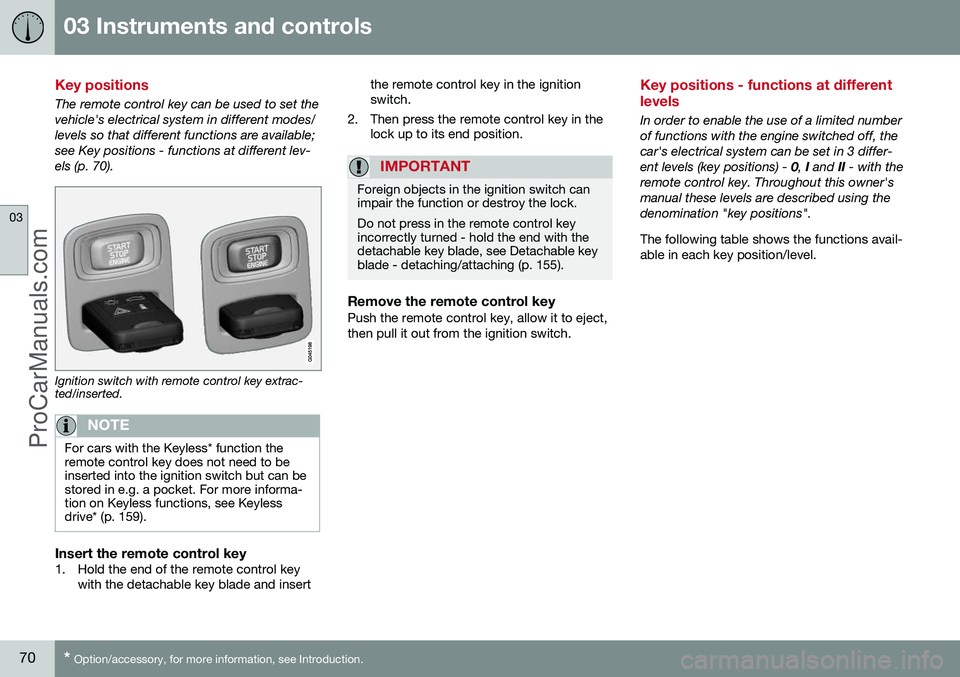
The remote control key can be used to set the vehicle's electrical system in different modes/levels so that different functions are available;see Key positions - functions at different lev-els (p. 70).
Ignition switch with remote control key extrac- ted/inserted.
NOTE
For cars with the Keyless* function the remote control key does not need to beinserted into the ignition switch but can bestored in e.g. a pocket. For more informa-tion on Keyless functions, see Keylessdrive* (p. 159).
Insert the remote control key1. Hold the end of the remote control key
with the detachable key blade and insert the remote control key in the ignition switch.
2. Then press the remote control key in the lock up to its end position.
IMPORTANT
Foreign objects in the ignition switch can impair the function or destroy the lock. Do not press in the remote control key incorrectly turned - hold the end with thedetachable key blade, see Detachable keyblade - detaching/attaching (p. 155).
Remove the remote control keyPush the remote control key, allow it to eject, then pull it out from the ignition switch.
Key positions - functions at different levels
In order to enable the use of a limited number of functions with the engine switched off, thecar's electrical system can be set in 3 differ-ent levels (key positions) - 0, I and II - with the
remote control key. Throughout this owner'smanual these levels are described using thedenomination "key positions". The following table shows the functions avail- able in each key position/level.
ProCarManuals.co’
Page 73 of 442
03 Instruments and controls
03
* Option/accessory, for more information, see Introduction.71
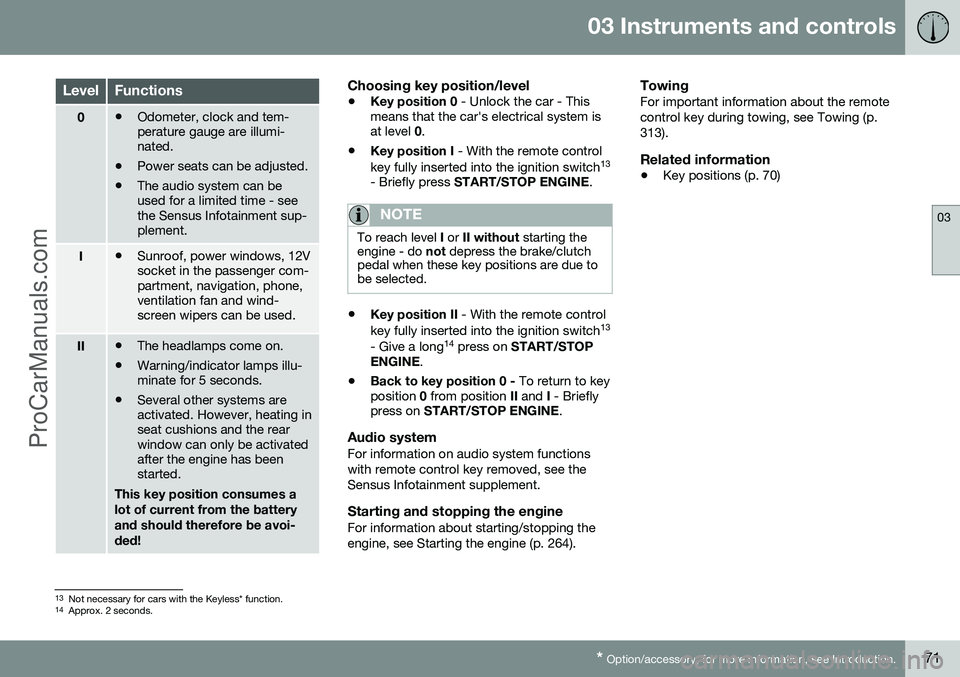
LevelFunctions
0• Odometer, clock and tem- perature gauge are illumi-nated.
• Power seats can be adjusted.
• The audio system can beused for a limited time - seethe Sensus Infotainment sup-plement.
I•Sunroof, power windows, 12V socket in the passenger com-partment, navigation, phone,ventilation fan and wind-screen wipers can be used.
II•The headlamps come on.
• Warning/indicator lamps illu- minate for 5 seconds.
• Several other systems areactivated. However, heating inseat cushions and the rearwindow can only be activatedafter the engine has beenstarted.
This key position consumes a lot of current from the batteryand should therefore be avoi-ded!
Choosing key position/level
• Key position 0
- Unlock the car - This
means that the car's electrical system is at level 0.
• Key position I
- With the remote control
key fully inserted into the ignition switch 13
- Briefly press START/STOP ENGINE .
NOTE
To reach level I or II without starting the
engine - do not depress the brake/clutch
pedal when these key positions are due to be selected.
• Key position II
- With the remote control
key fully inserted into the ignition switch 13
- Give a long 14
press on START/STOP
ENGINE .
• Back to key position 0 -
To return to key
position 0 from position II and I - Briefly
press on START/STOP ENGINE .
Audio systemFor information on audio system functions with remote control key removed, see theSensus Infotainment supplement.
Starting and stopping the engineFor information about starting/stopping theengine, see Starting the engine (p. 264).
TowingFor important information about the remotecontrol key during towing, see Towing (p.313).
Related information
•Key positions (p. 70)
13
Not necessary for cars with the Keyless* function.
14 Approx. 2 seconds.
ProCarManuals.co’
Page 75 of 442

03 Instruments and controls
03
* Option/accessory, for more information, see Introduction.73
Seats, front - electrically operated
The car's front seats have different setting options for optimum seating comfort. Thepower seat can be moved forward/backwardand up/down. The front edge of the seatcushion can be raised/lowered. The backrestangle can be changed.
Power seat*
Front edge of seat cushion up/down
Seat forward/backward and up/down
Backrest rake
The power front seats have overload protec- tion which is tripped if a seat is blocked by anobject. If this happens, go to key position I or
0 and wait a short time before adjusting the
seat again. Only one movement (forward/back/up/down) can be made at a time.
PreparationsThe seats can be adjusted for a certain timeafter unlocking the door with the remote con-trol key without the key in the ignition switch.Seat adjustment is normally made in keyposition I and can always be made when the
engine is running.
Seat with memory function*
The memory function stores settings for the seat and the door mirrors.
Store settingMemory button
Memory button
Memory button
Button for storing settings
1. Adjust the seat and the door mirrors. 2. Hold the button depressed to store set-
tings while depressing one of the memory buttons.
Using a stored settingHold one of the memory buttons depresseduntil the seat and the door mirrors stop. If yourelease the button then the movement of theseat will stop.
Heated seatsFor heated seats, see Heated front seats* (p.122) and Heated rear seat* (p. 122).
Related information
• Seats, front (p. 72)
• Seats, rear (p. 74)
ProCarManuals.co’
Page 79 of 442
03 Instruments and controls
03
* Option/accessory, for more information, see Introduction.77
3. Push back the lever to fix the steering
wheel in place. If the lever is stiff, press the steering wheel lightly at the same timeas you push the lever back.
WARNING
Adjust the steering wheel and fix it before driving away.
With speed related power steering* the level of steering force can be adjusted, see Adjust-able steering force* (p. 257).
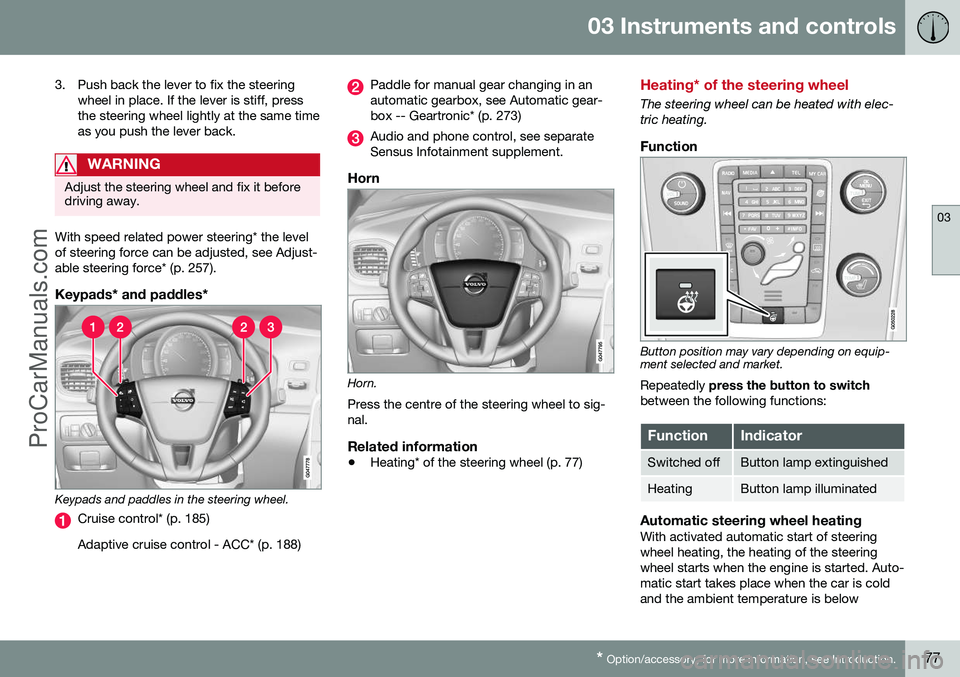
Keypads* and paddles*
Keypads and paddles in the steering wheel.
Cruise control* (p. 185) Adaptive cruise control - ACC* (p. 188)
Paddle for manual gear changing in an automatic gearbox, see Automatic gear-box -- Geartronic* (p. 273)
Audio and phone control, see separate Sensus Infotainment supplement.
Horn
Horn. Press the centre of the steering wheel to sig- nal.
Related information
• Heating* of the steering wheel (p. 77)
Heating* of the steering wheel
The steering wheel can be heated with elec- tric heating.
Function
Button position may vary depending on equip- ment selected and market.
Repeatedly press the button to switch
between the following functions:
FunctionIndicator
Switched offButton lamp extinguished
HeatingButton lamp illuminated
Automatic steering wheel heatingWith activated automatic start of steering wheel heating, the heating of the steeringwheel starts when the engine is started. Auto-matic start takes place when the car is coldand the ambient temperature is below
ProCarManuals.co’