keyless VOLVO V60 2014 User Guide
[x] Cancel search | Manufacturer: VOLVO, Model Year: 2014, Model line: V60, Model: VOLVO V60 2014Pages: 442, PDF Size: 13.85 MB
Page 163 of 442
06 Locks and alarm
06
* Option/accessory, for more information, see Introduction.161
Keyless drive* - locking
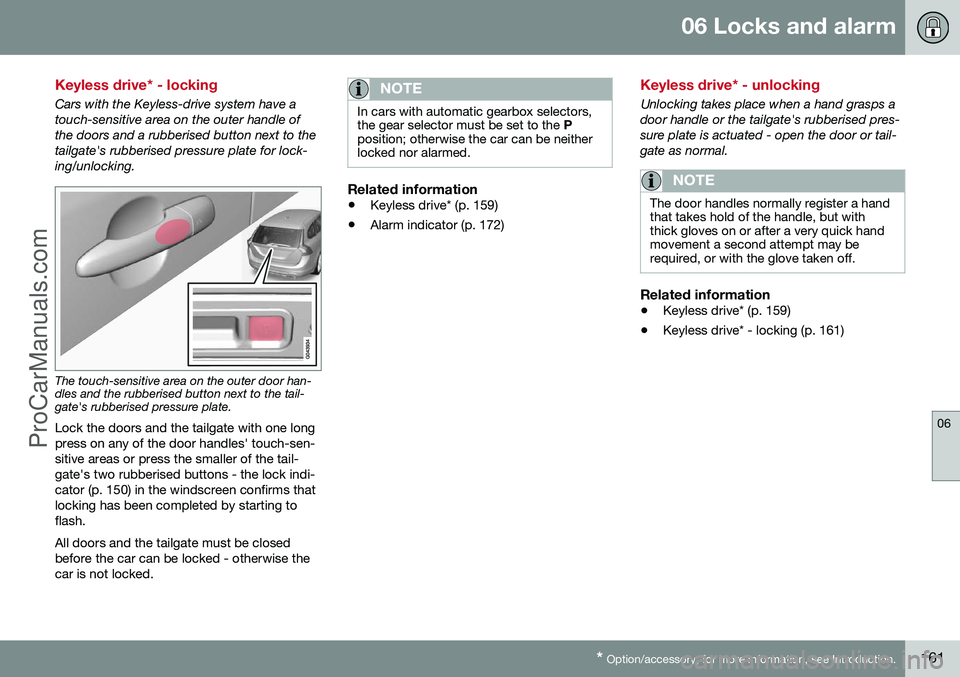
Cars with the Keyless-drive system have a touch-sensitive area on the outer handle ofthe doors and a rubberised button next to thetailgate's rubberised pressure plate for lock-ing/unlocking.
The touch-sensitive area on the outer door han- dles and the rubberised button next to the tail-gate's rubberised pressure plate.
Lock the doors and the tailgate with one long press on any of the door handles' touch-sen-sitive areas or press the smaller of the tail-gate's two rubberised buttons - the lock indi-cator (p. 150) in the windscreen confirms thatlocking has been completed by starting toflash. All doors and the tailgate must be closed before the car can be locked - otherwise thecar is not locked.
NOTE
In cars with automatic gearbox selectors, the gear selector must be set to the P
position; otherwise the car can be neitherlocked nor alarmed.
Related information
• Keyless drive* (p. 159)
• Alarm indicator (p. 172)
Keyless drive* - unlocking
Unlocking takes place when a hand grasps a door handle or the tailgate's rubberised pres-sure plate is actuated - open the door or tail-gate as normal.
NOTE
The door handles normally register a hand that takes hold of the handle, but withthick gloves on or after a very quick handmovement a second attempt may berequired, or with the glove taken off.
Related information
•
Keyless drive* (p. 159)
• Keyless drive* - locking (p. 161)
ProCarManuals.co’
Page 164 of 442
06 Locks and alarm
06
162* Option/accessory, for more information, see Introduction.
Keyless drive* - unlocking with the key blade
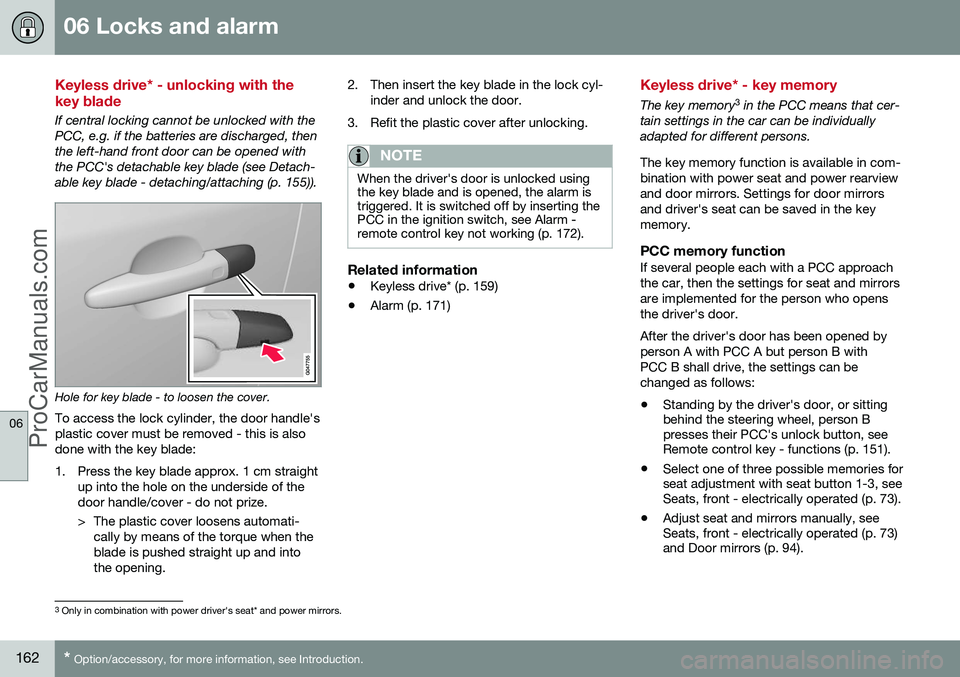
If central locking cannot be unlocked with the PCC, e.g. if the batteries are discharged, thenthe left-hand front door can be opened withthe PCC's detachable key blade (see Detach-able key blade - detaching/attaching (p. 155)).
Hole for key blade - to loosen the cover.
To access the lock cylinder, the door handle's plastic cover must be removed - this is alsodone with the key blade:
1. Press the key blade approx. 1 cm straight up into the hole on the underside of the door handle/cover - do not prize.
> The plastic cover loosens automati-cally by means of the torque when the blade is pushed straight up and intothe opening. 2. Then insert the key blade in the lock cyl-
inder and unlock the door.
3. Refit the plastic cover after unlocking.
NOTE
When the driver's door is unlocked using the key blade and is opened, the alarm istriggered. It is switched off by inserting thePCC in the ignition switch, see Alarm -remote control key not working (p. 172).
Related information
• Keyless drive* (p. 159)
• Alarm (p. 171)
Keyless drive* - key memory
The key memory 3
in the PCC means that cer-
tain settings in the car can be individually adapted for different persons. The key memory function is available in com- bination with power seat and power rearviewand door mirrors. Settings for door mirrorsand driver's seat can be saved in the keymemory.
PCC memory functionIf several people each with a PCC approachthe car, then the settings for seat and mirrorsare implemented for the person who opensthe driver's door. After the driver's door has been opened by person A with PCC A but person B withPCC B shall drive, the settings can bechanged as follows:
• Standing by the driver's door, or sitting behind the steering wheel, person Bpresses their PCC's unlock button, seeRemote control key - functions (p. 151).
• Select one of three possible memories forseat adjustment with seat button 1-3, seeSeats, front - electrically operated (p. 73).
• Adjust seat and mirrors manually, seeSeats, front - electrically operated (p. 73)and Door mirrors (p. 94).
3
Only in combination with power driver's seat* and power mirrors.
ProCarManuals.co’
Page 165 of 442
06 Locks and alarm
06
* Option/accessory, for more information, see Introduction.163
Related information
• Keyless drive* (p. 159)
• Remote control key - functions (p. 151)
Keyless drive* - lock settings
Lock settings for the Keyless function can be adapted. Lock settings for the Keyless function can be adapted by indicating in the menu system forMY CAR
which doors are to be unlocked. For
a description of the menu system, see MYCAR (p. 103).
Related information
• Keyless drive* (p. 159)
Keyless drive* - antenna location
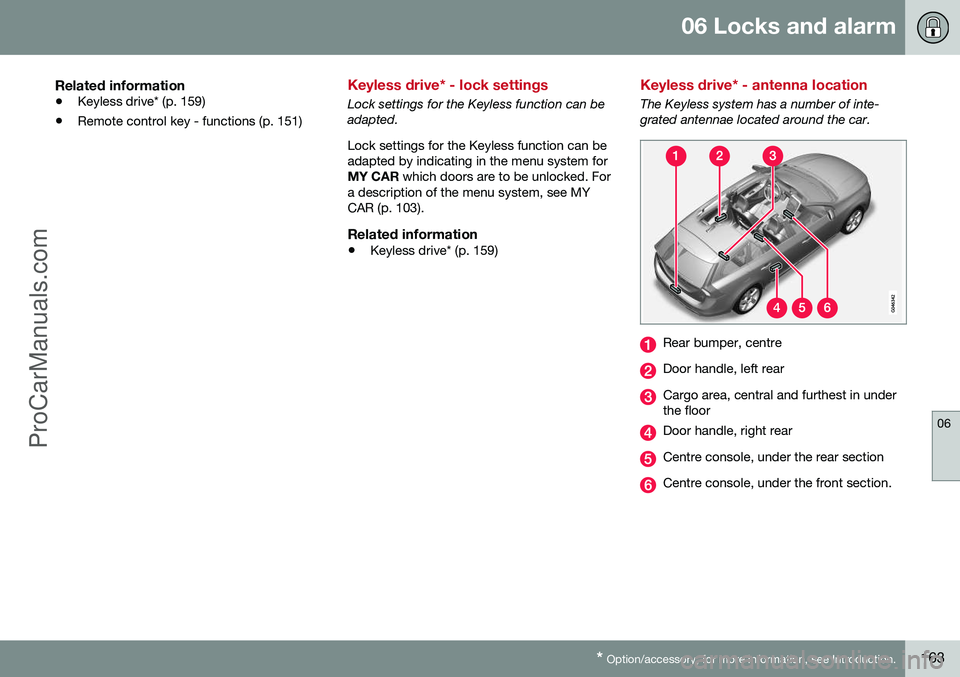
The Keyless system has a number of inte- grated antennae located around the car.
Rear bumper, centre
Door handle, left rear
Cargo area, central and furthest in under the floor
Door handle, right rear
Centre console, under the rear section
Centre console, under the front section.
ProCarManuals.co’
Page 166 of 442
||
06 Locks and alarm
06
164* Option/accessory, for more information, see Introduction.
WARNING
People who have had a pacemaker opera- tion should not come closer than 22 cm tothe Keyless system's antennas with theirpacemaker. This is to prevent interferencebetween the pacemaker and the Keylesssystem.
Related information
• Keyless drive* (p. 159)
Locking/unlocking - from the outside
Locking/unlocking from the outside is carried out using the remote control key (p. 149). Theremote control key can lock/unlock all doorsand the tailgate simultaneously. Differentsequences for unlocking can be selected, seeRemote control key - functions (p. 151). In order that the lock sequence can be acti- vated, the driver's door must be closed - ifany of the other doors or the tailgate is open,then it/they is/are locked and the alarm isactivated only when it/they are closed. Withthe Keyless* system all the doors and tailgatemust be closed.
NOTE
Be aware of the risk of locking the remote control key in the car.
If it is not possible to lock/unlock with the remote control key, the battery may be dis-charged - lock or unlock the left-hand frontdoor with the detachable key blade, seeDetachable key blade - detaching/attaching(p. 155).
NOTE
Remember that the alarm is triggered when the door is opened after beingunlocked with the key blade - the alarm isswitched off when the remote control keyis inserted into the ignition switch.
WARNING
Be aware of the risk of being locked in the car when it is locked from the outsideusing the remote control key - it is then notpossible to open any of the doors from theinside with the door controls. For moreinformation, see Deadlocks* (p. 168).
Automatic relockingIf none of the doors or the tailgate is opened within two minutes of unlocking, all arelocked again automatically. This functionreduces the risk that the car is left unlockedunintentionally. (For cars with alarm, seeAlarm (p. 171).)
Related information
•Locking/unlocking - from the inside (p. 165)
• Locking/unlocking - from the outside (p.164)
ProCarManuals.co’
Page 167 of 442
06 Locks and alarm
06
* Option/accessory, for more information, see Introduction.165
Manual locking of the door
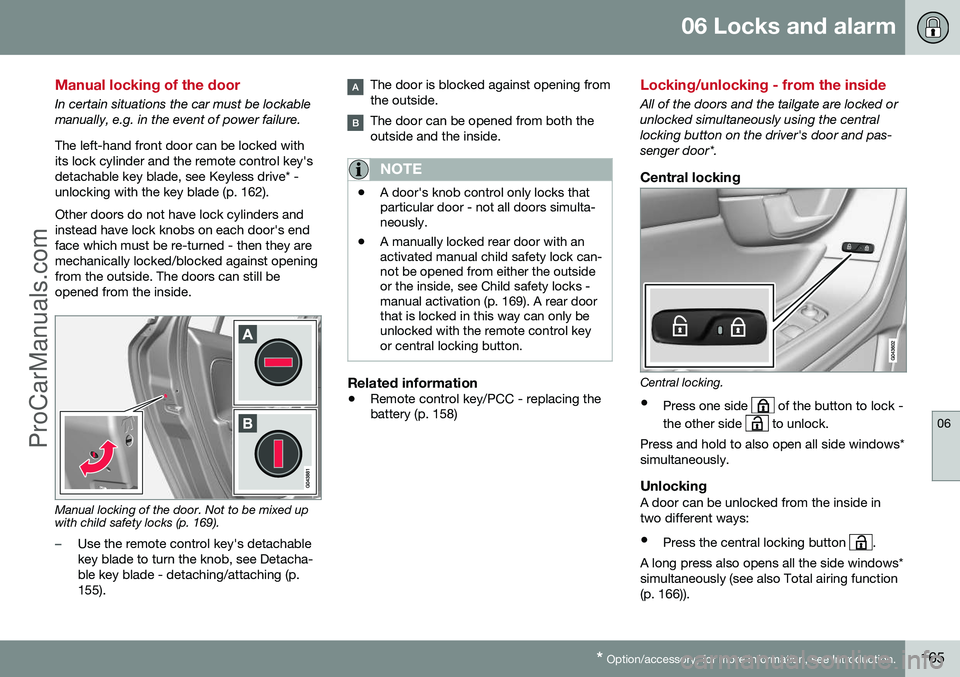
In certain situations the car must be lockable manually, e.g. in the event of power failure. The left-hand front door can be locked with its lock cylinder and the remote control key'sdetachable key blade, see Keyless drive* -unlocking with the key blade (p. 162). Other doors do not have lock cylinders and instead have lock knobs on each door's endface which must be re-turned - then they aremechanically locked/blocked against openingfrom the outside. The doors can still beopened from the inside.
Manual locking of the door. Not to be mixed up with child safety locks (p. 169).
–Use the remote control key's detachable key blade to turn the knob, see Detacha-ble key blade - detaching/attaching (p.155).
The door is blocked against opening from the outside.
The door can be opened from both the outside and the inside.
NOTE
• A door's knob control only locks that particular door - not all doors simulta-neously.
• A manually locked rear door with anactivated manual child safety lock can-not be opened from either the outsideor the inside, see Child safety locks -manual activation (p. 169). A rear doorthat is locked in this way can only beunlocked with the remote control keyor central locking button.
Related information
•
Remote control key/PCC - replacing the battery (p. 158)
Locking/unlocking - from the inside
All of the doors and the tailgate are locked or unlocked simultaneously using the centrallocking button on the driver's door and pas-senger door*.
Central locking
Central locking.
• Press one side
of the button to lock -
the other side
to unlock.
Press and hold to also open all side windows* simultaneously.
UnlockingA door can be unlocked from the inside intwo different ways:
• Press the central locking button
.
A long press also opens all the side windows* simultaneously (see also Total airing function(p. 166)).
ProCarManuals.co’
Page 170 of 442
||
06 Locks and alarm
06
168* Option/accessory, for more information, see Introduction.
The doors remain locked and armed.
• The tailgate is unlocked, but remains closed - press lightly on the rubberisedpressure plate under the outer handle andlift the tailgate.
If the tailgate is not opened within 2 minutes then it is relocked and the alarm is re-armed.
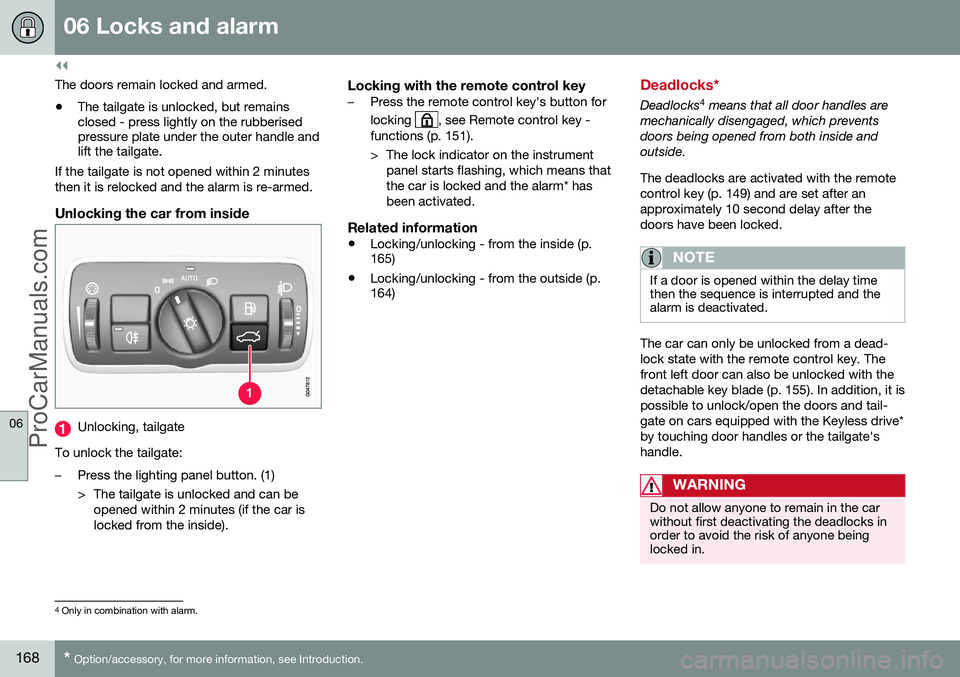
Unlocking the car from inside
Unlocking, tailgate
To unlock the tailgate:
–Press the lighting panel button. (1)
> The tailgate is unlocked and can be opened within 2 minutes (if the car is locked from the inside).
Locking with the remote control key–Press the remote control key's button for locking
, see Remote control key -
functions (p. 151).
> The lock indicator on the instrument panel starts flashing, which means that the car is locked and the alarm* hasbeen activated.
Related information
• Locking/unlocking - from the inside (p. 165)
• Locking/unlocking - from the outside (p.164)
Deadlocks*
Deadlocks 4
means that all door handles are
mechanically disengaged, which prevents doors being opened from both inside andoutside. The deadlocks are activated with the remote control key (p. 149) and are set after anapproximately 10 second delay after thedoors have been locked.
NOTE
If a door is opened within the delay time then the sequence is interrupted and thealarm is deactivated.
The car can only be unlocked from a dead- lock state with the remote control key. Thefront left door can also be unlocked with thedetachable key blade (p. 155). In addition, it ispossible to unlock/open the doors and tail-gate on cars equipped with the Keyless drive*by touching door handles or the tailgate'shandle.
WARNING
Do not allow anyone to remain in the car without first deactivating the deadlocks inorder to avoid the risk of anyone beinglocked in.
4 Only in combination with alarm.
ProCarManuals.co’
Page 171 of 442
06 Locks and alarm
06
* Option/accessory, for more information, see Introduction.169
Temporary deactivation
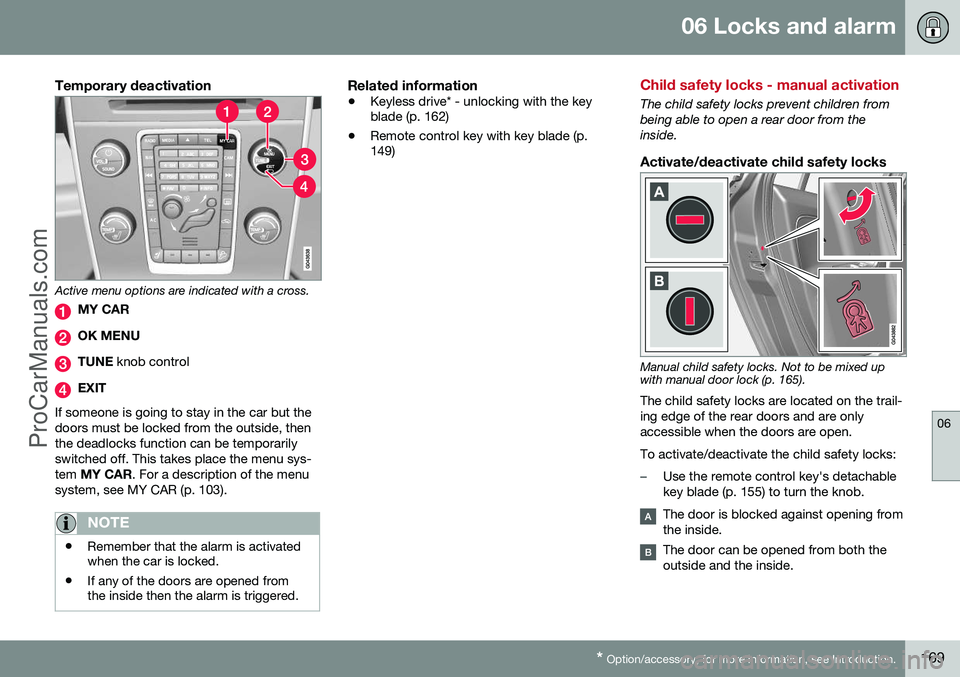
Active menu options are indicated with a cross.
MY CAR
OK MENU
TUNE knob control
EXIT
If someone is going to stay in the car but the doors must be locked from the outside, thenthe deadlocks function can be temporarilyswitched off. This takes place the menu sys-tem MY CAR . For a description of the menu
system, see MY CAR (p. 103).
NOTE
• Remember that the alarm is activated when the car is locked.
• If any of the doors are opened fromthe inside then the alarm is triggered.
Related information
•
Keyless drive* - unlocking with the key blade (p. 162)
• Remote control key with key blade (p.149)
Child safety locks - manual activation
The child safety locks prevent children from being able to open a rear door from theinside.
Activate/deactivate child safety locks
Manual child safety locks. Not to be mixed up with manual door lock (p. 165).
The child safety locks are located on the trail- ing edge of the rear doors and are onlyaccessible when the doors are open. To activate/deactivate the child safety locks:
–Use the remote control key's detachable key blade (p. 155) to turn the knob.
The door is blocked against opening from the inside.
The door can be opened from both the outside and the inside.
ProCarManuals.co’
Page 266 of 442
08 Starting and driving
08
264* Option/accessory, for more information, see Introduction.
Starting the engine
The engine is started and switched off using the remote control key and the START/STOP
ENGINE button.
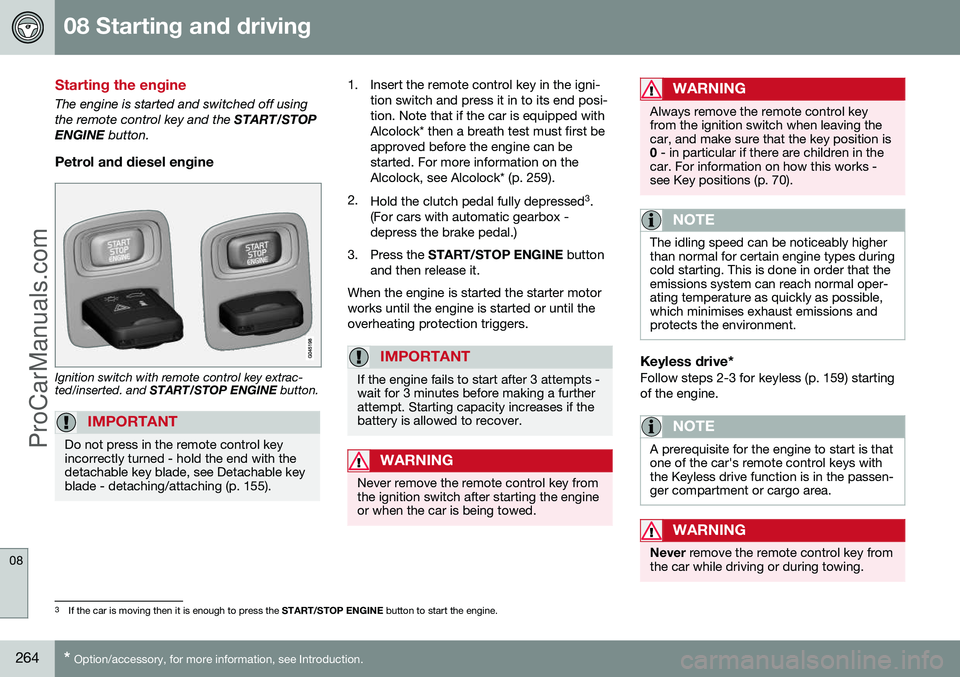
Petrol and diesel engine
Ignition switch with remote control key extrac- ted/inserted. and START/STOP ENGINE button.
IMPORTANT
Do not press in the remote control key incorrectly turned - hold the end with thedetachable key blade, see Detachable keyblade - detaching/attaching (p. 155).
1. Insert the remote control key in the igni-
tion switch and press it in to its end posi- tion. Note that if the car is equipped withAlcolock* then a breath test must first beapproved before the engine can bestarted. For more information on theAlcolock, see Alcolock* (p. 259).
2. Hold the clutch pedal fully depressed 3
.
(For cars with automatic gearbox -depress the brake pedal.)
3. Press the START/STOP ENGINE button
and then release it.
When the engine is started the starter motorworks until the engine is started or until theoverheating protection triggers.
IMPORTANT
If the engine fails to start after 3 attempts - wait for 3 minutes before making a furtherattempt. Starting capacity increases if thebattery is allowed to recover.
WARNING
Never remove the remote control key from the ignition switch after starting the engineor when the car is being towed.
WARNING
Always remove the remote control key from the ignition switch when leaving thecar, and make sure that the key position is0 - in particular if there are children in the
car. For information on how this works -see Key positions (p. 70).
NOTE
The idling speed can be noticeably higher than normal for certain engine types duringcold starting. This is done in order that theemissions system can reach normal oper-ating temperature as quickly as possible,which minimises exhaust emissions andprotects the environment.
Keyless drive*Follow steps 2-3 for keyless (p. 159) starting of the engine.
NOTE
A prerequisite for the engine to start is that one of the car's remote control keys withthe Keyless drive function is in the passen-ger compartment or cargo area.
WARNING
Never remove the remote control key from
the car while driving or during towing.
3 If the car is moving then it is enough to press the START/STOP ENGINE button to start the engine.
ProCarManuals.co’
Page 267 of 442
08 Starting and driving
08
265
Related information
•Switching off the engine (p. 265)
Switching off the engine
The engine is switched off using the
START/
STOP ENGINE button.
To stop the engine:
• Press
START/STOP ENGINE - the
engine stops.
If the gear selector is not in P position or if
the car is moving:
• Press twice on
START/STOP ENGINE or
hold the button depressed until the engine stops.
Related information
• Key positions (p. 70)
Steering lock
The steering lock makes steering difficult if the car is e.g. taken unlawfully.
Function
•
The steering lock unlocks when the remote control key is in the ignition switch 4
and the START/STOP ENGINE
button is depressed.
• The steering lock locks when the driver's door is opened after the engine has beenswitched off.
A mechanical noise can be perceived when the steering lock unlocks or locks.
Related information
• Starting the engine (p. 264)
• Key positions (p. 70)
• Steering wheel (p. 76)
4
Cars with Keyless drive must have a remote control key inside the passenger compartment.
ProCarManuals.co’
Page 296 of 442
||
08 Starting and driving
08
294
Disengaging the parking brake
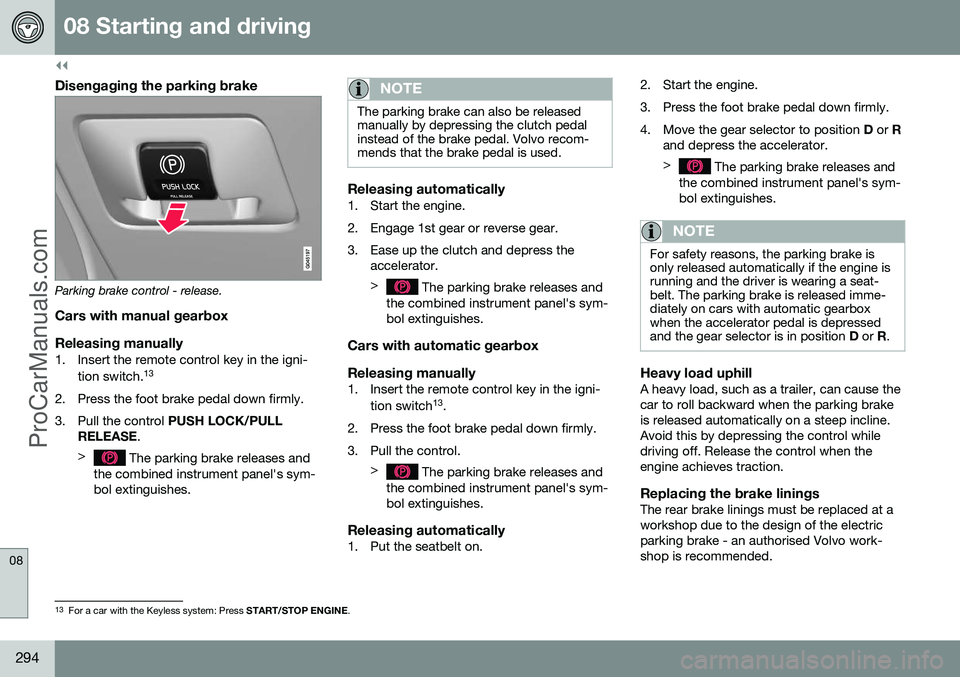
Parking brake control - release.
Cars with manual gearbox
Releasing manually
1. Insert the remote control key in the igni- tion switch. 13
2. Press the foot brake pedal down firmly.
3. Pull the control PUSH LOCK/PULL
RELEASE .
>
The parking brake releases and
the combined instrument panel's sym- bol extinguishes.
NOTE
The parking brake can also be released manually by depressing the clutch pedalinstead of the brake pedal. Volvo recom-mends that the brake pedal is used.
Releasing automatically1. Start the engine.
2. Engage 1st gear or reverse gear.
3. Ease up the clutch and depress the accelerator. >
The parking brake releases and
the combined instrument panel's sym- bol extinguishes.
Cars with automatic gearbox Releasing manually
1. Insert the remote control key in the igni-
tion switch 13
.
2. Press the foot brake pedal down firmly.
3. Pull the control. >
The parking brake releases and
the combined instrument panel's sym- bol extinguishes.
Releasing automatically1. Put the seatbelt on. 2. Start the engine.
3. Press the foot brake pedal down firmly.
4. Move the gear selector to position
D or R
and depress the accelerator. >
The parking brake releases and
the combined instrument panel's sym- bol extinguishes.
NOTE
For safety reasons, the parking brake is only released automatically if the engine isrunning and the driver is wearing a seat-belt. The parking brake is released imme-diately on cars with automatic gearboxwhen the accelerator pedal is depressedand the gear selector is in position D or R.
Heavy load uphillA heavy load, such as a trailer, can cause the car to roll backward when the parking brakeis released automatically on a steep incline.Avoid this by depressing the control whiledriving off. Release the control when theengine achieves traction.
Replacing the brake liningsThe rear brake linings must be replaced at aworkshop due to the design of the electricparking brake - an authorised Volvo work-shop is recommended.
13
For a car with the Keyless system: Press START/STOP ENGINE.
ProCarManuals.co’