display VOLVO V60 2014 Owner's Manual
[x] Cancel search | Manufacturer: VOLVO, Model Year: 2014, Model line: V60, Model: VOLVO V60 2014Pages: 442, PDF Size: 13.85 MB
Page 80 of 442
03 Instruments and controls
03
78* Option/accessory, for more information, see Introduction.
approx. 10 °C. Activate/deactivate the func- tion in the menu system MY CAR (p. 103).Light switches
The headlamp control activates and adjusts the external lighting. It is also used to adjustthe display, instrument and passenger com-partment lighting.
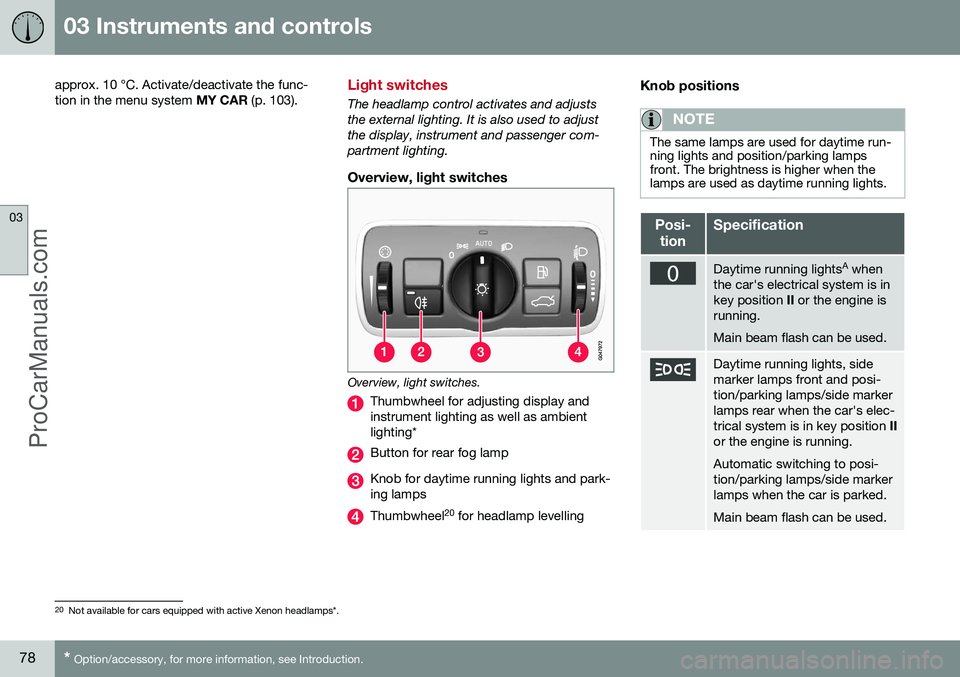
Overview, light switches
Overview, light switches.
Thumbwheel for adjusting display and instrument lighting as well as ambientlighting*
Button for rear fog lamp
Knob for daytime running lights and park- ing lamps
Thumbwheel 20
for headlamp levelling
Knob positions
NOTE
The same lamps are used for daytime run- ning lights and position/parking lampsfront. The brightness is higher when thelamps are used as daytime running lights.
Posi-
tionSpecification
Daytime running lights A
when
the car's electrical system is in key position II or the engine is
running. Main beam flash can be used.
Daytime running lights, side marker lamps front and posi-tion/parking lamps/side markerlamps rear when the car's elec-trical system is in key position II
or the engine is running. Automatic switching to posi- tion/parking lamps/side markerlamps when the car is parked. Main beam flash can be used.
20 Not available for cars equipped with active Xenon headlamps*.
ProCarManuals.co’
Page 81 of 442
03 Instruments and controls
03
* Option/accessory, for more information, see Introduction.79
Posi-
tionSpecification
Daytime running lights, side marker lamps front and posi-tion/parking lamps/side markerlamps rear during the day whenthe car's electrical system is inkey position II or the engine is
running. Automatic switching to dipped beam and position/parkinglamps/side marker lamps inpoor light conditions or whenthe windscreen wipers or rearfog lamps are activated. The tunnel detection (p. 81)* function is activated. The active high beam (p. 82)* function can be used. Main beam can be activated when dipped beam is switchedon. Main beam flash can be used.
Posi-
tionSpecification
Dipped beam and position/ parking lamps/side markerlamps. Main beam can be activated.Main beam flash can be used.
A Fitted in or under the front bumper.
Volvo recommends that
mode is used
when the car is being driven, as long as traffic situations or weather conditions are unfavour-able for the active high beam function*.
Instrument lightingDifferent display and instrument lighting isswitched on depending on key position; seeKey positions - functions at different levels (p.70). The display lighting is automatically subdued in darkness - the sensitivity is set with thethumbwheel. The intensity of the instrument lighting is adjusted with the thumbwheel.
Headlamp levellingThe load in the car changes the vertical align-ment of the headlamp beam, which coulddazzle oncoming motorists. Avoid this byadjusting the height of the beam. Lower thebeam if the car is heavily laden. 1. Leave the engine running, or have the
car's electrical system in key position I.
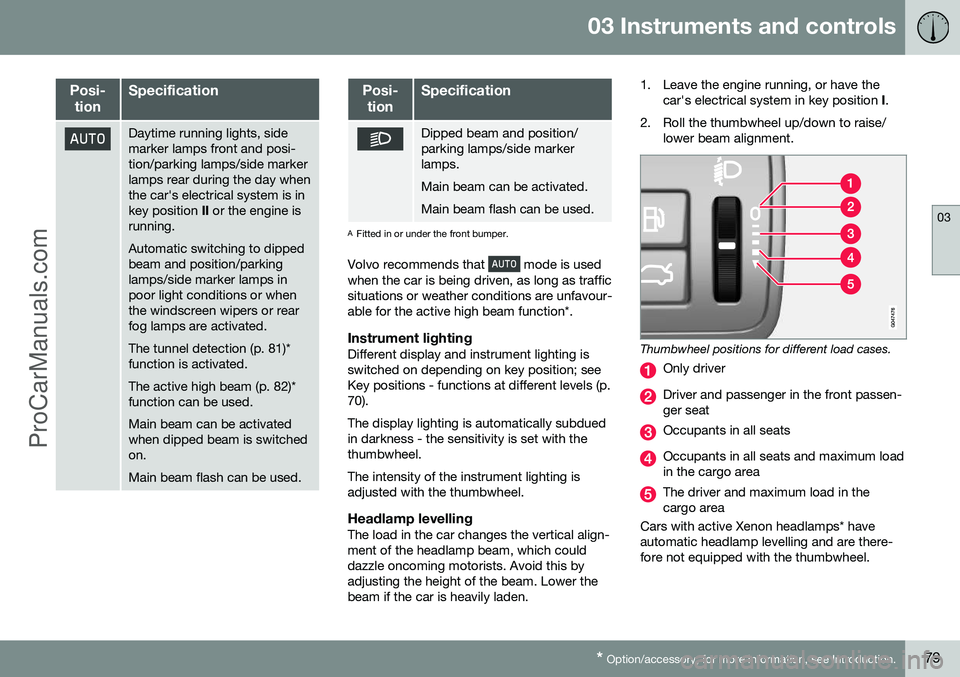
2. Roll the thumbwheel up/down to raise/ lower beam alignment.
Thumbwheel positions for different load cases.
Only driver
Driver and passenger in the front passen- ger seat
Occupants in all seats
Occupants in all seats and maximum load in the cargo area
The driver and maximum load in the cargo area
Cars with active Xenon headlamps* haveautomatic headlamp levelling and are there-fore not equipped with the thumbwheel.
ProCarManuals.co’
Page 85 of 442
03 Instruments and controls
03
}}
83
beam that points directly to the vehicle is dimmed.
Dipped beam directly toward oncoming vehicles, but continued main beam on both sides of thevehicle.
The lighting returns to full main beam about a second after the camera sensor no longerdetects the headlamp beams from oncomingtraffic or the rear lights from vehicles in front.
Activating/deactivatingAHB can be activated when the headlamp control's knob is in position
(provided
that the function has not been deactivated in the menu system MY CAR), see MY CAR (p.103).
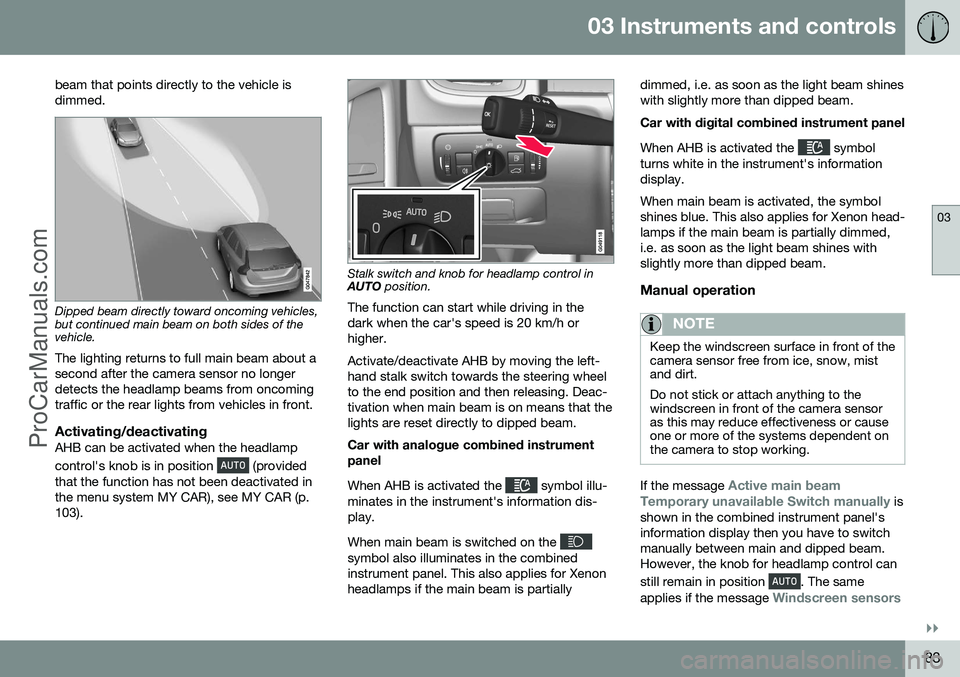
Stalk switch and knob for headlamp control in AUTO position.
The function can start while driving in the dark when the car's speed is 20 km/h orhigher. Activate/deactivate AHB by moving the left- hand stalk switch towards the steering wheelto the end position and then releasing. Deac-tivation when main beam is on means that thelights are reset directly to dipped beam. Car with analogue combined instrument panel When AHB is activated the
symbol illu-
minates in the instrument's information dis- play. When main beam is switched on the
symbol also illuminates in the combined instrument panel. This also applies for Xenonheadlamps if the main beam is partially dimmed, i.e. as soon as the light beam shineswith slightly more than dipped beam. Car with digital combined instrument panel When AHB is activated the
symbol
turns white in the instrument's information display. When main beam is activated, the symbol shines blue. This also applies for Xenon head-lamps if the main beam is partially dimmed,i.e. as soon as the light beam shines withslightly more than dipped beam.
Manual operation
NOTE
Keep the windscreen surface in front of the camera sensor free from ice, snow, mistand dirt. Do not stick or attach anything to the windscreen in front of the camera sensoras this may reduce effectiveness or causeone or more of the systems dependent onthe camera to stop working.
If the message Active main beam
Temporary unavailable Switch manually is
shown in the combined instrument panel's information display then you have to switchmanually between main and dipped beam.However, the knob for headlamp control can still remain in position
. The same
applies if the message
Windscreen sensors
ProCarManuals.com
Page 87 of 442
03 Instruments and controls
03
* Option/accessory, for more information, see Introduction.85
the same time as the information display shows an explanatory text and a further illu-minated symbol.
SymbolDisplaySpecification
Headlamp systemmalfunc-tion Serv-icerequiredThe system is disengaged. Visita workshop ifthe messageremains. Volvorecommendsthat you contactan authorisedVolvo workshop.
The function is only active in twilight or dark- ness and only when the car is moving. The function
23
can be deactivated/activated
in the menu system MY CAR, see MY CAR (p. 103). For headlamp pattern adjustment, see Head- lamps - adjusting headlamp pattern (p. 90).
Cornering lightsActive Xenon headlamps are equipped withcornering lights that temporarily illuminate thearea diagonally in front of the car in the direc-tion the steering wheel is turned in a sharpbend, or in the direction for which the direc-tion indicators are used. The function is activated when main beam ordipped beam is used and the car's speed islower than approx. 30 km/h. In addition, both cornering lights are switched on as a supplement to the reversing lampduring reversing.
Related information
•
Main/dipped beam (p. 81)
• Active high beam* (p. 82)
• Light switches (p. 78)
Rear fog lamp
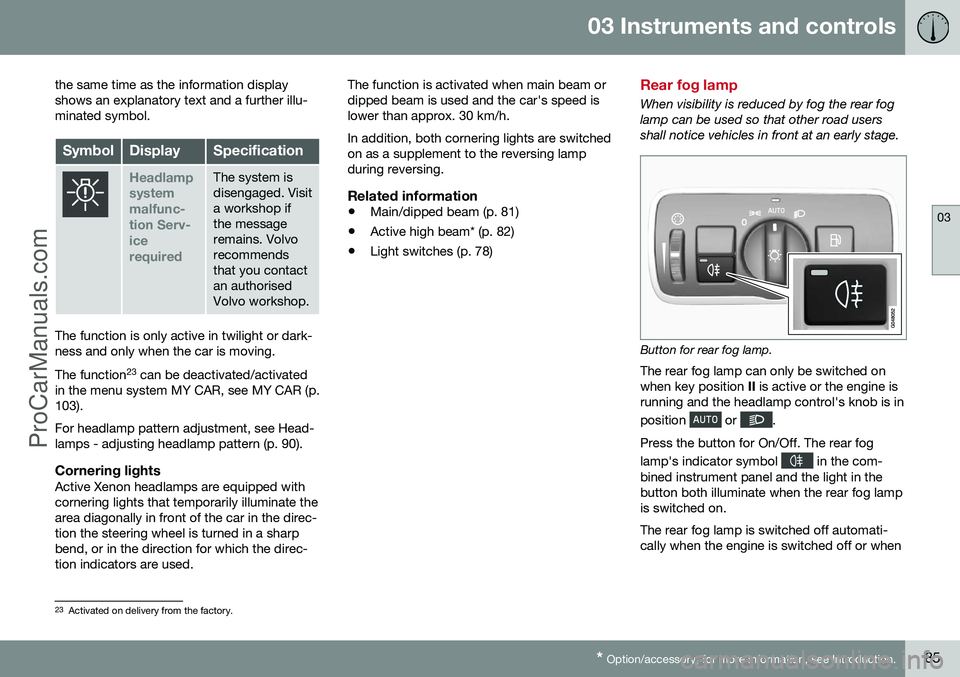
When visibility is reduced by fog the rear fog lamp can be used so that other road usersshall notice vehicles in front at an early stage.
Button for rear fog lamp.
The rear fog lamp can only be switched on when key position II is active or the engine is
running and the headlamp control's knob is in position
or .
Press the button for On/Off. The rear fog lamp's indicator symbol
in the com-
bined instrument panel and the light in the button both illuminate when the rear fog lampis switched on. The rear fog lamp is switched off automati- cally when the engine is switched off or when
23 Activated on delivery from the factory.
ProCarManuals.co’
Page 99 of 442
03 Instruments and controls
03
* Option/accessory, for more information, see Introduction.97
Automatic dimming*Bright light from behind is automatically dimmed by the rearview mirror. The controlfor manual dimming is not available on mir-rors with automatic dimming. The rearview mirror contains two sensors - one forward facing and one rearward facing -that work together to identify and eliminatedazzling light. The forward facing sensordetects ambient light, while the rearward fac-ing sensor detects the light from vehicleheadlights behind.
NOTE
If the sensors are obscured by e.g. parking permits, transponders, sun visors orobjects in the seats or in the cargo area insuch a way that light is prevented fromreaching the sensors, then the dimmingfunction of the interior rearview and doormirrors is reduced.
The compass (p. 97) can only be specified for a rearview mirror with automatic dimming.
Related information
• Door mirrors (p. 94)
Compass*
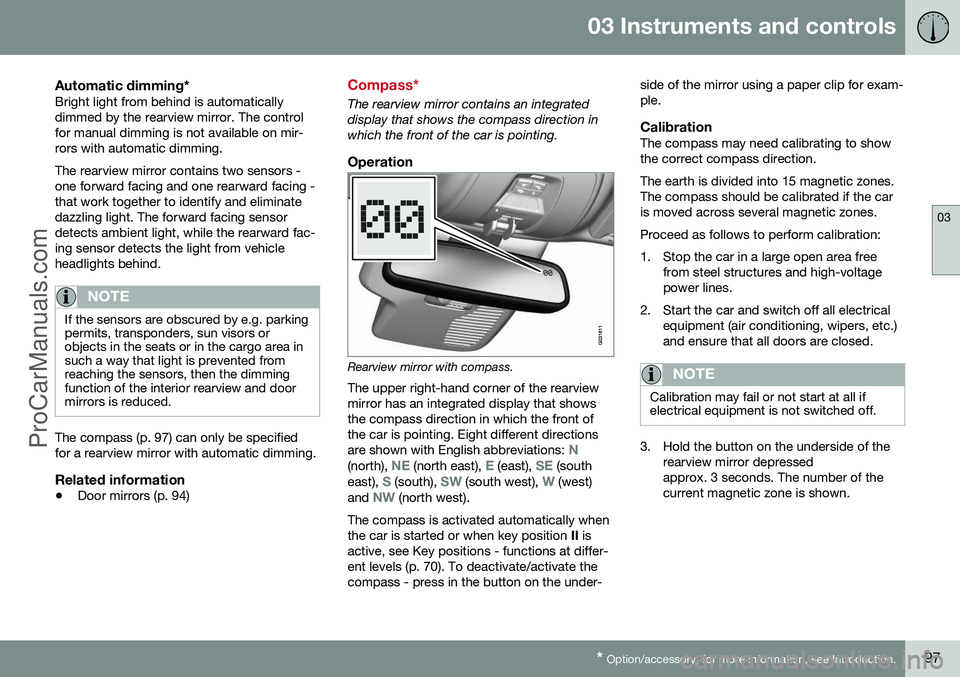
The rearview mirror contains an integrated display that shows the compass direction inwhich the front of the car is pointing.
Operation
Rearview mirror with compass.
The upper right-hand corner of the rearview mirror has an integrated display that showsthe compass direction in which the front ofthe car is pointing. Eight different directions are shown with English abbreviations:
N(north), NE (north east), E (east), SE (south
east), S (south), SW (south west), W (west)
and NW (north west).
The compass is activated automatically when the car is started or when key position II is
active, see Key positions - functions at differ-ent levels (p. 70). To deactivate/activate thecompass - press in the button on the under- side of the mirror using a paper clip for exam-ple.
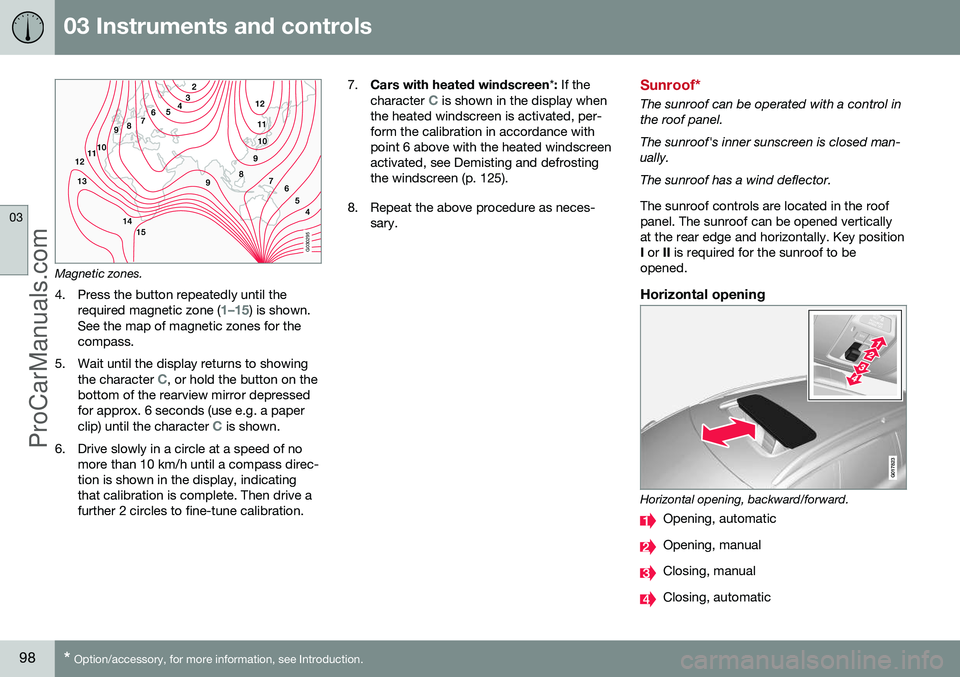
CalibrationThe compass may need calibrating to showthe correct compass direction. The earth is divided into 15 magnetic zones. The compass should be calibrated if the caris moved across several magnetic zones. Proceed as follows to perform calibration:
1. Stop the car in a large open area free
from steel structures and high-voltage power lines.
2. Start the car and switch off all electrical equipment (air conditioning, wipers, etc.)and ensure that all doors are closed.
NOTE
Calibration may fail or not start at all if electrical equipment is not switched off.
3. Hold the button on the underside of therearview mirror depressed approx. 3 seconds. The number of thecurrent magnetic zone is shown.
ProCarManuals.co’
Page 100 of 442
03 Instruments and controls
03
98* Option/accessory, for more information, see Introduction.
G030295
Magnetic zones.
4. Press the button repeatedly until the required magnetic zone (
1–15) is shown.
See the map of magnetic zones for the compass.
5. Wait until the display returns to showing the character
C, or hold the button on the
bottom of the rearview mirror depressed for approx. 6 seconds (use e.g. a paper clip) until the character
C is shown.
6. Drive slowly in a circle at a speed of no more than 10 km/h until a compass direc- tion is shown in the display, indicatingthat calibration is complete. Then drive afurther 2 circles to fine-tune calibration. 7.
Cars with heated windscreen *: If the
character
C is shown in the display when
the heated windscreen is activated, per- form the calibration in accordance withpoint 6 above with the heated windscreenactivated, see Demisting and defrostingthe windscreen (p. 125).
8. Repeat the above procedure as neces- sary.Sunroof*
The sunroof can be operated with a control in the roof panel. The sunroof's inner sunscreen is closed man- ually. The sunroof has a wind deflector. The sunroof controls are located in the roof panel. The sunroof can be opened verticallyat the rear edge and horizontally. Key positionI or II is required for the sunroof to be
opened.
Horizontal opening
G017823
Horizontal opening, backward/forward.
Opening, automatic
Opening, manual
Closing, manual
Closing, automatic
ProCarManuals.co’
Page 102 of 442
||
03 Instruments and controls
03
100
Pinch protectionThe sunroof's pinch protection function is triggered if it is blocked by an object duringautomatic closing. If blocked, the sunroof willstop and automatically open to the previousposition.
Wind deflector
The sunroof has a wind deflector that is folded up when the sunroof is in the openposition.
Menu navigation - combined instrument panel
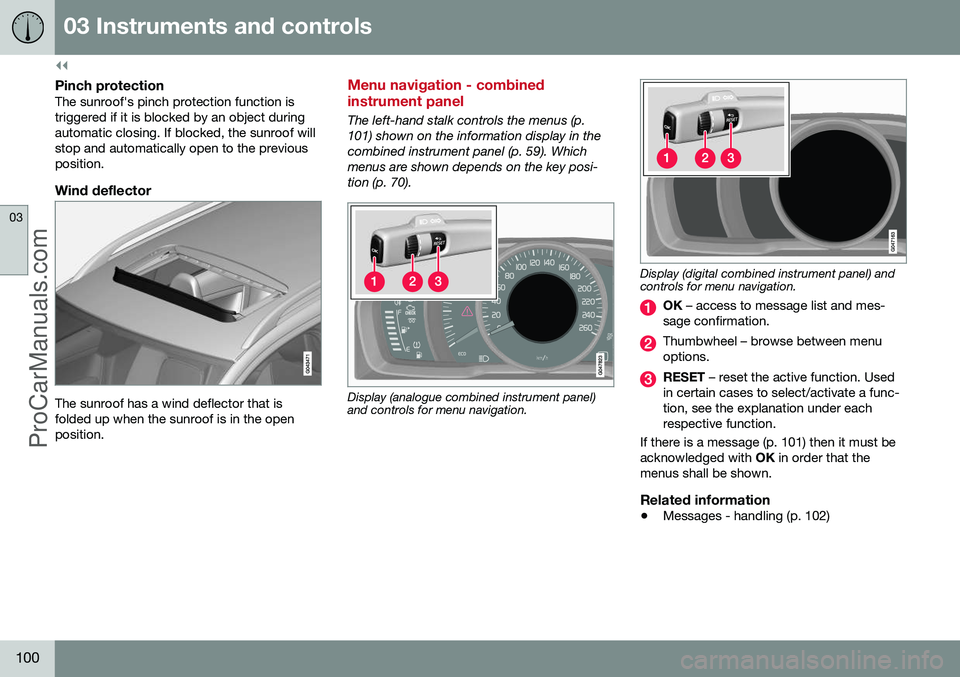
The left-hand stalk controls the menus (p. 101) shown on the information display in thecombined instrument panel (p. 59). Whichmenus are shown depends on the key posi-tion (p. 70).
Display (analogue combined instrument panel) and controls for menu navigation.
Display (digital combined instrument panel) and controls for menu navigation.
OK – access to message list and mes-
sage confirmation.
Thumbwheel – browse between menu options.
RESET – reset the active function. Used
in certain cases to select/activate a func- tion, see the explanation under eachrespective function.
If there is a message (p. 101) then it must beacknowledged with OK in order that the
menus shall be shown.
Related information
• Messages - handling (p. 102)
ProCarManuals.co’
Page 103 of 442
03 Instruments and controls
03
* Option/accessory, for more information, see Introduction.101
Menu overview - combined instrument panel
Which menus are shown in the combined instrument panel's information displaydepends on the key position (p. 70). Some of the following menu options require the function and hardware to be installed inthe car.
Analogue combined instrument panelDigital speed
Parking heater *
Additional heater *
TC options Service status
Oil level 27
Messages (##) 28
Digital combined instrument panel
Settings
*
Themes
Contrast mode /Colour mode
Service status
Messages 28
Oil level 27 Parking heater
*
Trip computer reset
Related information
• Analogue combined instrument panel - overview (p. 59)
• Digital combined instrument panel - over-view (p. 60)
• Menu navigation - combined instrumentpanel (p. 100)
Messages
When a warning, information or indicator symbol illuminates, a corresponding messageappears on the information display.
MessageSpecification
Stop safelyAStop and switch off the engine. Serious risk ofdamage - consult a work- shop B
.
Stop engineAStop and switch off the engine. Serious risk ofdamage - consult a work- shop B
.
Service urgentAContact a workshop B
to
check the car immedi- ately.
Service requiredAContact a workshop B
to
check the car as soon as possible.
See manualARead the owner's man- ual.
Book time for mainte-nanceTime to book regular service - contact a work- shop B
.
27 Certain engines.
28 The number of messages is indicated in brackets.
ProCarManuals.co’
Page 104 of 442
||
03 Instruments and controls
03
102* Option/accessory, for more information, see Introduction.
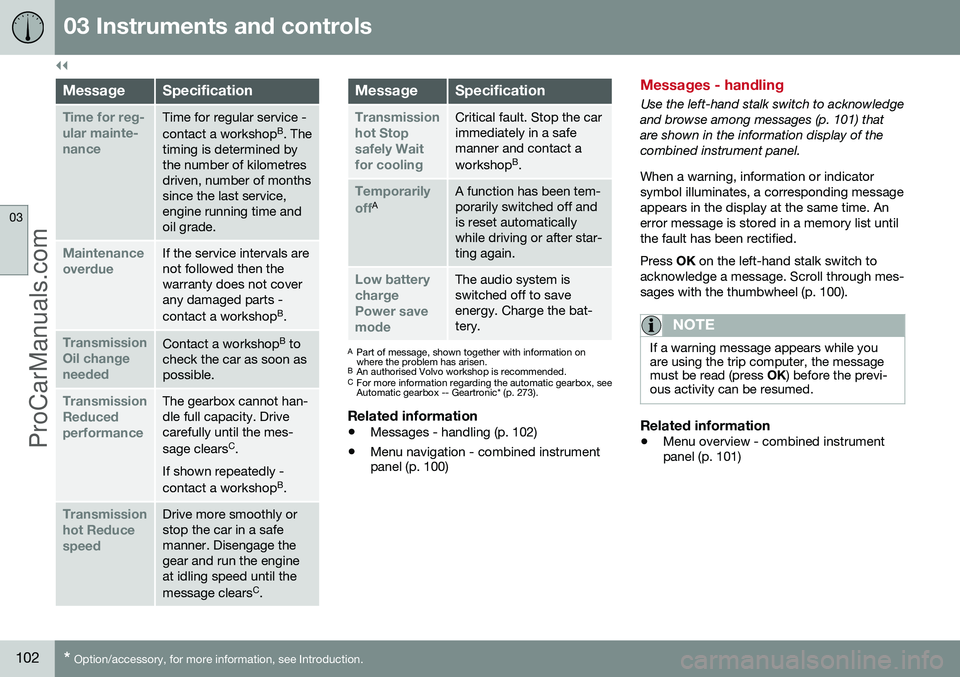
MessageSpecification
Time for reg- ular mainte-nanceTime for regular service - contact a workshop B
. The
timing is determined by the number of kilometresdriven, number of monthssince the last service,engine running time andoil grade.
Maintenance overdueIf the service intervals are not followed then thewarranty does not coverany damaged parts - contact a workshop B
.
Transmission Oil changeneededContact a workshop B
to
check the car as soon as possible.
Transmission ReducedperformanceThe gearbox cannot han- dle full capacity. Drivecarefully until the mes- sage clears C
.
If shown repeatedly -contact a workshop B
.
Transmission hot ReducespeedDrive more smoothly or stop the car in a safemanner. Disengage thegear and run the engineat idling speed until the message clears C
.
MessageSpecification
Transmission hot Stopsafely Waitfor coolingCritical fault. Stop the car immediately in a safemanner and contact a workshop B
.
Temporarily offAA function has been tem- porarily switched off andis reset automaticallywhile driving or after star-ting again.
Low battery chargePower savemodeThe audio system is switched off to saveenergy. Charge the bat-tery.
A Part of message, shown together with information on where the problem has arisen.
B An authorised Volvo workshop is recommended.
C For more information regarding the automatic gearbox, seeAutomatic gearbox -- Geartronic* (p. 273).
Related information
• Messages - handling (p. 102)
• Menu navigation - combined instrument panel (p. 100)
Messages - handling
Use the left-hand stalk switch to acknowledge and browse among messages (p. 101) thatare shown in the information display of thecombined instrument panel. When a warning, information or indicator symbol illuminates, a corresponding messageappears in the display at the same time. Anerror message is stored in a memory list untilthe fault has been rectified. Press
OK on the left-hand stalk switch to
acknowledge a message. Scroll through mes- sages with the thumbwheel (p. 100).
NOTE
If a warning message appears while you are using the trip computer, the messagemust be read (press OK) before the previ-
ous activity can be resumed.
Related information
• Menu overview - combined instrument panel (p. 101)
ProCarManuals.co’
Page 107 of 442
03 Instruments and controls
03
}}
105
Trip computer - combined instrument panel "Analog"
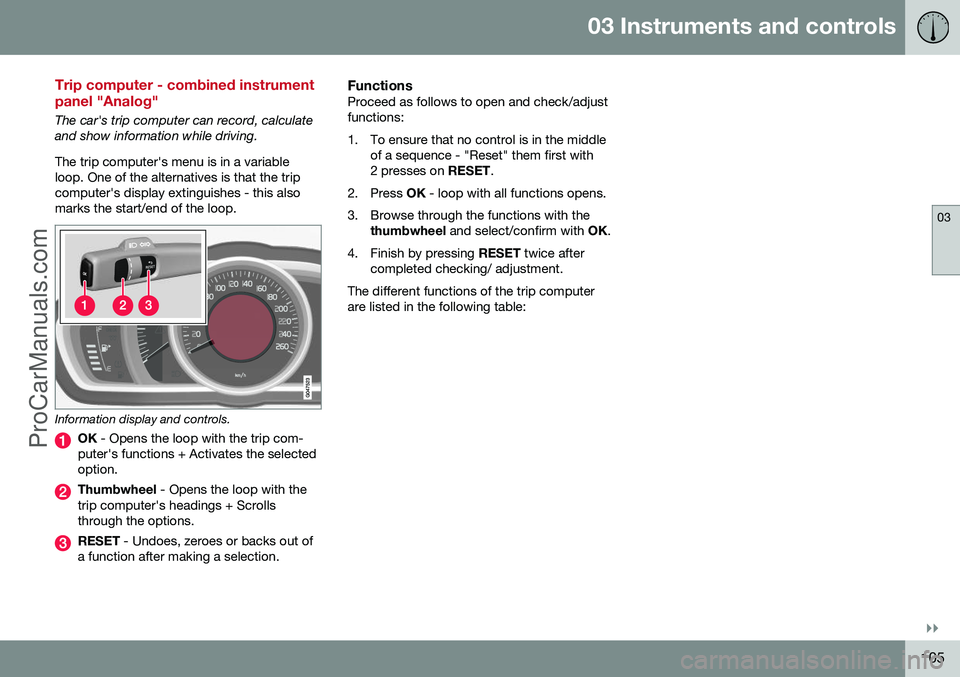
The car's trip computer can record, calculate and show information while driving. The trip computer's menu is in a variable loop. One of the alternatives is that the tripcomputer's display extinguishes - this alsomarks the start/end of the loop.
Information display and controls.
OK - Opens the loop with the trip com-
puter's functions + Activates the selected option.
Thumbwheel - Opens the loop with the
trip computer's headings + Scrolls through the options.
RESET - Undoes, zeroes or backs out of
a function after making a selection.
FunctionsProceed as follows to open and check/adjust functions:
1. To ensure that no control is in the middle of a sequence - "Reset" them first with 2 presses on RESET.
2. Press OK - loop with all functions opens.
3. Browse through the functions with the thumbwheel and select/confirm with OK.
4. Finish by pressing RESET twice after
completed checking/ adjustment.
The different functions of the trip computerare listed in the following table:
ProCarManuals.co’