display VOLVO V60 2014 Repair Manual
[x] Cancel search | Manufacturer: VOLVO, Model Year: 2014, Model line: V60, Model: VOLVO V60 2014Pages: 442, PDF Size: 13.85 MB
Page 243 of 442
07 Driver support
07
* Option/accessory, for more information, see Introduction.241
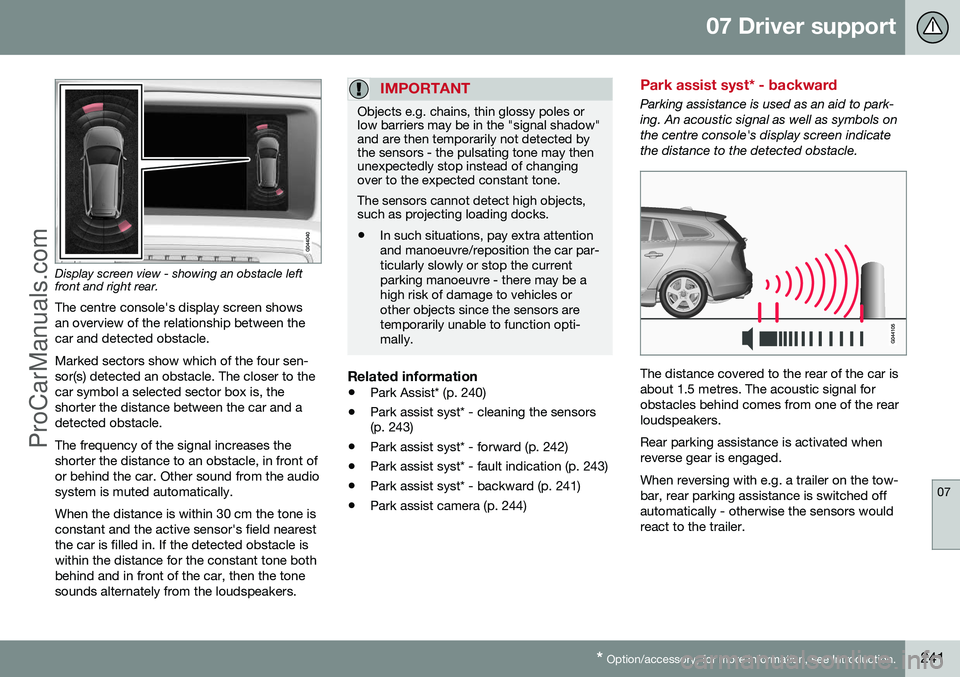
Display screen view - showing an obstacle left front and right rear. The centre console's display screen shows an overview of the relationship between thecar and detected obstacle. Marked sectors show which of the four sen- sor(s) detected an obstacle. The closer to thecar symbol a selected sector box is, theshorter the distance between the car and adetected obstacle. The frequency of the signal increases the shorter the distance to an obstacle, in front ofor behind the car. Other sound from the audiosystem is muted automatically. When the distance is within 30 cm the tone is constant and the active sensor's field nearestthe car is filled in. If the detected obstacle iswithin the distance for the constant tone bothbehind and in front of the car, then the tonesounds alternately from the loudspeakers.
IMPORTANT
Objects e.g. chains, thin glossy poles or low barriers may be in the "signal shadow"and are then temporarily not detected bythe sensors - the pulsating tone may thenunexpectedly stop instead of changingover to the expected constant tone. The sensors cannot detect high objects, such as projecting loading docks.
• In such situations, pay extra attention and manoeuvre/reposition the car par-ticularly slowly or stop the currentparking manoeuvre - there may be ahigh risk of damage to vehicles orother objects since the sensors aretemporarily unable to function opti-mally.
Related information
•
Park Assist* (p. 240)
• Park assist syst* - cleaning the sensors (p. 243)
• Park assist syst* - forward (p. 242)
• Park assist syst* - fault indication (p. 243)
• Park assist syst* - backward (p. 241)
• Park assist camera (p. 244)
Park assist syst* - backward
Parking assistance is used as an aid to park- ing. An acoustic signal as well as symbols onthe centre console's display screen indicatethe distance to the detected obstacle.
The distance covered to the rear of the car is about 1.5 metres. The acoustic signal forobstacles behind comes from one of the rearloudspeakers. Rear parking assistance is activated when reverse gear is engaged. When reversing with e.g. a trailer on the tow- bar, rear parking assistance is switched offautomatically - otherwise the sensors wouldreact to the trailer.
ProCarManuals.co’
Page 244 of 442
||
07 Driver support
07
242* Option/accessory, for more information, see Introduction.
NOTE
When reversing with e.g. a trailer or bike carrier on the towbar - without Volvo genu-ine trailer wiring - parking assistance mayneed to be switched off manually in orderthat the sensors do not react to them.
Related information
• Park Assist* (p. 240)
• Park assist syst* - cleaning the sensors (p. 243)
• Park assist syst* - function (p. 240)
• Park assist syst* - forward (p. 242)
• Park assist syst* - fault indication (p. 243)
• Park assist camera (p. 244)
Park assist syst* - forward
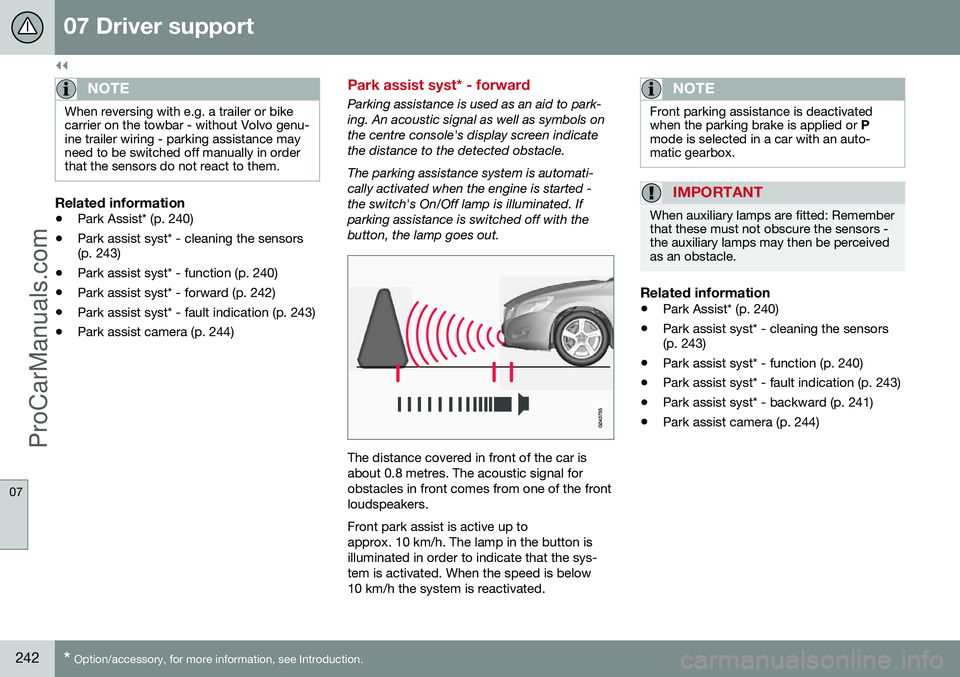
Parking assistance is used as an aid to park- ing. An acoustic signal as well as symbols onthe centre console's display screen indicatethe distance to the detected obstacle. The parking assistance system is automati- cally activated when the engine is started -the switch's On/Off lamp is illuminated. Ifparking assistance is switched off with thebutton, the lamp goes out.
The distance covered in front of the car is about 0.8 metres. The acoustic signal forobstacles in front comes from one of the frontloudspeakers. Front park assist is active up to approx. 10 km/h. The lamp in the button isilluminated in order to indicate that the sys-tem is activated. When the speed is below10 km/h the system is reactivated.
NOTE
Front parking assistance is deactivated when the parking brake is applied or
P
mode is selected in a car with an auto-matic gearbox.
IMPORTANT
When auxiliary lamps are fitted: Remember that these must not obscure the sensors -the auxiliary lamps may then be perceivedas an obstacle.
Related information
• Park Assist* (p. 240)
• Park assist syst* - cleaning the sensors (p. 243)
• Park assist syst* - function (p. 240)
• Park assist syst* - fault indication (p. 243)
• Park assist syst* - backward (p. 241)
• Park assist camera (p. 244)
ProCarManuals.co’
Page 245 of 442
07 Driver support
07
* Option/accessory, for more information, see Introduction.243
Park assist syst* - fault indication
Parking assistance is used as an aid to park- ing. An acoustic signal as well as symbols onthe centre console's display screen indicatethe distance to the detected obstacle.
If the combined instrument panel'sinformation symbol illuminates withconstant glow and the text message
Park assist syst Service required is shown
then parking assistance is disengaged.
IMPORTANT
In certain conditions the parking assis- tance system may produce incorrect warn-ing signals that are caused by externalsound sources that emit the same ultra-sonic frequencies that the system workswith. Examples of such sources include horns, wet tyres on asphalt, pneumatic brakesand exhaust noises from motorcycles etc.
Related information
• Park Assist* (p. 240)
• Park assist syst* - cleaning the sensors (p. 243)
• Park assist syst* - function (p. 240)
• Park assist syst* - forward (p. 242)
• Park assist syst* - backward (p. 241)
• Park assist camera (p. 244)
Park assist syst* - cleaning the sensors
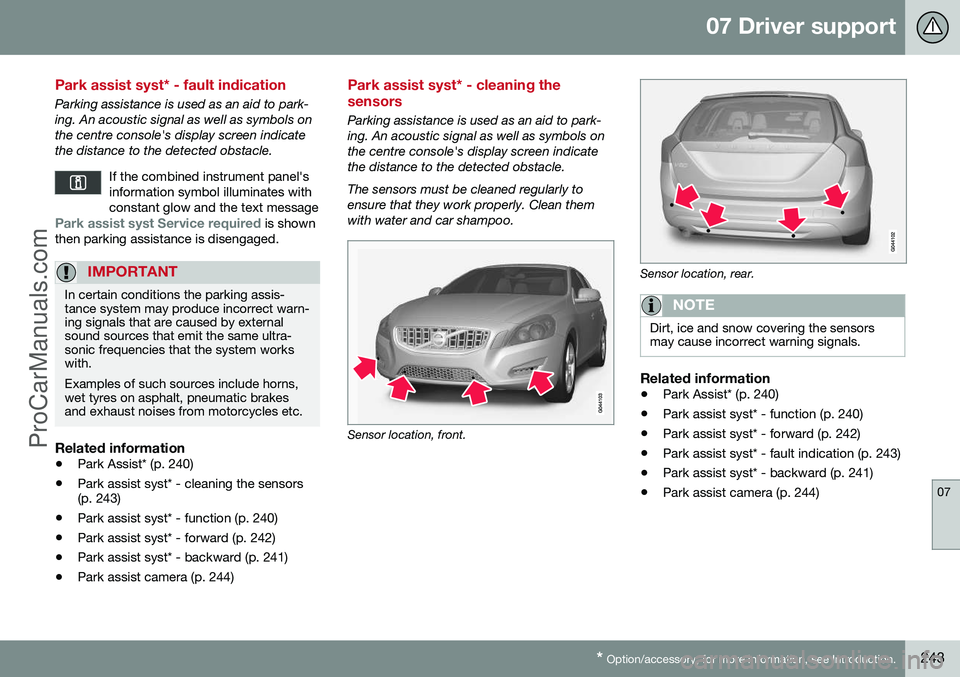
Parking assistance is used as an aid to park- ing. An acoustic signal as well as symbols onthe centre console's display screen indicatethe distance to the detected obstacle. The sensors must be cleaned regularly to ensure that they work properly. Clean themwith water and car shampoo.
Sensor location, front.
Sensor location, rear.
NOTE
Dirt, ice and snow covering the sensors may cause incorrect warning signals.
Related information
•Park Assist* (p. 240)
• Park assist syst* - function (p. 240)
• Park assist syst* - forward (p. 242)
• Park assist syst* - fault indication (p. 243)
• Park assist syst* - backward (p. 241)
• Park assist camera (p. 244)
ProCarManuals.co’
Page 246 of 442
07 Driver support
07
244* Option/accessory, for more information, see Introduction.
Park assist camera
The parking camera is an assist system and is activated when reverse gear is engaged (canbe changed in the settings menu (p. 246)). The camera image is shown on the centre console's screen.
NOTE
When a towbar is configured with the car's electrical system, the protrusion of thetowbar is included when the functionmeasures the parking space.
WARNING
• The parking camera serves as an aid. It does not relieve the driver of respon-sibility when reversing.
• The camera has blind spots, whereobstacles cannot be detected.
• Be aware of people and animals in thevicinity of the car.
Function and operation
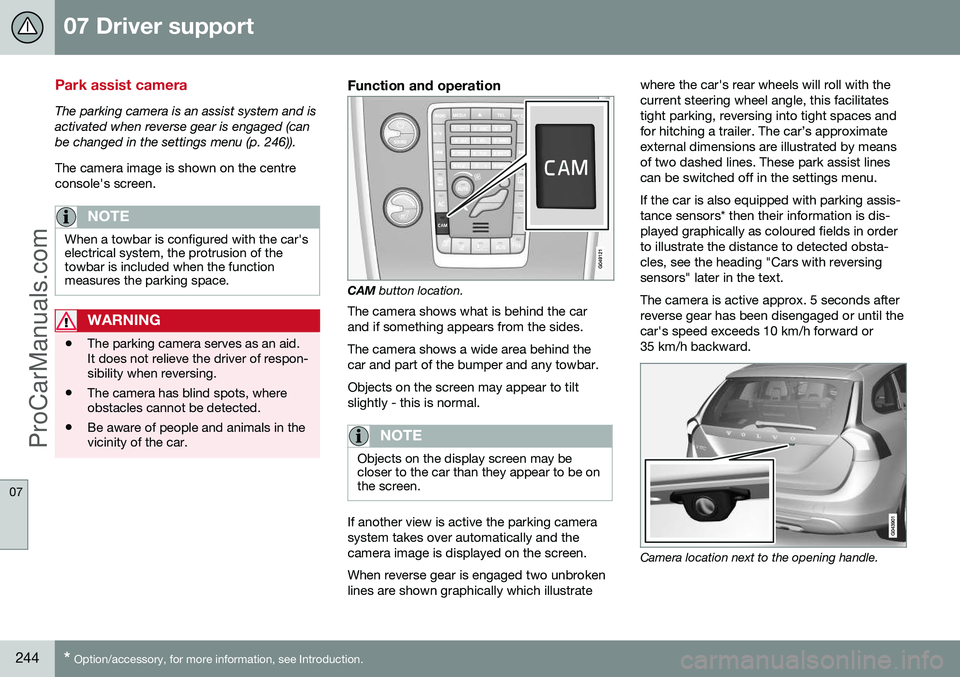
CAM
button location.
The camera shows what is behind the car and if something appears from the sides. The camera shows a wide area behind the car and part of the bumper and any towbar. Objects on the screen may appear to tilt slightly - this is normal.
NOTE
Objects on the display screen may be closer to the car than they appear to be onthe screen.
If another view is active the parking camera system takes over automatically and thecamera image is displayed on the screen. When reverse gear is engaged two unbroken lines are shown graphically which illustrate where the car's rear wheels will roll with thecurrent steering wheel angle, this facilitatestight parking, reversing into tight spaces andfor hitching a trailer. The car’s approximateexternal dimensions are illustrated by meansof two dashed lines. These park assist linescan be switched off in the settings menu. If the car is also equipped with parking assis- tance sensors* then their information is dis-played graphically as coloured fields in orderto illustrate the distance to detected obsta-cles, see the heading "Cars with reversingsensors" later in the text. The camera is active approx. 5 seconds after reverse gear has been disengaged or until thecar's speed exceeds 10 km/h forward or35 km/h backward.
Camera location next to the opening handle.
ProCarManuals.com
Page 247 of 442
07 Driver support
07
}}
245
Light conditionsThe camera image is adjusted automatically according to prevailing light conditions.Because of this, the image may vary slightlyin brightness and quality. Poor light condi-tions can result in a slightly reduced imagequality.
NOTE
Keep the camera lens clear of dirt, snow and ice to ensure optimum function. Thisis particularly important in poor light.
Park assist lines
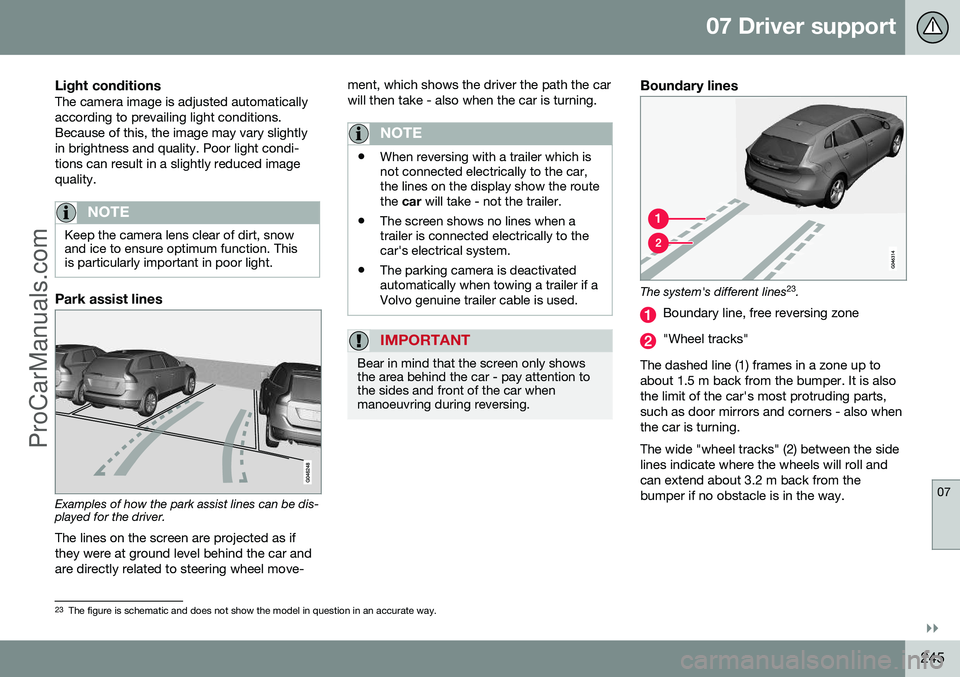
Examples of how the park assist lines can be dis- played for the driver.The lines on the screen are projected as if they were at ground level behind the car andare directly related to steering wheel move- ment, which shows the driver the path the carwill then take - also when the car is turning.
NOTE
•
When reversing with a trailer which is not connected electrically to the car,the lines on the display show the routethe
car will take - not the trailer.
• The screen shows no lines when atrailer is connected electrically to thecar's electrical system.
• The parking camera is deactivatedautomatically when towing a trailer if aVolvo genuine trailer cable is used.
IMPORTANT
Bear in mind that the screen only shows the area behind the car - pay attention tothe sides and front of the car whenmanoeuvring during reversing.
Boundary lines
The system's different lines 23
.
Boundary line, free reversing zone
"Wheel tracks"
The dashed line (1) frames in a zone up to about 1.5 m back from the bumper. It is alsothe limit of the car's most protruding parts,such as door mirrors and corners - also whenthe car is turning. The wide "wheel tracks" (2) between the side lines indicate where the wheels will roll andcan extend about 3.2 m back from thebumper if no obstacle is in the way.
23 The figure is schematic and does not show the model in question in an accurate way.
ProCarManuals.co’
Page 249 of 442
07 Driver support
07
* Option/accessory, for more information, see Introduction.247
towbar's intended "trajectory" toward the trailer can be shown on the screen - just asfor the "wheel tracks".
• If precise manoeuvring is required then the towbar can be zoomed in by pressingCAM
- pressing the button again returns
to normal view.
The towbar's park assist line is activated in
the menu system after pressing OK/MENU
where you can select to display either the "wheel tracks" or the towbar's trajectory -both options cannot be shown simultane-ously.
Related information
• Park assist camera (p. 244)
• Park assist camera - limitations (p. 247)
• Park Assist* (p. 240)
• MY CAR (p. 103)
Park assist camera - limitations
The parking camera is an assist system and is activated when reverse gear is engaged.
NOTE
A bike carrier or other accessory mounted on the rear of the car could obscure thecamera's view.
To bear in mindPay attention to the possibility that, even if it only looks like a relatively small part of theimage is obscured, it could be a relativelylarge sector that is hidden from view. Obsta-cles could thereby go undetected until theyare very close to the car.
• Keep the camera lens free from dirt, ice and snow.
• Clean the camera lens regularly with luke-warm water and car shampoo - take carenot to scratch the lens.
Related information
•Park assist camera (p. 244)
• Park assist camera - settings (p. 246)
• Park Assist* (p. 240)
Park Assist Pilot (PAP)*
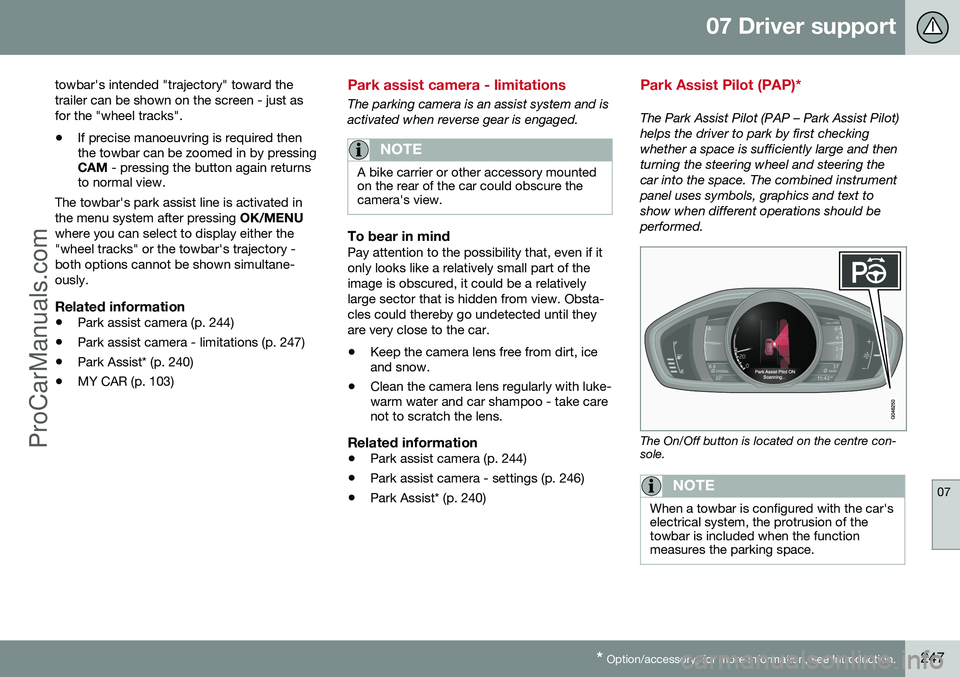
The Park Assist Pilot (PAP – Park Assist Pilot) helps the driver to park by first checkingwhether a space is sufficiently large and thenturning the steering wheel and steering thecar into the space. The combined instrumentpanel uses symbols, graphics and text toshow when different operations should beperformed.
The On/Off button is located on the centre con- sole.
NOTE
When a towbar is configured with the car's electrical system, the protrusion of thetowbar is included when the functionmeasures the parking space.
ProCarManuals.co’
Page 251 of 442
07 Driver support
07
* Option/accessory, for more information, see Introduction.249
•
Park assist camera (p. 244)
• Park Assist Pilot (PAP)* (p. 247)
Park Assist Pilot (PAP)* - operation
The Park Assist Pilot (PAP – Park Assist Pilot) helps the driver to park by first checkingwhether a space is sufficiently large and thenturning the steering wheel and steering thecar into the space. The combined instrumentpanel uses symbols, graphics and text toshow when different operations should beperformed.
NOTE
Remember that certain steering wheel positions may obstruct the combinedinstrument panel's instructions when youturn it during the parking manoeuvre.
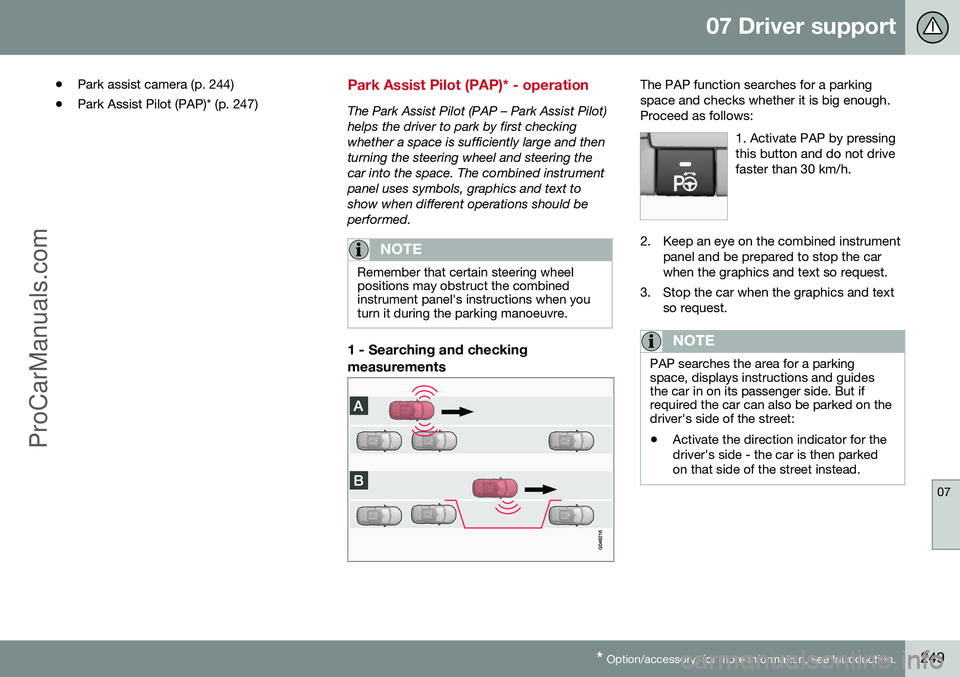
1 - Searching and checking measurements
The PAP function searches for a parking space and checks whether it is big enough.Proceed as follows:
1. Activate PAP by pressingthis button and do not drivefaster than 30 km/h.
2. Keep an eye on the combined instrumentpanel and be prepared to stop the car when the graphics and text so request.
3. Stop the car when the graphics and text so request.
NOTE
PAP searches the area for a parking space, displays instructions and guidesthe car in on its passenger side. But ifrequired the car can also be parked on thedriver's side of the street:
• Activate the direction indicator for the driver's side - the car is then parkedon that side of the street instead.
ProCarManuals.co’
Page 258 of 442
||
07 Driver support
07
256
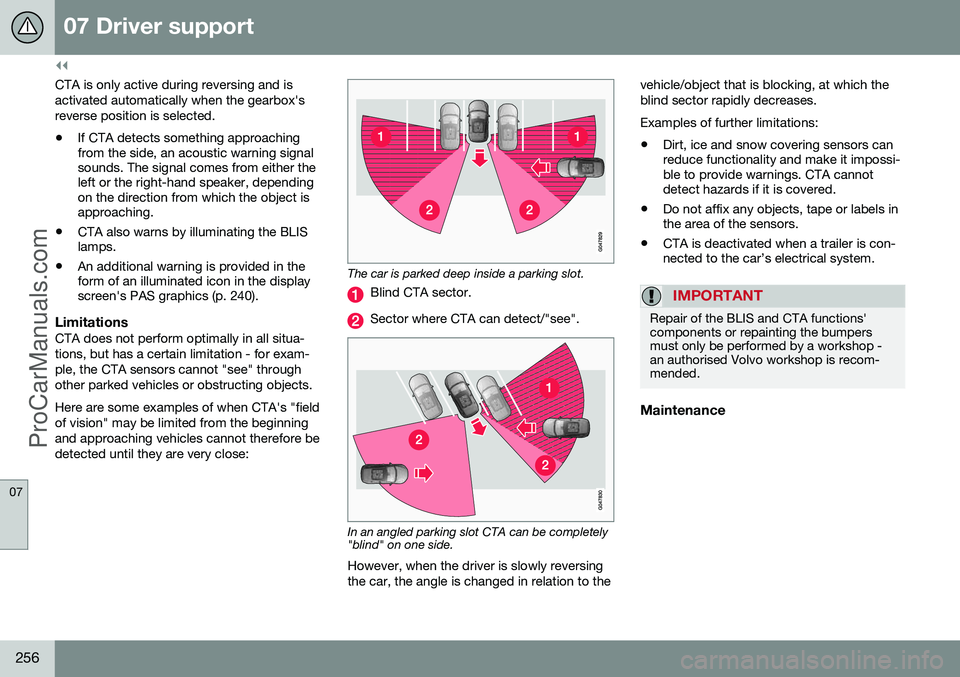
CTA is only active during reversing and is activated automatically when the gearbox'sreverse position is selected. •If CTA detects something approaching from the side, an acoustic warning signalsounds. The signal comes from either theleft or the right-hand speaker, dependingon the direction from which the object isapproaching.
• CTA also warns by illuminating the BLISlamps.
• An additional warning is provided in theform of an illuminated icon in the displayscreen's PAS graphics (p. 240).
LimitationsCTA does not perform optimally in all situa- tions, but has a certain limitation - for exam-ple, the CTA sensors cannot "see" throughother parked vehicles or obstructing objects. Here are some examples of when CTA's "field of vision" may be limited from the beginningand approaching vehicles cannot therefore bedetected until they are very close:
The car is parked deep inside a parking slot.
Blind CTA sector.
Sector where CTA can detect/"see".
In an angled parking slot CTA can be completely "blind" on one side.
However, when the driver is slowly reversing the car, the angle is changed in relation to the vehicle/object that is blocking, at which theblind sector rapidly decreases. Examples of further limitations:
• Dirt, ice and snow covering sensors can reduce functionality and make it impossi-ble to provide warnings. CTA cannotdetect hazards if it is covered.
• Do not affix any objects, tape or labels inthe area of the sensors.
• CTA is deactivated when a trailer is con-nected to the car’s electrical system.
IMPORTANT
Repair of the BLIS and CTA functions' components or repainting the bumpersmust only be performed by a workshop -an authorised Volvo workshop is recom-mended.
Maintenance
ProCarManuals.com
Page 263 of 442
08 Starting and driving
08
* Option/accessory, for more information, see Introduction.261
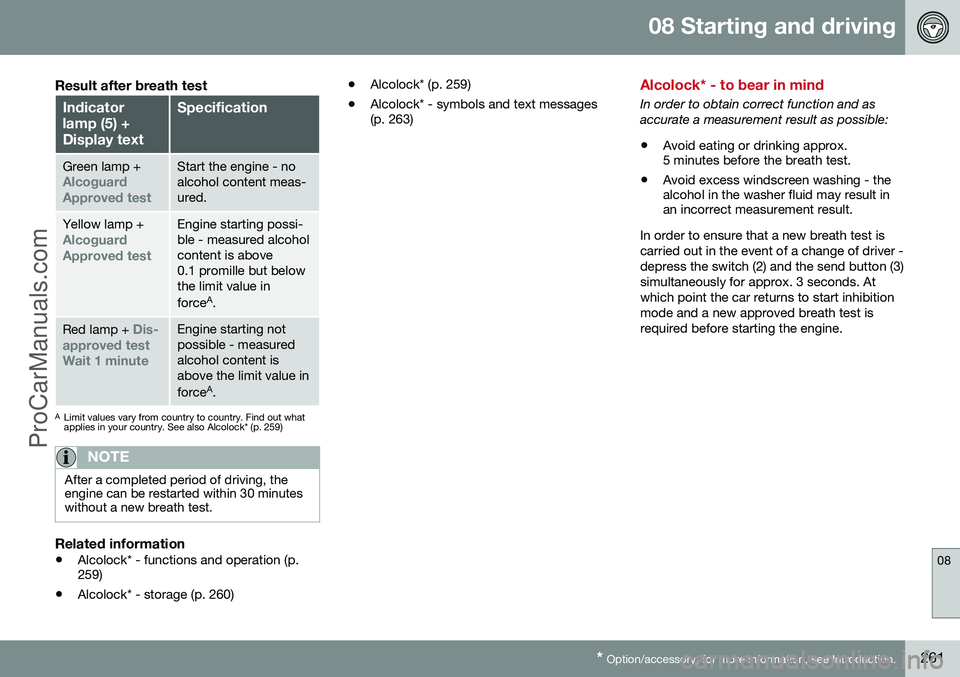
Result after breath test
Indicator lamp (5) +Display textSpecification
Green lamp +Alcoguard Approved testStart the engine - no alcohol content meas-ured.
Yellow lamp +Alcoguard Approved testEngine starting possi- ble - measured alcoholcontent is above0.1 promille but belowthe limit value in force A
.
Red lamp + Dis-
approved test Wait 1 minuteEngine starting not possible - measuredalcohol content isabove the limit value in force A
.
A Limit values vary from country to country. Find out what applies in your country. See also Alcolock* (p. 259)
NOTE
After a completed period of driving, the engine can be restarted within 30 minuteswithout a new breath test.
Related information
• Alcolock* - functions and operation (p. 259)
• Alcolock* - storage (p. 260) •
Alcolock* (p. 259)
• Alcolock* - symbols and text messages(p. 263)
Alcolock* - to bear in mind
In order to obtain correct function and as accurate a measurement result as possible:
• Avoid eating or drinking approx. 5 minutes before the breath test.
• Avoid excess windscreen washing - thealcohol in the washer fluid may result inan incorrect measurement result.
In order to ensure that a new breath test is carried out in the event of a change of driver -depress the switch (2) and the send button (3)simultaneously for approx. 3 seconds. Atwhich point the car returns to start inhibitionmode and a new approved breath test isrequired before starting the engine.
ProCarManuals.co’
Page 265 of 442
08 Starting and driving
08
* Option/accessory, for more information, see Introduction.263
•
Alcolock* - before starting the engine (p. 260)
• Alcolock* (p. 259)
• Alcolock* - symbols and text messages(p. 263)
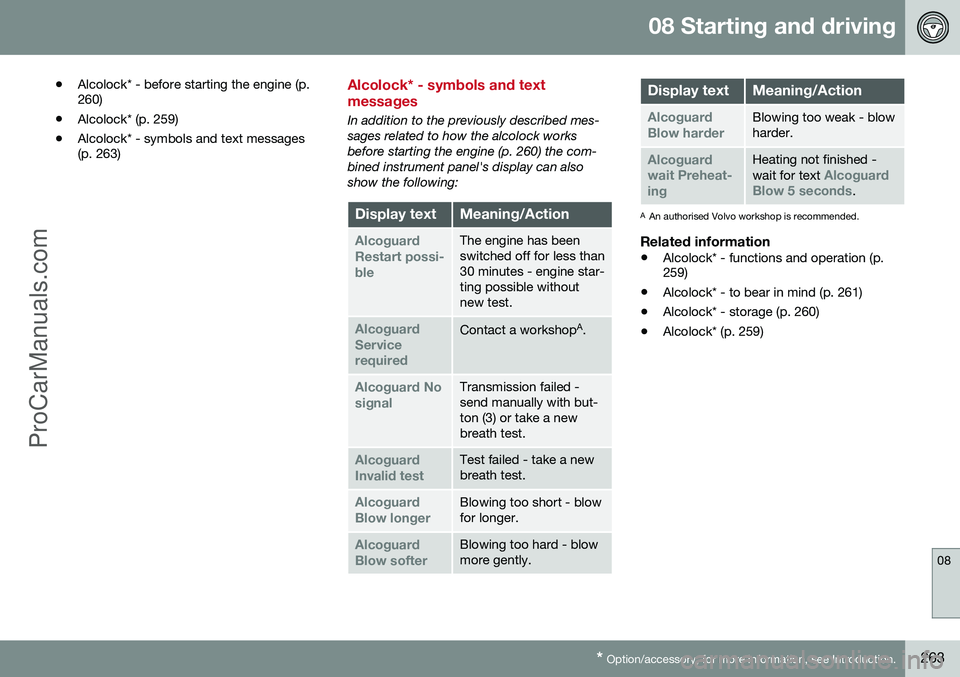
Alcolock* - symbols and text messages
In addition to the previously described mes- sages related to how the alcolock worksbefore starting the engine (p. 260) the com-bined instrument panel's display can alsoshow the following:
Display textMeaning/Action
Alcoguard Restart possi-bleThe engine has been switched off for less than30 minutes - engine star-ting possible withoutnew test.
Alcoguard ServicerequiredContact a workshop A
.
Alcoguard No signalTransmission failed - send manually with but-ton (3) or take a newbreath test.
Alcoguard Invalid testTest failed - take a new breath test.
Alcoguard Blow longerBlowing too short - blow for longer.
Alcoguard Blow softerBlowing too hard - blow more gently.
Display textMeaning/Action
Alcoguard Blow harderBlowing too weak - blow harder.
Alcoguard wait Preheat-ingHeating not finished - wait for text Alcoguard
Blow 5 seconds.
A An authorised Volvo workshop is recommended.
Related information
• Alcolock* - functions and operation (p. 259)
• Alcolock* - to bear in mind (p. 261)
• Alcolock* - storage (p. 260)
• Alcolock* (p. 259)
ProCarManuals.co’