display VOLVO V60 2014 Workshop Manual
[x] Cancel search | Manufacturer: VOLVO, Model Year: 2014, Model line: V60, Model: VOLVO V60 2014Pages: 442, PDF Size: 13.85 MB
Page 181 of 442
07 Driver support
07
* Option/accessory, for more information, see Introduction.179
Road Sign Information (RSI)*
The road sign information function (RSI – Road Sign Information) helps the driver toremember which speed-related road signs thecar has passed.
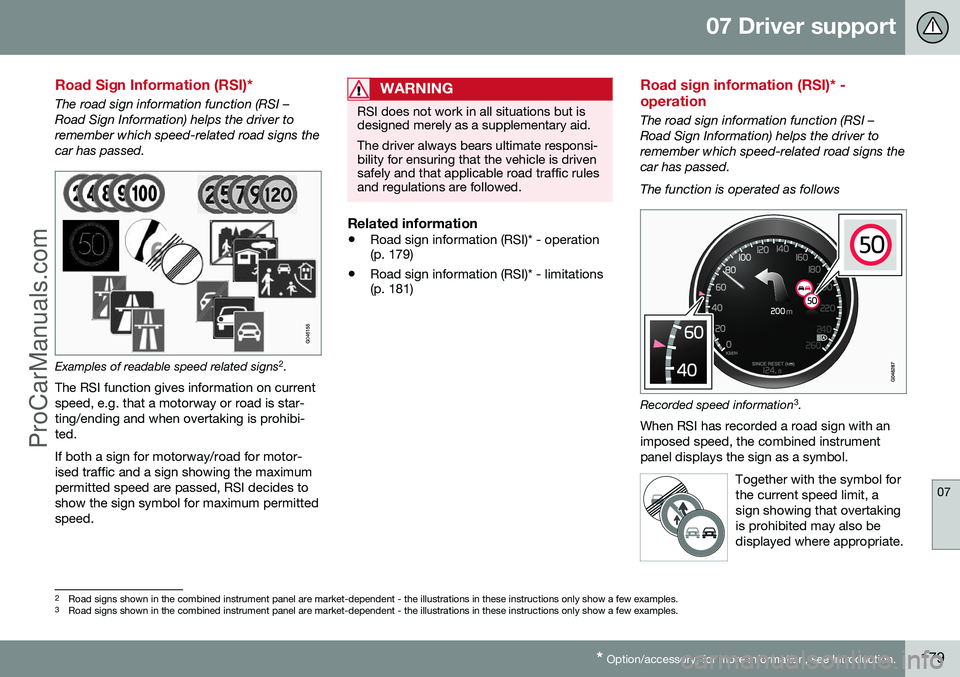
Examples of readable speed related signs 2
.
The RSI function gives information on current speed, e.g. that a motorway or road is star-ting/ending and when overtaking is prohibi-ted. If both a sign for motorway/road for motor- ised traffic and a sign showing the maximumpermitted speed are passed, RSI decides toshow the sign symbol for maximum permittedspeed.
WARNING
RSI does not work in all situations but is designed merely as a supplementary aid. The driver always bears ultimate responsi- bility for ensuring that the vehicle is drivensafely and that applicable road traffic rulesand regulations are followed.
Related information
• Road sign information (RSI)* - operation (p. 179)
• Road sign information (RSI)* - limitations(p. 181)
Road sign information (RSI)* - operation
The road sign information function (RSI – Road Sign Information) helps the driver toremember which speed-related road signs thecar has passed. The function is operated as follows
Recorded speed information 3
.
When RSI has recorded a road sign with an imposed speed, the combined instrumentpanel displays the sign as a symbol.
Together with the symbol forthe current speed limit, asign showing that overtakingis prohibited may also bedisplayed where appropriate.
2Road signs shown in the combined instrument panel are market-dependent - the illustrations in these instructions only show a few examples.
3 Road signs shown in the combined instrument panel are market-dependent - the illustrations in these instructions only show a few examples.
ProCarManuals.co’
Page 182 of 442
||
07 Driver support
07
180
End of restriction or motorwayA corresponding road sign is shown in the combined instrument panel forapprox. 10 seconds in situations where RSIdetects a sign that involves the end of aspeed limit - or other speed-related informa-tion, e.g. end of a motorway. Examples of such signs are:
End of all restrictions.
End of motorway. Following which, the sign information is hid- den until the next speed-related sign isdetected.
Additional signs
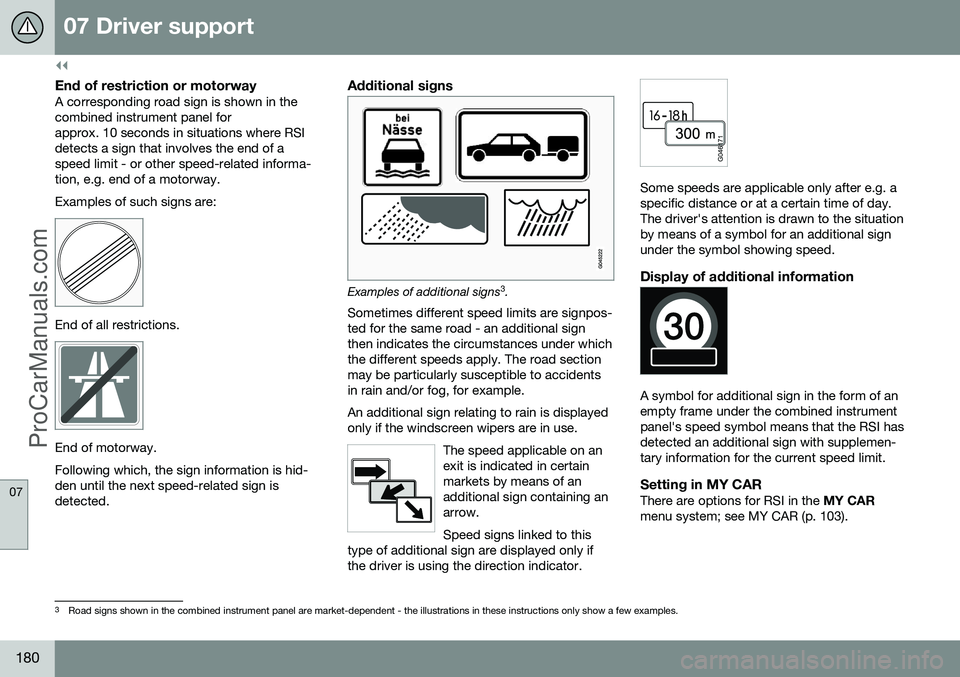
Examples of additional signs3
.
Sometimes different speed limits are signpos- ted for the same road - an additional signthen indicates the circumstances under whichthe different speeds apply. The road sectionmay be particularly susceptible to accidentsin rain and/or fog, for example. An additional sign relating to rain is displayed only if the windscreen wipers are in use.
The speed applicable on anexit is indicated in certainmarkets by means of anadditional sign containing anarrow. Speed signs linked to this
type of additional sign are displayed only if the driver is using the direction indicator.
Some speeds are applicable only after e.g. a specific distance or at a certain time of day.The driver's attention is drawn to the situationby means of a symbol for an additional signunder the symbol showing speed.
Display of additional information
A symbol for additional sign in the form of an empty frame under the combined instrumentpanel's speed symbol means that the RSI hasdetected an additional sign with supplemen-tary information for the current speed limit.
Setting in MY CARThere are options for RSI in the MY CAR
menu system; see MY CAR (p. 103).
3 Road signs shown in the combined instrument panel are market-dependent - the illustrations in these instructions only show a few examples.
ProCarManuals.co’
Page 183 of 442
07 Driver support
07
* Option/accessory, for more information, see Introduction.181
Road sign information On/Off
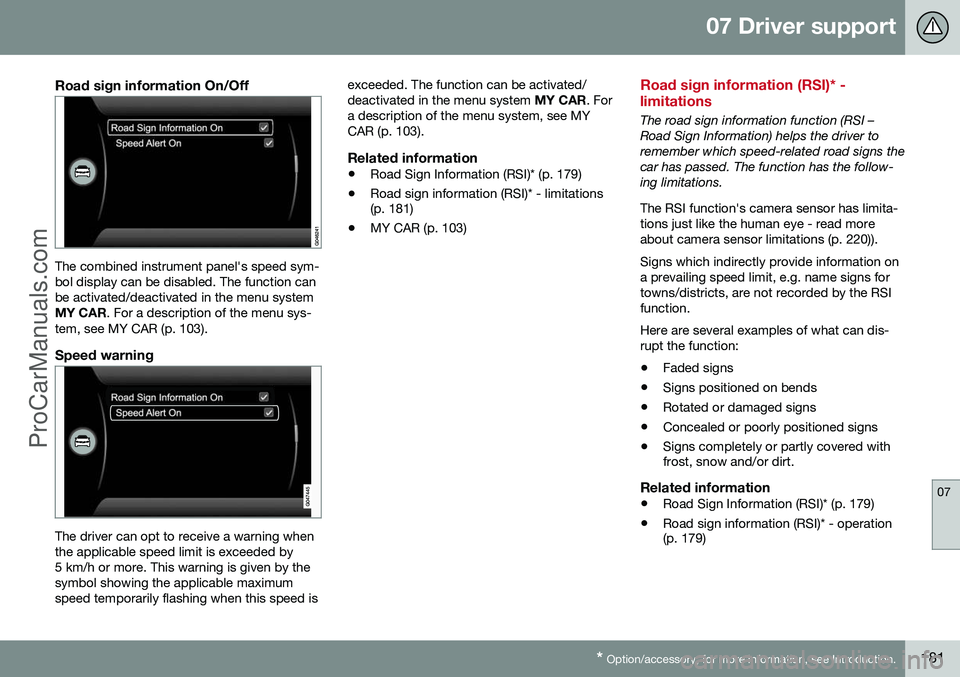
The combined instrument panel's speed sym- bol display can be disabled. The function canbe activated/deactivated in the menu systemMY CAR . For a description of the menu sys-
tem, see MY CAR (p. 103).
Speed warning
The driver can opt to receive a warning when the applicable speed limit is exceeded by5 km/h or more. This warning is given by thesymbol showing the applicable maximumspeed temporarily flashing when this speed is exceeded. The function can be activated/deactivated in the menu system
MY CAR. For
a description of the menu system, see MYCAR (p. 103).
Related information
• Road Sign Information (RSI)* (p. 179)
• Road sign information (RSI)* - limitations (p. 181)
• MY CAR (p. 103)
Road sign information (RSI)* - limitations
The road sign information function (RSI – Road Sign Information) helps the driver toremember which speed-related road signs thecar has passed. The function has the follow-ing limitations. The RSI function's camera sensor has limita- tions just like the human eye - read moreabout camera sensor limitations (p. 220)). Signs which indirectly provide information on a prevailing speed limit, e.g. name signs fortowns/districts, are not recorded by the RSIfunction. Here are several examples of what can dis- rupt the function:
• Faded signs
• Signs positioned on bends
• Rotated or damaged signs
• Concealed or poorly positioned signs
• Signs completely or partly covered with frost, snow and/or dirt.
Related information
•
Road Sign Information (RSI)* (p. 179)
• Road sign information (RSI)* - operation(p. 179)
ProCarManuals.co’
Page 186 of 442
||
07 Driver support
07
184* Option/accessory, for more information, see Introduction.
–Depress the accelerator pedal fully.
> The combined instrument panel shows
the stored maximum speed with a col- oured mark (5) and the driver can tem-porarily exceed the set maximumspeed - the mark (5) changes colourduring this time from GREEN toWHITE. The speed limiter is automatically reac- tivated after the release of the acceler-ator pedal and the car's speed isslowed down to below the selected/stored maximum speed - the display'smark (5) changes colour from WHITEto GREEN and the car's maximumspeed is again limited.
Related information
• Speed limiter* (p. 182)
• Speed limiter* - getting started (p. 182)
• Speed limiter* - changing speed (p. 183)
• Speed limiter* - deactivation (p. 184)
• Speed limiter* - alarm for speed excee- ded (p. 184)
Speed limiter* - alarm for speed exceeded
A (Speed Limiter) can be regarded as a reverse cruise control - the driver regulatesthe speed using the accelerator pedal but isprevented from accidentally exceeding apre-selected/set speed by the speed limiter. On a steep downhill gradient the speed limit- er's engine braking effect may be inadequateand the selected maximum speed is excee-ded. The driver is alerted about this with anacoustic signal. The signal is active until the driver has slowed to below the selected maximum speed.
NOTE
The alarm is only activated after 5 seconds if the speed has been exceeded by at least3 km/h provided that none of the buttons
or has been depressed during the
last half minute.
Related information
• Speed limiter* (p. 182)
• Speed limiter* - changing speed (p. 183)
• Speed limiter* - getting started (p. 182)
• Speed limiter* - temporary deactivation and standby mode (p. 183)
• Speed limiter* - deactivation (p. 184)
Speed limiter* - deactivation
A (Speed Limiter) can be regarded as a reverse cruise control - the driver regulatesthe speed using the accelerator pedal but isprevented from accidentally exceeding a pre-selected/set speed by the speed limiter. To deactivate the speed limiter:
–Press the steering wheel button .
> The combined instrument panel's sym- bol for the speed limiter (6) and the mark for the set speed (5) are extin-guished. The selected and storedspeed are thus deleted from the mem-ory and cannot be resumed with the
button.
The driver can then use the accelerator pedal to choose a speed without limi-tation.
Related information
• Speed limiter* (p. 182)
• Speed limiter* - getting started (p. 182)
• Speed limiter* - temporary deactivation and standby mode (p. 183)
• Speed limiter* - alarm for speed excee-ded (p. 184)
ProCarManuals.co’
Page 202 of 442
07 Driver support
07
200* Option/accessory, for more information, see Introduction.
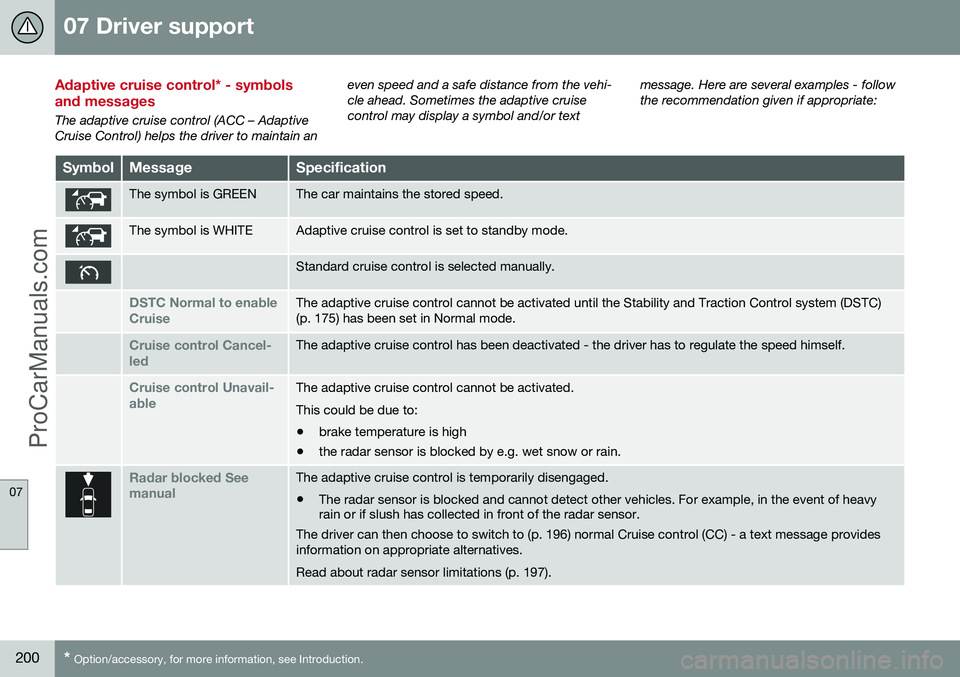
Adaptive cruise control* - symbols and messages
The adaptive cruise control (ACC – Adaptive Cruise Control) helps the driver to maintain an even speed and a safe distance from the vehi-cle ahead. Sometimes the adaptive cruisecontrol may display a symbol and/or text
message. Here are several examples - followthe recommendation given if appropriate:
SymbolMessageSpecification
The symbol is GREENThe car maintains the stored speed.
The symbol is WHITEAdaptive cruise control is set to standby mode.
Standard cruise control is selected manually.
DSTC Normal to enable CruiseThe adaptive cruise control cannot be activated until the Stability and Traction Control system (DSTC) (p. 175) has been set in Normal mode.
Cruise control Cancel- ledThe adaptive cruise control has been deactivated - the driver has to regulate the speed himself.
Cruise control Unavail- ableThe adaptive cruise control cannot be activated. This could be due to:
• brake temperature is high
• the radar sensor is blocked by e.g. wet snow or rain.
Radar blocked See manualThe adaptive cruise control is temporarily disengaged.
• The radar sensor is blocked and cannot detect other vehicles. For example, in the event of heavy rain or if slush has collected in front of the radar sensor.
The driver can then choose to switch to (p. 196) normal Cruise control (CC) - a text message provides information on appropriate alternatives. Read about radar sensor limitations (p. 197).
ProCarManuals.co’
Page 219 of 442
07 Driver support
07
}}
* Option/accessory, for more information, see Introduction.217
Collision warning system* - operation
"Collision Warning with Auto Brake and Cyclist and Pedestrian Detection" is an aid toassist the driver when there is a risk of collid-ing with a pedestrian, bicycle or vehicle infront that are stationary or moving in the samedirection. Settings for the collision warning system are made from MY CAR via the centre console
screen and menu system, see MY CAR (p.103).
Warning signals On and OffYou can select whether the collision warningsystem's acoustic and visual warning signalsshould be switched on or off. When starting the engine, the setting that was selected when the engine was switched off isobtained automatically.
NOTE
The Brake Support and Auto Brake func- tions are always enabled - they cannot bedeactivated.
Light and acoustic signalsBoth the light and acoustic signals can be deactivated after starting the engine. Thefunction can be activated/deactivated in themenu system MY CAR. For a description of
the menu system, see MY CAR (p. 103). The warning lamp (see (1) in the illustration (p.213)) is tested each time the engine is startedby briefly lighting the separate light points ofthe warning lamp if the visual and acousticwarning of the collision warning system isactivated.
Acoustic signalThe warning sound can be activated/deacti-vated separately in the menu system
MY
CAR . For a description of the menu system,
see MY CAR (p. 103).
Set warning distanceThe warning distance regulates the distanceat which the visual and acoustic warnings aredeployed. The warning distance is set in themenu system MY CAR. For a description of
the menu system, see MY CAR (p. 103). The warning distance determines the sys- tem's sensitivity. Warning distance
Long pro-
vides an earlier warning. First test with Longand if this setting produces too many warn- ings, which could be perceived as irritating incertain situations, then change to warning distance
Normal.
Only use warning distance
Short in excep-
tional cases, e.g. for dynamic driving.
NOTE
When the adaptive cruise control is in use the warning lamp and warning sound willbe used by the cruise control even if thecollision warning system is switched off. The collision warning system warns the driver in the event of a risk of a collision,but the function cannot shorten driverreaction time. In order for the collision warning system to be effective, always drive with DistanceWarning (p. 202) set at time interval 4–5.
NOTE
Even if the warning distance has been set to Long warnings could be perceived as
being late in certain situations, e.g. when there are large differences in speed or ifvehicles in front brake heavily.
WARNING
No automatic system can guarantee 100 % correct function in all situations.Therefore, never test Collision Warningwith Auto Brake by driving at people orvehicles - this may cause severe damageand injury and risk lives.
Checking settingsThe settings required can be controlled on the centre console display screen. Searchwith the menu system (p. 103) MY CAR.
ProCarManuals.co’
Page 222 of 442
07 Driver support
07
220* Option/accessory, for more information, see Introduction.
• Collision warning system* - operation (p. 217)
• Collision warning system* - camera sen-sor limitations (p. 220)
• Collision warning system* - symbols andmessages (p. 222)Collision warning system* - camera sensor limitations
"Collision Warning with Auto Brake and Cyclist and Pedestrian Detection" is an aid toassist the driver when there is a risk of collid-ing with a pedestrian, bicycle or vehicle infront that are stationary or moving in the samedirection.
The function uses the car's camera sensor,
which has certain limitations. The car’s camera sensor is also used - as well as by Collision Warning with Auto Brake- by the functions:
• Automatic main/dipped beam dim- ming (p. 82)
• Road sign information (p. 179)
• Driver Alert Control - DAC (p. 224)
• Lane Keeping Aid (p. 229)
NOTE
Keep the windscreen surface in front of the camera sensor free from ice, snow, mistand dirt. Do not stick or attach anything to the windscreen in front of the camera sensoras this may reduce effectiveness or causeone or more of the systems dependent onthe camera to stop working.
The camera sensors have limitations similar to the human eye, i.e. they "see" worse in darkness, heavy snowfall or rain and in thickfog for example. Under such conditions thefunctions of camera-dependent systemscould be significantly reduced or temporarilydisengaged. Strong oncoming light, reflections in the car- riageway, snow or ice on the road surface,dirty road surfaces or unclear lane markingscould also significantly reduce camera sensorfunction when it is used to scan the carriage-way and detect pedestrians and other vehi-cles. The field of vision of the camera sensor is lim- ited, which is why pedestrians, cyclists andvehicles cannot be detected in some situa-tions, or they are detected later than anticipa-ted. During very high temperatures the camera is temporarily switched off for about 15 minutesafter the engine is started in order to protectcamera functionality.
Fault tracing and actionIf the display shows the messageWindscreen Sensors blocked then this
means that the camera sensor is blocked and cannot detect pedestrians, cyclists, vehiclesor road markings in front of the car. At the same time, this means that - besides Collision Warning with Auto Brake - the Auto-matic main/dipped beam dimming, Road SignInformation, Driver Alert Control and Lane
ProCarManuals.co’
Page 227 of 442
07 Driver support
07
* Option/accessory, for more information, see Introduction.225
driver fatigue, irrespective of whether or not DAC issues a warning.
NOTE
The function must not be used to extend a period of driving. Always plan breaks atregular intervals, and make sure you arewell rested.
LimitationIn some cases the system may issue a warn- ing despite driving ability not deteriorating, forexample: •
in strong side winds
• on rutted road surfaces.
NOTE
The camera sensor has certain limitations (p. 220).
Related information
•Driver Alert System* (p. 224)
• Driver Alert Control (DAC)* - operation (p. 225)
• Driver Alert Control (DAC)* - symbols andmessages (p. 227)
Driver Alert Control (DAC)* - operation
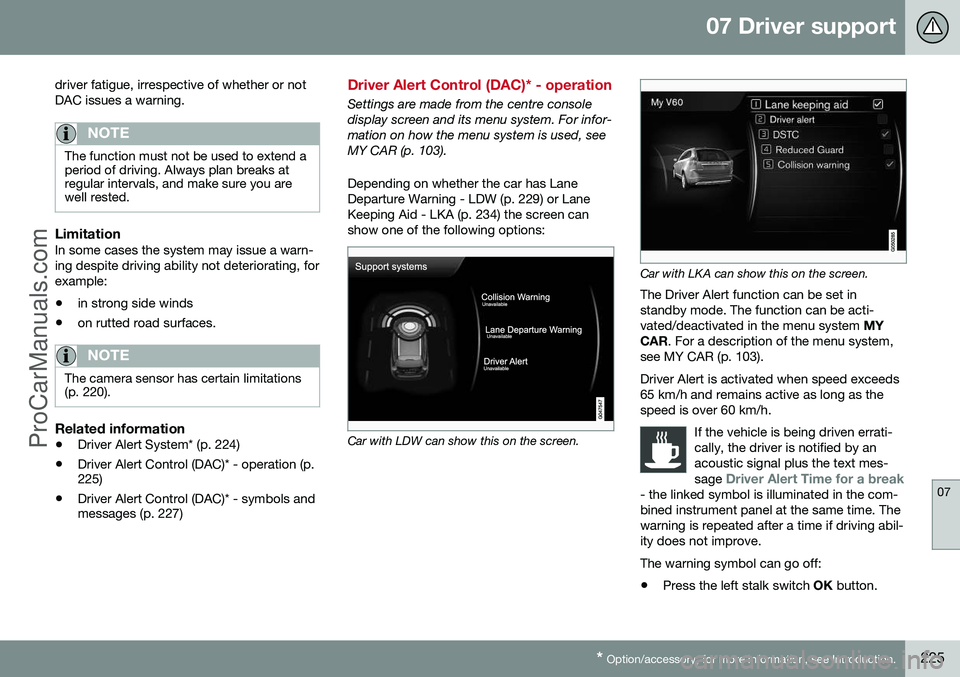
Settings are made from the centre console display screen and its menu system. For infor-mation on how the menu system is used, seeMY CAR (p. 103). Depending on whether the car has Lane Departure Warning - LDW (p. 229) or LaneKeeping Aid - LKA (p. 234) the screen canshow one of the following options:
Car with LDW can show this on the screen.
Car with LKA can show this on the screen.
The Driver Alert function can be set in standby mode. The function can be acti-vated/deactivated in the menu system MY
CAR . For a description of the menu system,
see MY CAR (p. 103). Driver Alert is activated when speed exceeds 65 km/h and remains active as long as thespeed is over 60 km/h.
If the vehicle is being driven errati-cally, the driver is notified by anacoustic signal plus the text mes- sage
Driver Alert Time for a break- the linked symbol is illuminated in the com- bined instrument panel at the same time. Thewarning is repeated after a time if driving abil-ity does not improve.
The warning symbol can go off:
• Press the left stalk switch
OK button.
ProCarManuals.co’
Page 229 of 442
07 Driver support
07
}}
* Option/accessory, for more information, see Introduction.227
Driver Alert Control (DAC)* - symbols and messages
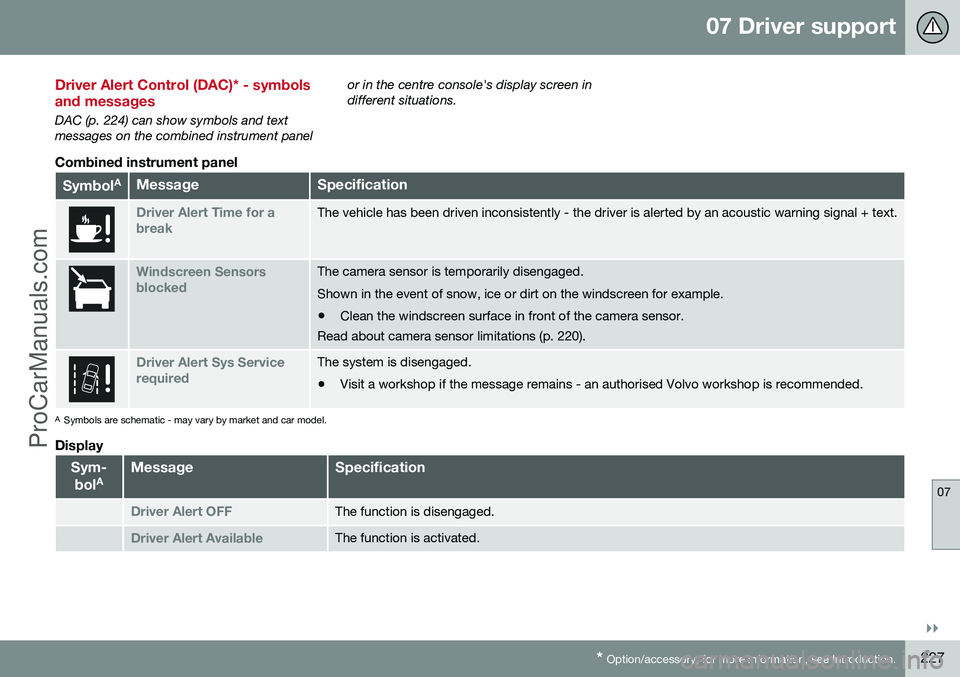
DAC (p. 224) can show symbols and text messages on the combined instrument panel or in the centre console's display screen indifferent situations.
Combined instrument panel
Symbol
AMessageSpecification
Driver Alert Time for a breakThe vehicle has been driven inconsistently - the driver is alerted by an acoustic warning signal + text.
Windscreen Sensors blockedThe camera sensor is temporarily disengaged. Shown in the event of snow, ice or dirt on the windscreen for example.
• Clean the windscreen surface in front of the camera sensor.
Read about camera sensor limitations (p. 220).
Driver Alert Sys Service requiredThe system is disengaged.
• Visit a workshop if the message remains - an authorised Volvo workshop is recommended.
A
Symbols are schematic - may vary by market and car model.
Display
Sym-
bol AMessageSpecification
Driver Alert OFFThe function is disengaged.
Driver Alert AvailableThe function is activated.
ProCarManuals.co’
Page 242 of 442
07 Driver support
07
240* Option/accessory, for more information, see Introduction.
Park Assist*
Parking assistance is used as an aid to park- ing. An acoustic signal as well as symbols onthe centre console's display screen indicatethe distance to the detected obstacle. Parking assistance sound level can be adjusted during the ongoing acoustic signalusing the centre console's VOL knob. The
sound level can also be adjusted in the audiosettings menu, which is accessed by pressingSOUND or in the car's menu system (p. 103)
MY CAR 22
.
Parking assistance is available in two vari-ants:
• Rear only
• Both front and rear.
NOTE
When a towbar is configured with the car's electrical system, the protrusion of thetowbar is included when the functionmeasures the parking space.
WARNING
•Parking assistance does not relinquish the driver's own responsibility duringparking.
• The sensors have blind spots whereobstacles cannot be detected.
• Be aware of e.g. people or animalsnear the car.
Related information
•
Park assist syst* - cleaning the sensors (p. 243)
• Park assist syst* - function (p. 240)
• Park assist syst* - forward (p. 242)
• Park assist syst* - fault indication (p. 243)
• Park assist syst* - backward (p. 241)
• Park assist camera (p. 244)
Park assist syst* - function
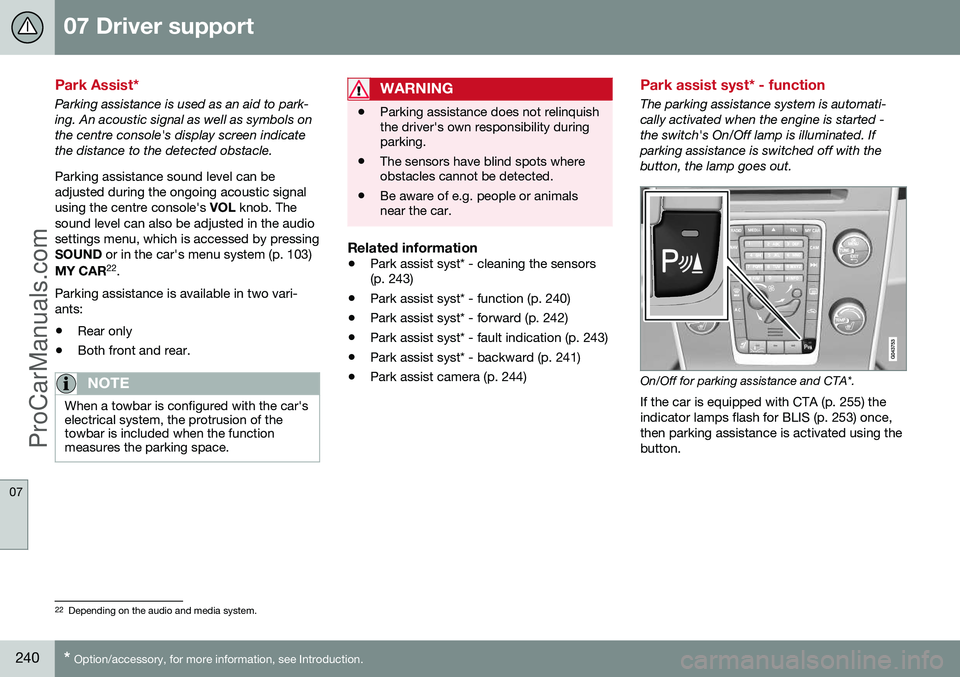
The parking assistance system is automati- cally activated when the engine is started -the switch's On/Off lamp is illuminated. Ifparking assistance is switched off with thebutton, the lamp goes out.
On/Off for parking assistance and CTA*.
If the car is equipped with CTA (p. 255) the indicator lamps flash for BLIS (p. 253) once,then parking assistance is activated using thebutton.
22 Depending on the audio and media system.
ProCarManuals.co’