key VOLVO V60 2014 Owner's Manual
[x] Cancel search | Manufacturer: VOLVO, Model Year: 2014, Model line: V60, Model: VOLVO V60 2014Pages: 442, PDF Size: 13.85 MB
Page 84 of 442
||
03 Instruments and controls
03
82* Option/accessory, for more information, see Introduction.
also activated automatically if the windscreen wipers or rear fog lamps are activated. With the knob in position
dipped beam
is always switched on when the engine is run- ning or when key position II is active.
Main beam flashMove the stalk switch gently towards thesteering wheel to the position for main beamflash. Main beam comes on until the stalkswitch is released.
Main beamMain beam can be activated when the knob is in position 21
or . Activate/deac-
tivate main beam by moving the stalk switch towards the steering wheel to the end posi-tion and then releasing. Alternatively, themain beam can be deactivated by a lightpress of the stalk switch toward the steeringwheel. When main beam has been activated the
symbol illuminates in the combined
instrument panel.
Auxiliary lamps*If the car has auxiliary lamps, the driver can use the MY CAR menu system to choosewhether they should be deactivated orswitched on/off simultaneously with the main beam 22
, see MY CAR (p. 103).
Related information
• Active Xenon headlamps* (p. 84)
• Active high beam* (p. 82)
• Light switches (p. 78)
• Headlamps - adjusting headlamp pattern (p. 90)
• Tunnel detection* (p. 81)
Active high beam*
The Active High Beam function detects the headlamp beams of oncoming traffic or therear lights of vehicles in front, and switchesthe lighting from main beam to dipped beam.Xenon headlamps only dim the portion of thelight beam that points directly to the vehicle.The lighting returns to main beam when theincoming light has stopped.
Active high beam - AHBActive high beam (Active High Beam - AHB) isa function which uses a camera sensor at thetop edge of the windscreen to detect theheadlamp beams of oncoming traffic or therear lights of vehicles in front, and thenswitches from main beam to dipped beam.The function can also take streetlights intoaccount. Car with halogen headlamps The lighting returns to main beam about a second after the camera sensor no longerdetects the headlamp beams from oncomingtraffic or the rear lights from vehicles in front. Car with Xenon headlamps Unlike what happens during conventional dimming, the light beam continues with mainbeam on both sides of oncoming traffic orvehicles ahead - only the part of the light
21
When dipped beam is switched on.
22 Auxiliary lamps must be connected to the electrical system by a workshop. Volvo recommends that you contact an authorised Volvo workshop.
ProCarManuals.co’
Page 87 of 442
03 Instruments and controls
03
* Option/accessory, for more information, see Introduction.85
the same time as the information display shows an explanatory text and a further illu-minated symbol.
SymbolDisplaySpecification
Headlamp systemmalfunc-tion Serv-icerequiredThe system is disengaged. Visita workshop ifthe messageremains. Volvorecommendsthat you contactan authorisedVolvo workshop.
The function is only active in twilight or dark- ness and only when the car is moving. The function
23
can be deactivated/activated
in the menu system MY CAR, see MY CAR (p. 103). For headlamp pattern adjustment, see Head- lamps - adjusting headlamp pattern (p. 90).
Cornering lightsActive Xenon headlamps are equipped withcornering lights that temporarily illuminate thearea diagonally in front of the car in the direc-tion the steering wheel is turned in a sharpbend, or in the direction for which the direc-tion indicators are used. The function is activated when main beam ordipped beam is used and the car's speed islower than approx. 30 km/h. In addition, both cornering lights are switched on as a supplement to the reversing lampduring reversing.
Related information
•
Main/dipped beam (p. 81)
• Active high beam* (p. 82)
• Light switches (p. 78)
Rear fog lamp
When visibility is reduced by fog the rear fog lamp can be used so that other road usersshall notice vehicles in front at an early stage.
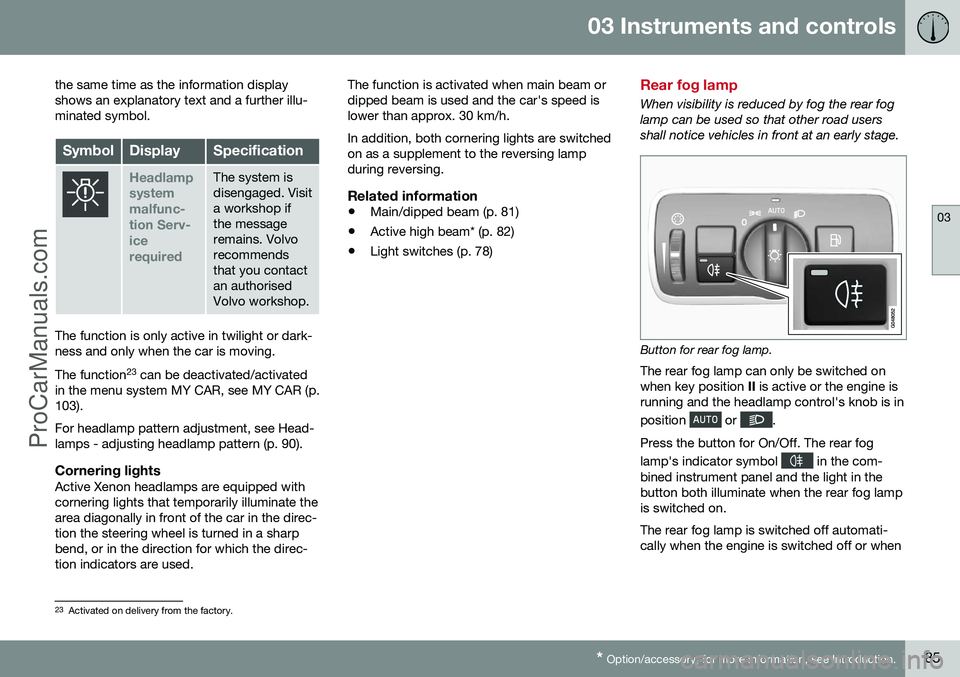
Button for rear fog lamp.
The rear fog lamp can only be switched on when key position II is active or the engine is
running and the headlamp control's knob is in position
or .
Press the button for On/Off. The rear fog lamp's indicator symbol
in the com-
bined instrument panel and the light in the button both illuminate when the rear fog lampis switched on. The rear fog lamp is switched off automati- cally when the engine is switched off or when
23 Activated on delivery from the factory.
ProCarManuals.co’
Page 90 of 442
03 Instruments and controls
03
88
Interior lighting
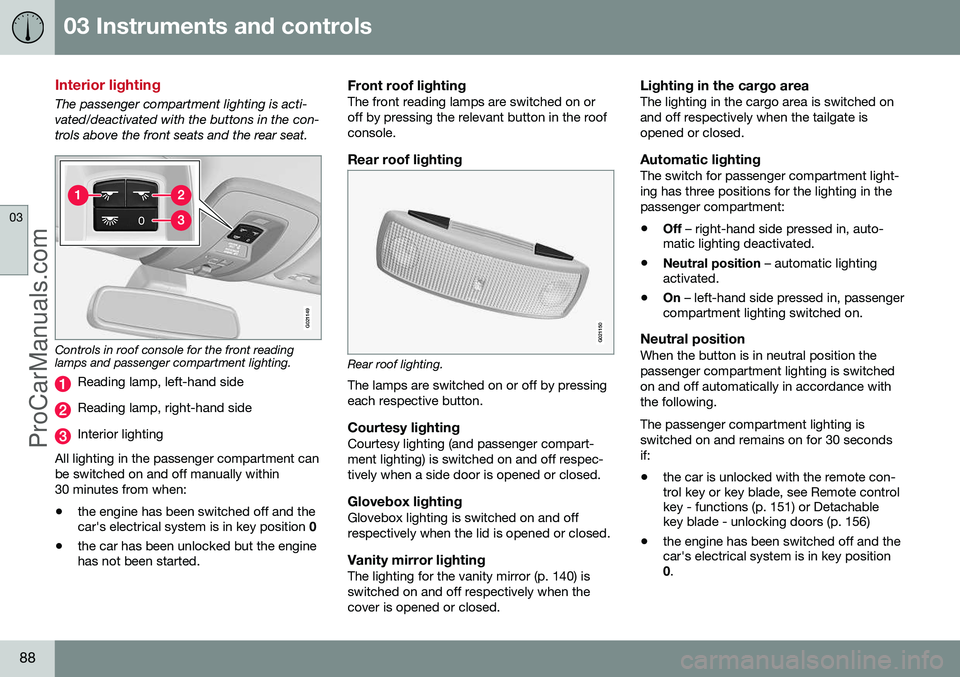
The passenger compartment lighting is acti- vated/deactivated with the buttons in the con-trols above the front seats and the rear seat.
G021149
Controls in roof console for the front reading lamps and passenger compartment lighting.
Reading lamp, left-hand side
Reading lamp, right-hand side
Interior lighting
All lighting in the passenger compartment can be switched on and off manually within30 minutes from when:
• the engine has been switched off and the car's electrical system is in key position
0
• the car has been unlocked but the enginehas not been started.
Front roof lightingThe front reading lamps are switched on or off by pressing the relevant button in the roofconsole.
Rear roof lighting
G021150
Rear roof lighting.
The lamps are switched on or off by pressing each respective button.
Courtesy lightingCourtesy lighting (and passenger compart-ment lighting) is switched on and off respec-tively when a side door is opened or closed.
Glovebox lightingGlovebox lighting is switched on and offrespectively when the lid is opened or closed.
Vanity mirror lightingThe lighting for the vanity mirror (p. 140) isswitched on and off respectively when thecover is opened or closed.
Lighting in the cargo areaThe lighting in the cargo area is switched onand off respectively when the tailgate isopened or closed.
Automatic lightingThe switch for passenger compartment light-ing has three positions for the lighting in thepassenger compartment:
• Off
– right-hand side pressed in, auto-
matic lighting deactivated.
• Neutral position
– automatic lighting
activated.
• On
– left-hand side pressed in, passenger
compartment lighting switched on.
Neutral positionWhen the button is in neutral position thepassenger compartment lighting is switchedon and off automatically in accordance withthe following. The passenger compartment lighting is switched on and remains on for 30 secondsif:
• the car is unlocked with the remote con- trol key or key blade, see Remote control key - functions (p. 151) or Detachable key blade - unlocking doors (p. 156)
• the engine has been switched off and thecar's electrical system is in key position0
.
ProCarManuals.co’
Page 91 of 442
03 Instruments and controls
03
89
Passenger compartment lighting is switched off when:
• the engine is started
• the car is locked.
The passenger compartment lighting comeson and remains on for two minutes if one ofthe doors is open. If any lighting is switched on manually and the car is locked then it will be switched offautomatically after two minutes.
Mood lightsWhen the normal passenger compartmentlighting is switched off and the engine is run-ning, a number of LEDs illuminate, includingone in the ceiling lighting, in order to providea low-light and enhance the mood while driv-ing. This lighting goes out for a little whileafter the normal passenger compartmentlighting when the car is locked. The bright-ness is controlled using the thumbwheel onthe headlamp control (p. 78).
Home safe light duration
Home safe lighting consists of dipped beam, parking lamps, lamps in the door mirrors,number plate lighting, interior roof lighting aswell as courtesy lighting. Some of the exterior lighting can be kept switched on to work as home safe lightingafter the car has been locked.
1. Remove the remote control key from the ignition switch.
2. Move the left-hand stalk switch toward the steering wheel to the end position and release it. The function can be activatedin the same way as with main beam flash;see Main/dipped beam (p. 81).
3. Get out of the car and lock the door. When the function is activated, dipped beam, parking lamps, door mirror lamps, numberplate lighting, interior roof lamps and courtesylighting are switched on. The length of time for which the home safe lighting should be kept on can be set in themenu system MY CAR, see MY CAR (p. 103).
Related information
• Approach light duration (p. 89)
Approach light duration
Approach light duration consists of parking lamps, lamps in the door mirrors, numberplate lighting, interior roof lighting as well ascourtesy lighting. Approach lighting is switched on with the remote control key, see Remote control key -functions (p. 151), and is used to switch onthe car's lighting at a distance. When the function is activated with the remote control, the parking lamps, door mir-ror lamps, number plate lighting, interior rooflamps and courtesy lighting are switched on. The length of time for which the approach lighting should be kept on can be set in themenu system MY CAR, see MY CAR (p. 103).
Related information
• Home safe light duration (p. 89)
ProCarManuals.co’
Page 93 of 442
03 Instruments and controls
03
}}
* Option/accessory, for more information, see Introduction.91
detects on the windscreen. The sensitivity of the rain sensor can be adjusted using thethumbwheel. When the rain sensor is activated a lamp in the button illuminates and the rain sensor symbol
is shown in the combined
instrument panel.
Activating and setting the sensitivityWhen activating the rain sensor, the car must be running or the remote control key in posi-tion I or II while the windscreen wiper stalk
switch must be in position 0 or in the position
for a single sweep. Activate the rain sensor by pressing the but- ton
. The windscreen wipers make one
sweep. Press the stalk switch up for the wipers to make an extra sweep. Turn the thumbwheel upward for higher sen- sitivity and downward for lower sensitivity.(An extra sweep is made when the thumb-wheel is turned upward.)
DeactivateDeactivate the rain sensor by pressing the button
or move the stalk switch down
to another wiper program. The rain sensor is automatically deactivated when the remote control key is removed from the ignition switch or five minutes after theengine has been switched off.
IMPORTANT
The windscreen wipers could start and be damaged in an automatic car wash.Switch off the rain sensor while the car isin motion or when the remote control keyis in position
I or II. The symbol in the
combined instrument panel and the lampin the button go out.
Washing the headlamps and windows
Washing function.
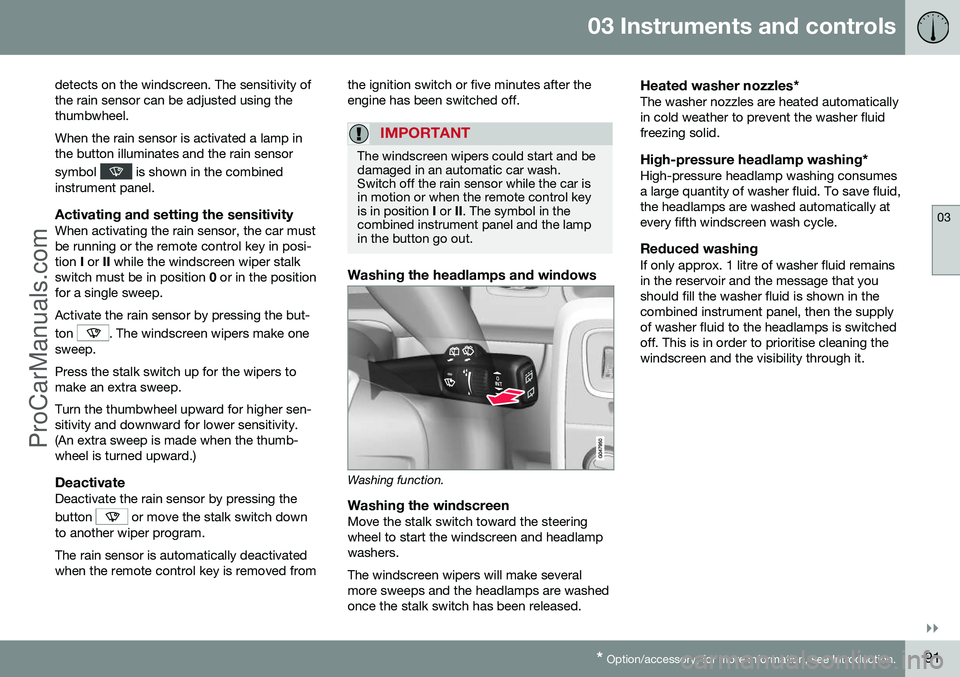
Washing the windscreenMove the stalk switch toward the steering wheel to start the windscreen and headlampwashers. The windscreen wipers will make several more sweeps and the headlamps are washedonce the stalk switch has been released.
Heated washer nozzles*The washer nozzles are heated automaticallyin cold weather to prevent the washer fluidfreezing solid.
High-pressure headlamp washing*High-pressure headlamp washing consumesa large quantity of washer fluid. To save fluid,the headlamps are washed automatically atevery fifth windscreen wash cycle.
Reduced washingIf only approx. 1 litre of washer fluid remainsin the reservoir and the message that youshould fill the washer fluid is shown in thecombined instrument panel, then the supplyof washer fluid to the headlamps is switchedoff. This is in order to prioritise cleaning thewindscreen and the visibility through it.
ProCarManuals.co’
Page 95 of 442
03 Instruments and controls
03
}}
93
WARNING
Check that no rear seat passengers are trapped when the windows are closedfrom the driver's door.
WARNING
Check that children or other passengers are not trapped if the windows are closed,even when the remote control key is used.
WARNING
If there are children in the car - remember to always switch off the power supply tothe power windows by selecting key posi-tion 0 and then take the remote control key
with you when leaving the car. For infor-mation on key positions - see Key posi-tions - functions at different levels (p. 70).
Operating
Operating the power windows.
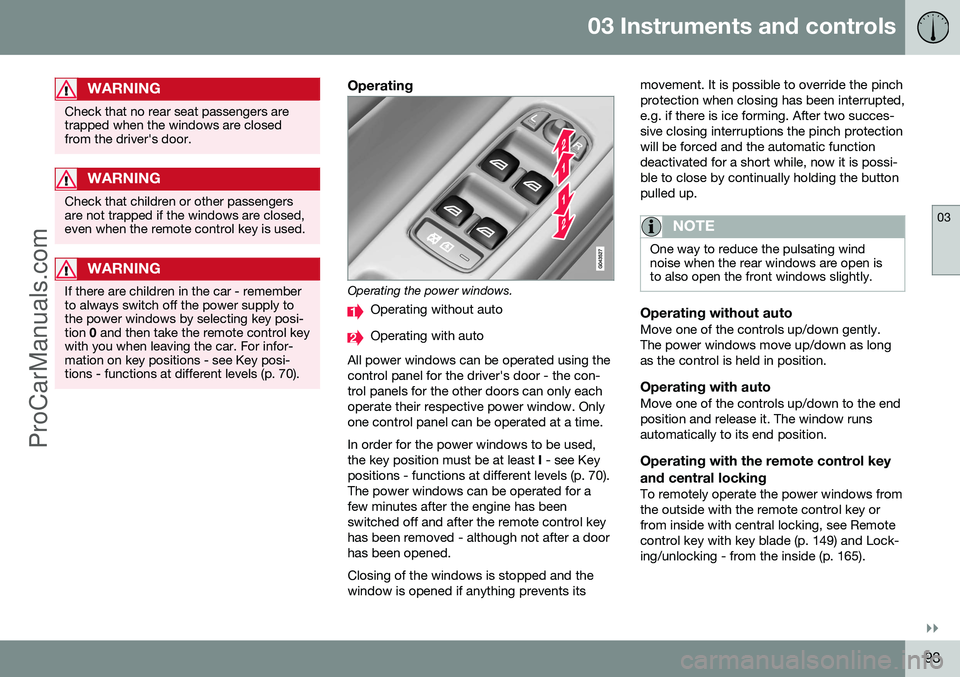
Operating without auto
Operating with auto
All power windows can be operated using the control panel for the driver's door - the con-trol panels for the other doors can only eachoperate their respective power window. Onlyone control panel can be operated at a time. In order for the power windows to be used, the key position must be at least I - see Key
positions - functions at different levels (p. 70).The power windows can be operated for afew minutes after the engine has beenswitched off and after the remote control keyhas been removed - although not after a doorhas been opened. Closing of the windows is stopped and the window is opened if anything prevents its movement. It is possible to override the pinchprotection when closing has been interrupted,e.g. if there is ice forming. After two succes-sive closing interruptions the pinch protectionwill be forced and the automatic functiondeactivated for a short while, now it is possi-ble to close by continually holding the buttonpulled up.
NOTE
One way to reduce the pulsating wind noise when the rear windows are open isto also open the front windows slightly.
Operating without autoMove one of the controls up/down gently. The power windows move up/down as longas the control is held in position.
Operating with autoMove one of the controls up/down to the endposition and release it. The window runsautomatically to its end position.
Operating with the remote control key and central locking
To remotely operate the power windows from the outside with the remote control key orfrom inside with central locking, see Remotecontrol key with key blade (p. 149) and Lock-ing/unlocking - from the inside (p. 165).
ProCarManuals.co’
Page 96 of 442
||
03 Instruments and controls
03
94
ResettingIf the battery is disconnected then the func- tion for automatic opening must be reset sothat it can work correctly.
1. Gently raise the front section of the but-ton to raise the window to its end position and hold it there for one second.
2. Release the button briefly.
3. Raise the front section of the button again for one second.
WARNING
A reset must take place for pinch protec- tion to work.
Door mirrors
The door mirror positions are adjusted with the joystick in the driver's door controls.
Door mirrors
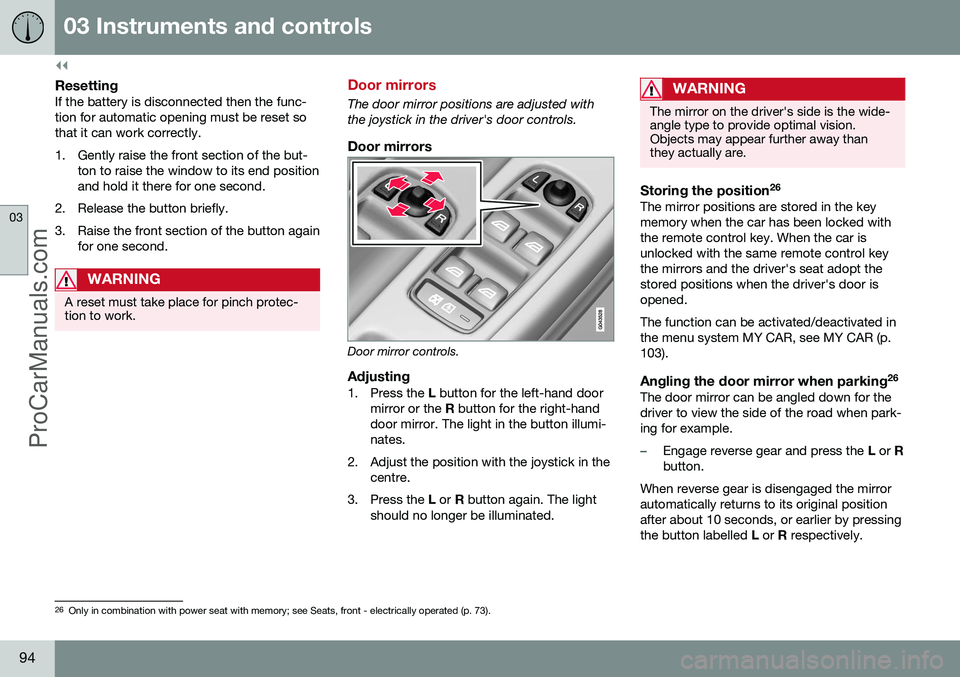
Door mirror controls.
Adjusting1. Press the L button for the left-hand door
mirror or the R button for the right-hand
door mirror. The light in the button illumi- nates.
2. Adjust the position with the joystick in the centre.
3. Press the L or R button again. The light
should no longer be illuminated.
WARNING
The mirror on the driver's side is the wide- angle type to provide optimal vision.Objects may appear further away thanthey actually are.
Storing the position 26The mirror positions are stored in the key memory when the car has been locked withthe remote control key. When the car isunlocked with the same remote control keythe mirrors and the driver's seat adopt thestored positions when the driver's door isopened. The function can be activated/deactivated in the menu system MY CAR, see MY CAR (p.103).
Angling the door mirror when parking 26The door mirror can be angled down for thedriver to view the side of the road when park-ing for example.
–Engage reverse gear and press the
L or R
button.
When reverse gear is disengaged the mirror automatically returns to its original positionafter about 10 seconds, or earlier by pressingthe button labelled L or R respectively.
26
Only in combination with power seat with memory; see Seats, front - electrically operated (p. 73).
ProCarManuals.co’
Page 97 of 442
03 Instruments and controls
03
* Option/accessory, for more information, see Introduction.95
Automatic angling of the door mirror when parking 26
When reverse gear is engaged the door mirror is automatically angled down so that thedriver can see the side of the road whenparking for example. When reverse gear isdisengaged the mirror automatically returnsto its original position after a short time. The function can be activated/deactivated in the menu system MY CAR, see MY CAR (p.103).
Automatic retraction when locking 26When the car is locked/unlocked with theremote control key the door mirrors are auto-matically retracted/extended. The function can be activated/deactivated in the menu system MY CAR, see MY CAR (p.103).
Resetting to neutralMirrors that have been moved out of positionby an external force must be reset electricallyto the neutral position for electric retracting/extending to work correctly:
1. Retract the mirrors with the
L and R but-
tons.
2. Fold them out again with the L and R but-
tons. 3. Repeat the above procedure as neces-
sary.
The mirrors are now reset in neutral position.
Automatic dimming*For the door mirrors to be fitted with this function requires that the interior rearviewmirror also has automatic dimming, see Rear-view mirror - interior (p. 96).
Retractable power door mirrors*The mirrors can be retracted for parking/driv-ing in narrow spaces:
1. Depress the L and R buttons simultane-
ously (key position must be at least I).
2. Release them after approximately 1 second. The mirrors automatically stop in the fully retractedposition.
Fold out the mirrors by pressing down the L
and R buttons simultaneously. The mirrors
automatically stop in the fully extended posi-tion.
Home safe and approach lightingThe lamp on the door mirrors illuminateswhen approach lighting (p. 89) or home safelighting (p. 89) is selected.
Related information
• Rearview mirror - interior (p. 96)
• Windows and rearview and door mirrors - heating (p. 96)
26
Only in combination with power seat with memory; see Seats, front - electrically operated (p. 73).
ProCarManuals.co’
Page 99 of 442
03 Instruments and controls
03
* Option/accessory, for more information, see Introduction.97
Automatic dimming*Bright light from behind is automatically dimmed by the rearview mirror. The controlfor manual dimming is not available on mir-rors with automatic dimming. The rearview mirror contains two sensors - one forward facing and one rearward facing -that work together to identify and eliminatedazzling light. The forward facing sensordetects ambient light, while the rearward fac-ing sensor detects the light from vehicleheadlights behind.
NOTE
If the sensors are obscured by e.g. parking permits, transponders, sun visors orobjects in the seats or in the cargo area insuch a way that light is prevented fromreaching the sensors, then the dimmingfunction of the interior rearview and doormirrors is reduced.
The compass (p. 97) can only be specified for a rearview mirror with automatic dimming.
Related information
• Door mirrors (p. 94)
Compass*
The rearview mirror contains an integrated display that shows the compass direction inwhich the front of the car is pointing.
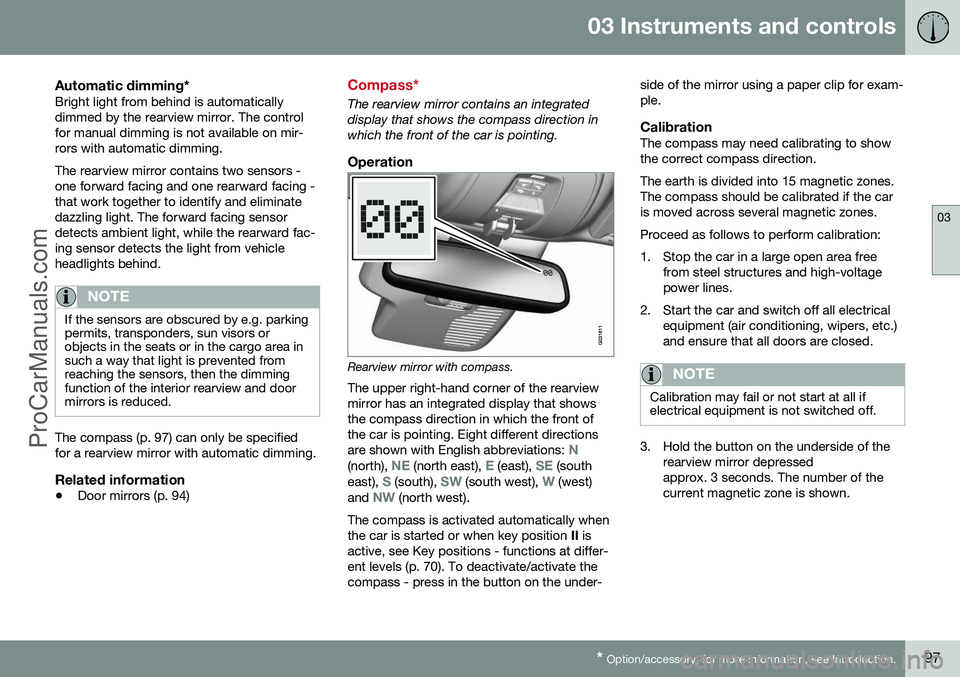
Operation
Rearview mirror with compass.
The upper right-hand corner of the rearview mirror has an integrated display that showsthe compass direction in which the front ofthe car is pointing. Eight different directions are shown with English abbreviations:
N(north), NE (north east), E (east), SE (south
east), S (south), SW (south west), W (west)
and NW (north west).
The compass is activated automatically when the car is started or when key position II is
active, see Key positions - functions at differ-ent levels (p. 70). To deactivate/activate thecompass - press in the button on the under- side of the mirror using a paper clip for exam-ple.
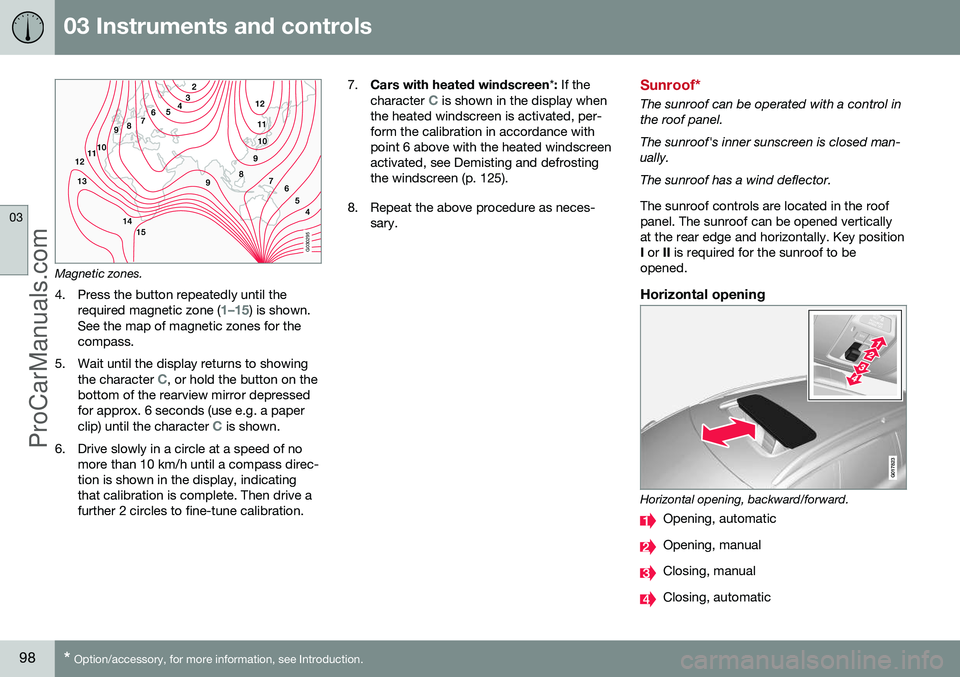
CalibrationThe compass may need calibrating to showthe correct compass direction. The earth is divided into 15 magnetic zones. The compass should be calibrated if the caris moved across several magnetic zones. Proceed as follows to perform calibration:
1. Stop the car in a large open area free
from steel structures and high-voltage power lines.
2. Start the car and switch off all electrical equipment (air conditioning, wipers, etc.)and ensure that all doors are closed.
NOTE
Calibration may fail or not start at all if electrical equipment is not switched off.
3. Hold the button on the underside of therearview mirror depressed approx. 3 seconds. The number of thecurrent magnetic zone is shown.
ProCarManuals.co’
Page 100 of 442
03 Instruments and controls
03
98* Option/accessory, for more information, see Introduction.
G030295
Magnetic zones.
4. Press the button repeatedly until the required magnetic zone (
1–15) is shown.
See the map of magnetic zones for the compass.
5. Wait until the display returns to showing the character
C, or hold the button on the
bottom of the rearview mirror depressed for approx. 6 seconds (use e.g. a paper clip) until the character
C is shown.
6. Drive slowly in a circle at a speed of no more than 10 km/h until a compass direc- tion is shown in the display, indicatingthat calibration is complete. Then drive afurther 2 circles to fine-tune calibration. 7.
Cars with heated windscreen *: If the
character
C is shown in the display when
the heated windscreen is activated, per- form the calibration in accordance withpoint 6 above with the heated windscreenactivated, see Demisting and defrostingthe windscreen (p. 125).
8. Repeat the above procedure as neces- sary.Sunroof*
The sunroof can be operated with a control in the roof panel. The sunroof's inner sunscreen is closed man- ually. The sunroof has a wind deflector. The sunroof controls are located in the roof panel. The sunroof can be opened verticallyat the rear edge and horizontally. Key positionI or II is required for the sunroof to be
opened.
Horizontal opening
G017823
Horizontal opening, backward/forward.
Opening, automatic
Opening, manual
Closing, manual
Closing, automatic
ProCarManuals.co’