steering wheel VOLVO V60 2014 Owner's Manual
[x] Cancel search | Manufacturer: VOLVO, Model Year: 2014, Model line: V60, Model: VOLVO V60 2014Pages: 442, PDF Size: 13.85 MB
Page 105 of 442
03 Instruments and controls
03
103
MY CAR
MY CAR is a menu source that handles many of the car's functions, e.g. City Safety, locksand alarm, automatic fan speed, setting theclock, etc. Certain functions are standard, others are optional - the range also varies depending onthe market.
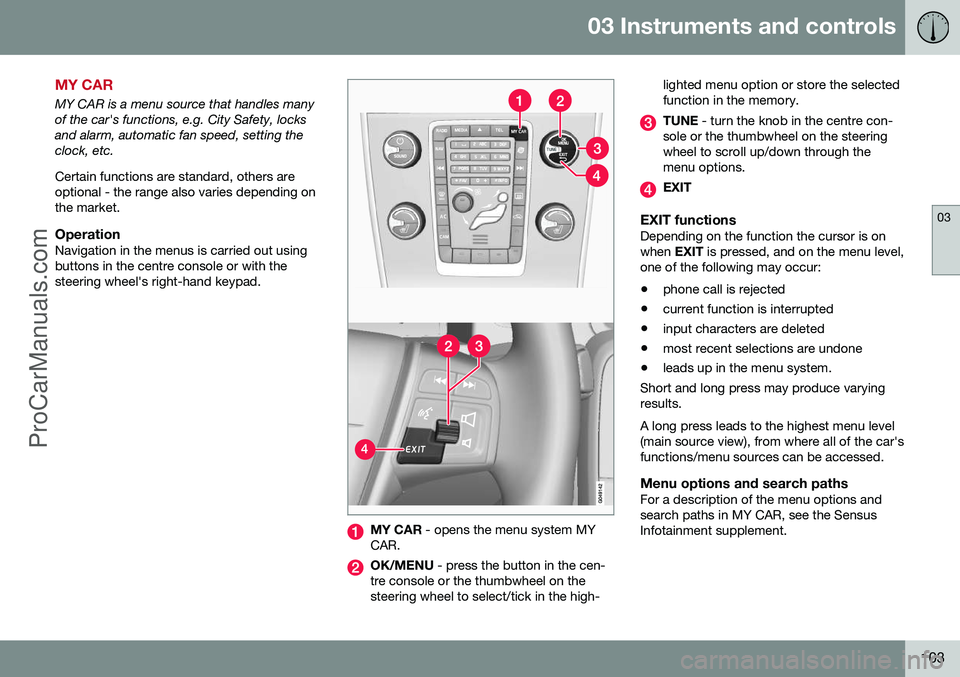
OperationNavigation in the menus is carried out usingbuttons in the centre console or with thesteering wheel's right-hand keypad.
MY CAR - opens the menu system MY
CAR.
OK/MENU - press the button in the cen-
tre console or the thumbwheel on the steering wheel to select/tick in the high- lighted menu option or store the selectedfunction in the memory.
TUNE
- turn the knob in the centre con-
sole or the thumbwheel on the steering wheel to scroll up/down through themenu options.
EXIT
EXIT functionsDepending on the function the cursor is on when EXIT is pressed, and on the menu level,
one of the following may occur:
• phone call is rejected
• current function is interrupted
• input characters are deleted
• most recent selections are undone
• leads up in the menu system.
Short and long press may produce varyingresults. A long press leads to the highest menu level (main source view), from where all of the car'sfunctions/menu sources can be accessed.
Menu options and search pathsFor a description of the menu options andsearch paths in MY CAR, see the SensusInfotainment supplement.
ProCarManuals.co’
Page 120 of 442
04 Climate control
04
118* Option/accessory, for more information, see Introduction.
Air cleaning - IAQS*
The air quality system IAQS separates gases and particles to reduce the levels of odoursand pollution in the passenger compartment. If the outside air is contaminated then the air intake is closed and the air is recirculated. It is possible to activate/deactivate the func- tion in the menu system MY CAR. For a
description of the menu system, see MY CAR(p. 103).
NOTE
The air quality sensor must always be ena- bled to ensure the best air in the passen-ger compartment. In a cold climate recirculation is limited so as to prevent misting. In the event of misting, the air quality sen- sor should be disengaged, and thedefroster functions for the windscreen andside windows, as well as the rear window,should be used.
Related information
• General information on climate control (p. 115)
• Air cleaning (p. 116)
• Air cleaning - Clean Zone Interior Pack-age (CZIP)* (p. 117)
Air cleaning - material
Tested materials have been developed in order to minimise the quantity of dust in thepassenger compartment and to contribute tomaking the passenger compartment easier tokeep clean. The carpets in both the passenger compart- ment and the cargo area are removable andeasy to remove and clean. Use cleaningagents and car care products recommendedby Volvo to clean the interior (p. 381).
Related information
•Air cleaning (p. 116)
Menu settings - climate control
It is possible to activate/deactivate or change the default settings for six of the climate con-trol system's functions via the centre console. •Fan level during automatic climate control (p. 123).
• Recirculation timer (p. 126).
• Automatic start of rear window defroster(p. 96).
• Interior air quality system (p. 118)*.
• Automatic start of seat heating driver (p.122).
• Automatic start of steering wheel heating(p. 77).
More information is available in the descrip-
tion of the menu system (p. 103).
The climate control system's functions can be
reset to default settings in the menu system MY CAR . For a description of the menu sys-
tem, see MY CAR (p. 103).
Related information
• General information on climate control (p. 115)
ProCarManuals.co’
Page 164 of 442
06 Locks and alarm
06
162* Option/accessory, for more information, see Introduction.
Keyless drive* - unlocking with the key blade
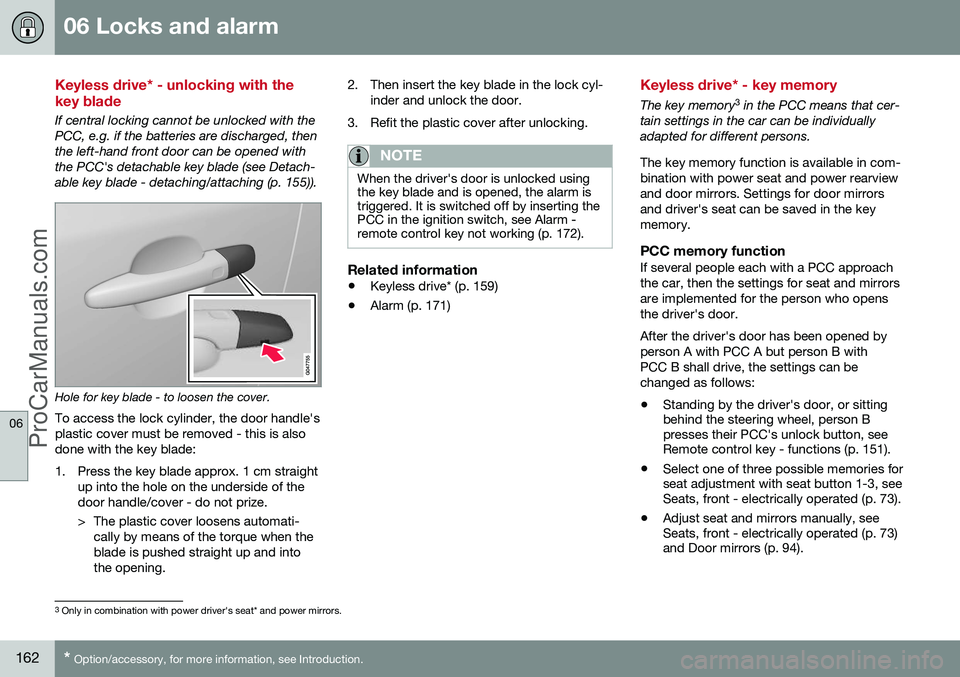
If central locking cannot be unlocked with the PCC, e.g. if the batteries are discharged, thenthe left-hand front door can be opened withthe PCC's detachable key blade (see Detach-able key blade - detaching/attaching (p. 155)).
Hole for key blade - to loosen the cover.
To access the lock cylinder, the door handle's plastic cover must be removed - this is alsodone with the key blade:
1. Press the key blade approx. 1 cm straight up into the hole on the underside of the door handle/cover - do not prize.
> The plastic cover loosens automati-cally by means of the torque when the blade is pushed straight up and intothe opening. 2. Then insert the key blade in the lock cyl-
inder and unlock the door.
3. Refit the plastic cover after unlocking.
NOTE
When the driver's door is unlocked using the key blade and is opened, the alarm istriggered. It is switched off by inserting thePCC in the ignition switch, see Alarm -remote control key not working (p. 172).
Related information
• Keyless drive* (p. 159)
• Alarm (p. 171)
Keyless drive* - key memory
The key memory 3
in the PCC means that cer-
tain settings in the car can be individually adapted for different persons. The key memory function is available in com- bination with power seat and power rearviewand door mirrors. Settings for door mirrorsand driver's seat can be saved in the keymemory.
PCC memory functionIf several people each with a PCC approachthe car, then the settings for seat and mirrorsare implemented for the person who opensthe driver's door. After the driver's door has been opened by person A with PCC A but person B withPCC B shall drive, the settings can bechanged as follows:
• Standing by the driver's door, or sitting behind the steering wheel, person Bpresses their PCC's unlock button, seeRemote control key - functions (p. 151).
• Select one of three possible memories forseat adjustment with seat button 1-3, seeSeats, front - electrically operated (p. 73).
• Adjust seat and mirrors manually, seeSeats, front - electrically operated (p. 73)and Door mirrors (p. 94).
3
Only in combination with power driver's seat* and power mirrors.
ProCarManuals.co’
Page 177 of 442
07 Driver support
07
* Option/accessory, for more information, see Introduction.175
Active chassis - Four C*
Active chassis "Four-C" (Continously Controlled Chassis Concept), regulates thecharacteristics of the shock absorbers so thatthe car's driving characteristics can beadjusted. There are three settings: Comfort,
Sport and Advanced .
ComfortThis setting means that the car is perceivedas being more comfortable on rough anduneven road surfaces. Shock absorption issoft and the movement of the body is smoothand gentle.
SportThis setting means that the car is perceivedas being more sporty and is recommendedfor more active driving. Steering response isfaster than in the Comfort mode. Shockabsorption is harder and the body follows theroad in order to reduce rolling during corner-ing.
AdvancedThis setting is only recommended on veryeven and smooth road surfaces. The shock absorbers are optimised for maxi- mum roadholding and rolling in bends is fur-ther minimised.
Operation
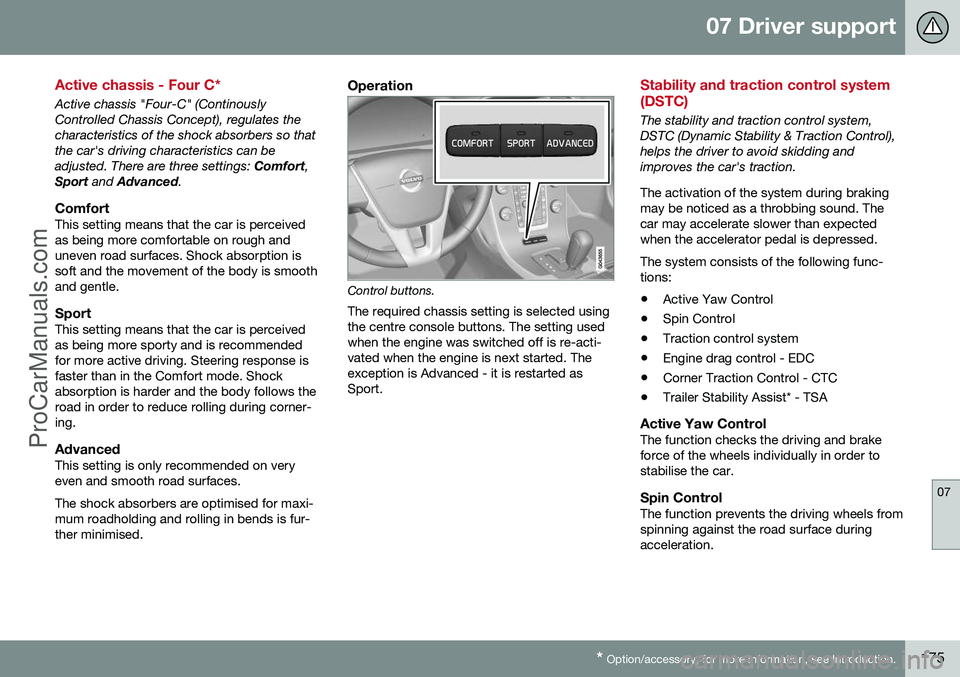
Control buttons.
The required chassis setting is selected using the centre console buttons. The setting usedwhen the engine was switched off is re-acti-vated when the engine is next started. Theexception is Advanced - it is restarted asSport.
Stability and traction control system (DSTC)
The stability and traction control system, DSTC (Dynamic Stability & Traction Control),helps the driver to avoid skidding andimproves the car's traction. The activation of the system during braking may be noticed as a throbbing sound. Thecar may accelerate slower than expectedwhen the accelerator pedal is depressed. The system consists of the following func- tions: • Active Yaw Control
• Spin Control
• Traction control system
• Engine drag control - EDC
• Corner Traction Control - CTC
• Trailer Stability Assist* - TSA
Active Yaw ControlThe function checks the driving and brake force of the wheels individually in order tostabilise the car.
Spin ControlThe function prevents the driving wheels fromspinning against the road surface duringacceleration.
ProCarManuals.co’
Page 184 of 442
07 Driver support
07
182* Option/accessory, for more information, see Introduction.
Speed limiter*
A (Speed Limiter) can be regarded as a reverse cruise control - the driver regulatesthe speed using the accelerator pedal but isprevented from accidentally exceeding a pre-selected/set speed by the speed limiter.
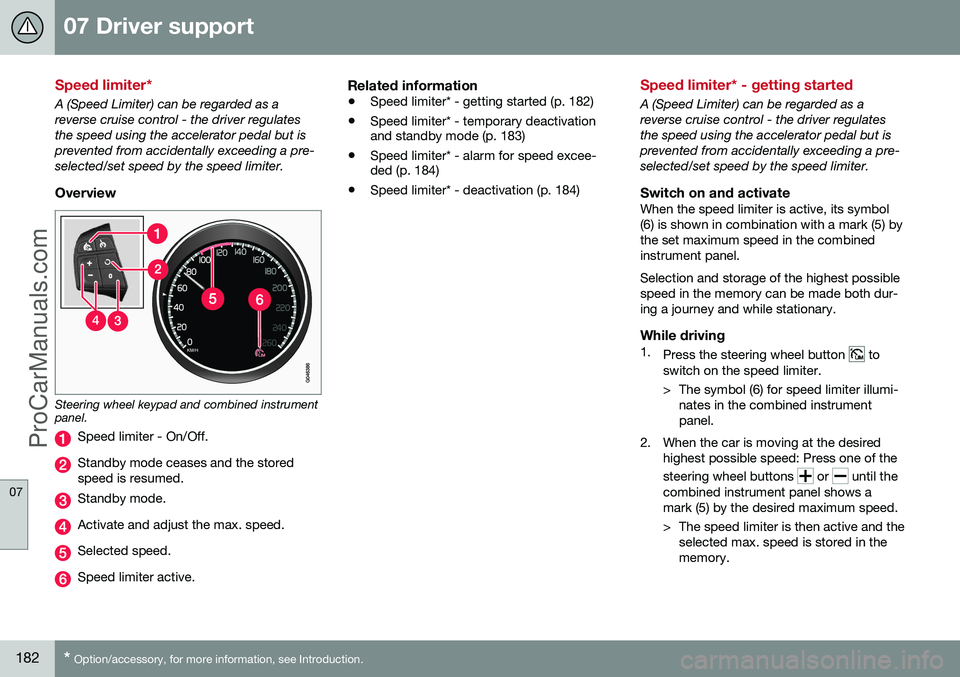
Overview
Steering wheel keypad and combined instrument panel.
Speed limiter - On/Off.
Standby mode ceases and the stored speed is resumed.
Standby mode.
Activate and adjust the max. speed.
Selected speed.
Speed limiter active.
Related information
• Speed limiter* - getting started (p. 182)
• Speed limiter* - temporary deactivation and standby mode (p. 183)
• Speed limiter* - alarm for speed excee-ded (p. 184)
• Speed limiter* - deactivation (p. 184)
Speed limiter* - getting started
A (Speed Limiter) can be regarded as a reverse cruise control - the driver regulatesthe speed using the accelerator pedal but isprevented from accidentally exceeding a pre-selected/set speed by the speed limiter.
Switch on and activateWhen the speed limiter is active, its symbol(6) is shown in combination with a mark (5) bythe set maximum speed in the combinedinstrument panel. Selection and storage of the highest possible speed in the memory can be made both dur-ing a journey and while stationary.
While driving1.
Press the steering wheel button to
switch on the speed limiter.
> The symbol (6) for speed limiter illumi- nates in the combined instrument panel.
2. When the car is moving at the desired highest possible speed: Press one of the steering wheel buttons
or until the
combined instrument panel shows a mark (5) by the desired maximum speed.
> The speed limiter is then active and the selected max. speed is stored in the memory.
ProCarManuals.co’
Page 185 of 442
07 Driver support
07
* Option/accessory, for more information, see Introduction.183
When stationary1.
Press the steering wheel button to
switch on the speed limiter.
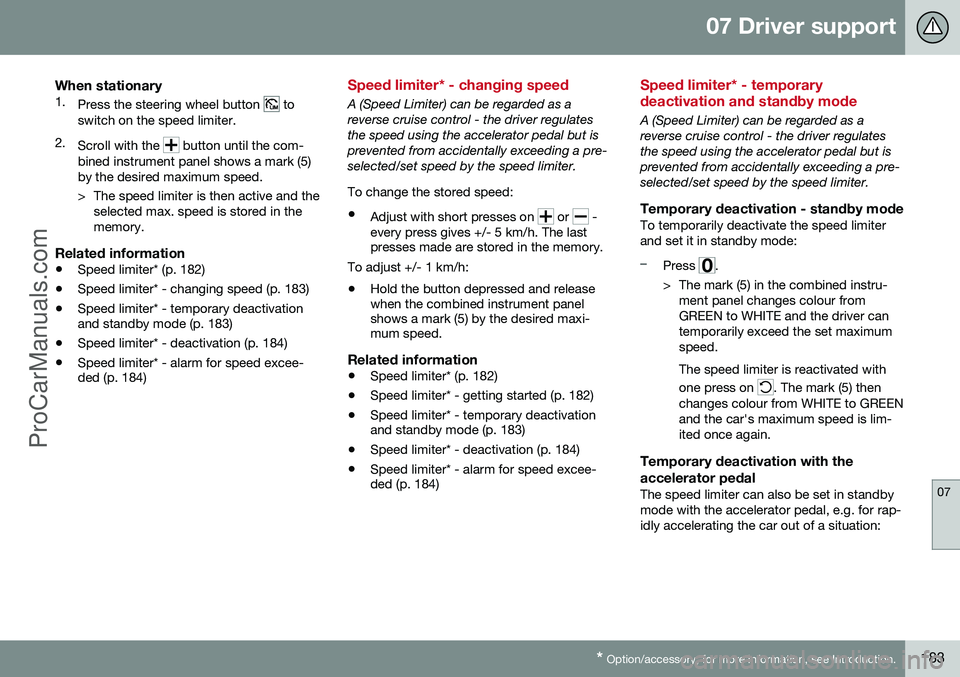
2. Scroll with the
button until the com-
bined instrument panel shows a mark (5) by the desired maximum speed.
> The speed limiter is then active and the selected max. speed is stored in the memory.
Related information
• Speed limiter* (p. 182)
• Speed limiter* - changing speed (p. 183)
• Speed limiter* - temporary deactivation and standby mode (p. 183)
• Speed limiter* - deactivation (p. 184)
• Speed limiter* - alarm for speed excee-ded (p. 184)
Speed limiter* - changing speed
A (Speed Limiter) can be regarded as a reverse cruise control - the driver regulatesthe speed using the accelerator pedal but isprevented from accidentally exceeding a pre-selected/set speed by the speed limiter. To change the stored speed: •
Adjust with short presses on
or -
every press gives +/- 5 km/h. The last presses made are stored in the memory.
To adjust +/- 1 km/h: • Hold the button depressed and release when the combined instrument panelshows a mark (5) by the desired maxi-mum speed.
Related information
•Speed limiter* (p. 182)
• Speed limiter* - getting started (p. 182)
• Speed limiter* - temporary deactivationand standby mode (p. 183)
• Speed limiter* - deactivation (p. 184)
• Speed limiter* - alarm for speed excee-ded (p. 184)
Speed limiter* - temporary deactivation and standby mode
A (Speed Limiter) can be regarded as a reverse cruise control - the driver regulatesthe speed using the accelerator pedal but isprevented from accidentally exceeding a pre-selected/set speed by the speed limiter.
Temporary deactivation - standby modeTo temporarily deactivate the speed limiterand set it in standby mode:
–Press .
> The mark (5) in the combined instru- ment panel changes colour from GREEN to WHITE and the driver cantemporarily exceed the set maximumspeed. The speed limiter is reactivated with one press on
. The mark (5) then
changes colour from WHITE to GREEN and the car's maximum speed is lim-ited once again.
Temporary deactivation with the accelerator pedal
The speed limiter can also be set in standby mode with the accelerator pedal, e.g. for rap-idly accelerating the car out of a situation:
ProCarManuals.co’
Page 186 of 442
||
07 Driver support
07
184* Option/accessory, for more information, see Introduction.
–Depress the accelerator pedal fully.
> The combined instrument panel shows
the stored maximum speed with a col- oured mark (5) and the driver can tem-porarily exceed the set maximumspeed - the mark (5) changes colourduring this time from GREEN toWHITE. The speed limiter is automatically reac- tivated after the release of the acceler-ator pedal and the car's speed isslowed down to below the selected/stored maximum speed - the display'smark (5) changes colour from WHITEto GREEN and the car's maximumspeed is again limited.
Related information
• Speed limiter* (p. 182)
• Speed limiter* - getting started (p. 182)
• Speed limiter* - changing speed (p. 183)
• Speed limiter* - deactivation (p. 184)
• Speed limiter* - alarm for speed excee- ded (p. 184)
Speed limiter* - alarm for speed exceeded
A (Speed Limiter) can be regarded as a reverse cruise control - the driver regulatesthe speed using the accelerator pedal but isprevented from accidentally exceeding apre-selected/set speed by the speed limiter. On a steep downhill gradient the speed limit- er's engine braking effect may be inadequateand the selected maximum speed is excee-ded. The driver is alerted about this with anacoustic signal. The signal is active until the driver has slowed to below the selected maximum speed.
NOTE
The alarm is only activated after 5 seconds if the speed has been exceeded by at least3 km/h provided that none of the buttons
or has been depressed during the
last half minute.
Related information
• Speed limiter* (p. 182)
• Speed limiter* - changing speed (p. 183)
• Speed limiter* - getting started (p. 182)
• Speed limiter* - temporary deactivation and standby mode (p. 183)
• Speed limiter* - deactivation (p. 184)
Speed limiter* - deactivation
A (Speed Limiter) can be regarded as a reverse cruise control - the driver regulatesthe speed using the accelerator pedal but isprevented from accidentally exceeding a pre-selected/set speed by the speed limiter. To deactivate the speed limiter:
–Press the steering wheel button .
> The combined instrument panel's sym- bol for the speed limiter (6) and the mark for the set speed (5) are extin-guished. The selected and storedspeed are thus deleted from the mem-ory and cannot be resumed with the
button.
The driver can then use the accelerator pedal to choose a speed without limi-tation.
Related information
• Speed limiter* (p. 182)
• Speed limiter* - getting started (p. 182)
• Speed limiter* - temporary deactivation and standby mode (p. 183)
• Speed limiter* - alarm for speed excee-ded (p. 184)
ProCarManuals.co’
Page 187 of 442
07 Driver support
07
* Option/accessory, for more information, see Introduction.185
Cruise control*
The cruise control (CC – Cruise Control) helps the driver maintain an even speed, resulting ina more relaxed driving on motorways andlong, straight roads in regular traffic flows.
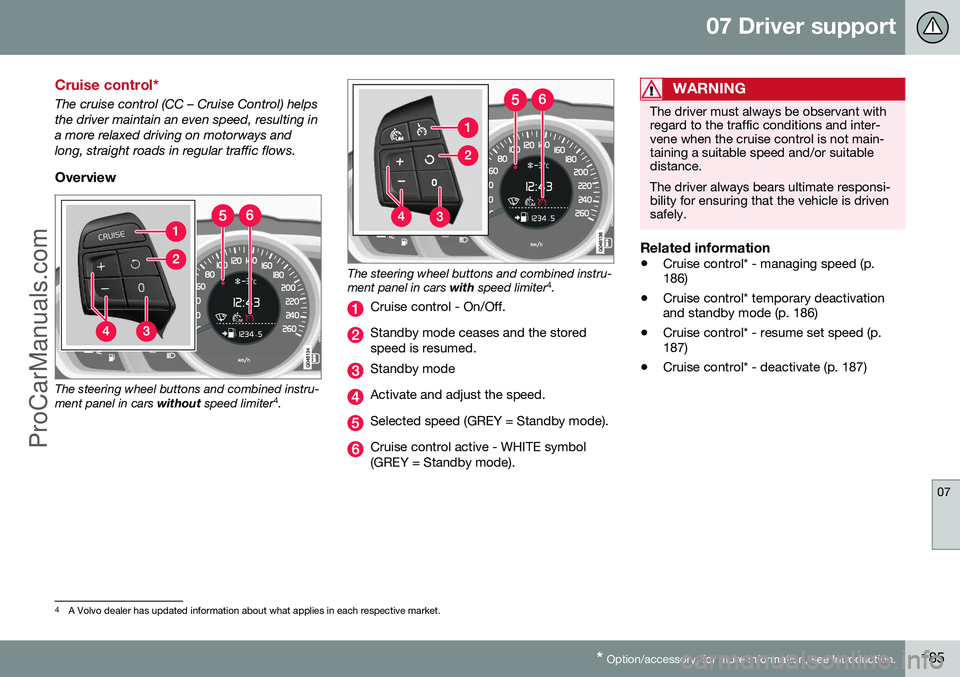
Overview
The steering wheel buttons and combined instru- ment panel in cars without speed limiter 4
.
The steering wheel buttons and combined instru- ment panel in cars with speed limiter 4
.
Cruise control - On/Off.
Standby mode ceases and the stored speed is resumed.
Standby mode
Activate and adjust the speed.
Selected speed (GREY = Standby mode).
Cruise control active - WHITE symbol (GREY = Standby mode).
WARNING
The driver must always be observant with regard to the traffic conditions and inter-vene when the cruise control is not main-taining a suitable speed and/or suitabledistance. The driver always bears ultimate responsi- bility for ensuring that the vehicle is drivensafely.
Related information
• Cruise control* - managing speed (p. 186)
• Cruise control* temporary deactivationand standby mode (p. 186)
• Cruise control* - resume set speed (p.187)
• Cruise control* - deactivate (p. 187)
4
A Volvo dealer has updated information about what applies in each respective market.
ProCarManuals.co’
Page 188 of 442
07 Driver support
07
186* Option/accessory, for more information, see Introduction.
Cruise control* - managing speed
The cruise control (CC – Cruise Control) helps the driver to maintain an even speed. It ispossible to activate, set or change the speed.
Activating and setting the speedTo enable cruise control:
• Press the steering wheel button
> The cruise control symbol in the com-
bined instrument panel changes from WHITE to GREY and shows that thecruise control is in standby mode.
To activate cruise control:
• At the required speed - press the steering wheel button
or .
> The current speed is stored in the mem- ory and the combined instrument panel's marking (5) is illuminated/turns WHITE atthe selected speed.
NOTE
Cruise Control cannot be enabled at speeds below 30 km/h.
Changing the speedTo change the stored speed: • Adjust with short presses on
or -
every press gives +/- 5 km/h. The last presses made are stored in the memory.
To adjust +/- 1 km/h: •
Hold down the button and release it atthe required speed.
A temporary increase in speed with the accel- erator pedal, e.g. during overtaking, does notaffect the cruise control setting - the carreturns to the set speed when the acceleratorpedal is released.
NOTE
If any of the Cruise Control buttons are held depressed for several minutes then itis blocked and deactivated. To be able toreactivate Cruise Control, the car must bestopped and the engine restarted.
Related information
• Cruise control* (p. 185)
• Cruise control* temporary deactivation and standby mode (p. 186)
• Cruise control* - resume set speed (p.187)
• Cruise control* - deactivate (p. 187)
Cruise control* temporary deactivation and standby mode
The cruise control (CC – Cruise Control) helps the driver to maintain an even speed. Thefunction can be temporarily deactivated andset in standby mode.
Temporary deactivation - standby modeTo temporarily disengage cruise control andset it in standby mode:
• Press the steering wheel button
.
> The combined instrument panel's mark- ing (5) and the symbol (6) change colour from WHITE to GREY.
Automatic standby modeCruise control is temporarily disengaged andset in standby mode if:
• wheels lose traction
• the foot brake is used
• speed falls below approx. 30 km/h
ProCarManuals.co’
Page 189 of 442
07 Driver support
07
* Option/accessory, for more information, see Introduction.187
•
the clutch pedal is held depressed for a short time - however, a few seconds does not activate standby mode 5
• the gear selector is moved to neutral position (automatic gearbox)
• the driver maintains a speed higher thanthe set speed for longer than 1 minute.
The driver must then regulate the speed.
Related information
• Cruise control* (p. 185)
• Cruise control* - managing speed (p. 186)
• Cruise control* - resume set speed (p.187)
• Cruise control* - deactivate (p. 187)
Cruise control* - resume set speed
The cruise control (CC – Cruise Control) helps the driver to maintain an even speed. Aftertemporary deactivation and standby mode (p.186) it is possible to resume the set speed. To reactivate the cruise control from standby mode: •
Press the steering wheel button
.
> The combined instrument panel's mark- ing (5) and symbol (6) change colour from GREY to WHITE and the speed is thenset to the last speed stored.
NOTE
A marked speed increase may occur once the speed has been resumed by selecting
.
Related information
• Cruise control* (p. 185)
• Cruise control* - managing speed (p. 186)
• Cruise control* temporary deactivation and standby mode (p. 186)
• Cruise control* - deactivate (p. 187)
Cruise control* - deactivate
The cruise control (CC – Cruise Control) helps the driver to maintain an even speed. How itis deactivated is described here. The cruise control is deactivated with a steer- ing wheel button (1) or by switching off theengine - the set speed is deleted from the memory and cannot be resumed with the
button.
Related information
•
Cruise control* (p. 185)
• Cruise control* - managing speed (p. 186)
• Cruise control* temporary deactivation and standby mode (p. 186)
• Cruise control* - resume set speed (p.187)
5
Cars with 4-cyl 2.0L engine also allow gear changing.
ProCarManuals.co’