brake light VOLVO V60 2014 Owners Manual
[x] Cancel search | Manufacturer: VOLVO, Model Year: 2014, Model line: V60, Model: VOLVO V60 2014Pages: 442, PDF Size: 13.85 MB
Page 5 of 442
Table of contents
* Option/accessory, for more information, see Introduction.3
03
03 Instruments and controls
Instruments and controls, left-hand drive
car - overview........................................... 53 Instruments and controls, right-hand
drive car - overview................................... 56
Combined instrument panel...................... 59Analogue combined instrument panel -
overview.................................................... 59 Digital combined instrument panel -
overview.................................................... 60
Eco guide & Power guide*........................ 63Combined instrument panel - meaning of
indicator symbols...................................... 64 Combined instrument cluster - meaning
of warning symbols................................... 65
Outside temperature gauge...................... 67
Trip meter.................................................. 68
Clock......................................................... 68
Volvo Sensus............................................ 68
Key positions............................................ 70Key positions - functions at different lev-
els.............................................................. 70
Seats, front................................................ 72
Seats, front - electrically operated............ 73
Key memory* in remote control key.......... 74
Seats, rear................................................. 74
03
Steering wheel.......................................... 76
Heating* of the steering wheel.................. 77
Light switches........................................... 78
Position/parking lamps............................. 80
Daytime running lights.............................. 80
Tunnel detection*...................................... 81
Main/dipped beam.................................... 81
Active high beam*..................................... 82
Active Xenon headlamps*......................... 84
Rear fog lamp........................................... 85
Brake lights............................................... 86
Hazard warning flashers........................... 86
Direction indicators................................... 87
Interior lighting.......................................... 88
Home safe light duration........................... 89
Approach light duration............................ 89Headlamps - adjusting headlamp pat-
tern............................................................ 90
Wipers and washing.................................. 90
Power windows......................................... 92
Door mirrors.............................................. 94Windows and rearview and door mirrors
- heating.................................................... 96
Rearview mirror - interior.......................... 96
03
Compass*................................................. 97
Sunroof*.................................................... 98Menu navigation - combined instrument
panel....................................................... 100 Menu overview - combined instrument
panel....................................................... 101
Messages................................................ 101
Messages - handling............................... 102
MY CAR.................................................. 103
Trip computer......................................... 104Trip computer - combined instrument
panel "Analog"........................................ 105 Trip computer - combined instrument
panel "Digital"......................................... 109 Trip computer - supplementary informa-
tion.......................................................... 112
Trip computer - trip statistics*................ 113
ProCarManuals.co’
Page 9 of 442
Table of contents
* Option/accessory, for more information, see Introduction.7
07
Park Assist Pilot (PAP)* - symbols and
messages................................................ 252
BLIS* (Blind Spot Information System)... 253BLIS* (Blind Spot Information System) -
operation................................................. 254
CTA (Cross Traffic Alert)*........................ 255
BLIS - symbols and messages............... 257
Adjustable steering force*....................... 257
08
08 Starting and driving
Alcolock*................................................. 259
Alcolock* - functions and operation........ 259
Alcolock* - storage.................................. 260
Alcolock* - before starting the engine.... 260
Alcolock* - to bear in mind..................... 261
Alcolock* - symbols and text messages. 263
Starting the engine.................................. 264
Switching off the engine......................... 265
Steering lock........................................... 265
Remote start (ERS)*................................ 266
Remote start (ERS) - operation............... 266Remote start (ERS) - symbols and mes-
sages....................................................... 268
Starting the engine – Flexifuel................. 269
Jump starting with battery...................... 270
Gearboxes............................................... 271
Manual gearbox...................................... 271
Gear shift indicator*................................ 272
Automatic gearbox -- Geartronic*........... 273
Automatic gearbox -- Powershift*.......... 276
Gear selector inhibitor............................. 278
Hill start assist (HSA)*............................. 279
Start/Stop*.............................................. 279
Start/Stop* - function and operation....... 280
08
Start/Stop* - the engine does not stop... 282
Start/Stop* - the engine auto-starts........ 283Start/Stop* - the engine does not auto-
start......................................................... 284 Start/Stop* - involuntary engine stop-
page manual gearbox............................. 284
Start/Stop* - settings.............................. 285
Start/Stop* - symbols and messages..... 286
ECO*....................................................... 288
All Wheel Drive - AWD*........................... 290
Foot brake............................................... 290
Foot brake - anti-lock braking system.... 291Foot brake - emergency brake lights and
automatic hazard warning flashers......... 291 Foot brake - emergency brake assis-
tance....................................................... 292
Parking brake.......................................... 293
Fording.................................................... 297
Overheating............................................. 297
Driving with open tailgate....................... 298
Overload - starter battery........................ 298
Before a long journey.............................. 299
Winter driving.......................................... 299
Fuel filler flap - Opening/closing............. 300
Fuel filler flap - manual opening.............. 300
ProCarManuals.co’
Page 11 of 442
Table of contents
9
10
10 Maintenance and service
Volvo service programme....................... 340
Raising the car........................................ 341
Bonnet - opening and closing................. 343
Engine compartment - overview............. 343
Engine compartment - checking............. 344
Engine oil - general................................. 345
Engine oil - checking and filling.............. 346
Coolant - level......................................... 349
Brake and clutch fluid - level.................. 350
Power steering fluid - level...................... 351Climate control system - fault tracing and
repair....................................................... 352
Lamp replacement.................................. 352
Lamp replacement - headlamps............. 353Lamp replacement - cover for main/
dipped beam bulbs................................. 354
Lamp replacement - dipped beam......... 355
Lamp replacement - main beam............. 355
Lamp replacement - extra main beam.... 355Lamp replacement - direction indicators
front......................................................... 356
Lamp replacement - rear lamp............... 356Lamp replacement - location of rear
lamps...................................................... 357
10
Lamp replacement - number plate light-
ing........................................................... 357 Lamp replacement - lighting in cargo
area......................................................... 357 Lamp replacement - vanity mirror light-
ing........................................................... 358
Lamps - specifications ........................... 358
Wiper blades........................................... 359
Washer fluid - filling................................ 361
Battery..................................................... 361
Battery - symbols.................................... 362
Starter battery - replacement.................. 363
Battery - Start/Stop................................. 365
Fuses - general....................................... 367
Fuses - in engine compartment.............. 368
Fuses - under glovebox.......................... 372Fuses - in the control module under the
glovebox................................................. 374
Fuses - in cargo area.............................. 376Fuses - in the engine compartment's
cold zone................................................ 377
Car washing............................................ 379
Polishing and waxing.............................. 380
Water and dirt-repellent coating............. 381
Rustproofing........................................... 381
10
Cleaning the interior................................ 381
Paint damage.......................................... 383
ProCarManuals.co’
Page 66 of 442
03 Instruments and controls
03
64* Option/accessory, for more information, see Introduction.
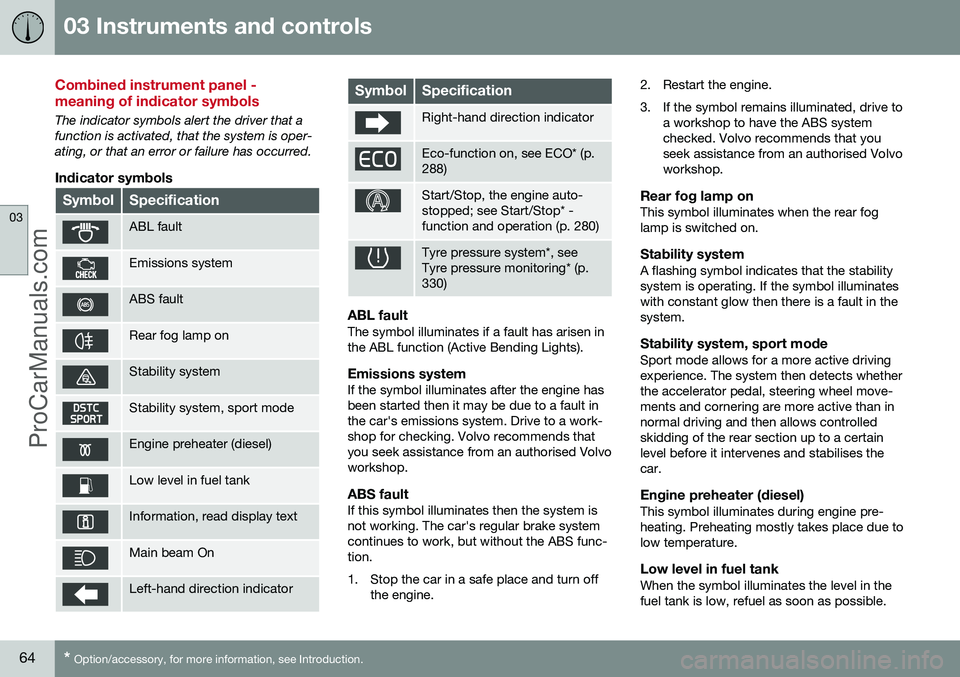
Combined instrument panel - meaning of indicator symbols
The indicator symbols alert the driver that a function is activated, that the system is oper-ating, or that an error or failure has occurred.
Indicator symbols
SymbolSpecification
ABL fault
Emissions system
ABS fault
Rear fog lamp on
Stability system
Stability system, sport mode
Engine preheater (diesel)
Low level in fuel tank
Information, read display text
Main beam On
Left-hand direction indicator
SymbolSpecification
Right-hand direction indicator
Eco-function on, see ECO* (p. 288)
Start/Stop, the engine auto- stopped; see Start/Stop* -function and operation (p. 280)
Tyre pressure system*, see Tyre pressure monitoring* (p.330)
ABL faultThe symbol illuminates if a fault has arisen in the ABL function (Active Bending Lights).
Emissions systemIf the symbol illuminates after the engine hasbeen started then it may be due to a fault inthe car's emissions system. Drive to a work-shop for checking. Volvo recommends thatyou seek assistance from an authorised Volvoworkshop.
ABS faultIf this symbol illuminates then the system isnot working. The car's regular brake systemcontinues to work, but without the ABS func-tion.
1. Stop the car in a safe place and turn off
the engine. 2. Restart the engine.
3. If the symbol remains illuminated, drive to
a workshop to have the ABS system checked. Volvo recommends that youseek assistance from an authorised Volvoworkshop.
Rear fog lamp onThis symbol illuminates when the rear foglamp is switched on.
Stability systemA flashing symbol indicates that the stabilitysystem is operating. If the symbol illuminateswith constant glow then there is a fault in thesystem.
Stability system, sport modeSport mode allows for a more active drivingexperience. The system then detects whetherthe accelerator pedal, steering wheel move-ments and cornering are more active than innormal driving and then allows controlledskidding of the rear section up to a certainlevel before it intervenes and stabilises thecar.
Engine preheater (diesel)This symbol illuminates during engine pre-heating. Preheating mostly takes place due tolow temperature.
Low level in fuel tankWhen the symbol illuminates the level in thefuel tank is low, refuel as soon as possible.
ProCarManuals.co’
Page 88 of 442
||
03 Instruments and controls
03
86
the headlamp control's knob is turned to position
or .
NOTE
Regulations on the use of rear fog lamps vary from country to country.
Related information
•Light switches (p. 78)
Brake lights
The brake light automatically comes on during braking. The brake light is switched on when the brake pedal is depressed. In addition, it is switchedon when one of driving support systemsAdaptive cruise control (p. 188), City Safety(p. 205) or Collision warning system (p. 212)brakes the car. For information on emergency brake lights and automatic hazard warning flashers, seeFoot brake - emergency brake lights andautomatic hazard warning flashers (p. 291).
Hazard warning flashers
The hazard warning flashers warn other road users by means of all of the car's directionindicator lamps flashing simultaneously whenthis function is activated. When the hazard warning flashers are acti- vated both direction indicator symbols flash inthe combined instrument panel.
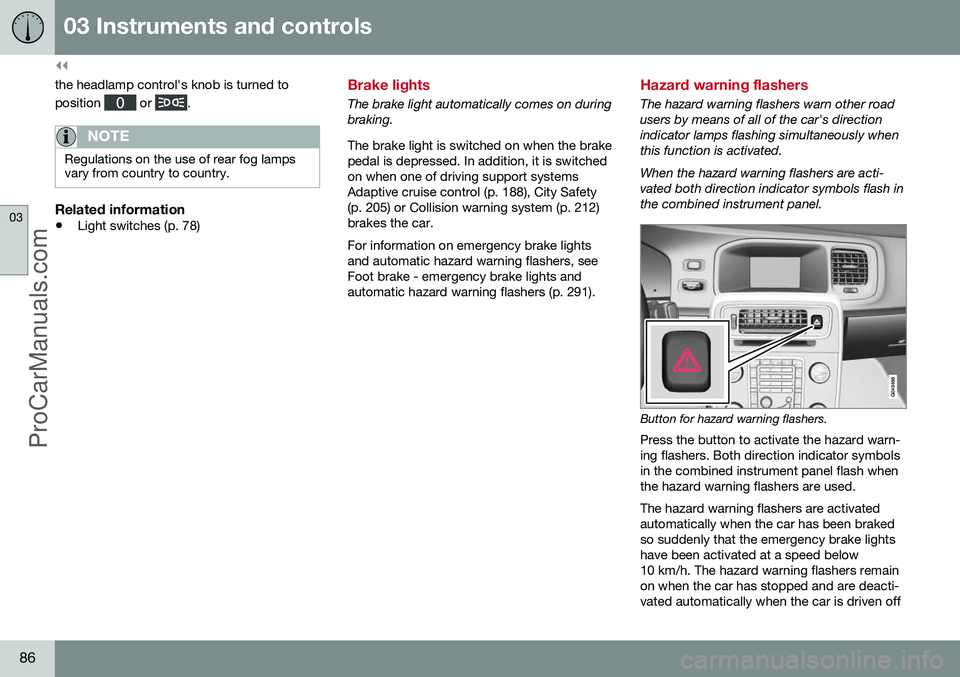
Button for hazard warning flashers.
Press the button to activate the hazard warn- ing flashers. Both direction indicator symbolsin the combined instrument panel flash whenthe hazard warning flashers are used. The hazard warning flashers are activated automatically when the car has been brakedso suddenly that the emergency brake lightshave been activated at a speed below10 km/h. The hazard warning flashers remainon when the car has stopped and are deacti-vated automatically when the car is driven off
ProCarManuals.co’
Page 89 of 442
03 Instruments and controls
03
87
again or the button is depressed. For more information on emergency brake lights andautomatic hazard warning flashers, see Footbrake - emergency brake lights and auto-matic hazard warning flashers (p. 291).
Related information
•
Direction indicators (p. 87)
Direction indicators
The car's direction indicators are operated with the left-hand stalk switch. The directionindicator lamps flash three times or continu-ously, depending on how far up or down thestalk switch is moved.
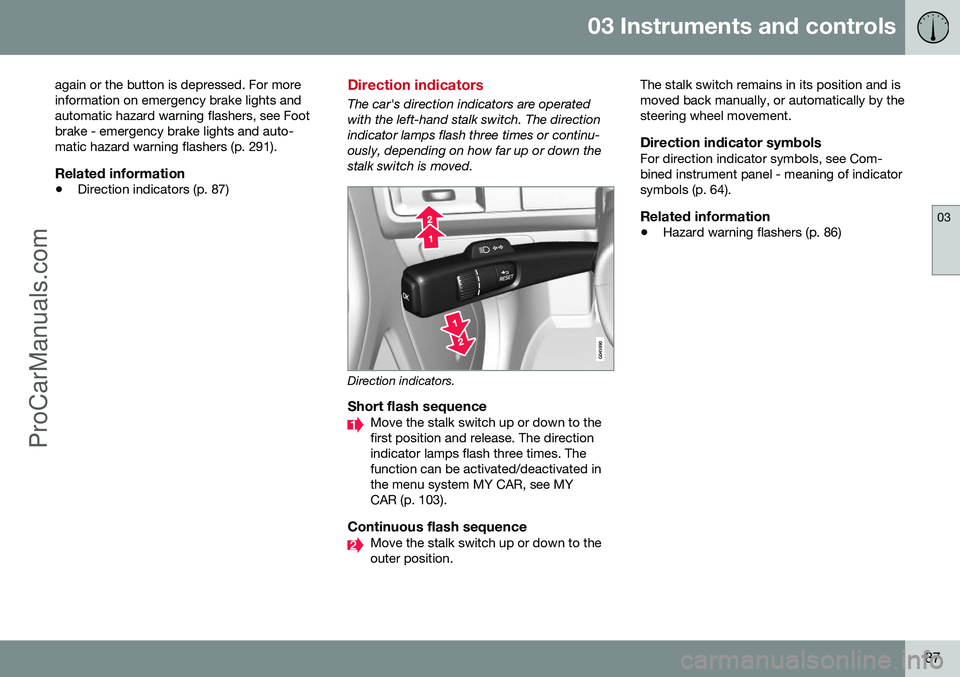
Direction indicators.
Short flash sequenceMove the stalk switch up or down to the first position and release. The directionindicator lamps flash three times. Thefunction can be activated/deactivated inthe menu system MY CAR, see MYCAR (p. 103).
Continuous flash sequenceMove the stalk switch up or down to the outer position. The stalk switch remains in its position and ismoved back manually, or automatically by thesteering wheel movement.
Direction indicator symbolsFor direction indicator symbols, see Com-bined instrument panel - meaning of indicatorsymbols (p. 64).
Related information
•
Hazard warning flashers (p. 86)
ProCarManuals.co’
Page 144 of 442
05 Loading and storage
05
142* Option/accessory, for more information, see Introduction.
Loading
Payload depends on the car's kerb weight. Payload depends on the car's kerb weight. The total of the weight of the passengers andall accessories reduces the car's payload bya corresponding weight. For more detailedinformation on weights, see Weights (p. 390).
The tailgate is opened via a buttonon the lighting panel or the remotecontrol key, see Locking/unlocking -
tailgate (p. 167).
WARNING
The car’s driving properties change depending on the weight and positioningof the load.
To bear in mind when loading
• Position the load firmly against the rear seat's backrest.
Note that objects must not prevent the func- tion of the WHIPS system for the front seats ifany of the rear seat's backrests is foldeddown, seeWHIPS - seating position (p. 35).
• Centre the load.
• Heavy objects should be placed as low as possible. Avoid placing heavy loads onlowered backrests.
• Cover sharp edges with something soft toavoid damaging the upholstery. •
Secure all loads to the load retaining eye-lets with straps or web lashings.
WARNING
A loose object weighing 20 kg can, in a frontal collision at a speed of 50 km/h,carry the impact of an item weighing1000 kg.
WARNING
The protection provided by the inflatable curtain in the headlining may be compro-mised or eliminated by high loads.
• Never load cargo above the backrest.
WARNING
Always secure the load. During heavy braking the load may otherwise shift, caus-ing injury to the car's occupants. Cover sharp edges and sharp corners with something soft. Switch off the engine and apply the park- ing brake when loading/unloading longitems. Otherwise you may accidentallyknock the gear lever or gear selector withthe load into a drive position - and the carcould then move off.
Related information
•
Load retaining eyelets (p. 143)
• Safety net* (p. 145) •
Loading - long load (p. 143)
• Roof load (p. 143)
ProCarManuals.co’
Page 180 of 442
07 Driver support
07
178
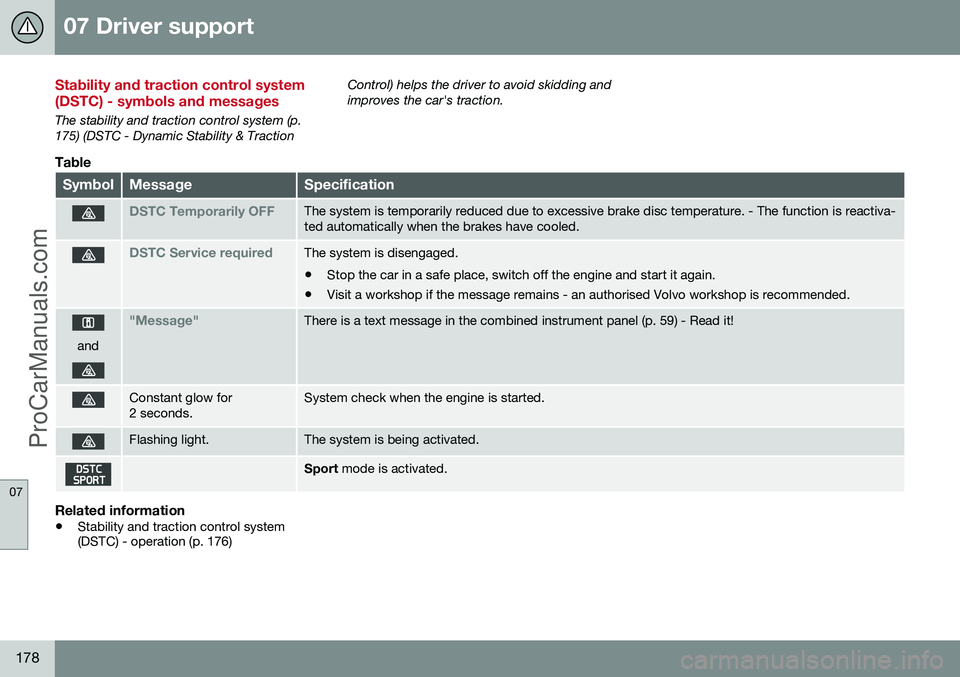
Stability and traction control system (DSTC) - symbols and messages
The stability and traction control system (p. 175) (DSTC - Dynamic Stability & TractionControl) helps the driver to avoid skidding andimproves the car's traction.
Table
SymbolMessageSpecification
DSTC Temporarily OFFThe system is temporarily reduced due to excessive brake disc temperature. - The function is reactiva- ted automatically when the brakes have cooled.
DSTC Service requiredThe system is disengaged.
• Stop the car in a safe place, switch off the engine and start it again.
• Visit a workshop if the message remains - an authorised Volvo workshop is recommended.
and
"Message"There is a text message in the combined instrument panel (p. 59) - Read it!
Constant glow for 2 seconds.System check when the engine is started.
Flashing light.The system is being activated.
Sport
mode is activated.
Related information
•Stability and traction control system (DSTC) - operation (p. 176)
ProCarManuals.co’
Page 192 of 442
||
07 Driver support
07
190* Option/accessory, for more information, see Introduction.
If the car needs to be braked more heavily than cruise control capacity and the driverdoes not brake, then cruise control uses thewarning lamp and warning sound from theCollision warning system (p. 212) in order toalert the driver that immediate intervention isrequired.
NOTE
The warning lamp may be difficult to see in strong sunlight or when wearing sun-glasses.
WARNING
Cruise Control warns only of vehicles which the radar sensor has detected.Hence the warning may not be given, or itmay be given with a certain delay. Do notwait for a warning without braking when sorequired.
Steep roads and/or heavy loadBear in mind that the adaptive cruise control is primarily intended for use when driving onlevel road surfaces. It may have difficulty inkeeping the correct distance from the vehicleahead when driving on steep downhill slopes,with a heavy load or with a trailer - in whichcase, be extra attentive and ready to slowdown.
Related information
• Adaptive cruise control - ACC* (p. 188)
• Adaptive cruise control* - deactivate (p. 194)
• Adaptive cruise control* - overtakinganother vehicle (p. 194)
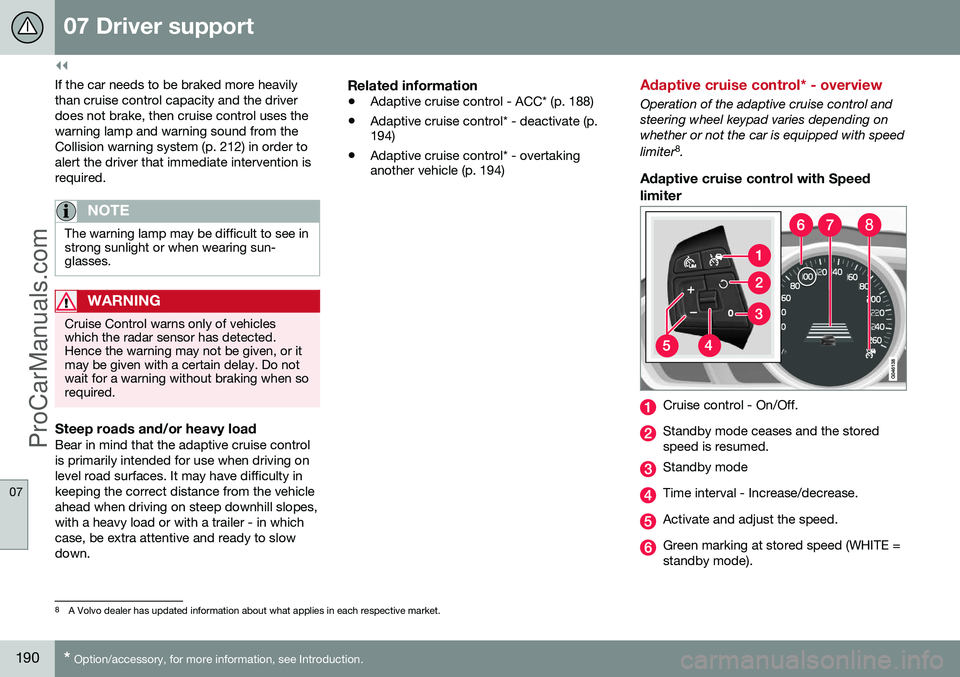
Adaptive cruise control* - overview
Operation of the adaptive cruise control and steering wheel keypad varies depending onwhether or not the car is equipped with speed limiter 8
.
Adaptive cruise control with Speed
limiter
Cruise control - On/Off.
Standby mode ceases and the stored speed is resumed.
Standby mode
Time interval - Increase/decrease.
Activate and adjust the speed.
Green marking at stored speed (WHITE = standby mode).
8 A Volvo dealer has updated information about what applies in each respective market.
ProCarManuals.co’
Page 197 of 442
07 Driver support
07
}}
* Option/accessory, for more information, see Introduction.195
Adaptive Cruise Control* - Queue Assist
The adaptive cruise control (ACC – Adaptive Cruise Control) helps the driver to maintain aneven speed and a safe distance from the vehi-cle ahead. Queue Assist also provides theAdaptive Cruise Control with enhanced func-tionality at speeds below 30 km/h.. In cars with automatic gearbox the adaptive cruise control is supplemented with theQueue Assist function (also referred to as"Queue Assist"). Queue Assistant has the following functions:
• Extended speed range - also below 30 km/h and when stationary
• Change of target
• Automatic braking ceases when station-ary
• Automatic activation parking brake.
Note that the lowest programmable speed for the adaptive cruise control is 30 km/h - eventhough it is capable of following another vehi-cle down to a standstill, a lower speed can-
not be selected.
Extended speed range
NOTE
In order to activate the cruise control the driver's door must be closed and the drivermust be wearing the seatbelt.
With an automatic gearbox, the adaptive cruise control can follow another vehiclewithin the range 0-200 km/h.
NOTE
Activation of the cruise control below 30 km/h requires a vehicle in front within areasonable distance.
For shorter stops in connection with inching in slow traffic or at traffic lights driving isautomatically resumed if the stops do notexceed about 3 seconds - if it takes longerbefore the car in front starts moving againthen the Adaptive cruise control is set instandby mode with automatic braking. Thedriver must then reactivate it in one of the fol-lowing ways:
• Press the steering wheel button
.
or
• Depress the accelerator pedal.
> The cruise control will then resume fol- lowing the vehicle in front.
NOTE
Queue Assist can hold the car stationary for a maximum of 4 minutes - then theparking brake is applied and Cruise Con-trol is disengaged.
• The driver has to release the parking brake before the cruise control can bereactivated.
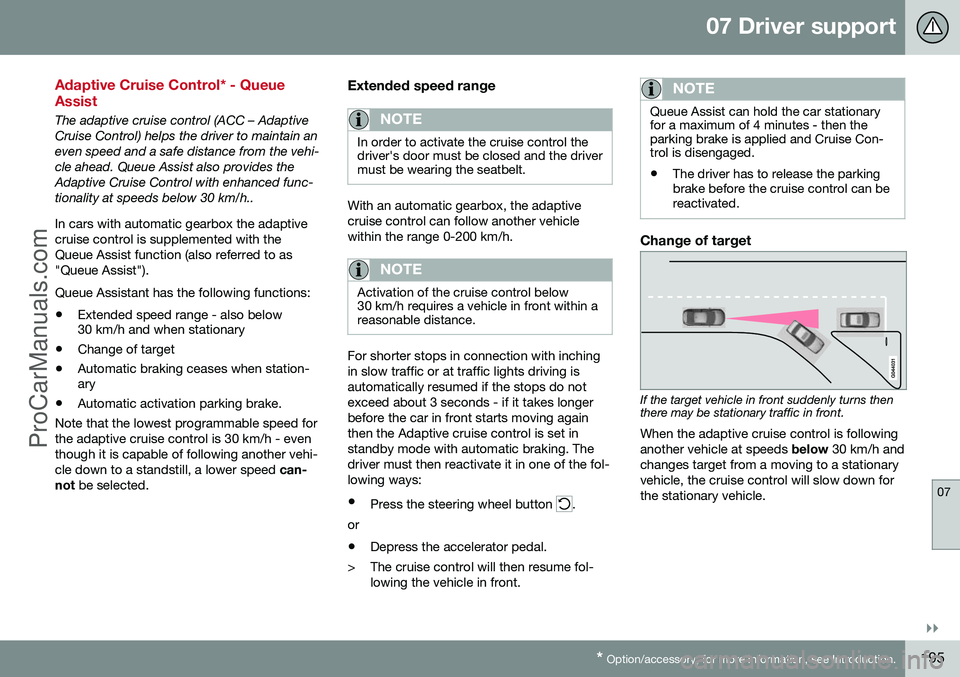
Change of target
If the target vehicle in front suddenly turns then there may be stationary traffic in front.
When the adaptive cruise control is following another vehicle at speeds below 30 km/h and
changes target from a moving to a stationaryvehicle, the cruise control will slow down forthe stationary vehicle.
ProCarManuals.co’