display VOLVO V60 2021 Owners Manual
[x] Cancel search | Manufacturer: VOLVO, Model Year: 2021, Model line: V60, Model: VOLVO V60 2021Pages: 661, PDF Size: 12.68 MB
Page 390 of 661
DRIVER SUPPORT
388
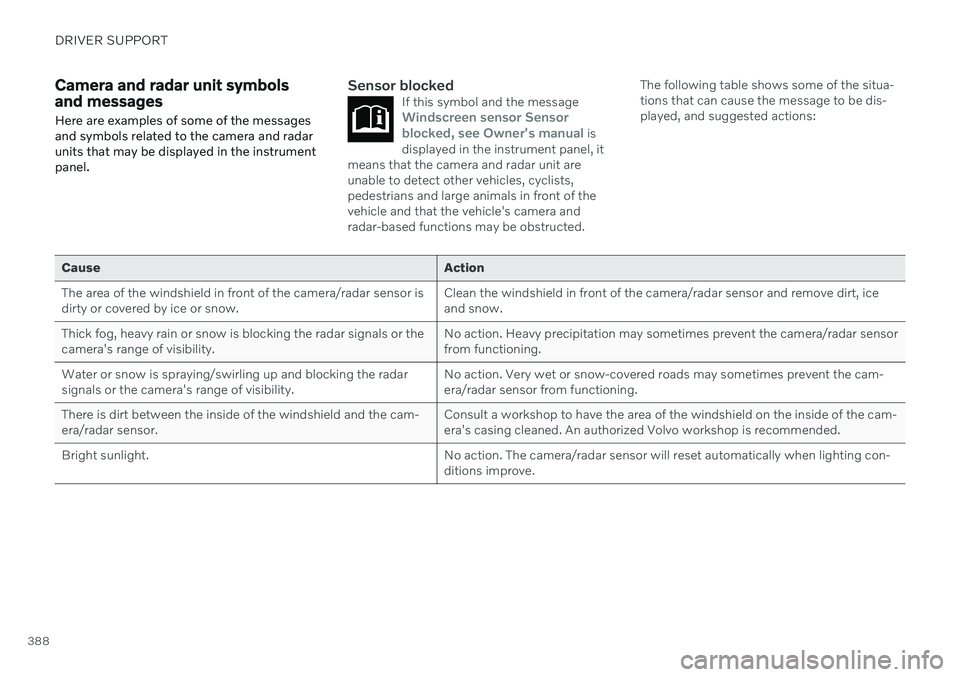
Camera and radar unit symbols and messages Here are examples of some of the messages and symbols related to the camera and radarunits that may be displayed in the instrumentpanel.Sensor blockedIf this symbol and the messageWindscreen sensor Sensor
blocked, see Owner's manual is
displayed in the instrument panel, it
means that the camera and radar unit are unable to detect other vehicles, cyclists,pedestrians and large animals in front of thevehicle and that the vehicle's camera andradar-based functions may be obstructed.
The following table shows some of the situa- tions that can cause the message to be dis-played, and suggested actions:
Cause Action
The area of the windshield in front of the camera/radar sensor is dirty or covered by ice or snow. Clean the windshield in front of the camera/radar sensor and remove dirt, iceand snow.
Thick fog, heavy rain or snow is blocking the radar signals or thecamera's range of visibility. No action. Heavy precipitation may sometimes prevent the camera/radar sensorfrom functioning.
Water or snow is spraying/swirling up and blocking the radarsignals or the camera's range of visibility. No action. Very wet or snow-covered roads may sometimes prevent the cam-era/radar sensor from functioning.
There is dirt between the inside of the windshield and the cam-era/radar sensor. Consult a workshop to have the area of the windshield on the inside of the cam-era's casing cleaned. An authorized Volvo workshop is recommended.
Bright sunlight. No action. The camera/radar sensor will reset automatically when lighting con-ditions improve.
Page 391 of 661

DRIVER SUPPORT
389
Defective cameraIf a camera sector is dark and contains this symbol, thisindicates that the camera isnot functioning properly.
The vehicle's left-side camera is malfunctioning.
A dark camera sector may also be displayed in the following situations, but without the
defective camera symbol: a door is open
the tailgate is open
a rearview mirror is folded in
Rear Park Assist Camera
WARNING
Be extra cautious when reversing if this symbol isshown when a trailer, bikecarrier or similar isattached and electricallyconnected to the vehicle. The symbol indicates that
the rear parking assist sensors are deacti-
vated and will not warn of any obstacles.
Related information
Camera (p. 383)
Radar sensor (p. 380)
Camera/radar sensor limitations (p. 383)
Volvo Cars support site (p. 21)
Page 397 of 661
STARTING AND DRIVING
}}
* Option/accessory.395
Ignition modes The vehicle's ignition can be put in various modes (levels) to make different functionsavailable.
To enable the use of a limited number of func- tions when the engine is not running, the igni-tion can be put in one of three different levels:0, I and II. These levels are referred to as "igni-
tion modes" in the Owner's Manual. The following table shows which functions are available in each ignition mode:
Mode Functions
0 The odometer, clock and tem- perature gauge are illumi- nated A
.
The power
* seats can be
adjusted.
The power windows can be used.
The center display is activated and can be used A
.
The infotainment system canbe used A
.
In this mode, the functions are available for a limited time andthen switch off automatically.Mode Functions
I The panoramic roof, power windows, 12-volt electricalsocket in the passenger com-partment, Bluetooth, naviga-tion, phone, blower and wind-shield wipers can be used.
The power seats can beadjusted.
The 12-volt electrical socket
* in
the cargo compartment can beused.
Electrical current will be taken
from the battery in this ignitionmode.
II The headlights illuminate.
Warning/indicator lights illumi-nate for 5 seconds.
A number of other systems areactivated. However, seat andrear window heating can onlybe activated when the engineis running.
This ignition mode uses a lot of
current from the battery andshould be avoided wheneverpossible!
A Also activated when the door is opened.
Page 403 of 661
STARTING AND DRIVING
401
Symbol in the instrument panel
Symbol Meaning
A
BThe symbol will be illuminated when the parking brake is acti-vated. A flashing symbol indicates that a fault has been detected. Readthe message in the instrumentpanel.
A
Canadian models.
B US models.
Automatic activation
The parking brake is applied automatically when the ignition is switched off and the setting for automatically activating theparking brake is activated in the centerdisplay.
when the gear selector is moved to
P on a
steep hill.
if the auto-hold brake (automatic brake atstandstill) function is activated and
the vehicle has been stationary for aprolonged period of time (5-10minutes).
the vehicle is switched off.
the driver has left the vehicle.
Emergency braking
In an emergency, the parking brake can be activated when the vehicle is moving by pull-ing and holding up the control. The brakingprocess is canceled when the control isreleased or if the accelerator pedal isdepressed.
NOTE
In case of emergency braking at high speeds, a signal sounds during the brakeprocedure.
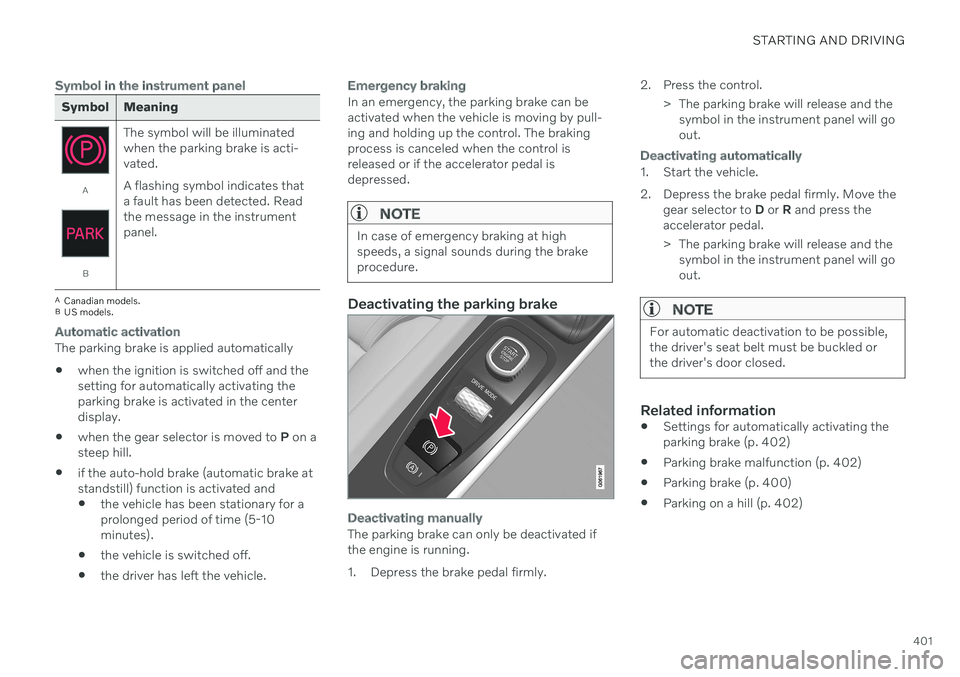
Deactivating the parking brake
Deactivating manually
The parking brake can only be deactivated if the engine is running.
1. Depress the brake pedal firmly. 2. Press the control.
> The parking brake will release and thesymbol in the instrument panel will go out.
Deactivating automatically
1. Start the vehicle.
2. Depress the brake pedal firmly. Move the gear selector to D or R and press the
accelerator pedal.
> The parking brake will release and the symbol in the instrument panel will go out.
NOTE
For automatic deactivation to be possible, the driver's seat belt must be buckled orthe driver's door closed.
Related information
Settings for automatically activating the parking brake (p. 402)
Parking brake malfunction (p. 402)
Parking brake (p. 400)
Parking on a hill (p. 402)
Page 404 of 661
STARTING AND DRIVING
402
Settings for automatically activating the parking brake Choose whether the parking brake should be activated automatically when the vehicle isswitched off.
To change this setting: 1.Tap
Settings in the center display's Top
view.
2. Tap
My CarParking Brake and
Suspension and select or deselect theAuto Activate Parking Brake function.
Related information
Activating and deactivating the parking brake (p. 400)
Parking brake (p. 400)
Parking on a hill
Always use the parking brake when parking on a hill.
WARNING
Always apply the parking brake when park- ing on an incline. Selecting a gear or put-ting the automatic transmission in P may
not be sufficient to keep the vehicle sta-tionary in all situations.
If the vehicle is pointing uphill:
Turn the front wheels so they are pointing away from
the curb.
If the vehicle is pointing downhill:
Turn the front wheels so they are pointingtoward
the curb.
Heavy load uphill
Heavy loads, such as a trailer, could cause the vehicle to roll backward when the parkingbrake is released automatically on steep uphillgradients. To help avoid this, pull the controlupward while you are driving away. Releasethe control when the vehicle gains traction.
Related information
Activating and deactivating the parkingbrake (p. 400)
Parking brake malfunction
If you are unable to deactivate or activate the parking brake after several attempts, contactan authorized Volvo workshop.
A audible warning signal will sound if the park- ing brake is activated while the vehicle isbeing driven. If the vehicle must be parked before the prob- lem is rectified, turn the wheels as when park-ing on an incline and put the gear selector inP .
Low battery charge levelIf the battery charge level is too low, it will notbe possible to activate or deactivate the park-ing brake. Connect an auxiliary battery to thevehicle if the battery is discharged.
Replacing brake padsDue to the design of the electric parkingbrake, the rear brake pads must be replacedby a workshop. An authorized Volvo workshopis recommended.
Page 408 of 661
STARTING AND DRIVING
* Option/accessory.
406
Transmission
The transmission is part of the vehicle's drive- line (power transmission) between the engineand the drive wheels. The function of thetransmission is to change gears dependingon speed and power needs.
The vehicle has an 8-speed automatic trans- mission. The number of gears allows theengine's torque and power band to be effec-tively utilized. Two of the gears are overdrive gears that save fuel when driving at a constant engine speed.Both the gear selector and the steering wheelpaddles can be used to shift up or down man-ually. The selected gear selector position willbe displayed in the instrument panel.
Related information
Automatic transmission (p. 406)
Automatic transmission
Gear position is selected automatically to make driving as energy efficient as possible.The transmission also has a manual mode.
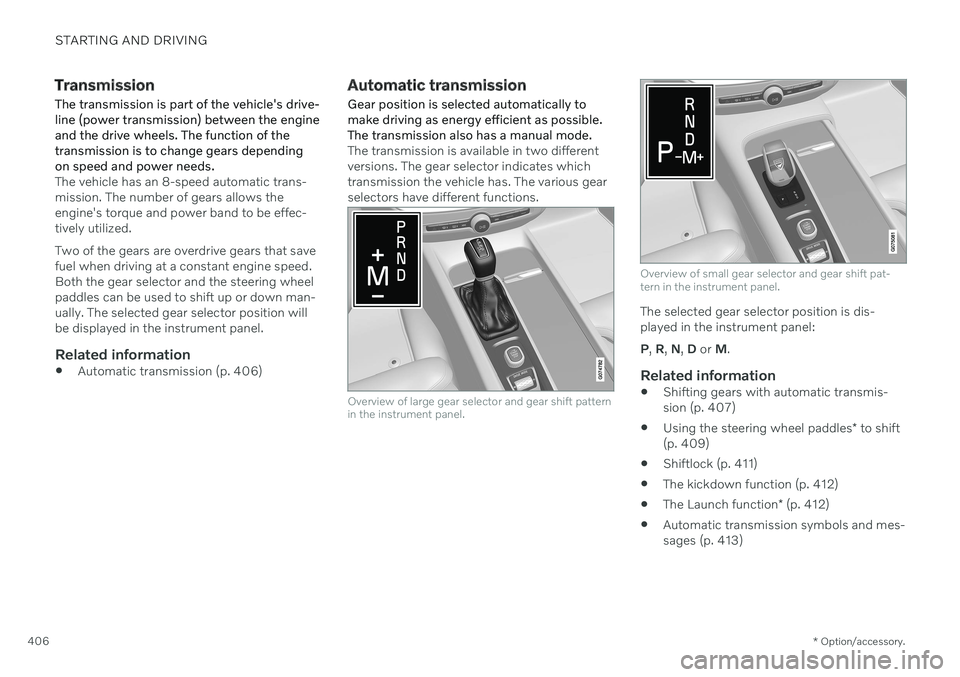
The transmission is available in two different versions. The gear selector indicates whichtransmission the vehicle has. The various gearselectors have different functions.
Overview of large gear selector and gear shift pattern in the instrument panel.
Overview of small gear selector and gear shift pat- tern in the instrument panel.
The selected gear selector position is dis- played in the instrument panel: P , R , N , D or M.
Related information
Shifting gears with automatic transmis- sion (p. 407)
Using the steering wheel paddles
* to shift
(p. 409)
Shiftlock (p. 411)
The kickdown function (p. 412)
The Launch function
* (p. 412)
Automatic transmission symbols and mes-sages (p. 413)
Page 411 of 661
STARTING AND DRIVING
}}
* Option/accessory.409
Push the gear selector to the right toward "
+ " (plus) and release to shift up one gear.
Push the gear selector to the left toward"
– " (minus) and release to shift down one
gear.
Push the gear selector rearward to returnto
D mode.
For smooth shifting and engine performance,the transmission will shift down automaticallyif the vehicle's speed becomes too low for theselected gear.
Related information
Automatic transmission (p. 406)
Shiftlock (p. 411)
Using the steering wheel paddles
* to shift
(p. 409)
The kickdown function (p. 412)
Using the steering wheel paddles
*
to shift
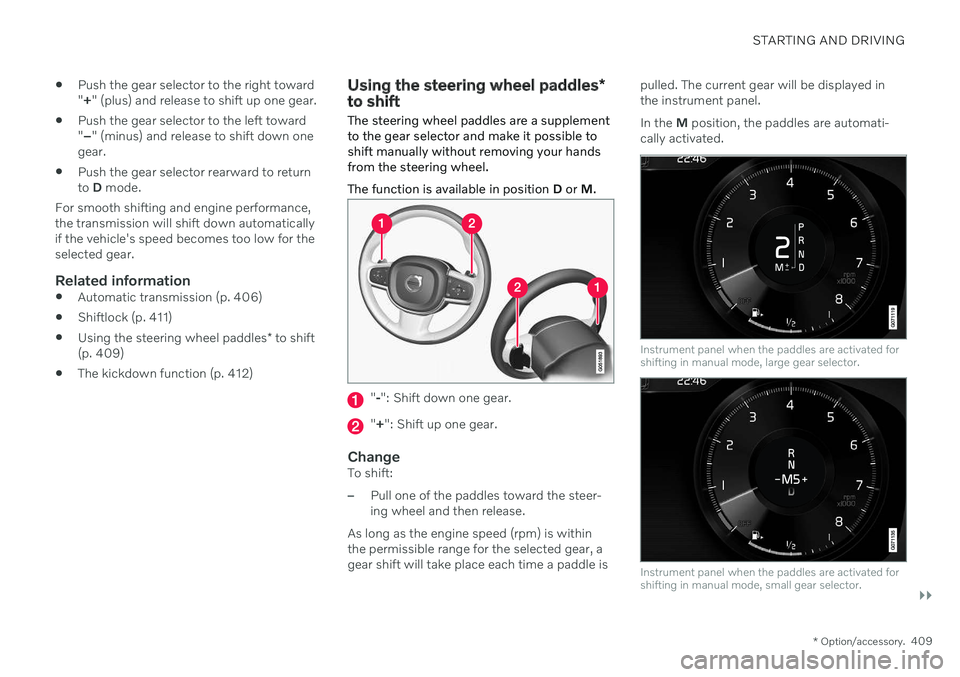
The steering wheel paddles are a supplement to the gear selector and make it possible toshift manually without removing your handsfrom the steering wheel. The function is available in position D or M.
"-": Shift down one gear.
" + ": Shift up one gear.
ChangeTo shift:
–Pull one of the paddles toward the steer- ing wheel and then release.
As long as the engine speed (rpm) is withinthe permissible range for the selected gear, agear shift will take place each time a paddle is pulled. The current gear will be displayed inthe instrument panel. In the
M position, the paddles are automati-
cally activated.
Instrument panel when the paddles are activated for shifting in manual mode, large gear selector.
Instrument panel when the paddles are activated for shifting in manual mode, small gear selector.
Page 415 of 661
STARTING AND DRIVING
}}
* Option/accessory.413
Automatic transmission symbols and messages If a problem occurs with the transmission, a symbol and a message are displayed in theinstrument panel.
CAUTION
Check the operating temperature of the transmission to help avoid damage to anyof the drive system components. If there isa risk of overheating, a warning symbol willappear in the instrument panel and a textmessage will be displayed. Follow the rec-ommendations given.
Symbol Meaning
A fault has occurred in the trans- mission. Read the message in the instru- ment panel.
Hot or overheated transmission. Read the message in the instru- ment panel.
Temporary fault in driveline. Read the message in the instru- ment panel.
Related information
Automatic transmission (p. 406)
All Wheel Drive (AWD)
*
All-wheel drive (AWD 9
), also called four-
wheel drive, means that power is distributed to all four wheels, which improves traction.
To achieve the best traction, power is auto- matically directed to the wheels that have thebest grip. The system continuously calculatesthe need for torque to the rear wheels, andcan immediately redistribute up to half of theengine's torque to the rear wheels. All-wheel drive also has a stabilizing effect at higher speeds. In normal driving conditions,most of the engine's power is directed to thefront wheels. When the vehicle is stationary,all-wheel drive is always activated in prepara-tion for maximum traction during acceleration. All-wheel drive reacts differently depending on which drive mode is selected.
Related information
Drive modes
* (p. 413)
Transmission (p. 406)
Drive modes
*
Drive modes affect the vehicle's driving cha- racteristics in different ways to enhance andsimplify the driving experience in certaintypes of situations.
Drive modes enable easy access to the vehi- cle's many functions and settings in differentdriving situations. The following systems areadapted to help optimize driving characteris-tics in each drive mode: Steering
Engine/transmission/all-wheel drive
*
Brakes
Shock absorbers
Instrument panel
Start/Stop function
Climate control settings
Select the drive mode that is adapted to the current driving conditions. Keep in mind thatnot all drive modes are available in all situa-tions.
Available drive modesWhen the engine is started, the vehicle will be in Comfort mode and the start/stop function
will be activated. Drive mode can be changed once the vehicle is started, e.g. to
Individualmode. Once Individual mode is selected, you
can adjust settings to personal preferences, e.g. to show the tachometer.
Page 416 of 661
||
STARTING AND DRIVING
* Option/accessory.
414
Comfort
Comfort is the vehicle's default mode. The
settings offer driving comfort, light steering and soft suspension adapted for normal driv-ing. In
Comfort mode, no tachometer will be dis-
played in the instrument panel 10
.
Eco
Adapt the vehicle for more fuel-efficient and eco-friendly driving with Eco mode.
In this mode, the Start/Stop function is acti- vated, suspension is soft and certain climatesettings are reduced. When driving in
Eco mode, an ECO gauge
indicating how economical the driving is will be displayed in the instrument panel.
Dynamic
Dynamic mode is designed to help pro-
vide sportier driving characteristics and a faster acceleration response.
Gear shifting will be faster and more distinctand the transmission will prioritize gears witha higher traction force. Steering response is faster and suspension is stiffer 11
to help reduce body roll when corner-
ing. The Start/Stop function is deactivated.
Dynamic mode is also available in a Polestar
Engineered* version.
Individual
Customizes drive mode to personal prefer- ences.
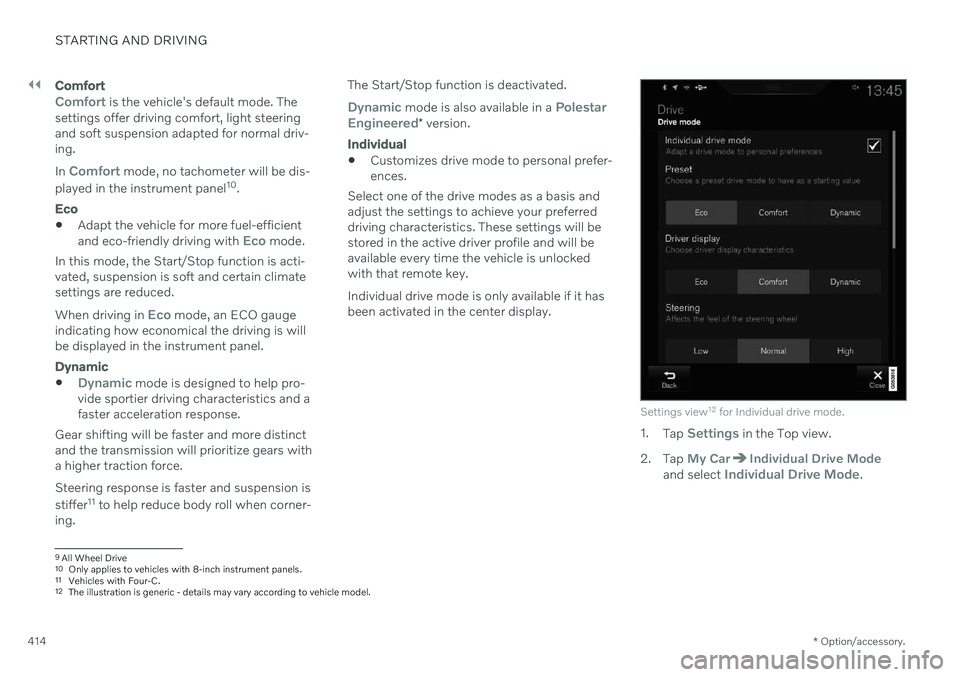
Select one of the drive modes as a basis andadjust the settings to achieve your preferreddriving characteristics. These settings will bestored in the active driver profile and will beavailable every time the vehicle is unlockedwith that remote key. Individual drive mode is only available if it has been activated in the center display.
Settings view 12
for Individual drive mode.
1. Tap Settings in the Top view.
2. Tap
My CarIndividual Drive Modeand select Individual Drive Mode.
9 All Wheel Drive
10 Only applies to vehicles with 8-inch instrument panels.
11 Vehicles with Four-C.
12 The illustration is generic - details may vary according to vehicle model.
Page 417 of 661

STARTING AND DRIVING
* Option/accessory.415
3.
Under
Presets, select one of the following
drive modes as a basis: Eco, Comfort,Dynamic or Polestar Engineered* .
The following settings can be modified:
Driver Display
Steering Force
Powertrain Characteristics
Brake Characteristics
Suspension Control
ECO Climate
Start/Stop.
Related information
Changing drive mode
* (p. 415)
Eco drive mode (p. 416)
Economical driving (p. 423)
Start/Stop function (p. 418)
All Wheel Drive (AWD)
* (p. 413)
Driver profiles (p. 134)
Regenerative braking
* (p. 405)
Changing drive mode *
Select the drive mode that is adapted to the current driving conditions. The drive mode is changed using the control in the tunnel console.
Keep in mind that not all drive modes are available in all situations. To change drive mode:
1. Press the DRIVE MODE control.
> A pop-up menu will appear in the cen- ter display.
2. Roll the wheel upward or downward to the desired drive mode. 3. Press the drive mode control or tap its
button in the center display to confirm the selection.
> The selected drive mode is shown inthe instrument panel.
Related information
Drive modes
* (p. 413)
Activating and deactivating Eco drive mode using the function button (p. 418)