display VOLVO V60 2021 Owners Manual
[x] Cancel search | Manufacturer: VOLVO, Model Year: 2021, Model line: V60, Model: VOLVO V60 2021Pages: 661, PDF Size: 12.68 MB
Page 352 of 661
DRIVER SUPPORT
* Option/accessory.
350
Driver Alert Control limitations
Driver Alert Control (DAC) functionality may be reduced in certain situations.
In certain situations, the system may provide a warning even if it has not detected a change indriving behavior, e.g.: in strong crosswinds
on grooved road surfaces.
WARNING
In certain cases, driving behavior might not be affected despite the driver's fatigue – when using the Pilot Assist
* function –
resulting in the driver not getting a warning from DAC. It is therefore very important to always stop and take a break at the slightest signof fatigue, regardless of whether the func-tion has issued a warning or not.
NOTE
The function uses the vehicle's camera and radar sensor, which has certain generallimitations.
Related information
Driver Alert Control (p. 348)
Camera/radar sensor limitations (p. 383)
Distance Alert
*93
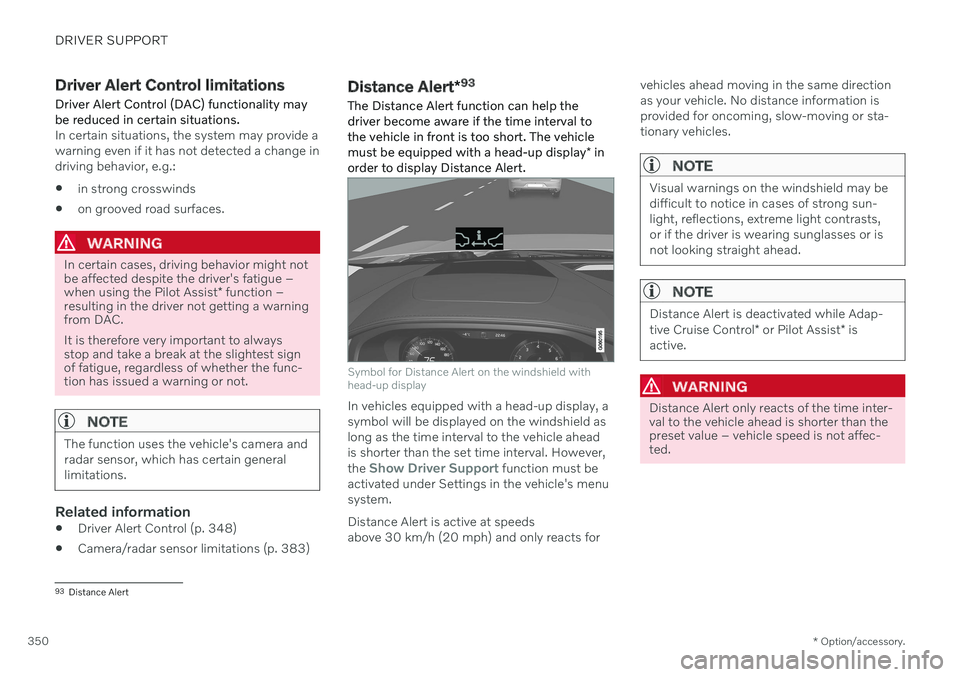
The Distance Alert function can help the driver become aware if the time interval tothe vehicle in front is too short. The vehicle must be equipped with a head-up display * in
order to display Distance Alert.
Symbol for Distance Alert on the windshield with head-up display
In vehicles equipped with a head-up display, a symbol will be displayed on the windshield aslong as the time interval to the vehicle aheadis shorter than the set time interval. However, the
Show Driver Support function must be
activated under Settings in the vehicle's menu system. Distance Alert is active at speeds above 30 km/h (20 mph) and only reacts for vehicles ahead moving in the same directionas your vehicle. No distance information isprovided for oncoming, slow-moving or sta-tionary vehicles.
NOTE
Visual warnings on the windshield may be difficult to notice in cases of strong sun-light, reflections, extreme light contrasts,or if the driver is wearing sunglasses or isnot looking straight ahead.
NOTE
Distance Alert is deactivated while Adap- tive Cruise Control
* or Pilot Assist * is
active.
WARNING
Distance Alert only reacts of the time inter- val to the vehicle ahead is shorter than thepreset value – vehicle speed is not affec-ted.
93 Distance Alert
Page 353 of 661
DRIVER SUPPORT
* Option/accessory.351
WARNING
The function is supplementary driver support intended to facilitate drivingand help make it safer – it cannot han-dle all situations in all traffic, weatherand road conditions.
The driver is advised to read all sec-tions in the Owner's Manual about thisfunction to learn of its limitations,which the driver must be aware ofbefore using the function.
Driver support functions are not a sub-stitute for the driver's attention andjudgment. The driver is always respon-sible for ensuring the vehicle is drivenin a safe manner, at the appropriatespeed, with an appropriate distance toother vehicles, and in accordance withcurrent traffic rules and regulations.
Related information
Activating or deactivating Distance Alert(p. 351)
Distance Alert limitations (p. 351)
Setting time interval to the vehicle ahead(p. 314)
Collision risk warning from driver support(p. 311)
Head-up display
* (p. 140)
Activating or deactivating Distance Alert 94
Distance Alert can be turned off. The function is only available in vehicles that can displayinformation on the windshield with a head-up display *.
Activate or deactivate the function using this button inthe center display's Functionview.
GREEN button indicator light – the func- tion is activated.
GRAY button indicator light – the functionis deactivated.
Distance Alert is automatically activated eachtime the engine is started.
Related information
Distance Alert
* (p. 350)
Distance Alert limitations (p. 351)
Distance Alert limitations 95
Distance Alert functionality may be reduced in certain situations. The function is onlyavailable in vehicles that can display informa-tion on the windshield with a head-up dis- play *.
WARNING
Detection ability may be affected by vehicle size, e.g. motorcycles, whichcan cause the warning light to come onat a shorter time interval than that setor cause the warning to be temporarilyabsent.
Very high speeds can cause the light tocome on at a shorter time interval thanthat set due to limitations in the rangeof the radar unit.
NOTE
The function uses the vehicle's camera and radar sensor, which has certain generallimitations.
Related information
Distance Alert
* (p. 350)
Camera/radar sensor limitations (p. 383)
Head-up display
* (p. 140)
Page 355 of 661
DRIVER SUPPORT
}}
* Option/accessory.353
Related information
Driver support systems (p. 270)
Activating or deactivating Cross Traffic Alert
* (p. 353)
Cross Traffic Alert
* limitations (p. 353)
Cross Traffic Alert
* messages (p. 355)
BLIS
* (p. 344)
Park Assist
* (p. 356)
Activating or deactivating Cross Traffic Alert *98
The driver can choose to deactivate the Cross
Traffic Alert (CTA) function.
Activate or deactivate the function using this button inthe center display's Functionview.
GREEN button indicator light – the func- tion is activated.
GRAY button indicator light – the functionis deactivated.
The function is automatically activated eachtime the engine is started.
Related information
Cross Traffic Alert
* (p. 352)
Cross Traffic Alert
* limitations (p. 353)
Cross Traffic Alert
* messages (p. 355)
Cross Traffic Alert *99
limitations
The Cross Traffic Alert (CTA) function with auto brake may have limited functionality in
certain situations. Auto-brake is active atspeeds under 15 km/h (9.3 mph).
WARNING
The auto-brake sub-function can only
detect and apply the brakes for other mov- ing vehicles – not for e.g. stationary obsta-
cles, cyclists or pedestrians.
The function has certain limitations – the sen- sors, for example, cannot "see" through otherparked vehicles or objects blocking the vehi-cle. Below are a few examples of situations in which the function's field of vision may be ini-tially limited and approaching vehicles maytherefore not be detected until they are veryclose to your vehicle:
98 Warning for crossing traffic when the vehicle is backing up.
99 Warning for crossing traffic when the vehicle is backing up.
Page 357 of 661
DRIVER SUPPORT
* Option/accessory.355
Cross Traffic Alert *100
messages
A number of messages related to Cross Traffic Alert (CTA) may be displayed in the instrument panel. Several examples are provi-ded below.
Message Meaning
Blind spot sensor Service requiredThe system is not functioning as intended. Contact a workshop
A
.
Blind spot system off Trailer attachedBLIS B
and CTA have been deactivated because a trailer has been connected to the vehicle's electrical system.
A An authorized Volvo workshop is recommended.
B Blind Spot Information System
A text message can be erased by briefly press- ing the
button in the center of the right-
side steering wheel keypad. If a message cannot be erased, contact a workshop A
.
Related information
Cross Traffic Alert
* (p. 352)
BLIS
* (p. 344)
Cross Traffic Alert
* limitations (p. 353)
100
Warning for crossing traffic when the vehicle is backing up.
Page 358 of 661
DRIVER SUPPORT
* Option/accessory.
356
Park Assist *
The Park Assist function (PAS 101
) uses sen-
sors to help the driver when maneuvering in tight spaces by indicating distances to obsta-cles using audible signals and graphics in thecenter display.
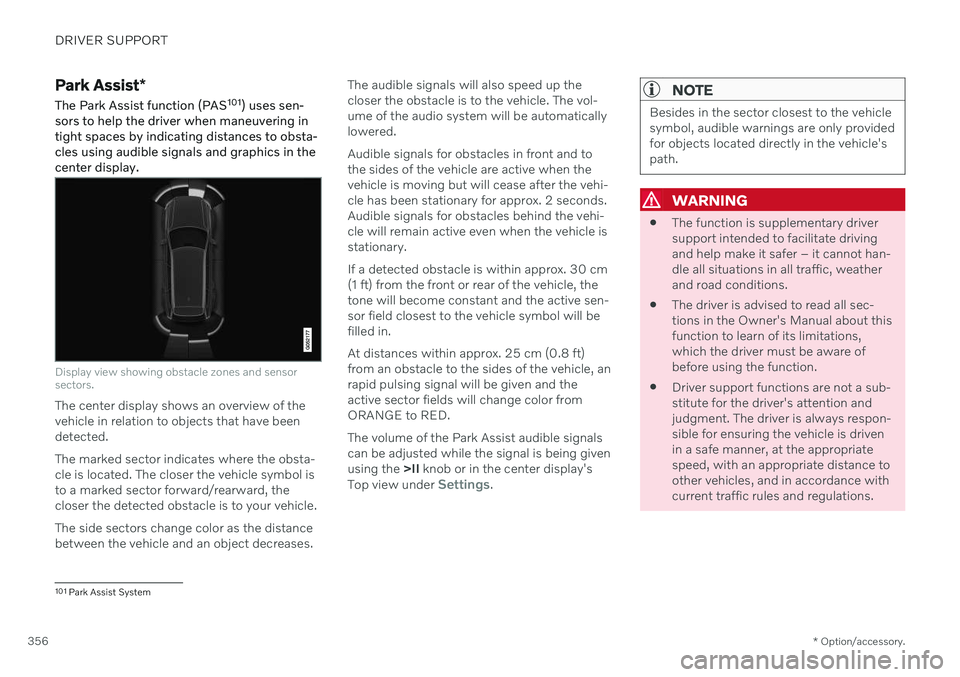
Display view showing obstacle zones and sensor sectors.
The center display shows an overview of the vehicle in relation to objects that have beendetected. The marked sector indicates where the obsta- cle is located. The closer the vehicle symbol isto a marked sector forward/rearward, thecloser the detected obstacle is to your vehicle. The side sectors change color as the distance between the vehicle and an object decreases. The audible signals will also speed up thecloser the obstacle is to the vehicle. The vol-ume of the audio system will be automaticallylowered. Audible signals for obstacles in front and to the sides of the vehicle are active when thevehicle is moving but will cease after the vehi-cle has been stationary for approx. 2 seconds.Audible signals for obstacles behind the vehi-cle will remain active even when the vehicle isstationary. If a detected obstacle is within approx. 30 cm (1 ft) from the front or rear of the vehicle, thetone will become constant and the active sen-sor field closest to the vehicle symbol will befilled in. At distances within approx. 25 cm (0.8 ft) from an obstacle to the sides of the vehicle, anrapid pulsing signal will be given and theactive sector fields will change color fromORANGE to RED. The volume of the Park Assist audible signals can be adjusted while the signal is being givenusing the
>II knob or in the center display's
Top view under
Settings.
NOTE
Besides in the sector closest to the vehicle symbol, audible warnings are only providedfor objects located directly in the vehicle'spath.
WARNING
The function is supplementary driver support intended to facilitate drivingand help make it safer – it cannot han-dle all situations in all traffic, weatherand road conditions.
The driver is advised to read all sec-tions in the Owner's Manual about thisfunction to learn of its limitations,which the driver must be aware ofbefore using the function.
Driver support functions are not a sub-stitute for the driver's attention andjudgment. The driver is always respon-sible for ensuring the vehicle is drivenin a safe manner, at the appropriatespeed, with an appropriate distance toother vehicles, and in accordance withcurrent traffic rules and regulations.
101
Park Assist System
Page 360 of 661
||
DRIVER SUPPORT
* Option/accessory.
358 The rear sensors will be activated if the vehicle begins rolling backward or if reverse gear isengaged. The distance monitored extends approx. 1.5 meters (5 ft) behind the vehicle. The Park Assist system's rear sensors will be automatically deactivated if the vehicle isbacking up with a trailer connected to thevehicle's electrical system.
NOTE
When reversing with e.g. a trailer or bike carrier on the trailer hitch – without Volvooriginal trailer cables – the Parking Assistsystem may have to be turned off manuallyto prevent the sensors from reacting tothese.
Side sensors
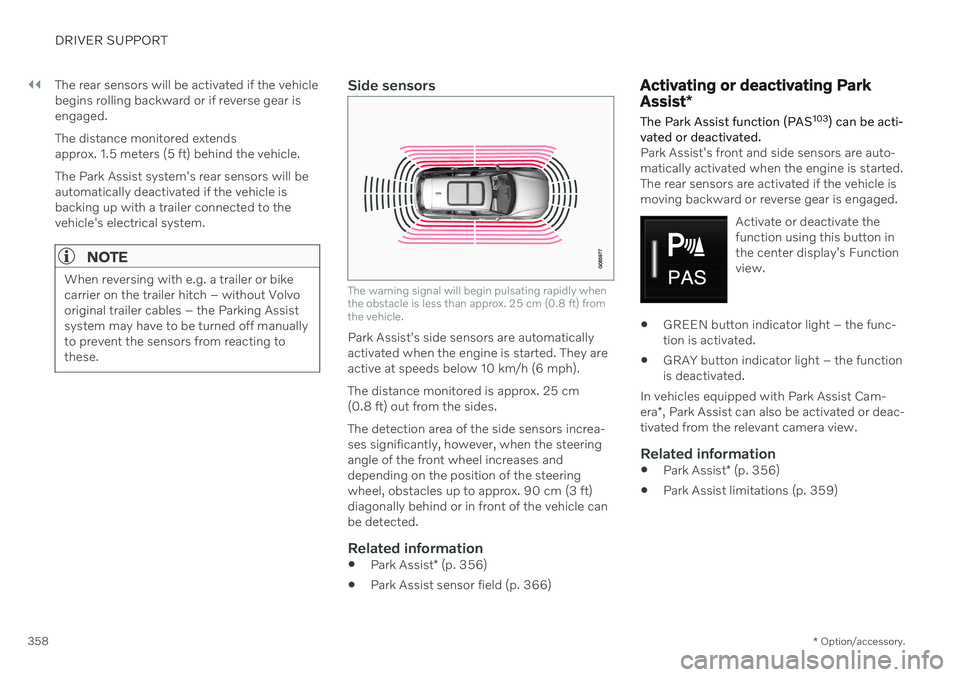
The warning signal will begin pulsating rapidly when the obstacle is less than approx. 25 cm (0.8 ft) fromthe vehicle.
Park Assist's side sensors are automatically activated when the engine is started. They areactive at speeds below 10 km/h (6 mph). The distance monitored is approx. 25 cm (0.8 ft) out from the sides. The detection area of the side sensors increa- ses significantly, however, when the steeringangle of the front wheel increases anddepending on the position of the steeringwheel, obstacles up to approx. 90 cm (3 ft)diagonally behind or in front of the vehicle canbe detected.
Related information
Park Assist
* (p. 356)
Park Assist sensor field (p. 366)
Activating or deactivating Park Assist
*
The Park Assist function (PAS 103
) can be acti-
vated or deactivated.
Park Assist's front and side sensors are auto- matically activated when the engine is started.The rear sensors are activated if the vehicle ismoving backward or reverse gear is engaged.
Activate or deactivate thefunction using this button inthe center display's Functionview.
GREEN button indicator light – the func- tion is activated.
GRAY button indicator light – the functionis deactivated.
In vehicles equipped with Park Assist Cam- era *, Park Assist can also be activated or deac-
tivated from the relevant camera view.
Related information
Park Assist
* (p. 356)
Park Assist limitations (p. 359)
Page 362 of 661
DRIVER SUPPORT
* Option/accessory.
360
Park Assist symbols and messages
Symbols and messages for the Park Assist system (PAS 105
) may be displayed in the instrument panel and/or the center display. Several examples are provided below.
Symbol Message Meaning
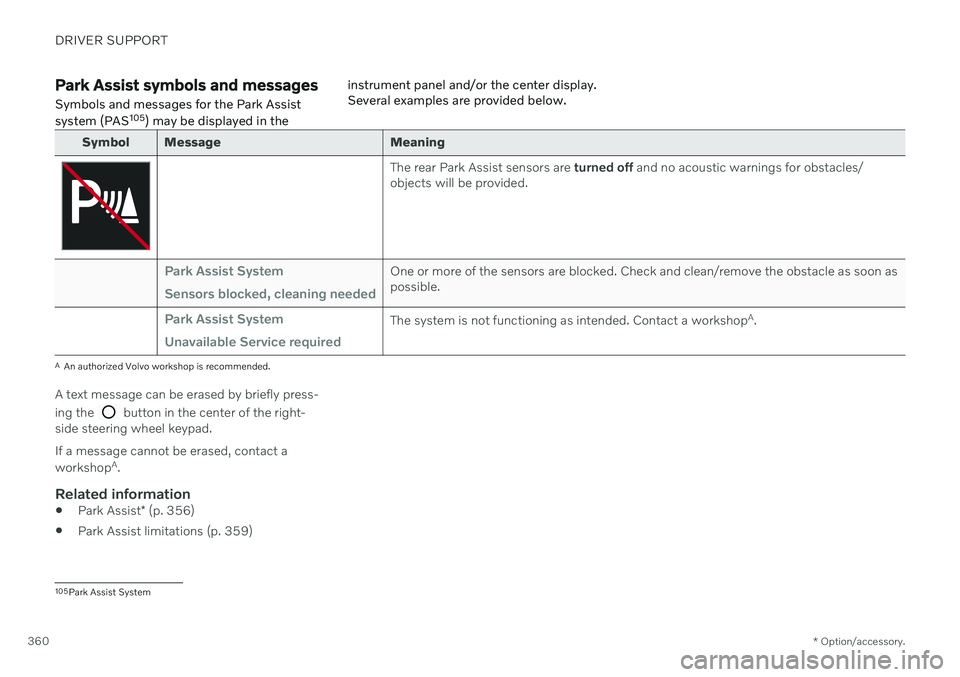
The rear Park Assist sensors are
turned off and no acoustic warnings for obstacles/
objects will be provided.
Park Assist System Sensors blocked, cleaning neededOne or more of the sensors are blocked. Check and clean/remove the obstacle as soon as possible.
Park Assist System Unavailable Service requiredThe system is not functioning as intended. Contact a workshop A
.
A An authorized Volvo workshop is recommended.
A text message can be erased by briefly press- ing the
button in the center of the right-
side steering wheel keypad. If a message cannot be erased, contact a workshop A
.
Related information
Park Assist
* (p. 356)
Park Assist limitations (p. 359)
105
Park Assist System
Page 363 of 661
DRIVER SUPPORT
}}
* Option/accessory.361
Park Assist Camera *
The Park Assist Camera (PAC 106
) can assist
the driver when maneuvering in tight spaces by indicating obstacles using the camerascreen and graphics in the center display.
The Park Assist Camera is a support function that is automatically activated when reversegear is engaged. It can also be started man-ually from the center display.
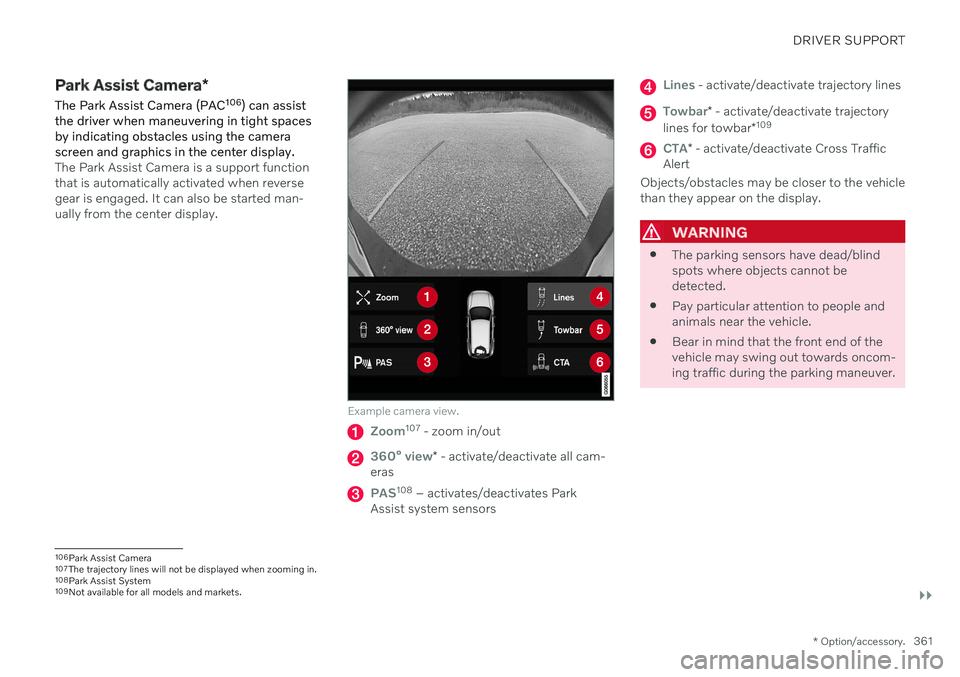
Example camera view.
Zoom107 - zoom in/out
360° view* - activate/deactivate all cam-
eras
PAS108 – activates/deactivates Park
Assist system sensors
Lines - activate/deactivate trajectory lines
Towbar* - activate/deactivate trajectory
lines for towbar *109
CTA*
- activate/deactivate Cross Traffic
Alert
Objects/obstacles may be closer to the vehicle than they appear on the display.
WARNING
The parking sensors have dead/blind spots where objects cannot bedetected.
Pay particular attention to people andanimals near the vehicle.
Bear in mind that the front end of thevehicle may swing out towards oncom-ing traffic during the parking maneuver.
106
Park Assist Camera
107 The trajectory lines will not be displayed when zooming in.
108 Park Assist System
109 Not available for all models and markets.
Page 364 of 661
||
DRIVER SUPPORT
* Option/accessory.
362
WARNING
The function is supplementary driver support intended to facilitate drivingand help make it safer – it cannot han-dle all situations in all traffic, weatherand road conditions.
The driver is advised to read all sec-tions in the Owner's Manual about thisfunction to learn of its limitations,which the driver must be aware ofbefore using the function.
Driver support functions are not a sub-stitute for the driver's attention andjudgment. The driver is always respon-sible for ensuring the vehicle is drivenin a safe manner, at the appropriatespeed, with an appropriate distance toother vehicles, and in accordance withcurrent traffic rules and regulations.
Related information
Driver support systems (p. 270)
Location and field of vision of Park Assist Cameras
* (p. 362)
Park Assist Camera trajectory lines
*
(p. 364)
Park Assist sensor field (p. 366)
Activating Park Assist Camera (p. 367)
Park Assist Camera symbols and mes- sages (p. 369)
Camera/radar sensor limitations (p. 383)
Park Assist
* (p. 356)
Cross Traffic Alert
* (p. 352)
Location and field of vision of Park Assist Cameras *
The Park Assist Cameras (PAC 110
) can display
a 360° panoramic view as well as separate views for each of the four cameras: rear,front, left and right.
110 Park Assist Camera
Page 365 of 661
DRIVER SUPPORT
}}
* Option/accessory.363
360° view*
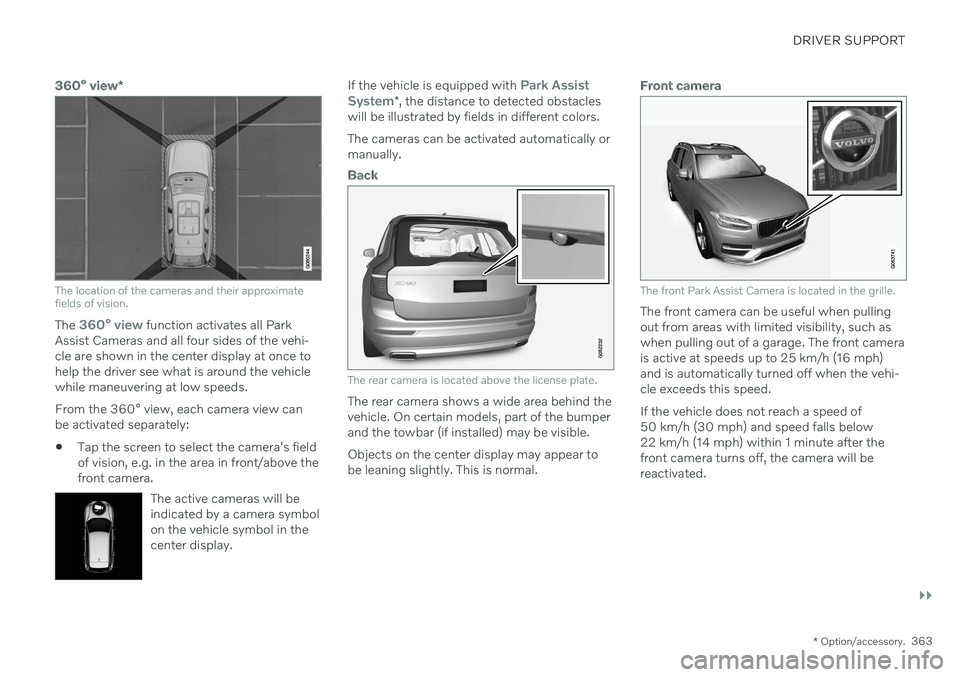
The location of the cameras and their approximate fields of vision.
The 360° view function activates all Park
Assist Cameras and all four sides of the vehi- cle are shown in the center display at once tohelp the driver see what is around the vehiclewhile maneuvering at low speeds. From the 360° view, each camera view can be activated separately:
Tap the screen to select the camera's fieldof vision, e.g. in the area in front/above thefront camera.
The active cameras will beindicated by a camera symbolon the vehicle symbol in thecenter display.
If the vehicle is equipped with Park Assist
System* , the distance to detected obstacles
will be illustrated by fields in different colors. The cameras can be activated automatically or manually.
Back
The rear camera is located above the license plate.
The rear camera shows a wide area behind the vehicle. On certain models, part of the bumperand the towbar (if installed) may be visible. Objects on the center display may appear to be leaning slightly. This is normal.
Front camera
The front Park Assist Camera is located in the grille.
The front camera can be useful when pulling out from areas with limited visibility, such aswhen pulling out of a garage. The front camerais active at speeds up to 25 km/h (16 mph)and is automatically turned off when the vehi-cle exceeds this speed. If the vehicle does not reach a speed of 50 km/h (30 mph) and speed falls below22 km/h (14 mph) within 1 minute after thefront camera turns off, the camera will bereactivated.