display VOLVO V60 2021 Owners Manual
[x] Cancel search | Manufacturer: VOLVO, Model Year: 2021, Model line: V60, Model: VOLVO V60 2021Pages: 661, PDF Size: 12.68 MB
Page 485 of 661
AUDIO, MEDIA AND INTERNET
* Option/accessory.483
NOTE
When a device is connected to Android Auto, it is possible to stream to anothermedia player via Bluetooth. Bluetooth isactive while Android Auto is in use.
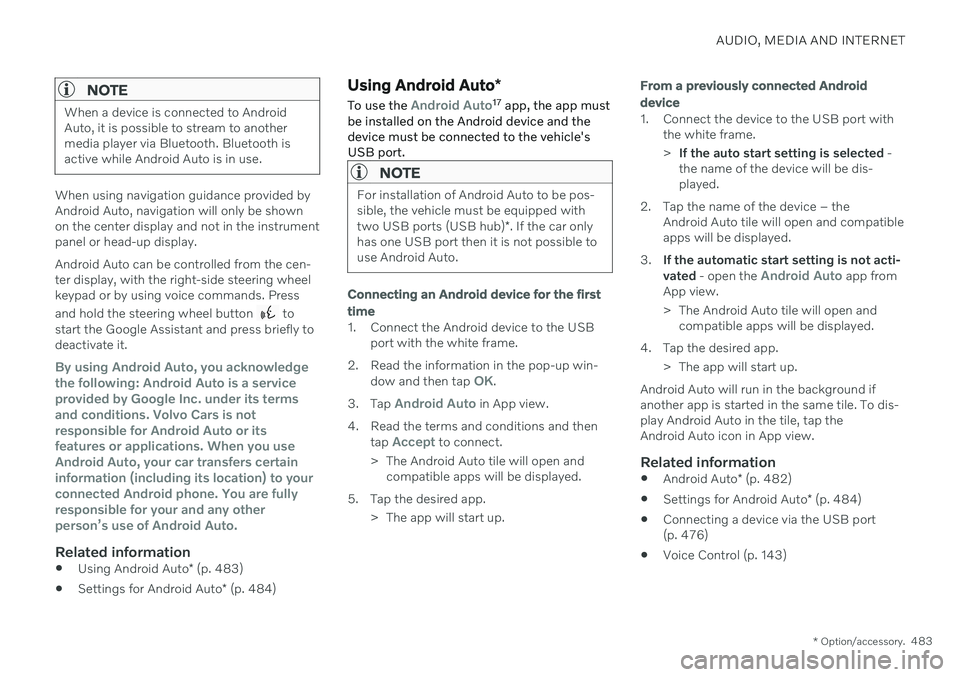
When using navigation guidance provided by Android Auto, navigation will only be shownon the center display and not in the instrumentpanel or head-up display. Android Auto can be controlled from the cen- ter display, with the right-side steering wheelkeypad or by using voice commands. Press and hold the steering wheel button
to
start the Google Assistant and press briefly to deactivate it.
By using Android Auto, you acknowledge the following: Android Auto is a serviceprovided by Google Inc. under its termsand conditions. Volvo Cars is notresponsible for Android Auto or itsfeatures or applications. When you useAndroid Auto, your car transfers certaininformation (including its location) to yourconnected Android phone. You are fullyresponsible for your and any otherperson
Page 486 of 661
AUDIO, MEDIA AND INTERNET
* Option/accessory.
484
Settings for Android Auto *
Settings for Android devices initially con- nected with Android Auto 18
.
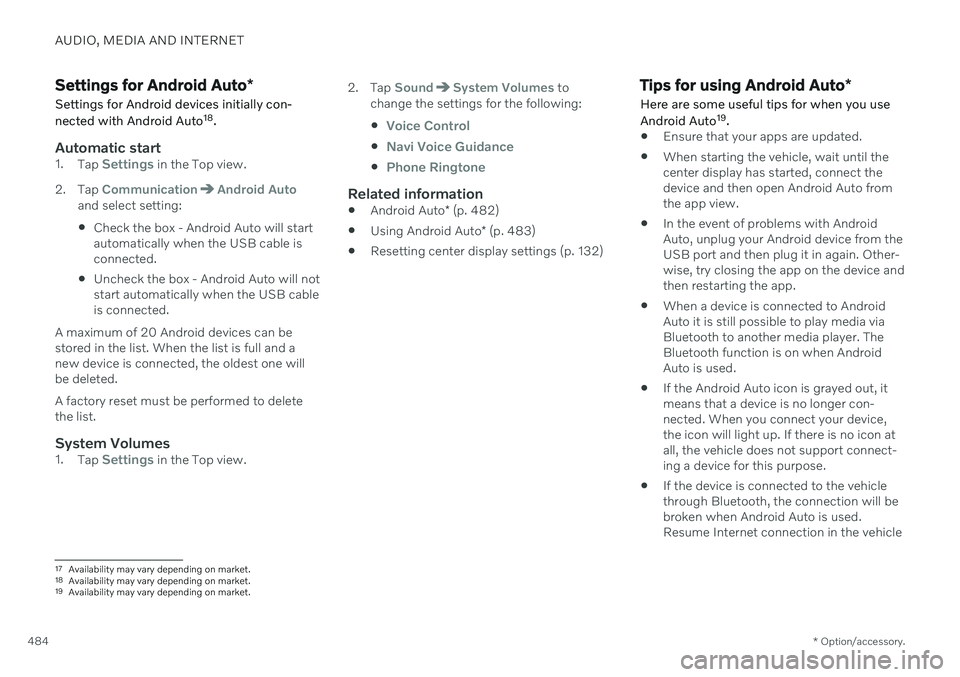
Automatic start1. Tap Settings in the Top view.
2. Tap
CommunicationAndroid Autoand select setting: Check the box - Android Auto will start automatically when the USB cable isconnected.
Uncheck the box - Android Auto will notstart automatically when the USB cableis connected.
A maximum of 20 Android devices can bestored in the list. When the list is full and anew device is connected, the oldest one willbe deleted. A factory reset must be performed to delete the list.
System Volumes1. Tap Settings in the Top view. 2. Tap
SoundSystem Volumes to
change the settings for the following:
Voice Control
Navi Voice Guidance
Phone Ringtone
Related information
Android Auto
* (p. 482)
Using Android Auto
* (p. 483)
Resetting center display settings (p. 132)
Tips for using Android Auto
*
Here are some useful tips for when you use Android Auto 19
.
Ensure that your apps are updated.
When starting the vehicle, wait until the center display has started, connect thedevice and then open Android Auto fromthe app view.
In the event of problems with AndroidAuto, unplug your Android device from theUSB port and then plug it in again. Other-wise, try closing the app on the device andthen restarting the app.
When a device is connected to AndroidAuto it is still possible to play media viaBluetooth to another media player. TheBluetooth function is on when AndroidAuto is used.
If the Android Auto icon is grayed out, it means that a device is no longer con- nected. When you connect your device,the icon will light up. If there is no icon atall, the vehicle does not support connect-ing a device for this purpose.
If the device is connected to the vehiclethrough Bluetooth, the connection will bebroken when Android Auto is used.Resume Internet connection in the vehicle
17
Availability may vary depending on market.
18 Availability may vary depending on market.
19 Availability may vary depending on market.
Page 487 of 661
AUDIO, MEDIA AND INTERNET
}}
* Option/accessory.485
by tethering using the device's Wi-Fi hot- spot.
Related information
Android Auto
* (p. 482)
Connecting the vehicle to the Internet viaa phone (Wi-Fi) (p. 501)
Phone
A phone equipped with Bluetooth can be wirelessly connected to the vehicle's inte-grated hands-free system.
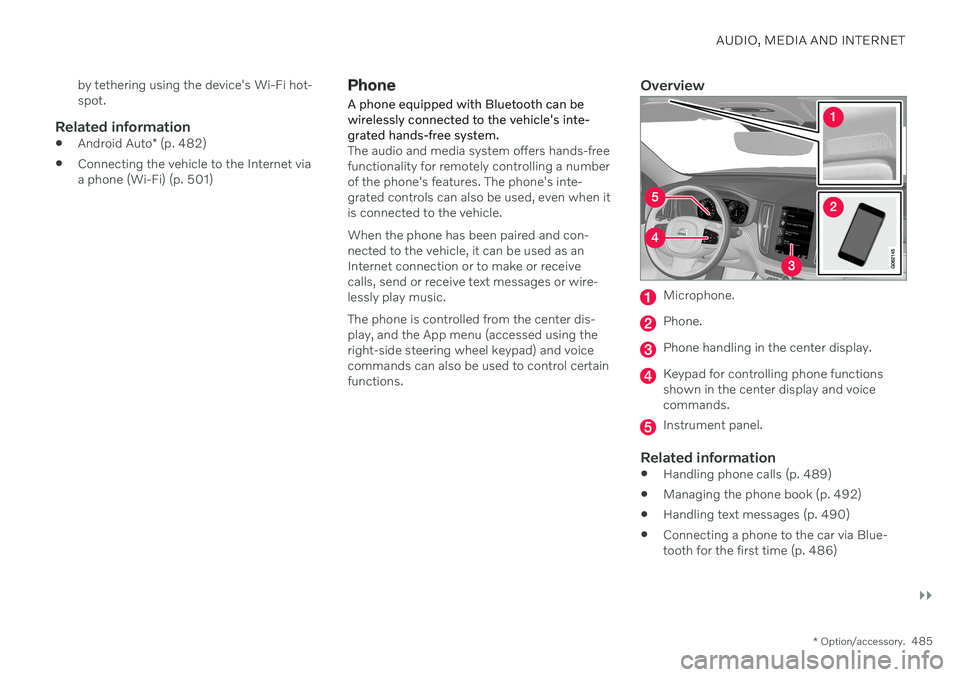
The audio and media system offers hands-free functionality for remotely controlling a numberof the phone's features. The phone's inte-grated controls can also be used, even when itis connected to the vehicle. When the phone has been paired and con- nected to the vehicle, it can be used as anInternet connection or to make or receivecalls, send or receive text messages or wire-lessly play music. The phone is controlled from the center dis- play, and the App menu (accessed using theright-side steering wheel keypad) and voicecommands can also be used to control certainfunctions.
Overview
Microphone.
Phone.
Phone handling in the center display.
Keypad for controlling phone functions shown in the center display and voicecommands.
Instrument panel.
Related information
Handling phone calls (p. 489)
Managing the phone book (p. 492)
Handling text messages (p. 490)
Connecting a phone to the car via Blue- tooth for the first time (p. 486)
Page 488 of 661
AUDIO, MEDIA AND INTERNET
* Option/accessory.
486
Connecting a phone to the car via Blue- tooth automatically (p. 488)
Connecting a phone to the car via Blue-tooth manually (p. 488)
Disconnecting a Bluetooth-connectedphone (p. 488)
Switch between phones connected viaBluetooth (p. 489)
Disconnecting Bluetooth-connected devi-ces (p. 489)
Wireless phone charger
* (p. 494)
Phone settings (p. 492)
Voice Control (p. 143)
Handling the App menu in the instrumentpanel (p. 103)
Sound settings (p. 448)
Connecting the vehicle to the Internet viaa Bluetooth-connected phone (p. 501)
Connecting a phone to the car via Bluetooth for the first time
Pair a Bluetooth-enabled phone to the vehicle to make calls, send/receive text messagesand wirelessly play media from the vehicle, orconnect the vehicle to the Internet.
Two Bluetooth devices can be connected at the same time, but in that case, only one willbe used for wireless playback. The mostrecently paired phone will be automaticallyconnected to make calls, send/receive textmessages, play media or use as an Internetconnection. It is possible to change what the phone is used for under
Bluetooth Devicesvia the settings menu in the center display's Top view. The cellular phone must be equip-ped with Bluetooth and support tethering. After the device has been connected/regis- tered for the first time via Bluetooth, thedevice no longer needs to be visible/searcha-ble. It just needs to have Bluetooth activated.A maximum of 20 paired Bluetooth devicescan be stored in the vehicle. There are two ways to pair a phone to the vehicle. Searching for the phone from the vehi-cle or searching for the vehicle from thephone.
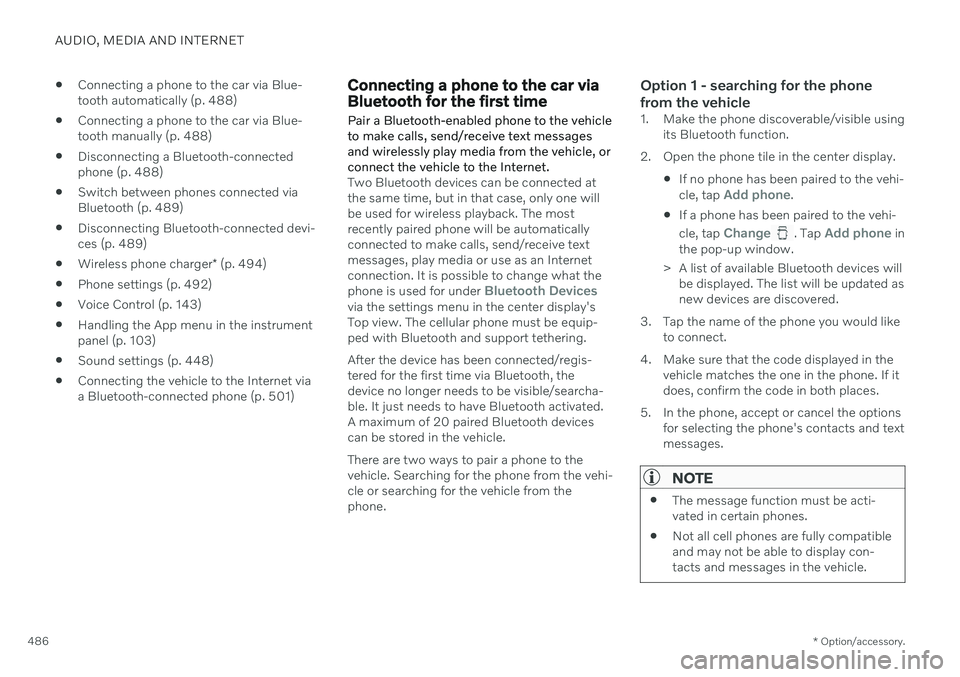
Option 1 - searching for the phone from the vehicle
1. Make the phone discoverable/visible using its Bluetooth function.
2. Open the phone tile in the center display.
If no phone has been paired to the vehi- cle, tap
Add phone.
If a phone has been paired to the vehi- cle, tap
Change. Tap Add phone in
the pop-up window.
> A list of available Bluetooth devices will be displayed. The list will be updated as new devices are discovered.
3. Tap the name of the phone you would like to connect.
4. Make sure that the code displayed in the vehicle matches the one in the phone. If itdoes, confirm the code in both places.
5. In the phone, accept or cancel the options for selecting the phone's contacts and textmessages.
NOTE
The message function must be acti- vated in certain phones.
Not all cell phones are fully compatibleand may not be able to display con-tacts and messages in the vehicle.
Page 489 of 661
AUDIO, MEDIA AND INTERNET
* Option/accessory.487
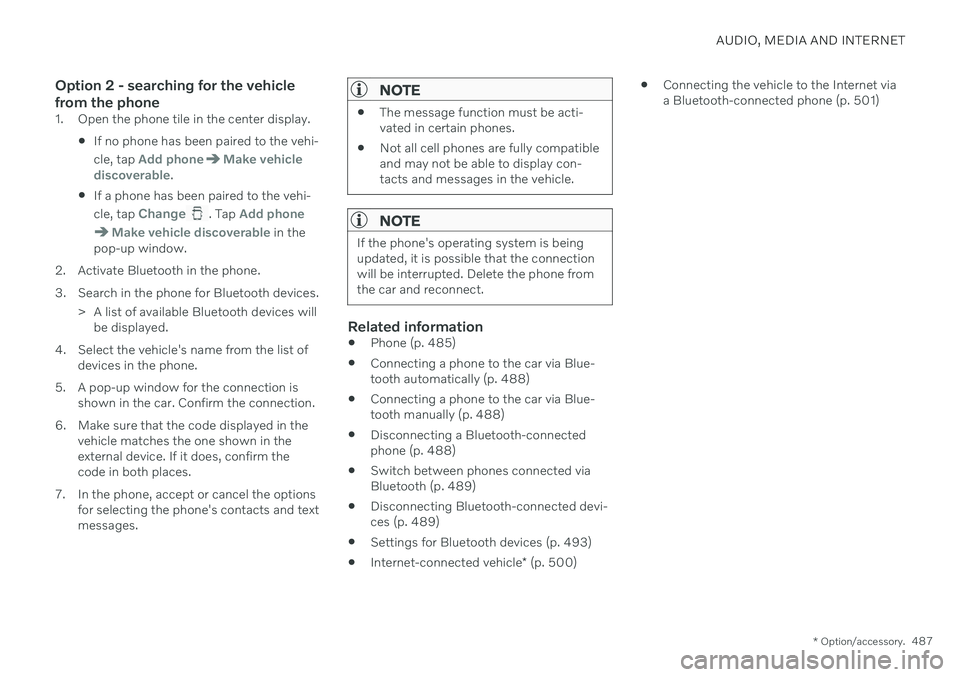
Option 2 - searching for the vehicle from the phone
1. Open the phone tile in the center display.
If no phone has been paired to the vehi- cle, tap
Add phoneMake vehicle
discoverable.
If a phone has been paired to the vehi- cle, tap
Change. Tap Add phone
Make vehicle discoverable in the
pop-up window.
2. Activate Bluetooth in the phone.
3. Search in the phone for Bluetooth devices. > A list of available Bluetooth devices willbe displayed.
4. Select the vehicle's name from the list of devices in the phone.
5. A pop-up window for the connection is shown in the car. Confirm the connection.
6. Make sure that the code displayed in the vehicle matches the one shown in the external device. If it does, confirm thecode in both places.
7. In the phone, accept or cancel the options for selecting the phone's contacts and textmessages.
NOTE
The message function must be acti- vated in certain phones.
Not all cell phones are fully compatibleand may not be able to display con-tacts and messages in the vehicle.
NOTE
If the phone's operating system is being updated, it is possible that the connectionwill be interrupted. Delete the phone fromthe car and reconnect.
Related information
Phone (p. 485)
Connecting a phone to the car via Blue- tooth automatically (p. 488)
Connecting a phone to the car via Blue-tooth manually (p. 488)
Disconnecting a Bluetooth-connectedphone (p. 488)
Switch between phones connected via Bluetooth (p. 489)
Disconnecting Bluetooth-connected devi- ces (p. 489)
Settings for Bluetooth devices (p. 493)
Internet-connected vehicle
* (p. 500)
Connecting the vehicle to the Internet viaa Bluetooth-connected phone (p. 501)
Page 491 of 661
AUDIO, MEDIA AND INTERNET
}}
489
Switch between phones connected via Bluetooth It is possible to switch between Bluetooth- connected phones.
1. Open the phone tile. 2.Tap
Change or pull down Top view
and tap
SettingsCommunication
Bluetooth DevicesAdd device.
> A list of available Bluetooth devices will be displayed.
3. Tap the name of the phone you would like to connect.
Related information
Phone (p. 485)
Connecting a phone to the car via Blue- tooth for the first time (p. 486)
Settings for Bluetooth devices (p. 493)
Disconnecting a Bluetooth-connectedphone (p. 488)
Disconnecting Bluetooth-connected devi-ces (p. 489)
Disconnecting Bluetooth- connected devices
Phones or other devices in the list of regis-
tered Bluetooth devices can be removed.
1. Tap Settings in the Top view.
2. Tap
CommunicationBluetooth
Devices.
> A list of registered Bluetooth devices is displayed.
3. Tap the name of the device you would like to remove.
4. Tap
Remove device and confirm.
> The device is no longer registered in the vehicle.
Related information
Phone (p. 485)
Connecting a phone to the car via Blue- tooth for the first time (p. 486)
Disconnecting a Bluetooth-connectedphone (p. 488)
Switch between phones connected viaBluetooth (p. 489)
Settings for Bluetooth devices (p. 493)
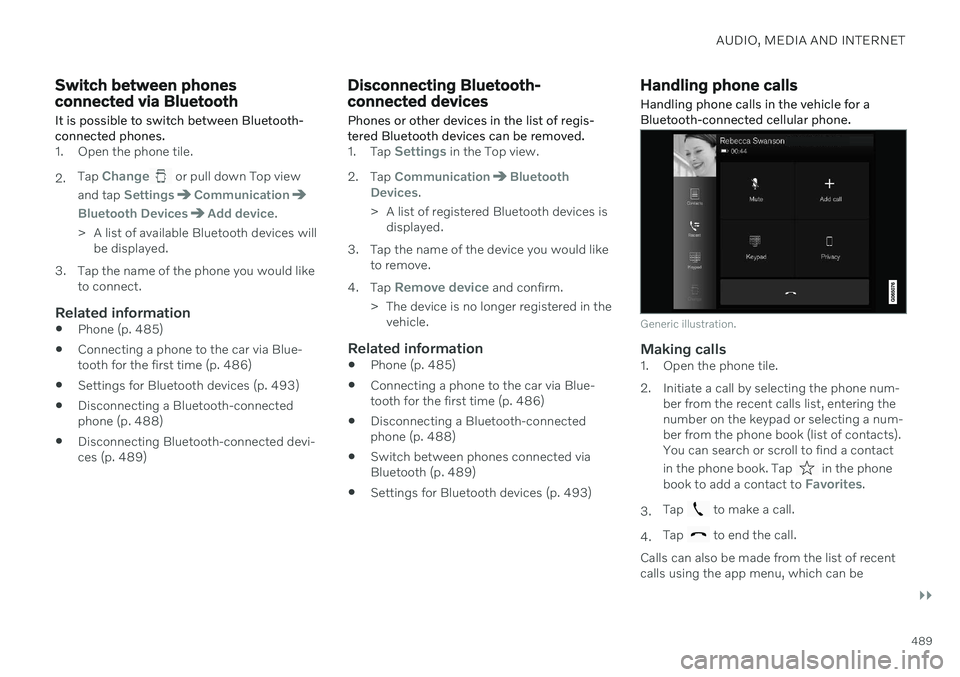
Handling phone calls
Handling phone calls in the vehicle for a
Bluetooth-connected cellular phone.
Generic illustration.
Making calls1. Open the phone tile.
2. Initiate a call by selecting the phone num- ber from the recent calls list, entering the number on the keypad or selecting a num-ber from the phone book (list of contacts).You can search or scroll to find a contact in the phone book. Tap
in the phone
book to add a contact to Favorites.
3. Tap
to make a call.
4. Tap
to end the call.
Calls can also be made from the list of recent calls using the app menu, which can be
Page 492 of 661
||
AUDIO, MEDIA AND INTERNET
490opened using the
button on the right-side
steering wheel keypad.
Making multiple calls
While the call is in progress: 1. Tap
Add call.
2. Select from the list of recent calls, favor- ites or contacts.
3. Tap an item/row in the list of recent calls or
for the contact in the phone book.
4. Tap
Swap call to switch between calls.
5. Tap
to end the current call.
Group (conference) calls
While multiple calls are in progress: 1.
Tap
Join calls to merge ongoing calls.
2. Tap
to end the call.
Incoming callsIncoming phone calls will be shown on the instrument panel and in the center display.Manage the calls using the right-side steeringwheel keypad or the center display. 1.
Tap
Answer/Reject.
2. Tap
to end the call.
Incoming calls while another call is in progress
1.
Tap Answer/Reject. 2.
Tap
to end the call.
Privacy–While a call is in progress, tap Privacyand select setting:
Switch to mobile phone - the hands-
free function will be disabled and the call will proceed on the cellular phone.
Driver focused - the microphone in the
ceiling liner on the passenger side will be muted and the call will proceedusing the vehicle's hands-free function.
Related information
Phone (p. 485)
Connecting a phone to the car via Blue-tooth for the first time (p. 486)
Voice control for cellular phones (p. 146)
Handling the App menu in the instrumentpanel (p. 103)
Entering characters, letters and words byhand in the center display (p. 127)
Managing the phone book (p. 492)
Handling text messages (p. 490)
Sound settings (p. 448)
Handling text messages 20
A Bluetooth-connected cellular phone's text messages can be handled in the vehicle.
Text message functionality needs to be acti- vated in certain phones. Not all phones arefully compatible and therefore cannot displaycontacts and messages in the vehicle.
Handling text messages in the center
display
Text messages are only shown in the centerdisplay if the relevant setting is made.
Tap
Messages in App view
to handle text messages in the center display.
NOTE
When the vehicle is moving:
Only one row of the message will be displayed. Tap
Read out to have the
entire message read aloud.
The center display's keyboard cannot be used.
Page 493 of 661
AUDIO, MEDIA AND INTERNET
* Option/accessory.491
Reading text messages in the center display aloud
Tap the icon to have the message read aloud.
Sending text messages in the center display21
1. It is possible to reply to text messages or
create a new message.
To reply to a text message - tap the name of the contact who sent the mes- sage and then tap
Answer.
To create a new message - tap
Create
new. Select a contact or enter a phone
number.
2. Write the message. 3. Tap
Send.
Handling text messages in the instrument panel
Text messages are only shown in the instru- ment panel if the relevant setting is made.
Reading new text messages in the instrument panel aloud
–To have the message read aloud, selectRead out using the steering wheel key-
pad.
Dictating replies in the instrument panel
After the text message has been read aloud, it is possible to dictate a brief reply if the vehiclehas an Internet connection.
–Tap Answer using the steering wheel key-
pad. A dictation dialog will start.
Message alertAlerts can be activated and deactivated in the text message settings.
Related information
Phone (p. 485)
Text message settings (p. 491)
Phone settings (p. 492)
Internet-connected vehicle
* (p. 500)
Voice control for cellular phones (p. 146)
Entering characters, letters and words byhand in the center display (p. 127)
Connecting a phone to the car via Blue-tooth for the first time (p. 486)
Terms of use and data sharing (p. 506)
Text message settings Settings for handling text messages received through a connected phone can be personal-ized.
1.
Tap Settings in the Top view.
2. Tap
CommunicationText Messagesand select settings:
Notification in center display - dis-
play text message notifications in the center display's status bar.
Notification in driver display - dis-
plays notifications in the driver's display and incoming messages can be man-aged using the steering wheel's right-hand keypad.
Text message tone - select tone for
incoming text messages.
Related information
Phone (p. 485)
Connecting a phone to the car via Blue- tooth for the first time (p. 486)
Handling text messages (p. 490)
Phone settings (p. 492)
20
Only applies to certain markets. Contact a Volvo retailer for more information.21Only certain phones can send text messages via the vehicle. The connected phone must support the Bluetooth profile Message Access Profile (MAP).
Page 494 of 661
AUDIO, MEDIA AND INTERNET
* Option/accessory.
492
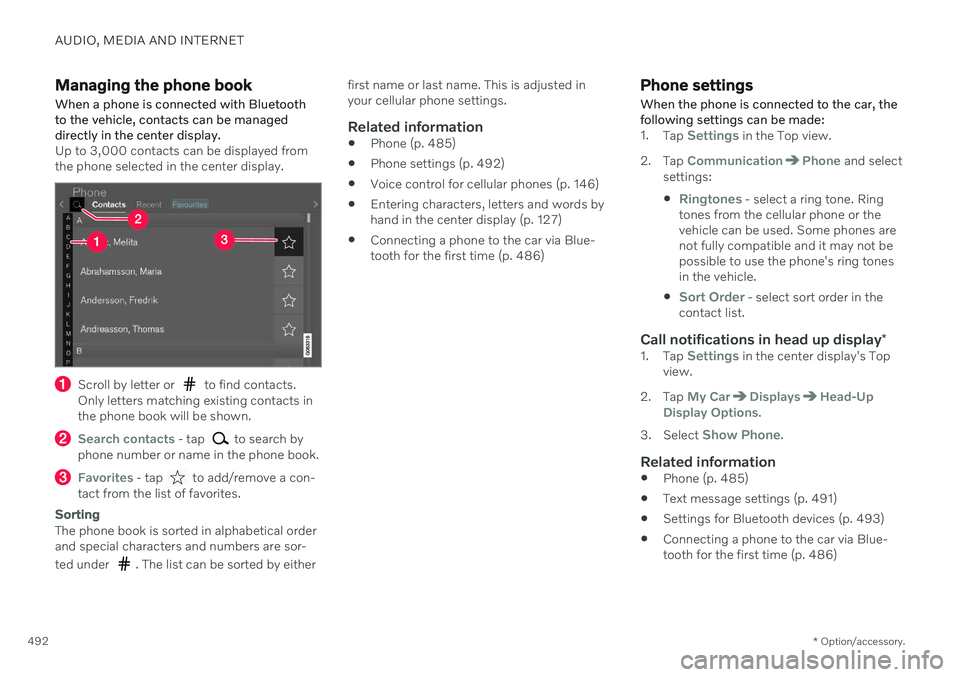
Managing the phone book When a phone is connected with Bluetooth to the vehicle, contacts can be manageddirectly in the center display.
Up to 3,000 contacts can be displayed from the phone selected in the center display.
Scroll by letter or to find contacts.
Only letters matching existing contacts in the phone book will be shown.
Search contacts - tap to search by
phone number or name in the phone book.
Favorites - tap to add/remove a con-
tact from the list of favorites.
Sorting
The phone book is sorted in alphabetical order and special characters and numbers are sor- ted under
. The list can be sorted by either first name or last name. This is adjusted in your cellular phone settings.
Related information
Phone (p. 485)
Phone settings (p. 492)
Voice control for cellular phones (p. 146)
Entering characters, letters and words byhand in the center display (p. 127)
Connecting a phone to the car via Blue-tooth for the first time (p. 486)
Phone settings When the phone is connected to the car, the following settings can be made:
1.
Tap Settings in the Top view.
2. Tap
CommunicationPhone and select
settings:
Ringtones - select a ring tone. Ring
tones from the cellular phone or the vehicle can be used. Some phones arenot fully compatible and it may not bepossible to use the phone's ring tonesin the vehicle.
Sort Order - select sort order in the
contact list.
Call notifications in head up display *1.
Tap Settings in the center display's Top
view.
2. Tap
My CarDisplaysHead-Up
Display Options.
3. Select
Show Phone.
Related information
Phone (p. 485)
Text message settings (p. 491)
Settings for Bluetooth devices (p. 493)
Connecting a phone to the car via Blue- tooth for the first time (p. 486)
Page 495 of 661
AUDIO, MEDIA AND INTERNET
* Option/accessory.493
Head-up display
* (p. 140)
Sound settings (p. 448)
Settings for Bluetooth devices
Settings for Bluetooth-connected devices.
1. Tap Settings in the Top view.
2. Tap
CommunicationBluetooth
Devices and select settings:
Add device - start the procedure for pair-
ing a new device.
Previously paired devices - lists regis-
tered/paired devices.
Remove device - remove a connected
device.
Allowed services for this device - select
what the device will be used for: making calls, sending/receiving messages,streaming media, Internet connection.
Internet connection connect the vehicle
to the Internet using the device's Bluetooth connection.
Bluetooth ®
declaration of conformityUSA FCC CAUTIONChanges or modifications not expressly approved by the party responsible for compli-ance could void the user's authority to operatethe equipment. This transmitter must not beco-located or operated in conjunction with anyother antenna or transmitter. Canada This device complies with Industry Canada license-exempt RSS standard(s). Operation issubject to the following two conditions: (1) this device may not cause interference, and (2) this device must accept any interference, including interference that may cause unde-sired operation of the device.
Related information
Phone (p. 485)
Phone settings (p. 492)
Internet-connected vehicle
* (p. 500)
Connecting a phone to the car via Blue-tooth for the first time (p. 486)