display VOLVO V60 2021 Owners Manual
[x] Cancel search | Manufacturer: VOLVO, Model Year: 2021, Model line: V60, Model: VOLVO V60 2021Pages: 661, PDF Size: 12.68 MB
Page 581 of 661
MAINTENANCE AND SERVICE
}}
579
Engine oil For the recommended service intervals and warranties to be applied, an approved engineoil must be used.
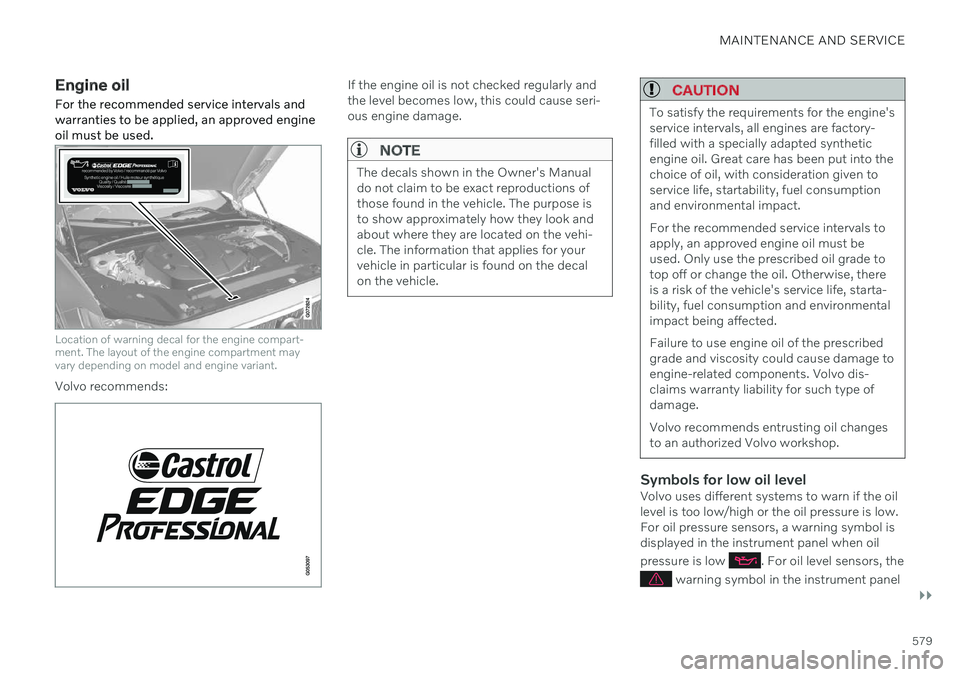
Location of warning decal for the engine compart- ment. The layout of the engine compartment mayvary depending on model and engine variant.
Volvo recommends:
If the engine oil is not checked regularly and the level becomes low, this could cause seri-ous engine damage.
NOTE
The decals shown in the Owner's Manual do not claim to be exact reproductions ofthose found in the vehicle. The purpose isto show approximately how they look andabout where they are located on the vehi-cle. The information that applies for yourvehicle in particular is found on the decalon the vehicle.
CAUTION
To satisfy the requirements for the engine's service intervals, all engines are factory-filled with a specially adapted syntheticengine oil. Great care has been put into thechoice of oil, with consideration given toservice life, startability, fuel consumptionand environmental impact. For the recommended service intervals to apply, an approved engine oil must beused. Only use the prescribed oil grade totop off or change the oil. Otherwise, thereis a risk of the vehicle's service life, starta-bility, fuel consumption and environmentalimpact being affected. Failure to use engine oil of the prescribed grade and viscosity could cause damage toengine-related components. Volvo dis-claims warranty liability for such type ofdamage. Volvo recommends entrusting oil changes to an authorized Volvo workshop.
Symbols for low oil levelVolvo uses different systems to warn if the oil level is too low/high or the oil pressure is low.For oil pressure sensors, a warning symbol isdisplayed in the instrument panel when oil pressure is low
. For oil level sensors, the
warning symbol in the instrument panel
Page 582 of 661
||
MAINTENANCE AND SERVICE
580and display messages are used to alert the driver. Some engine variants have both sys-tems. Contact a Volvo retailer for more infor-mation. Change the engine oil and oil filter according to the schedule specified in the Warranty andMaintenance Records Information booklet.Oils of a higher grade than that specified maybe used. If the vehicle is driven in adverse con-ditions, Volvo recommends using an oil with ahigher grade than that specified.
Related information
Checking and filling engine oil (p. 580)
Engine oil specifications (p. 636)
Volvo Cars support site (p. 21)
Checking and filling engine oil
The engine oil level is monitored by an elec- tronic oil level sensor.
Viewing oil level in the center display
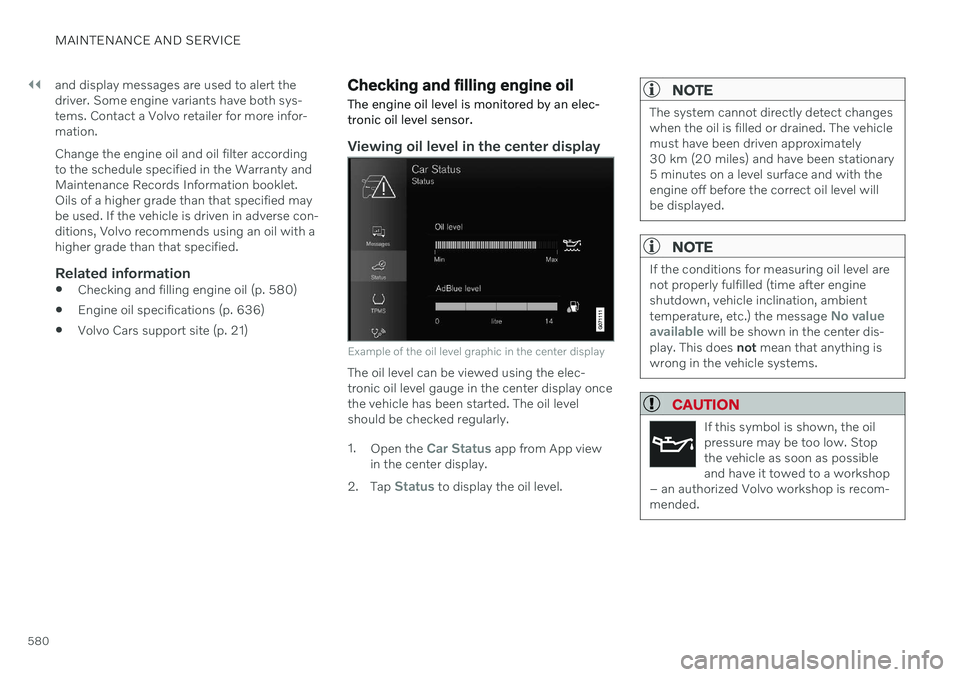
Example of the oil level graphic in the center display
The oil level can be viewed using the elec- tronic oil level gauge in the center display oncethe vehicle has been started. The oil levelshould be checked regularly. 1. Open the
Car Status app from App view
in the center display.
2. Tap
Status to display the oil level.
NOTE
The system cannot directly detect changes when the oil is filled or drained. The vehiclemust have been driven approximately30 km (20 miles) and have been stationary5 minutes on a level surface and with theengine off before the correct oil level willbe displayed.
NOTE
If the conditions for measuring oil level are not properly fulfilled (time after engineshutdown, vehicle inclination, ambient temperature, etc.) the message
No value
available will be shown in the center dis-
play. This does not mean that anything is
wrong in the vehicle systems.
CAUTION
If this symbol is shown, the oil pressure may be too low. Stopthe vehicle as soon as possibleand have it towed to a workshop
– an authorized Volvo workshop is recom-mended.
Page 583 of 661
MAINTENANCE AND SERVICE
581
Filling engine oil
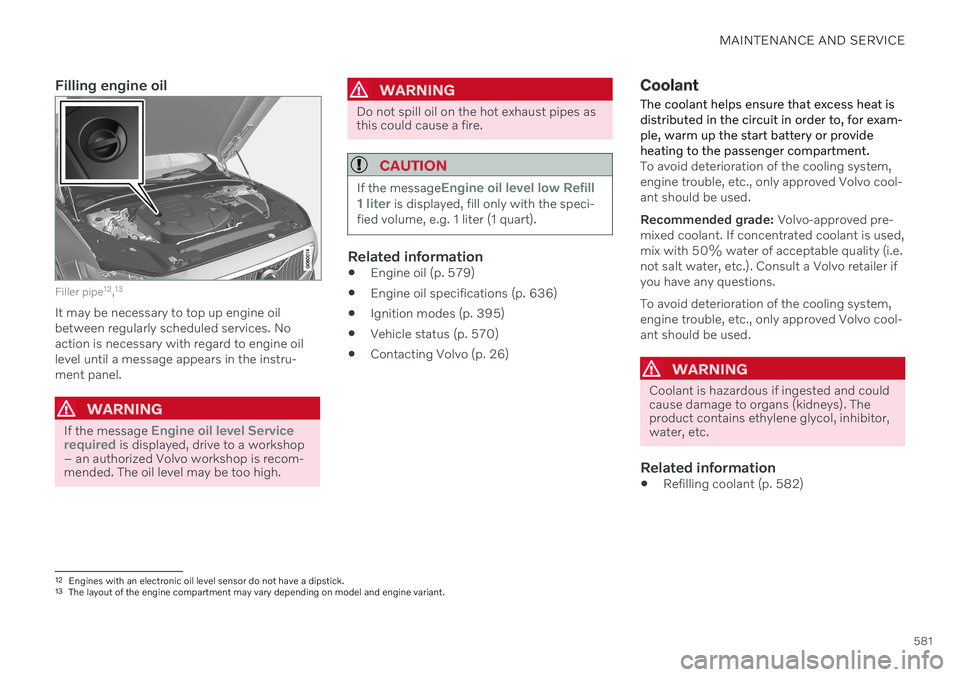
Filler pipe12
,13
It may be necessary to top up engine oil between regularly scheduled services. Noaction is necessary with regard to engine oillevel until a message appears in the instru-ment panel.
WARNING
If the message Engine oil level Service
required is displayed, drive to a workshop
– an authorized Volvo workshop is recom- mended. The oil level may be too high.
WARNING
Do not spill oil on the hot exhaust pipes as this could cause a fire.
CAUTION
If the messageEngine oil level low Refill
1 liter is displayed, fill only with the speci-
fied volume, e.g. 1 liter (1 quart).
Related information
Engine oil (p. 579)
Engine oil specifications (p. 636)
Ignition modes (p. 395)
Vehicle status (p. 570)
Contacting Volvo (p. 26)
Coolant
The coolant helps ensure that excess heat is distributed in the circuit in order to, for exam-ple, warm up the start battery or provideheating to the passenger compartment.
To avoid deterioration of the cooling system, engine trouble, etc., only approved Volvo cool-ant should be used. Recommended grade: Volvo-approved pre-
mixed coolant. If concentrated coolant is used, mix with 50% water of acceptable quality (i.e.not salt water, etc.). Consult a Volvo retailer ifyou have any questions. To avoid deterioration of the cooling system, engine trouble, etc., only approved Volvo cool-ant should be used.
WARNING
Coolant is hazardous if ingested and could cause damage to organs (kidneys). Theproduct contains ethylene glycol, inhibitor,water, etc.
Related information
Refilling coolant (p. 582)
12
Engines with an electronic oil level sensor do not have a dipstick.
13 The layout of the engine compartment may vary depending on model and engine variant.
Page 598 of 661
MAINTENANCE AND SERVICE
596
Fuses under the glove compartment Fuses under the glove compartment provide protection for e.g. electrical outlets, displaysand door modules.
Page 601 of 661
MAINTENANCE AND SERVICE
}}
* Option/accessory.599
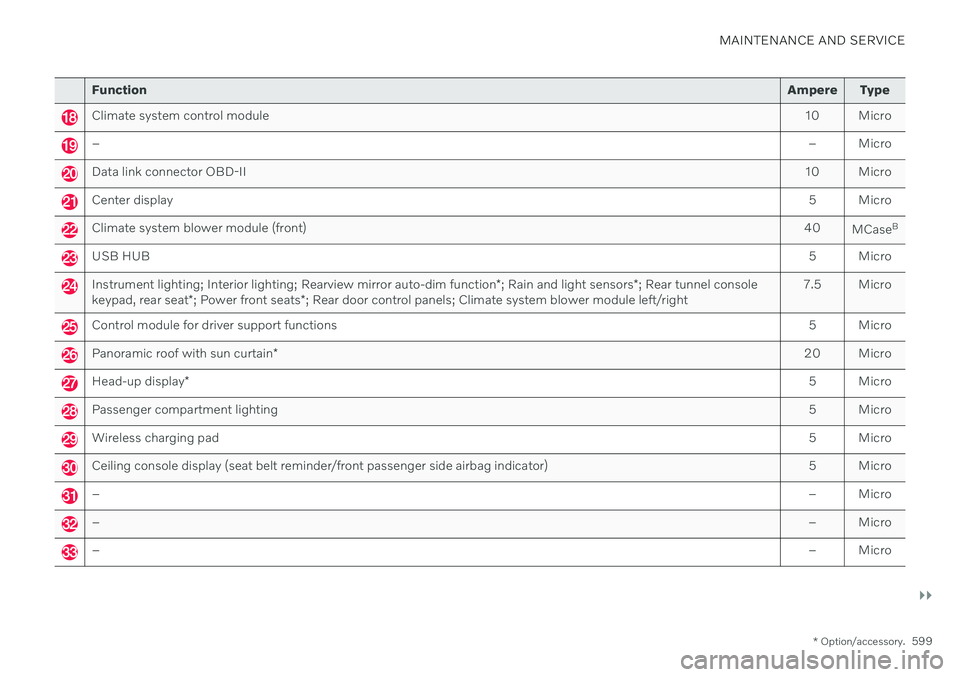
Function Ampere Type
Climate system control module 10 Micro
– – Micro
Data link connector OBD-II10 Micro
Center display 5 Micro
Climate system blower module (front)40
MCaseB
USB HUB
5 Micro
Instrument lighting; Interior lighting; Rearview mirror auto-dim function*; Rain and light sensors *; Rear tunnel console
keypad, rear seat *; Power front seats *; Rear door control panels; Climate system blower module left/right 7.5 Micro
Control module for driver support functions
5 Micro
Panoramic roof with sun curtain* 20 Micro
Head-up display
* 5 Micro
Passenger compartment lighting
5 Micro
Wireless charging pad5 Micro
Ceiling console display (seat belt reminder/front passenger side airbag indicator)5 Micro
–– Micro
–– Micro
–– Micro
Page 610 of 661
||
MAINTENANCE AND SERVICE
* Option/accessory.
608
Related information
Cleaning the center display (p. 608)
Cleaning fabric upholstery and ceiling liner (p. 609)
Cleaning the seat belt (p. 610)
Cleaning textile floor and inlay mats(p. 611)
Cleaning leather upholstery
* (p. 611)
Cleaning the leather steering wheel(p. 612)
Cleaning interior plastic, metal and woodsurfaces (p. 613)
Cleaning the center display
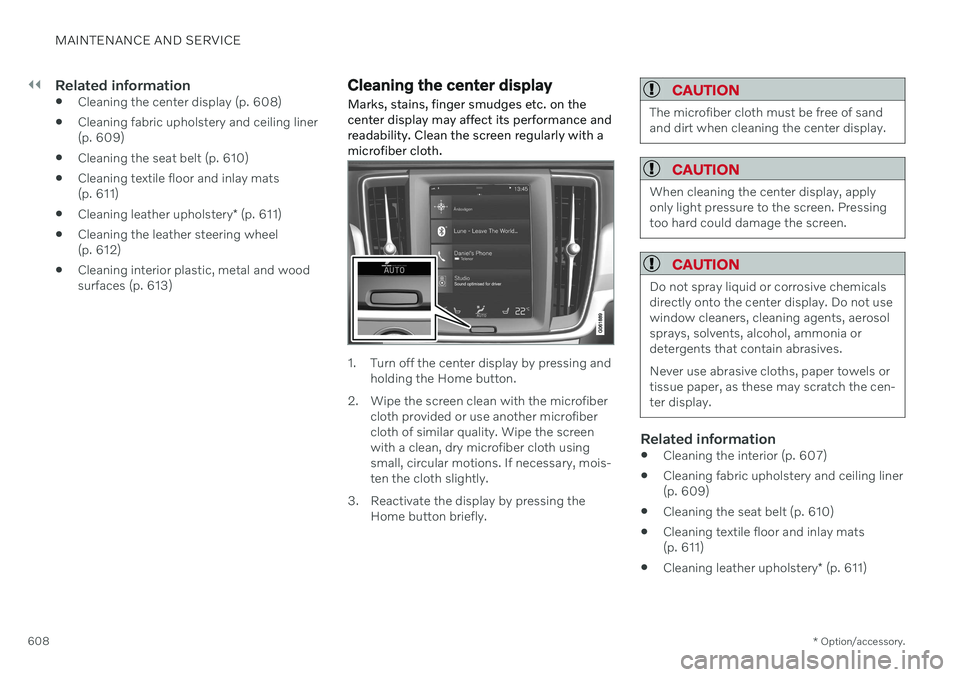
Marks, stains, finger smudges etc. on the center display may affect its performance andreadability. Clean the screen regularly with amicrofiber cloth.
1. Turn off the center display by pressing and holding the Home button.
2. Wipe the screen clean with the microfiber cloth provided or use another microfiber cloth of similar quality. Wipe the screenwith a clean, dry microfiber cloth usingsmall, circular motions. If necessary, mois-ten the cloth slightly.
3. Reactivate the display by pressing the Home button briefly.
CAUTION
The microfiber cloth must be free of sand and dirt when cleaning the center display.
CAUTION
When cleaning the center display, apply only light pressure to the screen. Pressingtoo hard could damage the screen.
CAUTION
Do not spray liquid or corrosive chemicals directly onto the center display. Do not usewindow cleaners, cleaning agents, aerosolsprays, solvents, alcohol, ammonia ordetergents that contain abrasives. Never use abrasive cloths, paper towels or tissue paper, as these may scratch the cen-ter display.
Related information
Cleaning the interior (p. 607)
Cleaning fabric upholstery and ceiling liner (p. 609)
Cleaning the seat belt (p. 610)
Cleaning textile floor and inlay mats(p. 611)
Cleaning leather upholstery
* (p. 611)
Page 611 of 661
MAINTENANCE AND SERVICE
}}
* Option/accessory.609
Cleaning the leather steering wheel (p. 612)
Cleaning interior plastic, metal and woodsurfaces (p. 613)
Cleaning the head-up display
* and
instrument panel
Carefully wipe the glass covering the head-up display unit with a clean and dry microfibercloth. If necessary, the cloth may be slightlymoistened.
Never use strong stain removers. For difficult cleaning conditions, a special cleaning agentcan be purchased at a Volvo retailer.
Related information
Activating and deactivating the head-up display
* (p. 141)
Head-up display
* (p. 140)
Cleaning fabric upholstery and ceiling liner
Use of textile cleaner is recommended when cleaning textile materials. Clean as neededand treat stains immediately.
CAUTION
Never scrape or rub a stain because this may damage the upholstery.
CAUTION
Never use stain removers or strong sol- vents because these may damage theupholstery.
Cleaning textile upholstery1. Start by vacuuming the upholstery.
2. Follow the instructions of the textile cleaner.
3. When cleaning upholstery, a spray extrac- tion cleaner is recommended for sucking up cleaning fluids and rinse water.
CAUTION
Certain dyed clothing (such as denim and suede garments) may stain the upholstery.Difficult stains, like oil, can be difficult toremove.
Page 612 of 661
||
MAINTENANCE AND SERVICE
* Option/accessory.
610
CAUTION
Always clean all of the upholstery, even if it only has isolated stains. This helps to pre-vent permanent water rings.
NOTE
Do not remove the upholstery when clean- ing.
Cleaning the ceiling liner1. Carefully brush the ceiling liner using a
soft brush.
2. Follow the instructions of the textile cleaner.
3. Then use a soft, lint-free cloth to wipe the ceiling liner.
CAUTION
Failure to take care during cleaning could lead to damage to the ceiling liner.
Related information
Cleaning the interior (p. 607)
Cleaning the center display (p. 608)
Cleaning the seat belt (p. 610)
Cleaning textile floor and inlay mats (p. 611)
Cleaning leather upholstery
* (p. 611)
Cleaning the leather steering wheel(p. 612)
Cleaning interior plastic, metal and woodsurfaces (p. 613)
Cleaning the seat belt
Use cleaning agents and car care products recommended by Volvo. Clean regularly andtreat stains immediately. It is important tovacuum before using a cleaning agent.
Use water and a synthetic soap solution. Spe- cially designed textile cleaning agents areavailable for purchase at Volvo retailers. Makesure the belt is dry before it is retracted.
Related information
Cleaning the interior (p. 607)
Cleaning the center display (p. 608)
Cleaning fabric upholstery and ceiling liner(p. 609)
Cleaning textile floor and inlay mats(p. 611)
Cleaning leather upholstery
* (p. 611)
Cleaning the leather steering wheel(p. 612)
Cleaning interior plastic, metal and woodsurfaces (p. 613)
Page 613 of 661
MAINTENANCE AND SERVICE
}}
* Option/accessory.611
Cleaning textile floor and inlay mats
Use of textile cleaner is recommended when cleaning textile mats. Clean regularly andtreat stains immediately. It is important tovacuum before using a cleaning agent.
Remove the inlay mats to clean the floor mats and inlay mats separately. Each inlay mat issecured into place with pins.
1. Remove the inlay mat by grasping the inlay mat at each pin and lifting the mat straight up.
2. Use a vacuum to remove dust and dirt.
NOTE
Do not swing or strike the inlay mats vio- lently against another object to remove dirtas this could damage the mats.
3. After vacuuming, a specially designed tex- tile cleaning agent should be used to remove stains on floor mats.
4. After cleaning, put the inlay mat back into place by pressing it in at each pin.
WARNING
Never use more than one inlay mat at a time on the driver's floor. If any othertype of floor mat is used, remove theoriginal mat from the driver's seat floorbefore driving. All types of mats mustbe securely anchored in the attach-ment points in the floor. Make sure thefloor mat does not impede the move-ment of the brake pedal or acceleratorpedal in any way, as this could be aserious safety hazard.
Volvo's floor mats are specially manu-factured for your vehicle. They must beproperly secured in the attachmentpoints in the floor to help ensure theycannot slide and become trappedunder the pedals.
Related information
Cleaning the interior (p. 607)
Cleaning the center display (p. 608)
Cleaning fabric upholstery and ceiling liner(p. 609)
Cleaning the seat belt (p. 610)
Cleaning leather upholstery
* (p. 611)
Cleaning the leather steering wheel(p. 612)
Cleaning interior plastic, metal and woodsurfaces (p. 613)
Cleaning leather upholstery
*
Use cleaning agents and car care products recommended by Volvo. Clean regularly andtreat stains immediately. It is important tovacuum before using a cleaning agent.
Volvo's leather upholstery * is treated to pro-
tect its original appearance. Over time, sun- light, grease, dirt, etc. could break down theprotective layer. This could result in scratchesand cracking. Leather upholstery * is a natural product that
changes and acquires a beautiful patina over time. Regular cleaning and treatments arerequired to preserve the qualities and color ofthe leather. Volvo offers a comprehensiveproduct, Volvo Leather Care KitWipes, forcleaning and treating leather upholstery.When used as directed, it helps preserve theleather's protective coating. For optimal results, Volvo recommends clean- ing and applying protective cream one to fourtimes a year (or more often as needed). VolvoLeather Care Kit 951 0251 and Volvo LeatherSoftener 943 7429 are available for purchaseat Volvo retailers.
Cleaning the leather upholstery1. Apply the leather cleaner to a damp sponge and squeeze it until the cleanerfoams.
Page 614 of 661
||
MAINTENANCE AND SERVICE
* Option/accessory.
612 2. Move the sponge in circular motions to
apply the foam to the stain.
3. Dampen the stain thoroughly with the sponge. Let the sponge absorb the stain and do not rub.
4. Dry the stain using a soft towel and let the leather dry completely.
Protecting the leather upholstery1. Apply a small amount of leather protector to a cloth and then apply the protector tothe leather using light circular movements.
2. Let it dry for approximately 20 minutes. > Protecting the leather upholsterymakes it better able to withstand sun-light's harmful UV rays.
Related information
Cleaning the interior (p. 607)
Cleaning the center display (p. 608)
Cleaning fabric upholstery and ceiling liner(p. 609)
Cleaning the seat belt (p. 610)
Cleaning textile floor and inlay mats(p. 611)
Cleaning the leather steering wheel(p. 612)
Cleaning interior plastic, metal and wood surfaces (p. 613)
Cleaning the leather steering wheel
Use cleaning agents and car care products recommended by Volvo. Clean regularly andtreat stains immediately. It is important tovacuum before using a cleaning agent.
Leather needs to breathe. Never cover the leather steering wheel with a plastic protector.Volvo Leather Care Kit 951 0251 and LeatherSoftener 943 7429 are recommended forcleaning the leather steering wheel. First,remove dirt, dust, etc. with a damp sponge orcloth.
CAUTION
Sharp objects such as rings could damage the leather on the steering wheel.
Treating stains on the steering wheel:Type 1 (ink, wine, coffee, milk, sweat or blood)
–Use a soft cloth or sponge. Wipe the steering wheel using a solution of 5%ammonia. For blood stains, mix approxi-mately 2 dl (1 cup) of water with 25 g(one ounce) of salt and wipe the stain.
Type 2 (grease, oil, sauces or chocolate)
1. Same procedure as for Type 1 stains.
2. Finish by wiping the wheel with an absorbent paper or towel. Type 3
(dry dirt or dust)
1. Remove the dirt/dust using a soft brush.
2. Same procedure as for Type 1 stains.
Related information
Cleaning the interior (p. 607)
Cleaning the center display (p. 608)
Cleaning fabric upholstery and ceiling liner (p. 609)
Cleaning the seat belt (p. 610)
Cleaning textile floor and inlay mats(p. 611)
Cleaning leather upholstery
* (p. 611)
Cleaning interior plastic, metal and woodsurfaces (p. 613)