change wheel VOLVO V60 2021 Owner's Manual
[x] Cancel search | Manufacturer: VOLVO, Model Year: 2021, Model line: V60, Model: VOLVO V60 2021Pages: 661, PDF Size: 12.68 MB
Page 369 of 661
DRIVER SUPPORT
}}
* Option/accessory.367
Side sensor fields
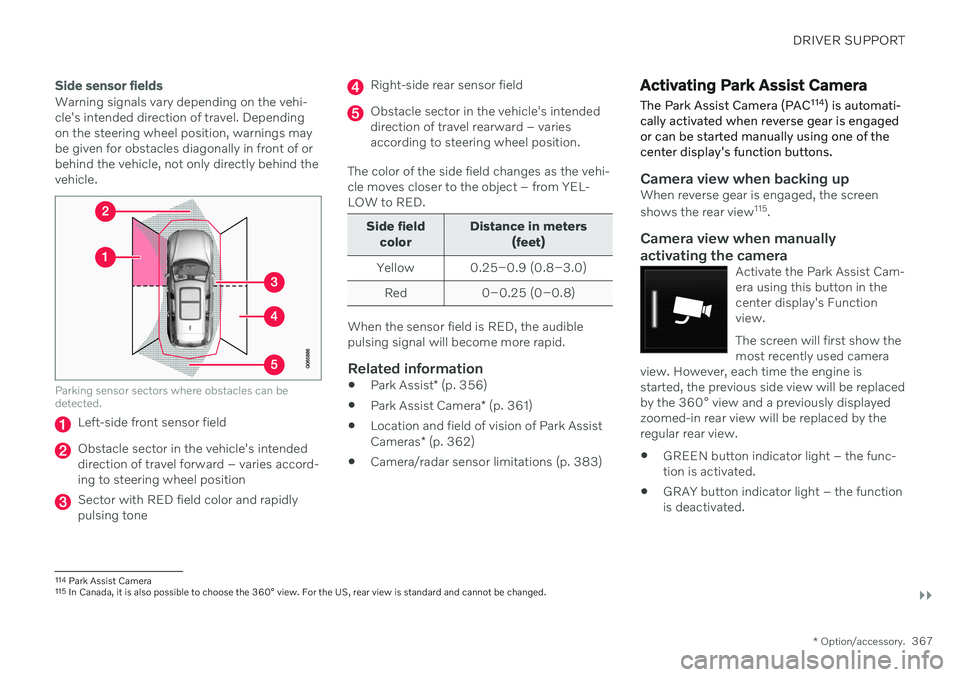
Warning signals vary depending on the vehi- cle's intended direction of travel. Dependingon the steering wheel position, warnings maybe given for obstacles diagonally in front of orbehind the vehicle, not only directly behind thevehicle.
Parking sensor sectors where obstacles can be detected.
Left-side front sensor field
Obstacle sector in the vehicle's intended direction of travel forward – varies accord-ing to steering wheel position
Sector with RED field color and rapidly pulsing tone
Right-side rear sensor field
Obstacle sector in the vehicle's intended direction of travel rearward – variesaccording to steering wheel position.
The color of the side field changes as the vehi-cle moves closer to the object – from YEL-LOW to RED.
Side field color Distance in meters
(feet)
Yellow 0.25–0.9 (0.8–3.0) Red 0–0.25 (0–0.8)
When the sensor field is RED, the audible pulsing signal will become more rapid.
Related information
Park Assist
* (p. 356)
Park Assist Camera
* (p. 361)
Location and field of vision of Park Assist Cameras
* (p. 362)
Camera/radar sensor limitations (p. 383)
Activating Park Assist Camera
The Park Assist Camera (PAC 114
) is automati-
cally activated when reverse gear is engaged or can be started manually using one of thecenter display's function buttons.
Camera view when backing upWhen reverse gear is engaged, the screen shows the rear view 115
.
Camera view when manually
activating the camera
Activate the Park Assist Cam- era using this button in thecenter display's Functionview. The screen will first show the most recently used camera
view. However, each time the engine isstarted, the previous side view will be replacedby the 360° view and a previously displayedzoomed-in rear view will be replaced by theregular rear view.
GREEN button indicator light – the func- tion is activated.
GRAY button indicator light – the functionis deactivated.
114
Park Assist Camera
115 In Canada, it is also possible to choose the 360° view. For the US, rear view is standard and cannot be changed.
Page 404 of 661
STARTING AND DRIVING
402
Settings for automatically activating the parking brake Choose whether the parking brake should be activated automatically when the vehicle isswitched off.
To change this setting: 1.Tap
Settings in the center display's Top
view.
2. Tap
My CarParking Brake and
Suspension and select or deselect theAuto Activate Parking Brake function.
Related information
Activating and deactivating the parking brake (p. 400)
Parking brake (p. 400)
Parking on a hill
Always use the parking brake when parking on a hill.
WARNING
Always apply the parking brake when park- ing on an incline. Selecting a gear or put-ting the automatic transmission in P may
not be sufficient to keep the vehicle sta-tionary in all situations.
If the vehicle is pointing uphill:
Turn the front wheels so they are pointing away from
the curb.
If the vehicle is pointing downhill:
Turn the front wheels so they are pointingtoward
the curb.
Heavy load uphill
Heavy loads, such as a trailer, could cause the vehicle to roll backward when the parkingbrake is released automatically on steep uphillgradients. To help avoid this, pull the controlupward while you are driving away. Releasethe control when the vehicle gains traction.
Related information
Activating and deactivating the parkingbrake (p. 400)
Parking brake malfunction
If you are unable to deactivate or activate the parking brake after several attempts, contactan authorized Volvo workshop.
A audible warning signal will sound if the park- ing brake is activated while the vehicle isbeing driven. If the vehicle must be parked before the prob- lem is rectified, turn the wheels as when park-ing on an incline and put the gear selector inP .
Low battery charge levelIf the battery charge level is too low, it will notbe possible to activate or deactivate the park-ing brake. Connect an auxiliary battery to thevehicle if the battery is discharged.
Replacing brake padsDue to the design of the electric parkingbrake, the rear brake pads must be replacedby a workshop. An authorized Volvo workshopis recommended.
Page 408 of 661
STARTING AND DRIVING
* Option/accessory.
406
Transmission
The transmission is part of the vehicle's drive- line (power transmission) between the engineand the drive wheels. The function of thetransmission is to change gears dependingon speed and power needs.
The vehicle has an 8-speed automatic trans- mission. The number of gears allows theengine's torque and power band to be effec-tively utilized. Two of the gears are overdrive gears that save fuel when driving at a constant engine speed.Both the gear selector and the steering wheelpaddles can be used to shift up or down man-ually. The selected gear selector position willbe displayed in the instrument panel.
Related information
Automatic transmission (p. 406)
Automatic transmission
Gear position is selected automatically to make driving as energy efficient as possible.The transmission also has a manual mode.
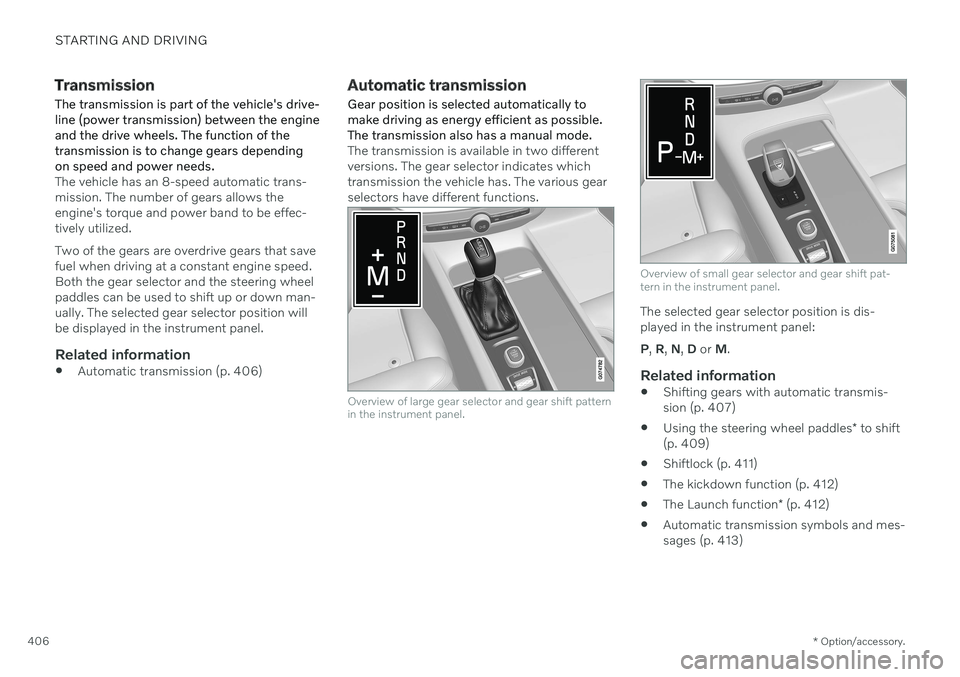
The transmission is available in two different versions. The gear selector indicates whichtransmission the vehicle has. The various gearselectors have different functions.
Overview of large gear selector and gear shift pattern in the instrument panel.
Overview of small gear selector and gear shift pat- tern in the instrument panel.
The selected gear selector position is dis- played in the instrument panel: P , R , N , D or M.
Related information
Shifting gears with automatic transmis- sion (p. 407)
Using the steering wheel paddles
* to shift
(p. 409)
Shiftlock (p. 411)
The kickdown function (p. 412)
The Launch function
* (p. 412)
Automatic transmission symbols and mes-sages (p. 413)
Page 411 of 661
STARTING AND DRIVING
}}
* Option/accessory.409
Push the gear selector to the right toward "
+ " (plus) and release to shift up one gear.
Push the gear selector to the left toward"
– " (minus) and release to shift down one
gear.
Push the gear selector rearward to returnto
D mode.
For smooth shifting and engine performance,the transmission will shift down automaticallyif the vehicle's speed becomes too low for theselected gear.
Related information
Automatic transmission (p. 406)
Shiftlock (p. 411)
Using the steering wheel paddles
* to shift
(p. 409)
The kickdown function (p. 412)
Using the steering wheel paddles
*
to shift
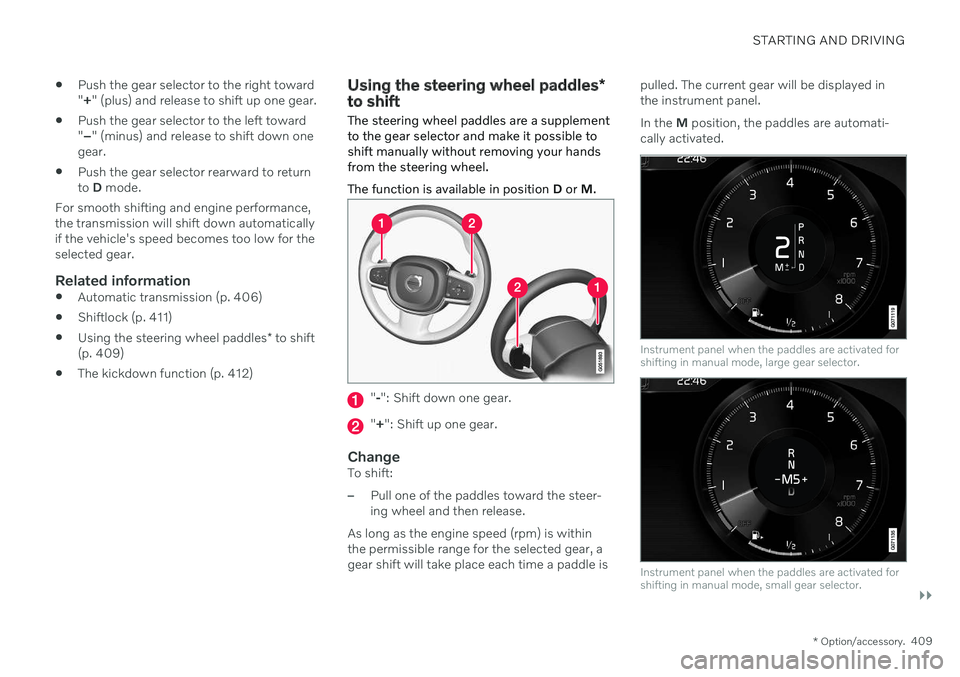
The steering wheel paddles are a supplement to the gear selector and make it possible toshift manually without removing your handsfrom the steering wheel. The function is available in position D or M.
"-": Shift down one gear.
" + ": Shift up one gear.
ChangeTo shift:
–Pull one of the paddles toward the steer- ing wheel and then release.
As long as the engine speed (rpm) is withinthe permissible range for the selected gear, agear shift will take place each time a paddle is pulled. The current gear will be displayed inthe instrument panel. In the
M position, the paddles are automati-
cally activated.
Instrument panel when the paddles are activated for shifting in manual mode, large gear selector.
Instrument panel when the paddles are activated for shifting in manual mode, small gear selector.
Page 415 of 661
STARTING AND DRIVING
}}
* Option/accessory.413
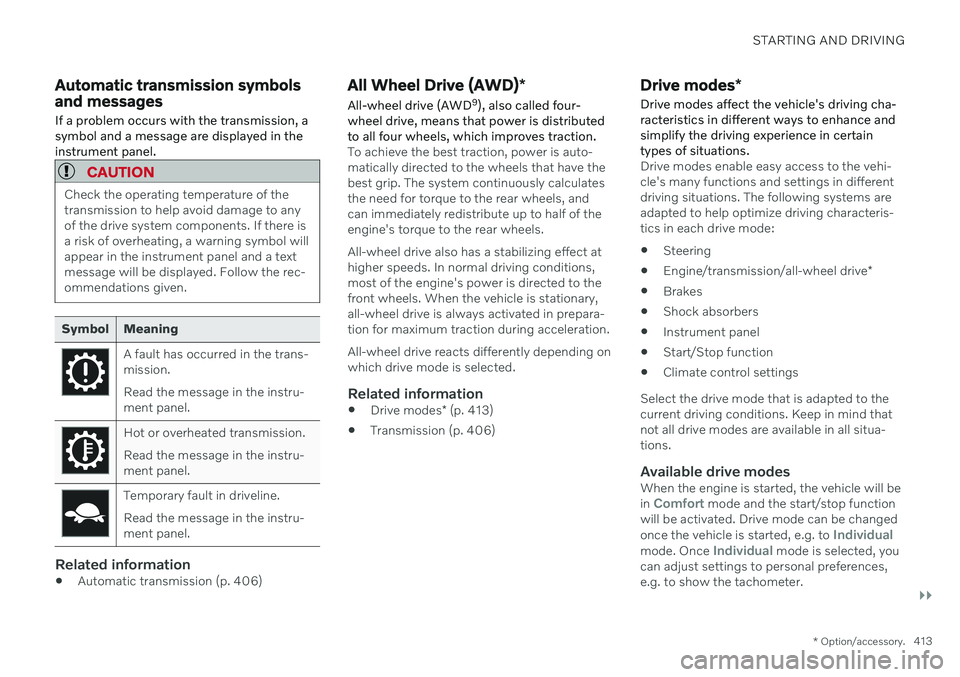
Automatic transmission symbols and messages If a problem occurs with the transmission, a symbol and a message are displayed in theinstrument panel.
CAUTION
Check the operating temperature of the transmission to help avoid damage to anyof the drive system components. If there isa risk of overheating, a warning symbol willappear in the instrument panel and a textmessage will be displayed. Follow the rec-ommendations given.
Symbol Meaning
A fault has occurred in the trans- mission. Read the message in the instru- ment panel.
Hot or overheated transmission. Read the message in the instru- ment panel.
Temporary fault in driveline. Read the message in the instru- ment panel.
Related information
Automatic transmission (p. 406)
All Wheel Drive (AWD)
*
All-wheel drive (AWD 9
), also called four-
wheel drive, means that power is distributed to all four wheels, which improves traction.
To achieve the best traction, power is auto- matically directed to the wheels that have thebest grip. The system continuously calculatesthe need for torque to the rear wheels, andcan immediately redistribute up to half of theengine's torque to the rear wheels. All-wheel drive also has a stabilizing effect at higher speeds. In normal driving conditions,most of the engine's power is directed to thefront wheels. When the vehicle is stationary,all-wheel drive is always activated in prepara-tion for maximum traction during acceleration. All-wheel drive reacts differently depending on which drive mode is selected.
Related information
Drive modes
* (p. 413)
Transmission (p. 406)
Drive modes
*
Drive modes affect the vehicle's driving cha- racteristics in different ways to enhance andsimplify the driving experience in certaintypes of situations.
Drive modes enable easy access to the vehi- cle's many functions and settings in differentdriving situations. The following systems areadapted to help optimize driving characteris-tics in each drive mode: Steering
Engine/transmission/all-wheel drive
*
Brakes
Shock absorbers
Instrument panel
Start/Stop function
Climate control settings
Select the drive mode that is adapted to the current driving conditions. Keep in mind thatnot all drive modes are available in all situa-tions.
Available drive modesWhen the engine is started, the vehicle will be in Comfort mode and the start/stop function
will be activated. Drive mode can be changed once the vehicle is started, e.g. to
Individualmode. Once Individual mode is selected, you
can adjust settings to personal preferences, e.g. to show the tachometer.
Page 417 of 661

STARTING AND DRIVING
* Option/accessory.415
3.
Under
Presets, select one of the following
drive modes as a basis: Eco, Comfort,Dynamic or Polestar Engineered* .
The following settings can be modified:
Driver Display
Steering Force
Powertrain Characteristics
Brake Characteristics
Suspension Control
ECO Climate
Start/Stop.
Related information
Changing drive mode
* (p. 415)
Eco drive mode (p. 416)
Economical driving (p. 423)
Start/Stop function (p. 418)
All Wheel Drive (AWD)
* (p. 413)
Driver profiles (p. 134)
Regenerative braking
* (p. 405)
Changing drive mode *
Select the drive mode that is adapted to the current driving conditions. The drive mode is changed using the control in the tunnel console.
Keep in mind that not all drive modes are available in all situations. To change drive mode:
1. Press the DRIVE MODE control.
> A pop-up menu will appear in the cen- ter display.
2. Roll the wheel upward or downward to the desired drive mode. 3. Press the drive mode control or tap its
button in the center display to confirm the selection.
> The selected drive mode is shown inthe instrument panel.
Related information
Drive modes
* (p. 413)
Activating and deactivating Eco drive mode using the function button (p. 418)
Page 422 of 661
STARTING AND DRIVING
420
Deactivating the Start/Stop function
In certain situations, it may be advisable to turn the Start/Stop function off.
To turn off Start/Stop, tap theStart/Stop function button
in the center display's Func- tion view. The indicator lightin the button will go outwhen the function has beenturned off.
The function will remain turned off until:
it is reactivated
the drive mode is changed to
Eco.
Related information
Driving with the Start/Stop function (p. 418)
Conditions for the Start/Stop function(p. 420)
Conditions for the Start/Stop function
Certain conditions must be met for Start/ Stop to function.
If any condition is not met, this will be indi- cated in the instrument panel.
The engine does not auto-stopThe engine will not auto-stop if: The vehicle has not reached a speed of ca 10 km/h (6 mph) after starting.
After several auto-stops, the speed mustagain exceed approximately ca 10 km/h(6 mph) before the next auto-stop.
The driver has not fastened the seatbelt.
The engine is not running at its normaloperating temperature.
The ambient temperature is underapproximately -5 °C (23 °F) or overapproximately 30 °C (86 °F).
Windshield heating is activated.
The climate system settings and theactual climate in the passenger compart-ment differ.
The vehicle is in reverse.
The driver is making large steering wheelmovements.
The road gradient is very steep.
The hood is open.
Driving at high altitude and the engine hasnot reached its normal operating tempera-ture.
ABS has been activated.
Hard braking (even if the ABS system hasnot been activated).
Many starts during a short period of timehave triggered the starter motor's over-heating protection.
The exhaust system's particulate filter isfull.
A trailer is connected to the vehicle's elec-trical system.
The transmission is not running at its nor-mal operating temperature.
The gear selector is in mode
M (±
).
If traffic conditions allow it (for example ina traffic jam).
The engine does not auto-startThe engine will not auto-start after an auto-stop if:
The driver is not wearing a seat belt, thegear selector is in the
P position and the
driver's door is open. The engine must bestarted normally.
Page 426 of 661
STARTING AND DRIVING
* Option/accessory.
424
Preparing for a long trip
It is important to have the vehicle's systems and equipment checked carefully before driv-ing long distances.
Check that
the engine is running properly and that fuel consumption is normal
there are no leaks (fuel, oil or other fluid)
the brake pedal is functioning properly
all lights work
tire tread depth and air pressure are atcorrect levels. Change to snow tires whendriving in areas where there is a risk ofsnowy or icy roads
the start battery is sufficiently charged
the wiper blades are in good condition
Related information
Checking tire pressure (p. 527)
Filling washer fluid (p. 626)
Winter driving (p. 424)
Economical driving (p. 423)
Vehicle modem settings (p. 503)
Loading recommendations (p. 556)
Driving with a trailer (p. 434)
Pilot Assist
* (p. 296)
Tire sealing system (p. 542)
Winter driving
It is important to check the vehicle before driving in cold/snowy conditions to makesure it can be driven safely.
Before the cold season arrives: Make sure the engine coolant contains 50% antifreeze. This mixture helps pro-tect the engine from frost erosion down toapprox. –35 °C (–31 °F). Do not mix dif-ferent types of antifreeze as this couldpose a health risk.
Keep the fuel tank well filled to preventcondensation from forming.
Check the viscosity of the engine oil. Oilwith low viscosity (thinner oil) improvescold-weather starting and reduces fuelconsumption when driving with a coldengine.
Check the condition and charge level ofthe start battery. Cold weather placesgreater demands on the start battery andreduces its capacity.
Use washer fluid containing antifreeze tohelp prevent ice from forming in thewasher fluid reservoir.
See separate section for engine oil recommen-dations.
Slippery driving conditionsTo help optimize traction and roadholding,Volvo recommends using snow tires on allwheels whenever there is a risk of snow or iceon the road.
NOTE
Certain countries require use of winter tires by law. Not all countries permit the use ofstudded tires.
Practice driving on slippery surfaces under controlled conditions to learn how the vehiclereacts.
Related information
Engine oil specifications (p. 636)
Snow tires (p. 540)
Snow chains (p. 541)
Braking on salted roads (p. 399)
Braking on wet roads (p. 399)
Filling washer fluid (p. 626)
Starter battery (p. 584)
Replacing windshield wiper blades(p. 624)
Changing rear window wipers (p. 622)
Refilling coolant (p. 582)
Page 456 of 661
AUDIO, MEDIA AND INTERNET
454
Changing waveband and radio station
Instructions for changing wavebands, wave- band lists and radio stations in the selectedlist are provided here.
Changing wavebandsSwipe from App view on the center display and select the desired waveband (e.g. FM) or
open the App menu in the instrument panel with the right-side steering wheel keypad andmake your selection there.
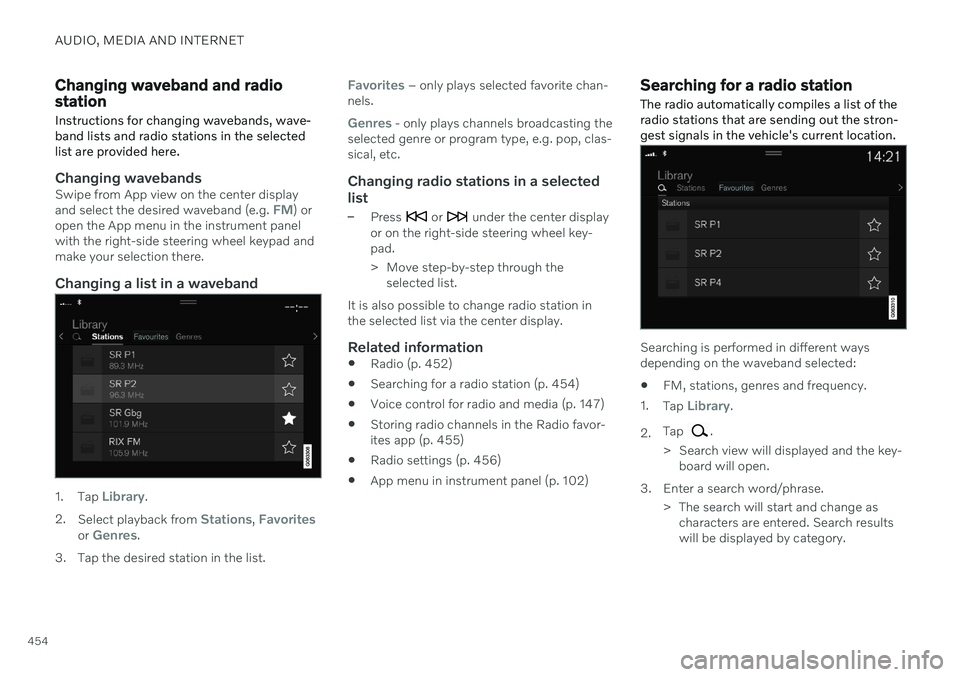
Changing a list in a waveband
1. Tap Library.
2. Select playback from
Stations, Favoritesor Genres.
3. Tap the desired station in the list.
Favorites – only plays selected favorite chan-
nels.
Genres - only plays channels broadcasting the
selected genre or program type, e.g. pop, clas- sical, etc.
Changing radio stations in a selected
list
–Press or under the center display
or on the right-side steering wheel key- pad.
> Move step-by-step through the selected list.
It is also possible to change radio station in the selected list via the center display.
Related information
Radio (p. 452)
Searching for a radio station (p. 454)
Voice control for radio and media (p. 147)
Storing radio channels in the Radio favor-ites app (p. 455)
Radio settings (p. 456)
App menu in instrument panel (p. 102)
Searching for a radio station
The radio automatically compiles a list of the radio stations that are sending out the stron-gest signals in the vehicle's current location.
Searching is performed in different ways depending on the waveband selected:
FM, stations, genres and frequency.
1. Tap
Library.
2. Tap
.
> Search view will displayed and the key- board will open.
3. Enter a search word/phrase. > The search will start and change ascharacters are entered. Search results will be displayed by category.
Page 474 of 661
||
AUDIO, MEDIA AND INTERNET
472Changing track/song - tap the desired track in the center display, or press
or below
the center display or on the right-side steering wheel keypad. Rewinding/fast-forwarding - tap the time axis in the center display and drag it sideways, or press and hold
or below the center
display or on the right-side steering wheel keypad. Changing media source - select from among previous sources in the app, tap the desiredapp in App view or use the right-side steeringwheel keypad to select the app in the app menu
.
Library - tap the button to
play from the library.
Shuffle - tap the button to
play tracks in a random order.
Similar - tap the button to
use Gracenote to search for similar music on the USBdevice and create a playlistfrom the music found. Theplaylist can contain up to 50tracks.
Change device - tap the but-
ton to toggle between USB devices when more than oneis connected.
Related information
Media player (p. 469)
Media searches (p. 472)
Sound settings (p. 448)
Apps (p. 450)
Gracenote ®
(p. 473)
Voice control for radio and media (p. 147)
Media searches
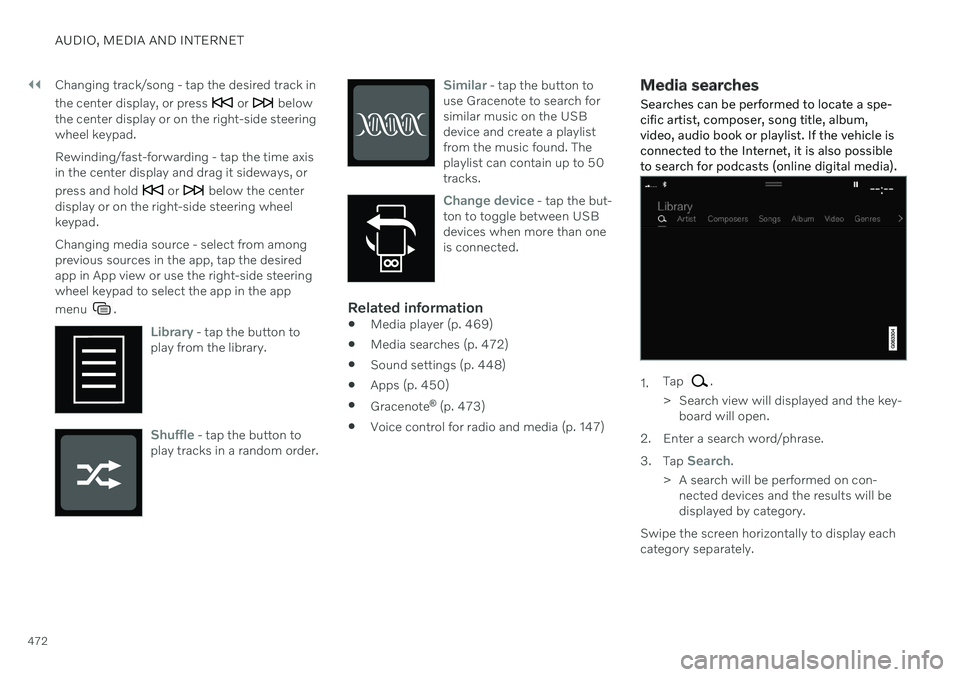
Searches can be performed to locate a spe- cific artist, composer, song title, album,video, audio book or playlist. If the vehicle isconnected to the Internet, it is also possibleto search for podcasts (online digital media).
1. Tap .
> Search view will displayed and the key- board will open.
2. Enter a search word/phrase. 3. Tap
Search.
> A search will be performed on con- nected devices and the results will be displayed by category.
Swipe the screen horizontally to display eachcategory separately.