seats VOLVO V60 2021 Owner's Manual
[x] Cancel search | Manufacturer: VOLVO, Model Year: 2021, Model line: V60, Model: VOLVO V60 2021Pages: 661, PDF Size: 12.68 MB
Page 75 of 661
SAFETY
}}
73
WARNING
A small child's head represents a con- siderable part of its total weight and itsneck is still very weak. Volvo recom-mends that children up to age 4 travel,properly restrained, facing rearward. Inaddition, Volvo recommends that chil-dren should ride rearward facing, prop-erly restrained, as long as possible.
Convertible child seats should be instal-led in the rear seat only.
A rear-facing convertible seat should notbe positioned behind the driver's seatunless there is adequate space for safeinstallation.
2. Attach the seat belt to the convertible seat according to the child restraint manufac-turer's instructions.
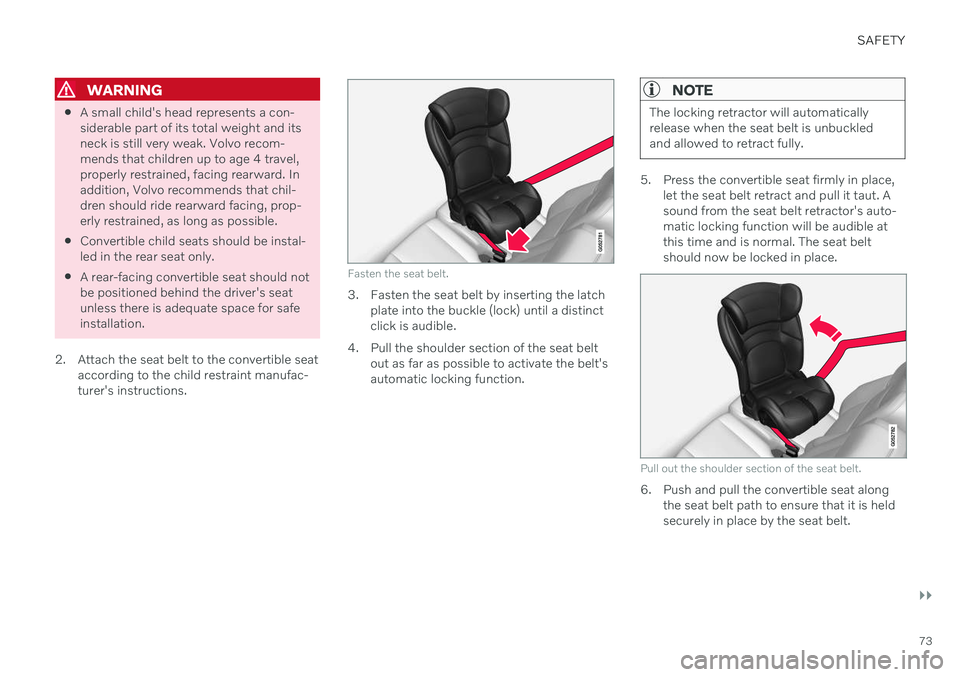
Fasten the seat belt.
3. Fasten the seat belt by inserting the latch plate into the buckle (lock) until a distinct click is audible.
4. Pull the shoulder section of the seat belt out as far as possible to activate the belt'sautomatic locking function.
NOTE
The locking retractor will automatically release when the seat belt is unbuckledand allowed to retract fully.
5. Press the convertible seat firmly in place,let the seat belt retract and pull it taut. A sound from the seat belt retractor's auto-matic locking function will be audible atthis time and is normal. The seat beltshould now be locked in place.
Pull out the shoulder section of the seat belt.
6. Push and pull the convertible seat alongthe seat belt path to ensure that it is held securely in place by the seat belt.
Page 76 of 661
||
SAFETY
74
WARNING
It should not be possible to move the child restraint more than 2.5 cm (1 in.) in anydirection along the seat belt path.
The convertible seat can be removed by unbuckling the seat belt and letting it retractcompletely.
Ensure that the convertible seat is securely in place.
WARNING
A child seat should never be used in the front passenger seat of any vehicle with afront passenger airbag - not even if the"Passenger airbag off" symbol near therear-view mirror is illuminated. If theseverity of an accident were to cause theairbag to inflate, this could lead to seriousinjury or death to a child seated in thisposition.
Related information
Child restraints (p. 68)
Infant seats (p. 70)
Booster cushions (p. 74)
Top tether anchors (p. 75)
Lower child seat attachment points (p. 77)
ISOFIX/LATCH lower anchors (p. 77)
Booster cushions
Suitable child restraints should always be used when children (depending on their age/size) are seated in the vehicle.
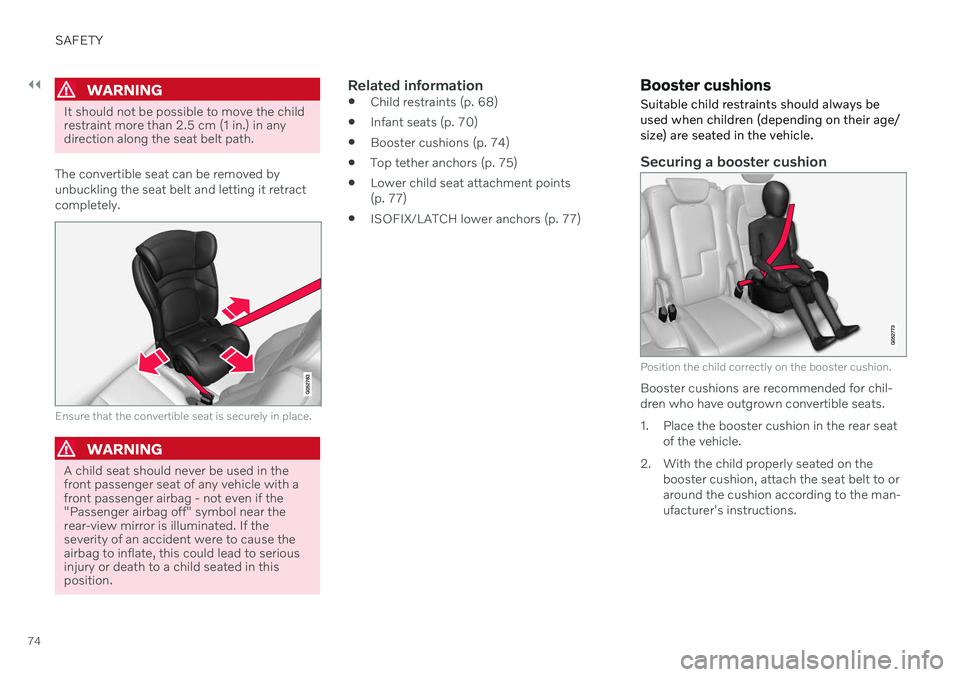
Securing a booster cushion
Position the child correctly on the booster cushion.
Booster cushions are recommended for chil- dren who have outgrown convertible seats.
1. Place the booster cushion in the rear seat of the vehicle.
2. With the child properly seated on the booster cushion, attach the seat belt to or around the cushion according to the man-ufacturer's instructions.
Page 77 of 661
SAFETY
}}
75
3. Fasten the seat belt by inserting the latch
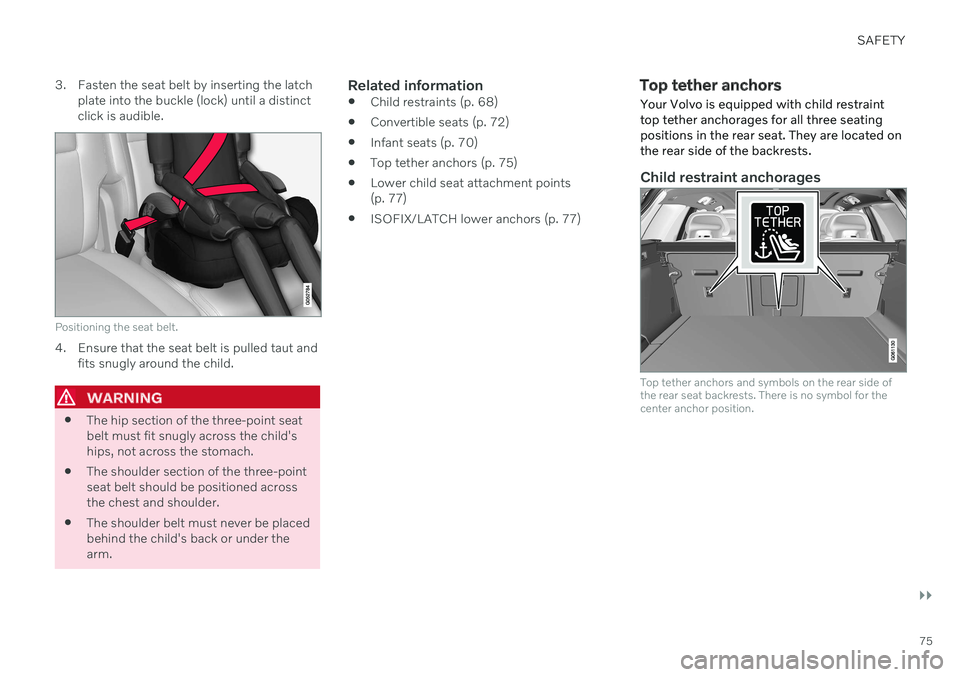
plate into the buckle (lock) until a distinct click is audible.
Positioning the seat belt.
4. Ensure that the seat belt is pulled taut and fits snugly around the child.
WARNING
The hip section of the three-point seat belt must fit snugly across the child'ships, not across the stomach.
The shoulder section of the three-pointseat belt should be positioned acrossthe chest and shoulder.
The shoulder belt must never be placedbehind the child's back or under thearm.
Related information
Child restraints (p. 68)
Convertible seats (p. 72)
Infant seats (p. 70)
Top tether anchors (p. 75)
Lower child seat attachment points(p. 77)
ISOFIX/LATCH lower anchors (p. 77)
Top tether anchors
Your Volvo is equipped with child restraint top tether anchorages for all three seatingpositions in the rear seat. They are located onthe rear side of the backrests.
Child restraint anchorages
Top tether anchors and symbols on the rear side of the rear seat backrests. There is no symbol for thecenter anchor position.
Page 79 of 661
SAFETY
}}
77
Lower child seat attachment pointsThe rear seats are equipped with lower child seat attachment points.
The lower child seat attachment points are intended for use with certain rear-facing childrestraints. Always follow the manufacturer's installation instructions when attaching a child seat to thelower child seat attachment points.
Location of child seat attachment points
Location of child seat attachment points in the rear seat.
The child seat attachment points in the rear seat are located on the rear section of thefront seat floor rails.
Related information
Child restraints (p. 68)
Top tether anchors (p. 75)
ISOFIX/LATCH lower anchors (p. 77)
ISOFIX/LATCH
lower anchors
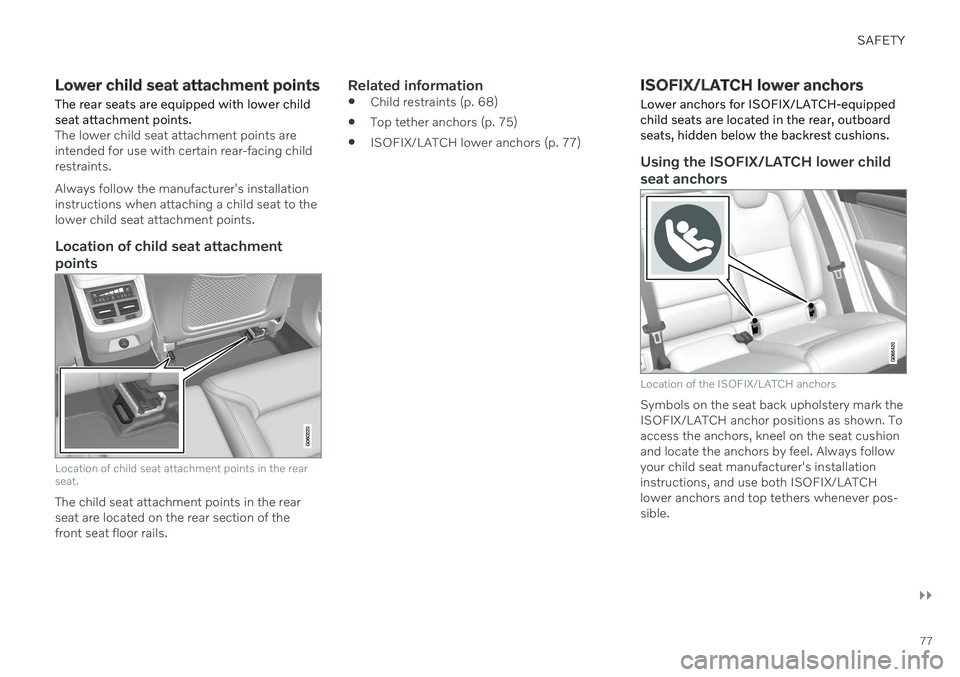
Lower anchors for ISOFIX/LATCH-equipped child seats are located in the rear, outboard seats, hidden below the backrest cushions.
Using the ISOFIX/LATCH lower child seat anchors
Location of the ISOFIX/LATCH anchors
Symbols on the seat back upholstery mark the ISOFIX/LATCH anchor positions as shown. Toaccess the anchors, kneel on the seat cushionand locate the anchors by feel. Always followyour child seat manufacturer's installationinstructions, and use both ISOFIX/LATCHlower anchors and top tethers whenever pos-sible.
Page 80 of 661
||
SAFETY
78
To access the anchors
1. Put the child restraint in position.
2. Kneel on the child restraint to press downthe seat cushion and locate the anchors by feel.
3. Fasten the attachment on the child restraint's lower straps to the ISOFIX/LATCH lower anchors.
4. Firmly tension the lower child seat straps according to the manufacturer's instruc-tions.
WARNING
Volvo's ISOFIX/LATCH anchors conform to FMVSS/CMVSS standards. Always referto the child restraint system's manual forweight and size ratings.
NOTE
The rear center seat is not equipped with ISOFIX/LATCH lower tetheranchors. If a child restraint is used inthis seat, attach the restraint's upperanchor strap (if equipped with these)to the top tether anchor point for thisstrap and secure the child restraintwith the vehicle's center seat belt.
Always follow your child seat manufac-turer's installation instructions, and useboth ISOFIX/LATCH lower anchorsand top tethers whenever possible.
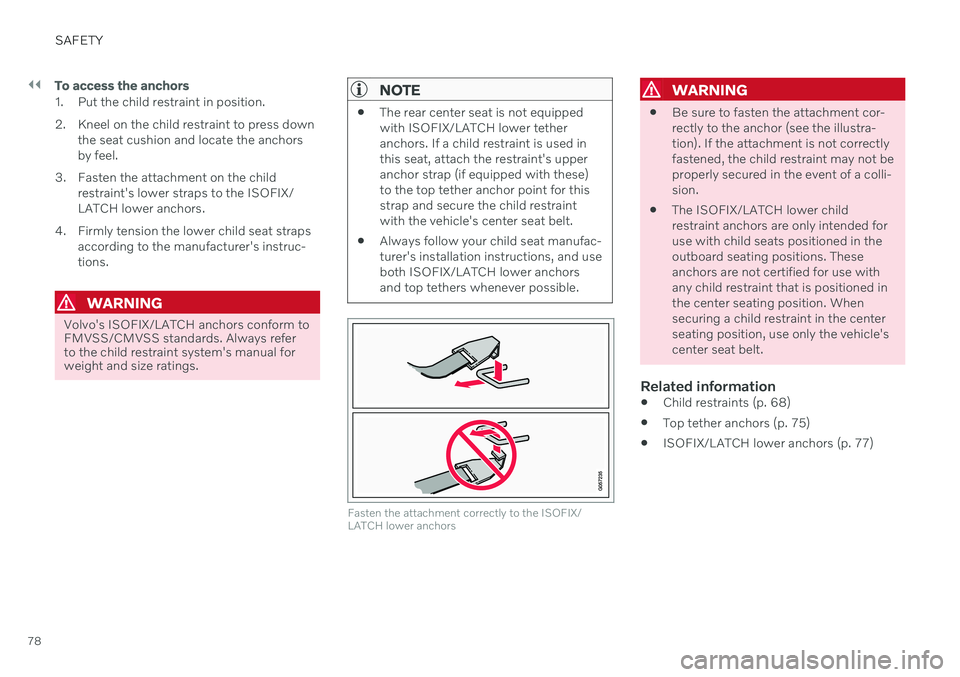
Fasten the attachment correctly to the ISOFIX/ LATCH lower anchors
WARNING
Be sure to fasten the attachment cor- rectly to the anchor (see the illustra-tion). If the attachment is not correctlyfastened, the child restraint may not beproperly secured in the event of a colli-sion.
The ISOFIX/LATCH lower childrestraint anchors are only intended foruse with child seats positioned in theoutboard seating positions. Theseanchors are not certified for use withany child restraint that is positioned inthe center seating position. Whensecuring a child restraint in the centerseating position, use only the vehicle'scenter seat belt.
Related information
Child restraints (p. 68)
Top tether anchors (p. 75)
ISOFIX/LATCH lower anchors (p. 77)
Page 83 of 661
DISPLAYS AND VOICE CONTROL
* Option/accessory.81
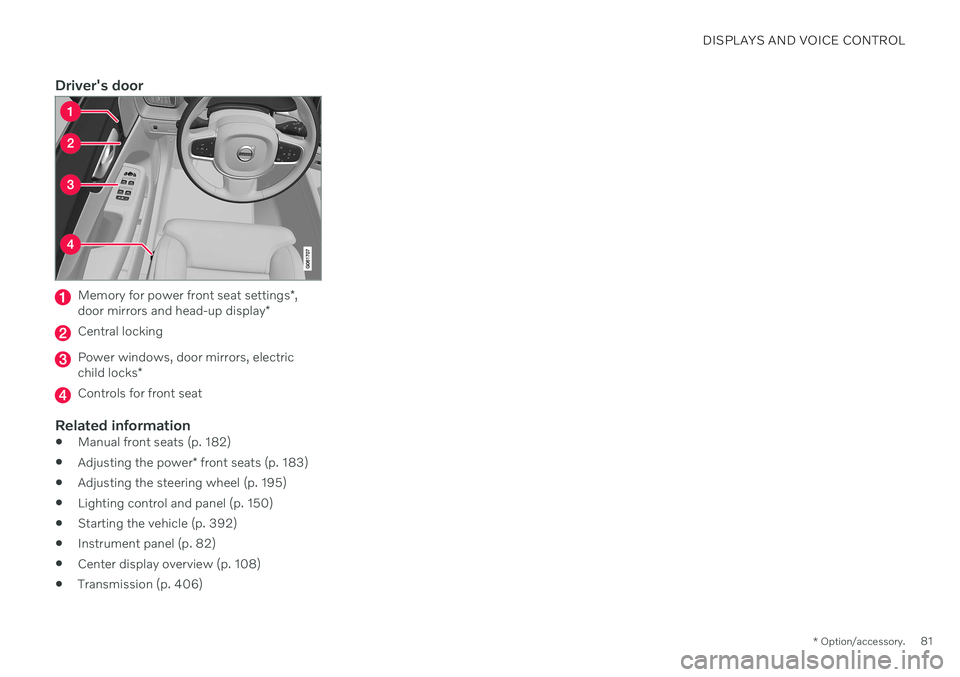
Driver's door
Memory for power front seat settings *,
door mirrors and head-up display *
Central locking
Power windows, door mirrors, electric child locks*
Controls for front seat
Related information
Manual front seats (p. 182)
Adjusting the power
* front seats (p. 183)
Adjusting the steering wheel (p. 195)
Lighting control and panel (p. 150)
Starting the vehicle (p. 392)
Instrument panel (p. 82)
Center display overview (p. 108)
Transmission (p. 406)
Page 136 of 661
||
DISPLAYS AND VOICE CONTROL
* Option/accessory.
134
System
Sub-categories
Driver Profile Date and TimeSystem Languages and UnitsPrivacy and DataKeyboard LayoutsVoice Control
*
Factory Reset System Information
Related information
Center display overview (p. 108)
Changing settings in the center display's Top view (p. 130)
Resetting center display settings (p. 132)
Driver profiles
Many of the vehicle's settings can be cus- tomized to the driver's personal preferencesand saved in one or more driver profiles.
These personal settings are automatically saved in the active driver profile. Each key canbe linked to one driver profile. When the linkedkey is used, the vehicle is customized to thespecific settings of that driver profile.
Which settings are saved in driver
profiles?
Many of the settings made in the vehicle willbe automatically stored in the active driverprofile if the profile is not protected. The vehi-cle has settings that can be made either per-sonal or global. The personal settings aresaved in driver profiles. Settings that can be saved in a driver profile include, among other things, screens, mirrors, front seats, navigation *, audio and media sys-
tem, language and voice control. Some settings are global settings. These set- tings can be changed but are not saved to aspecific driver profile. Changes to global set-tings affect all profiles.
Global settings
Global settings do not change when driver profiles are changed. They remain the sameregardless of which driver profile is currentlyactive. Keyboard layout is an example of a global set-ting. If driver profile X is used to add additionalkeyboard languages, these languages will alsobe available for driver profile Y. The settingsfor keyboard layout are not saved to a specificdriver profile - the settings are global.
Personal settings
If driver profile X has been used to e.g., set the brightness for the center display, driver profileY will not be affected by this setting. It willonly be saved to driver profile X becausebrightness setting is a personal setting.
Related information
Selecting a driver profile (p. 135)
Changing a driver profile's name (p. 135)
Linking a remote key to a driver profile(p. 136)
Protecting a driver profile (p. 136)
Resetting driver profile settings (p. 137)
Table of settings in the center display(p. 133)
Page 145 of 661
DISPLAYS AND VOICE CONTROL
}}
* Option/accessory.143
Calibrating the horizontal positionIf the windshield or display unit has been replaced, the head-up display's horizontalposition may need to be calibrated. Calibrationmeans that the projected image is rotatedclockwise or counterclockwise. 1.
Tap
Settings in the center display's Top
view.
2. Select
My CarDisplaysHead-Up
Display Options
Head-Up Display
Calibration.
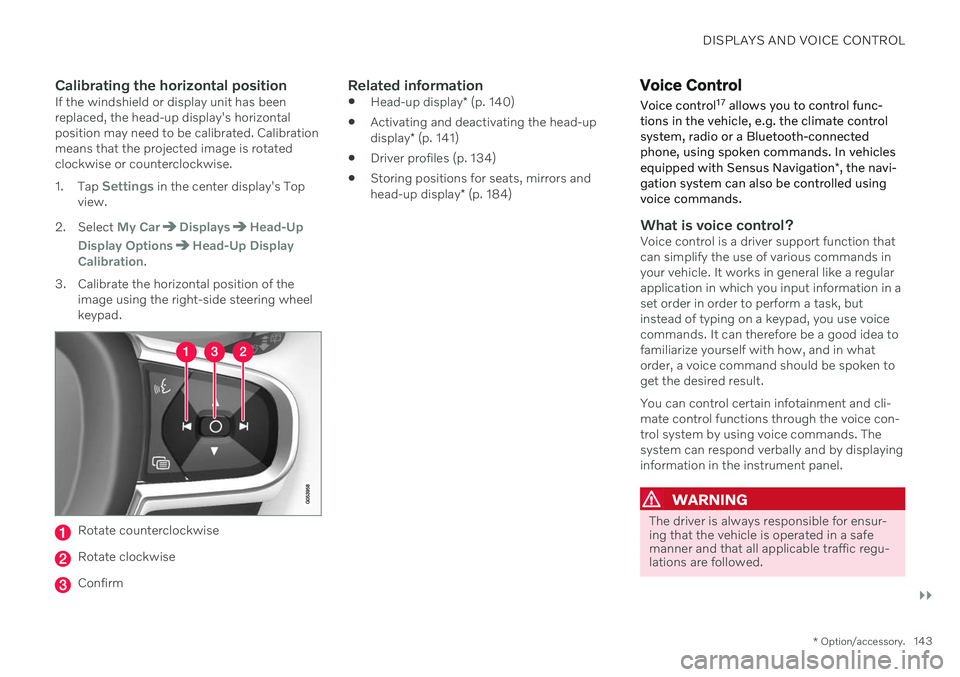
3. Calibrate the horizontal position of the image using the right-side steering wheel keypad.
Rotate counterclockwise
Rotate clockwise
Confirm
Related information
Head-up display
* (p. 140)
Activating and deactivating the head-up display
* (p. 141)
Driver profiles (p. 134)
Storing positions for seats, mirrors andhead-up display
* (p. 184)
Voice Control
Voice control 17
allows you to control func-
tions in the vehicle, e.g. the climate control system, radio or a Bluetooth-connectedphone, using spoken commands. In vehicles equipped with Sensus Navigation *, the navi-
gation system can also be controlled using voice commands.
What is voice control?Voice control is a driver support function that can simplify the use of various commands inyour vehicle. It works in general like a regularapplication in which you input information in aset order in order to perform a task, butinstead of typing on a keypad, you use voicecommands. It can therefore be a good idea tofamiliarize yourself with how, and in whatorder, a voice command should be spoken toget the desired result. You can control certain infotainment and cli- mate control functions through the voice con-trol system by using voice commands. Thesystem can respond verbally and by displayinginformation in the instrument panel.
WARNING
The driver is always responsible for ensur- ing that the vehicle is operated in a safemanner and that all applicable traffic regu-lations are followed.
Page 169 of 661
WINDOWS, GLASS AND MIRRORS
* Option/accessory.167
Keyless locking and unlocking
* (p. 255)
Locking and unlocking using the remote key (p. 241)
Rearview/door mirrors
The rearview mirror and door mirrors can be used to improve the driver's visibility behindthe vehicle.
Rearview mirrorThe rearview mirror is equipped with Home- Link *, auto-dim * and compass *.
The rearview mirror can be adjusted manually.
Door mirrors
WARNING
The door mirror on the passenger side is curved to improve visibility. Objects in themirror may appear farther away than theyactually are.
The joystick in the drivers' door control panel is used to adjust the position of the door mir-rors. There are also several automatic settings that can also be connected to the memory function buttons for the power seat *.
Related information
HomeLink ®
* (p. 441)
Compass
* (p. 445)
Adjusting the rearview mirror dimming function (p. 168)
Adjusting the door mirrors (p. 168)
Storing positions for seats, mirrors and head-up display
* (p. 184)
Activating and deactivating the heated rear window and door mirrors (p. 219)
Page 170 of 661
WINDOWS, GLASS AND MIRRORS
* Option/accessory.
168
Adjusting the rearview mirror dimming function
Bright light entering the vehicle from behind, e.g. from the headlights of following vehicles,could reflect in the rearview mirror and doormirrors and cause a glare. Use the dimmingfunction when light from behind is distract-ing.
Auto-dimIf bright light enters the vehicle from behind, the door mirrors will automatically dim when itis dark outside or when lighting conditions arelow, for example when driving in tunnels.Auto-dim is always active when the engine isrunning, except when reverse gear is engaged.
NOTE
Adjustments to the sensitivity level will not be noticeable immediately but will insteadtake effect after a short period of time.
The sensitivity level for dimming will affect both the rearview mirror and door mirrors. To change the dimming sensitivity level:1. Tap
Settings in the Top view in the center
display.
2. Tap
My CarMirrors and Convenience.
3. Under
Rearview Mirror Auto Dimming,
select Normal, Dark or Light. The rearview mirror has two sensors - one pointing forward and one pointing rearward -which work together to identify and eliminateglare. The forward-pointing sensor monitorsambient light, while the rearward-pointingsensor monitors light from the headlights offollowing vehicles. For the door mirrors to be equipped with auto- dim, the rearview mirror must also be equip-ped with auto-dim.
NOTE
If the sensors are obstructed by e.g. a parking permit, transponder, sunshade orobjects on the seats or in the cargo com-partment in a way that prevents light fromreaching the sensors, the auto-dim func-tion in the door and rearview mirrors willbe reduced.
Related information
Rearview/door mirrors (p. 167)
Adjusting the door mirrors (p. 168)
Adjusting the door mirrors
To improve visibility to the rear, the door mir- rors need to be adjusted to the driver's heightand seating position. There are several automatic settings that can also be connected to the memory function buttons for the power seat *.
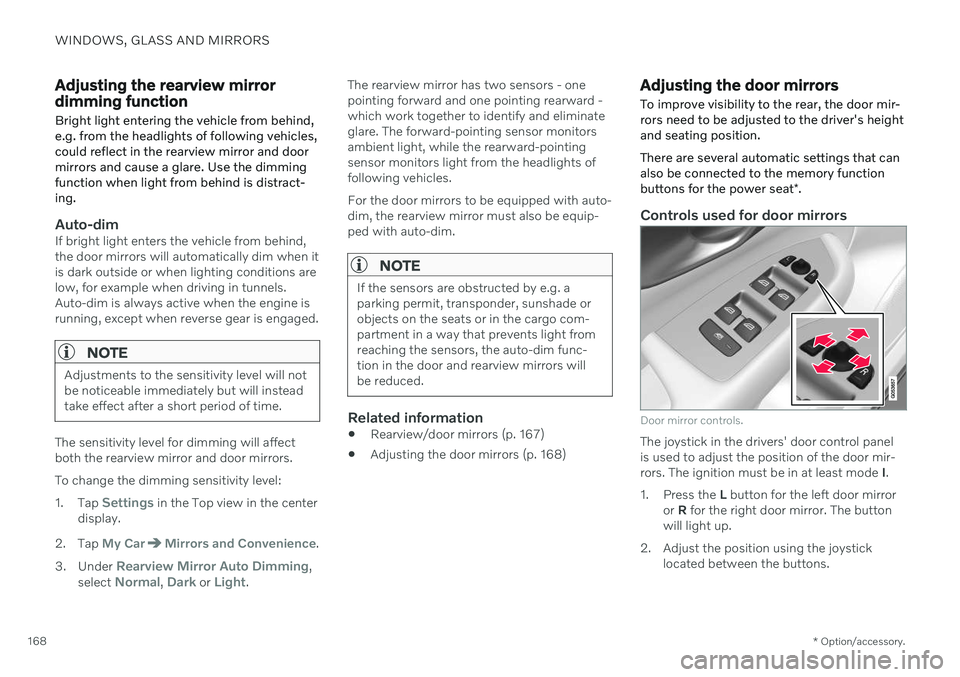
Controls used for door mirrors
Door mirror controls.
The joystick in the drivers' door control panel is used to adjust the position of the door mir-rors. The ignition must be in at least mode I.
1. Press the L button for the left door mirror
or R for the right door mirror. The button
will light up.
2. Adjust the position using the joystick located between the buttons.