change time VOLVO V60 2021 Owner's Guide
[x] Cancel search | Manufacturer: VOLVO, Model Year: 2021, Model line: V60, Model: VOLVO V60 2021Pages: 661, PDF Size: 12.68 MB
Page 345 of 661
DRIVER SUPPORT
}}
* Option/accessory.343
Rear Collision Warning *85
The Rear Collision Warning 86
(RCW) function
can help the driver avoid rear-end collisions from vehicles approaching from behind.
The function can alert drivers of following vehi- cles of the risk of a collision by rapidly flashingthe turn signals. If, at a speed below 30 km/h (20 mph), the function detects that the vehicle is in dangerof being hit from behind, the seat belt tension-ers may tension the front seat belts. TheWhiplash Protection System will also be acti-vated in a collision. Immediately before a collision from behind, the function may also activate the brakes inorder to reduce the forward acceleration of thevehicle during the collision. However, thebrakes will only be applied if your vehicle isstationary. The brakes will be immediatelyreleased if the accelerator pedal is depressed. The function is automatically activated each time the engine is started.
WARNING
The function is supplementary driver support intended to facilitate drivingand help make it safer – it cannot han-dle all situations in all traffic, weatherand road conditions.
The driver is advised to read all sec-tions in the Owner's Manual about thisfunction to learn of its limitations,which the driver must be aware ofbefore using the function.
Driver support functions are not a sub-stitute for the driver's attention andjudgment. The driver is always respon-sible for ensuring the vehicle is drivenin a safe manner, at the appropriatespeed, with an appropriate distance toother vehicles, and in accordance withcurrent traffic rules and regulations.
Related information
Driver support systems (p. 270)
Rear Collision Warning
* limitations
(p. 343)
Whiplash Protection System (p. 48)
Rear Collision Warning
*87
limitations In some situations, it may be difficult for Rear Collision Warning (RCW) to warn the driverof a collision risk.
This may be the case if: the vehicle approaching from the rear is detected at a late stage
the vehicle approaching from the rearchanges lanes at a late stage
a trailer, bicycle holder or similar is con-nected to the vehicle's electrical system -the function will then be automaticallydeactivated.
NOTE
In certain markets RCW does
not warn
with the direction indicators due to local traffic regulations – in such cases, that partof the function is deactivated.
NOTE
The function uses the vehicle's camera and radar sensor, which has certain generallimitations.
85 Warning of collision from the rear.
86 This function is not available on all markets.
87 Warning of collision from the rear.
Page 352 of 661
DRIVER SUPPORT
* Option/accessory.
350
Driver Alert Control limitations
Driver Alert Control (DAC) functionality may be reduced in certain situations.
In certain situations, the system may provide a warning even if it has not detected a change indriving behavior, e.g.: in strong crosswinds
on grooved road surfaces.
WARNING
In certain cases, driving behavior might not be affected despite the driver's fatigue – when using the Pilot Assist
* function –
resulting in the driver not getting a warning from DAC. It is therefore very important to always stop and take a break at the slightest signof fatigue, regardless of whether the func-tion has issued a warning or not.
NOTE
The function uses the vehicle's camera and radar sensor, which has certain generallimitations.
Related information
Driver Alert Control (p. 348)
Camera/radar sensor limitations (p. 383)
Distance Alert
*93
The Distance Alert function can help the driver become aware if the time interval tothe vehicle in front is too short. The vehicle must be equipped with a head-up display * in
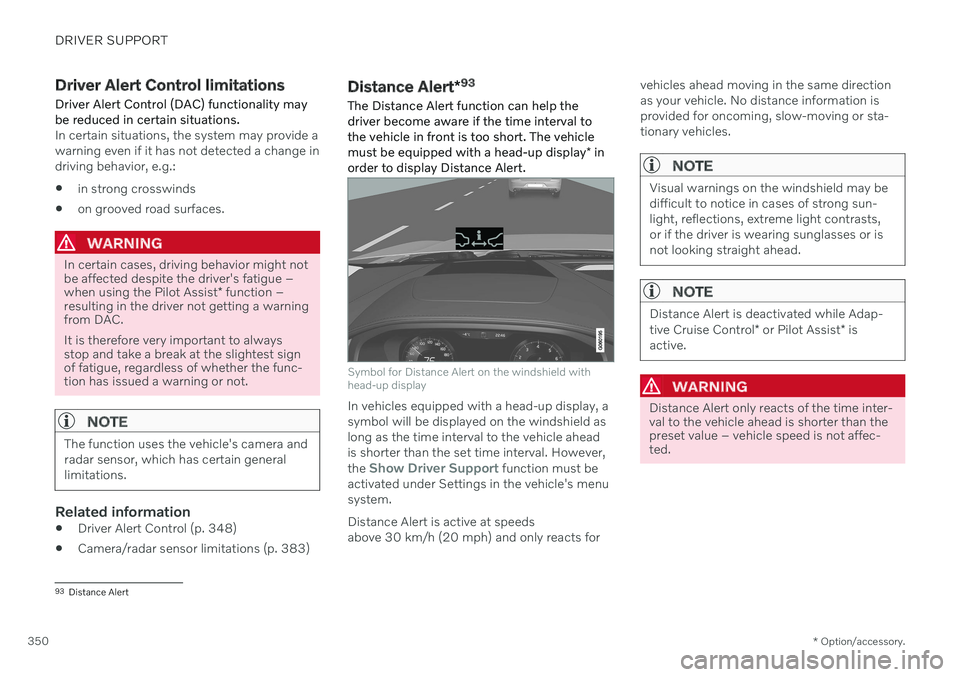
order to display Distance Alert.
Symbol for Distance Alert on the windshield with head-up display
In vehicles equipped with a head-up display, a symbol will be displayed on the windshield aslong as the time interval to the vehicle aheadis shorter than the set time interval. However, the
Show Driver Support function must be
activated under Settings in the vehicle's menu system. Distance Alert is active at speeds above 30 km/h (20 mph) and only reacts for vehicles ahead moving in the same directionas your vehicle. No distance information isprovided for oncoming, slow-moving or sta-tionary vehicles.
NOTE
Visual warnings on the windshield may be difficult to notice in cases of strong sun-light, reflections, extreme light contrasts,or if the driver is wearing sunglasses or isnot looking straight ahead.
NOTE
Distance Alert is deactivated while Adap- tive Cruise Control
* or Pilot Assist * is
active.
WARNING
Distance Alert only reacts of the time inter- val to the vehicle ahead is shorter than thepreset value – vehicle speed is not affec-ted.
93 Distance Alert
Page 368 of 661
||
DRIVER SUPPORT
* Option/accessory.
366 1.
Tap
Towbar (1).
> The trajectory line for the towbar's anticipated path toward the vehicle will appear and the vehicle's trajectory lineswill disappear. Trajectory lines cannot be displayed for both the vehicle and the towbar at thesame time.
2. Tap
Zoom (2) for a close-up view for more
precise maneuvering.
> The camera will zoom in.
Related information
Park Assist Camera
* (p. 361)
Location and field of vision of Park Assist Cameras
* (p. 362)
Camera/radar sensor limitations (p. 383)
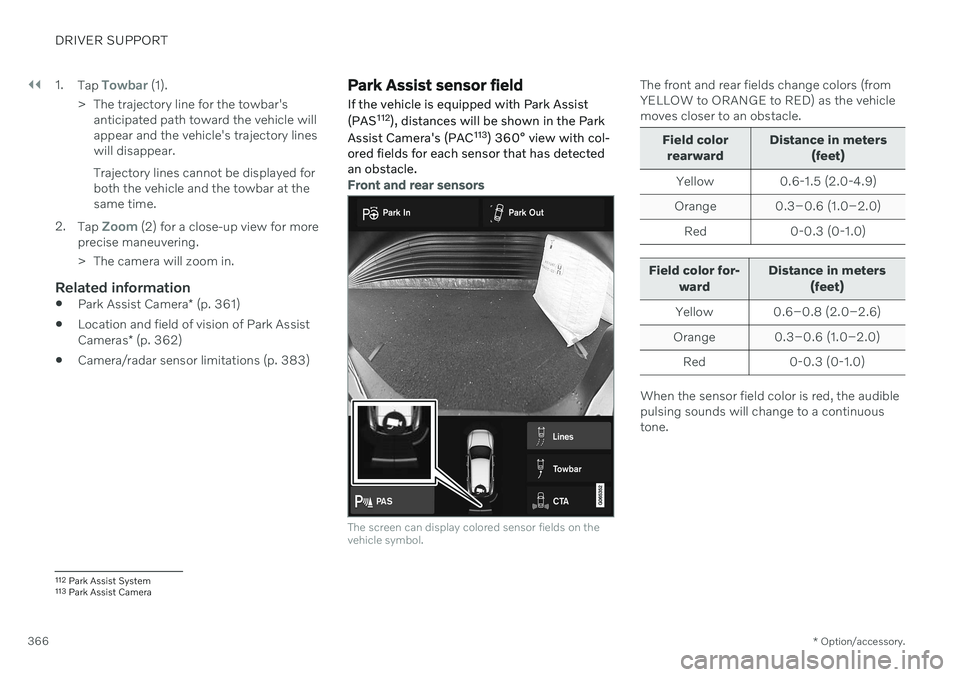
Park Assist sensor field
If the vehicle is equipped with Park Assist (PAS 112
), distances will be shown in the Park
Assist Camera's (PAC 113
) 360° view with col-
ored fields for each sensor that has detected an obstacle.
Front and rear sensors
The screen can display colored sensor fields on the vehicle symbol.
The front and rear fields change colors (from YELLOW to ORANGE to RED) as the vehiclemoves closer to an obstacle.
Field color
rearward Distance in meters
(feet)
Yellow 0.6-1.5 (2.0-4.9)
Orange 0.3–0.6 (1.0–2.0) Red 0-0.3 (0-1.0)
Field color for- ward Distance in meters
(feet)
Yellow 0.6–0.8 (2.0–2.6)
Orange 0.3–0.6 (1.0–2.0)
Red 0-0.3 (0-1.0)
When the sensor field color is red, the audible pulsing sounds will change to a continuoustone.
112 Park Assist System
113 Park Assist Camera
Page 369 of 661
DRIVER SUPPORT
}}
* Option/accessory.367
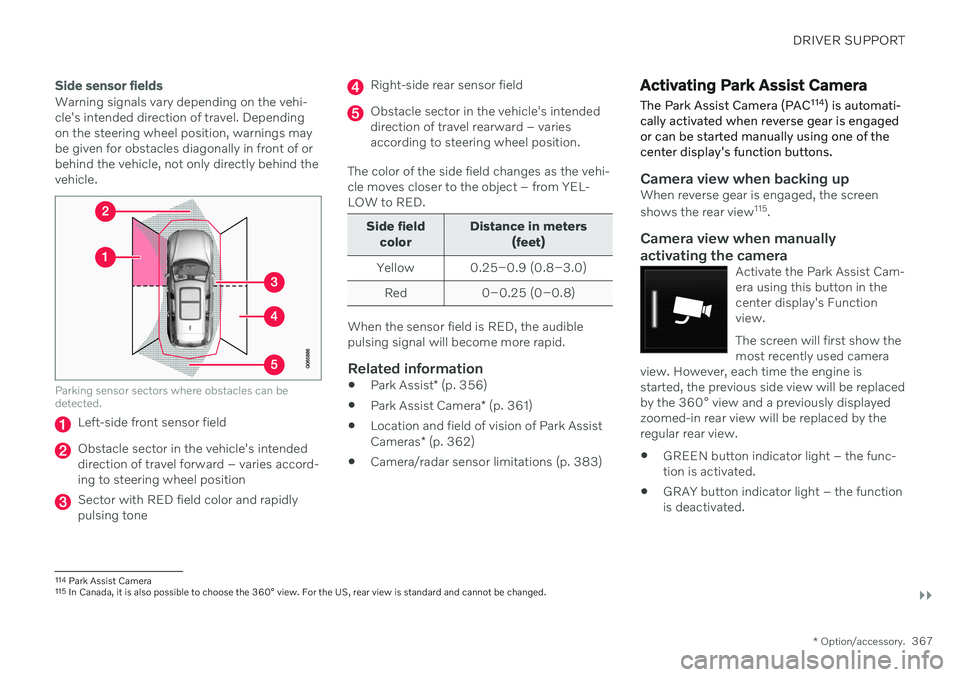
Side sensor fields
Warning signals vary depending on the vehi- cle's intended direction of travel. Dependingon the steering wheel position, warnings maybe given for obstacles diagonally in front of orbehind the vehicle, not only directly behind thevehicle.
Parking sensor sectors where obstacles can be detected.
Left-side front sensor field
Obstacle sector in the vehicle's intended direction of travel forward – varies accord-ing to steering wheel position
Sector with RED field color and rapidly pulsing tone
Right-side rear sensor field
Obstacle sector in the vehicle's intended direction of travel rearward – variesaccording to steering wheel position.
The color of the side field changes as the vehi-cle moves closer to the object – from YEL-LOW to RED.
Side field color Distance in meters
(feet)
Yellow 0.25–0.9 (0.8–3.0) Red 0–0.25 (0–0.8)
When the sensor field is RED, the audible pulsing signal will become more rapid.
Related information
Park Assist
* (p. 356)
Park Assist Camera
* (p. 361)
Location and field of vision of Park Assist Cameras
* (p. 362)
Camera/radar sensor limitations (p. 383)
Activating Park Assist Camera
The Park Assist Camera (PAC 114
) is automati-
cally activated when reverse gear is engaged or can be started manually using one of thecenter display's function buttons.
Camera view when backing upWhen reverse gear is engaged, the screen shows the rear view 115
.
Camera view when manually
activating the camera
Activate the Park Assist Cam- era using this button in thecenter display's Functionview. The screen will first show the most recently used camera
view. However, each time the engine isstarted, the previous side view will be replacedby the 360° view and a previously displayedzoomed-in rear view will be replaced by theregular rear view.
GREEN button indicator light – the func- tion is activated.
GRAY button indicator light – the functionis deactivated.
114
Park Assist Camera
115 In Canada, it is also possible to choose the 360° view. For the US, rear view is standard and cannot be changed.
Page 411 of 661
STARTING AND DRIVING
}}
* Option/accessory.409
Push the gear selector to the right toward "
+ " (plus) and release to shift up one gear.
Push the gear selector to the left toward"
– " (minus) and release to shift down one
gear.
Push the gear selector rearward to returnto
D mode.
For smooth shifting and engine performance,the transmission will shift down automaticallyif the vehicle's speed becomes too low for theselected gear.
Related information
Automatic transmission (p. 406)
Shiftlock (p. 411)
Using the steering wheel paddles
* to shift
(p. 409)
The kickdown function (p. 412)
Using the steering wheel paddles
*
to shift
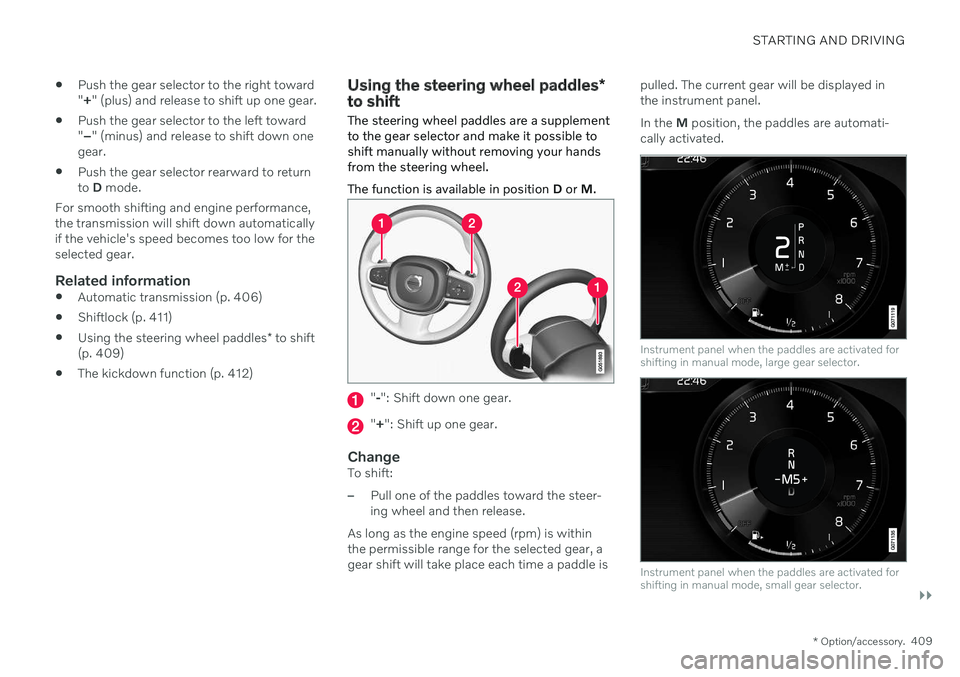
The steering wheel paddles are a supplement to the gear selector and make it possible toshift manually without removing your handsfrom the steering wheel. The function is available in position D or M.
"-": Shift down one gear.
" + ": Shift up one gear.
ChangeTo shift:
–Pull one of the paddles toward the steer- ing wheel and then release.
As long as the engine speed (rpm) is withinthe permissible range for the selected gear, agear shift will take place each time a paddle is pulled. The current gear will be displayed inthe instrument panel. In the
M position, the paddles are automati-
cally activated.
Instrument panel when the paddles are activated for shifting in manual mode, large gear selector.
Instrument panel when the paddles are activated for shifting in manual mode, small gear selector.
Page 422 of 661
STARTING AND DRIVING
420
Deactivating the Start/Stop function
In certain situations, it may be advisable to turn the Start/Stop function off.
To turn off Start/Stop, tap theStart/Stop function button
in the center display's Func- tion view. The indicator lightin the button will go outwhen the function has beenturned off.
The function will remain turned off until:
it is reactivated
the drive mode is changed to
Eco.
Related information
Driving with the Start/Stop function (p. 418)
Conditions for the Start/Stop function(p. 420)
Conditions for the Start/Stop function
Certain conditions must be met for Start/ Stop to function.
If any condition is not met, this will be indi- cated in the instrument panel.
The engine does not auto-stopThe engine will not auto-stop if: The vehicle has not reached a speed of ca 10 km/h (6 mph) after starting.
After several auto-stops, the speed mustagain exceed approximately ca 10 km/h(6 mph) before the next auto-stop.
The driver has not fastened the seatbelt.
The engine is not running at its normaloperating temperature.
The ambient temperature is underapproximately -5 °C (23 °F) or overapproximately 30 °C (86 °F).
Windshield heating is activated.
The climate system settings and theactual climate in the passenger compart-ment differ.
The vehicle is in reverse.
The driver is making large steering wheelmovements.
The road gradient is very steep.
The hood is open.
Driving at high altitude and the engine hasnot reached its normal operating tempera-ture.
ABS has been activated.
Hard braking (even if the ABS system hasnot been activated).
Many starts during a short period of timehave triggered the starter motor's over-heating protection.
The exhaust system's particulate filter isfull.
A trailer is connected to the vehicle's elec-trical system.
The transmission is not running at its nor-mal operating temperature.
The gear selector is in mode
M (±
).
If traffic conditions allow it (for example ina traffic jam).
The engine does not auto-startThe engine will not auto-start after an auto-stop if:
The driver is not wearing a seat belt, thegear selector is in the
P position and the
driver's door is open. The engine must bestarted normally.
Page 462 of 661
||
AUDIO, MEDIA AND INTERNET
* Option/accessory.
460
NOTE
There may be a noticeable difference in sound quality when a change from ana-logue to digital or digital to analogueoccurs, such as:
Volume increase or decrease
Equalizer settings, i.e., Bass/ Mid-range/Treble cut or boost
Time alignment (Digital program mate-rial in extreme cases can be as muchas 8 seconds behind the analogue).This will noticeable as a "stuttering"effect.
The above items are dependant on thebroadcaster's equipment settings anddo not indicate a fault in the vehicle'sradio receiver or antenna systems .
Related information
HD Radio
™ (p. 457)
Activating and deactivating the HD Radio
™ (p. 458)
HD Radio
™ sub-channels (p. 459)
SiriusXM ®
Satellite radio *
The SiriusXM ®
Satellite system broadcasts
from of a number of high elevation satellites in geosynchronous orbit.
Listening to satellite radioThe digital signals from the satellites are line- of-sight, which means that physical obstruc-tions such as bridges, tunnels, etc, may tem-porarily interfere with signal reception. Avoid any obstructions, such as metallic objects transported on roof racks or in a skibox, or other antennas that may impede sig- nals from the SiriusXM ®
satellites.
Selecting SiriusXM ®
Satellite radio
mode
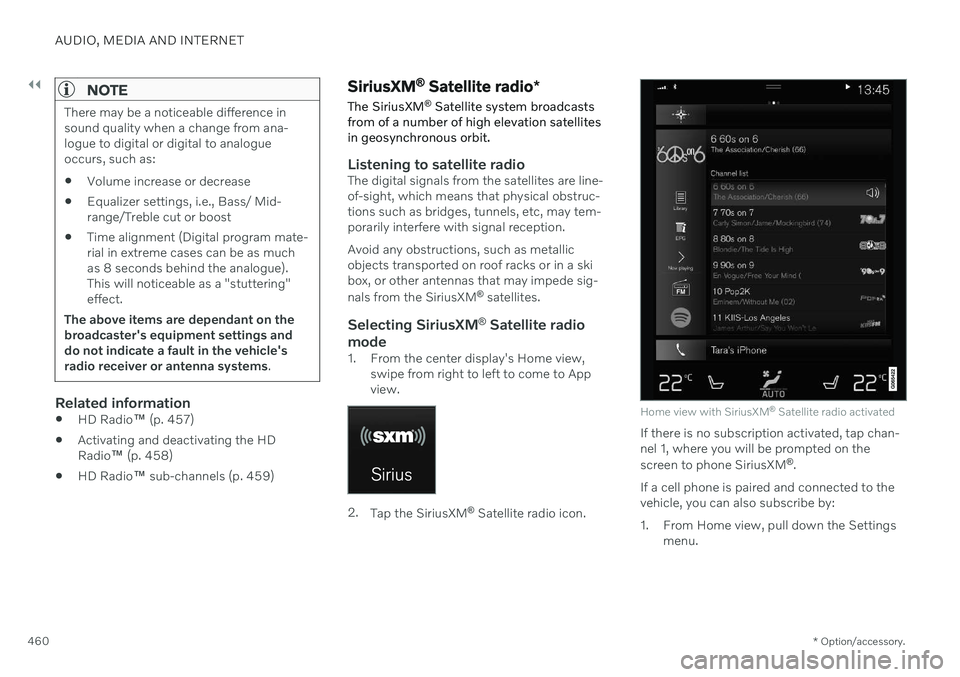
1. From the center display's Home view, swipe from right to left to come to App view.
2.Tap the SiriusXM ®
Satellite radio icon.
Home view with SiriusXM ®
Satellite radio activated
If there is no subscription activated, tap chan- nel 1, where you will be prompted on the screen to phone SiriusXM ®
.
If a cell phone is paired and connected to the vehicle, you can also subscribe by:
1. From Home view, pull down the Settings menu.
Page 474 of 661
||
AUDIO, MEDIA AND INTERNET
472Changing track/song - tap the desired track in the center display, or press
or below
the center display or on the right-side steering wheel keypad. Rewinding/fast-forwarding - tap the time axis in the center display and drag it sideways, or press and hold
or below the center
display or on the right-side steering wheel keypad. Changing media source - select from among previous sources in the app, tap the desiredapp in App view or use the right-side steeringwheel keypad to select the app in the app menu
.
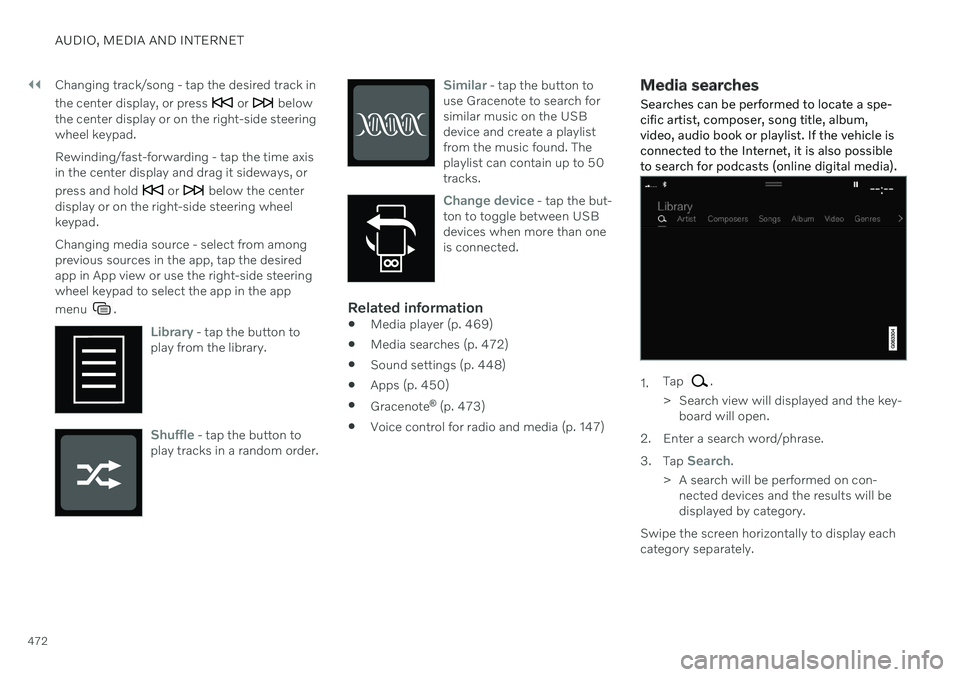
Library - tap the button to
play from the library.
Shuffle - tap the button to
play tracks in a random order.
Similar - tap the button to
use Gracenote to search for similar music on the USBdevice and create a playlistfrom the music found. Theplaylist can contain up to 50tracks.
Change device - tap the but-
ton to toggle between USB devices when more than oneis connected.
Related information
Media player (p. 469)
Media searches (p. 472)
Sound settings (p. 448)
Apps (p. 450)
Gracenote ®
(p. 473)
Voice control for radio and media (p. 147)
Media searches
Searches can be performed to locate a spe- cific artist, composer, song title, album,video, audio book or playlist. If the vehicle isconnected to the Internet, it is also possibleto search for podcasts (online digital media).
1. Tap .
> Search view will displayed and the key- board will open.
2. Enter a search word/phrase. 3. Tap
Search.
> A search will be performed on con- nected devices and the results will be displayed by category.
Swipe the screen horizontally to display eachcategory separately.
Page 477 of 661
AUDIO, MEDIA AND INTERNET
475
Video settings
You can change some language settings for video playback.
Audio Language and Subtitle Language can
be adjusted with the video player in full-screen mode or by opening Top view and tapping
SettingsMediaVideo.
Related information
Video (p. 474)
Streaming media via Bluetooth ®
The vehicle's media player is equipped with Bluetooth and can play audio files fromBluetooth-enabled external devices such ascellular phones and tablets.
In order for the media player to be able to wirelessly play audio files from an externaldevice, the device must be connected to thevehicle via Bluetooth.
Related information
Connecting a device via Bluetooth ®
(p. 475)
Connecting a phone to the car via Blue-tooth for the first time (p. 486)
Playing media (p. 470)
Compatible file formats for media (p. 477)
Connecting a device via Bluetooth ®
Connect a Bluetooth ®
device to the vehicle to
wirelessly play media and give the vehicle an Internet connection if it is available.
Many cellular phones on the market currently offer wireless Bluetooth ®
technology, but not
all phones are fully compatible with the vehi- cle. The procedure for connecting a media device is the same as for connecting a cellular phone to the vehicle via Bluetooth ®
.
Related information
Streaming media via Bluetooth ®
(p. 475)
Connecting a phone to the car via Blue- tooth for the first time (p. 486)
Playing media (p. 470)
Page 483 of 661
AUDIO, MEDIA AND INTERNET
}}
* Option/accessory.481
Settings for Apple ®
CarPlay ®
*
Settings for an iOS device connected through CarPlay 12
,13
.
Automatic start1. Tap Settings in the Top view.
2. Tap
CommunicationApple CarPlayand select the desired setting: Check the box - CarPlay will start auto- matically when the USB cable is con-nected.
Uncheck the box - CarPlay will not startautomatically when the USB cable isconnected.
A maximum of 20 iOS devices can be storedin the list, which may be worth noting if manypeople share the vehicle, e.g. in a car pool.When the list is full and a new device is con-nected, the oldest one will be deleted. To delete the list, the settings must be rest in the center display (factory reset).
System Volumes1. Tap Settings in the Top view. 2. Tap
SoundSystem Volumes to
change the settings for the following:
Voice Control
Navi Voice Guidance
Phone Ringtone
Related information
Apple ®
CarPlay ®
* (p. 478)
Using Apple ®
CarPlay ®
* (p. 479)
Resetting center display settings (p. 132)
Tips for using Apple ®
CarPlay ®
*
Here are some useful tips for when you use CarPlay ®
14
.
Update your iOS device with the latest version of the iOS operating system andensure that the apps have been updated.
In the event of a problem with CarPlay,unplug the iOS device from the USB portand then plug it in again. Otherwise, try toclose the app on the device that is notworking and then restart the app, or tryclosing all apps and restart your device.
If the apps do not appear when CarPlaystarts (black screen), try minimizing andexpanding the tile for CarPlay.
Using apps that are not compatible withCarPlay may sometimes cause the con-nection between the iOS device and thevehicle to be broken. Information aboutsupported apps and compatible devicescan be found on Apple's website. You canalso search for CarPlay in the App Store tofind information about apps that are com-patible with CarPlay in your market.
You can use Siri to write or dictate mes-sages or have them read aloud. Messagesare read aloud and dictated in the lan-guage selected in the Siri settings. When
12
Apple and CarPlay are registered trademarks of Apple Inc.
13 Availability may vary depending on market.
14 Availability may vary depending on market.