phone VOLVO V60 2021 Owner's Guide
[x] Cancel search | Manufacturer: VOLVO, Model Year: 2021, Model line: V60, Model: VOLVO V60 2021Pages: 661, PDF Size: 12.68 MB
Page 148 of 661
||
DISPLAYS AND VOICE CONTROL
146
Numbers
Number commands can be given in different ways depending on the function to be con-trolled:
Phone numbers and zip codes
should be
given by stating each number individually,e.g. "zero, three, one, two, two, four, four,three" (03122443).
Addresses
can be given by stating each
number individually or in a group, e.g."two, two" or "twenty-two" (22). For Eng-lish and Dutch language settings, groupsof numbers can also be said in sequence,e.g. "twenty-two, twenty-two" (22 22).For English, double or triple digits can alsobe used, e.g. "double zero" (00). Numbersin the range 0-2300 can be used.
Frequencies
can be given as "ninety-eight
point eight" (98.8), "one hundred fourpoint two" or "hundred and four pointtwo" (104.2).
Speech rate and repeat mode
The speed at which the system speaks can be adjusted. With repeat mode on, the system will repeat what you have said. To change the speech rate or activate/deacti- vate repeat mode: 1. Tap
Settings in the Top view. 2. Tap
SystemVoice Control and select
settings.
Repeat Voice Command
Speech Rate
Related information
Voice Control (p. 143)
Voice control for cellular phones (p. 146)
Voice control for radio and media (p. 147)
Climate control system voice commands (p. 200)
Voice control settings (p. 148)
Voice control for cellular phones 20
Call a contact in the phone book, have a text message read aloud or dictate short mes-sages using voice commands to a Bluetooth-connected phone.
To access a contact in the phone book, the voice command must contain the contactinformation entered in the phone book. If a contact, e.g.
Robyn Smith, has several phone
numbers listed in the phone book, a number category such as
home or cellular can also be
specified, i.e. "Call Robyn Smith cellular".
Tap
and say one of the following com-
mands: "
Call [contact]" - call the selected con-
tact from the phone book.
"
Call [phone number]" - call a phone
number.
"
Recent calls" - display the list of recent
calls.
"
Read message" - read a text message
aloud. If there are several messages, select the message to read aloud.
"
Message to [contact]" – the user is
prompted to dictate a short message. The message will then be read aloud and theuser can choose to send or re-dictate themessage. The vehicle must be connectedto the Internet to access this function.
Page 149 of 661
DISPLAYS AND VOICE CONTROL
* Option/accessory.147
NOTE
Not all system languages support voice control. If a language supports voice con- trol, it is marked with a
symbol in the
list of available system languages. Read more about where the information is foundin the section on voice control settings.
Related information
Voice Control (p. 143)
Use voice recognition (p. 144)
Voice control for radio and media (p. 147)
Climate control system voice commands (p. 200)
Voice control settings (p. 148)
Internet-connected vehicle
* (p. 500)
Voice control for radio and media 21
Voice commands for the radio and media players are shown below.
Tap and say one of the following com-
mands: "
Media" - initiates a dialog for media and
radio and displays examples of com- mands.
"
Play [artist]" - plays music by the
selected artist.
"
Play [song title]" - plays the selected
song.
"
Play [song title] from [album]" - plays
the selected song from the selected album.
"
Play [radio station]" - starts the
selected radio station.
"
Tune to [frequency]" - tunes to the
selected radio frequency in the currently active waveband. If no radio source isactive, the FM band will be started asdefault.
"
Tune to [frequency] [waveband]" -
tunes to the selected radio frequency on the selected waveband.
"
Radio" - starts FM radio.
"
Radio FM" - starts FM radio.
"
Radio AM" - starts AM radio.
"
SiriusXM" - starts SiriusXM radio
*
"
USB" - starts playback from USB.
"
iPod" - starts playback from iPod.
"
Bluetooth" - starts playback from a
Bluetooth-connected media source.
"
Similar music" - plays music from a
USB-connected device with music similar to that currently playing.
NOTE
Not all system languages support voice control. If a language supports voice con- trol, it is marked with a
symbol in the
list of available system languages. Read more about where the information is foundin the section on voice control settings.
Related information
Voice Control (p. 143)
Use voice recognition (p. 144)
Voice control for cellular phones (p. 146)
Climate control system voice commands (p. 200)
Voice control settings (p. 148)
20
Certain markets only.
21 Certain markets only.
Page 150 of 661
DISPLAYS AND VOICE CONTROL
148
Voice control settings22
Settings for the voice control system are made here.
SettingsSystemVoice Control
Settings can be personalized in the following areas:
Repeat Voice Command
Gender
Speech Rate
Sound settingsSelect sound settings under:
SettingsSoundSystem VolumesVoice Control
Language settingsThe voice control system is not available for all languages. The languages available for voice commands are indicated by the
icon in
the list of languages. Changing the language here will also change the language in the menus, messages andhelp texts.
SettingsSystemSystem Languages
and Units
System Language
Related information
Voice Control (p. 143)
Use voice recognition (p. 144)
Voice control for cellular phones (p. 146)
Climate control system voice commands (p. 200)
Voice control for radio and media (p. 147)
Sound settings (p. 448)
Changing system language (p. 130)
22
Certain markets only.
Page 197 of 661
SEATS AND STEERING WHEEL
}}
* Option/accessory.195
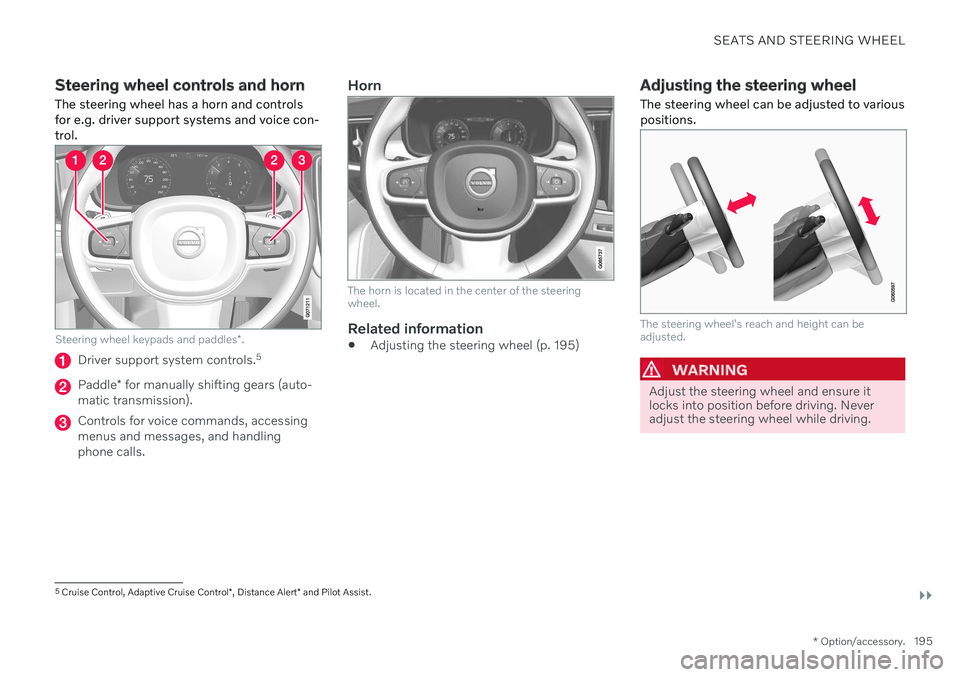
Steering wheel controls and horn The steering wheel has a horn and controls for e.g. driver support systems and voice con-trol.
Steering wheel keypads and paddles *.
Driver support system controls. 5
Paddle
* for manually shifting gears (auto-
matic transmission).
Controls for voice commands, accessing menus and messages, and handlingphone calls.
Horn
The horn is located in the center of the steering wheel.
Related information
Adjusting the steering wheel (p. 195)
Adjusting the steering wheel The steering wheel can be adjusted to various positions.
The steering wheel's reach and height can be adjusted.
WARNING
Adjust the steering wheel and ensure it locks into position before driving. Neveradjust the steering wheel while driving.
5
Cruise Control, Adaptive Cruise Control *, Distance Alert * and Pilot Assist.
Page 228 of 661

CLIMATE CONTROL
* Option/accessory.
226
Parking climate *
Parking climate is an umbrella term for vari- ous functions that improve the passengercompartment climate when the vehicle isparked, e.g. preconditioning.
Parking climate functions are con- trolled from the Parking climate tab
in the center display's Climate view. Tap the symbol in the center of the
climate bar to open Climate view.
Related information
Climate (p. 198)
Preconditioning
* (p. 226)
Pre-cleaning
* (p. 230)
Climate comfort retaining function
*
(p. 231)
Parking climate symbols and messages
*
(p. 233)
Preconditioning *
Preconditioning is a climate function that, if possible, attempts to achieve a comfortabletemperature in the passenger compartmentbefore driving.
Preconditioning can be started immediately or started at a preset time using a timer. In warm weather, the climate system venti- lates the passenger compartment by blowingair in from outside. The function cannot heatthe passenger compartment.
NOTE
During preconditioning of the passenger compartment, the vehicle works to reach acomfortable temperature and not the tem-perature set in the climate system.
NOTE
Pre-cleaning * starts automatically when
preconditioning is complete.
Related information
Parking climate
* (p. 226)
Starting and stopping preconditioning
*
(p. 226)
Preconditioning timer
* (p. 227)
Pre-cleaning
* (p. 230)
Starting and stopping preconditioning *
Preconditioning ventilates the passenger compartment, if possible, before driving. Thefunction can be started in the center displayor from a cellular phone.
Starting and stopping from the vehicle
1. Tap the symbol in the center of the climate bar to open Climate view in the center dis- play.
2. Select the
Parking climate tab.
3. Tap
Start Pre-con. & Cleaning.
> Preconditioning starts/stops and the button lights up/goes out.
NOTE
The vehicle doors and windows should be closed during preconditioning of the pas-senger compartment.
NOTE
Pre-cleaning * starts automatically when
preconditioning is complete.
Page 232 of 661
CLIMATE CONTROL
* Option/accessory.
230
Pre-cleaning *
Pre-cleaning of the vehicle before driving is used to improve the air quality in the passen-ger compartment.
It is only possible to activate pre-cleaning manually from the center display, but the func-tion is also started automatically when pre-conditioning has finished. The function uses the ventilation system to blow fresh air into the passenger compart-ment and then circulates the air through theclimate system's passenger compartment airfilter.
Related information
Parking climate
* (p. 226)
Starting and stopping pre-cleaning
*
(p. 230)
Preconditioning
* (p. 226)
Starting and stopping pre- cleaning *
Pre-cleaning improves the air quality in the
passenger compartment before driving. The function can be started in the center displayor from a cellular phone.
Starting and stopping from the vehicle
1. Tap the symbol in the center of the climate bar to open Climate view in the center dis- play.
2. Select the
Parking climate tab.
3. Tap
Start Pre-cleaning.
> Pre-cleaning starts/stops and the but- ton lights up/goes out.
Starting from app *A device with the Volvo On Call * app can be
used to start pre-cleaning or check settings.
NOTE
Precleaning always starts automatically when preconditioning is complete.
Related information
Parking climate
* (p. 226)
Pre-cleaning
* (p. 230)
Preconditioning
* (p. 226)
Page 242 of 661
||
KEY, LOCKS AND ALARM
* Option/accessory.
240
NOTE
Be aware of the risk of locking the remote key in the vehicle. If the remote key or key tag is left in the vehicle, it will be deactivated whenthe vehicle is locked and the alarm setusing another valid key. The key will bereactivated when the vehicle isunlocked.
If the remote key or Care Key is left inthe vehicle, it will be deactivated evenif the vehicle is locked using Volvo OnCall, and will be reactivated when thevehicle is unlocked using Volvo On Callor another valid key.
Button-less key (Key Tag)
*
The button-less key4
provided with the keyless
locking and unlocking function works in the same way as the regular remote key for key-less start, locking and unlocking. The key iswaterproof up to a depth of approx. 10 meters(30 feet) for up to 60 minutes. It does nothave a detachable key blade and its batterycannot be replaced.
Care Key - restricted remote keyA Care Key enables the vehicle owner to set amaximum speed limit for the vehicle. This limit is intended to promote safe use of the vehicle,e.g. when it is loaned out.
InterferenceElectromagnetic fields or obstructing objectsmay interfere with the remote key's functionsfor keyless start and keyless locking and unlocking
*.
NOTE
Avoid storing the remote key near metal objects or electronic devices, e.g. cellphones, tablets, laptops or chargers – pref-erably no closer than 10-15 cm (4-6 in.).
If you experience interference, use the remote key's detachable blade to unlock the vehicleand then place the remote key in the backupreader in the tunnel console cup holder to dis-arm the alarm and start the vehicle.
NOTE
When the remote control key is placed in the cup holder, make sure that no othervehicle keys, metal objects or electronicdevices (e.g. cell phones, tablets, laptopsor chargers) are found in the cup holder.Multiple vehicle keys close to each other inthe cup holder can disrupt their functional-ity.
WARNING
California Proposition 65 Operating, servicing and maintaining a pas- senger vehicle can expose you to chemi-cals including engine exhaust, carbon mon-oxide, phthalates, and lead, which areknown to the State of California to causecancer and birth defects or other reproduc-tive harm. To minimize exposure, avoidbreathing exhaust, do not idle the engineexcept as necessary, service your vehicle ina well ventilated area and wear gloves orwash your hands frequently when servicingyour vehicle. For more information go towww.P65Warnings.ca.gov/passenger-vehicle.
4
Also called sport key.
Page 279 of 661
DRIVER SUPPORT
}}
* Option/accessory.277
Activating or deactivating Connected Safety
For Connected Safety to be able to share information about road conditions with otherdrivers, the function must be activated. If youdo not wish to share information, the functioncan be deactivated.
Activate or deactivate the function using this button inthe center display's Functionview.
Illuminated button indicator light – the function is activated.
Extinguished button indicator light – thefunction is deactivated.
At activation, the driver must accept the spe-cial terms and conditions shown in the display before an Internet connection 12
can be estab-
lished. The driver must, for example, accept that data is sent from the vehicle using thedriver's cellular phone. Even when your vehicle is not connected to the Internet, you will still be notified if the sys-tem in your own vehicle detects slippery roadconditions. For Connected Safety to functionat full capacity, your vehicle needs to be con-nected to the Internet.
Related information
Connected Safety (p. 276)
Internet-connected vehicle
* (p. 500)
Terms of use and data sharing (p. 506)
Connected Safety limitations (p. 277)
Connected Safety limitations
Information on vehicles with activated hazard warning flashers or which have detected slip-pery road conditions is not always communi-cated between all vehicles in the affectedarea.
This may be the case if: No or insufficient Internet connection.
The maneuvers (steering wheel move- ments, acceleration or braking) made bythe vehicles on slippery surfaces are tooweak for friction between the tires androad to be detected.
Vehicles that have detected slippery roadconditions or activated hazard warningflashers have not activated the function.
Vehicles that have detected slippery roadconditions or activated hazard warningflashers are not equipped with the func-tion.
Insufficient GPS/satellite navigation mayprevent warnings.
Slippery road conditions were detected orhazard warning flashers were activated ona road that is not registered in the VolvoCars database.
Connected Safety is not developed on allmarkets and does not cover all areas. Con-
12
There may be a charge for transmitting data over the Internet, depending on your service plan.
Page 395 of 661
STARTING AND DRIVING
}}
393
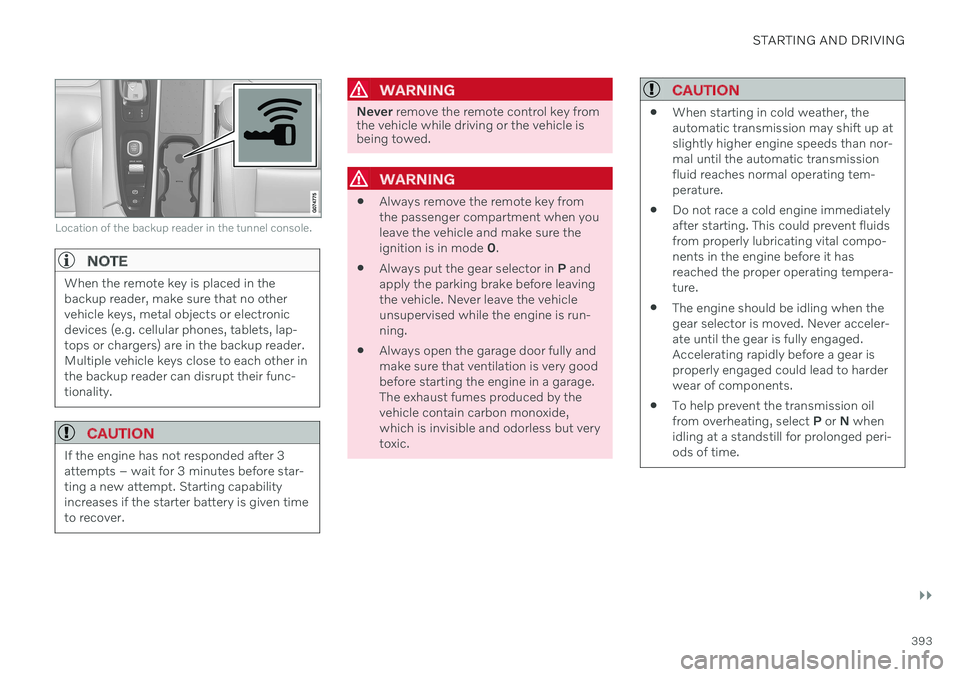
Location of the backup reader in the tunnel console.
NOTE
When the remote key is placed in the backup reader, make sure that no othervehicle keys, metal objects or electronicdevices (e.g. cellular phones, tablets, lap-tops or chargers) are in the backup reader.Multiple vehicle keys close to each other inthe backup reader can disrupt their func-tionality.
CAUTION
If the engine has not responded after 3 attempts – wait for 3 minutes before star-ting a new attempt. Starting capabilityincreases if the starter battery is given timeto recover.
WARNING
Never remove the remote control key from
the vehicle while driving or the vehicle is being towed.
WARNING
Always remove the remote key from the passenger compartment when youleave the vehicle and make sure theignition is in mode
0.
Always put the gear selector in
P and
apply the parking brake before leavingthe vehicle. Never leave the vehicleunsupervised while the engine is run-ning.
Always open the garage door fully andmake sure that ventilation is very goodbefore starting the engine in a garage.The exhaust fumes produced by thevehicle contain carbon monoxide,which is invisible and odorless but verytoxic.
CAUTION
When starting in cold weather, the automatic transmission may shift up atslightly higher engine speeds than nor-mal until the automatic transmissionfluid reaches normal operating tem-perature.
Do not race a cold engine immediatelyafter starting. This could prevent fluidsfrom properly lubricating vital compo-nents in the engine before it hasreached the proper operating tempera-ture.
The engine should be idling when thegear selector is moved. Never acceler-ate until the gear is fully engaged.Accelerating rapidly before a gear isproperly engaged could lead to harderwear of components.
To help prevent the transmission oilfrom overheating, select
P or N when
idling at a standstill for prolonged peri-ods of time.
Page 397 of 661
STARTING AND DRIVING
}}
* Option/accessory.395
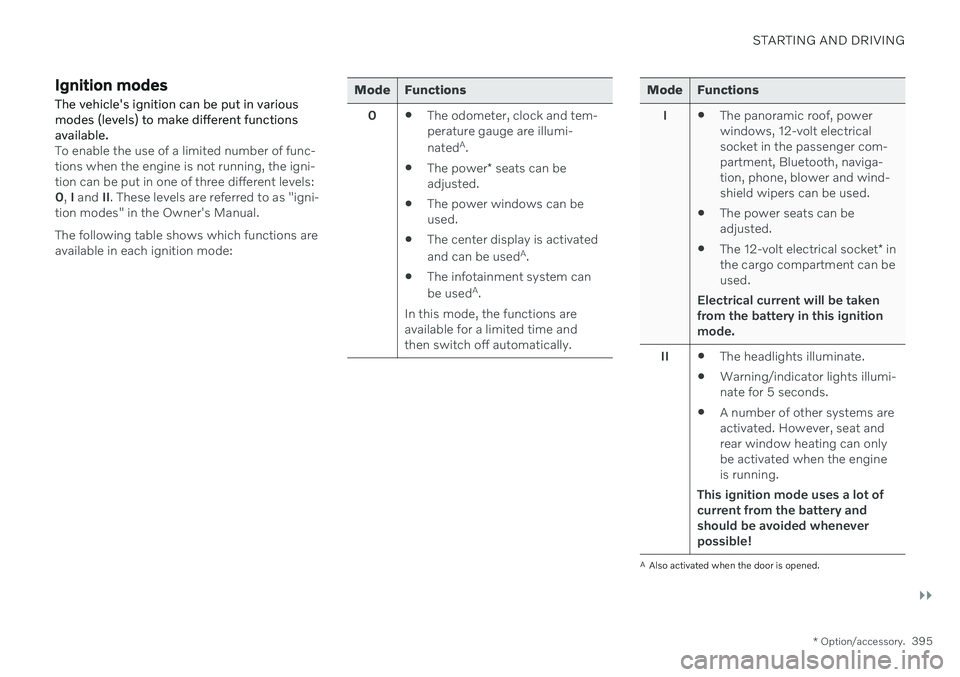
Ignition modes The vehicle's ignition can be put in various modes (levels) to make different functionsavailable.
To enable the use of a limited number of func- tions when the engine is not running, the igni-tion can be put in one of three different levels:0, I and II. These levels are referred to as "igni-
tion modes" in the Owner's Manual. The following table shows which functions are available in each ignition mode:
Mode Functions
0 The odometer, clock and tem- perature gauge are illumi- nated A
.
The power
* seats can be
adjusted.
The power windows can be used.
The center display is activated and can be used A
.
The infotainment system canbe used A
.
In this mode, the functions are available for a limited time andthen switch off automatically.Mode Functions
I The panoramic roof, power windows, 12-volt electricalsocket in the passenger com-partment, Bluetooth, naviga-tion, phone, blower and wind-shield wipers can be used.
The power seats can beadjusted.
The 12-volt electrical socket
* in
the cargo compartment can beused.
Electrical current will be taken
from the battery in this ignitionmode.
II The headlights illuminate.
Warning/indicator lights illumi-nate for 5 seconds.
A number of other systems areactivated. However, seat andrear window heating can onlybe activated when the engineis running.
This ignition mode uses a lot of
current from the battery andshould be avoided wheneverpossible!
A Also activated when the door is opened.