ESP VOLVO V60 2021 Workshop Manual
[x] Cancel search | Manufacturer: VOLVO, Model Year: 2021, Model line: V60, Model: VOLVO V60 2021Pages: 661, PDF Size: 12.68 MB
Page 353 of 661
DRIVER SUPPORT
* Option/accessory.351
WARNING
The function is supplementary driver support intended to facilitate drivingand help make it safer – it cannot han-dle all situations in all traffic, weatherand road conditions.
The driver is advised to read all sec-tions in the Owner's Manual about thisfunction to learn of its limitations,which the driver must be aware ofbefore using the function.
Driver support functions are not a sub-stitute for the driver's attention andjudgment. The driver is always respon-sible for ensuring the vehicle is drivenin a safe manner, at the appropriatespeed, with an appropriate distance toother vehicles, and in accordance withcurrent traffic rules and regulations.
Related information
Activating or deactivating Distance Alert(p. 351)
Distance Alert limitations (p. 351)
Setting time interval to the vehicle ahead(p. 314)
Collision risk warning from driver support(p. 311)
Head-up display
* (p. 140)
Activating or deactivating Distance Alert 94
Distance Alert can be turned off. The function is only available in vehicles that can displayinformation on the windshield with a head-up display *.
Activate or deactivate the function using this button inthe center display's Functionview.
GREEN button indicator light – the func- tion is activated.
GRAY button indicator light – the functionis deactivated.
Distance Alert is automatically activated eachtime the engine is started.
Related information
Distance Alert
* (p. 350)
Distance Alert limitations (p. 351)
Distance Alert limitations 95
Distance Alert functionality may be reduced in certain situations. The function is onlyavailable in vehicles that can display informa-tion on the windshield with a head-up dis- play *.
WARNING
Detection ability may be affected by vehicle size, e.g. motorcycles, whichcan cause the warning light to come onat a shorter time interval than that setor cause the warning to be temporarilyabsent.
Very high speeds can cause the light tocome on at a shorter time interval thanthat set due to limitations in the rangeof the radar unit.
NOTE
The function uses the vehicle's camera and radar sensor, which has certain generallimitations.
Related information
Distance Alert
* (p. 350)
Camera/radar sensor limitations (p. 383)
Head-up display
* (p. 140)
Page 354 of 661
DRIVER SUPPORT
* Option/accessory.
352
Cross Traffic Alert *96
Cross Traffic Alert(CTA) is a supplementary driver support system to BLIS 97
that is
intended to help the driver detect vehicles crossing behind the vehicle while backing up. The auto-brake subfunction can help the
driver stop the car if there is a risk of collision with an unobserved vehicle.
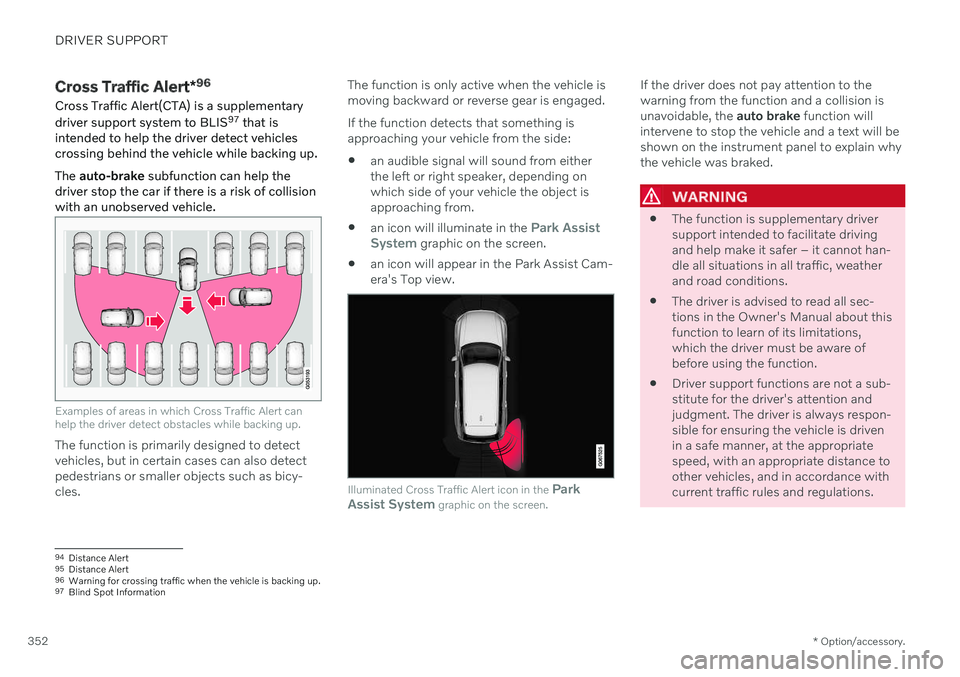
Examples of areas in which Cross Traffic Alert can help the driver detect obstacles while backing up.
The function is primarily designed to detect vehicles, but in certain cases can also detectpedestrians or smaller objects such as bicy-cles. The function is only active when the vehicle ismoving backward or reverse gear is engaged. If the function detects that something is approaching your vehicle from the side:
an audible signal will sound from eitherthe left or right speaker, depending onwhich side of your vehicle the object isapproaching from.
an icon will illuminate in the
Park Assist
System graphic on the screen.
an icon will appear in the Park Assist Cam- era's Top view.
Illuminated Cross Traffic Alert icon in the
Park
Assist System graphic on the screen.
If the driver does not pay attention to the warning from the function and a collision isunavoidable, the auto brake function will
intervene to stop the vehicle and a text will beshown on the instrument panel to explain whythe vehicle was braked.
WARNING
The function is supplementary driver support intended to facilitate drivingand help make it safer – it cannot han-dle all situations in all traffic, weatherand road conditions.
The driver is advised to read all sec-tions in the Owner's Manual about thisfunction to learn of its limitations,which the driver must be aware ofbefore using the function.
Driver support functions are not a sub-stitute for the driver's attention andjudgment. The driver is always respon-sible for ensuring the vehicle is drivenin a safe manner, at the appropriatespeed, with an appropriate distance toother vehicles, and in accordance withcurrent traffic rules and regulations.
94
Distance Alert
95 Distance Alert
96 Warning for crossing traffic when the vehicle is backing up.
97 Blind Spot Information
Page 358 of 661
DRIVER SUPPORT
* Option/accessory.
356
Park Assist *
The Park Assist function (PAS 101
) uses sen-
sors to help the driver when maneuvering in tight spaces by indicating distances to obsta-cles using audible signals and graphics in thecenter display.
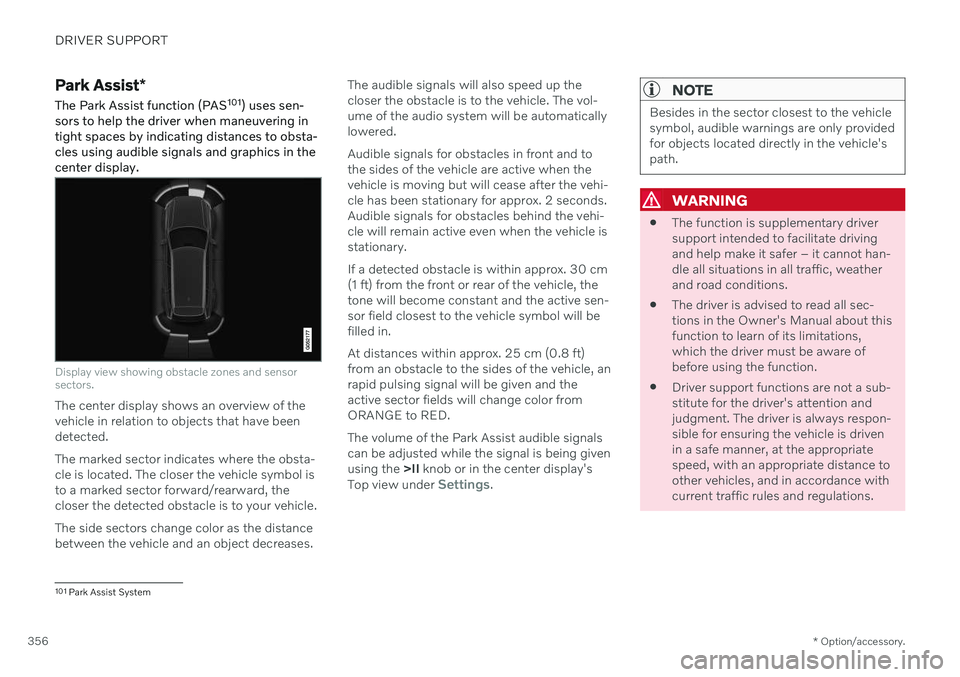
Display view showing obstacle zones and sensor sectors.
The center display shows an overview of the vehicle in relation to objects that have beendetected. The marked sector indicates where the obsta- cle is located. The closer the vehicle symbol isto a marked sector forward/rearward, thecloser the detected obstacle is to your vehicle. The side sectors change color as the distance between the vehicle and an object decreases. The audible signals will also speed up thecloser the obstacle is to the vehicle. The vol-ume of the audio system will be automaticallylowered. Audible signals for obstacles in front and to the sides of the vehicle are active when thevehicle is moving but will cease after the vehi-cle has been stationary for approx. 2 seconds.Audible signals for obstacles behind the vehi-cle will remain active even when the vehicle isstationary. If a detected obstacle is within approx. 30 cm (1 ft) from the front or rear of the vehicle, thetone will become constant and the active sen-sor field closest to the vehicle symbol will befilled in. At distances within approx. 25 cm (0.8 ft) from an obstacle to the sides of the vehicle, anrapid pulsing signal will be given and theactive sector fields will change color fromORANGE to RED. The volume of the Park Assist audible signals can be adjusted while the signal is being givenusing the
>II knob or in the center display's
Top view under
Settings.
NOTE
Besides in the sector closest to the vehicle symbol, audible warnings are only providedfor objects located directly in the vehicle'spath.
WARNING
The function is supplementary driver support intended to facilitate drivingand help make it safer – it cannot han-dle all situations in all traffic, weatherand road conditions.
The driver is advised to read all sec-tions in the Owner's Manual about thisfunction to learn of its limitations,which the driver must be aware ofbefore using the function.
Driver support functions are not a sub-stitute for the driver's attention andjudgment. The driver is always respon-sible for ensuring the vehicle is drivenin a safe manner, at the appropriatespeed, with an appropriate distance toother vehicles, and in accordance withcurrent traffic rules and regulations.
101
Park Assist System
Page 364 of 661
||
DRIVER SUPPORT
* Option/accessory.
362
WARNING
The function is supplementary driver support intended to facilitate drivingand help make it safer – it cannot han-dle all situations in all traffic, weatherand road conditions.
The driver is advised to read all sec-tions in the Owner's Manual about thisfunction to learn of its limitations,which the driver must be aware ofbefore using the function.
Driver support functions are not a sub-stitute for the driver's attention andjudgment. The driver is always respon-sible for ensuring the vehicle is drivenin a safe manner, at the appropriatespeed, with an appropriate distance toother vehicles, and in accordance withcurrent traffic rules and regulations.
Related information
Driver support systems (p. 270)
Location and field of vision of Park Assist Cameras
* (p. 362)
Park Assist Camera trajectory lines
*
(p. 364)
Park Assist sensor field (p. 366)
Activating Park Assist Camera (p. 367)
Park Assist Camera symbols and mes- sages (p. 369)
Camera/radar sensor limitations (p. 383)
Park Assist
* (p. 356)
Cross Traffic Alert
* (p. 352)
Location and field of vision of Park Assist Cameras *
The Park Assist Cameras (PAC 110
) can display
a 360° panoramic view as well as separate views for each of the four cameras: rear,front, left and right.
110 Park Assist Camera
Page 373 of 661
DRIVER SUPPORT
* Option/accessory.371
Park Assist Pilot *
Park Assist Pilot (PAP 117
) can help the driver
maneuver the vehicle when parking. The function can also assist with steering whenpulling out from a parallel parking space.
The function first checks whether there is suf- ficient space and then helps the driver steerthe vehicle into the space. The center display uses symbols, graphics and messages to inform the driver of what stepsneed to be taken and when.
WARNING
The function is supplementary driver support intended to facilitate drivingand help make it safer – it cannot han-dle all situations in all traffic, weatherand road conditions.
The driver is advised to read all sec-tions in the Owner's Manual about thisfunction to learn of its limitations,which the driver must be aware ofbefore using the function.
Driver support functions are not a sub-stitute for the driver's attention andjudgment. The driver is always respon-sible for ensuring the vehicle is drivenin a safe manner, at the appropriatespeed, with an appropriate distance toother vehicles, and in accordance withcurrent traffic rules and regulations.
Related information
Driver support systems (p. 270)
Types of parking with Park Assist Pilot
*
(p. 372)
Using Park Assist Pilot
* (p. 373)
Leaving a parallel parking space with Park Assist Pilot
* (p. 376)
Park Assist Pilot
* limitations (p. 376)
Park Assist Pilot
* messages (p. 379)
117
Park Assist Pilot
Page 379 of 661
DRIVER SUPPORT
}}
377
The parking sequence is cancelledA parking sequence will be cancelled if: the driver moves the steering wheel
the vehicle's speed exceeds 7 km/h (4 mph)
the driver taps
Cancel in the center dis-
play
when the anti-lock brakes or the Elec- tronic stability control are engaged - e.g.when a wheel loses grip on a slippery road
when speed-dependent power steeringwheel resistance is working at reducedpower – e.g. during cooling due to over-heating
when, while parking, the parking sensorsdetect a vehicle or pedestrian in the vehi-cle's intended direction of travel behind orin front of the vehicle, the auto-brake func-tion will bring the vehicle to a standstill.
A message in the center display will explainwhy the parking sequence was cancelled.
CAUTION
Under certain circumstances, the function may not be able to find parking spaces –one reason may be that the sensors aredisrupted by external sound sources thatemit the same ultrasonic frequencies thatthe system works with. Examples of such sources include horns, wet tires on asphalt, pneumatic brakes,exhaust noise from motorcycles, etc.
NOTE
Dirt, ice and snow covering the sensors reduce their function and can make meas-urement impossible.
Driver responsibilityThe driver should keep in mind that the func- tion is a parking aid ‒
not an infallible fully
automatic system. The driver must always beprepared to take control and cancel a parkingsequence if necessary. There are a number of things to keep in mindwhen parking, including:
The driver is always responsible for deter-mining if the space suggested by the func-tion is suitable for parking.
Do not use the function when using snowchains or a temporary spare tire.
Do not use the function if there are anyobjects protruding from the vehicle.
Heavy rain or snowfall may inhibit PAP'sability to accurately measure a parkingspace.
While searching and measuring the park-ing space, the function may be unable todetect objects located far into the space.
PAP may not suggest parking spaces onnarrow streets if it does not detect suffi-cient space for maneuvering the vehicle.
Use approved tires 122
inflated to the cor-
rect tire pressure because this affects thefunction's ability to provide parking assis-tance.
The function is based on the way the vehi-cles are parked behind and in front of yourparking space. If they are, for example,parked too close to the curb, there is a riskthat your vehicle's tires or wheel rims
122
"Approved tires" refers to tires of the same type and make as the vehicle's original, factory-installed tires.
Page 383 of 661
DRIVER SUPPORT
}}
* Option/accessory.381
Radar sensor type approval
The type approval for the vehicle's radar units for adaptive cruise control * (ACC 124
), Pilot
Assist * and BLIS *125
are found here.
Market ACC & PA BLIS Type approval Canada ✓
FCC ID: L2C0054TR IC: 3432A-0054TR FCC ID: L2C0055TR IC: 3432A-0055TR
✓ Canada Standard RSS-310
USA ✓
FCC ID: L2C0054TR IC: 3432A-0054TRFCC ID: L2C0055TR IC: 3432A-0055TR
✓ FCC ID: NBG01RS4
This device complies with Part 15 of the FCC Rules and with Industry Canada license-exempt RSS standard(s). Operation is subjectto the following two conditions: (1) This device may not cause harmful interference, and (2) This device must accept any interference received, including interference that maycause undesired operation. Ce dispositif de radiocommunication de catégorie II respecte la norme CNR-310d
Page 386 of 661
||
DRIVER SUPPORT
384
Common camera and radar limitations
Obstructed camera
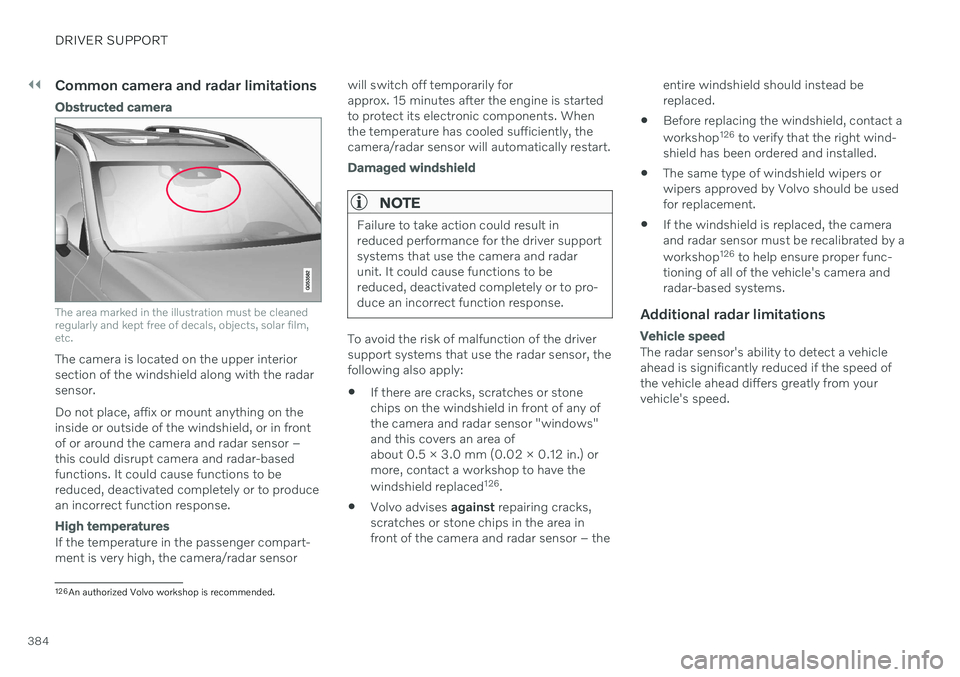
The area marked in the illustration must be cleaned regularly and kept free of decals, objects, solar film,etc.
The camera is located on the upper interior section of the windshield along with the radarsensor. Do not place, affix or mount anything on the inside or outside of the windshield, or in frontof or around the camera and radar sensor –this could disrupt camera and radar-basedfunctions. It could cause functions to bereduced, deactivated completely or to producean incorrect function response.
High temperatures
If the temperature in the passenger compart- ment is very high, the camera/radar sensorwill switch off temporarily forapprox. 15 minutes after the engine is startedto protect its electronic components. Whenthe temperature has cooled sufficiently, thecamera/radar sensor will automatically restart.
Damaged windshield
NOTE
Failure to take action could result in reduced performance for the driver supportsystems that use the camera and radarunit. It could cause functions to bereduced, deactivated completely or to pro-duce an incorrect function response.
To avoid the risk of malfunction of the driver support systems that use the radar sensor, thefollowing also apply:
If there are cracks, scratches or stonechips on the windshield in front of any ofthe camera and radar sensor "windows"and this covers an area ofabout 0.5 × 3.0 mm (0.02 × 0.12 in.) ormore, contact a workshop to have the windshield replaced 126
.
Volvo advises
against repairing cracks,
scratches or stone chips in the area in front of the camera and radar sensor – the entire windshield should instead bereplaced.
Before replacing the windshield, contact a workshop 126
to verify that the right wind-
shield has been ordered and installed.
The same type of windshield wipers or wipers approved by Volvo should be usedfor replacement.
If the windshield is replaced, the cameraand radar sensor must be recalibrated by a workshop 126
to help ensure proper func-
tioning of all of the vehicle's camera and radar-based systems.
Additional radar limitations
Vehicle speed
The radar sensor's ability to detect a vehicle ahead is significantly reduced if the speed ofthe vehicle ahead differs greatly from yourvehicle's speed.
126 An authorized Volvo workshop is recommended.
Page 395 of 661
STARTING AND DRIVING
}}
393
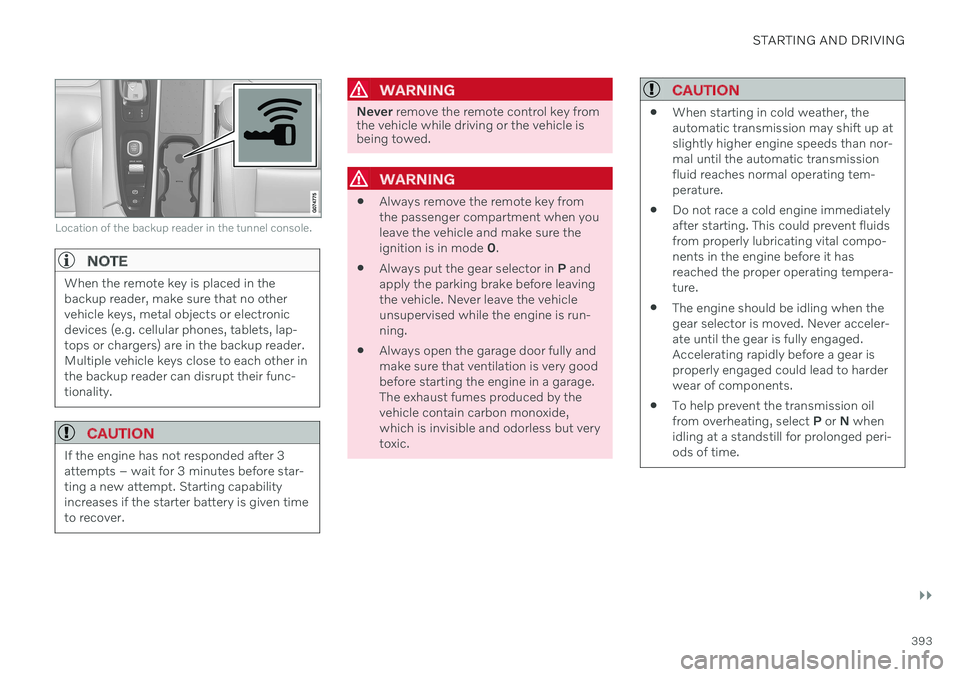
Location of the backup reader in the tunnel console.
NOTE
When the remote key is placed in the backup reader, make sure that no othervehicle keys, metal objects or electronicdevices (e.g. cellular phones, tablets, lap-tops or chargers) are in the backup reader.Multiple vehicle keys close to each other inthe backup reader can disrupt their func-tionality.
CAUTION
If the engine has not responded after 3 attempts – wait for 3 minutes before star-ting a new attempt. Starting capabilityincreases if the starter battery is given timeto recover.
WARNING
Never remove the remote control key from
the vehicle while driving or the vehicle is being towed.
WARNING
Always remove the remote key from the passenger compartment when youleave the vehicle and make sure theignition is in mode
0.
Always put the gear selector in
P and
apply the parking brake before leavingthe vehicle. Never leave the vehicleunsupervised while the engine is run-ning.
Always open the garage door fully andmake sure that ventilation is very goodbefore starting the engine in a garage.The exhaust fumes produced by thevehicle contain carbon monoxide,which is invisible and odorless but verytoxic.
CAUTION
When starting in cold weather, the automatic transmission may shift up atslightly higher engine speeds than nor-mal until the automatic transmissionfluid reaches normal operating tem-perature.
Do not race a cold engine immediatelyafter starting. This could prevent fluidsfrom properly lubricating vital compo-nents in the engine before it hasreached the proper operating tempera-ture.
The engine should be idling when thegear selector is moved. Never acceler-ate until the gear is fully engaged.Accelerating rapidly before a gear isproperly engaged could lead to harderwear of components.
To help prevent the transmission oilfrom overheating, select
P or N when
idling at a standstill for prolonged peri-ods of time.
Page 401 of 661
STARTING AND DRIVING
399
Braking on wet roadsProlonged driving in heavy rain without brak- ing may cause braking effect to be slightlydelayed the first time the brakes are applied.
This may also occur after washing the vehicle. It will then be necessary to apply greater pres-sure to the brake pedal. You should thereforemaintain a greater distance to the vehicleahead. Firmly apply the brakes after washing the vehicle or driving on wet roads. This helpswarm up the brake discs, enabling them to drymore quickly and protecting them against cor-rosion. Consider the current traffic situationwhen braking.
Related information
Brakes (p. 397)
Braking on salted roads (p. 399)
Braking on salted roads
When driving on salted roads, a layer of salt may form on the brake discs and brake pads.
This could increase stopping distance. Main- tain an extra large safety distance to the vehi-cle ahead. Make sure to also:
Apply the brakes from time to time to helpremove salt. Make sure braking does notpose a risk to any other road users.
Gently apply the brakes when you havefinished driving and before driving again.
Related information
Brakes (p. 397)
Braking on wet roads (p. 399)
Maintenance of the brake system
Regularly check the brake system compo- nents for wear.
To keep the vehicle as safe and reliable as possible, follow the Volvo service schedulespecified in the Warranty and MaintenanceRecords Information booklet. After replacingbrake pads and brake discs, braking effect isnot adapted until they are "broken in" by driv-ing a few hundred kilometers (miles). Com-pensate for the reduced braking effect byapplying greater pressure to the brake pedal.Volvo recommends only using brake padsapproved for your Volvo.
CAUTION
The brake system's components should be regularly checked for wear. Contact a workshop for advice on how to do this or let a workshop perform theinspection - an authorized Volvo workshopis recommended.
Related information
Brakes (p. 397)