ESP VOLVO V60 2021 Owner's Guide
[x] Cancel search | Manufacturer: VOLVO, Model Year: 2021, Model line: V60, Model: VOLVO V60 2021Pages: 661, PDF Size: 12.68 MB
Page 291 of 661
DRIVER SUPPORT
}}
* Option/accessory.289
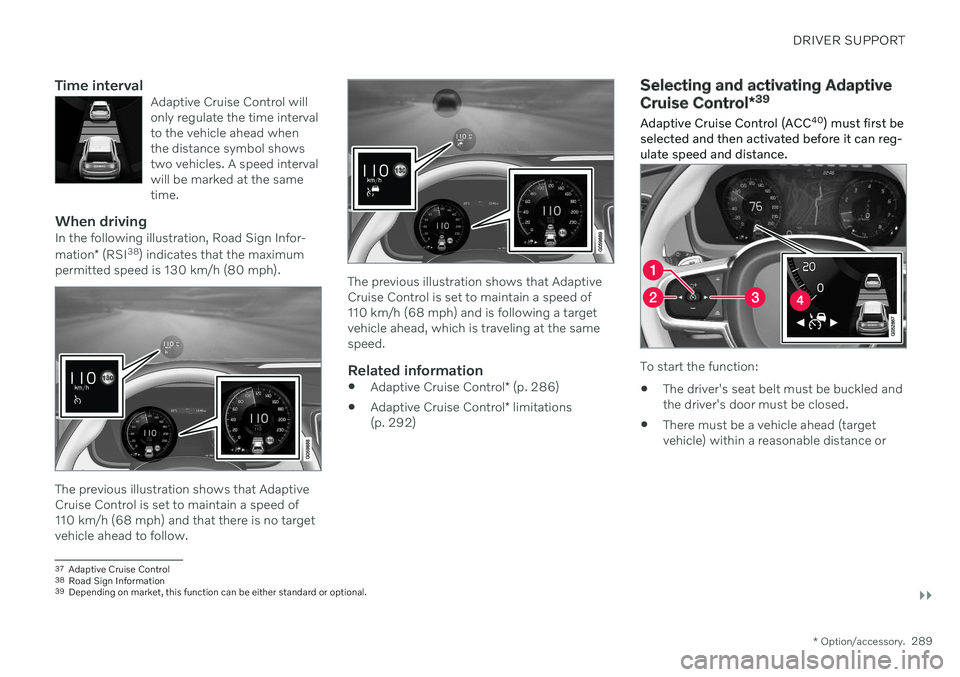
Time intervalAdaptive Cruise Control will only regulate the time intervalto the vehicle ahead whenthe distance symbol showstwo vehicles. A speed intervalwill be marked at the sametime.
When drivingIn the following illustration, Road Sign Infor- mation* (RSI 38
) indicates that the maximum
permitted speed is 130 km/h (80 mph).
The previous illustration shows that Adaptive Cruise Control is set to maintain a speed of110 km/h (68 mph) and that there is no targetvehicle ahead to follow.
The previous illustration shows that Adaptive Cruise Control is set to maintain a speed of110 km/h (68 mph) and is following a targetvehicle ahead, which is traveling at the samespeed.
Related information
Adaptive Cruise Control
* (p. 286)
Adaptive Cruise Control
* limitations
(p. 292)
Selecting and activating Adaptive Cruise Control *39
Adaptive Cruise Control (ACC 40
) must first be
selected and then activated before it can reg- ulate speed and distance.
To start the function:
The driver's seat belt must be buckled and the driver's door must be closed.
There must be a vehicle ahead (targetvehicle) within a reasonable distance or
37
Adaptive Cruise Control
38 Road Sign Information
39 Depending on market, this function can be either standard or optional.
Page 294 of 661

||
DRIVER SUPPORT
* Option/accessory.
292 such as Electronic Stability Control (ESC
45
).
The driver opens the door.
The driver unbuckles the seat belt.
The engine speed (rpm) is too low/high.
One or more of the wheels lose traction.
The brake temperature is high.
The parking brake is applied.
The camera and radar unit is covered by snow or heavy rain (the camera lens/radarwaves are blocked).
Your vehicle's speed goes below 5 km/h(3 mph) and ACC cannot determine if thevehicle ahead is stationary or if it isanother object, e.g. a speed bump.
Your vehicle's speed goes below 5 km/h(3 mph) and the vehicle ahead turns sothat ACC no longer has a vehicle to follow.
Related information
Adaptive Cruise Control
* (p. 286)
Selecting and activating Adaptive Cruise Control
* (p. 289)
Deactivating Adaptive Cruise Control
*
(p. 290)
Adaptive Cruise Control
* limitations
(p. 292)
Adaptive Cruise Control *46
limitations Adaptive Cruise Control (ACC 47
) may have
limited functionality in certain situations.
Steep roads and/or heavy loadsAdaptive Cruise Control is primarily intended to be driven on flat roads. The function maynot be able to maintain the correct time inter-val to the vehicle ahead when driving downsteep hills. The driver should be extra attentiveand prepared to apply the brakes. Do not use Adaptive Cruise Control if the vehi- cle is carrying a heavy load or towing a trailer.
Drive mode unavailableThe Off Road drive mode cannot be selected
if Adaptive Cruise Control is activated.
WARNING
This is not a collision avoidance sys- tem. The driver is always responsibleand must intervene if the system failsto detect a vehicle ahead.
The function does not brake for peopleor animals and does not brake for smallvehicles, such as bikes and motorcy-cles. Similarly, it does not brake for lowtrailers, oncoming, slow-moving or sta-tionary vehicles and objects.
Do not use the function in demandingsituations, such as in city traffic, atintersections, on slippery surfaces,with a lot of water or slush on the road,in heavy rain/snow, in poor visibility, onwinding roads, or on on/off ramps.
NOTE
The function uses the vehicle's camera and radar sensor, which has certain generallimitations.
Related information
Adaptive Cruise Control
* (p. 286)
Camera/radar sensor limitations (p. 383)
45
Electronic Stability Control
46 Depending on market, this function can be either standard or optional.
Page 299 of 661
DRIVER SUPPORT
}}
297
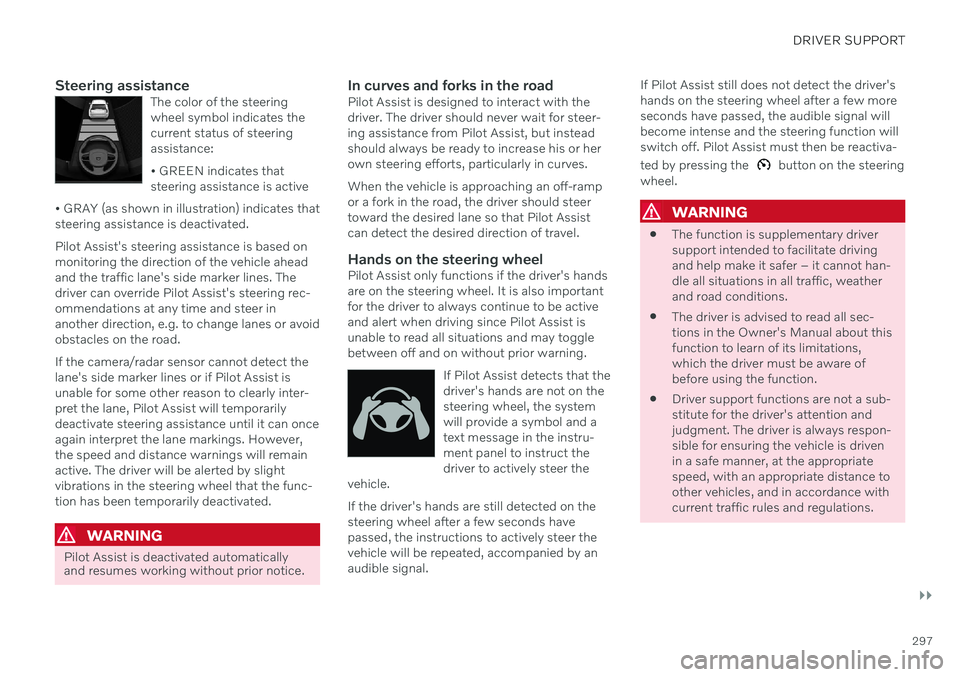
Steering assistanceThe color of the steering wheel symbol indicates thecurrent status of steeringassistance: • GREEN indicates that steering assistance is active
• GRAY (as shown in illustration) indicates thatsteering assistance is deactivated.
Pilot Assist's steering assistance is based on monitoring the direction of the vehicle aheadand the traffic lane's side marker lines. Thedriver can override Pilot Assist's steering rec-ommendations at any time and steer inanother direction, e.g. to change lanes or avoidobstacles on the road. If the camera/radar sensor cannot detect the lane's side marker lines or if Pilot Assist isunable for some other reason to clearly inter-pret the lane, Pilot Assist will temporarilydeactivate steering assistance until it can onceagain interpret the lane markings. However,the speed and distance warnings will remainactive. The driver will be alerted by slightvibrations in the steering wheel that the func-tion has been temporarily deactivated.
WARNING
Pilot Assist is deactivated automatically and resumes working without prior notice.
In curves and forks in the roadPilot Assist is designed to interact with the driver. The driver should never wait for steer-ing assistance from Pilot Assist, but insteadshould always be ready to increase his or herown steering efforts, particularly in curves. When the vehicle is approaching an off-ramp or a fork in the road, the driver should steertoward the desired lane so that Pilot Assistcan detect the desired direction of travel.
Hands on the steering wheelPilot Assist only functions if the driver's handsare on the steering wheel. It is also importantfor the driver to always continue to be activeand alert when driving since Pilot Assist isunable to read all situations and may togglebetween off and on without prior warning.
If Pilot Assist detects that thedriver's hands are not on thesteering wheel, the systemwill provide a symbol and atext message in the instru-ment panel to instruct thedriver to actively steer the
vehicle.
If the driver's hands are still detected on the steering wheel after a few seconds havepassed, the instructions to actively steer thevehicle will be repeated, accompanied by anaudible signal. If Pilot Assist still does not detect the driver'shands on the steering wheel after a few moreseconds have passed, the audible signal willbecome intense and the steering function willswitch off. Pilot Assist must then be reactiva- ted by pressing the
button on the steering
wheel.
WARNING
The function is supplementary driver support intended to facilitate drivingand help make it safer – it cannot han-dle all situations in all traffic, weatherand road conditions.
The driver is advised to read all sec-tions in the Owner's Manual about thisfunction to learn of its limitations,which the driver must be aware ofbefore using the function.
Driver support functions are not a sub-stitute for the driver's attention andjudgment. The driver is always respon-sible for ensuring the vehicle is drivenin a safe manner, at the appropriatespeed, with an appropriate distance toother vehicles, and in accordance withcurrent traffic rules and regulations.
Page 306 of 661
DRIVER SUPPORT
* Option/accessory.
304
Pilot Assist *62
limitations
Pilot Assist functionality may be reduced in certain situations.
Pilot Assist is a driver support function designed to simplify driving and assist thedriver in many situations. However, the driveris always responsible for maintaining a suita-ble distance to vehicles or objects around itand ensuring that the vehicle is correctly posi-tioned in the traffic lane.
WARNING
In some situations, Pilot Assist may have trouble helping the driver properly or maybe deactivated automatically – we adviseagainst using Pilot Assist in such cases.Examples of such situations include:
the lane markings are unclear, worn, missing, cross each other, or there aremultiple sets of road markings.
the lane division changes, e.g. whenlanes split or merge, and at off-ramps.
when there is road construction andsudden changes to the road surface,e.g. when the lines may no longer markthe correct route.
edges or other lines than lane markingsare present on or near the road, e.g.curbs, joints or repairs to the road sur-face, edges of barriers, roadside edgesor strong shadows.
the lane is narrow or winding.
the lane contains ridges or holes.
weather conditions are poor, e.g. rain,snow or fog or slush or reduced visibil-
ity with poor light conditions, back- lighting, wet road surface, etc.
The driver should also note that Pilot Assist has the following limitations:
High curbs, roadside barriers, tempo- rary obstacles (traffic cones, safety bar-riers, etc.) are not detected. Alterna-tively, they may be detected incorrectlyas lane markings, with a subsequentrisk of contact between the vehicle andsuch obstacles. The driver is responsi-ble for ensuring that the vehicle main-tains a suitable distance from suchobstacles.
The camera and radar sensors do nothave the capacity to detect all oncom-ing objects and obstacles in trafficenvironments, e.g. potholes, stationaryobstacles or objects that completely orpartially block the route.
Pilot Assist does not "see" pedestrians,animals, etc.
The steering assistance is limited inforce, which means that Pilot Assistcannot always help the driver to steerand keep the vehicle within the lane.
In vehicles equipped with Sensus Navigation
*, the function is able to use
62
Depending on market, this function can be either standard or optional.
Page 307 of 661
DRIVER SUPPORT
* Option/accessory.305
information from map data, which could cause variations in performance.
Pilot Assist will be switched off if thespeed-dependent power steeringwheel resistance is working at reducedpower, e.g. during cooling due to over-heating.
WARNING
Pilot Assist should only be used if there are clear lane lines painted on each side of thelane. All other use will increase the risk ofcontact with nearby obstacles that cannotbe detected by the functions.
WARNING
This is not a collision avoidance sys- tem. The driver is always responsibleand must intervene if the system failsto detect a vehicle ahead.
The function does not brake for peopleor animals and does not brake for smallvehicles, such as bikes and motorcy-cles. Similarly, it does not brake for lowtrailers, oncoming, slow-moving or sta-tionary vehicles and objects.
Do not use the function in demandingsituations, such as in city traffic, atintersections, on slippery surfaces,with a lot of water or slush on the road,in heavy rain/snow, in poor visibility, onwinding roads, or on on/off ramps.
The driver can always correct or adjust steer-ing assistance provided by Pilot Assist by turn-ing the steering wheel to the desired position.
Steep roads and/or heavy loadsPilot Assist is primarily intended to be drivenon flat roads. The function may not be able tomaintain the correct time interval to the vehi-cle ahead when driving down steep hills. Thedriver should be extra attentive and preparedto apply the brakes. Do not use Pilot Assist if the vehicle is carryinga heavy load or towing a trailer.
NOTE
Pilot Assist cannot be activated if a trailer, bike carrier or similar is connected to thevehicle electrical system.
Drive mode unavailableThe Off Road drive mode cannot be selected
when Pilot Assist is activated.
NOTE
The function uses the vehicle's camera and radar sensor, which has certain generallimitations.
Related information
Pilot Assist
* (p. 296)
Camera/radar sensor limitations (p. 383)
Speed-dependent steering wheel resis- tance (p. 270)
Drive modes
* (p. 413)
Page 310 of 661
DRIVER SUPPORT
* Option/accessory.
308
Curve Speed Assist (CSA) *64
Curve Speed Assist can help the driver
reduce speed before sharp turns if the preset speed for the driver support function Adap- tive Cruise Control * or Pilot Assist * is deter-
mined to be too high.
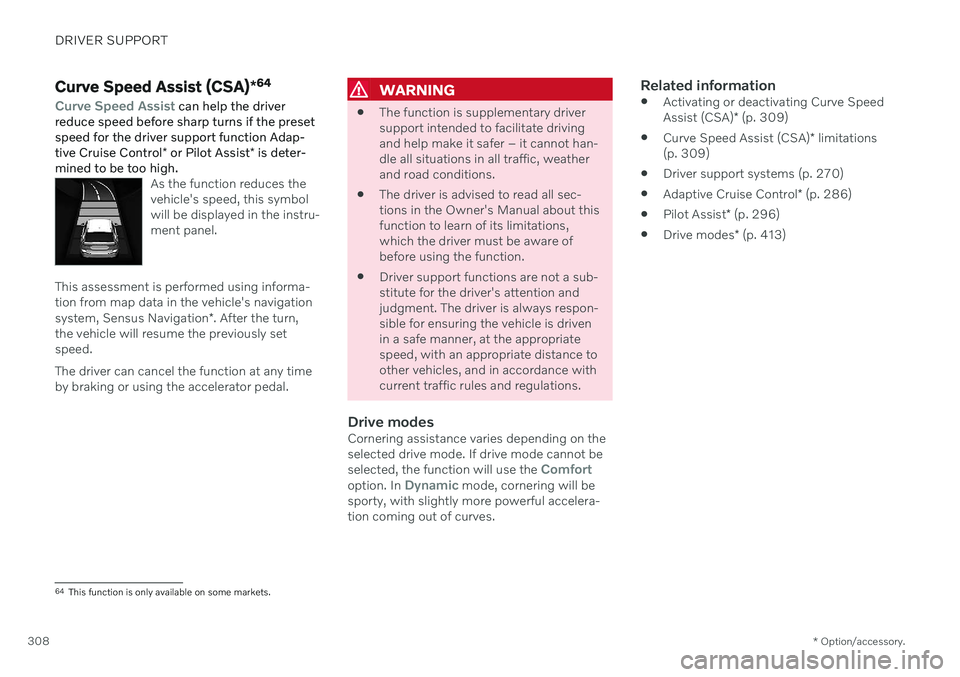
As the function reduces the vehicle's speed, this symbolwill be displayed in the instru-ment panel.
This assessment is performed using informa- tion from map data in the vehicle's navigation system, Sensus Navigation *. After the turn,
the vehicle will resume the previously set speed. The driver can cancel the function at any time by braking or using the accelerator pedal.
WARNING
The function is supplementary driver support intended to facilitate drivingand help make it safer – it cannot han-dle all situations in all traffic, weatherand road conditions.
The driver is advised to read all sec-tions in the Owner's Manual about thisfunction to learn of its limitations,which the driver must be aware ofbefore using the function.
Driver support functions are not a sub-stitute for the driver's attention andjudgment. The driver is always respon-sible for ensuring the vehicle is drivenin a safe manner, at the appropriatespeed, with an appropriate distance toother vehicles, and in accordance withcurrent traffic rules and regulations.
Drive modesCornering assistance varies depending on theselected drive mode. If drive mode cannot be selected, the function will use the
Comfortoption. In Dynamic mode, cornering will be
sporty, with slightly more powerful accelera- tion coming out of curves.
Related information
Activating or deactivating Curve Speed Assist (CSA)
* (p. 309)
Curve Speed Assist (CSA)
* limitations
(p. 309)
Driver support systems (p. 270)
Adaptive Cruise Control
* (p. 286)
Pilot Assist
* (p. 296)
Drive modes
* (p. 413)
64
This function is only available on some markets.
Page 311 of 661
DRIVER SUPPORT
* Option/accessory.309
Activating or deactivating Curve Speed Assist (CSA) *
The Curve Speed Assist (CSA) function can be activated as a supplement to Adaptive Cruise Control * or Pilot Assist *. The driver can
also deactivate the function.
Activate or deactivate the function using this button inthe center display's Functionview.
GREEN button indicator light – the func- tion is activated.
GRAY button indicator light – the functionis deactivated.
The next time the engine is started, the lastused setting is reactivated or the key's driver profile settings are followed 65
.
Related information
Curve Speed Assist (CSA)
* (p. 308)
Curve Speed Assist (CSA)
* limitations
(p. 309)
Curve Speed Assist (CSA) *66
limitations
Curve Speed Assist (CSA) functionality may be reduced in certain situations. The drivershould be aware of the following limitations:
Curve Speed Assist (CSA) may have lim- ited performance on small roads and indensely populated areas.
At off-ramps or intersections, CurveSpeed Assist (CSA) may temporarilyswitch off.
If the satellite navigator's 67
map data is
not updated, Curve Speed Assist (CSA)may have limited functionality.
Curve Speed Assist (CSA) functionality may be limited if the satellite navigator 67
has lost contact with the satellite system.
On new or rebuilt roads, map data may be incorrect.
The risk of reduced grip due to adverseweather or road conditions is not takeninto account when calculating suitablecornering speed.
NOTE
The function uses the vehicle's camera and radar sensor, which has certain generallimitations.
Related information
Curve Speed Assist (CSA)
* (p. 308)
Activating or deactivating Curve Speed Assist (CSA)
* (p. 309)
Camera/radar sensor limitations (p. 383)
65
These alternatives are market dependent.
66 This function is only available on some markets.
67 Only with Volvo Sensus Navigation * installed.
Page 312 of 661
DRIVER SUPPORT
* Option/accessory.
310
Passing assistance *
Passing assistance can assist the driver when passing other vehicles. The function can be used with Adaptive Cruise Control * or Pilot
Assist *.
When Adaptive Cruise Control or Pilot Assist is following another vehicle and you indicatethat you intend to pass that vehicle by using the turn signal 68
, the system will begin accel-
erating toward the vehicle ahead before your
vehicle has moved into the passing lane. The function will then delay a speed reduction to avoid early braking as your vehicleapproaches a slower-moving vehicle. The function remains active until your vehicle has passed the other vehicle.
WARNING
Please note that this function can be acti- vated in more situations than just passinganother vehicle, such as when a directionindicator is used to indicate a lane changeor before exiting to another road – the vehi-cle will then briefly accelerate.
WARNING
The function is supplementary driver support intended to facilitate drivingand help make it safer – it cannot han-dle all situations in all traffic, weatherand road conditions.
The driver is advised to read all sec-tions in the Owner's Manual about thisfunction to learn of its limitations,which the driver must be aware ofbefore using the function.
Driver support functions are not a sub-stitute for the driver's attention andjudgment. The driver is always respon-sible for ensuring the vehicle is drivenin a safe manner, at the appropriatespeed, with an appropriate distance toother vehicles, and in accordance withcurrent traffic rules and regulations.
Related information
Driver support systems (p. 270)
Using passing assistance (p. 310)
Adaptive Cruise Control
* (p. 286)
Pilot Assist
* (p. 296)
Using passing assistance Passing assistance can be used with Adap- tive Cruise Control * or Pilot Assist *. Several
conditions must be met for passing assis- tance to be possible.
In order to activate passing assistance:
your vehicle must be following a vehicle ahead (target vehicle)
your vehicle's
current speed must be
at least 70 km/h (43 mph)
the set speed
must be high enough to
safely pass another vehicle.
To start passing assistance:
–Turn on the left turn signal.
> Passing assistance will start.
68 Only the left-hand turn signal for left-hand drive vehicles, or right-hand turn signal for right-hand drive vehicles.
Page 316 of 661
DRIVER SUPPORT
* Option/accessory.
314
Setting time interval to the vehicle ahead The time interval to the vehicle ahead can be set for the functions Adaptive Cruise Control *,
Pilot Assist * and Distance Alert *.
Different time intervals to the vehicle ahead can be selectedand are shown in the instru-ment panel as 1–5 horizontalbars. The more bars, thelonger the time interval. Onebar represents an interval of
approx. 1 second to the vehicle ahead. 5 barsrepresents approx. 3 seconds.
NOTE
When the symbol in the instrument panel shows a vehicle and a steering wheel, PilotAssist follows a vehicle ahead at a presettime interval. When only a steering wheel is shown, there is no vehicle ahead within a reasona-ble distance.
NOTE
When the symbol in the instrument panel shows two vehicles, Adaptive Cruise Con-trol is following the vehicle ahead at a pre-set time interval. When only one vehicle is shown, there is no vehicle ahead within a reasonable dis-tance.
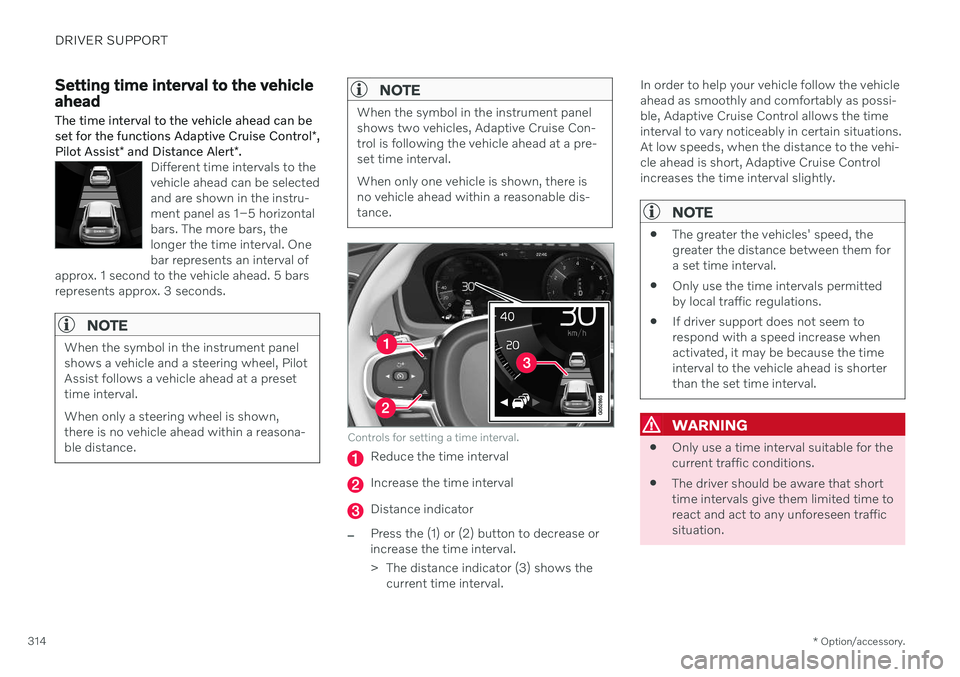
Controls for setting a time interval.
Reduce the time interval
Increase the time interval
Distance indicator
–Press the (1) or (2) button to decrease or increase the time interval.
> The distance indicator (3) shows the current time interval. In order to help your vehicle follow the vehicle ahead as smoothly and comfortably as possi-ble, Adaptive Cruise Control allows the timeinterval to vary noticeably in certain situations.At low speeds, when the distance to the vehi-cle ahead is short, Adaptive Cruise Controlincreases the time interval slightly.
NOTE
The greater the vehicles' speed, the greater the distance between them fora set time interval.
Only use the time intervals permittedby local traffic regulations.
If driver support does not seem torespond with a speed increase whenactivated, it may be because the timeinterval to the vehicle ahead is shorterthan the set time interval.
WARNING
Only use a time interval suitable for the current traffic conditions.
The driver should be aware that shorttime intervals give them limited time toreact and act to any unforeseen trafficsituation.
Page 319 of 661
DRIVER SUPPORT
}}
317
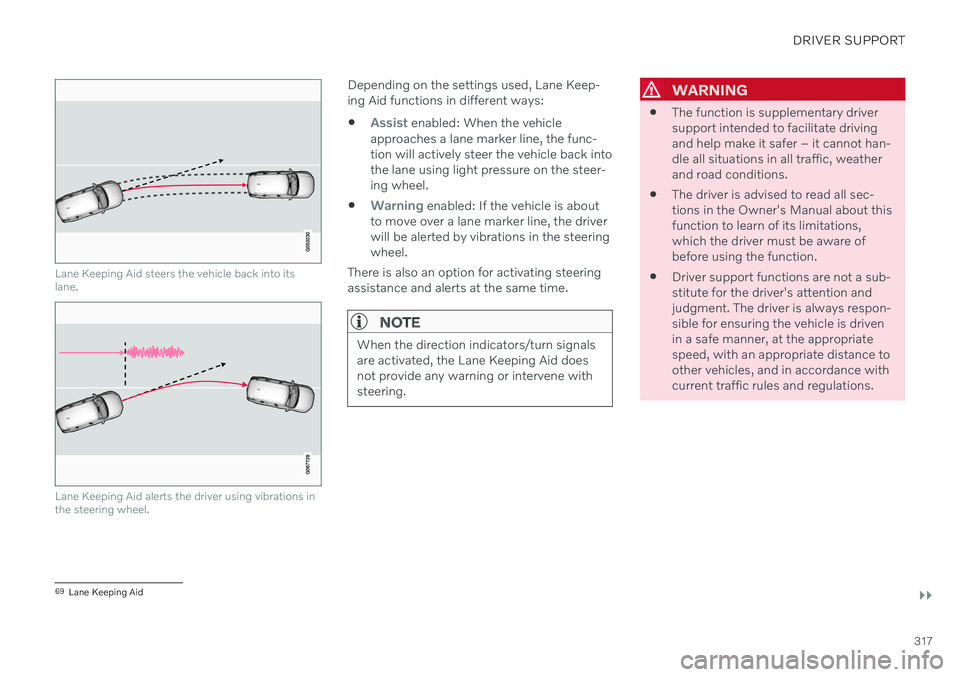
Lane Keeping Aid steers the vehicle back into its lane.
Lane Keeping Aid alerts the driver using vibrations in the steering wheel.
Depending on the settings used, Lane Keep- ing Aid functions in different ways:
Assist enabled: When the vehicle
approaches a lane marker line, the func- tion will actively steer the vehicle back intothe lane using light pressure on the steer-ing wheel.
Warning enabled: If the vehicle is about
to move over a lane marker line, the driver will be alerted by vibrations in the steeringwheel.
There is also an option for activating steeringassistance and alerts at the same time.
NOTE
When the direction indicators/turn signals are activated, the Lane Keeping Aid doesnot provide any warning or intervene withsteering.
WARNING
The function is supplementary driver support intended to facilitate drivingand help make it safer – it cannot han-dle all situations in all traffic, weatherand road conditions.
The driver is advised to read all sec-tions in the Owner's Manual about thisfunction to learn of its limitations,which the driver must be aware ofbefore using the function.
Driver support functions are not a sub-stitute for the driver's attention andjudgment. The driver is always respon-sible for ensuring the vehicle is drivenin a safe manner, at the appropriatespeed, with an appropriate distance toother vehicles, and in accordance withcurrent traffic rules and regulations.
69
Lane Keeping Aid