warning light VOLVO V60 2021 Workshop Manual
[x] Cancel search | Manufacturer: VOLVO, Model Year: 2021, Model line: V60, Model: VOLVO V60 2021Pages: 661, PDF Size: 12.68 MB
Page 353 of 661
DRIVER SUPPORT
* Option/accessory.351
WARNING
The function is supplementary driver support intended to facilitate drivingand help make it safer – it cannot han-dle all situations in all traffic, weatherand road conditions.
The driver is advised to read all sec-tions in the Owner's Manual about thisfunction to learn of its limitations,which the driver must be aware ofbefore using the function.
Driver support functions are not a sub-stitute for the driver's attention andjudgment. The driver is always respon-sible for ensuring the vehicle is drivenin a safe manner, at the appropriatespeed, with an appropriate distance toother vehicles, and in accordance withcurrent traffic rules and regulations.
Related information
Activating or deactivating Distance Alert(p. 351)
Distance Alert limitations (p. 351)
Setting time interval to the vehicle ahead(p. 314)
Collision risk warning from driver support(p. 311)
Head-up display
* (p. 140)
Activating or deactivating Distance Alert 94
Distance Alert can be turned off. The function is only available in vehicles that can displayinformation on the windshield with a head-up display *.
Activate or deactivate the function using this button inthe center display's Functionview.
GREEN button indicator light – the func- tion is activated.
GRAY button indicator light – the functionis deactivated.
Distance Alert is automatically activated eachtime the engine is started.
Related information
Distance Alert
* (p. 350)
Distance Alert limitations (p. 351)
Distance Alert limitations 95
Distance Alert functionality may be reduced in certain situations. The function is onlyavailable in vehicles that can display informa-tion on the windshield with a head-up dis- play *.
WARNING
Detection ability may be affected by vehicle size, e.g. motorcycles, whichcan cause the warning light to come onat a shorter time interval than that setor cause the warning to be temporarilyabsent.
Very high speeds can cause the light tocome on at a shorter time interval thanthat set due to limitations in the rangeof the radar unit.
NOTE
The function uses the vehicle's camera and radar sensor, which has certain generallimitations.
Related information
Distance Alert
* (p. 350)
Camera/radar sensor limitations (p. 383)
Head-up display
* (p. 140)
Page 355 of 661
DRIVER SUPPORT
}}
* Option/accessory.353
Related information
Driver support systems (p. 270)
Activating or deactivating Cross Traffic Alert
* (p. 353)
Cross Traffic Alert
* limitations (p. 353)
Cross Traffic Alert
* messages (p. 355)
BLIS
* (p. 344)
Park Assist
* (p. 356)
Activating or deactivating Cross Traffic Alert *98
The driver can choose to deactivate the Cross
Traffic Alert (CTA) function.
Activate or deactivate the function using this button inthe center display's Functionview.
GREEN button indicator light – the func- tion is activated.
GRAY button indicator light – the functionis deactivated.
The function is automatically activated eachtime the engine is started.
Related information
Cross Traffic Alert
* (p. 352)
Cross Traffic Alert
* limitations (p. 353)
Cross Traffic Alert
* messages (p. 355)
Cross Traffic Alert *99
limitations
The Cross Traffic Alert (CTA) function with auto brake may have limited functionality in
certain situations. Auto-brake is active atspeeds under 15 km/h (9.3 mph).
WARNING
The auto-brake sub-function can only
detect and apply the brakes for other mov- ing vehicles – not for e.g. stationary obsta-
cles, cyclists or pedestrians.
The function has certain limitations – the sen- sors, for example, cannot "see" through otherparked vehicles or objects blocking the vehi-cle. Below are a few examples of situations in which the function's field of vision may be ini-tially limited and approaching vehicles maytherefore not be detected until they are veryclose to your vehicle:
98 Warning for crossing traffic when the vehicle is backing up.
99 Warning for crossing traffic when the vehicle is backing up.
Page 359 of 661
DRIVER SUPPORT
}}
* Option/accessory.357
Related information
Driver support systems (p. 270)
Park Assist front, rear and sides
* (p. 357)
Activating or deactivating Park Assist
*
(p. 358)
Park Assist symbols and messages (p. 360)
Park Assist limitations (p. 359)
Park Assist front, rear and sides
*
Park Assist (PAS 102
) behaves differently
depending on which part of the vehicle is approaching an obstacle.
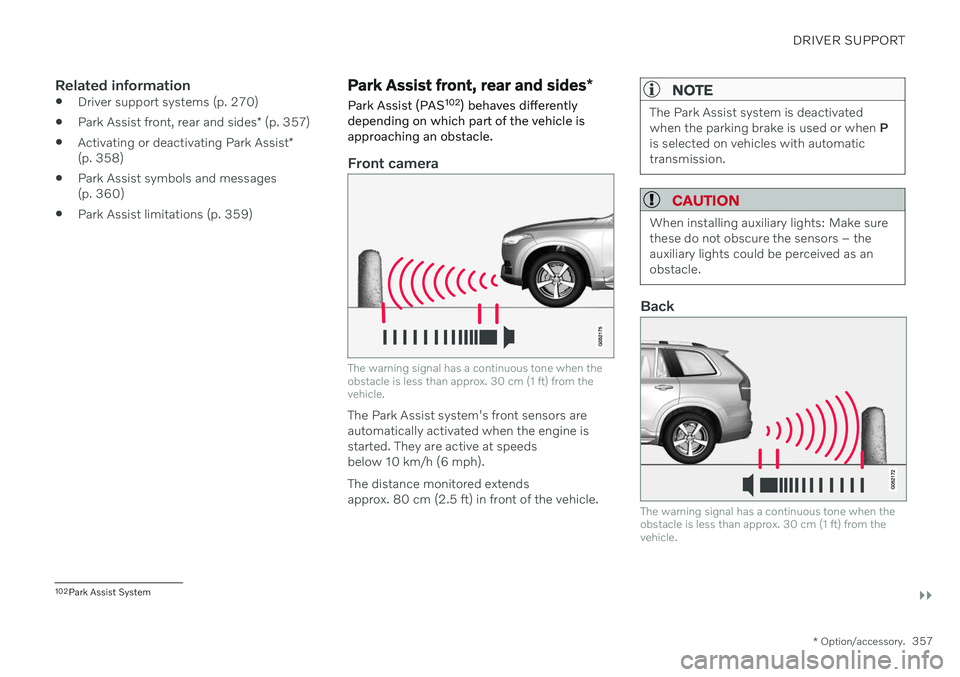
Front camera
The warning signal has a continuous tone when the obstacle is less than approx. 30 cm (1 ft) from thevehicle.
The Park Assist system's front sensors are automatically activated when the engine isstarted. They are active at speedsbelow 10 km/h (6 mph). The distance monitored extends approx. 80 cm (2.5 ft) in front of the vehicle.
NOTE
The Park Assist system is deactivated when the parking brake is used or when P
is selected on vehicles with automatictransmission.
CAUTION
When installing auxiliary lights: Make sure these do not obscure the sensors – theauxiliary lights could be perceived as anobstacle.
Back
The warning signal has a continuous tone when the obstacle is less than approx. 30 cm (1 ft) from thevehicle.
102 Park Assist System
Page 360 of 661
||
DRIVER SUPPORT
* Option/accessory.
358 The rear sensors will be activated if the vehicle begins rolling backward or if reverse gear isengaged. The distance monitored extends approx. 1.5 meters (5 ft) behind the vehicle. The Park Assist system's rear sensors will be automatically deactivated if the vehicle isbacking up with a trailer connected to thevehicle's electrical system.
NOTE
When reversing with e.g. a trailer or bike carrier on the trailer hitch – without Volvooriginal trailer cables – the Parking Assistsystem may have to be turned off manuallyto prevent the sensors from reacting tothese.
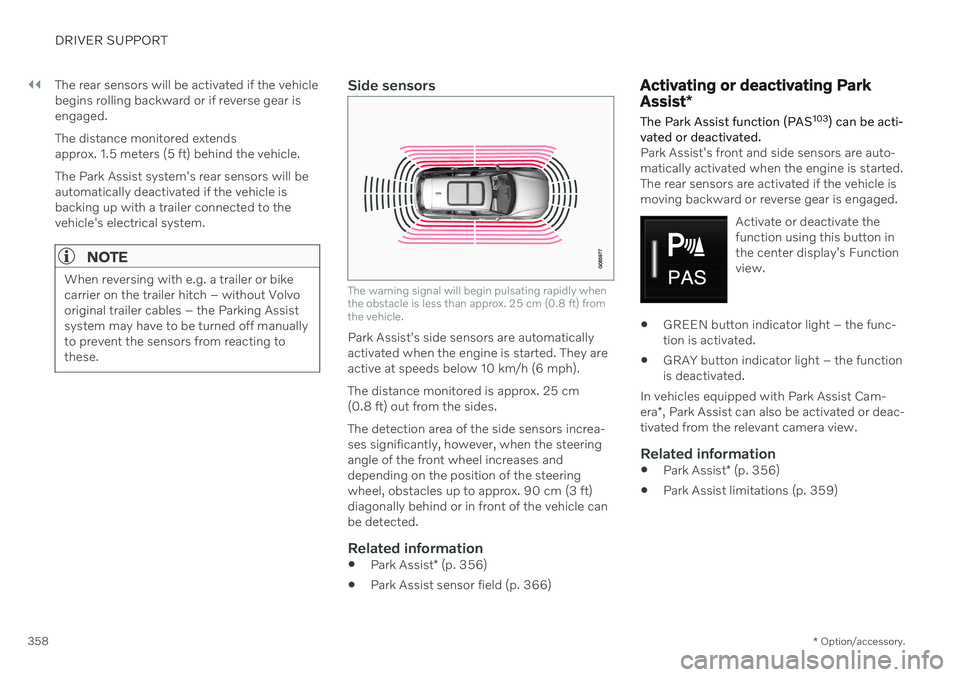
Side sensors
The warning signal will begin pulsating rapidly when the obstacle is less than approx. 25 cm (0.8 ft) fromthe vehicle.
Park Assist's side sensors are automatically activated when the engine is started. They areactive at speeds below 10 km/h (6 mph). The distance monitored is approx. 25 cm (0.8 ft) out from the sides. The detection area of the side sensors increa- ses significantly, however, when the steeringangle of the front wheel increases anddepending on the position of the steeringwheel, obstacles up to approx. 90 cm (3 ft)diagonally behind or in front of the vehicle canbe detected.
Related information
Park Assist
* (p. 356)
Park Assist sensor field (p. 366)
Activating or deactivating Park Assist
*
The Park Assist function (PAS 103
) can be acti-
vated or deactivated.
Park Assist's front and side sensors are auto- matically activated when the engine is started.The rear sensors are activated if the vehicle ismoving backward or reverse gear is engaged.
Activate or deactivate thefunction using this button inthe center display's Functionview.
GREEN button indicator light – the func- tion is activated.
GRAY button indicator light – the functionis deactivated.
In vehicles equipped with Park Assist Cam- era *, Park Assist can also be activated or deac-
tivated from the relevant camera view.
Related information
Park Assist
* (p. 356)
Park Assist limitations (p. 359)
Page 369 of 661
DRIVER SUPPORT
}}
* Option/accessory.367
Side sensor fields
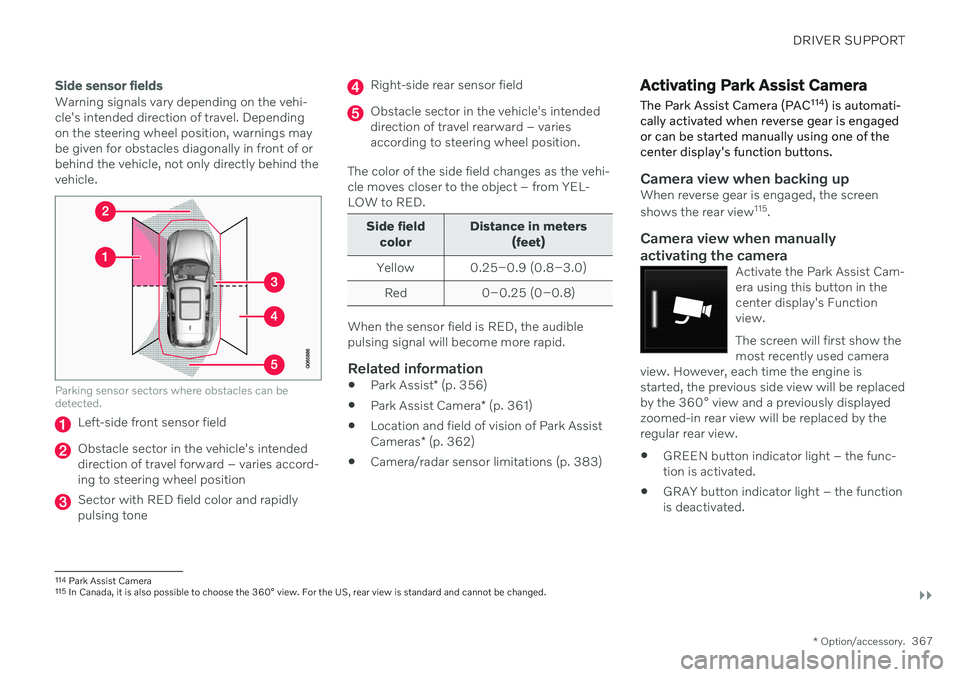
Warning signals vary depending on the vehi- cle's intended direction of travel. Dependingon the steering wheel position, warnings maybe given for obstacles diagonally in front of orbehind the vehicle, not only directly behind thevehicle.
Parking sensor sectors where obstacles can be detected.
Left-side front sensor field
Obstacle sector in the vehicle's intended direction of travel forward – varies accord-ing to steering wheel position
Sector with RED field color and rapidly pulsing tone
Right-side rear sensor field
Obstacle sector in the vehicle's intended direction of travel rearward – variesaccording to steering wheel position.
The color of the side field changes as the vehi-cle moves closer to the object – from YEL-LOW to RED.
Side field color Distance in meters
(feet)
Yellow 0.25–0.9 (0.8–3.0) Red 0–0.25 (0–0.8)
When the sensor field is RED, the audible pulsing signal will become more rapid.
Related information
Park Assist
* (p. 356)
Park Assist Camera
* (p. 361)
Location and field of vision of Park Assist Cameras
* (p. 362)
Camera/radar sensor limitations (p. 383)
Activating Park Assist Camera
The Park Assist Camera (PAC 114
) is automati-
cally activated when reverse gear is engaged or can be started manually using one of thecenter display's function buttons.
Camera view when backing upWhen reverse gear is engaged, the screen shows the rear view 115
.
Camera view when manually
activating the camera
Activate the Park Assist Cam- era using this button in thecenter display's Functionview. The screen will first show the most recently used camera
view. However, each time the engine isstarted, the previous side view will be replacedby the 360° view and a previously displayedzoomed-in rear view will be replaced by theregular rear view.
GREEN button indicator light – the func- tion is activated.
GRAY button indicator light – the functionis deactivated.
114
Park Assist Camera
115 In Canada, it is also possible to choose the 360° view. For the US, rear view is standard and cannot be changed.
Page 378 of 661
DRIVER SUPPORT
* Option/accessory.
376
Leaving a parallel parking space with Park Assist Pilot *
The
Park Out function can help the driver to
pull out of a parking space when the vehicle is parallel-parked.
NOTE
Leaving a parking space with the Park Outfunction should only be used in connection with parallel parking – it does not work forperpendicular parking.
The Park Out function is acti-
vated in the center display's Function view or in Cameraview.
GREEN button indicator light – the func- tion is activated.
GRAY button indicator light – the functionis deactivated.
1. Tap
Park Out in Function view or in Cam-
era view.
2. Move the gear selector to the suitable position (e.g. D or R) for the direction in which you will be pulling out of the park-ing space. 3. Be prepared to stop the vehicle when
instructed to do so by a graphic and mes-sage in the center display. Follow theinstructions in the same way as for theparking procedure.
Note that the steering wheel can "spring"back when the procedure is completed andthe driver may need to turn the steering wheelback to the maximum position in order to pullout of the parking space. If the function determines that the driver can pull out of the parking space without any extramaneuvers, the function will be deactivated,even if it seems as though the vehicle is notcompletely out of the parking space.
Related information
Park Assist Pilot
* (p. 371)
Park Assist Pilot
* limitations (p. 376)
Park Assist Pilot * limitations
Park Assist Pilot (PAP 121
) may not be able to
detect all conditions in all situations and func- tionality may therefore be limited.
The driver should be aware of the following limitations for Park Assist Pilot.
WARNING
The parking sensors have dead/blind spots where objects cannot bedetected.
Pay particular attention to people andanimals near the vehicle.
Bear in mind that the front end of thevehicle may swing out towards oncom-ing traffic during the parking maneuver.
CAUTION
Objects situated higher than the detection area of the sensors are not included whenthe parking maneuver is calculated, whichcould cause the function to swing into theparking space too early. Such parkingspaces should be avoided for this reason.
121
Park Assist Pilot
Page 388 of 661
||
DRIVER SUPPORT
* Option/accessory.
386
Additional Park Assist Camera *
limitations
Blind sectors
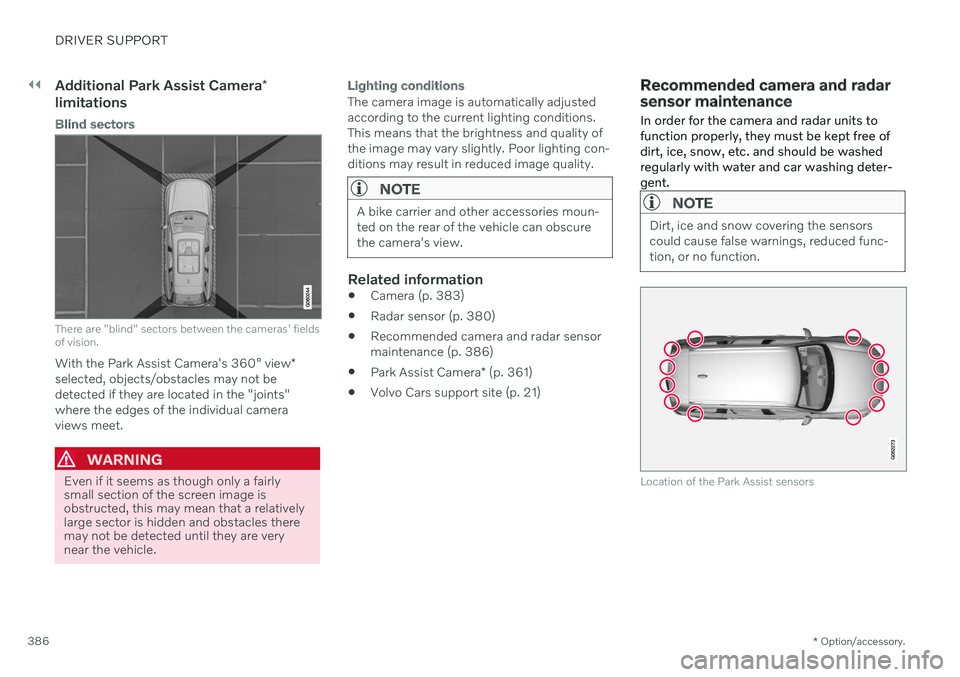
There are "blind" sectors between the cameras' fields of vision.
With the Park Assist Camera's 360° view *
selected, objects/obstacles may not be detected if they are located in the "joints"where the edges of the individual cameraviews meet.
WARNING
Even if it seems as though only a fairly small section of the screen image isobstructed, this may mean that a relativelylarge sector is hidden and obstacles theremay not be detected until they are verynear the vehicle.
Lighting conditions
The camera image is automatically adjusted according to the current lighting conditions.This means that the brightness and quality ofthe image may vary slightly. Poor lighting con-ditions may result in reduced image quality.
NOTE
A bike carrier and other accessories moun- ted on the rear of the vehicle can obscurethe camera's view.
Related information
Camera (p. 383)
Radar sensor (p. 380)
Recommended camera and radar sensor maintenance (p. 386)
Park Assist Camera
* (p. 361)
Volvo Cars support site (p. 21)
Recommended camera and radar sensor maintenance
In order for the camera and radar units to function properly, they must be kept free ofdirt, ice, snow, etc. and should be washedregularly with water and car washing deter-gent.
NOTE
Dirt, ice and snow covering the sensors could cause false warnings, reduced func-tion, or no function.
Location of the Park Assist sensors
Page 395 of 661
STARTING AND DRIVING
}}
393
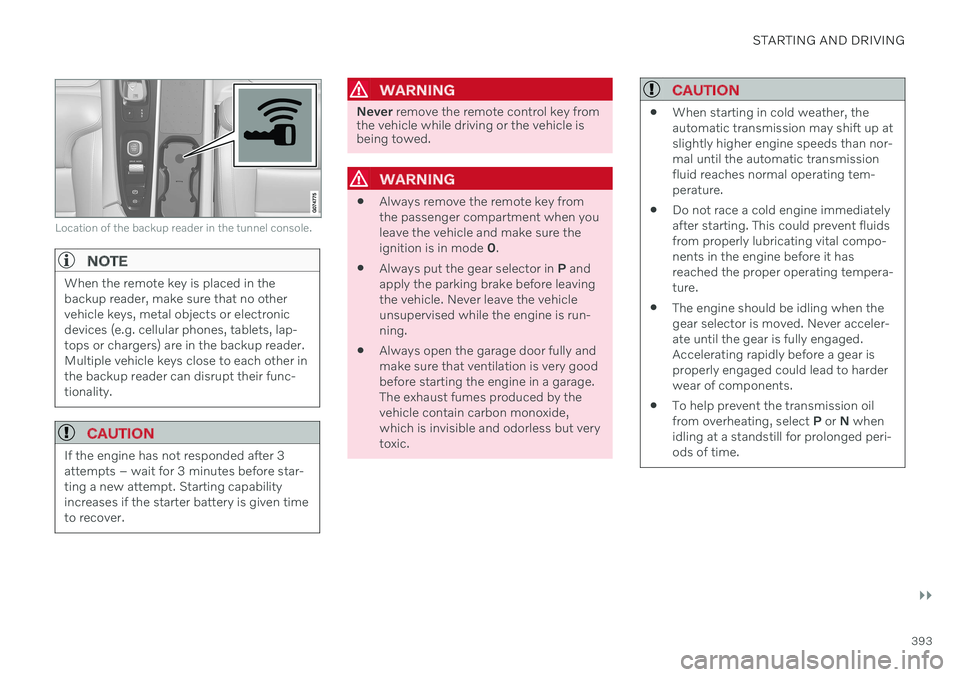
Location of the backup reader in the tunnel console.
NOTE
When the remote key is placed in the backup reader, make sure that no othervehicle keys, metal objects or electronicdevices (e.g. cellular phones, tablets, lap-tops or chargers) are in the backup reader.Multiple vehicle keys close to each other inthe backup reader can disrupt their func-tionality.
CAUTION
If the engine has not responded after 3 attempts – wait for 3 minutes before star-ting a new attempt. Starting capabilityincreases if the starter battery is given timeto recover.
WARNING
Never remove the remote control key from
the vehicle while driving or the vehicle is being towed.
WARNING
Always remove the remote key from the passenger compartment when youleave the vehicle and make sure theignition is in mode
0.
Always put the gear selector in
P and
apply the parking brake before leavingthe vehicle. Never leave the vehicleunsupervised while the engine is run-ning.
Always open the garage door fully andmake sure that ventilation is very goodbefore starting the engine in a garage.The exhaust fumes produced by thevehicle contain carbon monoxide,which is invisible and odorless but verytoxic.
CAUTION
When starting in cold weather, the automatic transmission may shift up atslightly higher engine speeds than nor-mal until the automatic transmissionfluid reaches normal operating tem-perature.
Do not race a cold engine immediatelyafter starting. This could prevent fluidsfrom properly lubricating vital compo-nents in the engine before it hasreached the proper operating tempera-ture.
The engine should be idling when thegear selector is moved. Never acceler-ate until the gear is fully engaged.Accelerating rapidly before a gear isproperly engaged could lead to harderwear of components.
To help prevent the transmission oilfrom overheating, select
P or N when
idling at a standstill for prolonged peri-ods of time.
Page 397 of 661
STARTING AND DRIVING
}}
* Option/accessory.395
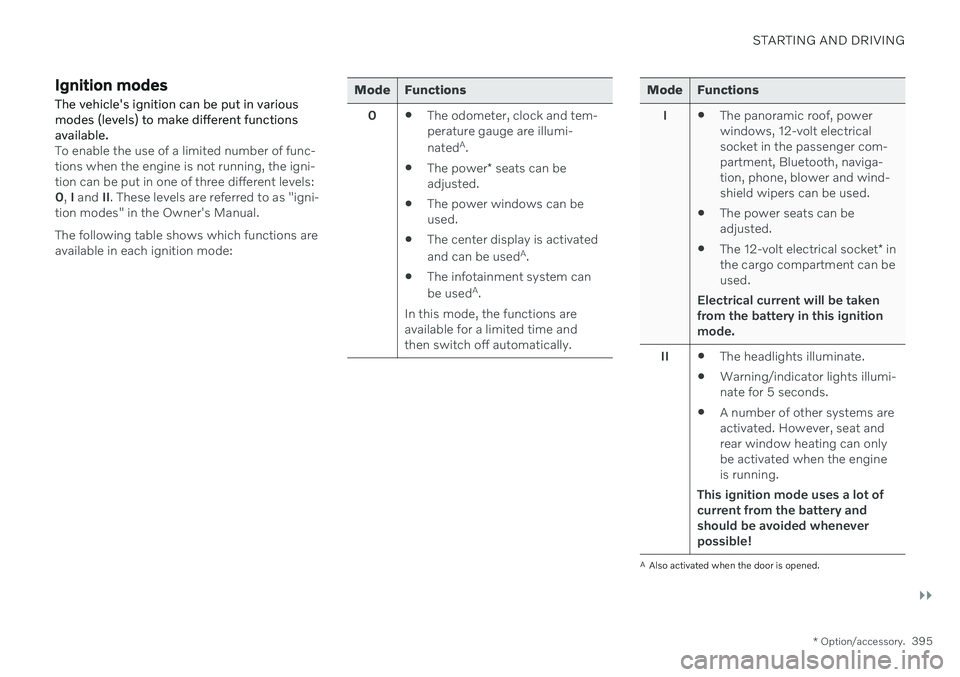
Ignition modes The vehicle's ignition can be put in various modes (levels) to make different functionsavailable.
To enable the use of a limited number of func- tions when the engine is not running, the igni-tion can be put in one of three different levels:0, I and II. These levels are referred to as "igni-
tion modes" in the Owner's Manual. The following table shows which functions are available in each ignition mode:
Mode Functions
0 The odometer, clock and tem- perature gauge are illumi- nated A
.
The power
* seats can be
adjusted.
The power windows can be used.
The center display is activated and can be used A
.
The infotainment system canbe used A
.
In this mode, the functions are available for a limited time andthen switch off automatically.Mode Functions
I The panoramic roof, power windows, 12-volt electricalsocket in the passenger com-partment, Bluetooth, naviga-tion, phone, blower and wind-shield wipers can be used.
The power seats can beadjusted.
The 12-volt electrical socket
* in
the cargo compartment can beused.
Electrical current will be taken
from the battery in this ignitionmode.
II The headlights illuminate.
Warning/indicator lights illumi-nate for 5 seconds.
A number of other systems areactivated. However, seat andrear window heating can onlybe activated when the engineis running.
This ignition mode uses a lot of
current from the battery andshould be avoided wheneverpossible!
A Also activated when the door is opened.
Page 399 of 661
STARTING AND DRIVING
}}
397
Brake functions
The vehicle's brakes are used to reduce speed or prevent the vehicle from rolling.
In addition to the wheel brakes and parking brakes, the vehicle is also equipped with anumber of automatic brake assist functions.These systems provide assistance by e.g. thedriver not needing to depress the brake pedalat a traffic light or when starting up a hill. Depending on how the vehicle is equipped, the following brake assist functions may beincluded:
Auto-hold brake function at a standstill(Auto Hold)
Hill Start Assist (Hill Start Assist)
Braking assist after a collision
City Safety
Related information
Brakes (p. 397)
Parking brake (p. 400)
Auto-hold brakes (p. 403)
Braking assist after a collision (p. 405)
Hill Start Assist (p. 405)
City Safety
™ (p. 323)
Brakes
The brake pedal is used to apply the vehicle's regular brakes, which are part of the brakesystem.
The vehicle is equipped with two brake cir- cuits. If one brake circuit is damaged, thebrake pedal may go down further whendepressed. More pressure will then berequired from the driver for normal brakingeffect. The driver's pressure on the brake pedal is enhanced by a power braking function.
WARNING
Power braking only functions if the engine is running.
If the brake pedal is used when the engine is turned off, the pedal will feel stiffer than usualand greater pressure must be applied to brakethe vehicle. In very hilly areas or when driving with a heavy load, manual gear shifting can be used to aug-ment the brakes with engine braking. Enginebraking is most effective if the same gear isused both uphill and downhill.
Anti-lock brakesThe vehicle is equipped with an Anti-lock Braking System (ABS 2
), which helps prevent
the wheels from locking and helps maintain steering control when braking. Vibrations maybe felt from the brake pedal when ABS isoperating, which is normal. After the vehicle is started, a brief test of the ABS system is automatically performed whenthe driver releases the brake pedal. An addi-tional automatic test of the system may beperformed when the vehicle is traveling at alow speed. During the test, the brake pedalmay feel as though it is pulsating.
2 Anti-lock Braking System