light VOLVO V70 2006 Workshop Manual
[x] Cancel search | Manufacturer: VOLVO, Model Year: 2006, Model line: V70, Model: VOLVO V70 2006Pages: 138, PDF Size: 3.53 MB
Page 96 of 138
Turn signal, driver's side
Removing the defective bulb:
1. Switch off the headlights and turn the ignition switch to position 0.
2. Pull out the bulb holder by twisting it counterclockwise.
3. Remove the bulb from the holder by pressing it in and turning it counterclockwise.
Installing the new bulb:
1. Insert the new bulb into the holder by pressing it in and turning it clockwise.
2. Reinsert the bulb holder in the headlight housing and twist it clockwise until it seats properly.
Turn signal, passenger's side
Removing the defective bulb:
1. Switch off the headlights and turn the ignition switch to position 0.
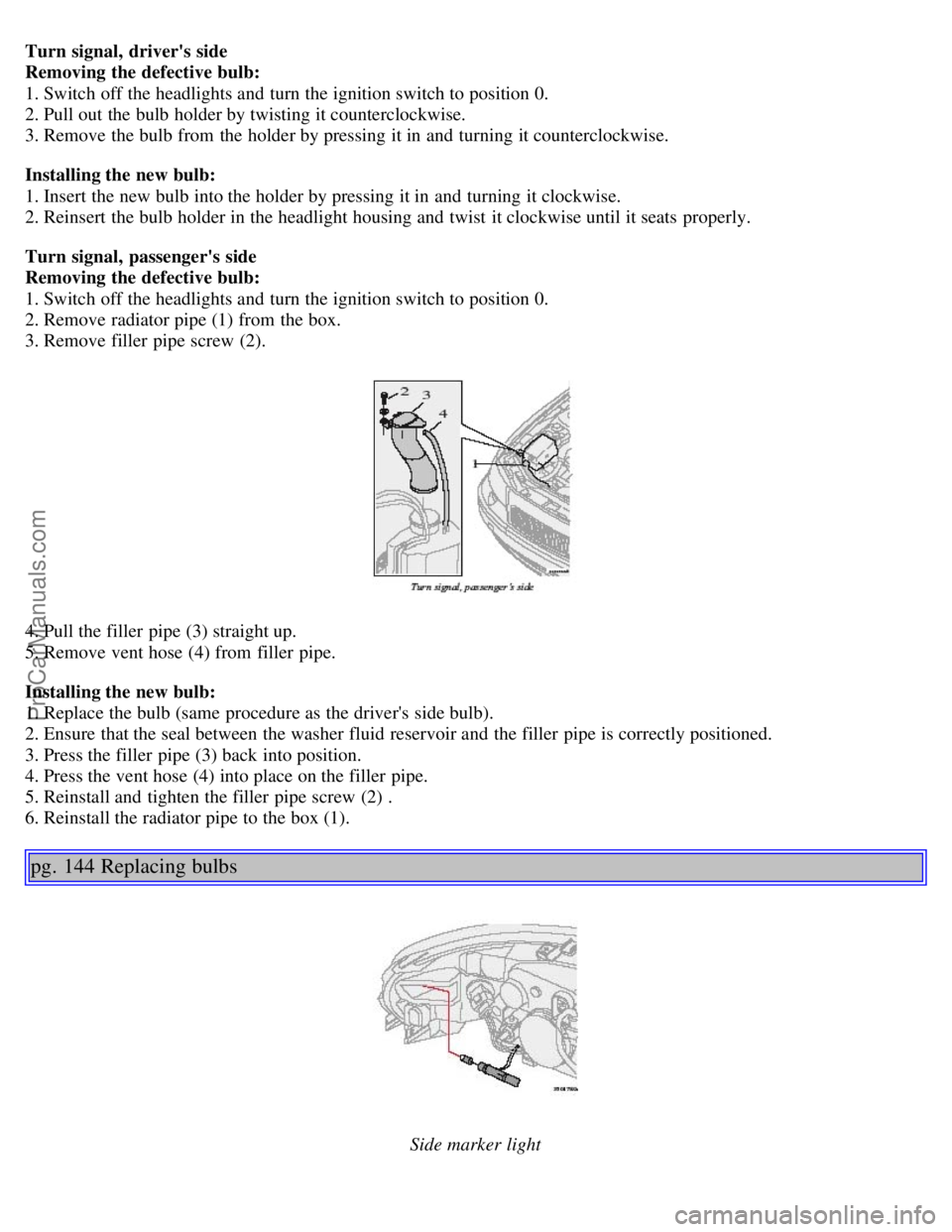
2. Remove radiator pipe (1) from the box.
3. Remove filler pipe screw (2).
4. Pull the filler pipe (3) straight up.
5. Remove vent hose (4) from filler pipe.
Installing the new bulb:
1. Replace the bulb (same procedure as the driver's side bulb).
2. Ensure that the seal between the washer fluid reservoir and the filler pipe is correctly positioned.
3. Press the filler pipe (3) back into position.
4. Press the vent hose (4) into place on the filler pipe.
5. Reinstall and tighten the filler pipe screw (2) .
6. Reinstall the radiator pipe to the box (1).
pg. 144 Replacing bulbs
Side marker light
ProCarManuals.com
Page 97 of 138
Side marker light
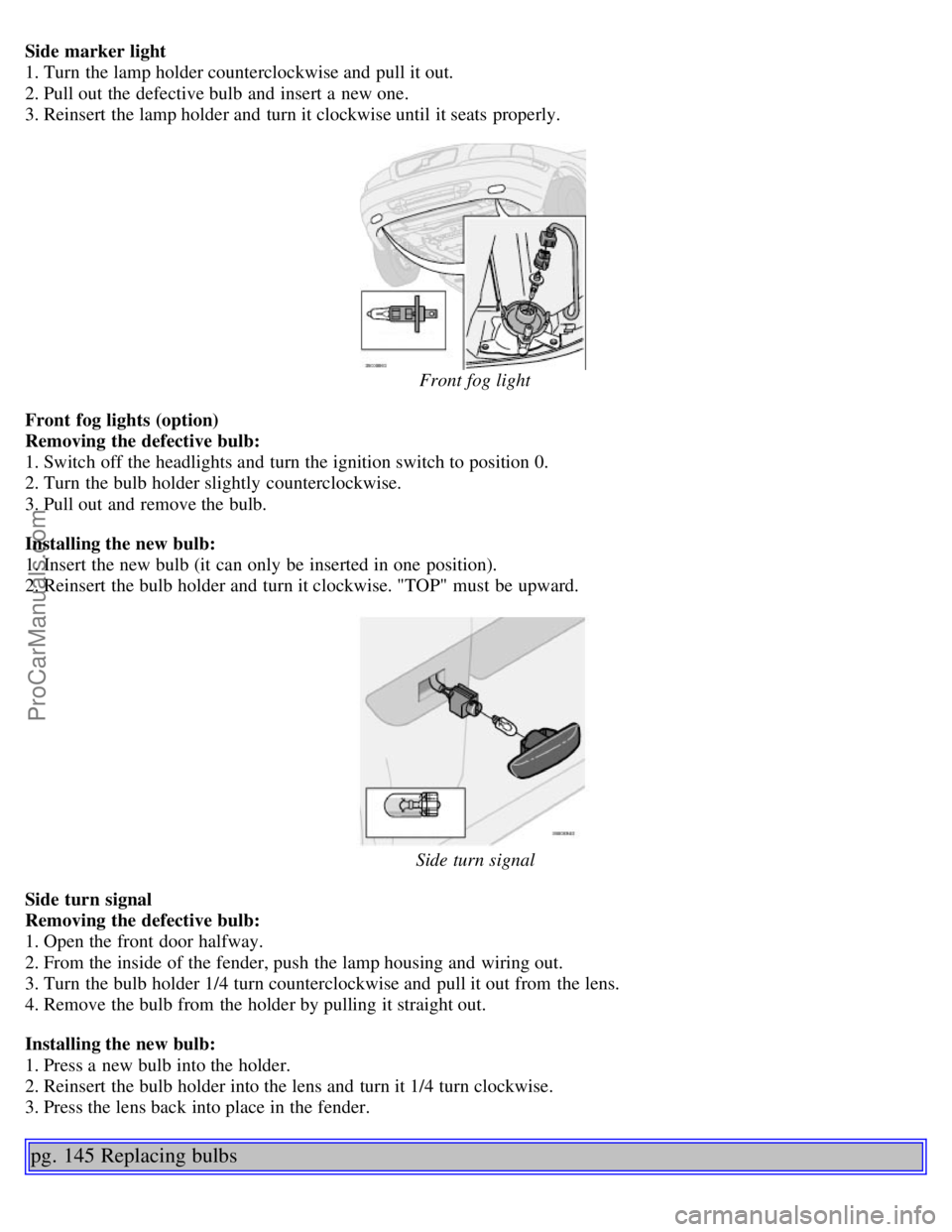
1. Turn the lamp holder counterclockwise and pull it out.
2. Pull out the defective bulb and insert a new one.
3. Reinsert the lamp holder and turn it clockwise until it seats properly.
Front fog light
Front fog lights (option)
Removing the defective bulb:
1. Switch off the headlights and turn the ignition switch to position 0.
2. Turn the bulb holder slightly counterclockwise.
3. Pull out and remove the bulb.
Installing the new bulb:
1. Insert the new bulb (it can only be inserted in one position).
2. Reinsert the bulb holder and turn it clockwise. "TOP" must be upward.
Side turn signal
Side turn signal
Removing the defective bulb:
1. Open the front door halfway.
2. From the inside of the fender, push the lamp housing and wiring out.
3. Turn the bulb holder 1/4 turn counterclockwise and pull it out from the lens.
4. Remove the bulb from the holder by pulling it straight out.
Installing the new bulb:
1. Press a new bulb into the holder.
2. Reinsert the bulb holder into the lens and turn it 1/4 turn clockwise.
3. Press the lens back into place in the fender.
pg. 145 Replacing bulbs
ProCarManuals.com
Page 98 of 138
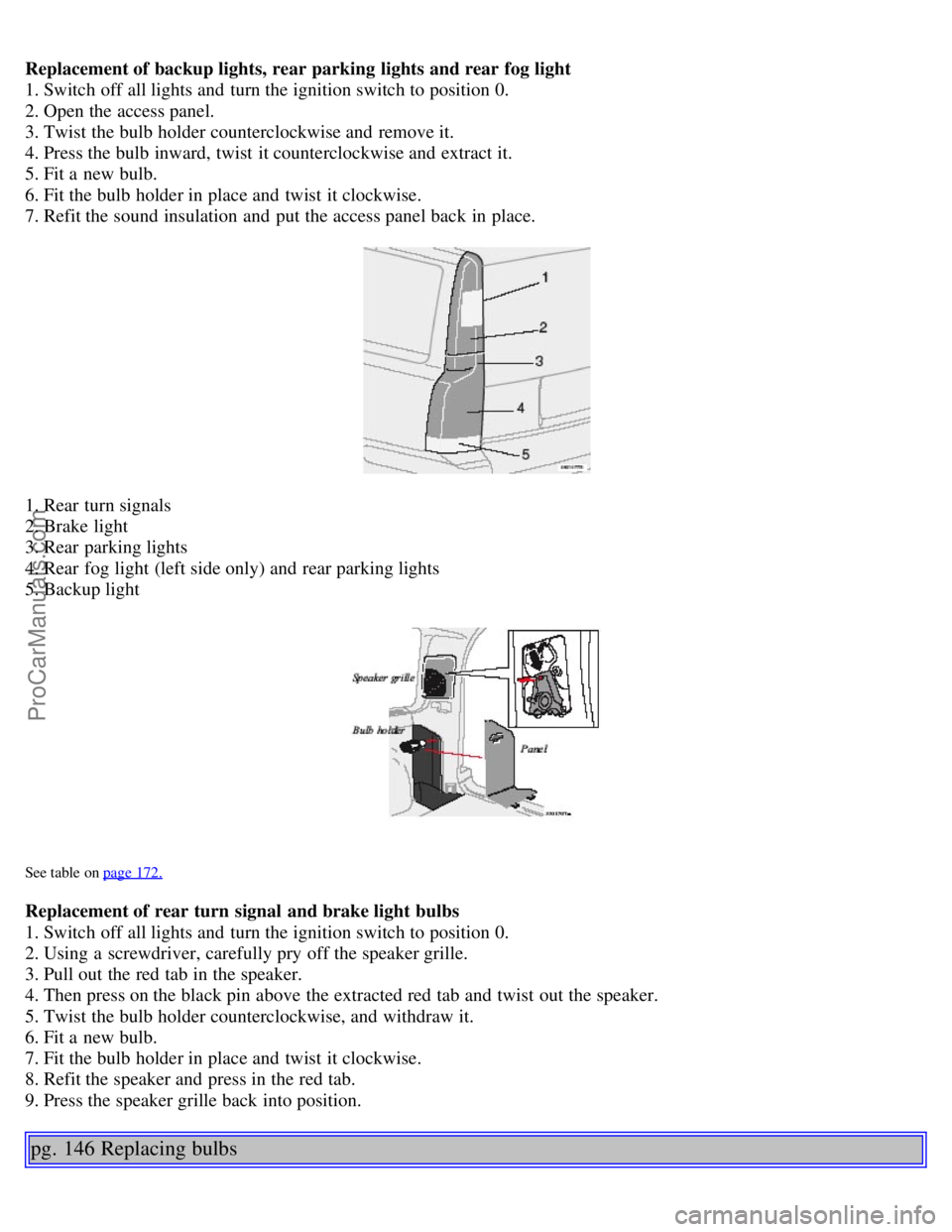
Replacement of backup lights, rear parking lights and rear fog light
1. Switch off all lights and turn the ignition switch to position 0.
2. Open the access panel.
3. Twist the bulb holder counterclockwise and remove it.
4. Press the bulb inward, twist it counterclockwise and extract it.
5. Fit a new bulb.
6. Fit the bulb holder in place and twist it clockwise.
7. Refit the sound insulation and put the access panel back in place.
1. Rear turn signals
2. Brake light
3. Rear parking lights
4. Rear fog light (left side only) and rear parking lights
5. Backup light
See table on page 172.
Replacement of rear turn signal and brake light bulbs
1. Switch off all lights and turn the ignition switch to position 0.
2. Using a screwdriver, carefully pry off the speaker grille.
3. Pull out the red tab in the speaker.
4. Then press on the black pin above the extracted red tab and twist out the speaker.
5. Twist the bulb holder counterclockwise, and withdraw it.
6. Fit a new bulb.
7. Fit the bulb holder in place and twist it clockwise.
8. Refit the speaker and press in the red tab.
9. Press the speaker grille back into position.
pg. 146 Replacing bulbs
ProCarManuals.com
Page 99 of 138
License plate lights
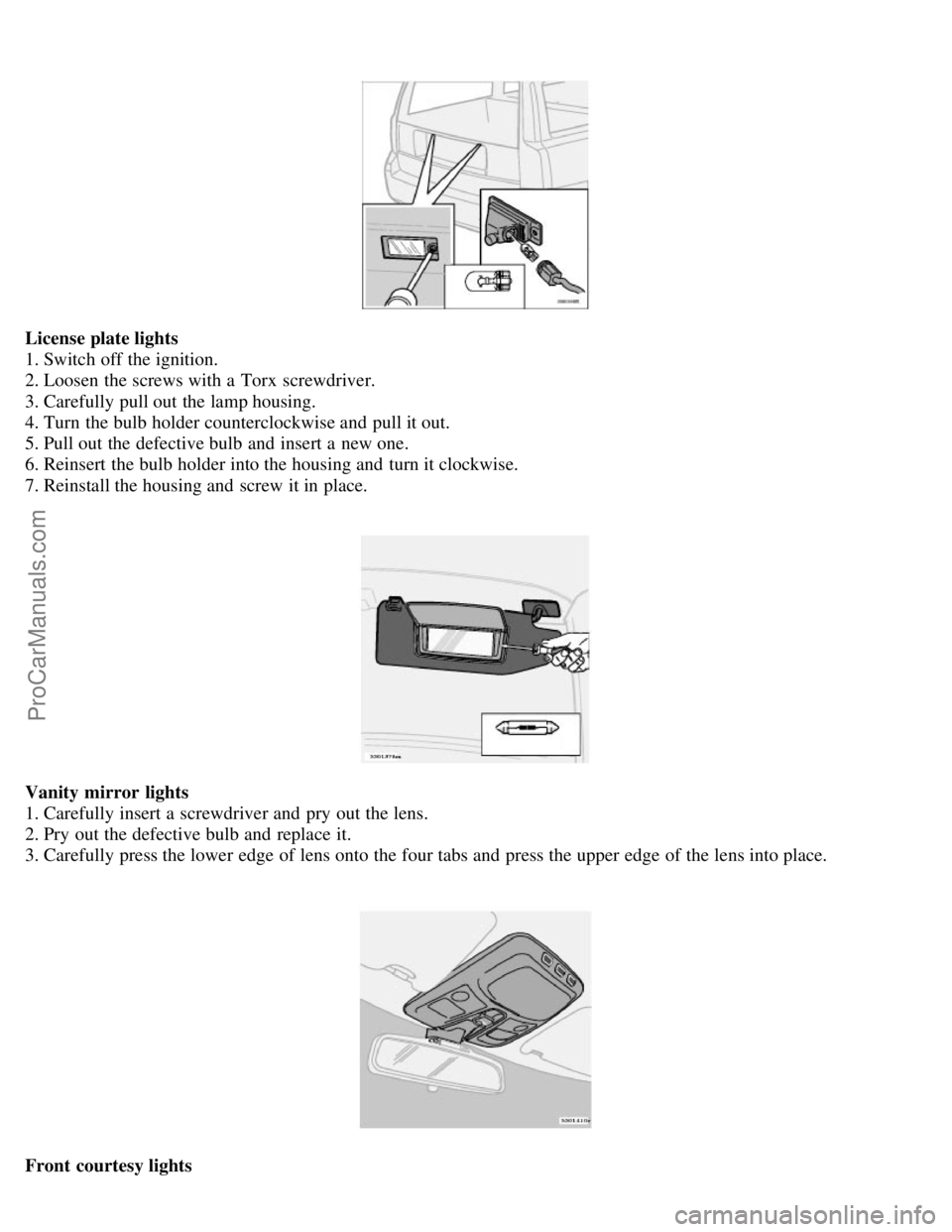
1. Switch off the ignition.
2. Loosen the screws with a Torx screwdriver.
3. Carefully pull out the lamp housing.
4. Turn the bulb holder counterclockwise and pull it out.
5. Pull out the defective bulb and insert a new one.
6. Reinsert the bulb holder into the housing and turn it clockwise.
7. Reinstall the housing and screw it in place.
Vanity mirror lights
1. Carefully insert a screwdriver and pry out the lens.
2. Pry out the defective bulb and replace it.
3. Carefully press the lower edge of lens onto the four tabs and press the upper edge of the lens into place.
Front courtesy lights
ProCarManuals.com
Page 100 of 138
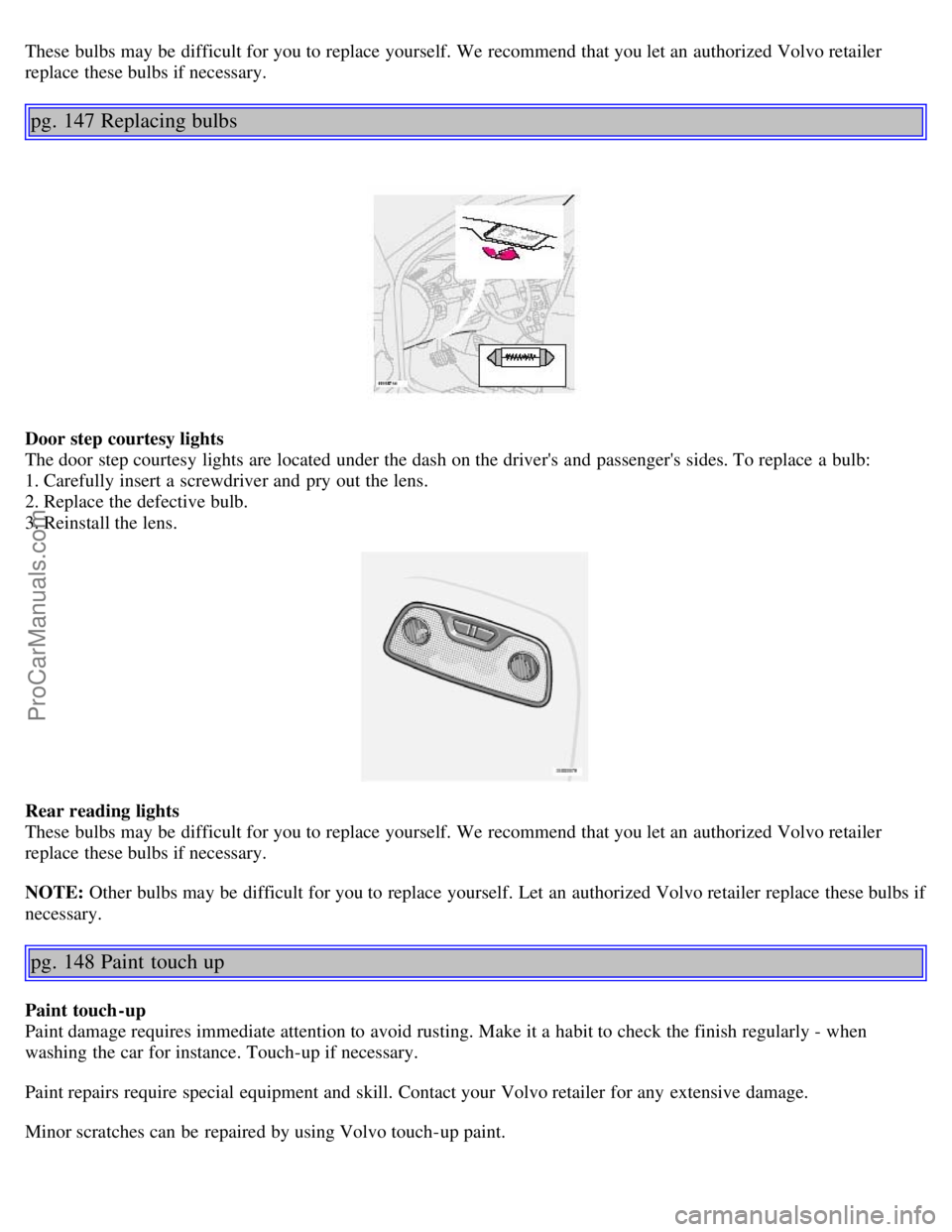
These bulbs may be difficult for you to replace yourself. We recommend that you let an authorized Volvo retailer
replace these bulbs if necessary.
pg. 147 Replacing bulbs
Door step courtesy lights
The door step courtesy lights are located under the dash on the driver's and passenger's sides. To replace a bulb:
1. Carefully insert a screwdriver and pry out the lens.
2. Replace the defective bulb.
3. Reinstall the lens.
Rear reading lights
These bulbs may be difficult for you to replace yourself. We recommend that you let an authorized Volvo retailer
replace these bulbs if necessary.
NOTE: Other bulbs may be difficult for you to replace yourself. Let an authorized Volvo retailer replace these bulbs if
necessary.
pg. 148 Paint touch up
Paint touch-up
Paint damage requires immediate attention to avoid rusting. Make it a habit to check the finish regularly - when
washing the car for instance. Touch-up if necessary.
Paint repairs require special equipment and skill. Contact your Volvo retailer for any extensive damage.
Minor scratches can be repaired by using Volvo touch-up paint.
ProCarManuals.com
Page 101 of 138
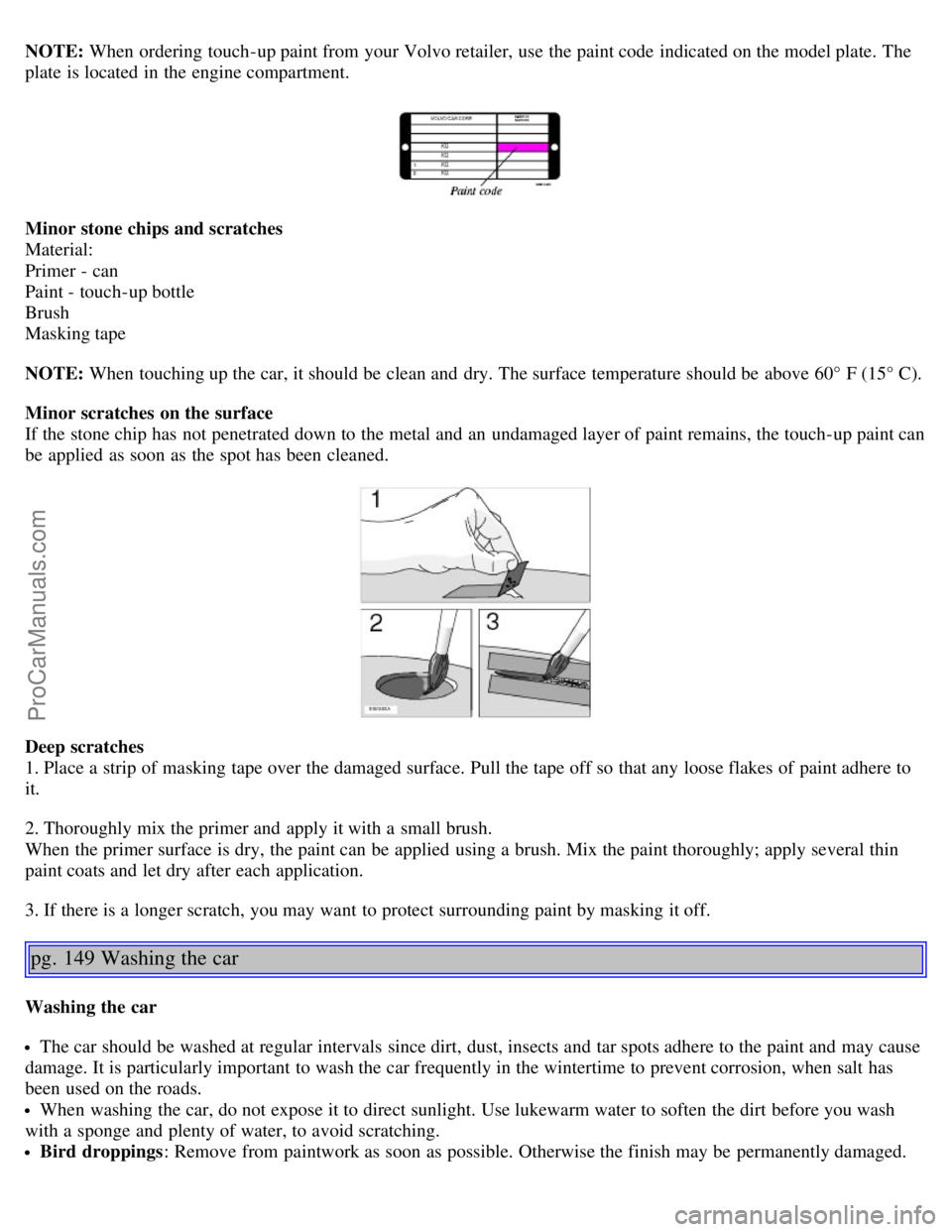
NOTE: When ordering touch-up paint from your Volvo retailer, use the paint code indicated on the model plate. The
plate is located in the engine compartment.
Minor stone chips and scratches
Material:
Primer - can
Paint - touch-up bottle
Brush
Masking tape
NOTE: When touching up the car, it should be clean and dry. The surface temperature should be above 60° F (15° C).
Minor scratches on the surface
If the stone chip has not penetrated down to the metal and an undamaged layer of paint remains, the touch-up paint can
be applied as soon as the spot has been cleaned.
Deep scratches
1. Place a strip of masking tape over the damaged surface. Pull the tape off so that any loose flakes of paint adhere to
it.
2. Thoroughly mix the primer and apply it with a small brush.
When the primer surface is dry, the paint can be applied using a brush. Mix the paint thoroughly; apply several thin
paint coats and let dry after each application.
3. If there is a longer scratch, you may want to protect surrounding paint by masking it off.
pg. 149 Washing the car
Washing the car
The car should be washed at regular intervals since dirt, dust, insects and tar spots adhere to the paint and may cause
damage. It is particularly important to wash the car frequently in the wintertime to prevent corrosion, when salt has
been used on the roads.
When washing the car, do not expose it to direct sunlight. Use lukewarm water to soften the dirt before you wash
with a sponge and plenty of water, to avoid scratching.
Bird droppings : Remove from paintwork as soon as possible. Otherwise the finish may be permanently damaged.
ProCarManuals.com
Page 103 of 138

Polishing and waxing
Normally, polishing is not required during the first year after delivery. However, waxing may be beneficial.
Before applying polish or wax the car must be washed and dried. Tar spots can be removed with kerosene or tar
remover. Difficult spots may require a fine rubbing compound.
After polishing, use liquid or paste wax.
Several commercially available products contain both polish and wax.
Waxing alone does not substitute for polishing of a dull surface.
A wide range of polymer-based car waxes can be purchased today. These waxes are easy to use and produce a long-
lasting, high-gloss finish that protects the bodywork against oxidation, road dirt and fading.
Do not polish or wax your car in direct sunlight (the surface of the car should not be warmer than 113° F (45° C).
CAUTION:
Volvo does not recommend the use of long-life or durable paint protection coatings, some of which may claim to
prevent pitting, fading, oxidation, etc. These coatings have not been tested by Volvo for compatibility with your
vehicle's clear coat. Some of them may cause the clear coat to soften, crack, or cloud. Damage caused by application
of paint protection coatings may not be covered under your vehicle's paint warranty.
pg. 151 Cleaning the upholstery
Fabric
Clean with soapy water or a detergent. For more difficult spots caused by oil, ice cream, shoe polish, grease, etc., use a
clothing/fabric stain remover. Consult your Volvo retailer.
Interior plastic components
Cleaning interior plastic components should be done with a cleaning agent specially designed for this purpose. Consult
your Volvo retailer.
Alcantera™ suede-like material
Suede -like upholstery can be cleaned with a soft cloth and mild soap solution.
Leather care
Volvo's leather upholstery is manufactured with a protectant to repel soiling. Over time, sunlight, grease and dirt can
break down the protection. Staining, cracking, scuffing, and fading can result.
Volvo offers an easy-to-use, non-greasy leather care kit formulated to clean and beautify your vehicle's leather, and to
renew the protective qualities of its finish. The cleaner removes dirt and oil buildup. The light cream protectant
restores a barrier against soil and sunlight.
Volvo also offers a special leather softener that should be applied after the cleaner and protectant. It leaves leather soft
and smooth, and reduces friction between leather and other finishes in the vehicle.
Volvo recommends cleaning, protecting and conditioning your vehicle's leather two to four times a year. Ask your
Volvo retailer about Leather Care Kit 951 0251 and Leather Softener 943 7429.
CAUTION!
Under no circumstances should gasoline, naphtha or similar cleaning agents be used on the plastic or the leather
since these can cause damage.
Take extra care when removing stains such as ink or lipstick since the coloring can spread.
Use solvents sparingly. Too much solvent can damage the seat padding.
Start from the outside of the stain and work toward the center.
ProCarManuals.com
Page 112 of 138
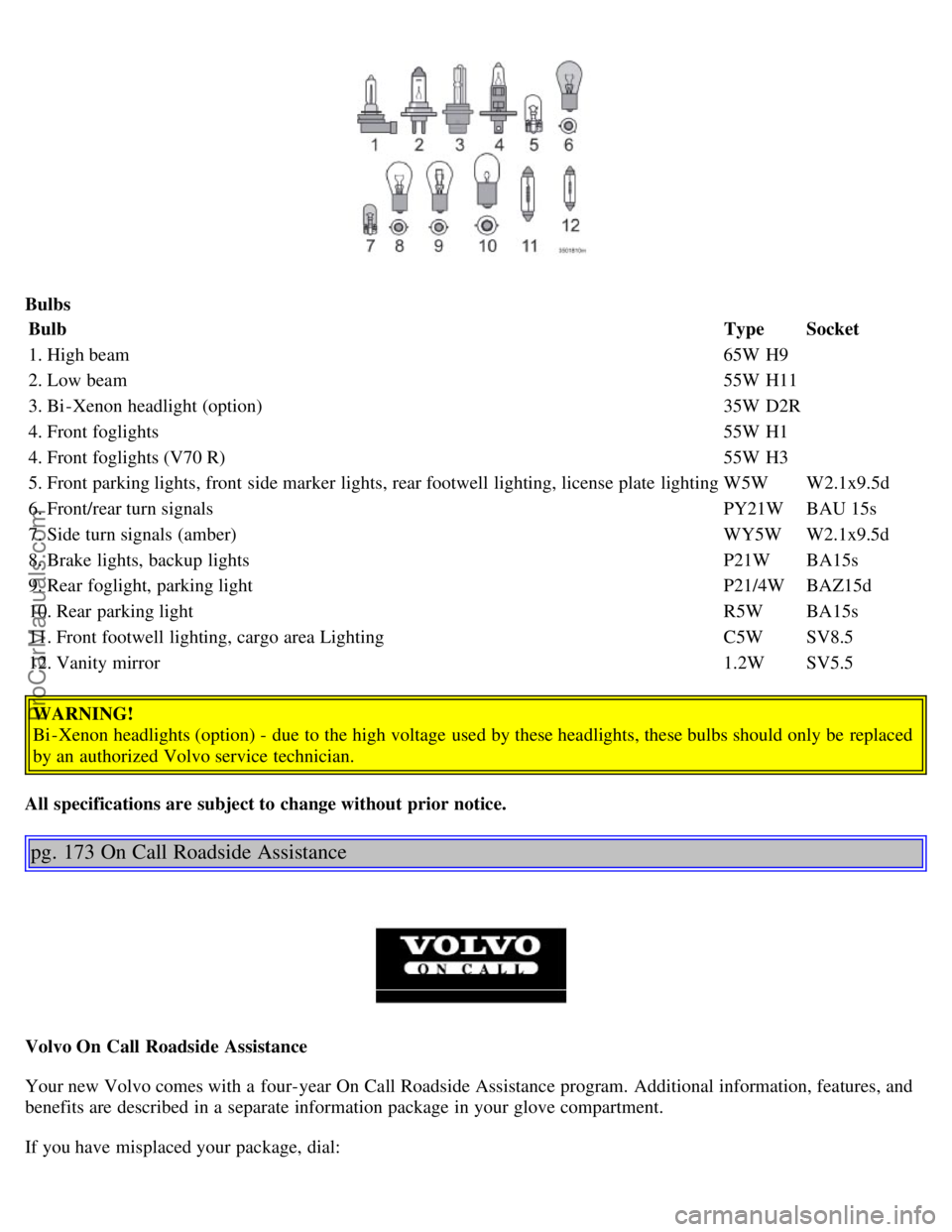
BulbsBulb TypeSocket
1. High beam 65W H9
2. Low beam 55W H11
3. Bi -Xenon headlight (option) 35W D2R
4. Front foglights 55W H1
4. Front foglights (V70 R) 55W H3
5. Front parking lights, front side marker lights, rear footwell lighting, license plate lighting W5WW2.1x9.5d
6. Front/rear turn signals PY21WBAU 15s
7. Side turn signals (amber) WY5WW2.1x9.5d
8. Brake lights, backup lights P21WBA15s
9. Rear foglight, parking light P21/4WBAZ15d
10. Rear parking light R5WBA15s
11. Front footwell lighting, cargo area Lighting C5WSV8.5
12. Vanity mirror 1.2WSV5.5
WARNING!
Bi -Xenon headlights (option) - due to the high voltage used by these headlights, these bulbs should only be replaced
by an authorized Volvo service technician.
All specifications are subject to change without prior notice.
pg. 173 On Call Roadside Assistance
Volvo On Call Roadside Assistance
Your new Volvo comes with a four-year On Call Roadside Assistance program. Additional information, features, and
benefits are described in a separate information package in your glove compartment.
If you have misplaced your package, dial:
ProCarManuals.com
Page 115 of 138

• Never use cleaning spray or antistatic liquid. Use only cleaners specifically made for CDs.
• Use discs of the correct size only (3.5" discs should never be used). The discs should conform to the norms EN60908
(IEC60908).
• Do not put tape or labels on the disc itself.
• Volvo does not recommend the use of plastic outer rings on the disc.
• Condensation may occur on discs/optical components of the changer in cold winter weather. The disc can be dried
with a clean, lint-free cloth. Optical components in the CD changer may, however, take up to one hour to dry off.
• Never attempt to play a disc which is damaged in any way.
• When not in use, the discs should be stored in their covers. Avoid storing discs in excessive heat, direct sunlight or
dusty locations.
pg. 177 Audio system HU-650 - overview
1. On/off - press
Volume - turn
2. Buttons for selecting stored radio stations/discs in optional CD changer
3. Bass (press to release control and turn to adjust)
4. Treble (press to release the control, and turn to adjust)
5. Balance (left/right) - press to release control and turn to adjust
6. Fader (front/rear) - press to release the control, and turn to adjust
7. Source/Menu
Press to open main menu
Turn to select FM, AM, CD, CD changer (option)
8. Scan function (automatically search for radio stations)
9. Exit (exit the menu)
10. Navigation buttons (seek/change radio station or CD track)
11. CD eject
12. CD slot
ProCarManuals.com
Page 122 of 138
2 0 0 6
VOLVO V70
HomeLink® Universal Transceiver (option)
pg. 192 HomeLink® Universal Transceiver (option)
HomeLink® Universal Transceiver
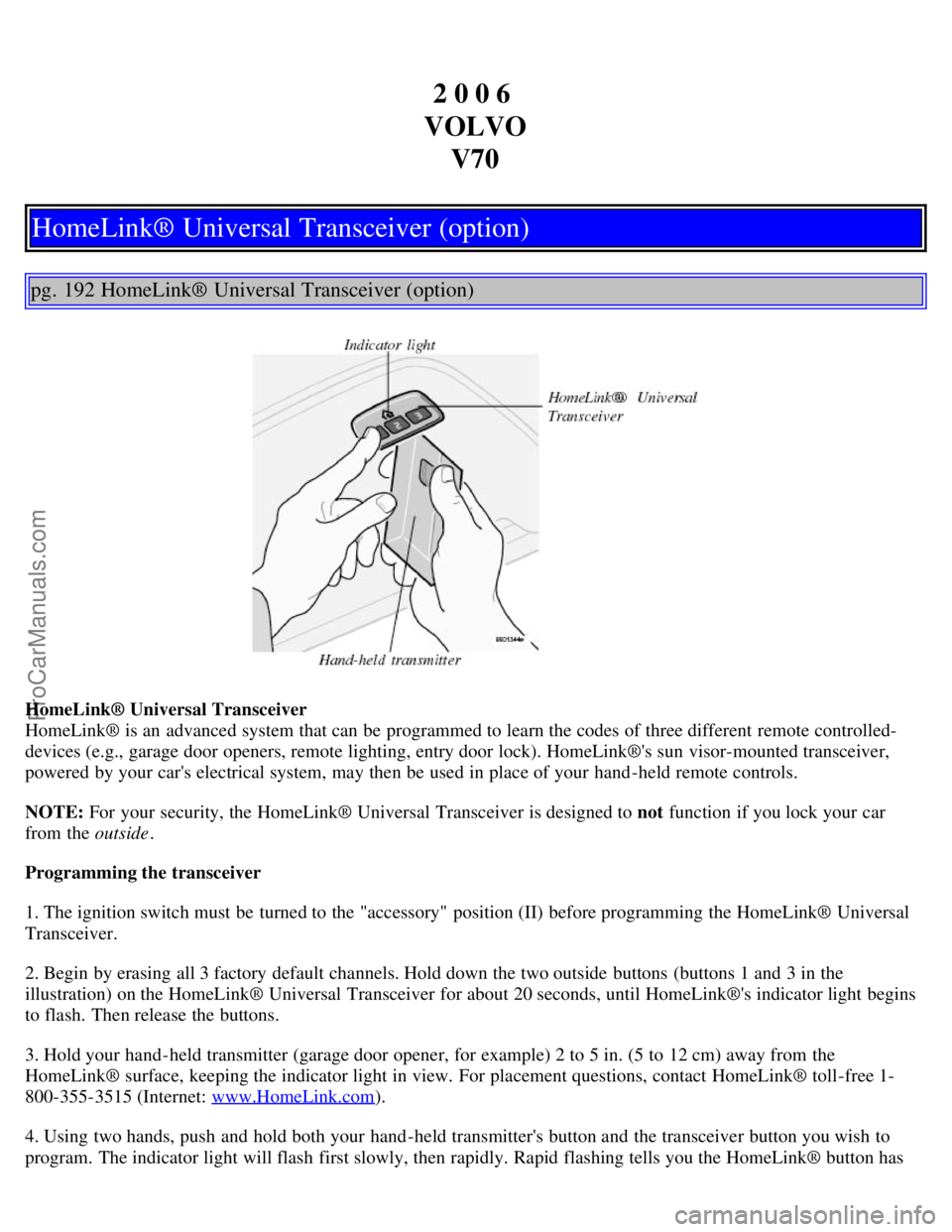
HomeLink® is an advanced system that can be programmed to learn the codes of three different remote controlled-
devices (e.g., garage door openers, remote lighting, entry door lock). HomeLink®'s sun visor-mounted transceiver,
powered by your car's electrical system, may then be used in place of your hand -held remote controls.
NOTE: For your security, the HomeLink® Universal Transceiver is designed to not function if you lock your car
from the outside .
Programming the transceiver
1. The ignition switch must be turned to the "accessory" position (II) before programming the HomeLink® Universal
Transceiver.
2. Begin by erasing all 3 factory default channels. Hold down the two outside buttons (buttons 1 and 3 in the
illustration) on the HomeLink® Universal Transceiver for about 20 seconds, until HomeLink®'s indicator light begins
to flash. Then release the buttons.
3. Hold your hand -held transmitter (garage door opener, for example) 2 to 5 in. (5 to 12 cm) away from the
HomeLink® surface, keeping the indicator light in view. For placement questions, contact HomeLink® toll-free 1-
800-355-3515 (Internet: www.HomeLink.com
).
4. Using two hands, push and hold both your hand -held transmitter's button and the transceiver button you wish to
program. The indicator light will flash first slowly, then rapidly. Rapid flashing tells you the HomeLink® button has
ProCarManuals.com