light VOLVO V70 2006 User Guide
[x] Cancel search | Manufacturer: VOLVO, Model Year: 2006, Model line: V70, Model: VOLVO V70 2006Pages: 138, PDF Size: 3.53 MB
Page 22 of 138

This light indicates that the rear fog light is on.
Malfunction indicator lamp
On-Board Diagnostic II (OBDII): As you drive, a computer called "OBDII" monitors your car's engine, transmission,
electrical and emission systems. The CHECK ENGINE light will light up if the computer senses a condition that
potentially may need correcting. When this happens, please have your car checked by a Volvo retailer as soon as
possible.
A CHECK ENGINE light may have many causes. Sometimes, you may not notice a change in your car's behavior.
Even so, an uncorrected condition could hurt fuel economy, emission cleanliness, and driveability. Extended driving
without correcting the cause could even damage other components in your car.
Canadian models are equipped with this warning light:
NOTE : If the fuel filler cap is not closed tightly or if the engine is running when the car is refueled, the Malfunction
Indicator Lamp may indicate a fault. However, your vehicle's performance will not be affected. Use only Volvo
original or approved fuel filler caps.
Anti-lock Brake System ABS
If the warning light comes on, there is a malfunction of the ABS system (the standard braking system will still
function). The vehicle should be driven to a Volvo retailer for inspection. See page 114
for additional information.
Stability Traction Control (STC) system (option), or Dynamic Stability and Traction Control (DSTC) system
(option)
An indicator light will flash when STC or DSTC is actively working to stabilize the car. See pages 115-116
for more
detailed information.
Turn signal indicator - trailer (certain models)
If you are towing a trailer, this light will flash simultaneously with the turn signals on the trailer. If the light does not
flash when signaling, neither the trailer's turn signals nor the car's turn signals are functioning.
Seat belt reminder
This symbol lights up to indicate that the driver has not fastened his/her seat belt.
Tire pressure warning light
See page 123
for more information on this function.
ProCarManuals.com
Page 23 of 138

Supplemental Restraint System (SRS)
If this light comes on while the car is being driven, or remains on for longer than approximately 10 seconds after the
car has been started, the SRS systemÕs diagnostic functions have detected a fault in a seat belt lock or tensioner, a
front airbag, side impact airbag, and/or an inflatable curtain. Have the system(s) inspected by a trained and qualified
Volvo service technician as soon as possible.
pg. 30 Text information window
Messages in the text window
When a warning light in the instrument panel comes on, a message is also displayed in the text window. After you
have read the message, you can erase it by pressing button A (see illustration above).
NOTE: Certain messages cannot be erased until the condition has been corrected.
Warning messages override text messages from any car feature that also uses the text window. A warning message
must be acknowledged (erased) before you can access the feature of your choice. Press button A to erase the warning
message.
Erased messages are stored in the system's memory until the required action has been taken. You can scroll through
the stored messages by pressing button A. The text window can be cleared (the message will be returned to memory)
by pressing button A again.
General messages
STOP SAFELY: Stop and switch off the engine - to help prevent serious risk of damage.
STOP ENGINE: Stop and switch off the engine - to help prevent serious risk of damage.
SERVICE URGENT: Take your car to a trained and qualified Volvo service technician for inspection immediately.
SEE MANUAL: Refer to your owner's manual. For additional information, please contact your Volvo retailer.
SERVICE REQUIRED: Take your car to a trained and qualified Volvo service technician for inspection as soon as
possible (but preferably before the next scheduled maintenance service).
FIX NEXT SERVICE: Have the system affected inspected at the next scheduled maintenance service.
TIME FOR REGULAR SERVICE: This light will come on at 7,500 mile (12,000 km) intervals, after 750 hours of
driving or after 12 months, whichever occurs first, to remind the driver that the service interval has been exceeded. The
ProCarManuals.com
Page 24 of 138
light will stay on for 2 minutes after start until reset by the servicing retailer.
1) OIL LEVEL LOW/FILL OIL* Check the oil level and top up if necessary. See page 160.
2) OIL LEVEL LOW/STOP SAFELY* Stop as soon as possible and switch off the engine, check the oil level and
top up if necessary. See page 160
.
2) OIL LEVEL LOW/STOP ENGINE* Stop as soon as possible and switch off the engine, check the oil level and
top up if necessary. See page 160
.
2) OIL LEVEL LOW/SEE MANUAL* Stop as soon as possible and switch off the engine, check the oil level and
top up if necessary. See page 160
.
* These messages apply to R-models only.
1) Orange warning triangle, see page 28
.
2) Red warning triangle, see page 28
.
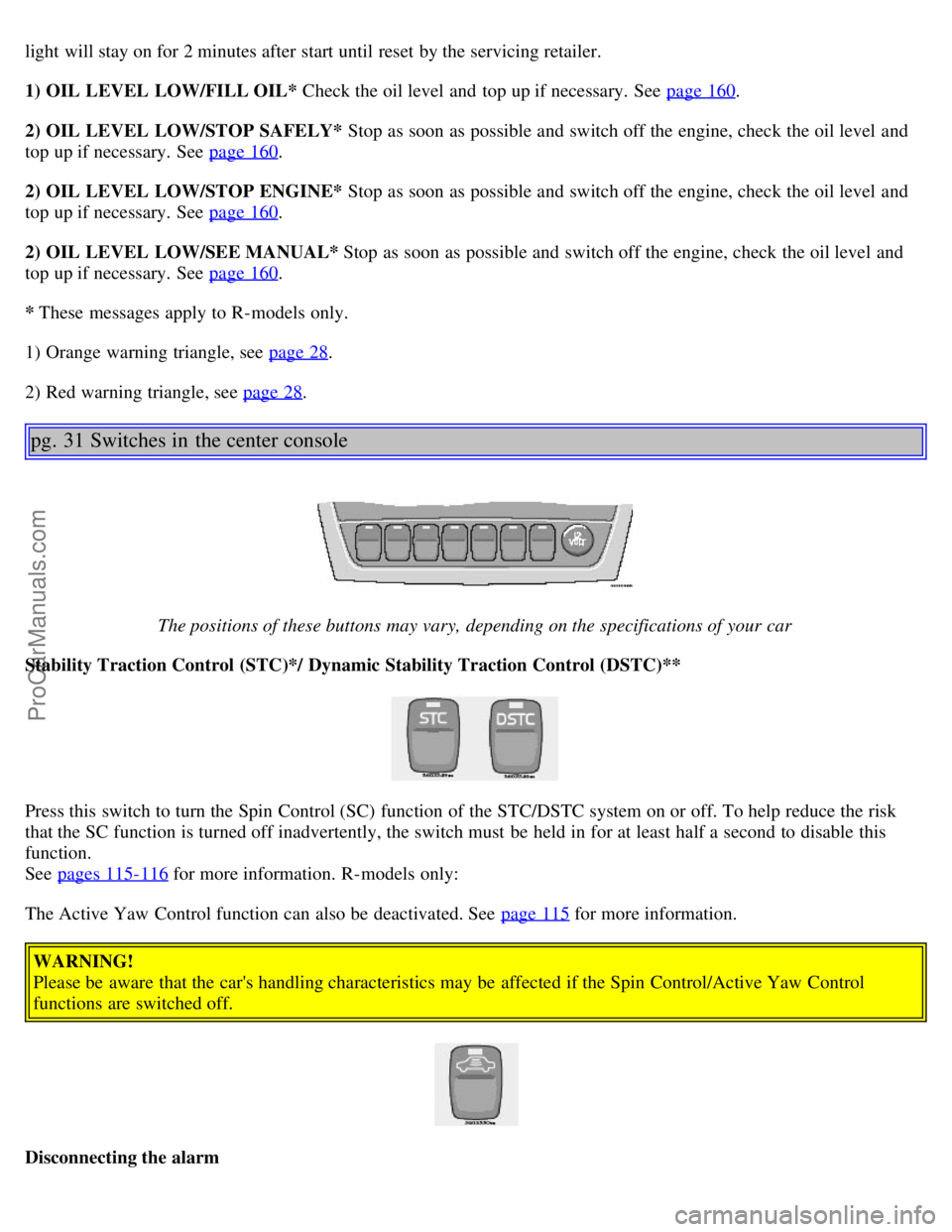
pg. 31 Switches in the center console
The positions of these buttons may vary, depending on the specifications of your car
Stability Traction Control (STC)*/ Dynamic Stability Traction Control (DSTC)**
Press this switch to turn the Spin Control (SC) function of the STC/DSTC system on or off. To help reduce the risk
that the SC function is turned off inadvertently, the switch must be held in for at least half a second to disable this
function.
See pages 115-116
for more information. R-models only:
The Active Yaw Control function can also be deactivated. See page 115
for more information.
WARNING!
Please be aware that the car's handling characteristics may be affected if the Spin Control/Active Yaw Control
functions are switched off.
Disconnecting the alarm
ProCarManuals.com
Page 26 of 138
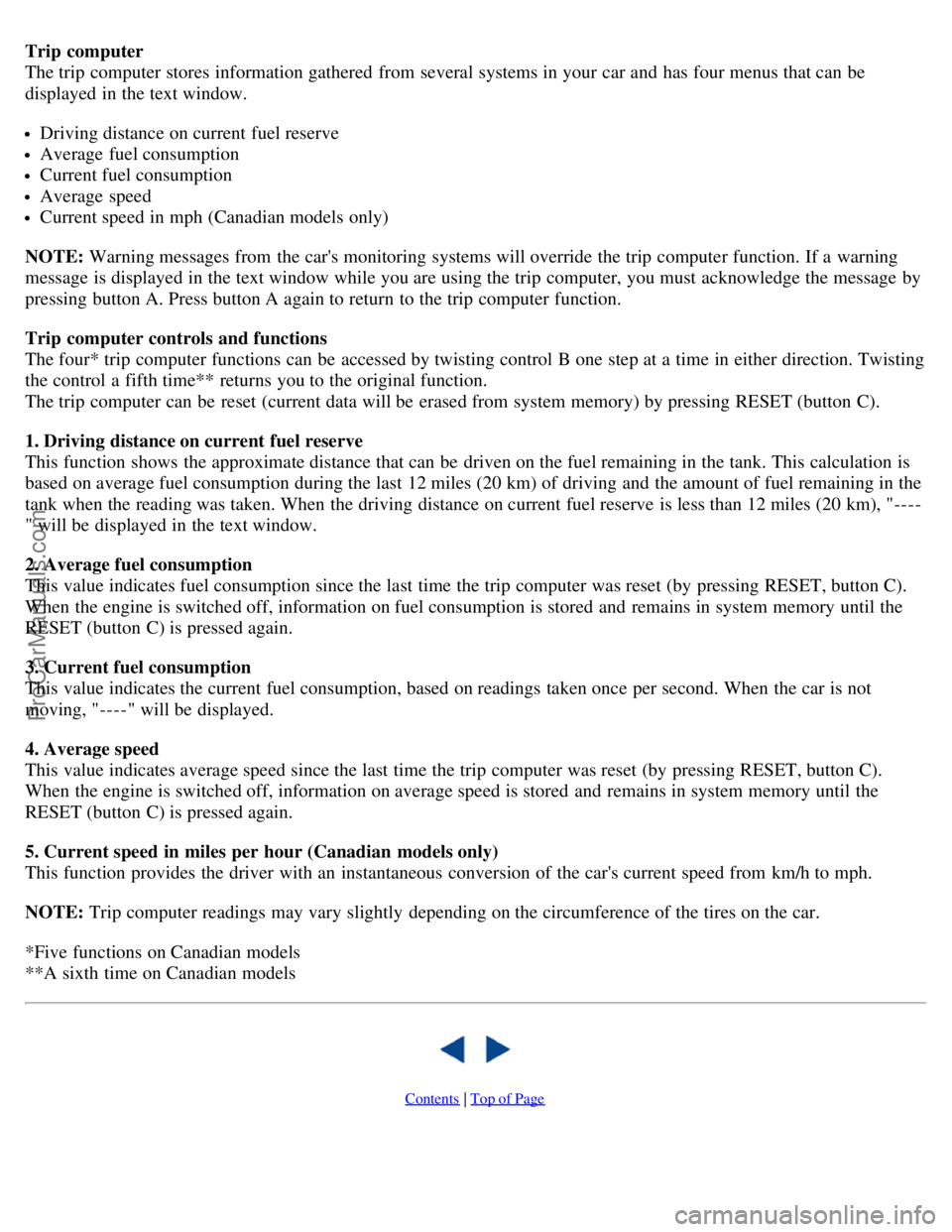
Trip computer
The trip computer stores information gathered from several systems in your car and has four menus that can be
displayed in the text window.
Driving distance on current fuel reserve
Average fuel consumption
Current fuel consumption
Average speed
Current speed in mph (Canadian models only)
NOTE: Warning messages from the car's monitoring systems will override the trip computer function. If a warning
message is displayed in the text window while you are using the trip computer, you must acknowledge the message by
pressing button A. Press button A again to return to the trip computer function.
Trip computer controls and functions
The four* trip computer functions can be accessed by twisting control B one step at a time in either direction. Twisting
the control a fifth time** returns you to the original function.
The trip computer can be reset (current data will be erased from system memory) by pressing RESET (button C).
1. Driving distance on current fuel reserve
This function shows the approximate distance that can be driven on the fuel remaining in the tank. This calculation is
based on average fuel consumption during the last 12 miles (20 km) of driving and the amount of fuel remaining in the
tank when the reading was taken. When the driving distance on current fuel reserve is less than 12 miles (20 km), "----
" will be displayed in the text window.
2. Average fuel consumption
This value indicates fuel consumption since the last time the trip computer was reset (by pressing RESET, button C).
When the engine is switched off, information on fuel consumption is stored and remains in system memory until the
RESET (button C) is pressed again.
3. Current fuel consumption
This value indicates the current fuel consumption, based on readings taken once per second. When the car is not
moving, "----" will be displayed.
4. Average speed
This value indicates average speed since the last time the trip computer was reset (by pressing RESET, button C).
When the engine is switched off, information on average speed is stored and remains in system memory until the
RESET (button C) is pressed again.
5. Current speed in miles per hour (Canadian models only)
This function provides the driver with an instantaneous conversion of the car's current speed from km/h to mph.
NOTE: Trip computer readings may vary slightly depending on the circumference of the tires on the car.
*Five functions on Canadian models
**A sixth time on Canadian models
Contents | Top of Page
ProCarManuals.com
Page 29 of 138

Sensors
The sunlight sensor on the dashboard and passenger compartment temperature sensor in the ECC control panel should
not be covered in any way as this could cause incorrect information to be sent to the ECC system.
Parking the car in warm weather
If your car has been parked in the sun in warm weather, opening the windows and moonroof (option) for several
minutes before driving will help release the warm air from the passenger compartment. When the engine is running,
close the windows and moonroof and use the recirculation function for several minutes to enable the air conditioning
to cool the compartment as quickly as possible.
Windows and optional moonroof
The ECC system will function best if the windows and optional moonroof are closed. If you drive with the moonroof
open, we recommend that you manually adjust the temperature and blower control (the LED in the AUTO switch
should be off).
Acceleration
The air conditioning is momentarily disengaged during full-throttle acceleration.
Climate control maintenance
Special tools and equipment are required to maintain and carry out repairs on the climate system. Work of this type
should only be done by a trained and qualified Volvo service technician.
Refrigerant
Volvo cares about the environment. The air conditioning system in your car contains a CFC-free refrigerant - R134a
(HFC134a). This substance will not deplete the ozone layer. The system contains 2.2 lbs (1000 g) R134a and uses
PAG oil.
Climate system blower
The climate system blower will be automatically switched off when the engine is not running (even if the ignition key
is in position I or II) to avoid unnecessary battery drain. To activate the blower, turn the control to the desired setting.
Passenger compartment blower
Approximately 50 minutes after the ignition is turned off, the blower may come on automatically, and run for five
minutes, to remove condensation in the A/C evaporator.
pg. 50 Electronic Climate Control (ECC)
ProCarManuals.com
Page 30 of 138
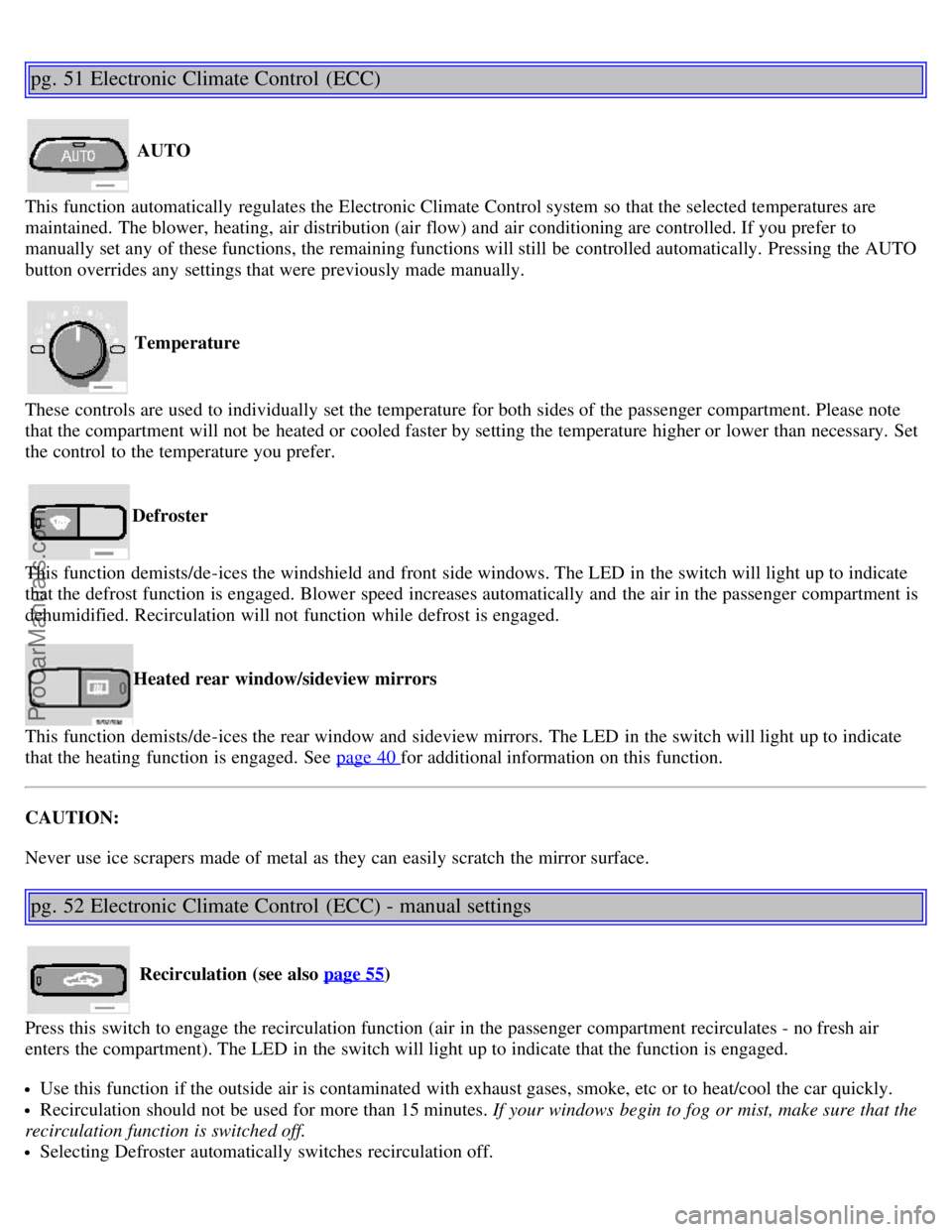
pg. 51 Electronic Climate Control (ECC)
AUTO
This function automatically regulates the Electronic Climate Control system so that the selected temperatures are
maintained. The blower, heating, air distribution (air flow) and air conditioning are controlled. If you prefer to
manually set any of these functions, the remaining functions will still be controlled automatically. Pressing the AUTO
button overrides any settings that were previously made manually.
Temperature
These controls are used to individually set the temperature for both sides of the passenger compartment. Please note
that the compartment will not be heated or cooled faster by setting the temperature higher or lower than necessary. Set
the control to the temperature you prefer.
Defroster
This function demists/de-ices the windshield and front side windows. The LED in the switch will light up to indicate
that the defrost function is engaged. Blower speed increases automatically and the air in the passenger compartment is
dehumidified. Recirculation will not function while defrost is engaged.
Heated rear window/sideview mirrors
This function demists/de-ices the rear window and sideview mirrors. The LED in the switch will light up to indicate
that the heating function is engaged. See page 40
for additional information on this function.
CAUTION:
Never use ice scrapers made of metal as they can easily scratch the mirror surface.
pg. 52 Electronic Climate Control (ECC) - manual settings
Recirculation (see also page 55)
Press this switch to engage the recirculation function (air in the passenger compartment recirculates - no fresh air
enters the compartment). The LED in the switch will light up to indicate that the function is engaged.
Use this function if the outside air is contaminated with exhaust gases, smoke, etc or to heat/cool the car quickly.
Recirculation should not be used for more than 15 minutes. If your windows begin to fog or mist, make sure that the
recirculation function is switched off.
Selecting Defroster automatically switches recirculation off.
ProCarManuals.com
Page 31 of 138

Timer mode activation: (Cars with Interior Air Quality system have no timer mode) Press and hold the recirculation
button for at least 3 seconds to activate a recirculation timer mode. The amber LED in the recirculation button will
flash 5 times to show that the timer mode is being activated. In the timer mode, each time the recirculation button is
pressed, the climate control system will recirculate the air in the passenger compartment for 5-12 minutes, depending
on the outside air and then revert back to fresh air.
Timer mode deactivation: Press and hold the recirculation button for at least 3 seconds. The amber LED in the
recirculation button will illuminate steadily for 5 seconds to show a return to "normal" mode.
In normal mode, when the recirculation button is pressed, the climate control system will recirculate the air in the
passenger compartment until the recirculation button is pressed again.
Timer mode memory: If the car is turned off while timer mode is active, timer mode will still be active when the
car is restarted.
Heated front seats (option)
Please see page 40
for more information on this function.
Press AUTO to automatically regulate air flow or press any combination of the controls shown in the illustration to
manually adjust air flow. An LED in the switch will light up if an air flow control has been pressed.
Air conditioning ON/OFF
Press the switch to turn the air conditioning on or off. The "ON" or "OFF" LED will light up to indicate if the system
is switched on or off. Other functions will still be regulated automatically (if the AUTO switch is on).
The air conditioning functions only at temperatures above 32° F (0° C).
While the Defroster function is selected, the air conditioning is temporarily activated to dehumidify the air, even if
you have manually switched the air conditioning off. This will only function if the blower is not switched off.
Blower control
Turn the control clockwise to increase or counterclockwise to decrease the blower speed. Pressing the AUTO switch
will automatically regulate blower speed and override manual adjustment.
NOTE: Turning the blower control counterclockwise as far as possible (an orange LED next to the control will light
up) will turn both the blower and the air conditioning off.
pg. 53 Electronic Climate Control (ECC) with Interior Air Quality system (option)
Interior Air Quality system (option)
Some cars are equipped with a multifilter and air quality sensor. The filter separates gases and particles, thereby
reducing the amounts of odors and contaminants entering the car. The air quality sensor detects increased levels of
contaminants in the outside air. When the Air quality sensor detects contaminated outside air, the air intake closes and
ProCarManuals.com
Page 32 of 138

the air inside the passenger compartment is recirculated, i.e. no outside air enters the car. The filter also cleans
recirculated passenger compartment air. When the Air quality sensor is activated, the LED AUT comes on in
Operation:
Press
to activate the Air quality sensor (normal setting).
Or select one of three functions by pressing
.
1. Press
: the LED AUT comes on. The Air quality sensor is now activated.
2. Press
: no LED is lighted. Recirculation not activated.
3. Press
: the LED MAN comes on. Recirculation is now activated.
You can switch between these three functions by repeatedly pressing
Keep the following in mind:
Make it a rule to have the air quality sensor activated at all times.
Recirculation is limited in cold climates to avoid misting up.
If misting occurs, you should deactivate the Air quality sensor.
If the windows mist up, you can also use the windshield and side window defroster functions. See page 51.
The filter should be changed at the intervals listed in the Warranty and Service Records Information booklet.
However, if the car is used in a severely contaminated environment, it may be necessary to change the filter more
frequently.
pg. 54 Manual climate control with air conditioning, A/C
ProCarManuals.com
Page 33 of 138
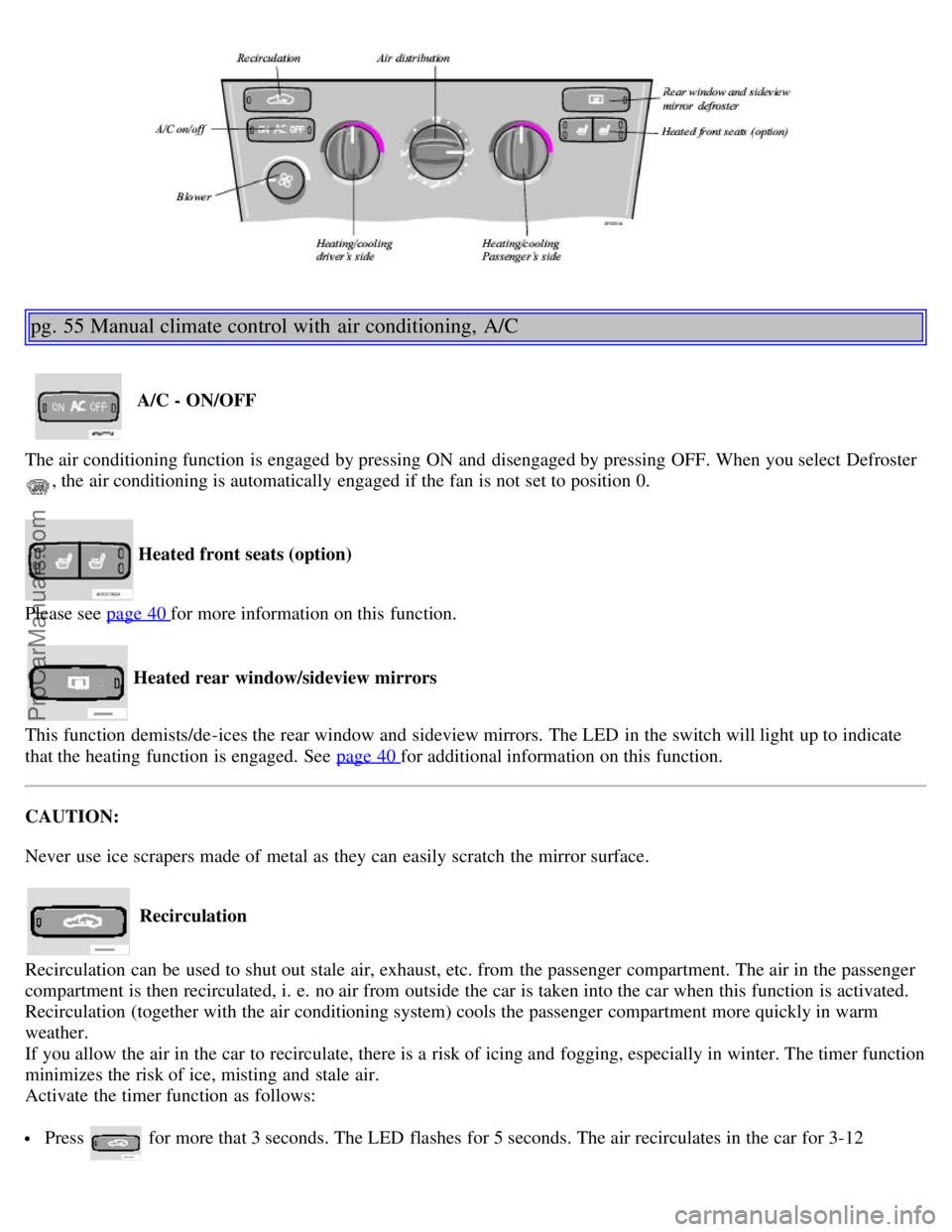
pg. 55 Manual climate control with air conditioning, A/C
A/C - ON/OFF
The air conditioning function is engaged by pressing ON and disengaged by pressing OFF. When you select Defroster
, the air conditioning is automatically engaged if the fan is not set to position 0.
Heated front seats (option)
Please see page 40
for more information on this function.
Heated rear window/sideview mirrors
This function demists/de-ices the rear window and sideview mirrors. The LED in the switch will light up to indicate
that the heating function is engaged. See page 40
for additional information on this function.
CAUTION:
Never use ice scrapers made of metal as they can easily scratch the mirror surface.
Recirculation
Recirculation can be used to shut out stale air, exhaust, etc. from the passenger compartment. The air in the passenger
compartment is then recirculated, i. e. no air from outside the car is taken into the car when this function is activated.
Recirculation (together with the air conditioning system) cools the passenger compartment more quickly in warm
weather.
If you allow the air in the car to recirculate, there is a risk of icing and fogging, especially in winter. The timer function
minimizes the risk of ice, misting and stale air.
Activate the timer function as follows:
Press for more that 3 seconds. The LED flashes for 5 seconds. The air recirculates in the car for 3-12
ProCarManuals.com
Page 34 of 138
minutes depending on the outside temperature.
The timer function is activated each time you press .
To switch off the timer function :
Press again for more than 3 seconds. The LED lights for 5 seconds to confirm your selection.
Recirculation is always disconnected when you select Defroster
.
Blower
Blower speed can be increases or decreased by turning the knob. If the knob is set to 0, the air conditioning function is
automatically disengaged.
Temperature
Turn the control to set the temperature for the driver's and passenger's sides of the car. For cooler air, the air
conditioning function must be engaged.
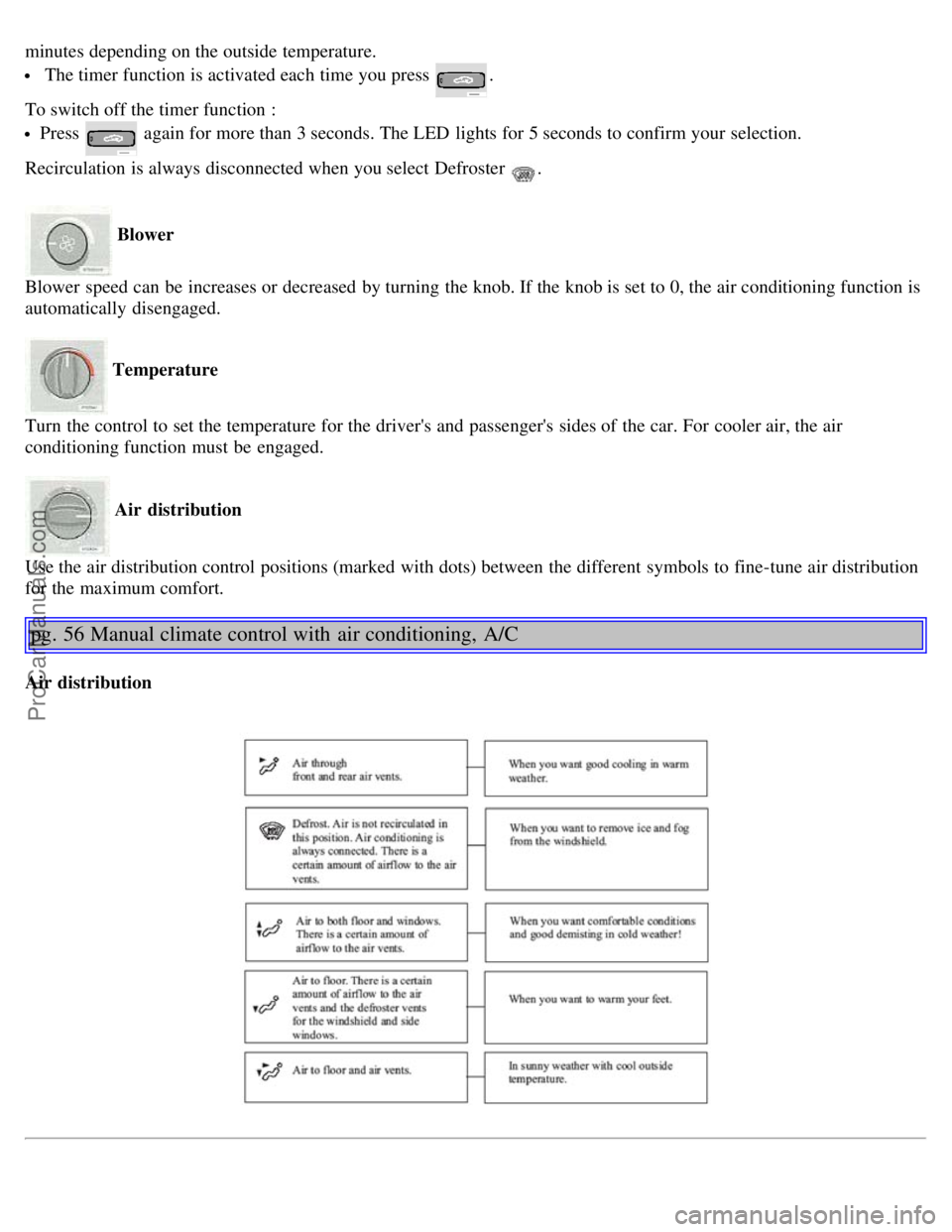
Air distribution
Use the air distribution control positions (marked with dots) between the different symbols to fine-tune air distribution
for the maximum comfort.
pg. 56 Manual climate control with air conditioning, A/C
Air distribution
ProCarManuals.com