steering VOLVO V90 2017 Owners Manual
[x] Cancel search | Manufacturer: VOLVO, Model Year: 2017, Model line: V90, Model: VOLVO V90 2017Pages: 594, PDF Size: 15.07 MB
Page 399 of 594
STARTING AND DRIVING
}}
397
With automatic gearbox
• Stop the car with the foot brake and then keep your foot on the brake pedal - theengine stops automatically.
With manual gearbox
• Declutch, set the gear lever in neutral posi-tion and release the clutch pedal - theengine stops automatically.
In drive mode
Eco or Comfort3 , the engine may
auto-stop before the car is completely stationary. With the
Adaptive cruise or Pilot Assist func-
tion activated, the engine will autostop after approximately three seconds. See the section "Conditions for Start/Stop func- tion".
AutostartThe following is required for the engine to auto-start: With automatic gearbox
• Release the brake pedal - the engine will autostart and you can continue driving. On anuphill gradient hill start assist (HSA) engages, which prevents the car from rollingbackwards.
• When the
Auto hold function is activated,
auto-start is delayed until the accelerator pedal is depressed.
• When the
Adaptive cruise or Pilot Assistfunction are activated, the engine will autos- tart when the accelerator pedal is depressed, or by pressing the
button on the left
keypad of the steering wheel.
• Maintain foot pressure on the brake pedal and depress the accelerator pedal - theengine auto-starts.
• On a downhill gradient: Release pressure onthe brake pedal slightly so that the carbegins to roll - the engine will auto-start aftera slight speed increase.
With manual gearbox
• With the gear lever in neutral position:Depress the clutch pedal or depress theaccelerator pedal - the engine starts.
• On a downhill gradient: Release pressure onthe brake pedal slightly so that the carbegins to roll - the engine will auto-start aftera slight speed increase.
Symbols in the driver display
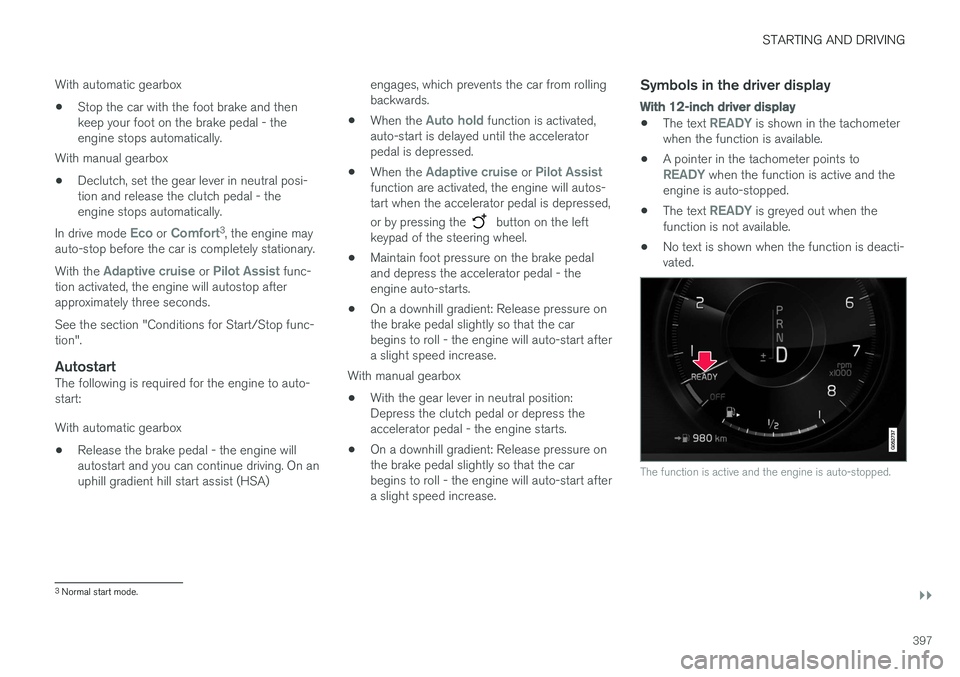
With 12-inch driver display
•
The text READY is shown in the tachometer
when the function is available.
• A pointer in the tachometer points to
READY when the function is active and the
engine is auto-stopped.
• The text
READY is greyed out when the
function is not available.
• No text is shown when the function is deacti- vated.
The function is active and the engine is auto-stopped.
3
Normal start mode.
Page 401 of 594
STARTING AND DRIVING
}}
399
•
The driver makes sweeping steering wheel movements.
• The road is very steep.
• The bonnet is opened.
• When driving at high altitudes when theengine has not reached operating tempera-ture.
• The ABS system has been activated.
• In the event of heavy braking (even withoutthe ABS system having been activated).
• Many starts during a short period of timehave activated the starter motor's thermalprotection.
• The exhaust system's particulate filter is full 4
.
• A trailer is connected electrically to the car
Page 402 of 594
||
STARTING AND DRIVING
* Option/accessory.
400
Related information
• Start/Stop (p. 396)
• Using the Start/Stop function (p. 396)
• Support battery (p. 533)
Drive modes
*
Selection of drive mode affects the car's driving characteristics in order to enhance the drivingexperience and facilitate driving in special situa-tions.
Using the drive modes it is possible to quickly have access to the car's numerous functions andsettings for different driving needs. The followingsystems are adapted to obtain the best possibledriving characteristics in each respective drivemode: • Steering
• Engine/gearbox 5
/all-wheel drive *
• Brakes
• Shock absorption
• Driver display
• Start/Stop function
• Climate settings
Select the drive mode that best suits the current driving conditions. Remember that not all drivemodes can be selected in all situations.
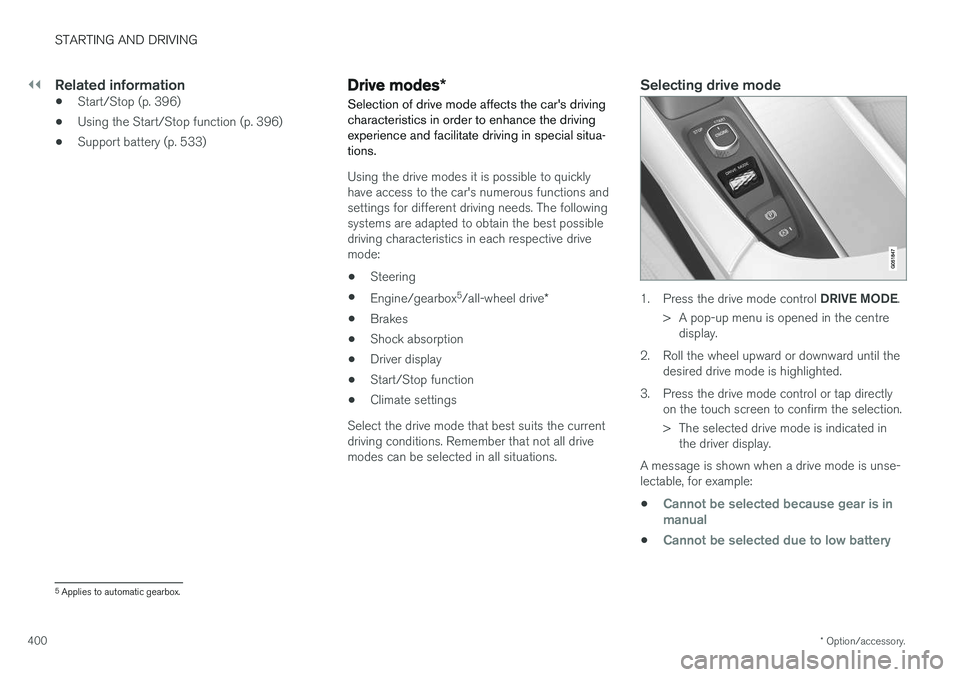
Selecting drive mode
1. Press the drive mode control DRIVE MODE.
> A pop-up menu is opened in the centre display.
2. Roll the wheel upward or downward until the desired drive mode is highlighted.
3. Press the drive mode control or tap directly on the touch screen to confirm the selection.
> The selected drive mode is indicated inthe driver display.
A message is shown when a drive mode is unse- lectable, for example:
•
Cannot be selected because gear is in manual
•Cannot be selected due to low battery
5 Applies to automatic gearbox.
Page 403 of 594
STARTING AND DRIVING
}}
401
•
Cannot be selected due to low temperature
•Cannot be selected due to limitations
•Cannot be selected because speed is too high.
Selectable drive modes
COMFORT
•
This is the car's normal mode.
When the car starts, it is in
Comfort mode and
the Start/Stop function is activated. These set- tings mean that the car feels comfortable, thesteering is light, the shock absorption is soft andbody's movement is smooth. This drive mode is the certification mode for car- bon dioxide emissions.
ECO
• Adapt the car for more energy-efficient and environmentally-conscious driving with the
Eco mode.
The drive mode means, for example, that the Start/Stop function is activated and the output ofcertain climate settings is reduced. The driver display has an ECO gauge that facili- tates fuel-efficient driving. More information on this drive mode is found in the section "Drive mode ECO".
DYNAMIC
•Dynamic mode means that the car has
sportier characteristics and faster response to accelerating.
The gear changes become faster and more dis-tinct, and the gearbox prioritises a gear withgreater traction. Steering response is faster and shock absorption is harder 6
which means that the body follows the
roadway in order to reduce roll during cornering. Start/Stop function is deactivated.
INDIVIDUAL
• Adapting a drive mode according to individ- ual preferences.
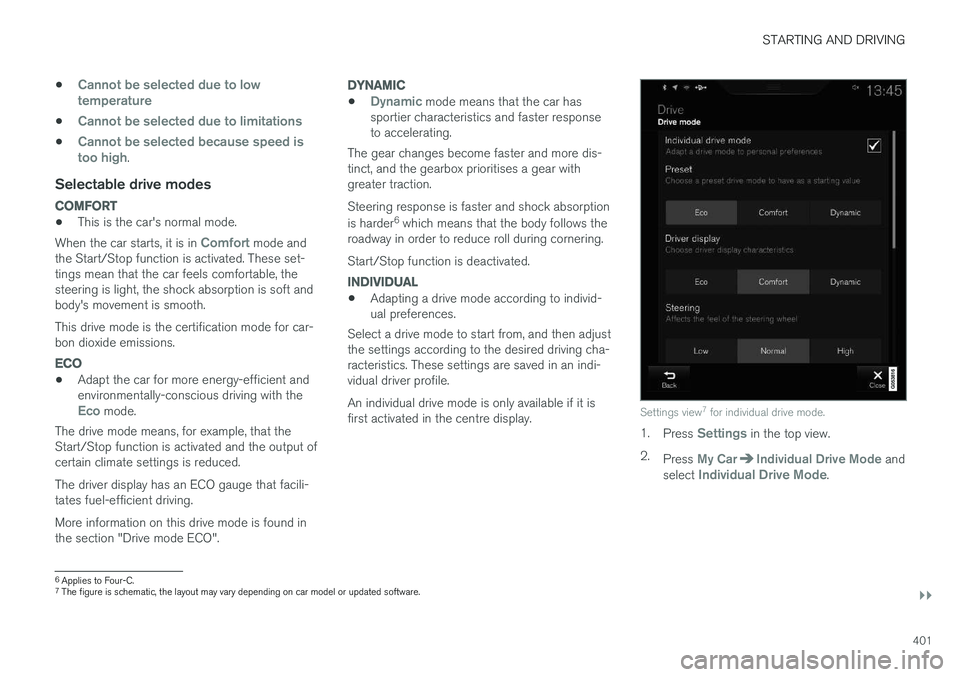
Select a drive mode to start from, and then adjustthe settings according to the desired driving cha-racteristics. These settings are saved in an indi-vidual driver profile. An individual drive mode is only available if it is first activated in the centre display.
Settings view 7
for individual drive mode.
1. Press Settings in the top view.
2. Press
My CarIndividual Drive Mode and
select Individual Drive Mode.
6 Applies to Four-C.
7 The figure is schematic, the layout may vary depending on car model or updated software.
Page 404 of 594
||
STARTING AND DRIVING
* Option/accessory.
402 3.
In
Presets, select a drive mode to start from:Eco, Comfort or Dynamic.
Possible adjustments apply to settings for:
•
Driver Display
•Steering force
•Powertrain Characteristics
•Brake Characteristics
•Suspension Control
•ECO Climate
•Start/Stop.
Related information
• Speed-dependent steering force (p. 272)
• Level control
* and shock absorption (p. 405)
• Start/Stop (p. 396)
• Drive mode ECO (p. 402)
• All-wheel drive
* (p. 405)
Drive mode ECO
Driving mode ECO mode optimises the car's
driving characteristics for more fuel efficient and environmentally-conscious driving.
Use this drive mode to save fuel and the environ- ment. The following properties are adapted for Eco driv- ing:
• Gearbox gearshift points 8
.
• Engine management and response from theaccelerator pedal.
• The Eco Coast 9
freewheel function is acti-
vated and engine braking is deactivatedwhen the accelerator pedal is released atspeeds between 65 and 140 km/h(40 and 87 mph).
• Some of the climate control system's set-tings work at reduced power or are deacti-vated.
• The driver display shows information in anECO gauge which facilitates environmentally-conscious and fuel-efficient driving.
Selecting ECO modeThe Eco mode is deactivated when the engine isswitched off, and it must therefore be activatedafter each time the engine is started. The driver display shows ECO when the function is acti-vated.
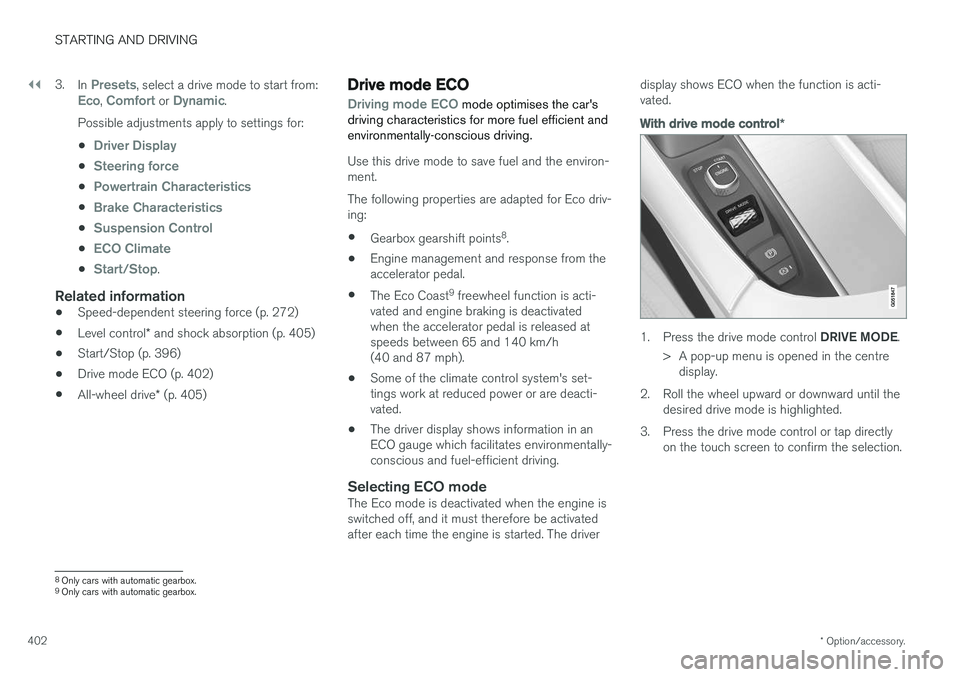
With drive mode control
*
1.
Press the drive mode control DRIVE MODE.
> A pop-up menu is opened in the centre display.
2. Roll the wheel upward or downward until the desired drive mode is highlighted.
3. Press the drive mode control or tap directly on the touch screen to confirm the selection.
8Only cars with automatic gearbox.
9 Only cars with automatic gearbox.
Page 405 of 594
STARTING AND DRIVING
}}
* Option/accessory.403
In the centre display's function view
A car without drive mode con- trol has a function button for
Driving mode ECO in the
centre display's function view.
–Press the button in order to activate the function.
> An indicator in the button illuminates when the function is activated.
Freewheel function Eco Coast 10The freewheel function Eco Coast means in prac- tice that engine braking ceases, meaning in turnthat the car's kinetic energy is used to freewheelfor longer distances. When the driver releasesthe accelerator pedal the gearbox is automaticallydisengaged from the engine whose speed isreduced to idling speed with reduced consump-tion. The function is best used where it is possible to freewheel a long way, e.g. roads with a slightdownhill gradient or when there is a predictablespeed reduction to freewheel into a zone with alower speed limit.
Activating the freewheel function
The function is activated when the accelerator pedal is fully released, in combination with thefollowing parameters:
• Drive mode
Eco is activated.
• The gear selector is in
D position.
• Speed within the range of approx. 65-140 km/h (40-87 mph).
• The road's downhill gradient is not steeperthan approx. 6%.
The driver display shows
COASTING when the
freewheel function is being used.
Limitations
The freewheel function is not available if:
• Engine and/or gearbox are not at normal operating temperature.
• The cruise control is activated.
• The gear selector is moved from the
D posi-
tion and the manual position.
• The speed is outside the range ofapprox. 65-140 km/h (40-87 mph).
• The road's downhill gradient is steeper thanapprox. 6%.
• Manual gear changing is performed with the steering wheel paddles
*.
Deactivating and switching off the freewheel function
In certain situations it may be desirable to deacti- vate or switch off the function in order to useengine braking. Examples of such situations maybe on steep downhill gradients or before animminent overtaking manoeuvre - in order to beable to do it in the safest way possible. Deactivate the freewheel function as follows:
• Actuate the accelerator or brake pedal.
• Move the gear selector to manual position.
• Changing gear with steering wheel paddles
*.
Switch off the freewheel function as follows:
• Change drive mode
*, or switch off the
Driving mode ECO in the function view.
Even without the freewheel function, it is possible to freewheel for short distances. This, in turn,reduces consumption. However, for the best fueleconomy it is better to have the freewheel func-tion activated and be able to freewheel for longerdistances.
ECO gauge in the driver displayThe ECO gauge indicates how fuel-efficient thedriving is:
10 Only cars with automatic gearbox.
Page 408 of 594
STARTING AND DRIVING
406
Brake functions
The car's brakes are used to reduce the speed or prevent the car from rolling.
Besides the foot brake and parking brake, the car is equipped with several automatic brake assistfunctions. These can assist the driver by notneeding to keep his/her foot on the brake pedalwhen stationary at a traffic light, when starting onan uphill gradient or when driving on a downhillgradient. Depending on the car's equipment, the following auto braking functions are available:
• Automatic braking when stationary (AutoHold)
• Hill start assist (Hill Start Assist)
• Auto braking after a collision
• City Safety
Related information
•
Foot brake (p. 406)
• Parking brake (p. 409)
• Hill start assist (p. 412)
• Automatic braking when stationary (p. 412)
• Auto braking after a collision (p. 408)
Foot brake
The foot brake is used to reduce the car's speed while driving.
Foot brake systemThe car is equipped with two brake circuits. If a brake circuit is damaged, the brake pedal willengage deeper. Higher pressure on the pedal willtherefore be needed to produce the normal brak-ing effect. The driver's brake pedal pressure is assisted by a brake servo.
WARNING
The brake servo only works when the engine is running.
If the foot brake is used when the engine is switched off then the pedal will feel stiff and ahigher pedal pressure must be used to brake thecar. In very hilly terrain or when driving with a heavy load the brakes can be relieved by using enginebraking in manual gearshift mode. Engine brakingis most efficiently used if the same gear is useddownhill as up.
Anti-lock braking systemThe car has anti-lock brakes, Anti-lock BrakingSystem (ABS), which prevent the wheels fromlocking while braking and allows maintained steering control. Vibration may be felt in thebrake pedal when this is engaged and this is nor-mal. A short test of the ABS system is made automat- ically after the engine has been started when thedriver releases the brake pedal. A further auto-matic test of the system may be made at lowspeed. The test may be experienced as pulses inthe brake pedal.
Braking on wet roadsWhen driving for a prolonged period of time inheavy rain without braking, the braking effect maybe delayed slightly when next using the brakes.This may also be the case after a car wash. It isthen necessary to depress the brake pedal moreforcefully. You should therefore maintain agreater distance to the vehicles in front. Brake the car firmly after driving on wet roads or using a car wash. This warms up the brake discs,enabling them to dry faster and protecting themagainst corrosion. Bear in mind the current trafficsituation when braking.
Braking on salted roadsWhen driving on salted roads, a layer of salt mayform on the brake discs and brake linings. Thismay extend braking distance. You should there-fore maintain an extra large safety distance tovehicles in front. In addition, make sure you dothe following:
Page 424 of 594
STARTING AND DRIVING
* Option/accessory.
422
Economical driving
Drive economically and eco-consciously by driv- ing smoothly, thinking ahead, and adjusting yourdriving style and speed to the prevailing condi-tions.
• For lower fuel consumption, activate ECO drive mode.
• Use the Eco Coast 17
freewheel function -
engine braking will cease and the car'skinetic energy can be used to freewheel forlonger distances.
• Drive in the highest gear 18
possible, adapted
to the current traffic situation and road -lower engine speeds result in lower fuel con-sumption. Use the gear shift indicator.
• Drive at a steady speed and keep a good dis-tance to other vehicles and objects to mini-mise braking.
• High speed results in increased fuel con-sumption - the wind resistance increaseswith speed.
• Do not run the engine to operating tempera-ture at idling speed, but rather drive with anormal load right after starting - a coldengine consumes more fuel than a warmone. •
Drive with the correct air pressure in thetyres and check this regularly - select ECOtyre pressure for best results.
• Choice of tyres can affect fuel consumption -seek advice on suitable tyres from a dealer.
• Remove unnecessary items from the car -the greater the load the higher the consump-tion.
• Use engine braking to slow down, when itcan take place without risk to other roadusers.
• A roof load and space box increase windresistance, leading to higher consumption -remove the load carriers when not in use.
• Avoid driving with open windows.
WARNING
Never switch off the engine while moving, such as downhill, this deactivates importantsystems such as the power steering andbrake servo.
Related information
•
Drive mode ECO (p. 402)
• Approved tyre pressures (p. 574)
• Fuel consumption and CO2 emissions (p. 572)
• Drive-E - cleaner driving pleasure (p. 25)
Towing bracket
*
The car can be equipped with a towing bracket that makes it possible to tow e.g. a trailer afterthe car.
There may be different towing bracket variants available for the car; contact a Volvo dealer formore information. For information on towing capacity and towball load, see the section "Towing capacity and tow-ball load".
IMPORTANT
When the engine is switched off, the constant battery voltage to the trailer connector can beswitched off automatically so as not to drainthe starter battery.
IMPORTANT
The towball needs regular cleaning and lubri- cation with grease in order to prevent wear.
17 See the section "Drive mode ECO".
18 Applies to driving with manual gear changing.
Page 429 of 594
STARTING AND DRIVING
* Option/accessory.427
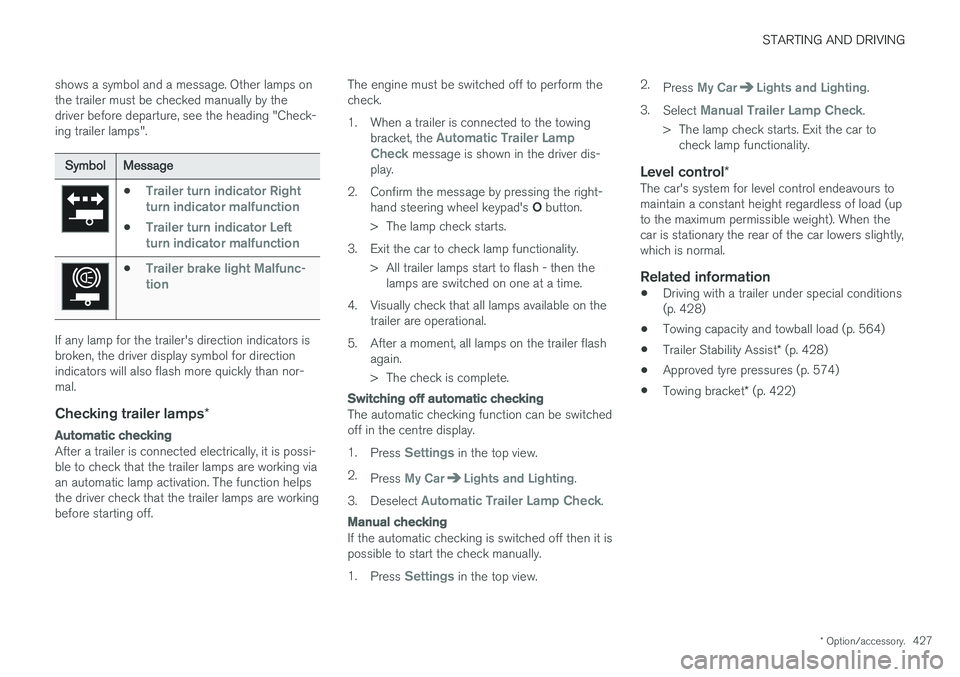
shows a symbol and a message. Other lamps on the trailer must be checked manually by thedriver before departure, see the heading "Check-ing trailer lamps".
Symbol
Message
•Trailer turn indicator Right
turn indicator malfunction
•Trailer turn indicator Left
turn indicator malfunction
•Trailer brake light Malfunc-
tion
If any lamp for the trailer's direction indicators is broken, the driver display symbol for directionindicators will also flash more quickly than nor-mal.
Checking trailer lamps *
Automatic checking
After a trailer is connected electrically, it is possi- ble to check that the trailer lamps are working viaan automatic lamp activation. The function helpsthe driver check that the trailer lamps are workingbefore starting off. The engine must be switched off to perform thecheck.
1. When a trailer is connected to the towing
bracket, the
Automatic Trailer Lamp
Check message is shown in the driver dis-
play.
2. Confirm the message by pressing the right- hand steering wheel keypad's O button.
> The lamp check starts.
3. Exit the car to check lamp functionality. > All trailer lamps start to flash - then thelamps are switched on one at a time.
4. Visually check that all lamps available on the trailer are operational.
5. After a moment, all lamps on the trailer flash again.
> The check is complete.
Switching off automatic checking
The automatic checking function can be switched off in the centre display. 1.Press
Settings in the top view.
2. Press
My CarLights and Lighting.
3. Deselect
Automatic Trailer Lamp Check.
Manual checking
If the automatic checking is switched off then it is possible to start the check manually. 1.Press
Settings in the top view. 2.
Press
My CarLights and Lighting.
3. Select
Manual Trailer Lamp Check.
> The lamp check starts. Exit the car to check lamp functionality.
Level control *The car's system for level control endeavours to maintain a constant height regardless of load (upto the maximum permissible weight). When thecar is stationary the rear of the car lowers slightly,which is normal.
Related information
•Driving with a trailer under special conditions(p. 428)
• Towing capacity and towball load (p. 564)
• Trailer Stability Assist
* (p. 428)
• Approved tyre pressures (p. 574)
• Towing bracket
* (p. 422)
Page 431 of 594
STARTING AND DRIVING
429
snaking. The function is included in the stability system ESC19
.
Reasons for snakingThe snaking phenomenon can occur with any car/trailer combination. Snaking normally occursat high speeds. But, there is a risk of it occurringat lower speeds if the trailer is overloaded or theload is improperly distributed, e.g. too far back. In order for snaking to occur, there must be a triggering factor, e.g.: • Car with trailer subjected to a sudden and powerful side wind.
• Car with trailer drives on an uneven road sur-face or in a pothole.
• Sweeping steering wheel movements.
If snaking has started, it could be difficult or evenimpossible to suppress. This makes the car/trailer combination difficult to control and there isa risk that you could, for example, end up in thewrong lane or leave the carriageway.
Trailer Stability Assist functionThe trailer stability assist function continuallymonitors car movements, particularly lateralmovements. If snaking is detected, the frontwheels are individually braked. This serves to sta-bilise the car/trailer combination. This is oftenenough to help the driver regain control of thecar. If snaking is not eliminated the first time thattrailer stability assist comes into action, the car/trailer combination is braked with all wheels andengine power is reduced. Once snaking has beengradually suppressed and the car/trailer combi-nation is stable once again, the system stopsregulating and the driver once again has full con-trol of the car.
NOTE
The stability function is deactivated if the driver selects Sport mode by deactivating
ESC via the menu system in the centre dis-
play.
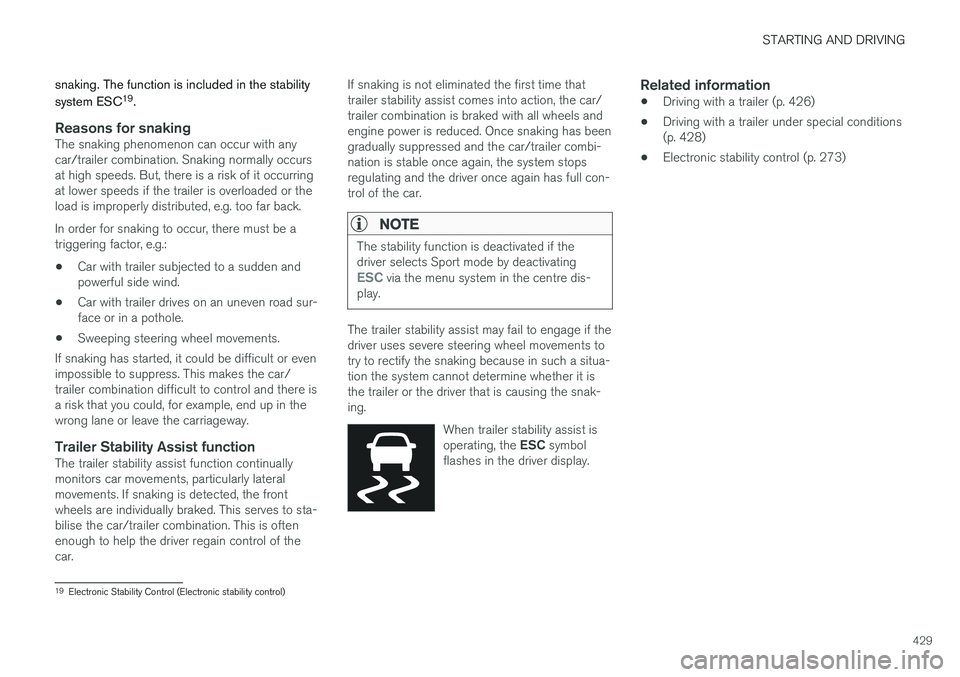
The trailer stability assist may fail to engage if the driver uses severe steering wheel movements totry to rectify the snaking because in such a situa-tion the system cannot determine whether it isthe trailer or the driver that is causing the snak-ing.
When trailer stability assist is operating, the ESC symbol
flashes in the driver display.
Related information
• Driving with a trailer (p. 426)
• Driving with a trailer under special conditions (p. 428)
• Electronic stability control (p. 273)
19
Electronic Stability Control (Electronic stability control)