steering VOLVO V90 2017 Manual Online
[x] Cancel search | Manufacturer: VOLVO, Model Year: 2017, Model line: V90, Model: VOLVO V90 2017Pages: 594, PDF Size: 15.07 MB
Page 338 of 594
||
DRIVER SUPPORT
336The following further criteria must also be fulfil- led:
• your car must be travelling at no less than4 km/h (3 mph)
• your car must turn to the left in markets withright-hand traffic (or to the right in left-handtraffic)
• the oncoming vehicle must have its head-lamps switched on.
WARNING
City Safety is an aid and does not work in all driving situations, traffic, weather and roadconditions. Warnings and brake interventions due to a collision risk with an oncoming vehicle oftencome very late. The driver is always responsible for maintain- ing the correct distance and speed - neverwait for a collision warning or for City Safetyto intervene.
Limitations in cross trafficIn some cases City Safety may have difficulty helping the driver deal with collision risks due tooncoming cross traffic. Examples are:
• stability control ESC intervenes in the eventof slippery driving conditions
• if the oncoming vehicle is detected too late •
if the oncoming vehicle is obscured by some-thing
• if the oncoming vehicle has headlampsswitched off
• if the oncoming vehicle drives in an unpre-dictable manner, for example, abruptlychanges lanes at a late stage.
Related information
•
City Safety (p. 330)
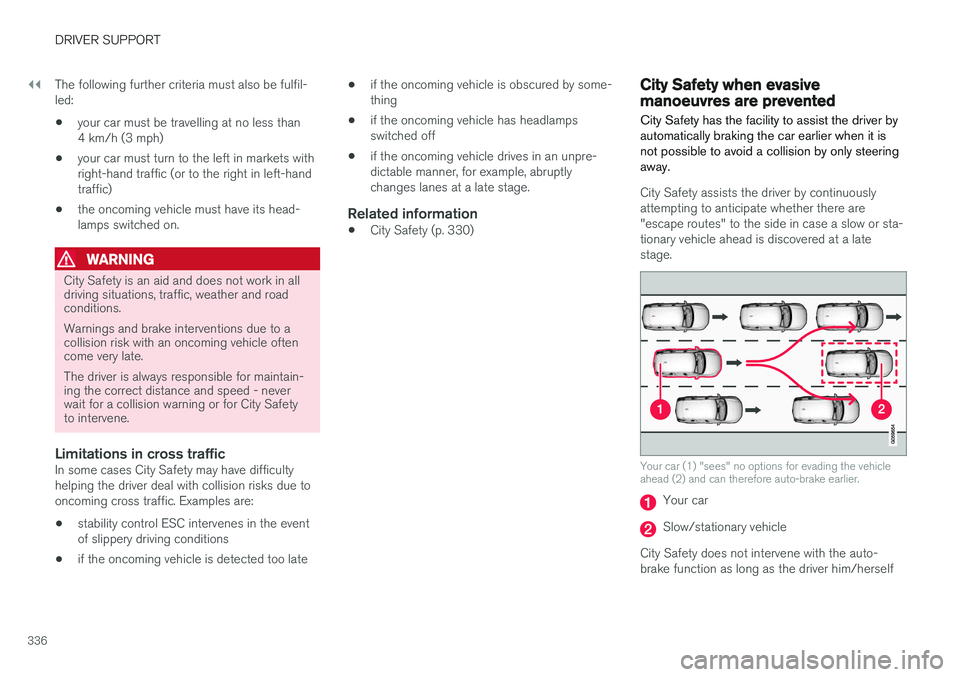
City Safety when evasive manoeuvres are prevented City Safety has the facility to assist the driver by automatically braking the car earlier when it isnot possible to avoid a collision by only steeringaway.
City Safety assists the driver by continuously attempting to anticipate whether there are"escape routes" to the side in case a slow or sta-tionary vehicle ahead is discovered at a latestage.
Your car (1) "sees" no options for evading the vehicle ahead (2) and can therefore auto-brake earlier.
Your car
Slow/stationary vehicle
City Safety does not intervene with the auto- brake function as long as the driver him/herself
Page 339 of 594
DRIVER SUPPORT
}}
337
has the opportunity to avoid a collision via a steering manoeuvre. However, if City Safety anticipates that an evasive manoeuvre is not possible due to traffic in anadjacent lane, the function can assist the driverby automatically starting to brake at an earlierstage.
WARNING
City Safety's ability to anticipate a certain sit- uation is an aid, and does not work in all driv-ing situations or traffic, weather and road con-ditions. The driver always bears ultimate responsibility for ensuring that the vehicle is driven safelyand that applicable laws and road traffic regu-lations are followed.
Related information
•
City Safety (p. 330)
• Limitations of City Safety (p. 337)
Limitations of City Safety
The City Safety function may have limitations in certain situations.
Surroundings
Low objects
Low-hanging objects, e.g. a flag/pennant for pro- jecting load, or accessories such as auxiliarylamps and bull bars that are higher than the bon-net limit the function.
Skidding
On slippery road surfaces the braking distance is extended, which may reduce the capacity of CitySafety to avoid a collision. In such situations, theanti-lock brakes and the stability control ESC willgive the best possible braking force with main-tained stability.
Oncoming light
The visual warning signal in the windscreen may be difficult to notice in the event of strong sun-light, reflections, when sunglasses are beingworn or if the driver is not looking straight ahead.
Heat
In the event of high passenger compartment temperature caused by e.g. strong sunlight, thevisual warning signal in the windscreen may betemporarily disengaged.
The camera and radar unit's field of view
The camera's field of vision is limited, which is why pedestrians, large animals, cyclists and vehi- cles in some situations cannot be detected, orthey are detected later than anticipated. Dirty vehicles may be detected later than others and if it is dark, motorcycles may be detected lateor not at all. If a text message in the driver display indicates that the camera and radar unit is obstructed, CitySafety may be unable to detect pedestrians, largeanimals, cyclists, vehicles or road lines ahead ofthe car. This means that the functionality of CitySafety may be reduced. However, an error message is not shown in all situations where the windscreen sensors areobstructed. The driver must therefore take care tokeep the area of windscreen in front of the cam-era and radar unit clear.
IMPORTANT
Maintenance and replacement of City Safety components must only be performed by aworkshop - an authorised Volvo workshop isrecommended.
Driver intervention
Reversing
When your own car is reversing, City Safety is temporarily deactivated.
Page 340 of 594
||
DRIVER SUPPORT
338
Low speed
City Safety is not activated at very low speeds - below 4 km/h (3 mph) - and the system there-fore does not intervene in situations where yourcar is approaching a vehicle ahead very slowly,e.g. when parking.
Active driver
Driver commands are always prioritised, which is why City Safety does not intervene or postponewarning/intervention in situations where thedriver is steering and accelerating in a decisivemanner, even if a collision is unavoidable. Active and aware driving behaviour can therefore delay a collision warning and intervention in orderto minimise unnecessary warnings.
Miscellaneous
WARNING
Warnings and brake interventions could be implemented late or not at all if a traffic situa-tion or external influences mean that the cam-era and radar unit cannot detect pedestrians,cyclists, large animals or vehicles correctly. For vehicles to be detected at night, their headlamps and rear lamp cluster must beswitched on and shining clearly. The camera and radar unit has a limited range for pedestrians and cyclists. The system canprovide effective warnings and brake interven-tions as long as the relative speed is below50 km/h (30 mph). For stationary or slow-moving vehicles, warnings and brake interven-tions are effective at vehicle speeds up to70 km/h (43 mph). Speed reduction for largeanimals is less than 15 km/h (9 mph) andcan be achieved at vehicle speeds above70 km/h (43 mph). The warning and brakeintervention for large animals is less effectiveat lower speeds. Warnings for stationary or slow-moving vehi- cles and large animals could be disengageddue to darkness or poor visibility. Warnings and brake interventions for pedes- trians and cyclists are deactivated at vehiclespeeds exceeding 70 km/h (43 mph). Do not place, stick or mount anything on the outside or inside of the windscreen in front ofor around the camera and radar unit — thiscan interfere with camera-dependent func-tions.
Objects, snow, ice or dirt in the area of the camera sensor may reduce its function, fullydeactivate it or give incorrect functionresponse.
NOTE
The function uses the car's camera unit, which has some general limitations, see the"Limitations for camera unit" section.
NOTE
The function uses the car's radar unit, which has some general limitations, see the "Limita-tions for radar unit" section.
Related information
•City Safety (p. 330)
• Limitations of the camera unit (p. 327)
• Limitations of the radar unit (p. 319)
Page 356 of 594
||
DRIVER SUPPORT
* Option/accessory.
354 2.
Press
My CarIntelliSafeDriver Alert
Control.
3. Select
Rest Stop Guidance to activate/
deactivate the rest place guide.
Related information
• Driver Alert Control (p. 352)
• Limitations of Driver Alert Control (p. 354)
Limitations of Driver Alert Control
The Driver Alert Control (DAC) function may have limitations in certain situations.
In some cases, driving behaviour may not be affected, despite the driver being tired - e.g. whenusing the Pilot Assist function - with the resultthat the driver is then not given a warning fromDAC. For this reason, it is always very importantto stop and take a break in the event of theslightest sign of driver fatigue, regardless ofwhether DAC has given a warning. In some cases the system may issue a warning despite driving ability not deteriorating, for exam-ple:
• in strong side winds
• on rutted road surfaces.
NOTE
The function uses the car's camera unit, which has some general limitations, see the"Limitations for camera unit" section.
Related information
•
Driver Alert Control (p. 352)
• Activate/deactivate Driver Alert Control (p. 353)
• Limitations of the camera unit (p. 327)
• Pilot Assist
* (p. 304)
Lane Keeping Aid
The function of lane assistance is to help the driver to reduce the risk of the car accidentallyleaving its own lane on motorways and similarmajor routes.
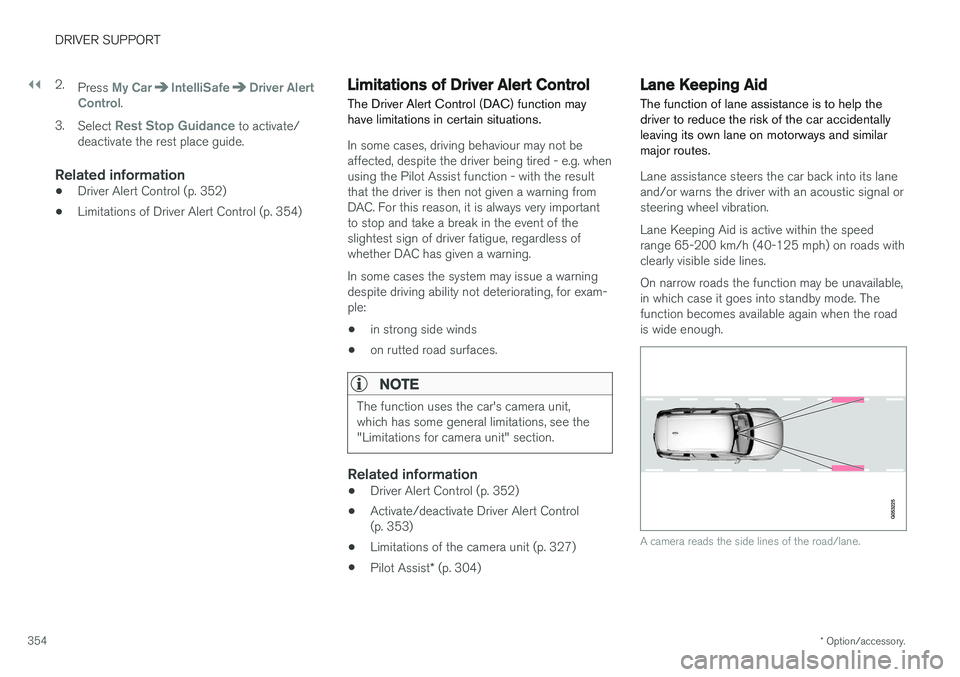
Lane assistance steers the car back into its lane and/or warns the driver with an acoustic signal orsteering wheel vibration. Lane Keeping Aid is active within the speed range 65-200 km/h (40-125 mph) on roads withclearly visible side lines. On narrow roads the function may be unavailable, in which case it goes into standby mode. Thefunction becomes available again when the roadis wide enough.
A camera reads the side lines of the road/lane.
Page 357 of 594
DRIVER SUPPORT
}}
355
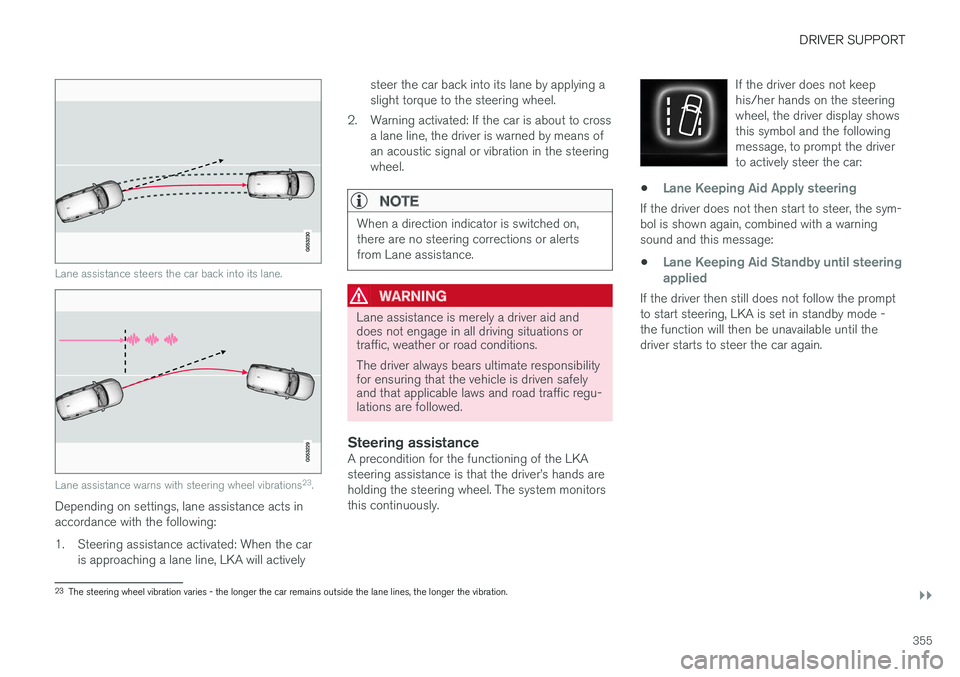
Lane assistance steers the car back into its lane.
Lane assistance warns with steering wheel vibrations23
.
Depending on settings, lane assistance acts in accordance with the following:
1. Steering assistance activated: When the car
is approaching a lane line, LKA will actively steer the car back into its lane by applying a slight torque to the steering wheel.
2. Warning activated: If the car is about to cross a lane line, the driver is warned by means ofan acoustic signal or vibration in the steeringwheel.
NOTE
When a direction indicator is switched on, there are no steering corrections or alertsfrom Lane assistance.
WARNING
Lane assistance is merely a driver aid and does not engage in all driving situations ortraffic, weather or road conditions. The driver always bears ultimate responsibility for ensuring that the vehicle is driven safelyand that applicable laws and road traffic regu-lations are followed.
Steering assistanceA precondition for the functioning of the LKA steering assistance is that the driver
Page 358 of 594
||
DRIVER SUPPORT
356
Lane assistance does not intervene
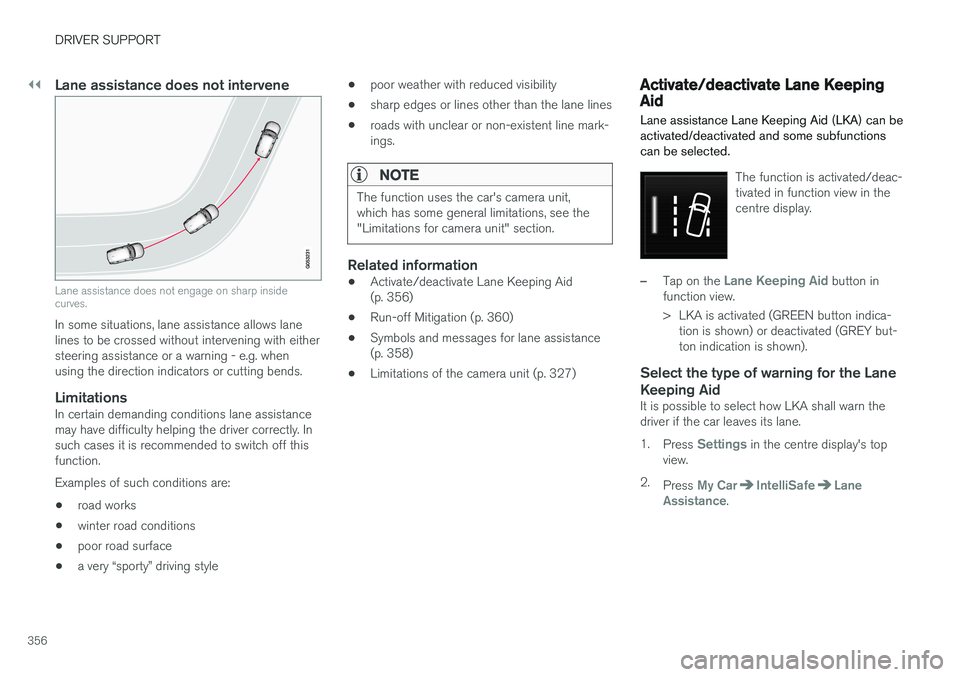
Lane assistance does not engage on sharp inside curves.
In some situations, lane assistance allows lane lines to be crossed without intervening with eithersteering assistance or a warning - e.g. whenusing the direction indicators or cutting bends.
LimitationsIn certain demanding conditions lane assistancemay have difficulty helping the driver correctly. Insuch cases it is recommended to switch off thisfunction. Examples of such conditions are:• road works
• winter road conditions
• poor road surface
• a very “sporty” driving style •
poor weather with reduced visibility
• sharp edges or lines other than the lane lines
• roads with unclear or non-existent line mark- ings.
NOTE
The function uses the car's camera unit, which has some general limitations, see the"Limitations for camera unit" section.
Related information
•
Activate/deactivate Lane Keeping Aid (p. 356)
• Run-off Mitigation (p. 360)
• Symbols and messages for lane assistance(p. 358)
• Limitations of the camera unit (p. 327)
Activate/deactivate Lane Keeping Aid Lane assistance Lane Keeping Aid (LKA) can be activated/deactivated and some subfunctionscan be selected.
The function is activated/deac- tivated in function view in thecentre display.
–Tap on the Lane Keeping Aid button in
function view.
> LKA is activated (GREEN button indica- tion is shown) or deactivated (GREY but- ton indication is shown).
Select the type of warning for the Lane Keeping Aid
It is possible to select how LKA shall warn the driver if the car leaves its lane. 1. Press
Settings in the centre display's top
view.
2. Press
My CarIntelliSafeLane
Assistance.
Page 359 of 594
DRIVER SUPPORT
357
3.
Under
Lane Keeping Aid Warning
Feedback, select type of warning:
•
Sound - the driver is warned by an
acoustic signal.
•
Vibration — the driver is warned with
steering wheel vibrations.
Assistance options for Lane Keeping Aid
It is possible to select how LKA shall react if the driver if the car leaves its lane. 1. Press
Settings in the centre display's top
view.
2. Press
My CarIntelliSafeLane
Assistance.
3. Under
Lane Keeping Aid Mode, select how
LKA shall react
•
Assist - the driver is given steering assis-
tance without a warning.
•
Both - the driver is given both a warning
and steering assistance.
•
Warning — warning to driver only.
Related information
• Lane Keeping Aid (p. 354)
• Symbols and messages for lane assistance (p. 358)
Page 360 of 594
DRIVER SUPPORT
358
Symbols and messages for lane assistance
A number of symbols and messages regarding lane assistance can be shown on the driver dis-play.
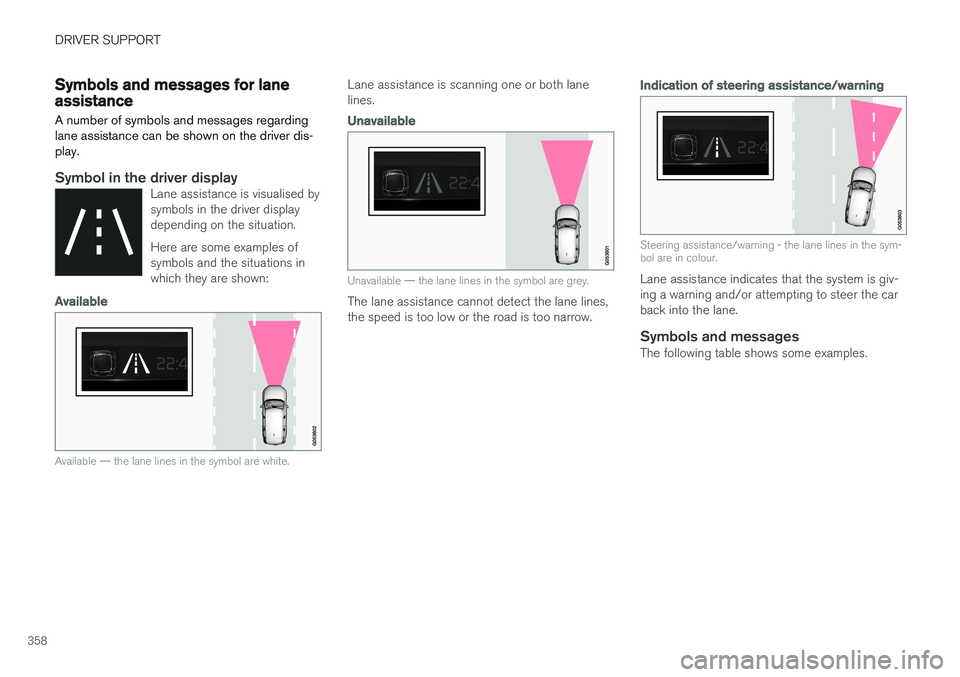
Symbol in the driver displayLane assistance is visualised by symbols in the driver displaydepending on the situation. Here are some examples of symbols and the situations inwhich they are shown:
Available
Available — the lane lines in the symbol are white.
Lane assistance is scanning one or both lane lines.
Unavailable
Unavailable — the lane lines in the symbol are grey.
The lane assistance cannot detect the lane lines, the speed is too low or the road is too narrow.
Indication of steering assistance/warning
Steering assistance/warning - the lane lines in the sym- bol are in colour.
Lane assistance indicates that the system is giv- ing a warning and/or attempting to steer the carback into the lane.
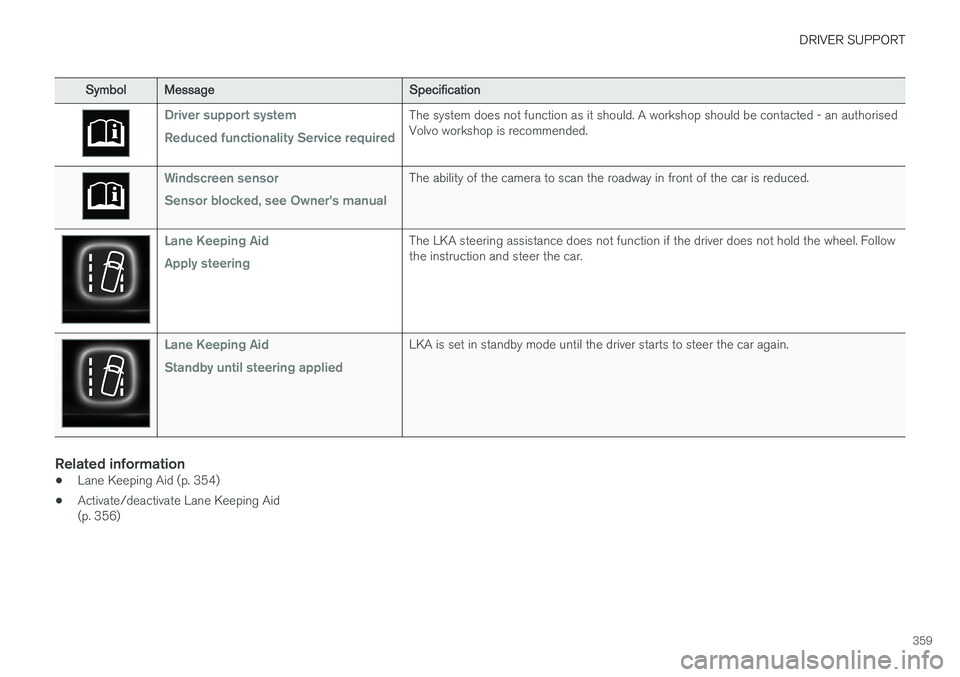
Symbols and messagesThe following table shows some examples.
Page 361 of 594
DRIVER SUPPORT
359
SymbolMessage Specification
Driver support system Reduced functionality Service requiredThe system does not function as it should. A workshop should be contacted - an authorised Volvo workshop is recommended.
Windscreen sensor Sensor blocked, see Owner's manualThe ability of the camera to scan the roadway in front of the car is reduced.
Lane Keeping Aid Apply steeringThe LKA steering assistance does not function if the driver does not hold the wheel. Follow the instruction and steer the car.
Lane Keeping Aid Standby until steering appliedLKA is set in standby mode until the driver starts to steer the car again.
Related information
•Lane Keeping Aid (p. 354)
• Activate/deactivate Lane Keeping Aid (p. 356)
Page 362 of 594
DRIVER SUPPORT
360
Run-off Mitigation
The function of Run-off Mitigation is to assist the driver to reduce the risk of the car accidentallyleaving the road by means of actively steeringthe car back onto the road.
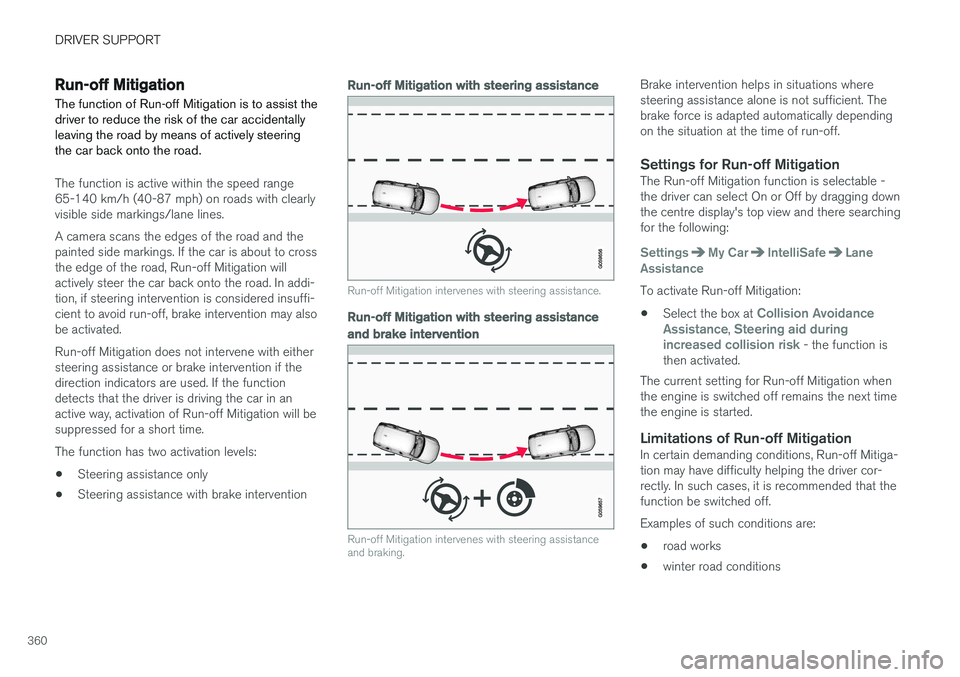
The function is active within the speed range 65-140 km/h (40-87 mph) on roads with clearlyvisible side markings/lane lines. A camera scans the edges of the road and the painted side markings. If the car is about to crossthe edge of the road, Run-off Mitigation willactively steer the car back onto the road. In addi-tion, if steering intervention is considered insuffi-cient to avoid run-off, brake intervention may alsobe activated. Run-off Mitigation does not intervene with either steering assistance or brake intervention if thedirection indicators are used. If the functiondetects that the driver is driving the car in anactive way, activation of Run-off Mitigation will besuppressed for a short time. The function has two activation levels: • Steering assistance only
• Steering assistance with brake intervention
Run-off Mitigation with steering assistance
Run-off Mitigation intervenes with steering assistance.
Run-off Mitigation with steering assistance
and brake intervention
Run-off Mitigation intervenes with steering assistance and braking.
Brake intervention helps in situations where steering assistance alone is not sufficient. Thebrake force is adapted automatically dependingon the situation at the time of run-off.
Settings for Run-off MitigationThe Run-off Mitigation function is selectable -the driver can select On or Off by dragging downthe centre display's top view and there searchingfor the following:
SettingsMy CarIntelliSafeLane
Assistance
To activate Run-off Mitigation:
• Select the box at
Collision Avoidance
Assistance, Steering aid during
increased collision risk - the function is
then activated.
The current setting for Run-off Mitigation when the engine is switched off remains the next timethe engine is started.
Limitations of Run-off MitigationIn certain demanding conditions, Run-off Mitiga-tion may have difficulty helping the driver cor-rectly. In such cases, it is recommended that thefunction be switched off. Examples of such conditions are:
• road works
• winter road conditions